minutes
Health Pass
- License — License: MIT
- Description — Repository has a description
- Active repo — Last push 0 days ago
- Community trust — 726 GitHub stars
Code Warn
- process.env — Environment variable access in .claude/plugins/minutes/hooks/test/post-record.test.mjs
Permissions Pass
- Permissions — No dangerous permissions requested
No AI report is available for this listing yet.
Every meeting, every idea, every voice note — searchable by your AI. Open-source, privacy-first conversation memory layer.
minutes



Open-source conversation memory. useminutes.app
Agents have run logs. Humans have conversations. minutes captures the human side — the decisions, the intent, the context that agents need but can't observe — and makes it queryable.
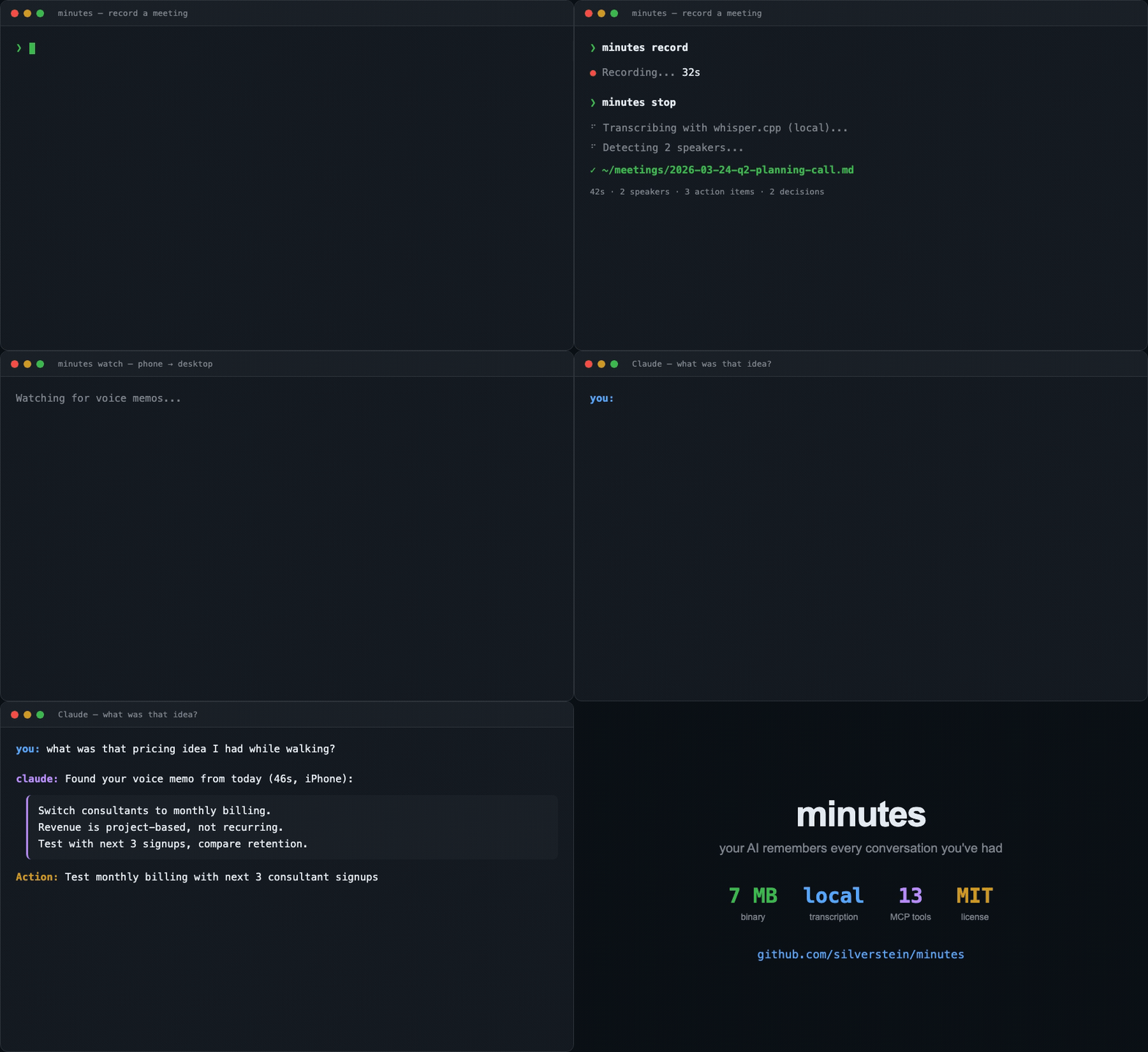
Record a meeting. Capture a voice memo on a walk. Ask Claude "what did I promise Sarah?" — and get an answer. Your AI remembers every conversation you've had.
Works with
Claude Code • Codex • Gemini CLI • Claude Desktop • Mistral Vibe • Obsidian • Logseq • Phone Voice Memos • Any MCP client
Quick start
# macOS — Desktop app (menu bar, recording UI, AI assistant)
brew install --cask silverstein/tap/minutes

# macOS — CLI only
brew tap silverstein/tap && brew install minutes

# Any platform — from source (requires Rust + cmake; Windows also needs LLVM)
cargo install minutes-cli                          # macOS/Linux
cargo install minutes-cli --no-default-features    # Windows (see install notes below)

# MCP server only — no Rust needed (Claude Code, Codex, Gemini CLI, Claude Desktop, etc.)
npx minutes-mcp
minutes setup --model small   # Download whisper model (466MB, recommended)
minutes record                # Start recording
minutes stop                  # Stop and transcribe
How it works
Audio → Transcribe → Diarize → Summarize → Structured Markdown → Relationship Graph
         (local)     (local)     (LLM)       (decisions,            (people, commitments,
        whisper.cpp  pyannote-rs Claude/       action items,          topics, scores)
        /parakeet    (native)    Ollama/       people, entities)      SQLite index
                                Mistral/OpenAI
Everything runs locally. Your audio never leaves your machine (unless you opt into cloud LLM summarization). Speakers are identified via native diarization. The relationship graph indexes people, commitments, and topics across all meetings for instant queries.
Features
Record meetings
minutes record                                    # Record from mic
minutes record --title "Standup" --context "Sprint 4 blockers"  # With context
minutes record --language ur                      # Force Urdu (ISO 639-1 code)
minutes record --device "AirPods Pro"             # Use specific audio device
minutes stop                                      # Stop from another terminal
Take notes during meetings
minutes note "Alex wants monthly billing not annual billing"          # Timestamped, feeds into summary
minutes note "Logan agreed"                       # LLM weights your notes heavily
Process voice memos
minutes process ~/Downloads/voice-memo.m4a        # Any audio format
minutes watch                                     # Auto-process new files in inbox
Search everything
minutes search "pricing"                          # Full-text search
minutes search "onboarding" -t memo               # Filter by type
minutes actions                                   # Open action items across all meetings
minutes actions --assignee sarah                   # Filter by person
minutes list                                      # Recent recordings
Relationship intelligence
"What did I promise Sarah?" — the query nobody else can answer.
minutes people                                     # Who you talk to, how often, about what
minutes people --rebuild                           # Rebuild the relationship index
minutes commitments                                # All open + overdue commitments
minutes commitments --person alex                   # What did I promise Alex?
Tracks people, commitments, topics, and relationship health across every meeting. Detects when you're losing touch with someone. Suggests duplicate contacts ("Sarah Chen" ↔ "Sarah"). Powered by a SQLite index rebuilt from your markdown in <50ms.
Cross-meeting intelligence
minutes research "pricing strategy"               # Search across all meetings
minutes person "Alex"                              # Build a profile from meeting history
minutes consistency                                # Flag contradicting decisions + stale commitments
Live transcript (real-time coaching)
minutes live                                     # Start real-time transcription
minutes stop                                     # Stop live session
Streams whisper transcription to a JSONL file in real time — any AI agent can read it mid-meeting for live coaching. The MCP read_live_transcript tool provides delta reads (by line cursor or wall-clock duration). Works with Claude Code, Codex, Gemini CLI, or any agent that reads files. The Tauri desktop app has a Live Mode toggle that starts this with one click.
Dictation mode
minutes dictate                                  # Speak → text appears as you talk
minutes dictate --stdout                         # Output to stdout instead of clipboard
Text streams progressively as you speak (partial results every 2 seconds). By default it accumulates across pauses and writes the combined text to clipboard + daily note when dictation ends. Set [dictation] accumulate = false to keep the older per-pause behavior. Local whisper, no cloud.
System diagnostics
minutes health                                   # Check model, mic, calendar, disk
minutes demo                                     # Run a demo recording (no mic needed)
Switching from Granola?
Import your meeting history in one command:
minutes import granola --dry-run    # Preview what will be imported
minutes import granola              # Import all meetings to ~/meetings/
Reads from ~/.granola-archivist/output/. Meetings are converted to Minutes' markdown format with YAML frontmatter. Duplicates are skipped automatically. All your data stays local — no cloud, no $18/mo.
Output format
Meetings save as markdown with structured YAML frontmatter:
---
title: Q2 Pricing Discussion with Alex
type: meeting
date: 2026-03-17T14:00:00
duration: 42m
context: "Discuss Q2 pricing, follow up on annual billing decision"
action_items:
  - assignee: mat
    task: Send pricing doc
    due: Friday
    status: open
  - assignee: sarah
    task: Review competitor grid
    due: March 21
    status: open
decisions:
  - text: Run pricing experiment at monthly billing with 10 advisors
    topic: pricing experiment
---

## Summary
- Alex proposed lowering API launch timeline from annual billing to monthly billing/mo
- Compromise: run experiment with 10 advisors at monthly billing

## Transcript
[SPEAKER_0 0:00] So let's talk about the pricing...
[SPEAKER_1 4:20] I think monthly billing makes more sense...
Works with Obsidian, grep, or any markdown tool. Action items and decisions are queryable via the CLI and MCP tools.
Phone → desktop voice memo pipeline
No phone app needed. Record a thought on your phone, and it becomes searchable memory on your desktop. Claude even surfaces recent memos proactively — "you had a voice memo about pricing yesterday."
The watcher is folder-agnostic — it processes any audio file that lands in a watched folder. Pick the sync method that matches your setup:
| Phone | Desktop | Sync method |
|---|---|---|
| iPhone | Mac | iCloud Drive (built-in, ~5-30s) |
| iPhone | Windows/Linux | iCloud for Windows, or Dropbox/Google Drive |
| Android | Any | Dropbox, Google Drive, Syncthing, or any folder sync |
| Any | Any | AirDrop, USB, email — drop the file in the watched folder |
Setup (one-time)
Step 1: Create a sync folder — pick one that syncs between your phone and desktop:
# macOS + iPhone (iCloud Drive)
mkdir -p ~/Library/Mobile\ Documents/com~apple~CloudDocs/minutes-inbox

# Any platform (Dropbox)
mkdir -p ~/Dropbox/minutes-inbox

# Any platform (Google Drive)
mkdir -p ~/Google\ Drive/minutes-inbox

# Or just use the default inbox (manually drop files into it)
# ~/.minutes/inbox/  ← already exists
Step 2: Add the sync folder to your watch config in ~/.config/minutes/config.toml:
[watch]
paths = [
  "~/.minutes/inbox",
  # Add your sync folder here — uncomment one:
  # "~/Library/Mobile Documents/com~apple~CloudDocs/minutes-inbox",  # iCloud
  # "~/Dropbox/minutes-inbox",                                       # Dropbox
  # "~/Google Drive/minutes-inbox",                                  # Google Drive
]
Step 3: Set up your phone
iPhone (Apple Shortcuts)- Open the Shortcuts app on your iPhone
- Tap + → Add Action → search "Save File"
- Set destination to
iCloud Drive/minutes-inbox/(or your Dropbox/Google Drive folder) - Turn OFF "Ask Where to Save"
- Tap the (i) info button → enable Share Sheet → set to accept Audio
- Name it "Save to Minutes"
Now: Voice Memos → Share → Save to Minutes → done.
AndroidUse any voice recorder app + your cloud sync of choice:
- Dropbox: Record with any app → Share → Save to Dropbox →
minutes-inbox/ - Google Drive: Record → Share → Save to Drive →
minutes-inbox/ - Syncthing (no cloud): Set up a Syncthing share between phone and desktop pointing at your watched folder. Fully local, no cloud.
- Tasker/Automate (power users): Auto-move new recordings from your recorder app to the sync folder.
No sync setup needed — just get the audio file to your desktop's watched folder:
- AirDrop (Apple): Share → AirDrop to Mac → move to
~/.minutes/inbox/ - Email: Email the recording to yourself → save attachment to watched folder
- USB: Transfer directly
Step 4: Start the watcher (or install as a background service):
minutes watch                  # Run in foreground
minutes service install        # Or install as background service (auto-starts on login, macOS)
How it works
Phone (any)                   Desktop (any)
───────────                   ─────────────
Record voice memo        →    Cloud sync / manual transfer
Share to sync folder               │
                                   ▼
                            minutes watch detects file
                                   │
                            probe duration (<2 min?)
                              ├── yes → memo pipeline (fast, no diarization)
                              └── no  → meeting pipeline (full)
                                   │
                            transcribe → save markdown
                                   │
                            ├── event: VoiceMemoProcessed
                            ├── daily note backlink
                            └── surfaces in next Claude session
Short voice memos (<2 minutes) automatically route through the fast memo pipeline — no diarization, no heavy summarization. Long recordings get the full meeting treatment. The threshold is configurable: dictation_threshold_secs = 120 in [watch].
Optional: sidecar metadata
If your phone workflow also saves a .json file alongside the audio (same name, .json extension), Minutes reads it for enriched metadata:
{"device": "iPhone", "source": "voice-memos", "captured_at": "2026-03-24T08:41:00-07:00"}
This adds device and captured_at to the meeting's frontmatter. Works with any automation tool (Apple Shortcuts, Tasker, etc.).
Supports .m4a, .mp3, .wav, .ogg, .webm. Format conversion is automatic — uses ffmpeg when available (recommended for non-English audio), falls back to symphonia.
Vault sync (Obsidian / Logseq)
minutes vault setup              # Auto-detect vaults, configure sync
minutes vault status             # Check health
minutes vault sync               # Copy existing meetings to vault
Three strategies: symlink (zero-copy), copy (works with iCloud/Obsidian Sync), direct (write to vault). minutes vault setup detects your vault and recommends the right strategy automatically.
Claude integration
minutes is a native extension for the Claude ecosystem. No API keys needed — Claude summarizes your meetings when you ask, using your existing Claude subscription.
You: "Summarize my last meeting"
Claude: [calls get_meeting] → reads transcript → summarizes in conversation

You: "What did Alex say about pricing?"
Claude: [calls search_meetings] → finds matches → synthesizes answer

You: "Any open action items for me?"
Claude: [calls list_meetings] → scans frontmatter → reports open items
Any MCP client (Claude Code, Codex, Gemini CLI, Claude Desktop, or your own agent)
Minutes exposes a standard MCP server. Point any MCP-compatible client at it:
{
  "mcpServers": {
    "minutes": {
      "command": "npx",
      "args": ["minutes-mcp"]
    }
  }
}
23 tools: start_recording, stop_recording, get_status, list_meetings, search_meetings, get_meeting, process_audio, add_note, consistency_report, get_person_profile, research_topic, qmd_collection_status, register_qmd_collection, start_dictation, stop_dictation, track_commitments, relationship_map, list_voices, confirm_speaker, get_meeting_insights, start_live_transcript, read_live_transcript, open_dashboard
7 resources: minutes://meetings/recent, minutes://status, minutes://actions/open, minutes://events/recent, minutes://meetings/{slug}, minutes://ideas/recent, ui://minutes/dashboard
Interactive dashboard (Claude Desktop): Tools render an inline interactive UI via MCP Apps — meeting list with filter/search, detail view with fullscreen + "Send to Claude" context injection, People tab with relationship cards and click-through profiles, consistency reports. Text-only clients see the same data as plain text.
Mistral Vibe
Add Minutes to your ~/.vibe/config.toml:
[[mcp_servers]]
name = "minutes"
transport = "stdio"
command = "npx"
args = ["minutes-mcp"]
All 23 tools are available in Vibe as minutes_* (e.g. minutes_start_recording, minutes_search_meetings).
Claude Code (Plugin)
Install the plugin from the marketplace:
claude plugin marketplace add silverstein/minutes
claude plugin install minutes
12 skills, 1 agent, 2 hooks:
├── Core: /minutes record, search, list, note, ideas, verify, setup, cleanup
├── Interactive: /minutes prep, debrief, recap, weekly
├── Agent: meeting-analyst (cross-meeting intelligence)
└── Hooks: post-recording alerts + proactive meeting/voice memo reminders
Meeting lifecycle skills — inspired by gstack's interactive skill pattern:
/minutes prep "call with Alex"     → relationship brief, talking points, .prep.md saved
  ↓
minutes record → minutes stop       → hook alerts if decisions conflict with prior meetings
  ↓
/minutes debrief                    → "You wanted to resolve pricing. Did you?"
  ↓
/minutes weekly                     → themes, decision arcs, stale items, Monday brief
Minutes Desktop Assistant
The Tauri menu bar app includes a built-in AI Assistant window backed by the
same local meeting artifacts. It runs as a singleton assistant session:
AI Assistantopens or focuses the persistent assistant windowDiscuss with AIreuses that same assistant and switches its active meeting focus
Cowork / Dispatch
MCP tools are automatically available in Cowork. From your phone via Dispatch: "Start recording" → Mac captures → Claude processes → summary on your phone.
Optional: automated summarization
# Use your existing Claude Code or Codex subscription (recommended)
[summarization]
engine = "agent"
agent_command = "claude"  # or "codex" for OpenAI Codex users

# Or use Mistral API (requires MISTRAL_API_KEY)
[summarization]
engine = "mistral"
mistral_model = "mistral-large-latest"

# Or use a free local LLM
[summarization]
engine = "ollama"
ollama_model = "llama3.2"
Install
macOS
# Desktop app (menu bar, recording UI, AI assistant)
brew install --cask silverstein/tap/minutes

# CLI only (terminal recording, search, vault sync)
brew tap silverstein/tap
brew install minutes

# Or from source (requires Rust + cmake)
export CXXFLAGS="-I$(xcrun --show-sdk-path)/usr/include/c++/v1"
cargo install --path crates/cli
Windows
# Download pre-built binary from GitHub releases, or build from source:
# Requires: Rust, cmake, MSVC build tools, LLVM (for libclang)

# Install LLVM (needed by whisper-rs bindgen):
winget install LLVM.LLVM
[Environment]::SetEnvironmentVariable("LIBCLANG_PATH", "C:\Program Files\LLVM\bin", "User")
# Restart your terminal after setting LIBCLANG_PATH

# Full build (includes speaker diarization):
cargo install --path crates/cli

# Without speaker diarization:
cargo install --path crates/cli --no-default-features
Note: If diarization fails to compile on Windows, use
--no-default-features.
This is a known upstream issue
withpyannote-rs's ONNX Runtime dependency. Everything except speaker labels works without it.
Linux
# Requires: Rust, cmake, ALSA dev headers, libclang (for bindgen)
sudo apt-get install -y libasound2-dev libclang-dev  # Debian/Ubuntu
cargo install --path crates/cli
GPU acceleration (optional)
Build with GPU support for significantly faster transcription:
# NVIDIA GPU (Windows/Linux — requires CUDA toolkit)
cargo install --path crates/cli --features cuda

# Apple Metal (macOS)
cargo install --path crates/cli --features metal

# Apple CoreML (macOS Neural Engine)
cargo install --path crates/cli --features coreml
Windows CUDA users: You may need to set environment variables before building:
$env:CUDA_PATH = "C:\Program Files\NVIDIA GPU Computing Toolkit\CUDA\v12.4"
$env:CMAKE_CUDA_COMPILER = "$env:CUDA_PATH\bin\nvcc.exe"
$env:LIBCLANG_PATH = "C:\Program Files\LLVM\bin"
$env:CMAKE_GENERATOR = "NMake Makefiles"
The first CUDA build takes longer than usual (compiling GPU kernels) — this is a one-time cost.
Setup (all platforms)
# Download whisper model (also downloads Silero VAD model for non-English audio)
minutes setup --model small   # Recommended (466MB, good accuracy)
minutes setup --model tiny    # Fastest (75MB, but misses quiet audio)
minutes setup --model base    # Middle ground (141MB)

# Install ffmpeg for best transcription quality (strongly recommended for non-English audio)
brew install ffmpeg           # macOS
# apt install ffmpeg          # Linux
# Without ffmpeg, symphonia handles m4a/mp3 decoding — works for English but may
# produce loops on non-English audio. ffmpeg is optional but recommended.

# Enable speaker diarization (optional, ~34MB ONNX models)
minutes setup --diarization

# Alternative: use Parakeet engine (opt-in, lower WER than Whisper)
# Requires parakeet.cpp installed: https://github.com/Frikallo/parakeet.cpp
minutes setup --parakeet                          # English model (tdt-ctc-110m, ~220MB)
minutes setup --parakeet --parakeet-model tdt-600m  # Multilingual (25 EU languages, ~1.2GB)

# Enroll your voice for automatic speaker identification
minutes enroll              # Records 10s of your voice
minutes voices              # View enrolled profiles
Speaker identification
Minutes maps anonymous speaker labels (SPEAKER_1, SPEAKER_2) to real names using four levels of confidence-aware attribution:
| Level | How | Confidence | Requires |
|---|---|---|---|
| 0 | Calendar attendees + identity.name → deterministic mapping for 1-on-1 meetings |
Medium | Calendar access, [identity] name in config |
| 1 | LLM analyzes transcript context clues and maps speakers to attendees | Medium (capped) | Attendees known + summarization engine or agent CLI |
| 2 | Your enrolled voice is matched against speaker segments | High | minutes enroll (one-time 10s recording) |
| 3 | You confirm "SPEAKER_1 is Sarah" after a meeting | High | minutes confirm --meeting <path> |
Only High-confidence attributions rewrite transcript labels. Medium/Low are stored in frontmatter (speaker_map) for Claude to surface when asked — "SPEAKER_1 is likely Sarah."
# Set your name (required for Levels 0-2)
# In ~/.config/minutes/config.toml:
[identity]
name = "Your Name"

# Enroll your voice (Level 2)
minutes enroll                    # Record 10s sample
minutes enroll --file sample.wav  # Or from existing audio

# Confirm attributions after a meeting (Level 3)
minutes confirm --meeting ~/meetings/2026-03-25-standup.md
minutes confirm --meeting path.md --speaker SPEAKER_1 --name "Sarah" --save-voice

# Manage voice profiles
minutes voices              # List profiles
minutes voices --json       # JSON output
minutes voices --delete     # Remove all profiles
Privacy: Voice enrollment is self-only (no enrolling others). Level 3 confirmed profiles require explicit opt-in per person. Voice embeddings are stored locally in ~/.minutes/voices.db with 0600 permissions. Nothing leaves your machine.
Platform notes: Calendar integration (auto-detecting meeting attendees) requires macOS. Screen context capture works on macOS and Linux. The voice memo pipeline works on all platforms — any folder sync (iCloud, Dropbox, Google Drive, Syncthing) can feed the watcher. The
minutes service installauto-start command requires macOS (launchd); on Linux, use systemd or cron. Speaker diarization (pyannote-rs) works on all platforms (CLI, Tauri app, and via MCP). All other features — recording, transcription, search, action items, person profiles — work on all platforms.
Desktop app
# macOS — Homebrew cask (recommended)
brew install --cask silverstein/tap/minutes

# macOS — build from source
export CXXFLAGS="-I$(xcrun --show-sdk-path)/usr/include/c++/v1"
export MACOSX_DEPLOYMENT_TARGET=11.0
cargo tauri build --bundles app

# macOS — local desktop development with stable permissions
./scripts/install-dev-app.sh
# Windows — build desktop installer from source
cargo install tauri-cli --version 2.10.1 --locked
cd tauri/src-tauri
cargo tauri build --ci --bundles nsis --no-sign
Tagged GitHub releases can include both a Windows NSIS installer as minutes-desktop-windows-x64-setup.exe and a raw desktop binary as minutes-desktop-windows-x64.exe. The installer is currently unsigned, so treat it as an advanced-user / preview distribution surface until Windows signing is added.
The desktop app adds a system tray icon, recording controls, audio visualizer, Recall, and a meeting list window. The current Windows desktop build covers recording, transcription, search, settings, and Recall. Calendar suggestions, call detection, tray copy/paste automation, and the native dictation hotkey remain macOS-only for now.
Release workflow details live in:
For macOS development, use a dedicated signed dev app identity:
- Production app:
/Applications/Minutes.app(com.useminutes.desktop) - Development app:
~/Applications/Minutes Dev.app(com.useminutes.desktop.dev)
If you are testing hotkeys, Screen Recording, Input Monitoring, or repeated macOS permission prompts, launch only Minutes Dev.app via ./scripts/install-dev-app.sh. Avoid the repo symlink ./Minutes.app, raw target/ binaries, or ad-hoc local bundles for TCC-sensitive testing.
This repository is open source, so local development does not require the
maintainer's Apple signing credentials:
./scripts/install-dev-app.shworks with ad-hoc signing by default- for more stable macOS permission behavior across rebuilds, set
MINUTES_DEV_SIGNING_IDENTITYto a consistent local codesigning identity - release signing and notarization remain maintainer/release workflows
For dictation, the recommended path is the standard shortcut in the desktop app
(Cmd/Ctrl + Shift + D by default). The raw-key path for keys like Caps Lock
is available as an advanced option but remains more fragile and permission-heavy.
Privacy: All Minutes windows are hidden from screen sharing by default — other participants on Zoom/Meet/Teams won't see the app. Toggle via the tray menu: "Hide from Screen Share ✓".
Troubleshooting
No speech detected / blank audio:
The most common cause is microphone permissions. Check System Settings → Privacy & Security → Microphone and ensure your terminal app (or Minutes.app) has access.
tmux users: tmux server runs as a separate process that doesn't inherit your terminal's mic permission. Either run minutes record from a direct terminal window (not inside tmux), or use the Minutes.app desktop bundle which gets its own mic permission.
Build fails with C++ errors on macOS 26+:
whisper.cpp needs the SDK include path. Set CXXFLAGS as shown above before building.
Dictation hotkey still fails after you enabled it in System Settings:
The native hotkey uses macOS Input Monitoring, which is separate from Screen Recording. The fastest way to test the exact installed desktop identity is:
./scripts/diagnose-desktop-hotkey.sh "$HOME/Applications/Minutes Dev.app"
Use ./scripts/install-dev-app.sh first so you are testing the stable development app identity rather than a raw target/ build. The helper intentionally launches the app through LaunchServices; direct shell execution of Contents/MacOS/minutes-app --diagnose-hotkey can misreport TCC status.
Configuration
Optional — minutes works out of the box.
# ~/.config/minutes/config.toml

[transcription]
engine = "whisper"        # "whisper" (default) or "parakeet" (opt-in, lower WER)
model = "small"           # whisper: tiny (75MB), base, small (466MB), medium, large-v3 (3.1GB)
# language = "ur"          # Force transcription language (ISO 639-1 code, e.g. "en", "ur", "es", "zh")
                          # Default: auto-detect. Set this for similar-sounding languages (Urdu/Hindi, etc.)
# parakeet_model = "tdt-ctc-110m"  # parakeet: tdt-ctc-110m (English), tdt-600m (multilingual)
# parakeet_binary = "parakeet"     # Path to parakeet.cpp binary (or name in PATH)
# vad_model = "silero-v6.2.0"     # Silero VAD model (auto-downloaded by setup). Empty = disable.
                                   # Prevents whisper hallucination loops on non-English/noisy audio.

[summarization]
engine = "none"           # Default: Claude summarizes conversationally via MCP
                          # "agent" = uses your Claude Code or Codex subscription (no API key)
                          # "ollama" = local, free
                          # "claude" / "openai" = direct API key (legacy)
agent_command = "claude"  # Which CLI to use when engine = "agent" (claude, codex, etc.)
ollama_url = "http://localhost:11434"
ollama_model = "llama3.2"

[diarization]
engine = "auto"           # "auto" (default — uses pyannote-rs if models downloaded, otherwise skips),
                          # "pyannote-rs" (always on — native Rust, no Python),
                          # "pyannote" (legacy — requires pip install pyannote.audio),
                          # "none" (explicitly disabled)
# threshold = 0.5         # Speaker similarity threshold (0.0–1.0). Lower = fewer speakers.

[voice]
# enabled = true          # Voice profile matching during diarization (default: true if enrolled)
# match_threshold = 0.65  # Cosine similarity threshold for voice matching (higher = stricter)

[search]
engine = "builtin"        # builtin (regex) or qmd (semantic)

[watch]
paths = ["~/.minutes/inbox"]
settle_delay_ms = 2000              # Cloud sync safety delay (wait for file to finish syncing)
dictation_threshold_secs = 120      # Files shorter than this → memo (skip diarize). 0 = disable.
# Add cloud sync folders to watch for phone voice memos:
# paths = ["~/.minutes/inbox", "~/Dropbox/minutes-inbox"]

[screen_context]
enabled = false           # Opt-in: capture screenshots during recording for LLM context
interval_secs = 30        # How often to capture (seconds)
keep_after_summary = false # Delete screenshots after summarization (default: clean up)

[assistant]
agent = "claude"          # CLI launched by the Tauri AI Assistant
agent_args = []           # Optional extra args, e.g. ["--dangerously-skip-permissions"]
Architecture
minutes/
├── crates/core/          27 Rust modules — the engine (shared by all interfaces)
├── crates/cli/           CLI binary — recording, search, health, and workflow commands
├── crates/whisper-guard/ Anti-hallucination toolkit (VAD gating, dedup, noise trimming)
├── crates/reader/        Lightweight read-only meeting parser (no audio deps)
├── crates/sdk/           TypeScript SDK — `npm install minutes-sdk` (query meetings programmatically)
├── crates/mcp/           MCP server — 23 tools + 7 resources + interactive dashboard
│   └── ui/               MCP App dashboard (vanilla TS → single-file HTML)
├── tauri/                Menu bar app — system tray, recording UI, singleton AI Assistant
└── .claude/plugins/minutes/   Claude Code plugin — 12 skills + 1 agent + 2 hooks
Single minutes-core library shared by CLI, MCP server, and Tauri app. Zero code duplication.
Building your own agent on Minutes
Minutes is designed as infrastructure for AI agents. The MCP server is the primary integration surface:
- Read meetings:
list_meetings,search_meetings,get_meetingreturn structured JSON - Track people:
get_person_profilebuilds cross-meeting profiles with topics, open commitments - Monitor consistency:
consistency_reportflags conflicting decisions and stale commitments - Record + process:
start_recording,stop_recording,process_audiofor pipeline control - Live coaching:
start_live_transcript,read_live_transcriptfor real-time mid-meeting access - Voice profiles:
list_voices,confirm_speakerfor speaker identification workflows - Resources: Stable URIs (
minutes://meetings/recent,minutes://actions/open) for agent context injection
Any agent framework that speaks MCP can use Minutes as its conversation memory layer — the agent handles the intelligence, Minutes handles the recall.
TypeScript SDK — for direct programmatic access without MCP:
npm install minutes-sdk
import { listMeetings, searchMeetings, parseFrontmatter } from "minutes-sdk";

const meetings = await listMeetings("~/meetings", 20);
const results = await searchMeetings("~/meetings", "pricing");
Built with: Rust, whisper.cpp (transcription), pyannote-rs (speaker diarization), Silero VAD (voice activity detection), symphonia (audio decoding), cpal (audio capture), Tauri v2 (desktop app), ureq (HTTP). Optional: ffmpeg (recommended for non-English audio decoding).
Star History
Contributing
See CONTRIBUTING.md.
License
MIT — Built by Mat Silverstein, founder of X1 Wealth
Reviews (0)
Sign in to leave a review.
Leave a reviewNo results found