cccost-dashboard
Health Warn
- License — License: MIT
- Description — Repository has a description
- Active repo — Last push 0 days ago
- Low visibility — Only 6 GitHub stars
Code Fail
- fs.rmSync — Destructive file system operation in extension/build.js
- fs module — File system access in extension/build.js
- os.homedir — User home directory access in extension/src/extension.js
- fs module — File system access in extension/src/extension.js
- os.homedir — User home directory access in lib/scan.js
- process.env — Environment variable access in lib/scan.js
- fs module — File system access in lib/scan.js
- process.env — Environment variable access in server.js
- fs module — File system access in server.js
- rm -rf — Recursive force deletion command in test/core.test.js
- process.env — Environment variable access in test/core.test.js
Permissions Pass
- Permissions — No dangerous permissions requested
No AI report is available for this listing yet.
Local, zero-setup dashboard for Claude Code token usage and cost — per project, client, model, and prompt, with an efficiency advisor.
Claude Code Cost Dashboard




A local, zero-setup dashboard that shows where your Claude Code
tokens and money go — per project, per model, and per prompt, over time — with
an efficiency advisor that flags where you're likely overspending.
It reads the session logs Claude Code already writes to ~/.claude/projects/. No
API key, no proxy, no account, no data leaves your machine.
Unofficial. Not affiliated with or endorsed by Anthropic. "Claude" and
"Claude Code" are trademarks of Anthropic. Costs shown are API-equivalent
value computed from local usage logs — on a Pro/Max subscription they are not
what you are billed.
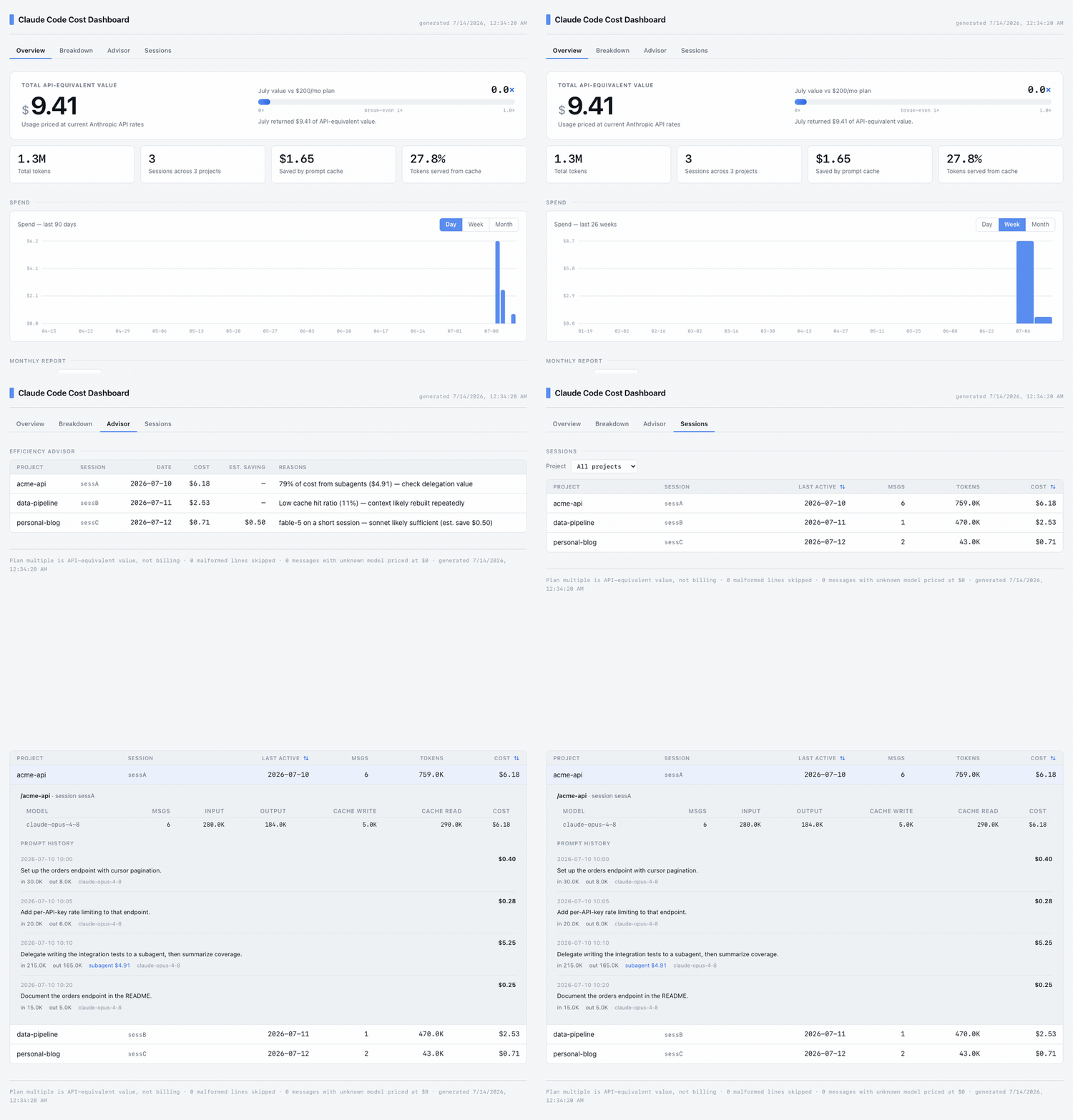
Efficiency advisor — flags likely overspend, per session:
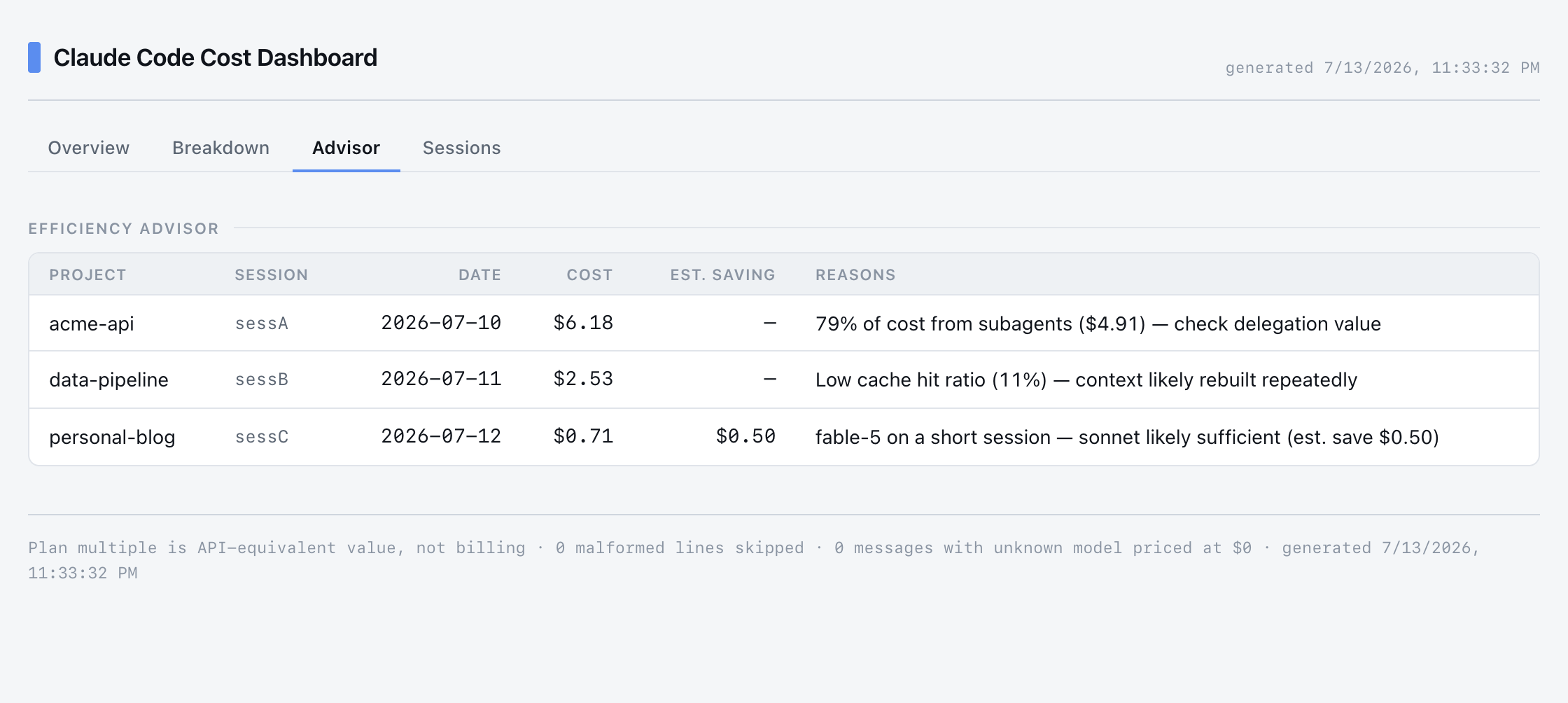
Per-prompt cost — expand any session for a timeline of what each prompt cost,
including subagent work attributed to the triggering prompt:
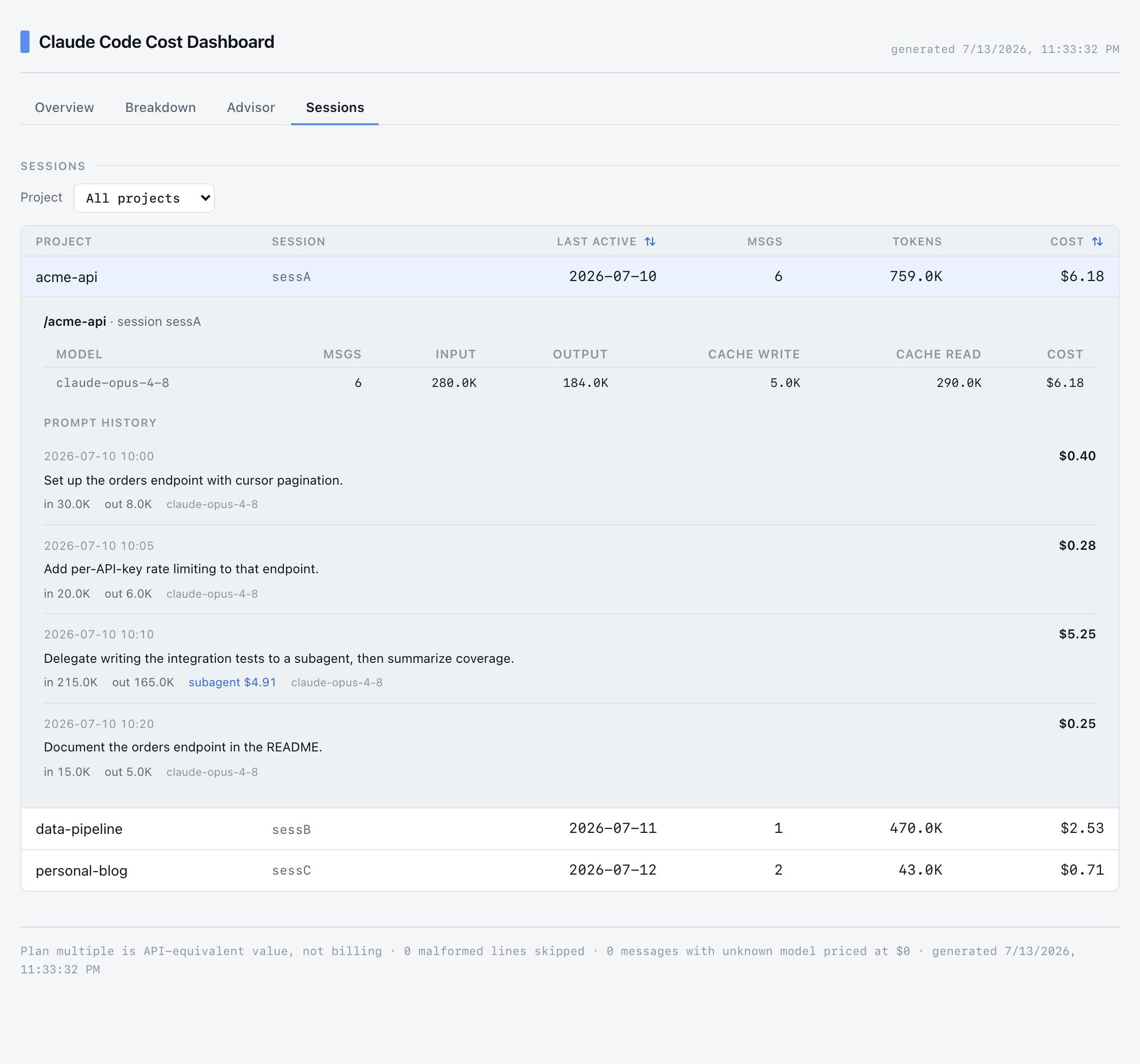
Screenshots use the bundled demo dataset (
demo/projects/), not real data.
Why this one
Most Claude Code cost tools are either live "fuel gauges" (ccusage, usage
monitors) or team/org platforms that need a proxy or gateway (LiteLLM, Bifrost,
Mavvrik). This one is aimed at a solo developer or consultant on a subscription
plan and focuses on attribution and advice:
- Per-prompt cost — expand any session to see what each individual prompt cost,
including subagent work attributed to the right turn. - Spend over time — a Day / Week / Month toggle on the spend chart, plus a
monthly total report you can download. - Efficiency advisor — computed-from-your-own-sessions flags (not generic
blog advice) for likely waste, with dollar estimates. - Subagent accounting — subagent and workflow-agent transcripts are merged into
their parent session and their cost share is surfaced.
Requirements
- Node.js ≥ 20.19 (uses
node --testand recursivefs.readdir; the frontend
build needs Vite 8 / React 19).
Install
Run it without cloning:
npx cccost-dashboard # then open http://localhost:3456
Or install it globally:
npm install -g cccost-dashboard
cccost-dashboard
Refresh the page to pick up new sessions — only changed files are re-parsed.
Override the port with PORT=4000 cccost-dashboard.
VS Code extension
Run the dashboard inside VS Code in a panel, plus a status-bar item showing
today's spend. Desktop VS Code only (needs local filesystem access; does not
run in vscode.dev / github.dev).
Install from the
VS Code Marketplace:
- In VS Code: Extensions view → search “cccost” → Install.
- CLI:
code --install-extension turja.cccost-dashboard-vscode
Then open it: click the status-bar item (bottom-right), or runCmd/Ctrl+Shift+P → "Claude Code: Open Cost Dashboard".
.vsix from source instead
npm --prefix web run build                 # build the SPA
npm --prefix extension install             # extension build/package deps
npm --prefix extension run package         # -> extension/cccost-dashboard-vscode-<version>.vsix
code --install-extension extension/cccost-dashboard-vscode-*.vsix
Using Cursor / VSCodium / Windsurf? Install the built .vsix withcursor --install-extension … (or Extensions view → ⋯ → Install from VSIX…).
See extension/README.md for details.
From source
git clone https://github.com/simantaturja/cccost-dashboard
cd cccost-dashboard
npm --prefix web install   # frontend deps (backend has none)
npm run build              # build the React app into web/dist
npm start                  # serve at http://localhost:3456
Try it against the bundled synthetic dataset (source checkout only — the demo data
isn't shipped in the npm package):
CLAUDE_PROJECTS_DIR=./demo/projects npm start
CLAUDE_PROJECTS_DIR overrides the default ~/.claude/projects scan path.
Frontend dev mode
cd web && npm run dev # Vite dev server with hot reload
Run npm start in the repo root alongside it — the dev server proxies /api tohttp://localhost:3456 for live data.
Configuration
Optional. Create a config.json in the directory you run cccost-dashboard
from, or at ~/.config/cccost-dashboard/config.json:
{
  "subscriptionUSDPerMonth": 200
}
subscriptionUSDPerMonth— your plan price, used for the plan-ROI figure.- With no
config.json, ROI uses a $200 default.
Features
| Tab | Shows |
|---|---|
| Overview | Total cost, tokens, cache savings, plan-ROI multiple, a spend chart with a Day/Week/Month toggle, and a monthly total report to download. |
| Breakdown | Cost by project and by model (with cache-read %). |
| Advisor | Sessions flagged for likely overspend (see below). |
| Sessions | Sortable session list; expand a row for a per-prompt timeline and per-model breakdown. Filter by project. |
How the efficiency advisor works
Each session runs through advisorFor (lib/core.js). A session can trip several
rules; only flagged sessions are returned, sorted by cost and capped at 25. The
thresholds are hand-picked heuristics — treat the output as a "look here first"
signal, not a verdict.
| Rule | Fires when | Meaning |
|---|---|---|
| Low cache hit ratio | cost ≥ $1 and cache-read < 50% of input-side tokens | Context rebuilt instead of served from cache (reads are ~10× cheaper). |
| Premium model, short session | used a top-tier model (e.g. fable-5 / mythos-5) and < 20 messages |
A short session rarely needs the most expensive model. Est. saving = premiumCost × 0.7. |
| Subagent-heavy | cost ≥ $5 and subagents > 60% of cost | Fan-out overhead — check the delegation earned its cost. |
Only the premium-model rule estimates dollars. Known limits: a low cache ratio is
often not your fault (5-minute cache TTL, /clear, idle gaps); the saving
estimate assumes the task would have succeeded on a cheaper model; the cutoffs
will produce some false positives.
How costs are computed
- Source — one JSONL file per session under
~/.claude/projects/; assistant
messages carryusage. Subagent files under a session's directory are merged in. - Pricing — a table in
lib/core.js(PRICING), USD per 1M tokens. Cache
writes are priced per TTL (5-minute = 1.25× input, 1-hour = 2× input); cache
reads at 0.1× input. Update the table when Anthropic pricing changes. - Dedup — streaming writes the same
message.idmultiple times; the last
(complete) occurrence wins. - Time — days and months bucket by the machine's local calendar date, so
billing months follow wall-clock time, not UTC. - Unknown models — priced at $0 and counted in the diagnostics footer.
API
The server also exposes JSON/markdown endpoints directly:
| Endpoint | Returns |
|---|---|
GET /api/data |
Full aggregated payload (summary, byProject, byModel, daily, monthly, roi, advisor, sessions). Prompt text is not included. |
GET /api/report?month=YYYY-MM |
Markdown monthly total summary (cost + tokens). Defaults to the current month. |
GET /api/session?key=<sessionKey> |
Per-prompt timeline for one session, read from disk on demand. |
Privacy
Everything runs locally. The server reads your Claude Code logs from disk and
serves them to localhost only. No API key, no telemetry, no outbound network
calls. Your config.json is gitignored.
Testing
npm test # node --test — pure aggregation logic in lib/core.js
Contributing
Issues and PRs welcome. Keep the backend dependency-free (lib/core.js andserver.js use only Node built-ins) and add a test in test/core.test.js for any
change to cost math or aggregation. See docs/DESIGN.md for how
the cost model, dedup, subagent merge, and advisor work.
Roadmap
- MCP server — expose the same cost data (today's spend, by project/model,
monthly report, per-session drill-down) as a standalone
MCP server over stdio, reusinglib/core.js.
Any MCP client (Claude Code, Cursor, Zed, Claude Desktop) could then query it —
agent-rendered answers, not a visual dashboard. This is the path for Zed: a
native Zed dashboard isn't possible, since Zed extensions have no webview/UI
panel API and their filesystem access is scoped to the open project.
License
MIT © 2026 Simanta Deb Turja
Reviews (0)
Sign in to leave a review.
Leave a reviewNo results found