horchestra
Health Warn
- License — License: MIT
- Description — Repository has a description
- Active repo — Last push 0 days ago
- Low visibility — Only 6 GitHub stars
Code Pass
- Code scan — Scanned 12 files during light audit, no dangerous patterns found
Permissions Pass
- Permissions — No dangerous permissions requested
No AI report is available for this listing yet.
Orchestrator-led agent teams for Herdr, with a live agent map in every tab
Horchestra


Orchestrator-led agent teams for Herdr, with a live
agent map in every tab.
Start one orchestrator in a space. It adopts the agents already running
there, hires new ones when the work needs them, and keeps the team in ateam.toml you can read and edit. Every agent tab gets a map of the team;
the agents in the tab you are looking at are highlighted.
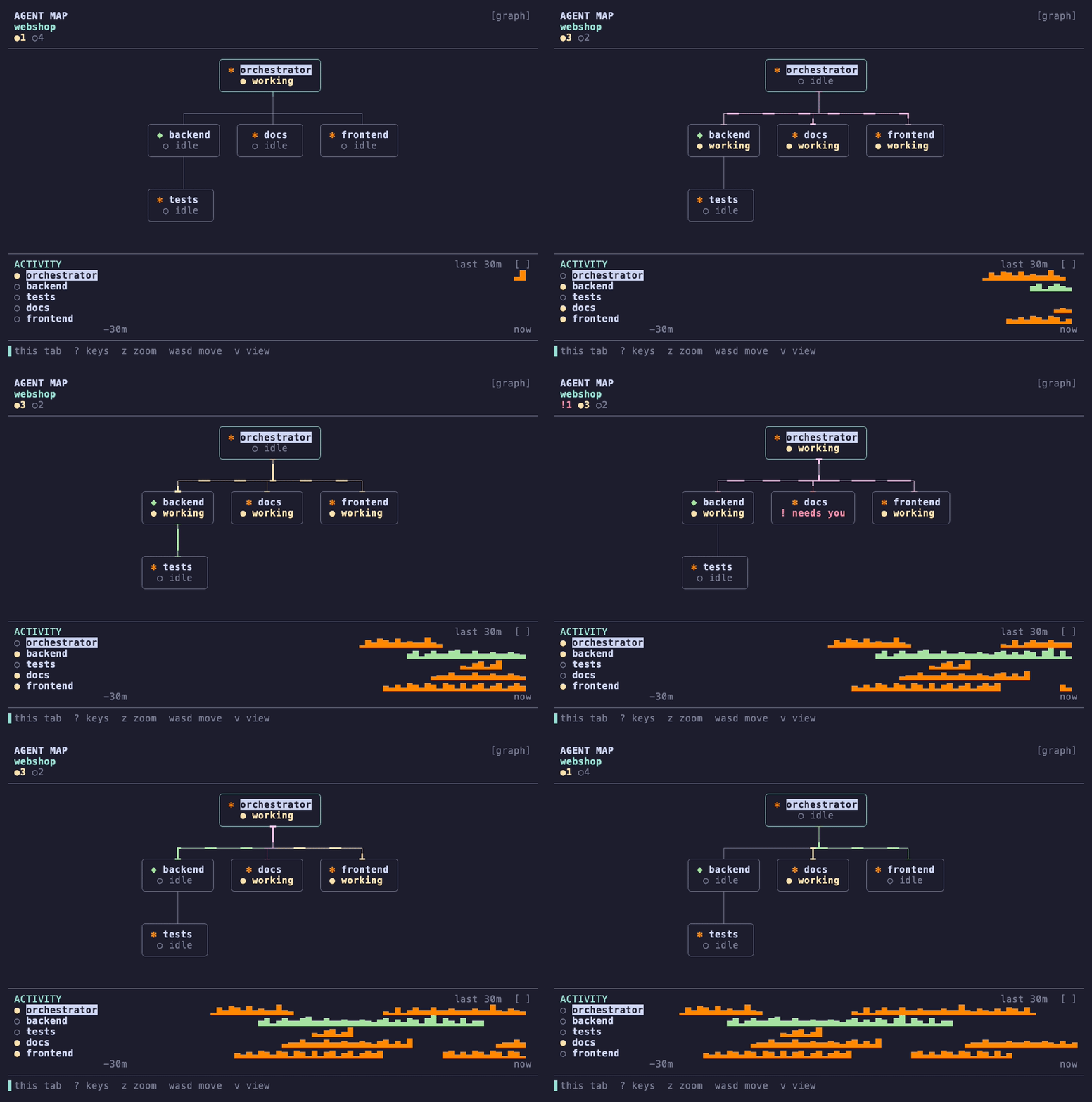
Yellow: working · green: reported back · magenta: a message between agents · red: needs you. The activity plot underneath is read from each agent's own transcript. (A scripted demo team, sped up: tools/demo/.)
 |
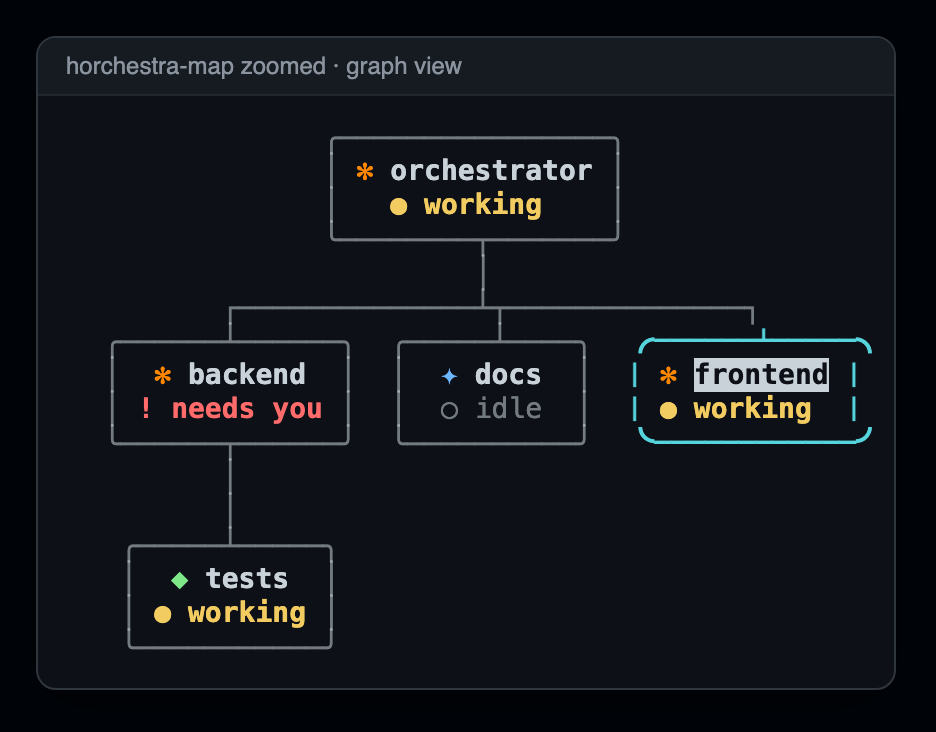 |
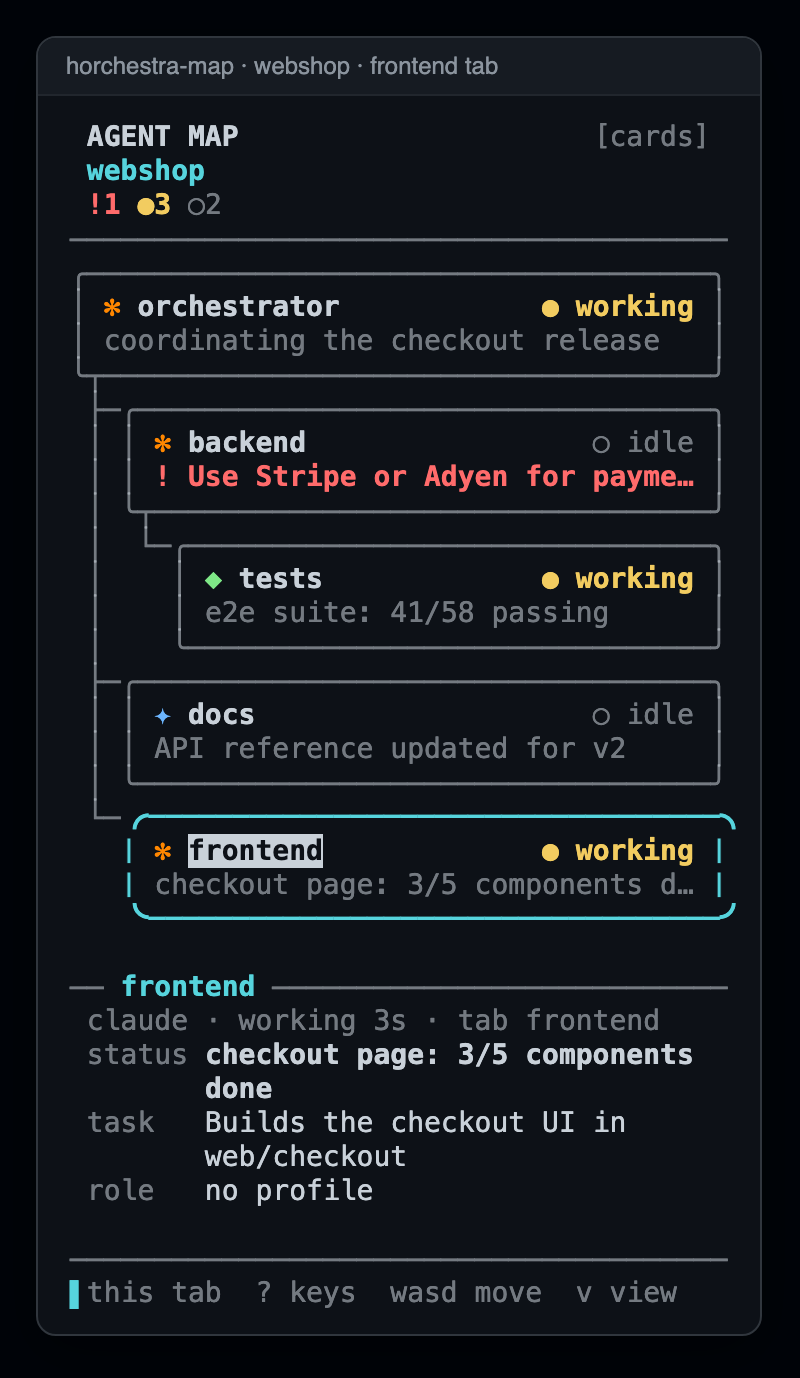
| Map in every agent tab: cards and details box | Same team as a graph |
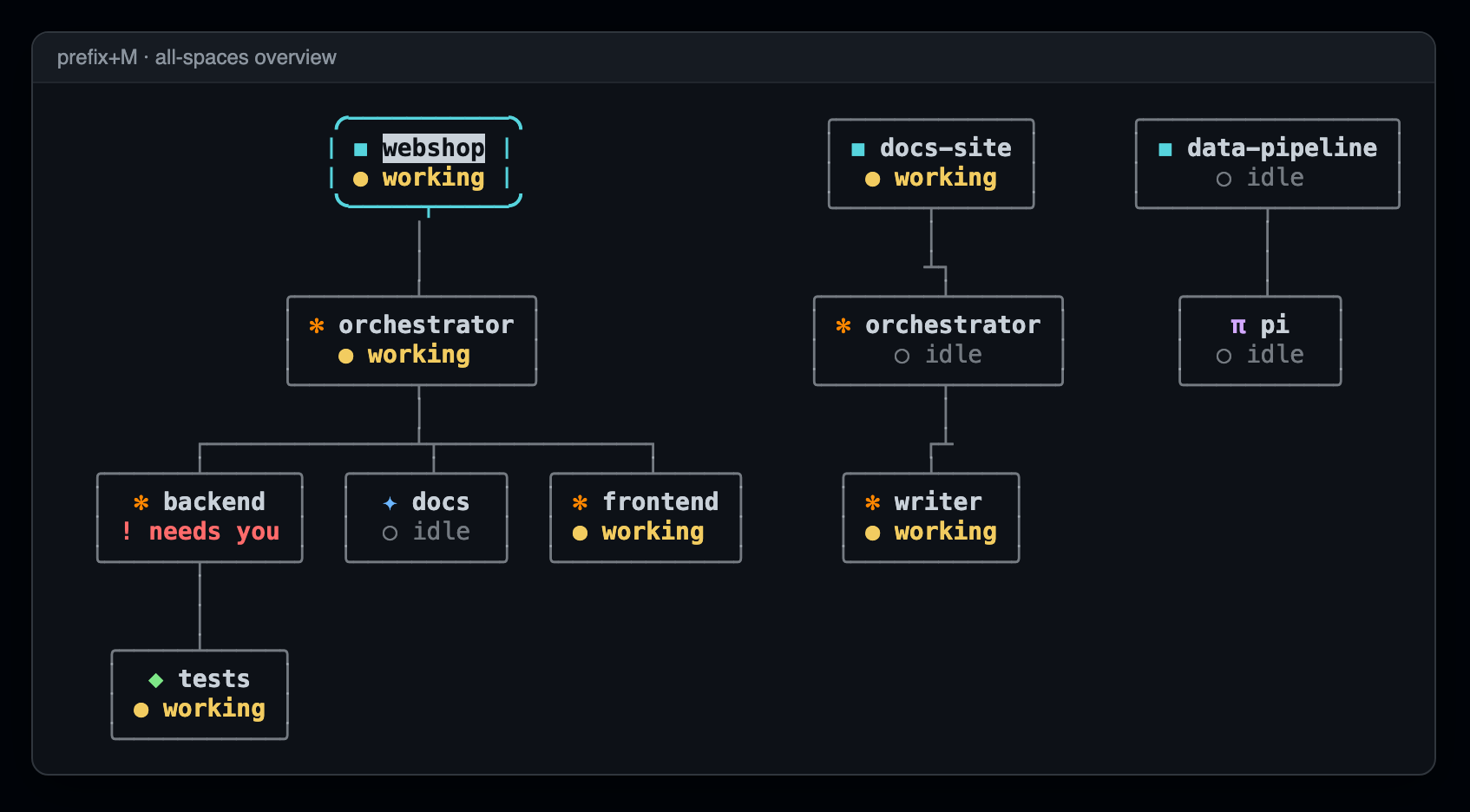
prefix+M: the all-spaces overview along the bottom of a tab
Requirements
- Herdr 0.9.3 or newer, on macOS or Linux (Windows is not supported yet)
- Python 3.11+ (standard library only; nothing to install)
- Claude Code 2.1 or newer for the orchestrator and for role profiles,
respawn, and session names (tested with 2.1.289); members can be any
agent Herdr can start (claude,codex,gemini,pi, …) - Herdr's Claude/Codex integrations, so Herdr can resume agents after a
restart (herdr integration install claude); for Antigravity members,herdr integration install antigravity-cli
Install
herdr plugin install SimoneDaniotti/horchestra
herdr plugin action invoke horchestra.setup
plugin install clones the public repository over HTTPS and needs no
credentials. Installing from a private fork needs git credentials (for
example gh auth setup-git).
setup adds the pieces that live outside the plugin directory, and prints
what it did:
| What | Where |
|---|---|
horchestra-team, horchestra-tag commands |
symlinks in ~/.local/bin |
orchestrator Claude Code session agent |
symlink in ~/.claude/agents |
prefix+m toggles the maps, prefix+M the all-spaces overview |
marked block in ~/.config/herdr/config.toml, only for keys that are free |
It never overwrites files it did not create. A symlink in ~/.local/bin or~/.claude/agents is replaced (setup) or removed (teardown) only if it points
into a Horchestra plugin directory (one whose herdr-plugin.toml has idhorchestra, or the legacy agent-map). Your own symlinks with the same
names (say, an orchestrator.md from your dotfiles) are left alone: setup
reports them as SKIPPED and teardown as kept. Edits to Herdr's config.toml
are atomic and keep the file's permissions; a symlinked config.toml is
written through to its target. If an edit would make a valid config invalid
TOML, setup or teardown reports an ERROR and leaves the file unchanged. It also checks that Herdr's
Claude/Codex integrations (and Antigravity's, if agy is installed) are current (needed to resume agents after a Herdr
restart) and suggests turning on notifications if they are off.
Quick start
In any space, open a tab and run:
claude --agent orchestrator
Then tell it what you want, or just "set up the team". On its first turn it:
- registers itself as the space's orchestrator and creates
team.tomlat
the project's git root (horchestra-team init) - finds agents already running in the space (
horchestra-team scan) and adopts
them, naming roles after their tabs, without restarting or messaging them - opens a map in every agent tab and summarizes the team
From then on it hires and fires members itself. You can drive the same
commands by hand.
To run an Antigravity orchestrator instead, run horchestra-team up --kind agy
in the project folder. Horchestra writes the orchestrator instructions to.agents/agents/horchestra-orchestrator/agent.md and starts agy --agent horchestra-orchestrator; after a Herdr restart its conversation resumes
with them. claude-mem memory and respawn are Claude only.
The map
prefix+m shows or hides a map in every tab of the space that runs an agent.prefix+M (shift) shows or hides the all-spaces overview: a wide strip
along the bottom of the current tab with every space side by side, each with
its team underneath. Enter on a space switches to it; Enter on an agent jumps
to it. Press ? in any map to see every key.
| Key / mouse | Action |
|---|---|
w s / ↑ ↓ / k j / wheel |
move selection up / down |
a d / ← → / h l |
go to parent / first child |
Enter / double-click |
focus that agent's pane |
Space |
fold or unfold a subtree |
v |
cycle views: auto → cards → graph → compact |
i |
show or hide the details box (info) |
t |
show or hide the activity plot |
o |
move into the task list (Esc back); the details box shows the selected task |
c |
move into the cycle's subtasks (Esc back); the details box shows the selected subtask |
y y |
approve the cycle's gate when it waits for you (press twice) |
b |
show or hide the tasks and cycle sections |
f |
open the file viewer on the selected subtask, task or agent |
[ ] |
activity plot: shorter / longer window (10m · 30m · 1h · 3h · 12h) |
z |
zoom into the selected agent's session with zoetrope |
W A S D (shift) |
dock the maps (or the overview) at the top / left / bottom / right; remembered |
r / q |
refresh / close this map |
? |
show or hide the list of keys |
cards: one card per agent: icon, status, and a detail line (a
needs-you question, the agent's reported status, or its task).graph: top-down tree. auto uses it whenever the pane is wide enough,
e.g. when you zoom the map pane withprefix+z.compact: one line per agent.
▌(cyan) marks agents in the map's own tab.Live edges, in every view (see Configuration to keep them still):
- yellow, parent → child: the child is working;
- green, child → parent: the child just reported (
horchestra-team report); - red, child → parent: the child needs you (
report --needs-you); - magenta, sender → receiver: a
horchestra-team message; between two
members it runs up to their common parent and down again.
Report and message pulses run for about 6 seconds. Text the orchestrator
types into a member with Herdr's ownagent promptshows only as the
yellow working pulse.Under the agents, TASKS lists open and blocked tasks first, then the
last few closed ones, each with its owner, age and subtask. The details box
of a selected agent also lists its open tasks. Assigning a task pulses down
the edge to the member, anddone/blockedpulse back up.CYCLE shows the open (or last) cycle: a phase strip (
● done ─ ◉ now ─ ○ to come), what the gate still needs, and an agent × phase grid of who
holds which subtask in which state:?proposed,!countered,✓
agreed or verified,·waiting,●working,↺reopened,◌awaiting
review. When the gate waits for you, it turns red andy yapproves. So
does Herdr's Approve this space's cycle gate action from any pane.The activity plot under the map has one line per agent (one per space
in the overview): how busy it was over the last 30 minutes. For Claude and
Codex agents it comes from their own session transcripts (Herdr reports
each pane's session id), including Claude subagents, so it covers time
before the map opened. Other agents are sampled while the map runs. The
transcripts are only read, never sent anywhere.Zoom (
z) opens the selected Claude or Codex agent's session in
zoetrope over the map: its
subagents, tool calls and a scrubbable timeline, following live. Quit
zoetrope (q) to return to the map. Needszoeinstalled
(brew install furkankly/tap/zoetropeorcargo install zoetrope) and the
agent's Herdr integration (herdr integration install claude).The details box shows the selected agent's kind, state and for how
long, tab, reported status, task, and the last thing it said.?lists every key, in the map itself: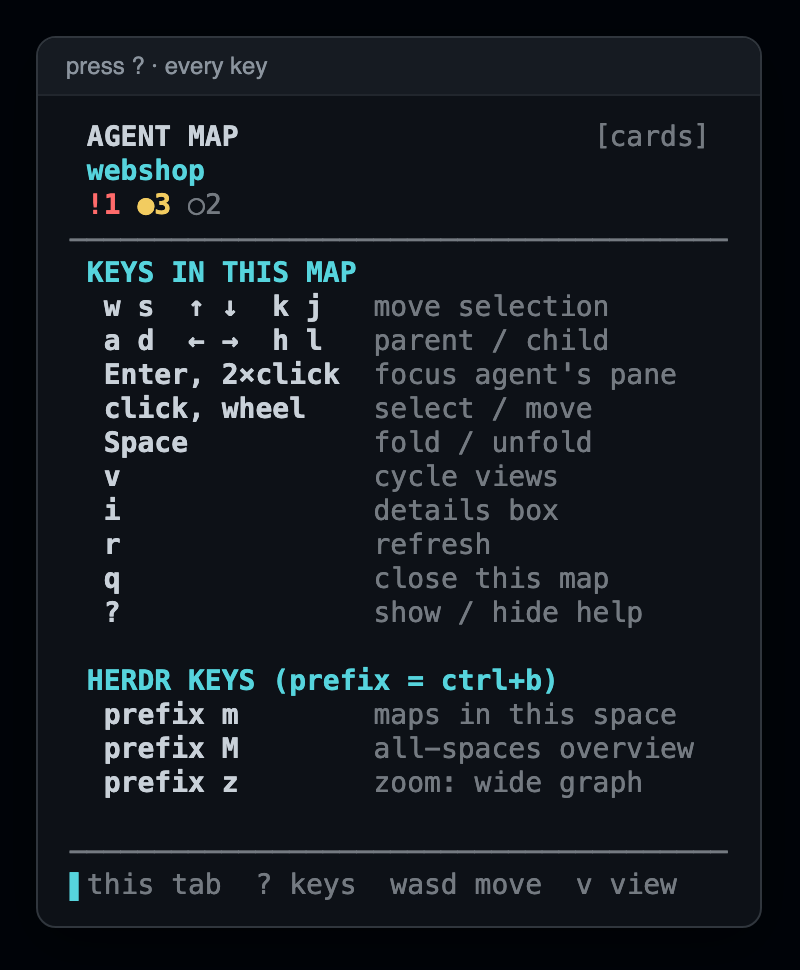
Icons: ✻ Claude · ◆ Codex · ✦ Gemini · π Pi.
Status: ● working · ▲ blocked · ✓ done · ○ idle · ! needs you.
Teams
team.toml is the team's source of truth. It starts with only the
orchestrator and records each agent's session id so the team can be found
again after a Herdr restart:
default_kind = "claude"

[orchestrator]
kind = "claude"
session = "900a16f3-…"
# brief = "Optional standing goal for the orchestrator"

[[member]]
role = "slides"
kind = "claude"
task = "Designs the quarterly review deck in web/checkout/"
session = "a3ff62c9-…"
# reports_to = "research"   # nest under another member
# cwd = "web"               # relative folder inside the project
# args = ["--model", "sonnet"]
| Command | What it does |
|---|---|
horchestra-team init |
register the calling agent as orchestrator; open maps |
horchestra-team scan |
list running agents in the space that are not on the team |
horchestra-team adopt <pane> --role R [--task T] |
add a running agent, unchanged |
horchestra-team hire R --kind K --task T [--profile P] [--only-skill S] [--uses-skill S] [--deny-skill S] |
add a member: own tab named after the role, start the agent with its role profile, send its brief |
horchestra-team fire R |
remove a member from team.toml and close its pane (refused for orchestrator; see below) |
horchestra-team status |
show the team, with each member's latest reported line |
horchestra-team message R "text" |
send a message to a team agent by role (e.g. orchestrator); queued if it is busy |
horchestra-team sync |
apply a hand-edited team.toml: start missing members, repair names and map links |
horchestra-team roles |
list role profiles in .orchestra/roles and who uses them |
horchestra-team respawn R | --all |
restart a Claude agent in place with its current profile, keeping its conversation |
horchestra-team reopen |
recreate a closed space from team.toml: one tab per role, every agent resumed with its conversation and profile |
horchestra-team forget |
stop restoring the current team after Herdr restarts (up registers it again) |
horchestra-team up [--kind K] |
start claude --agent orchestrator (or another kind, e.g. agy) in the current pane (also the horchestra.team-up action) |
Which commands create team.toml: only up, init and adopt, and they
refuse to do so directly in your home folder or at / unless you pass--file PATH (a .git in your home folder, such as a dotfiles repo, does not
make it a project root). scan and roles work without a team.toml and never
create or register one; status, sync, hire, fire, message andrespawn never create one either.
team.toml is type-checked on load and errors name the field (e.g.member[0] (qa).args must be a list of strings). args = "x y" (a single
string) is treated as one argument. cwd must be a relative folder inside the
project. Horchestra honours CLAUDE_CONFIG_DIR: it looks for the orchestrator
agent at $CLAUDE_CONFIG_DIR/agents/orchestrator.md and for resumable
sessions in $CLAUDE_CONFIG_DIR/projects (default ~/.claude).
fire R works only for a member listed in team.toml (never orchestrator); a
pane that merely carries the team:R label is not closed. It closes the pane
only if that pane runs the session recorded in team.toml. If no session is
recorded yet, the pane must carry the team:R label and the map's role tag,
and no other pane may have the same label. Otherwise the member is still
removed from team.toml, the pane stays open, and a note names it. If hire
fails after the pane was created or the agent started (e.g. a folder-trust
prompt timed out), the member stays in team.toml: answer the prompt in the
named pane, then run horchestra-team sync. sync reports stray team:*
panes and tells you to close them by hand.
Names stay in step with roles:
- each hired member gets its own tab named after its role, and every
horchestra-teamcommand renames an agent's tab to its role when it is the
only agent in that tab, and only when that role's own agent is running there (setname_tabs = falsein team.toml to turn off) - Claude members and the orchestrator are started with
--name <role>, so the
conversation (prompt box,/resumepicker, terminal title) has the same
name;respawnand the restart repair apply it again - panes are labelled
team:<role>, and Herdr agent names are<folder>-<hash>-<role>(e.g.webshop-3f2a-slides; the hash is a short
digest of the project path, so two projects with the same folder name do not
collide) forherdr agent prompt <name> "…". A team whose pane already holds
the old plain name (<folder>-<role>) keeps it; if Herdr drops the name on
a restart, that member moves to the hashed name and restore re-applies it.horchestra-team message <role>works either way, since it goes by role
Role profiles: each member's own instructions and skills
Give a role its own context with a folder in the project:
.orchestra/roles/slides/
├── ROLE.md                      # the member's own instructions
├── CLAUDE.md                    # optional extra memory for this role
└── .claude/skills/deck-style/   # skills only this role gets
hire slides picks the folder up automatically (or --profile <folder>),
and team.toml can add skills to use or block:
deny_skills = ["legacy-*"]                # blocked for every hired member

[[member]]
role = "slides"
only_skills = ["deck-style"]             # allowlist (role-folder skills stay allowed)
# uses_skills = ["deck-style"]          # or: skills it must use, others still allowed
# deny_skills = ["chart-kit"]           # block specific names or patterns
only_skills puts "use only these skills" in the member's instructions and
blocks every other skill found in the user skills folder ($CLAUDE_CONFIG_DIR/skills, default ~/.claude/skills) and the project's.claude/skills. Skills from Claude Code plugins and built-ins cannot be
listed from disk, so for those only the instruction applies.
For a Claude member, hiring generates a session agent.claude/agents/horchestra-<role>.md (team context + ROLE.md + skills to use)
and starts it with claude --agent horchestra-<role> --settings <deny rules> --add-dir <profile folder>. The member still sees the project's own
CLAUDE.md and skills.
An Antigravity member (--kind agy) gets the same profile as a custom agent,.agents/agents/horchestra-<role>/agent.md, started with agy --agent horchestra-<role>. The file lists the role's own skills and its CLAUDE.md
(or AGENTS.md / GEMINI.md) by path and grants Antigravity's full toolset;
the member still sees the project's own rules and skills. Antigravity has no
per-session skill block, so deny_skills and only_skills are instructions
only for these members. A conversation keeps the profile it started with:
Herdr restarts and reopen resume it (agy --conversation <id>) with its
profile intact, but respawn cannot apply a changed one, so fire and re-hire
the member instead. args may not contain --agent, --conversation or--continue/-c.
Antigravity's auto mode asks you before a command whenever its safety check
cannot run (for example when the checking model is out of capacity), which
stalls the agent until you answer. Commands listed in agy_allow skip that
check: set it at the top of team.toml for every agy agent, or on one member
or the orchestrator for that agent only. Each entry is a command prefix;horchestra-team is always allowed.
agy_allow = ["uv run", "ls", "git status", "git diff", "git log"]
The list is passed with --settings at each start, so horchestra-team respawn <role> (or a Herdr restart) applies a change. Keep git itself off
the list: for agy agents the git guard is an instruction only.
Other agent kinds get the same instructions in their first message.
Horchestra rewrites .claude/agents/horchestra-<role>.md only
if it carries its <!-- generated by horchestra marker; if you wrote a file
with that name yourself, hire and respawn stop with an error asking you to
rename the file or the role.
For Claude agents, args (in team.toml or hire --arg) may not contain flags
Horchestra sets itself: --agent, --settings, --add-dir, --resume/-r,--continue/-c, --system-prompt-snapshot, --name/-n,--append-system-prompt(-file), --system-prompt(-file).
What is and is not guaranteed (tested with Claude Code 2.1):
| Role instructions | in the member's system prompt; kept by claude --resume |
| Role-only skills | available, from the profile folder |
| Denied skills | cannot be used (the call is refused), but are still listed |
only_skills |
instruction for all skills; hard block for skills on disk; plugin and built-in skills rely on the instruction |
| After a Herdr restart | the startup hook re-applies each member's profile (see below) |
Check a member from its pane with /skills and /context; horchestra-team status, horchestra-team roles, and the map's details box show each member's
profile.
Applying a profile to a running agent. horchestra-team respawn <role>
quits the member's Claude session and restarts it in the same pane withclaude --resume <its session> --system-prompt-snapshot off plus its profile
flags. It keeps its whole conversation and gains the role instructions,
skills, and deny rules. Use it after adopting an agent, after editing a
ROLE.md, or with --all for the whole team. Wait until the member is idle
(or pass --force). Claude only (an Antigravity conversation keeps the
profile it started with); it takes a few seconds per member.
Onboarding: when to call a member, how it gets work, when it reports
Before hiring (or right after adopting) a member, the orchestrator runs a
short interview with you. For that member it proposes two or three concrete
options each for:
- call when: which work goes to it ("UI or CSS changes under web/");
- handoff: how it receives work ("one task at a time, under an hour each");
- reporting: when it reports back beyond finishing ("a status line at
each milestone", "ask before deleting files").
In Claude Code these appear as multiple-choice questions; you can always
write your own answer. The answers become the member's working agreement:
horchestra-team hire fe --task "checkout page" \
  --call-when "UI or CSS changes under web/" \
  --handoff "one task at a time, under an hour each" \
  --reporting "a status line at each milestone"
horchestra-team onboard docs --call-when "anything user-facing changes"   # adopted or later
The agreement is saved in team.toml, written into the member's agent file
(with a list of its teammates and when to call each), sent to the member if
it is running, and listed by horchestra-team status, where the orchestrator
routes work from.
Tasks
Work goes out as numbered tasks and comes back closed:
horchestra-team assign fe "add a coupon field"     # orchestrator: records and sends task #2
horchestra-team done 2 "coupon field added"        # member: closes it and tells the orchestrator
horchestra-team blocked 2 "need the API keys"      # member: cannot finish
horchestra-team tasks [--all]                      # open and blocked tasks (or every task)
horchestra-team cancel 2 "postponed"               # orchestrator
hire --task records task #1 the same way. done and blocked message the
orchestrator ([horchestra] message from fe: task #2 done: …) and update the
member's line in the map, so nobody has to poll. If a member goes idle while
it still has an open task (it never ran done), a Herdr event hook sends
the orchestrator a note to check its output, at most once every 10 minutes
per task. Restart and reopen notes list the tasks still open.
Tasks live in .orchestra/tasks.json in the project, written under a lock so
members finishing at the same time cannot lose an update.
Status lines and "needs you"
Members keep their own line in the map:
horchestra-team report "tests 3/5 passing"
horchestra-team report --needs-you "Use v1 or v2 API docs?"
horchestra-team report --clear
report only updates the map (and status); to tell the orchestrator
something other than a finished task, a member runshorchestra-team message orchestrator "…", which
arrives in the orchestrator's conversation as[horchestra] message from <role>: …. Hired and respawned members have both
commands in their instructions; the orchestrator tells adopted ones.
Messages, tasks and reports never land in the middle of something you are
typing. If an agent's input box holds your draft, the message waits and goes
in right after you send (or clear) it. The sender sees queued: …, and a
courier log is in ~/.local/state/horchestra/outbox.log.
A needs-you report shows ! until the agent works again and sends a Herdr
notification. Herdr's own "agent finished / needs input" alerts cover
the rest. Both follow [ui.toast] in Herdr's config, which is off by default:
[ui.toast]
delivery = "system"   # or "herdr" for in-app toasts
Skills and MCPs on start and after compaction
A Claude orchestrator lists its skills and MCP servers (with failed ones
marked) at the top of its first reply after it starts, is resumed or
restarted, or is compacted. Horchestra adds a SessionStart hook to the
orchestrator's own session settings for this; members don't get it.
Worktrees and merging
For parallel coding, hire <role> --worktree gives a member its own git
checkout, .worktrees/<role>, on branch horchestra/<role>, started from
the team's integration branch (integration_branch in team.toml; the first--worktree hire saves the current branch, horchestra-team integration <branch> sets or creates another). The member commits there and merges the
integration branch in before it reports done. The orchestrator reviews the
branch with code-review, then horchestra-team merge <role> merges it
with a merge commit; a conflict aborts the merge and goes back to the member.fire removes the worktree and branch only when nothing would be lost..worktrees/ and Horchestra's generated agent files are added to the repo's.git/info/exclude, so no tracked file changes.
Claude members also get a git guard (adapted from Matt Pocock'sgit-guardrails-claude-code): a hook blocks git push, reset --hard,clean -f, branch -D, checkout ./restore ., worktree remove andstash drop/clear, while git commit -m "push fix" still runs. The
orchestrator merges and pushes. git_guard = false at the top of team.toml
turns it off. Antigravity members get the rule as an instruction only.
Cycles: align, plan, implement, verify
A cycle runs one macro task through four phases, recorded in onedocs/cycles/<NNN>-<slug>/plan.md. It comes in two sizes:
- light, the default: align happens inside plan, and you approve once,
the plan; - full (
--size full): you also approve the alignment and accept the
results. Each phase has one skill, typed in for the
orchestrator when the phase opens, and a gate thathorchestra-team cycle advanceenforces:
| Phase | Skill | Leaves when |
|---|---|---|
| align | /grill-with-docs |
Goal and Decisions are written, and you approve |
| plan | /to-tickets |
every subtask has an owner, a deliverable and an acceptance check, its owner agreed (cycle agree), plan.md and .orchestra/cycles/<NNN>.json are committed, and you approve: that commit is tagged prereg/<NNN>-<slug> |
| implement | tdd (members) |
every subtask is done: its --check-cmd passes (or, without one, --evidence); moves on by itself |
| verify | code-review |
every subtask is verified, which re-runs its check; full: you accept the results, light: closes by itself |
A closed cycle waits for the next retro (below).
horchestra-team cycle start "c9 firm-size heterogeneity"
horchestra-team cycle subtask add --owner econ --deliverable "12 verdict rows" \
    --check "audit replicates within 5%" --check-cmd "uv run pytest tests/test_c9.py" --needs 1
horchestra-team cycle propose          # owners agree or counter
horchestra-team cycle approve          # you, in your own shell
horchestra-team assign econ --subtask 2
horchestra-team done 14 "rows written"     # runs the check command; refuses if it fails
horchestra-team cycle verify 2 "Spec ok vs check; Standards ok"
State lives in .orchestra/cycles/<NNN>.json, and plan.md is rendered from
it. Agents write only the free-text sections (Goal, Decisions, Team).
While a cycle is open:
assignneeds--subtask N(agreed, with its needs done) or--adhoc;doneon cycle work needs--evidence;- after the freeze, changes go through
cycle amend, which you approve.
Every conversation that takes part in a cycle is listed indocs/cycles/<NNN>-<slug>/sessions.toml, fired members' too. At each phase
change Horchestra copies the transcripts to its state folder, so Claude
Code's own cleanup (after cleanupPeriodDays, 30 by default) cannot delete
them before a retro reads them. horchestra-team cycle sessions shows
where each one is. retro close deletes the copies, and retro close --keep-transcripts keeps them.
The words you settle during /grill-with-docs go into the project'sGLOSSARY.md (and decisions into docs/adr/). They last across cycles:
the next grilling starts from them, and every member is told to read the
glossary and use its terms.
cycle approve refuses when run inside an agent, so you run it in a plain
terminal; "approved" in chat does not count. The approval is logged in
plan.md with how it was given. This makes it hard for an agent to approve
for you, but it doesn't make it impossible. cycles = false in team.toml
turns cycles off.
Everyone commits through one commit skill: by default commit_custom, when~/.claude/commands/commit_custom.md exists. Members are told so in their
instructions; agy members get the file's path to follow. The orchestrator
sees it in horchestra-team flow. commit_skill = "<name>" in team.toml
picks another skill, and commit_skill = "" turns the rule off. A reopened
subtask can only be reassigned with its fixes (assign ROLE --subtask N "<the fixes>"), so they stay in the task history.
Agents Horchestra starts run with Claude Code's prompt suggestions off, so
an Enter on an empty-looking input box cannot send a guessed prompt as
yours. Claude members may run git add and git commit without asking;
cycle tasks ask them to commit the failing test before the code.
Showing diffs: the file viewer
Horchestra includes its own copy of
herdr-file-viewer by Saeed
Marzban (MIT) in viewer/, so its details can be changed here; seeviewer/VENDORED.md for what changed and how to take upstream versions.
Installing Horchestra builds it with viewer/build.sh, which needs Rust
(brew install rustup && rustup default stable); brew install git-delta glow bat adds diffs, Markdown and highlighting. horchestra-team view opens it
beside the orchestrator in the team's space. Changed files show as diffs,
Markdown renders, and code is highlighted:
view subtask N: a subtask's owner's folder, at verify;view factory: the factory's pending retro proposals, before you
accept or reject them;view ROLE: a worktree member's branch, beforemerge;view PATH:LINE(orPATH:FROM-TO): one spot, e.g. a line a review
found.
The orchestrator offers it at those moments. f in the map opens it on the
selected subtask, task or agent. setup binds prefix+f (split) andprefix+shift+f (tab) to the viewer, and prefix+a to Approve this space's
cycle gate, when those keys are free.
The factory: roles every team is staffed from
The factory is your own git repo of role prompts, skills and MCPs
(~/factory, or $HORCHESTRA_FACTORY). Every team is staffed from it, and
every cycle's retro proposes improvements to it.
horchestra-team factory init --from ~/Projects/asana_final_results/team.toml   # seed it once
horchestra-team factory                     # roles and their track record
horchestra-team hire econ --from-factory    # or: hire analyst --from-factory econ
horchestra-team factory accept "📝 docs: econ names row ids in errors"   # you, after a retro
horchestra-team factory reject              # sets the proposals aside (git stash)
- A role is
roles/<role>/ROLE.mdplus arole.tomlcard: purpose, when
to use it, kind and model, skills, MCPs,writesand the working agreement.
Hiring from the factory copies the role into the project, records its
version, and brings the agreement, so no onboarding interview is needed. - Which project uses what:
projects/<project>.tomllists the factory
roles a project uses (member →role@version). Hiring from the factory,factory upgradeandfirekeep it current, and CATALOG.md shows each
role's "Used by". Roles themselves are shared, so an improvement reaches
every project that upgrades to it. - Project facts go in the project's
.orchestra/roles/<role>/ROLE.local.md,
which is added after the factory prompt. writeslimits a Claude member's file edits to those paths, through a
hook.mcpsgives the member the factory'smcps/<name>.jsonservers.- Proposals: the retro edits the factory but never commits. You accept
or reject, and a retro cannot close before you do. - Track record: at close, each factory role's results go into its track
record (subtasks, verified first try, reopens), shown inCATALOG.md. - glitch-walk:
factory initadds theglitch-walkskill
(Glitch Cat Club, MIT) for the tutor's walks through the project's own code.
Retros: every few hours, over several cycles
A cycle is about an hour of work, so the retro is not part of it. One retro
looks back over every cycle closed since the last one, by default every
four hours (retro_every_hours = 8 in team.toml for once a day of work).horchestra-team flow and the map say how many cycles wait and when a
retro is due; the orchestrator offers it at a pause, and you can ask for one
sooner.
horchestra-team retro            # due? which cycles wait?
horchestra-team retro start      # opens docs/retros/<NNN>-<date>/retro.md, types /retro in
horchestra-team retro sessions   # the conversations of every cycle in it
horchestra-team retro close      # marks the cycles covered, deletes the transcript copies
A retro has three layers:
- project: causes per cycle and subtask, with quoted evidence in
evidence.mdnext to retro.md, which the gate requires; - factory: the proposals above;
- lessons: up to three topics where you seemed unsure, each offered as
a lesson (teach) or a walk (glitch-walk).
Each cycle's Process cost line (minutes per phase, approvals, reopens) is
listed in retro.md, and the retro must propose one simplification for every
rule it adds.
Permission prompts go to the orchestrator
When a member stops on a permission prompt (Herdr shows it as blocked),
Horchestra reads the request from its pane and sends it to the
orchestrator, which answers with horchestra-team approve <role> (--always
picks the prompt's "always allow in this conversation" option) orhorchestra-team deny <role>. Its instructions say to approve only what
fits the member's brief and to bring you anything destructive, a push, or
outside the project. Works for Claude and Antigravity members; you can run
the same commands yourself. Antigravity asks whenever its own safety check
cannot run (e.g. the checking model is out of capacity), so without this an
agy member stalls until you answer it in its pane.
Skills kit
Horchestra gives every team Matt Pocock's engineering skills
(mattpocock/skills, MIT), from its own
copy in skills-kit/, split by job:
| Who | Skills |
|---|---|
| Orchestrator, on its own | grilling, writing-for-agents, code-review, domain-modeling, pr |
| Orchestrator, you type them | /grill-with-docs, /to-spec, /to-tickets, /retro, /wayfinder, /setup-matt-pocock-skills |
| Members | tdd, diagnosing-bugs, prototype, research, codebase-design, /teach (you type it, in a tutor's pane) |
implement-spec and chief-of-staff are left out: they run tickets as
hidden subagents, which the team does with visible members.
Edit a skill in skills-kit/ like any other Horchestra file; nothing
downloads over it. Each agent loads its set for its own session
(--add-dir, or skill paths for agy), so your own skill list is untouched;
running agents pick up edits when they restart or respawn. Matt Pocock's
newer versions come in by merge, keeping your edits: horchestra-team kit update does it now, and the hooks/pre-push git hook does it before every
push, committing the merge on its own and stopping the push so you can look
first (see skills-kit/VENDORED.md). horchestra-team kit shows the kit,
and kit = false at the top of team.toml turns it off for a space. If you installed the mattpocock-skills Claude
Code plugin, Claude agents have every skill already and the kit adds nothing
to them. A member's --only-skill allowlist also blocks kit skills it does
not name.
When the orchestrator offers a skill
Skills like /retro only start when you type them, so the orchestrator
offers them at the right moment instead, and on your "yes" runshorchestra-team slash <skill>, which types the command into its own input
(or a tutor's) for you:
| Skill | Offered when |
|---|---|
/setup-matt-pocock-skills |
the repo has no docs/agents/issue-tracker.md (a "no" is saved in team.toml) |
/grill-with-docs |
you bring new work that needs decisions or several members |
/to-spec, /to-tickets, then /compact |
the grilling has no open questions left |
the retro (retro start) |
closed cycles wait and retro_every_hours (4) have passed; with cycles = false, /retro after 8 done tasks |
/teach (in the tutor's pane) |
you park a question or say you don't understand something |
horchestra-team flow shows what is due; the orchestrator runs it at the
start of each session.
Memory for the orchestrator (optional)
claude-mem gives an agent memory
across sessions: it notes what the agent does and hands the relevant notes
back when a new or compacted session starts. Horchestra offers it to
orchestrators only. A new orchestrator, or one restarted before you chose,
asks you once; the answer is saved as memory = "on" or "off" under[orchestrator] in team.toml. Members never load it.
Install it once yourself, kept on your Mac and off by default:
DO_NOT_TRACK=1 npx claude-mem install --ide claude-code --provider claude --no-auto-start
npx claude-mem telemetry disable
claude plugin disable claude-mem@thedotmack   # Horchestra turns it on per orchestrator
With --provider claude there is no claude-mem account: notes and their
search index stay on your Mac, and each note is written by Haiku through your
Claude subscription (it counts toward your usage limits). horchestra-team memory [on|off] shows or changes the choice; switching restarts the
orchestrator, and its conversation continues.
After a Herdr restart
Herdr resumes the agents' conversations itself when its Claude/Codex
integrations are current. The plugin's startup hook then:
- matches resumed agents to roles by session id and restores names, labels
and map links - sends a resumed orchestrator a short note listing who came back (not after
a live handoff, where nothing restarted) - resumes, from the conversations recorded in team.toml, any agent Herdr did
not bring back (Herdr only resumes sessions its integration still knew
about), with its role profile; this includes a team Herdr resumed nothing
of, as long as its labelled panes are there. An agent is resumed only into
its ownteam:<role>pane holding nothing but an idle shell, only if its
conversation file exists, and never if another pane already runs it - starts a fresh orchestrator only when it has no saved conversation
- closes and reopens map and overview panes, which come back as idle shells,
only when they keep theirhorchestra-map/horchestra-overviewtitle,
run no agent, and have only an idle shell in the foreground (checked withherdr pane process-info); panes titled with the pre-0.1Agent mapname
are never closed automatically - respawns every Claude member launched with a profile, because Herdr's plain
claude --resumewould bring back the instructions recorded when the
conversation began; the orchestrator is refreshed from the currentorchestrator.mdthe same way
Restore waits until the team's panes and agent states have stopped changing
for about 12 seconds before it restarts anyone: right after startup Herdr is
still finishing its own resumes, and restarting an agent then can leave its
name stuck on an empty pane. If that happens anyway (on restore or a manualrespawn), the agent is started in a fresh pane in the same tab and the
empty pane is closed, so no role is left without its agent; a pane id that
goes stale during startup is retried. Each agent's name is recorded in
team.toml (agent_name) and reused, so names stay the same across restarts.
Restore repairs each team on its own: one broken team.toml, or a pane that
disappears mid-way, does not stop the other teams; a failing team is retried
and dropped after 3 failures. Registered team files that no longer exist are
dropped. If two registered team.toml files share the same agent sessions (a
copied project), only the team whose folder holds those agents' working
directory is restored; when that cannot be told, both are skipped with a log
message. Give the copy a fresh team.toml. respawn and the profile
re-apply and orchestrator re-brief never restart or message a pane matched by
label alone; two panes with the same team:R label are reported as ambiguous.sync/status never record the session of a pane found only by its label:
a recorded session is replaced only by an agent Horchestra started, an
explicit adopt/init, or a new conversation in the role's own terminal.
Members whose conversation cannot be resumed (no saved conversation, no
pane, or a pane running something else) are reported to the orchestrator and
never started fresh. When a starting agent stops at a question, typically
Claude asking to trust a folder it has not seen, Horchestra never answers it:
it sends a Herdr notification naming the folder and pane, and waits.
Moved projects: the registry keeps real paths, so a team reached through a
symlink (for example ~/Desktop/proj after moving it to ~/Projects/proj)
is followed to its new folder on the next start. Claude Code then asks once
whether to trust the new folder. Results are inherdr plugin log list --plugin horchestra.
Closing and reopening a space
team.toml records every agent's conversation, so a team survives closing
its whole space. From a shell in any space:
cd ~/path/to/project
horchestra-team reopen
It creates a space named after the project, opens one tab per role in team
order, resumes each agent's own conversation with its profile and name
(claude --resume …, codex resume …, agy --conversation …), reopens the maps, and tells the
orchestrator who came back. A member whose conversation no longer exists on
disk starts fresh with its task. It refuses while any pane, in any space, still runs one of the team's
sessions or is a team:<role> pane inside the project folder; use sync in
that space, or close those panes first. Extra panes, splits and scrollback are not restored; work on disk
is untouched by closing a space, but an agent's in-progress turn is lost, so
close when agents are idle.
Configuration
| Setting | Where | Default |
|---|---|---|
| Map width (docked left/right) | a number in $(herdr plugin config-dir horchestra)/width |
32 |
| Map height (docked top/bottom) | a number in …/height |
14 |
| Map side | shift+W/A/S/D in a map, or left/right/top/bottom in …/map_side |
left |
| Overview side | shift+W/A/S/D in the overview, or …/overview_side |
bottom |
| Edge animation | off in $(herdr plugin config-dir horchestra)/animate (or HORCHESTRA_ANIMATE=0) |
on |
| Map toggle key | the managed block in Herdr's config, or bind horchestra.toggle yourself |
prefix+m |
| Overview key | the managed block, or bind horchestra.overview yourself |
prefix+M (prefix+shift+m) |
| Team-start key | bind the horchestra.team-up action |
none |
| Default member agent | default_kind in team.toml |
claude |
| Plugin state | HORCHESTRA_STATE_DIR |
~/.local/state/horchestra |
Upgrading from the pre-0.1 names
Earlier builds were called agent-map with agentmap-team /agentmap-tag. Re-run horchestra.setup after installing: it replaces the
old key binding, links the new commands, keeps agentmap-team /agentmap-tag as deprecated aliases (running agents may still use them), and
the state folder moves to ~/.local/state/horchestra on first use. Runhorchestra-team respawn --all and respawn orchestrator so running agents
get instructions with the new names.
Uninstall
herdr plugin action invoke horchestra.teardown
herdr plugin uninstall horchestra
teardown removes only what setup added. team.toml files in your
projects and the state directory are left in place.
How it works
- Uses only Herdr's public surfaces: the
herdrCLI and the documented event
socket. No private TUI protocol, no screen scraping for state. The screen
is read only to see whether you are typing into an agent's input box or a
trust prompt is waiting. - Events only trigger a fresh read, and unknown fields are ignored, so new
Herdr releases can add fields or events without breaking it. - The map reconnects with backoff after server restarts and updates, and
falls back to polling if subscriptions are rejected. - Agent relationships are pane tokens (
agentmap_parent,agentmap_role,
…) shown by the map;team.tomland session ids make them durable.
Security
The plugin runs as your user. setup writes symlinks into ~/.local/bin and~/.claude/agents and a marked block into Herdr's config; the startup hook
and hire start agents on your machine. Read install.py andherdr-plugin.toml before installing, as with any Herdr plugin.
Known limits
- An agent restarted before it ever replied has no saved conversation and
cannot be resumed (a fresh orchestrator is started; such members are
reported). - Each map takes about 32 columns (or 14 rows) in its tab. Herdr moves panes
only by keyboard or command, not by dragging, so maps are docked with
shift+W/A/S/D; dragging a border still resizes them. Docked top or bottom
in a tab split into columns, a map spans the pane it docks against, not
the whole tab. hireandfirerewrite team.toml, dropping comments added by hand.- Files in
~/.claude/agentsare also offered as subagents in every Claude
session; the orchestrator's description asks Claude not to use it that way. - Manually tagged panes (
horchestra-tag) lose their tags on a Herdr restart. - A Codex member running in a read-only sandbox cannot reach Herdr's socket,
so it cannotreportormessage; the orchestrator can still message it
and read its output. - Hiring a Claude member writes
.claude/agents/horchestra-<role>.mdinto the
project; commit it or add.claude/agents/horchestra-*.mdto.gitignore.
Development
gh repo clone SimoneDaniotti/horchestra   # or git clone https://github.com/SimoneDaniotti/horchestra
cd horchestra
herdr plugin link .            # run your working copy
python3 install.py install     # same as the setup action
python3 -m unittest discover -s tests -t .
README screenshots are real map output: `herdr pane read --format ansi
map.ansi
, thenpython3 tools/ansi2html.py map.ansi map.html --squeezeand a headless-browser screenshot of the page. The animated demo is the real map driven by a scripted team and a stand-inherdr(tools/demo/); record it with [vhs](https://github.com/charmbracelet/vhs):vhs tools/demo/demo.tape`.
Credits
Horchestra is built on Herdr's plugin system and
public CLI. Several ideas came from other Herdr plugins; no code was copied
from them:
| Idea | From |
|---|---|
| Card-style agent nodes and a tree/graph view of agents | herdr-world |
| A details box for the selected item under the graph | herdr-dagr |
| Agent-reported progress, "needs you" flags, adopting agent panes you already started | herdr-projects |
| Per-vendor agent icons and colours | herdr-radar, herdr-world |
| Nesting agents under the agent that spawned them | herdr-pi-tree |
| A side panel that sits next to each agent tab | agent-panel |
Edges that light up while an agent runs, an activity sparkline from session transcripts; z opens zoetrope itself |
zoetrope |
License
MIT
Reviews (0)
Sign in to leave a review.
Leave a reviewNo results found