cinderbar
Health Warn
- License — License: NOASSERTION
- Description — Repository has a description
- Active repo — Last push 0 days ago
- Low visibility — Only 6 GitHub stars
Code Fail
- rm -rf — Recursive force deletion command in scripts/bundle.sh
Permissions Pass
- Permissions — No dangerous permissions requested
No AI report is available for this listing yet.
macOS menu bar port of Burn Bar: AI token burn and plan pacing for Claude and Codex
Cinder Bar
Cinder Bar is a macOS port of Burn Bar,
the Omarchy bar plugin by nixfred.
The idea, the pacing and guidance rules, the transcript parsing rules and the
visual design all come from Burn Bar. Cinder Bar re-implements them as a native
Swift menu-bar app for the Mac. It is an independent port and is not
affiliated with or endorsed by the original author. MIT licensed, like the
original.
A live thermal strip in the macOS menu bar for anyone paying for more than one
AI subscription. It reads what this Mac actually uses (Claude Code,
Codex and Grok), turns it into one heat map, and tells you what to do: which
subscription has budget in the bank, which one needs a rest and until when, and
which one to reach for next.

The strip
CLAUDE ◄── time ──┤ now ├── time ──► CODEX │ GROK ──► CHIP

Claude burns on the left and Codex on the right. The newest bucket of each
sits against the centre divider, so the divider is always "now" and time
radiates outward. Grok follows Codex behind a thin rule, newest on its left. Colour carries the token count on a ramp from cold ember
through the agent's colour and amber to white-hot. Height is only a secondary
swell. The thin line under each lane is its plan gauge, which turns amber when
the plan is over pace and red when it is spent.
The strip glows as Burn Bar's does. Hot cells flicker like embers and bloom
past their edges, and a white-hot filament appears only in a cell at the top of
the scale. The strip sits on a faint bed of light that brightens with total
burn. A lane flashes when new burn lands, and the cell at "now" breathes. A plan
gauge past 90% beats, and so does a warning chip. At most one thing pulses: while
a 5-hour chip shows, everything else holds still. Every frame costs macOS a
redraw of the menu bar item, so the strip animates at 4 frames a second while
something burns, briefly faster through a flash, and not at all at rest.
Ember motion in SETUP turns it off, and so does Reduce Motion in System
Settings › Accessibility.
The chip beside the cells gives guidance, not multipliers. While a sub is past
an even spend it says what to do (CLAUDE REST 8H, CODEX SPENT,CLAUDE 5H OUT IN 40M). With nothing to warn about it names the sub to use
next, in that sub's colour.
The cockpit
Click the strip. A guidance banner (USE CODEX NEXT, KEEP USING CLAUDE,USE CODEX NOW: use it or lose it) sits above one card per subscription:
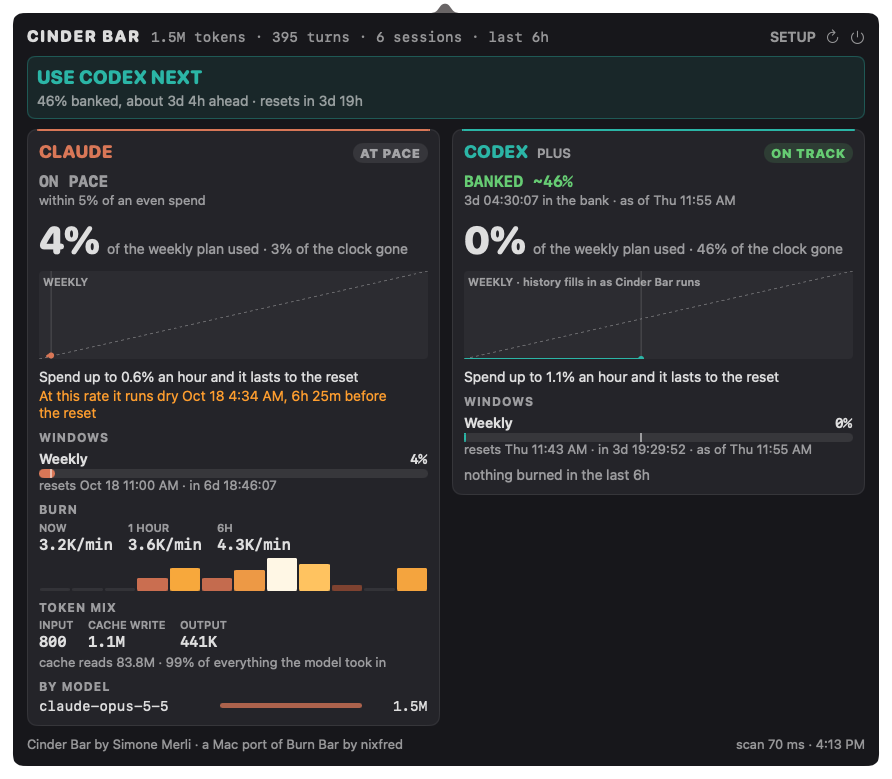
- Verdict: ON TRACK, AT PACE, OVER or WAY OVER. Over starts 5% past an
even spend. - What to do:
BANKED 49%with a running clock of time in the bank,COME BACK IN 8:36:42if you stop,BACK AT THE RESET, orON PACE. - Headline: budget (share of the plan spent) or tokens. Click it to flip.
- Burndown: an even-spend diagonal, the measured line and a projection.
- Instruction: how much you can spend per hour and still make the reset,
and when the plan runs dry at the current rate. - Windows: every limit the provider reports, with a gauge, an even-spend
tick and the reset. A window whose reset has passed reads "rolled over" and
its figure is withheld. - Burn, token mix, by model.
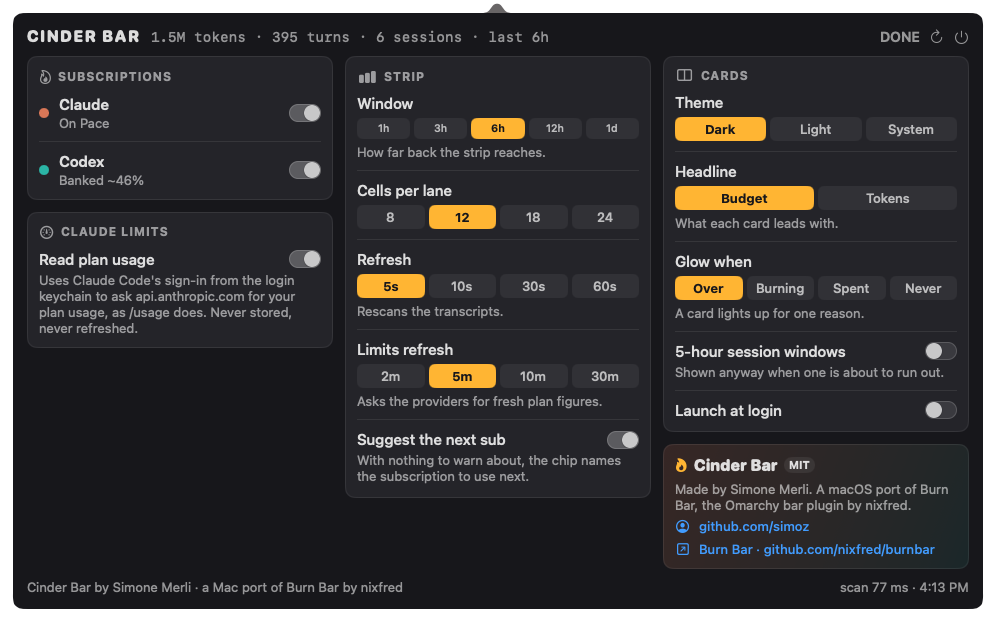
SETUP (top right of the panel) holds every option: lanes, strip window and
cell count, refresh rates, card headline, glow reason, 5-hour session windows
and launch at login. R refreshes.
The rules it keeps
These are Burn Bar's rules, ported unchanged and covered by tests:
- It needs a choice. It suggests nothing unless there are two
subscriptions. - Only a sub that is ahead is ever suggested. The winner has the most plan
left against the clock it has left, which compares a week and a month on the
same scale. - A full 5-hour window blocks a sub, and so does one that will be full
within half an hour. - A snapshot is not treated as exact. Codex only reports its quota when
Codex runs, so an older reading needs five times the margin and says when it
was measured (BANKED ~44% · as of Thu 11:55 AM). Grok logs its quota only
when Grok starts, so it always needs that margin, and 25% once Grok has been
used since (as of Sun 1:50 PM, used since). - A plan change is not a reset. Moving from SuperGrok Plus to Heavy took
the weekly figure from 14% to 8% with the same reset, because the same week
was measured against a bigger pool. The window stays whole. Only the samples
from before the change are dropped, and the card saysupgraded to Heavy Mon 8:58 PM. - It does not flap. The current pick keeps the job until another sub is
clearly better. - A lane you untick is left out: no cells, no card, no advice.
Install
Cinder Bar needs macOS 14 or later.
From a release. Download Cinder-Bar-<version>.zip from
Releases, unzip it and moveCinder Bar.app to /Applications. The app is not notarised, so macOS blocks
it the first time it opens. Clear the quarantine flag once:
xattr -dr com.apple.quarantine "/Applications/Cinder Bar.app"
You can also go to System Settings › Privacy & Security and choose
Open Anyway after the first attempt.
Opened from anywhere other than Applications, Cinder Bar offers to move itself
there and relaunch. The first time it runs from Applications it turns on
Launch at login, so it is in the menu bar every time you start the Mac. You
can turn that off in SETUP.
From source. You need the Xcode Command Line Tools
(xcode-select --install). Full Xcode is not required.
./scripts/bundle.sh             # builds "dist/Cinder Bar.app"
INSTALL=1 ./scripts/bundle.sh   # builds it and installs it in /Applications
ZIP=1 ./scripts/bundle.sh       # builds it and zips it for a release
While developing, use swift run CinderBar. The icon is drawn byswift scripts/make-icon.swift Resources/AppIcon.icns.
Two diagnostic modes:
swift run CinderBar --print            # one collector run, a text summary, exit
swift run CinderBar --render out/      # writes strip.png and cockpit-*.png
For screenshots of the real panel, --show opens the cockpit at launch and--show-setup opens SETUP.
Tests run without Xcode, because the Command Line Tools ship neither XCTest nor
the swift-testing macros:
swift run cinderbar-checks
Uninstall
- Open the panel, go to SETUP and turn off Launch at login. This removes
Cinder Bar from System Settings › General › Login Items. - Quit it with the power button at the top right of the panel.
- Move
Cinder Bar.appfrom Applications to the Trash. - Remove its data and settings:
rm -rf ~/Library/Application\ Support/CinderBar
defaults delete dev.cinderbar.CinderBar
The first command removes the scan cache and the pace history. The second
removes the SETUP preferences. Cinder Bar never writes to your Claude, Codex or
Grok files, so nothing else needs cleaning up.
If you deleted the app before step 1 and it still appears in Login Items,
remove it there with the minus button.
Where the numbers come from
- Claude:
~/.claude/projects/**/*.jsonl. Assistant lines carrymessage.usage. The same message is re-serialized as it streams, somessage.idis the dedupe key and the largest revision counts. The heat map
counts fresh input, cache writes and output. Cache reads are carried
separately for the token mix. - Codex:
~/.codex/sessions/YYYY/MM/DD/rollout-*.jsonl. Thetoken_count
events carry a cumulative counter, and Cinder Bar counts the deltas. The same
events carryrate_limits(the 5-hour and weekly windows, and the plan),
which is Codex's plan meter. - Grok:
$GROK_HOME,~/.grokby default.
The Grok CLI (1.0.52 on) writessessions/**/usage.json, a per-turn ledger
it rewrites in place. Each turn counts once, keyed by session and turn number,
and the latest content wins. Fresh input isinputTokenslesscachedReadTokens, cache writes arecacheCreationTokens, and output isoutputTokens, which already includes reasoning. Cache reads are carried
separately, as for Claude. The model is the turn'sprimaryModelId. A
session without ausage.json(older Grok builds) falls back to an estimate:sessions/**/updates.jsonlcarries_meta.totalTokens, the running context
size, for eachpromptId, and a prompt's burn is the rise of that figure
within the prompt. A prompt whose figure does not change adds nothing, andsummary.jsonnames the model. The Free plan logs no credit figure, so its
card shows tokens only. The
weekly credit figure and the plan (SuperGrok Heavyis shown asHEAVY PLAN) come from thebilling: fetched credits configlines inlogs/unified.jsonl. The card's account line is the newest sign-in's email
inauth.json. - Claude limits: Claude Code writes no quota into its transcripts, so Cinder Bar
asks the endpoint that Claude Code's own/usageuses
(api.anthropic.com/api/oauth/usage). It uses the sign-in that Claude Code
already keeps in the login keychain, read through/usr/bin/security.
The endpoint is undocumented and may change. Every field is read defensively,
and anything that does not parse is withheld rather than shown as 0%. You can
turn this off in SETUP. Cinder Bar then shows Claude in tokens only.
Scanning is incremental. An unchanged file replays its cached contribution. A
file that grew is read from the previous offset, but only if the 48 bytes
before that offset still match. Cinder Bar's state lives in~/Library/Application Support/CinderBar/: the scan cache and the history of
measured percentages that the burndown is drawn from.
Privacy
Cinder Bar reads your Claude, Codex and Grok transcripts on this Mac to count tokens. It
keeps numbers, model names and message ids, never message text. Each card's
account label comes from one field of the file where that tool keeps its
sign-in: oauthAccount.emailAddress (else the display name) in~/.claude.json, the email in the ChatGPT id_token of ~/.codex/auth.json
(or API key for an API-key login), and the newest email in Grok'sauth.json. The tokens in those files are never copied, logged or stored. Account names in SETUP hides
the label for a screen share. The only
network request it makes is the Claude limits probe described above. That
request goes only to api.anthropic.com, using the token Claude Code already
holds. The token is never stored, logged or refreshed, because refreshing it
would rotate Claude Code's own sign-in.
Differences from Burn Bar
Cinder Bar covers part of Burn Bar so far:
- Lanes for Claude, Codex and Grok. Kimi, Zcode and the local Ollama/GPU
lane are not ported yet. - No rising sparks, and the lane flash is a glow rather than Burn Bar's
shockwave: at 18 points tall the menu bar has no room for either. - The motion runs at 4 frames a second rather than Burn Bar's 20, because macOS
re-snapshots the menu bar item on every frame. - The burndown line is drawn from percentages Cinder Bar itself has measured, so it
fills in over time after install.
Credits
- Cinder Bar by Simone Merli (@simoz).
- Burn Bar by
nixfred, the Omarchy plugin this is a port of.
Go and star it.
License
MIT. See LICENSE, which carries both the Cinder Bar copyright and the
original Burn Bar copyright.
Reviews (0)
Sign in to leave a review.
Leave a reviewNo results found