loopat
Health Pass
- License — License: Apache-2.0
- Description — Repository has a description
- Active repo — Last push 0 days ago
- Community trust — 18 GitHub stars
Code Fail
- rm -rf — Recursive force deletion command in scripts/build-to-nginx.sh
- process.env — Environment variable access in server/src/bootstrap.ts
- process.env — Environment variable access in server/src/bwrap.ts
- exec() — Shell command execution in server/src/chat.ts
- execSync — Synchronous shell command execution in server/src/claude-binary.ts
Permissions Pass
- Permissions — No dangerous permissions requested
No AI report is available for this listing yet.
Self-hosted AI workspace built around context management. Works solo, scales to teams.
🧶 loopat
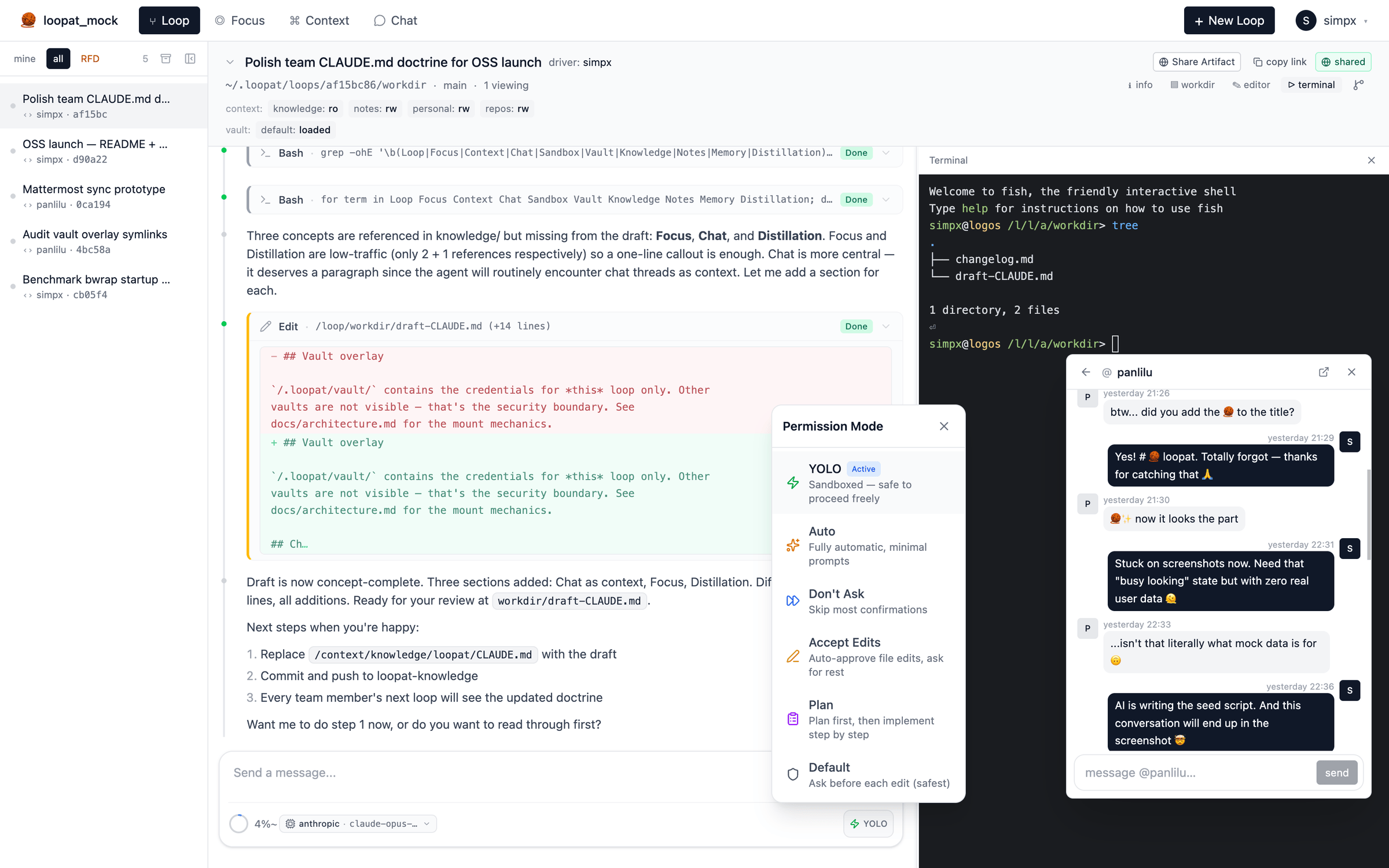
Self-hosted AI workspace built around context management — works solo, scales to teams
⭐ Star on GitHub ·
🚀 Quick start ·
📖 Architecture
When humans collaborate with AI, three things only humans can bring:
- Drive — pushing the work forward. AI has no desires, no
ambition of its own; momentum has to come from a human. - Attention — what matters now, what to ignore. AI doesn't know
what's worth your time. - Entropy reduction — turning noise into structured knowledge.
AI generates tokens but won't spontaneously simplify.
loopat is built around managing these three as first-class concepts:
Loop (drive) · Focus (attention) · Context (entropy
reduction). A fourth concept — Chat — coordinates the team on the
sync axis.
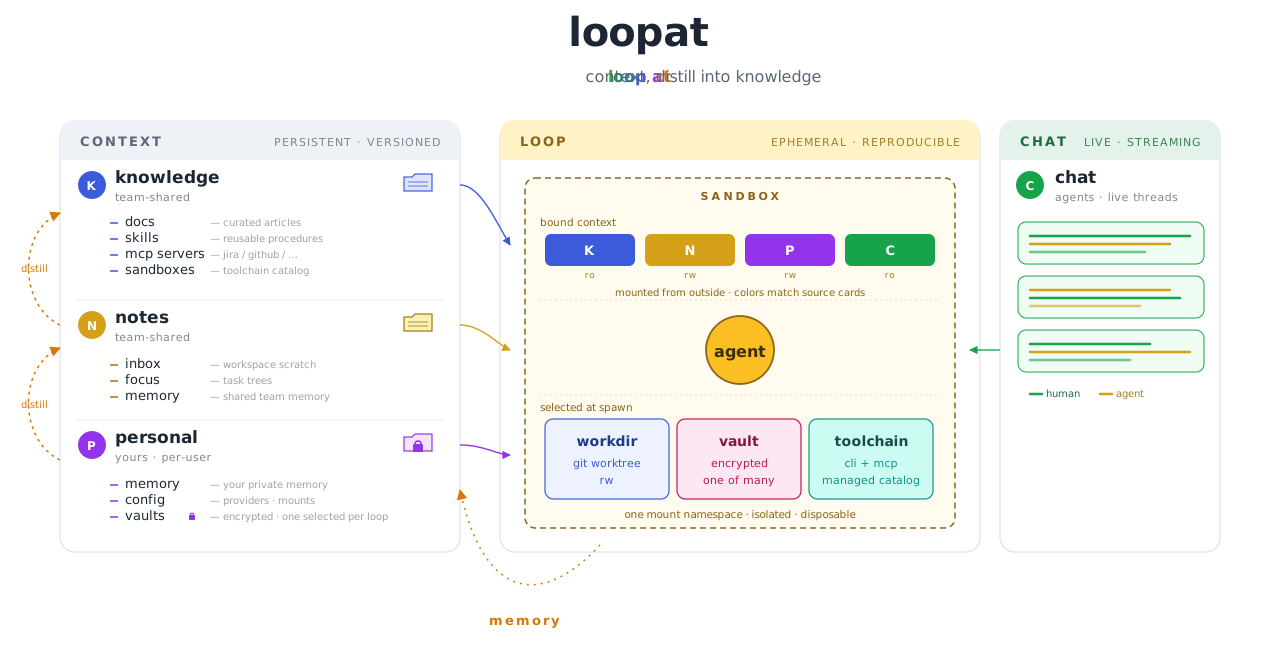
The agent itself is the Claude Agent SDK; what makes loopat
distinct is the context architecture around it — how chat, code,
memory, and knowledge interlock so context doesn't get lost across
sessions or teammates.
What makes loopat different
- End-to-end context management. Team chat (IM) threads, code
edits, agent decisions, memory — all live in the same context graph
and all flow into the next loop. Most AI tools make you copy-paste
from Slack into the AI to give it situational context; loopat treats
team chat as a first-class context source — spawn a loop from
any chat thread and that thread becomes part of the loop's context
automatically. - Works solo, scales to teams. Same workspace whether you're
alone or onboarding teammates. Solo, it's a personal AI workspace;
with a team, sharedknowledge/andnotes/git repos sync across
members, loops auto-commit their work, and observations promote
upward through a distillation pipeline. Most AI tools force you to
pick between solo CLI and team SaaS — loopat is one tool at any scale. - Reproducible loops. Every loop runs in its own sandbox with a
versioned toolchain and a pinned credential vault. Spawn the same
loop tomorrow on a different machine and get the same starting
state. No "works on my machine" for AI sessions. - Self-hosted, data you own. All artifacts live in plain git
repos you fully control; vault secrets are git-crypt encrypted.
BYO API key — nothing leaves your machine except the model API call
itself.
How loopat compares
| Claude Code | Cursor | opencode | Codex | loopat | |
|---|---|---|---|---|---|
| Form factor | CLI | IDE | TUI | Web (hosted) | Web (self-hosted) |
| License | proprietary | proprietary | MIT | proprietary | Apache 2.0 |
| Team IM integration | external (manual paste) | external (manual paste) | external (manual paste) | external (manual paste) | built-in, threads ingested into loop context |
| Memory management | personal (CLAUDE.md) |
personal (rules + memories) | personal (AGENTS.md) |
none | personal + team-shared, with distillation pipeline |
| Multi-user | single user | per-seat | single user | per-account | shared workspace |
| Shared team knowledge | individual config | individual config | individual config | individual config | git-synced across team |
| Per-session sandbox | process-level | process-level | process-level | OpenAI-managed | bwrap (default) · Docker (planned) |
| Toolchain pinning | host runtime | host runtime | host runtime | fixed (hosted env) | per-loop versioned |
| Per-task credential isolation | shared (env vars) | shared (subscription) | shared (env vars) | account-managed | per-loop vault overlay |
| Data location | local files | cloud | local files | OpenAI servers | git repos you control |
| Secrets storage | env vars (plaintext) | cloud-managed | env vars (plaintext) | platform-managed | git-crypt encrypted vault |
| Agent engine | proprietary (Anthropic) | proprietary (multi-model) | pluggable | proprietary (OpenAI) | Claude Agent SDK |
Quick start
git clone https://github.com/simpx/loopat.git
cd loopat && bun install
bun run dev
Open http://localhost:7787. The first run bootstraps ~/.loopat/,
prints a checklist, and prompts you to set your API key in~/.loopat/config.json. Restart — done.
Needs: Linux + bubblewrap + mise + bun on
the host. macOS / Windows is via Docker (see below). For team setups
with shared knowledge/notes git repos and full bootstrap details, see
the installation guide.
Setup guides
Loopat splits configuration along role lines — read whichever applies:
- Admin setup — provision the workspace:
knowledge / notes repos, team sandboxes, MCP, operator mounts. Run
this once per workspace. - User setup — join an existing workspace:
personal credential repo, providers, vaults, sandbox mounts. Run
this once per member, per machine.
Deployment
Docker (recommended)
docker compose up -d
Open http://localhost:17787 (note: 17787, not 7787 — the host
port is remapped to avoid collision with a local dev server; seedocker-compose.yml). Workspace persists in
the loopat-data volume. Needs SYS_ADMIN + unconfined AppArmor for
bwrap mount namespaces.
From source (Linux)
bun run build                     # installs deps + builds frontend → web/dist/
PORT=7787 bun run server/src/index.ts
Single Hono process serves API + static SPA + websocket on one port.
Put a reverse proxy in front and proxy /api + /ws to the server.
Documentation
- Admin setup — workspace config, knowledge /
notes repos, sandboxes, MCP, operator mounts. - User setup — personal repo, providers,
vaults, sandbox mounts. - Installation guide — host install, system deps,
environment variables. - Architecture — the read/write path, layered
context model, distillation pipeline, Claude config injection paths. - Sandbox — bwrap mount mechanics, three-tier mount
authority, what stops the agent from escaping. - Troubleshooting — chat won't start, banner
errors, common pitfalls.
Contributing
Issues and PRs welcome. Before opening a non-trivial PR, please skimdocs/architecture.md so the change lands in the
right layer (sandbox / vault / loop / chat).
Contributors are asked to sign the Contributor License Agreement
on their first PR — the CLA Assistant bot prompts you
with a one-click link. This keeps future licensing options open (e.g.
moving to a business-friendly license) without having to re-collect
permission from every contributor.
Acknowledgments
loopat is built on top of:
- Claude Agent SDK — the agent runtime
- assistant-ui — React
components for the chat interface - Hono — the HTTP + WebSocket server
- bubblewrap — sandbox mount
namespaces - mise — per-loop toolchain installs
License
Apache License 2.0. See NOTICE for required
attributions and CLA.md for contribution terms.
Reviews (0)
Sign in to leave a review.
Leave a reviewNo results found