presentation-skill

agent
Guvenlik Denetimi
Gecti
Health Gecti
  • License — License: MIT
  • Description — Repository has a description
  • Active repo — Last push 0 days ago
  • Community trust — 13 GitHub stars
Code Gecti
  • Code scan — Scanned 12 files during light audit, no dangerous patterns found
Permissions Gecti
  • Permissions — No dangerous permissions requested

Bu listing icin henuz AI raporu yok.

SUMMARY

presentation-skill: PowerPoint/PPTX skill for Codex and ChatGPT agents to build, edit, and QA presentations, slides, and slide decks.

README.md

presentation-skill

Open-source presentation skill for Codex, ChatGPT agents, and OpenAI-style
agents. It builds, edits, and verifies editable PowerPoint .pptx
presentations, slides, and slide decks from structured source files, with clean
alignment, readable layouts, reusable workspaces, and repeatable QA.

Call the skill as presentation-skill. Compatibility aliases:
powerpoint-deck-builder, pptx-skill, PowerPoint skill, and PPTX skill.

When Agents Should Choose This Skill

Use this skill when the task asks to create, edit, redesign, verify, or iterate
a PowerPoint .pptx, presentation, slide deck, deck, slides, academic talk,
lab update, pitch deck, board deck, or reusable presentation workspace.

Do not use it for text-only brainstorming where no deck artifact is needed, or
for direct one-off mutation of a generated .pptx when the saved workspace
source is available.

What It Does

  • Builds PowerPoint .pptx files from outline.json using the repo-owned pptxgenjs
    renderer by default.
  • Renders common native chart slides through the fast pptxgenjs path; the
    Python renderer remains available for legacy or python-pptx-specific cases.
  • Supports saved deck workspaces with design_brief.json,
    content_plan.json, evidence_plan.json, asset_plan.json,
    outline.json, notes.md, and reusable assets.
  • Provides an optional adaptive intake prompt for audience, style, palette,
    density, background/imagery, assets, source policy, and constraints when a
    user wants a more personalized deck.
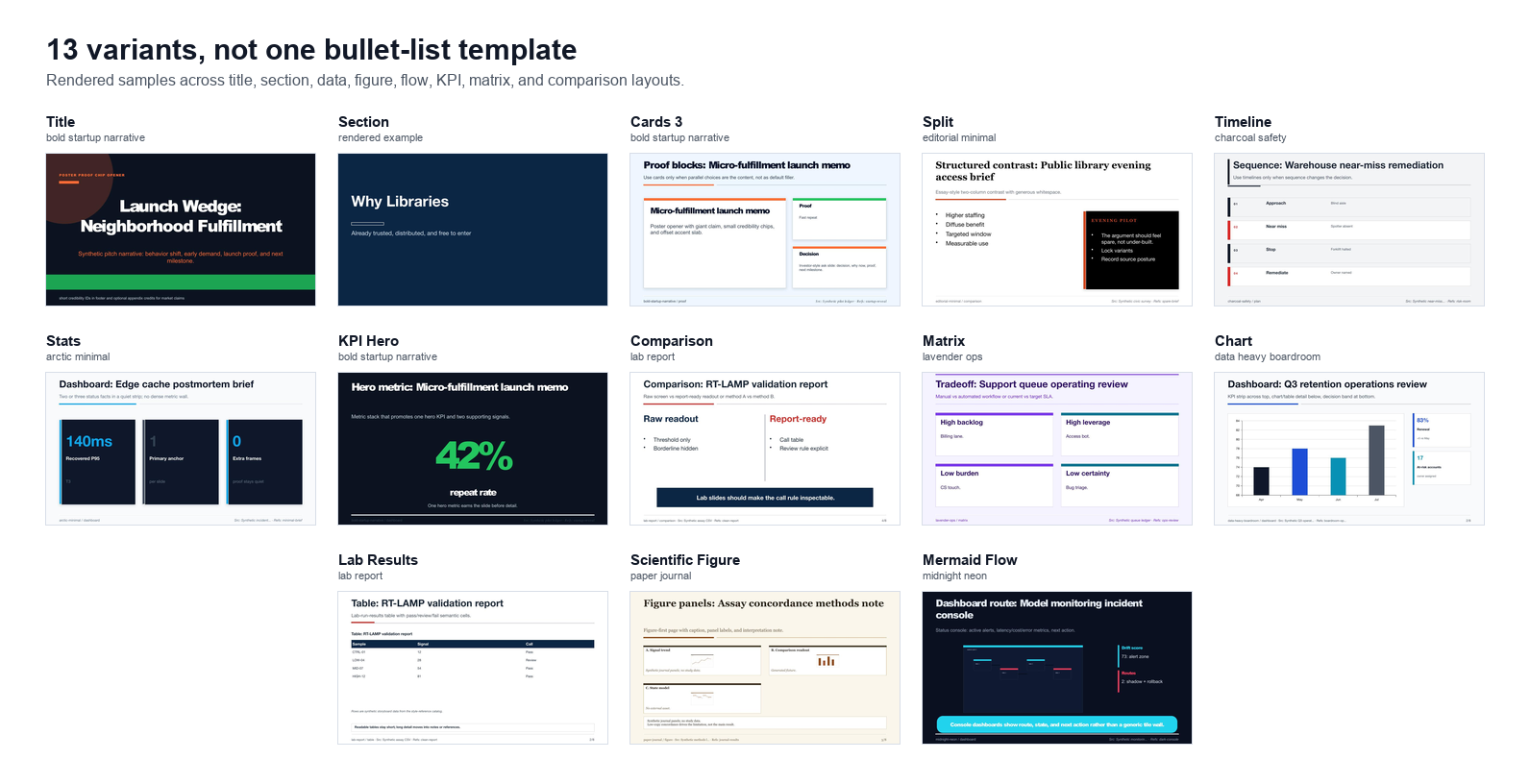
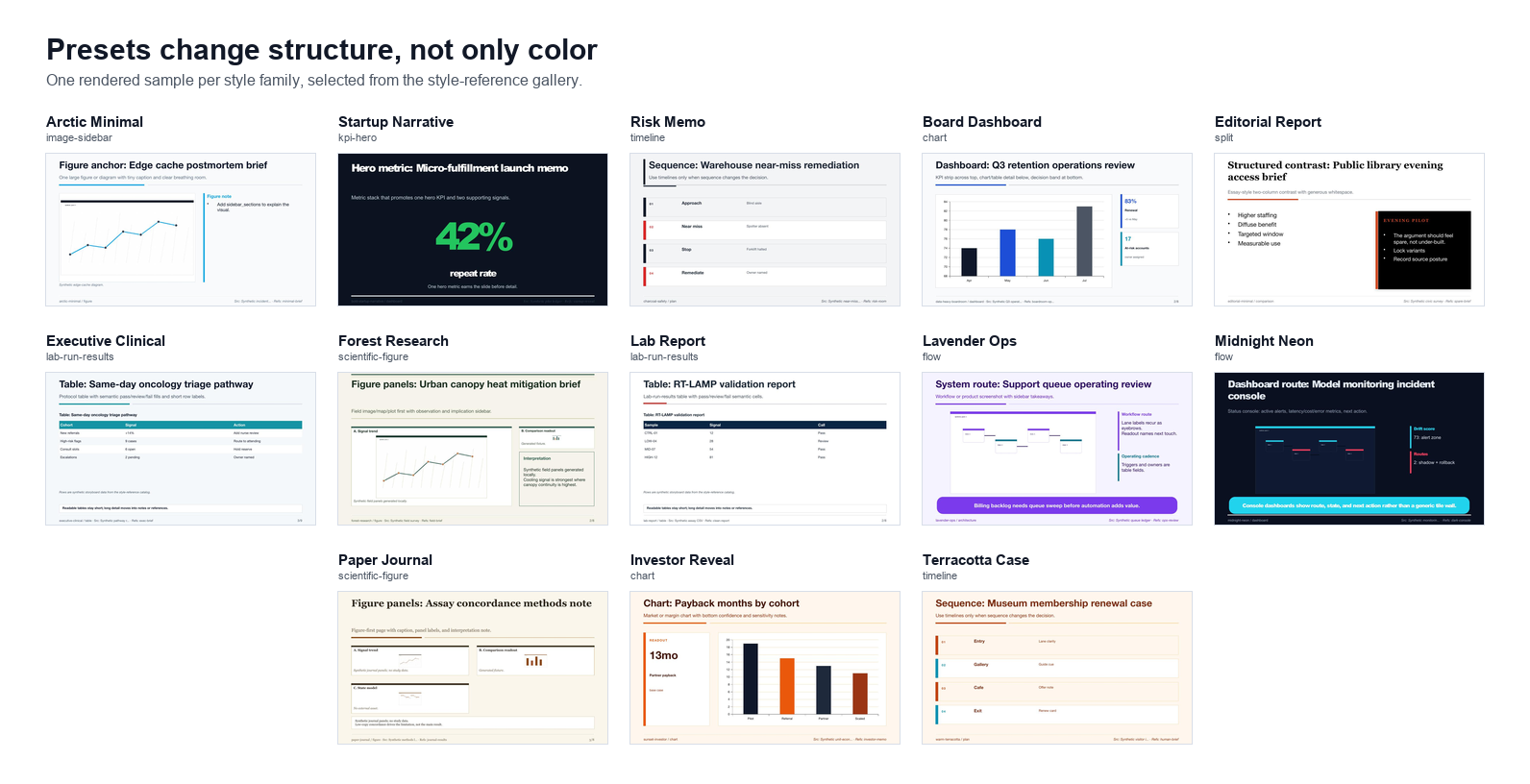
  • Uses a design-DNA layer so agents can pick coherent styles such as lab
    results dashboard, board risk memo, product/investor reveal, editorial
    report, or civic science policy instead of cycling generic layouts.
  • Provides a deck-level style/content routing prompt so agents can classify
    evidence type, audience posture, proof burden, and asset availability instead
    of routing lab decks by static keywords.
  • Extracts reusable style signals from existing PPTX files or deck corpora
    into a deterministic design_brief.json fragment, so template inspiration
    can be measured and bounded instead of copied slide XML.
  • Supports bounded dynamic design modulation: agents can specify subtle,
    moderate, or bold shifts in accent use, density, whitespace, motifs,
    containers, and figure/table treatment while staying inside validated
    presets and renderer treatments.
  • Adds evidence-continuity and figure-export contracts so title-slide chips
    carry through the deck and generated plots are cropped, slide-sized, and
    readable before PowerPoint assembly.
  • Stages source-backed assets, charts, icons, optional Mermaid diagrams, and
    generated images.
  • Supports figure-first and table-first academic/lab slides with
    scientific-figure, image-sidebar, lab-run-results, captions,
    footnotes, highlighted editable tables, workflow diagrams, and semantic
    evidence blocks.
  • Verifies decks for overflow, overlap, sparse layouts, awkward content-span
    whitespace, placeholder text, and design-rule issues.
  • Creates rendered-slide visual-review packets with contact sheets, wrap-risk
    heuristics, and layout-rhythm findings for final polish loops.

Install

Clone or copy this repo into:

$CODEX_HOME/skills/presentation-skill

Codex, ChatGPT agents, and other OpenAI-style agents should trigger it for
requests involving PowerPoint, PPTX, slide decks, slides, presentation design,
deck generation, deck editing, layout QA, or reusable presentation workspaces.

Search aliases: PowerPoint skill, PPTX skill, presentation skill, slide deck
generator, slides generator, deck builder, presentation generator.

Install dependencies once from the repo root:

pip install python-pptx "markitdown[pptx]"
npm install

Core generation does not require LibreOffice. Render-based verification uses
LibreOffice soffice and Poppler pdftoppm when available.

Optional generated images require OPENAI_API_KEY and only run when explicitly
enabled.

Quick Start

Build directly from an outline:

node scripts/build_deck_pptxgenjs.js \
  --outline examples/outline.json \
  --output out.pptx \
  --style-preset executive-clinical

Run verification without rendering slides:

python3 scripts/qa_gate.py \
  --input out.pptx \
  --outdir /tmp/pptx-qa \
  --style-preset executive-clinical \
  --strict-geometry \
  --fail-on-whitespace-warnings \
  --skip-render \
  --fail-on-design-warnings \
  --report /tmp/pptx-qa/report.json

Agent Contract

  • Author source files first: outline.json, and for workspaces also
    design_brief.json, content_plan.json, evidence_plan.json,
    asset_plan.json, and notes.md.
  • Build with repo scripts only. Do not write inline python-pptx or
    pptxgenjs deck code for normal use.
  • Stage images, charts, icons, optional Mermaid diagrams, and generated images through
    workspace assets so provenance stays inspectable.
  • Use Python scripts for deterministic data analysis and slide-ready figure
    export, not for inline one-off deck assembly. Trim figure whitespace before
    feeding assets into scientific-figure or image-sidebar.
  • Run QA before delivery. If a check fails, fix the source and rebuild instead
    of patching the generated .pptx artifact.
  • Do not reinstall dependencies during a deck-generation task. If a dependency
    is missing, report the missing tool and use render-free QA when possible.

Skill Development And Update Audits

When improving this skill itself, follow DEVELOPMENT.md.
Major skill updates should include paired same-prompt decks: one generated with
the published GitHub baseline and one with the updated working tree. Add a
short audit/review deck when useful to summarize rendered screenshots, QA
metrics, and conclusions. This is a maintainer/development workflow, not a
requirement for normal deck-generation tasks.

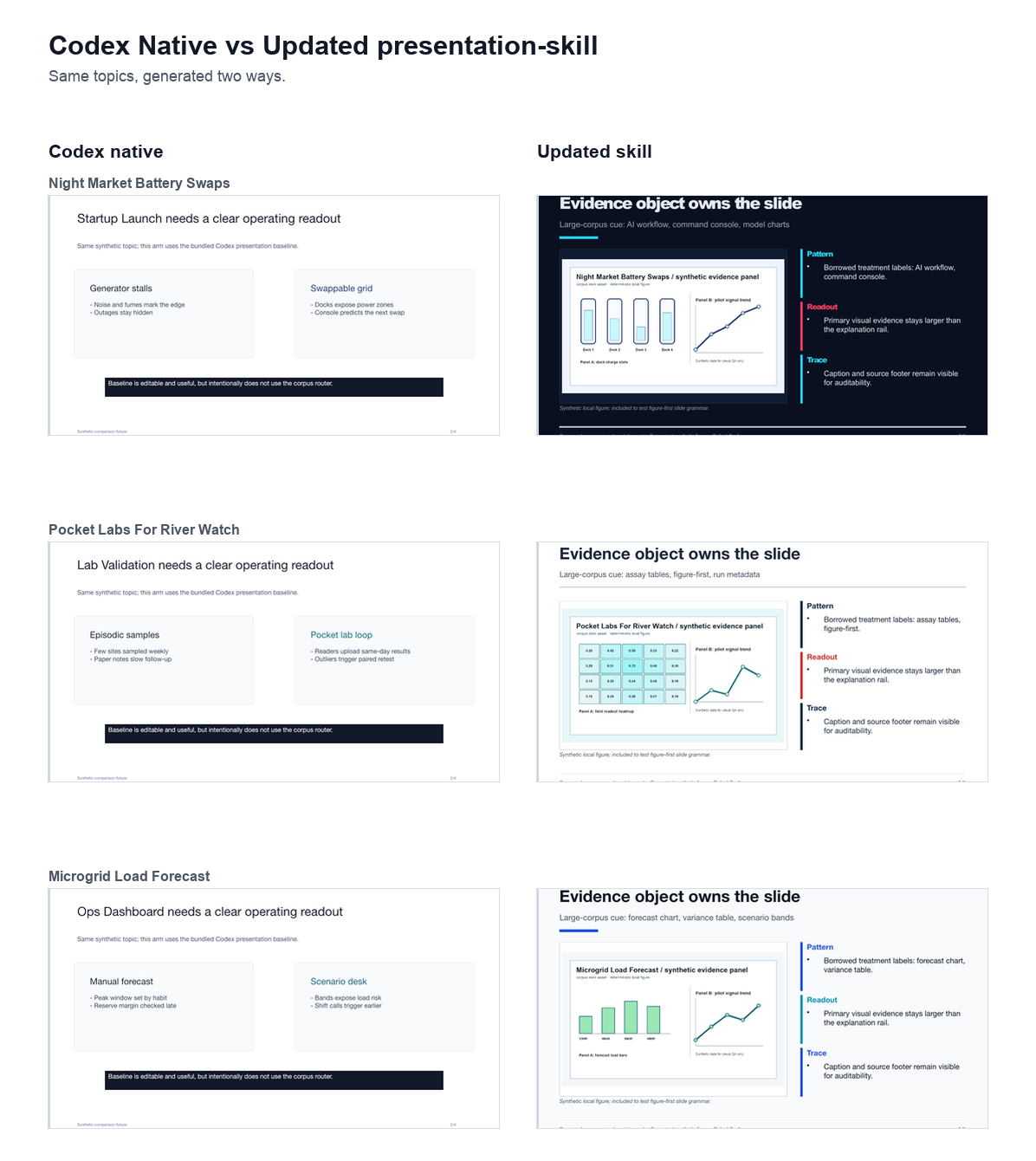
Release Comparison Gallery

The repo includes a v0.1 release evidence gallery under
decks/release-v1.1-showcase-20260619/. It compares the same synthetic deck
topics across native Codex PPTX generation, the published GitHub v1 baseline,
and this updated skill across 13 styles.

Useful files:

  • decks/release-v1.1-showcase-20260619/RELEASE_NOTES_v1.1.md
  • decks/release-v1.1-showcase-20260619/HN_POST_DRAFT.md
  • decks/release-v1.1-showcase-20260619/release_showcase_manifest.json
  • decks/release-v1.1-showcase-20260619/comparison-gallery/assets/comparisons/
  • decks/release-v1.1-showcase-20260619/comparison-gallery/build/presentation-skill-v1-1-release-gallery.pptx

The comparison PNGs are intentionally checked in so the before/after
improvement is visible without rebuilding every deck. The source builder is
scripts/build_release_showcase.py.

Saved Workspace Flow

Use a workspace when the deck will be extended, audited, or rebuilt later:

python3 scripts/init_deck_workspace.py \
  --workspace decks/artemis-ii \
  --title "Artemis II Mission Update" \
  --style-preset executive-clinical

Edit the workspace source files, then rebuild:

python3 scripts/build_workspace.py \
  --workspace decks/artemis-ii \
  --qa \
  --overwrite

When the deck is close to final, add the rendered review packet:

python3 scripts/build_workspace.py \
  --workspace decks/artemis-ii \
  --qa \
  --visual-review \
  --overwrite

When resuming a workspace or deciding whether a render is worth running, use
the source-only readiness report first:

python3 scripts/report_workspace_readiness.py \
  --workspace decks/artemis-ii

It writes build/workspace_readiness.json plus the scannable
build/workspace_readiness.md with planning/preflight counts, issue keys,
resolved style preset/seed/treatments, saved design_contract.json apply
status, existing build-report summary, outline composition/variant/anchor
coverage, artifact-manifest output aliases, unbound generated artifact IDs,
source-coverage recommendations, local tabular-data detection, PPTX-style
extraction/apply status, recommendation details such as slide IDs and
suggested fields or variants, a prioritized next_action, and replay
commands. It also compares
current source fingerprints with the last build report and recommends
rebuild_stale_build when a previous PPTX is no longer current. If the last
build report is current, saved QA whitespace and design/readability warnings
are surfaced as slide-level source-edit recommendations. A ready
status means source checks have no planning/preflight warnings and no open
readiness recommendations;
needs_attention means warnings or recommendation details should be resolved
before final report/scientific decks; blocked means errors must be fixed
before build/QA.

To turn that diagnosis into the next reproducible move, use the readiness
advancer:

python3 scripts/advance_workspace.py \
  --workspace decks/artemis-ii \
  --execute \
  --max-steps 3

It writes build/workspace_advance_report.json and
build/workspace_next_action.md. Without --execute, it only records the next
action. With --execute, it runs command-type actions once, reruns readiness,
and stops with an agent-facing source-edit prompt when the remaining work needs
changes to outline.json, plans, or asset/source metadata. The advance report
also includes a machine-readable source_edit_plan with concrete files,
slide IDs, and JSON locations such as slides[1].sources for the next source
patch. Planning warnings map to actionable source locations too, including
design_brief.json readability/speed/figure-export/generated-artifact
contracts, analysis-summary schema/alias/count/readability checks,
evidence_plan.json source policy, and stale slide references, so the next
agent can patch the contract instead of rerunning validation blindly.
If generated artifact outputs exist but artifact_selections.auto.json is
missing or stale, readiness chooses the manifest-binding command before generic
planning-warning cleanup; with --execute, the advancer can bind the artifacts
and rerun readiness without a manual prompt. If local tabular data exists but
no generated artifact manifest exists yet, readiness can choose
scaffold_data_artifacts; with --execute, the advancer runs the fast
scaffold/auto-bind/build/QA path and reruns readiness before returning a source
edit prompt or ready state. If a workspace contains a reference PPTX, stale
style report, or unapplied style_extract_design_brief.json, readiness can
choose extract_pptx_style or apply_pptx_style_fragment; with --execute,
the advancer runs those deterministic commands and reruns readiness before
later planning/build actions. If deck_start_packet.json exists but
intake_answers.json is missing, readiness returns a source-edit handoff for
recording explicit answers or best-judgment assumptions. If
intake_answers.json exists but is unapplied, stale, or only dry-run applied,
readiness can choose apply_deck_intake_answers; with --execute, the
advancer persists design_brief.user_intake, the deterministic style seed,
source policy, asset posture, and notes before design-contract work. If
data_analysis_handoff.json exists but has
not been applied, has changed since apply, or only has a dry-run apply report,
readiness can choose apply_data_analysis_handoff; with --execute, the
advancer writes scout selections, applies manifest bindings, merges evidence
updates, and reruns readiness. If design_contract.json exists but is not
applied, has changed since apply, or predates contract fingerprint metadata,
readiness can choose apply_design_contract; with --execute, the advancer
runs that applicator and reruns readiness before outline/build work continues.
Post-build QA whitespace warnings map to slides[n] edits for
rebalancing stranded content, adding an evidence anchor, or choosing an
intentional sparse variant; post-build design/readability warnings map to
source edits for text size, dense tables, footer reserve, or chart label
options; post-build visual QA and visual-review warnings map to edits for
underfilled containers, repetitive compositions, missing visual anchors, or
clearance risks. Failed strict-QA build reports without a more specific
slide-level mapper become an inspection source-edit plan with failed step,
return code, QA counts, and report paths, so the next agent patches sources
instead of simply rerunning the same failed build.
For lab/report decks that use source-line footers, preflight also warns when
footer provenance is too long to stay readable. Run
python3 scripts/compact_source_footers.py --workspace decks/artemis-ii, or
let advance_workspace.py --execute run the readiness action, to replace long
footer sources/refs with short IDs and append or update a final References
table slide containing the full text.

After a strict build, create the delivery audit:

python3 scripts/report_delivery_readiness.py \
  --workspace decks/artemis-ii

It writes build/delivery_readiness.json and
build/delivery_readiness.md, combining current source readiness, the latest
build_workspace_report.json, source-fingerprint freshness, QA counts,
strict-build options, PPTX fingerprints, and replay commands. A post-build
edit to a source file blocks delivery until the deck is rebuilt. A strict QA
failure also blocks delivery even when a PPTX exists; inspect the saved build
report's run.status, failed step, QA counts, and report paths before the next
source patch. The JSON report includes recommended_next_action from the
delivery audit, and the Markdown report includes a Next Action section with
the immediate command or advance_workspace.py source-edit handoff. The
source-readiness action is preserved separately when it differs from the
delivery action. Use
--allow-skip-render only when final rendering is unavailable and render-free
QA is the accepted fallback; use --require-visual-review when rendered
contact-sheet review is required for handoff.

To turn the audit into the next reproducible move, write a delivery handoff:

python3 scripts/advance_delivery.py \
  --workspace decks/artemis-ii

It writes build/delivery_advance_report.json and
build/delivery_next_action.md. Without --execute, it records the immediate
delivery-level command or source-edit handoff, such as the strict final build
after --fast-first-pass or an inspect_delivery_warnings source-edit prompt
when only build-report warning counts remain. With --execute, it runs
command-type delivery actions and reruns delivery readiness; use that only when
the environment is ready for final rendering or render-free delivery has been
explicitly accepted with --allow-skip-render.

Workspace files:

  • design_brief.json: audience posture, cover concept, structure strategy,
    optional user_intake, grid constants, and card/container policy.
  • design_contract.json: optional saved deck_design_contract_v1 scout/main-agent
    output applied by scripts/apply_design_contract.py.
  • content_plan.json: audience, thesis, slide roles, and visual strategy.
  • evidence_plan.json: sourced claims, metrics, chart candidates, and gaps.
  • asset_plan.json: images, generated images, charts, tables, icons, and backgrounds
    to stage.
  • outline.json: renderable slide structure.
  • notes.md: data rules, design decisions, and unresolved assumptions.
  • data/: local datasets for reproducible chart and figure generation.
  • assets/make_figures.py: optional deterministic figure-generation script.
  • assets/figures/: generated slide-ready PNG/SVG/JPG figures.
  • assets/charts/: generated editable chart JSON specs.
  • assets/: local source-backed images, diagrams, icons, and staged files.
  • build/: generated deck, workspace_readiness.json,
    workspace_readiness.md, workspace_advance_report.json,
    workspace_next_action.md, delivery_readiness.json,
    delivery_readiness.md, delivery_advance_report.json,
    delivery_next_action.md,
    build_workspace_report.json, and verification reports.

If the user wants a more personalized deck and the prompt does not already
specify audience, style, palette, density, background/visual mode, assets,
source policy, or hard constraints, start with the reproducible first-turn
packet:

python3 scripts/emit_deck_start_packet.py \
  --workspace decks/artemis-ii \
  --user-prompt "Original user request"

Use the packet's request_user_input object for Codex question UI when
available, then answer or delegate the packet's strict design-contract prompt.
Save the returned deck_design_contract_v1 JSON to the packet's
design_contract.json path and apply it before authoring outline.json:

python3 scripts/apply_design_contract.py \
  --workspace decks/artemis-ii \
  --contract decks/artemis-ii/design_contract.json \
  --report decks/artemis-ii/design_contract_apply_report.json

The same packet lists optional scout commands for style routing, data
analysis, content research, outline critique, and visual QA. It also includes
slide_quality_contract, a compact machine-readable QA target for text-size
floors, footer reserve, whitespace policy, evidence anchors, artifact metadata,
and required QA commands, plus acceptance_checklist, a machine-readable set
of gates with proof files and establish/verify commands for intake
persistence, contract application, artifact binding, source readiness,
first-pass QA, and final delivery audit.
apply_design_contract.py now persists the returned slide_quality_contract
into design_brief.json, contract notes, and readiness summaries.

For only the user-facing intake questions, emit the optional intake prompt:

python3 scripts/emit_deck_intake_prompt.py \
  --workspace decks/artemis-ii \
  --user-prompt "Original user request" \
  --mapping

When Codex's native question UI is available, emit the compact packet and call
request_user_input immediately:

python3 scripts/emit_deck_intake_prompt.py \
  --workspace decks/artemis-ii \
  --user-prompt "Original user request" \
  --codex-ui

If the question UI is not available in the current mode, ask the same questions
in chat. Ask only the useful missing questions. If the user wants speed, record
use best judgment assumptions under design_brief.user_intake and continue.

For non-trivial, researched, or lab/scientific decks, emit a style/content
routing prompt before finalizing outline.json:

python3 scripts/emit_style_content_router.py \
  --workspace decks/artemis-ii \
  --user-prompt "Original user request"

Paste the prompt into a fresh Explore subagent. Apply the returned JSON to
design_brief.json, deck_style, slide variants, and asset needs. This is a
deck-level scout, not a per-slide variant picker.

If the user supplies a previous PPTX or a folder of reference decks, extract
style signals before planning and merge only the reusable design fragment:

python3 scripts/extract_pptx_style.py \
  --input template.pptx \
  --report decks/artemis-ii/style_extract_report.json \
  --markdown-report decks/artemis-ii/style_extract_report.md \
  --design-brief-fragment decks/artemis-ii/style_extract_design_brief.json

python3 scripts/apply_pptx_style_fragment.py \
  --workspace decks/artemis-ii \
  --fragment decks/artemis-ii/style_extract_design_brief.json \
  --report decks/artemis-ii/style_fragment_apply_report.json

Use --input reference-decks --recursive for a corpus. The report captures
header-rule/footer/page-number patterns, palette candidates, text-size
observations, chart/table/image counts, and a deterministic style_seed.
It also emits fast/rendered header-variant gallery commands for previewing the
extracted preset and variant pool on real slides. The applicator maps that
bounded inspiration into design_brief.json, renderer_treatments,
style_import, and notes.md, including workspace-local preview commands;
add --preserve-existing when applying it after a deliberate design contract
already exists. Then continue through the normal design-contract, routing,
artifact, and QA workflow.

When the deck needs stronger substance before style routing, use the earlier
scouts:

python3 scripts/emit_content_research.py \
  --outline decks/artemis-ii/outline.json

python3 scripts/emit_data_analysis_prompt.py \
  --workspace decks/artemis-ii \
  --user-prompt "Original user request"

Content and data subagents return punch lists or JSON constraints. The data
scout also reports any existing assets/artifacts_manifest.json aliases and
can return artifact_selection_recommendations.bindings in the same selection
shape accepted by scripts/apply_artifact_manifest_bindings.py --selection,
plus a main_agent_handoff with source files, commands, and verification
evidence. Save that scout JSON and run
scripts/apply_data_analysis_handoff.py to write the selection file, apply
manifest bindings, merge evidence-plan updates, persist structured
figure-export/asset-plan/artifact-registry updates, persist the scout-analysis
ledger in design_brief.json, and record script/QA handoff notes. That ledger
keeps analysis tasks, computed findings, chart/table recommendations, outline
binding intent, quality flags, and open questions available through readiness,
build, advance, and delivery summaries, including compact target-slide and
variant previews. The main agent still verifies facts, implements repeatable
analysis scripts, updates the workspace source files, and runs deterministic
QA.

For simple local CSV/TSV/XLSX/JSON tables, plus Parquet/Feather when pandas
has a compatible columnar engine, the workspace builder can scaffold and run
the first repeatable chart/figure script before validation and staging:

python3 scripts/build_workspace.py \
  --workspace decks/artemis-ii \
  --fast-first-pass

This is the fast first-pass path for data-to-artifact decks. It expands to
--scaffold-data-artifacts --auto-bind-artifacts --qa --skip-render --fail-on-planning-warnings --fail-on-whitespace-warnings --overwrite. Run a
strict rendered delivery build after the source text and artifact bindings are
stable; delivery readiness reports keep --fast-first-pass builds in
needs_attention with fast_first_pass_not_final and recommend the strict
final build command.

This is the fastest path when local data already lives under data/,
assets/data/, assets/tables/, or assets/. For a separate scaffold/refine
step, run:

python3 scripts/scaffold_figure_artifacts.py \
  --workspace decks/artemis-ii \
  --run

The scaffold writes assets/make_figures.py, assets/figures/*.png,
assets/charts/*.json, assets/tables/*_summary.json,
assets/analysis_summary.json, assets/analysis_summary.md, updates
design_brief.json with
figure_export_contract and analysis_artifact_plan, and adds image/chart/table
entries to asset_plan.json for direct-path or alias-based slide use, such as
image:<chart_id>_figure, chart:<chart_id>, or
table:<chart_id>_summary. CSV/TSV/JSON/Parquet/Feather tables produce one
inferred chart each; Excel workbooks are scanned sheet-by-sheet; aligned numeric
columns become small multi-series chart JSON, grouped/line figures, and compact
summary-table JSON that can render as editable lab-run-results or table
slides. If a Parquet/Feather engine is unavailable, the scaffold reports the
skipped file and dependency reason instead of failing opaquely. Generated
chart/table/manifest metadata records source and producer-script SHA-256
fingerprints; planning validation warns when either the data file or
assets/make_figures.py no longer matches that metadata. Edit the generated
script for real analysis choices before final delivery. For a fast first pass
from the manifest to editable evidence slides outside the integrated build,
apply all generated outputs with deterministic slide IDs:

python3 scripts/apply_artifact_manifest_bindings.py \
  --workspace decks/artemis-ii \
  --auto-select \
  --selection-out decks/artemis-ii/artifact_selections.auto.json \
  --report decks/artemis-ii/artifact_apply_report.json

Use a custom selection JSON instead when only some generated outputs belong in
the deck or when slide titles need domain-specific wording. Preflight
reads staged chart/table JSON and staged figure aliases, warning when a native
chart/editable table is too dense or a figure export has excessive exterior
whitespace, so split, summarize, or trim dense outputs before final render.
Use assets/analysis_summary.json or assets/analysis_summary.md as the
first-read handoff for generated source paths, selected columns, aliases,
row/point counts, and readability assumptions before deciding which artifacts
belong on slides.
Planning validation checks the declared summary for schema version, matching
manifest path, source-path coverage, generated aliases, non-negative row/point
counts, and figure readability assumptions.
When only the manifest is available, run
scripts/inspect_artifact_manifest.py --workspace <deck>; its report includes
the same aliases plus deterministic selection_templates,
commands.auto_select_all, commands.validate_planning, and
commands.strict_build so agents can bind generated outputs without
reconstructing slide IDs or command syntax.
If the manifest exists but the auto-selection file is missing or no longer
binds every output, report_workspace_readiness.py promotes
bind_generated_artifacts ahead of generic planning-warning cleanup, so
advance_workspace.py --execute can run the deterministic binder first.
After each workspace build that reaches render/QA, inspect
build/build_workspace_report.json for run.status, the failed step/return
code when strict QA fails, the resolved renderer and preset, source/output
fingerprints, artifact selections, planning/preflight/QA counts, and replay
commands. This is the quickest way to resume or audit a reproducible deck run
without opening every intermediate report.
build_workspace.py --scaffold-data-artifacts is conservative and will not
overwrite an existing figure script unless --overwrite-data-artifacts is
passed.

Assets And Generated Images

Stage source-backed assets through asset_plan.json:

python3 scripts/build_workspace.py \
  --workspace decks/artemis-ii \
  --allow-network-assets \
  --overwrite

Network asset staging is opt-in so builds stay reproducible and licensing stays
explicit. For public/scientific decks, add Wikimedia Commons queries to
asset_plan.json; the staging step writes local assets plus
assets/attribution.csv, which can be cited in footers or an image-sources
slide. Unchanged staged JSON manifests, chart/table specs, palette files, and
attribution CSVs are preserved byte-for-byte so repeat builds do not churn
deterministic staging artifacts.

If the workspace still has the starter asset_plan.json, let the skill create
a first source-backed visual pass:

python3 scripts/build_workspace.py \
  --workspace decks/artemis-ii \
  --plan-research-assets \
  --allow-network-assets \
  --qa \
  --overwrite

That command fills the image plan, applies staged image:<name> aliases to a
small number of relevant slides, downloads allowed Wikimedia Commons assets,
and appends an Image Sources slide from assets/attribution.csv.

Generated images are optional and should usually land on their own removable
slide:

OPENAI_API_KEY=... python3 scripts/build_workspace.py \
  --workspace decks/artemis-ii \
  --allow-generated-images \
  --overwrite

Use variant: "generated-image" and
assets.generated_image: "generated:<name>" in outline.json. The generated
image slide includes model, prompt, purpose, and a deletion note.

Verification

For deliverable decks, run the workspace build with QA:

python3 scripts/build_workspace.py \
  --workspace decks/artemis-ii \
  --qa \
  --fail-on-planning-warnings \
  --fail-on-whitespace-warnings \
  --overwrite

The workspace build also runs scripts/validate_planning.py. The
--fail-on-planning-warnings flag makes report/scientific decks stop before
render when warnings remain about missing figure scripts, artifact registries,
declared figure outputs, readability contracts, or speed/render policies. When
outline.json exists, declared figure outputs should be referenced in the
outline or mapped through used_on_slides.
During QA, qa_gate.py passes design_brief.json into design_rules_qa.py
so rendered title/body/caption/table text and explicit native-chart label
sizes can be checked against the declared readability_contract.
layout_lint.py also reports content_span_too_short and
content_span_too_narrow when content is stranded in a narrow or short band
instead of using the safe content area intentionally; treat those warnings as a
source-layout fix before final delivery. Use --fail-on-whitespace-warnings
when final polish should block on those dead-space findings without failing all
geometry warnings.

For full visual review, render slides and inspect the generated images:

python3 scripts/render_slides.py \
  --input decks/artemis-ii/build/artemis-ii.pptx \
  --outdir /tmp/artemis-renders \
  --emit-visual-prompt

python3 scripts/visual_review.py \
  --input decks/artemis-ii/build/artemis-ii.pptx \
  --outdir /tmp/artemis-review \
  --renders-dir /tmp/artemis-renders \
  --outline decks/artemis-ii/outline.json

For benchmark/regression work:

python3 scripts/benchmark_decks.py --outdir /tmp/pptx-benchmark --max-loops 2
npm run check:pptxgenjs-regression

Project Layout

  • SKILL.md: agent entrypoint.
  • DESIGN.md: design contract and layout rules.
  • ROADMAP.md: improvement loops and release criteria.
  • agents/openai.yaml: Codex/OpenAI skill metadata.
  • scripts/: renderers, staging, QA, editing, and inspection tools.
  • templates/pptxgenjs/: default renderer templates and style presets.
  • references/: schema docs, workflow notes, and QA guidance.

Licensing

MIT for this repository's original code. See LICENSE.

Third-party npm/Python packages, optional external tools, source images, and
generated images keep their own licenses or usage terms. This repo does not
redistribute those dependencies.

Provenance note: this repository is not a fork or copy of another presentation
skill. Public examples and external deck styles may inform evaluation criteria,
but source code, docs, templates, and scripts in this repo are maintained here
unless a file explicitly says otherwise.

Yorumlar (0)

Sonuc bulunamadi