StarAgent
Health Gecti
- License — License: MIT
- Description — Repository has a description
- Active repo — Last push 0 days ago
- Community trust — 45 GitHub stars
Code Uyari
- network request — Outbound network request in staragent/dashboard/static/explorer.js
Permissions Gecti
- Permissions — No dangerous permissions requested
Bu listing icin henuz AI raporu yok.
Lightweight agent multiplexer, all in one Web dashboard
StarAgent
⚠️ This project is currently intended for personal use and is under active development. A stable version will be released later.
⚠️ This project was primarily built with vibe coding and may contain potential bugs. Please keep this in mind before using it.
StarAgent is an agent multiplexer for managing coding agent sessions across machines in a unified dashboard. It reflects my own best practices for using multiple agents:
We just need a lightweight tmux wrapper for Codex / Claude Code that supports cross-machine connections and can be accessed from any of my devices.
Design Principles
It is built around a few practical needs that show up when using coding agents day to day:
- We often run multiple agent CLI instances in parallel across different working directories, each handling a separate task. We need one place to check their status and interact with them in real time.
- We want to interact with our agents anywhere, anytime, and on any device. And the sessions should be consistent.
- Agent CLI sessions should be long-lived, so we do not need to keep typing
/resume.
Based on hands-on experience, StarAgent uses the simplest effective stack for this workflow, making it feel like managing a small team of coding agents:
tmux-first. All coding agent CLI sessions run inside long-lived tmux sessions. For consistency, system-level background services are also represented as tmux sessions. See SESSIONS.md for the session model.
Cross-machine connectivity via Tailscale. Tailscale provides a secure and unified network layer across machines. See tailscale/README.md for the Tailscale setup.
Unified management through a web dashboard. The web dashboard lets you control agents from any device with a browser, including phones and laptops, without installing extra software.
StarAgent uses a centralized architecture: the StarAgent Hub runs the web dashboard and also acts as a local node, while other machines connect as StarAgent Nodes over the same Tailscale network. Every node can launch agent sessions, all managed from one dashboard.
For the technical architecture, see ARCHITECTURE.md.
Preview
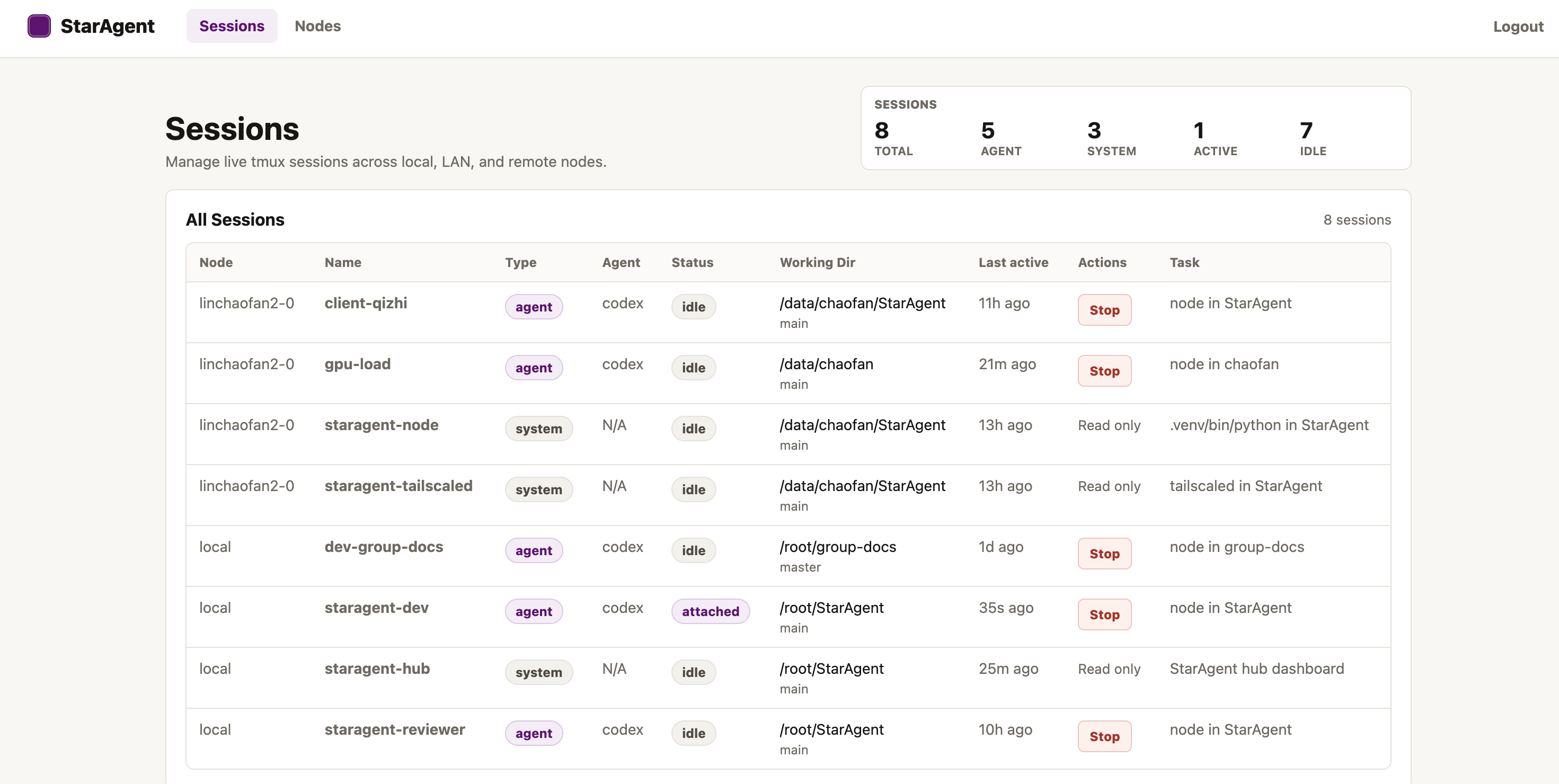
Managing your session in one place:
Each session includes a lightweight chat console for interacting with agents, plus a Terminal and File Explorer.
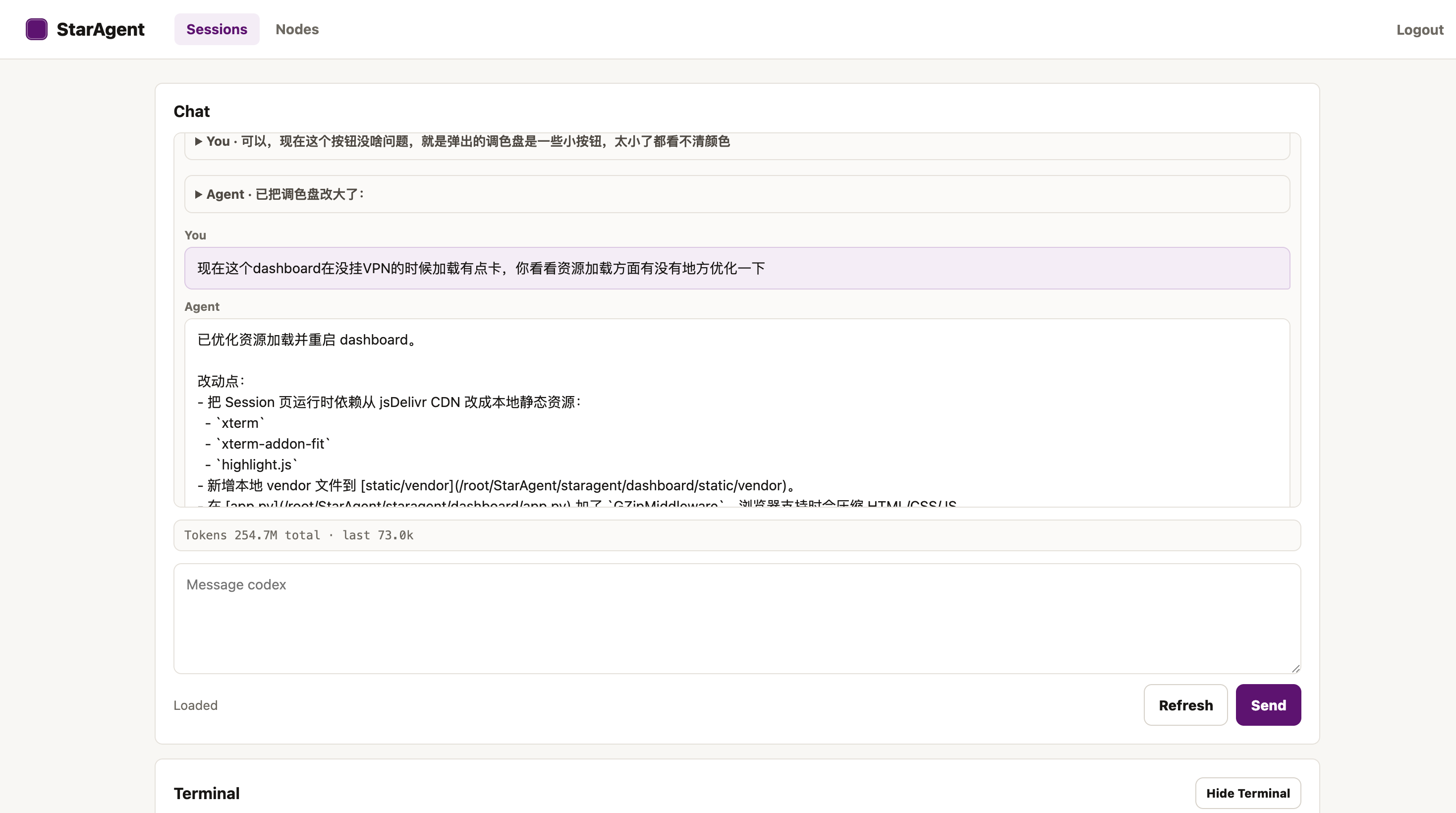
NOTICE: None of this gets in the way of manually SSHing into the server and attaching to the corresponding tmux session for development. The web interface is implemented entirely as a parser — the tmux CLI sessions on the server are always the ground truth.
Hub
Run this on the machine that runs the dashboard:
pip install -e '.[dev]'
staragent hub --host 0.0.0.0 --port 8080
staragent hub creates the staragent-hub tmux system session by default.
Open http://<hub-node>:8080 and log in with the token printed by staragent hub.
Hub auth is saved in <staragent-source>/.staragent/auth_token; set STARAGENT_AUTH_TOKEN
before starting the Hub if you want to choose the token yourself.
Runtime state defaults to <staragent-source>/.staragent; set STARAGENT_STATE_DIR to override it.
Remote Node
Run this on each machine that should run agent sessions:
pip install -e '.[dev]'
export STARAGENT_NODE_TOKEN="<same token as the Hub>"
sudo tailscale up --ssh
staragent node-ts --sudo
staragent node-ts checks that Tailscale is installed and already connected, then
starts the staragent-node tmux system session and configures tailscale serve.
If Tailscale is not ready, it prints the tailscale up --ssh command to run first.
Use --sudo when tailscale serve requires root privileges.
For LAN or another network layer that does not need tailscale serve, use:
staragent node
Before adding the Node, verify it from the Hub machine:
staragent verify-node <node-host-or-100.x-ip>
Add the reachable Host and Port in the Hub dashboard, for example 100.x.x.x and 8081.
If the Node uses a non-default port, enter that port explicitly, for example 8082.
Acknowledgements
StarAgent's CLI transcript parsing is adapted from ideas and code in botmux. The dashboard visual style is inspired by the Tailscale admin console. The web terminal uses xterm.js, and file preview highlighting uses highlight.js.
License
MIT. See LICENSE.
Yorumlar (0)
Yorum birakmak icin giris yap.
Yorum birakSonuc bulunamadi