burp-ai-agent
Health Gecti
- License — License: MIT
- Description — Repository has a description
- Active repo — Last push 0 days ago
- Community trust — 851 GitHub stars
Code Gecti
- Code scan — Scanned 4 files during light audit, no dangerous patterns found
Permissions Gecti
- Permissions — No dangerous permissions requested
This extension integrates AI capabilities directly into Burp Suite. It allows security professionals to connect local or cloud-based AI models to analyze web traffic and autonomously identify vulnerabilities using passive and active scanning.
Security Assessment
The tool inherently interacts with highly sensitive data because it processes web traffic and proxy history. It makes network requests by design, specifically routing HTTP traffic to configured AI providers (like OpenAI or Anthropic) or local models. It also offers cloud CLI integrations which inherently require and execute shell commands to interface with external tools. The automated light code scan found no hardcoded secrets and noted no dangerous permission requests. However, because it sends potentially sensitive web request data to third-party cloud providers, the extension itself provides configurable STRICT, BALANCED, and OFF privacy modes with audit logging to help redact sensitive information before it leaves Burp. Overall risk is rated as Medium due to the inherent risk of sending raw web traffic to external AI endpoints.
Quality Assessment
The project demonstrates excellent quality and maintenance, with its last code push occurring today. It enjoys strong community trust, as evidenced by over 850 GitHub stars. The repository includes a clear description, comprehensive documentation, and is fully licensed under the permissive MIT license.
Verdict
Use with caution: The extension itself is a safe, actively maintained, and well-regarded tool, but users must actively manage privacy settings to prevent accidental exposure of sensitive web traffic to third-party AI providers.
Burp Suite extension that adds built-in MCP tooling, AI-assisted analysis, privacy controls, passive and active scanning and more
Burp AI Agent
The bridge between Burp Suite and modern AI.
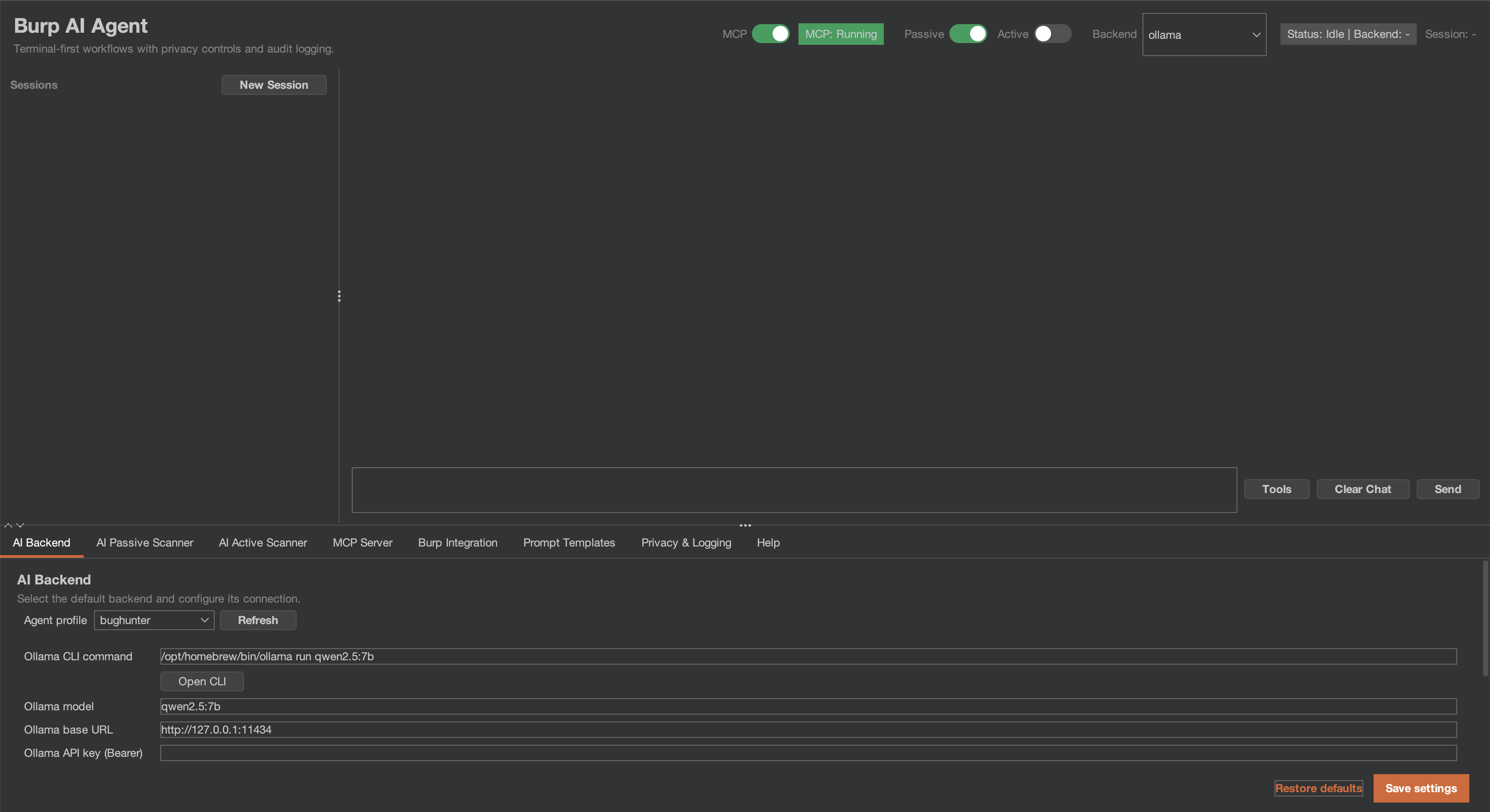
Burp AI Agent is an extension for Burp Suite that integrates AI into your security workflow. Use local models or cloud providers, connect external AI agents via MCP, and let passive/active scanners find vulnerabilities while you focus on manual testing.
Highlights
- 7 AI Backends — Ollama, LM Studio, Generic OpenAI-compatible, Gemini CLI, Claude CLI, Codex CLI, OpenCode CLI.
- 53+ MCP Tools — Let Claude Desktop (or any MCP client) drive Burp autonomously.
- 62 Vulnerability Classes — Passive and Active AI scanners across injection, auth, crypto, and more.
- Burp Scan Skill — Use your preferred AI coding assistant (Claude Code, Gemini CLI, Codex, etc.) as a scanner via MCP.
- 3 Privacy Modes — STRICT / BALANCED / OFF. Redact sensitive data before it leaves Burp.
- Audit Logging — JSONL with SHA-256 integrity hashing for compliance.
Quick Start
1. Install
Download the latest JAR from Releases, or build from source (Java 21):
git clone https://github.com/six2dez/burp-ai-agent.git
cd burp-ai-agent
JAVA_HOME=/path/to/jdk-21 ./gradlew clean shadowJar
# Output: build/libs/Burp-AI-Agent-<version>.jar
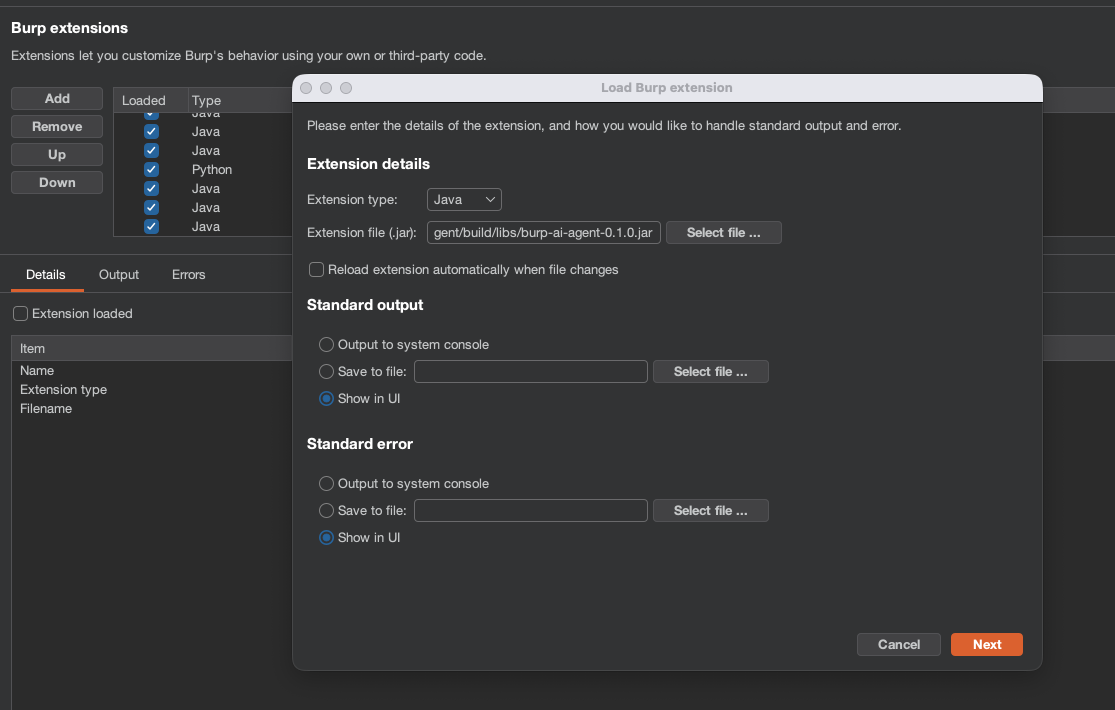
2. Load into Burp
- Open Burp Suite (Community or Professional).
- Go to Extensions > Installed > Add.
- Select Java as extension type and choose the
.jarfile.
3. Agent Profiles
The extension auto-installs the bundled profiles into ~/.burp-ai-agent/AGENTS/ on first run.
Drop additional *.md files in that directory to add custom profiles.
4. Configure a Backend
Open the AI Agent tab and go to Settings. Pick a backend:
| Backend | Type | Setup |
|---|---|---|
| Ollama | Local HTTP | Install Ollama, run ollama serve, pull a model (ollama pull llama3.1). |
| LM Studio | Local HTTP | Install LM Studio, load a model, start the server. |
| Generic OpenAI-compatible | HTTP | Provide a base URL and model for any OpenAI-compatible provider. |
| Gemini CLI | Cloud CLI | Install gemini, run gemini auth login. |
| Claude CLI | Cloud CLI | Install claude, set ANTHROPIC_API_KEY or run claude login. |
| Codex CLI | Cloud CLI | Install codex, set OPENAI_API_KEY. |
| OpenCode CLI | Cloud CLI | Install opencode, configure provider credentials. |
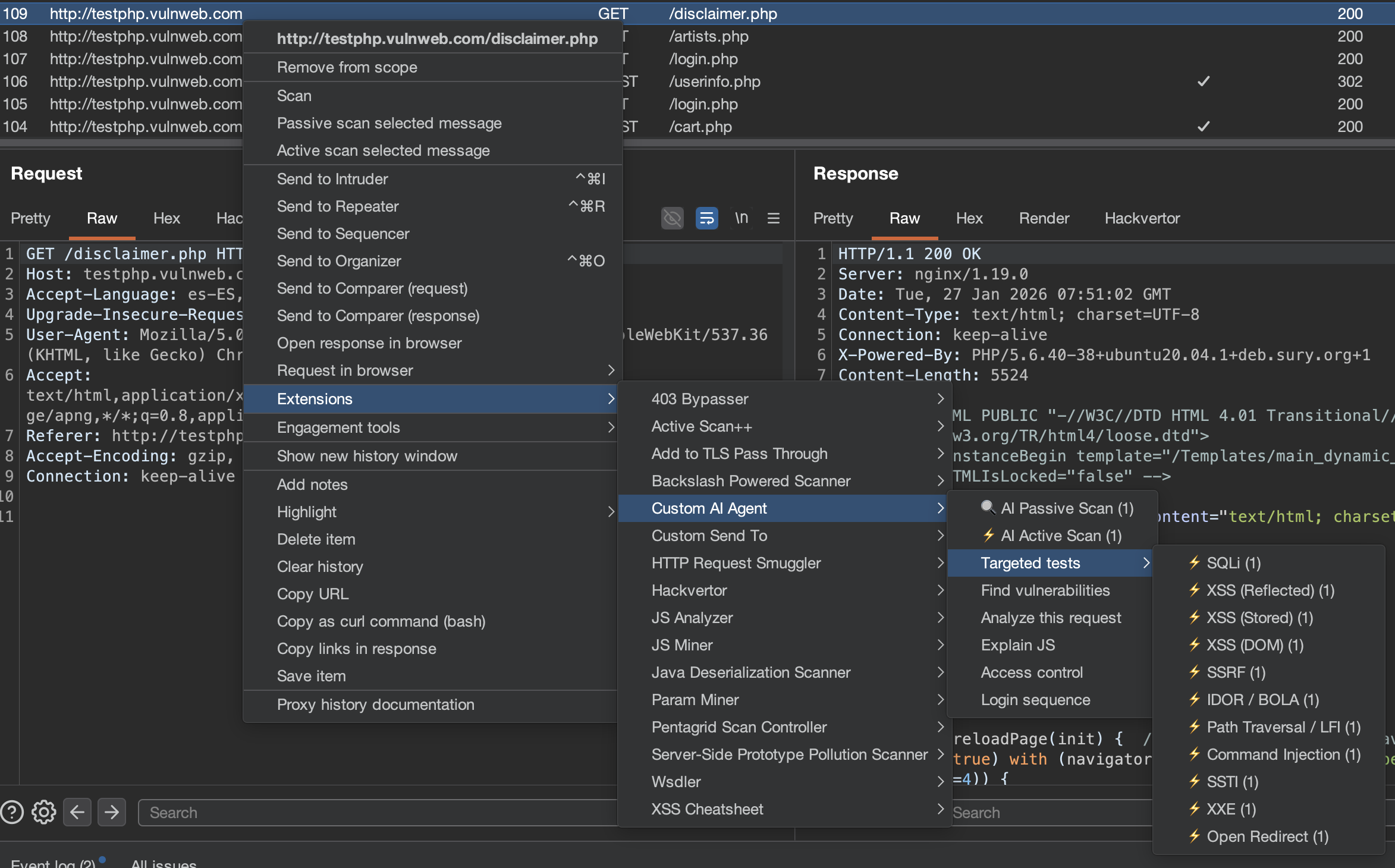
5. Run Your First Analysis
- Browse a target through Burp Proxy.
- Right-click any request in Proxy > HTTP History.
- Select Extensions > Burp AI Agent > Analyze this request.
- A chat session opens with the AI analysis.
6. Connect Claude Desktop via MCP (Optional)
Enable the MCP server in Settings > MCP Server and add this to your Claude Desktop config:
macOS: ~/Library/Application Support/Claude/claude_desktop_config.json
Windows: %APPDATA%\Claude\claude_desktop_config.json
{
  "mcpServers": {
    "burp-ai-agent": {
      "command": "npx",
      "args": [
        "-y",
        "supergateway",
        "--sse",
        "http://127.0.0.1:9876/sse"
      ]
    }
  }
}
Requires Node.js 18+. If you enable External Access, the MCP client must send
Authorization: Bearer <token>on every request.
Burp Scan Skill (Terminal AI Scanning)
The burp-scan skill lets you use any AI coding assistant (Claude Code, Gemini CLI, Codex, etc.) as a Burp scanner from your terminal. Instead of the plugin's built-in AI, your terminal AI becomes the reasoning engine while Burp provides the tools via MCP.
What It Contains
- 53+ MCP tool reference organized by scanning action
- Passive analysis protocol (traffic analysis without sending requests)
- Active testing payload library (200+ payloads for 62 vuln classes with detection patterns)
- End-to-end scanning workflow (scope -> passive -> active -> OOB -> report)
- Issue creation protocol with severity/confidence mapping
Install for Claude Code
Copy the skill to your Claude Code skills directory:
# Global (available in all projects)
cp -r skills/burp-scan ~/.claude/skills/burp-scan

# Or project-specific
cp -r skills/burp-scan .claude/skills/burp-scan
Then use /burp-scan in Claude Code or let it trigger automatically when you mention Burp scanning.
Install for Other AI Assistants
The skill is a standalone Markdown file at skills/burp-scan/SKILL.md. You can use it with any AI assistant that supports system prompts or context files:
- Gemini CLI / Codex / OpenCode: Add as a context file or paste into your system prompt
- Custom MCP clients: Include the skill content as system context alongside your MCP connection
- Any LLM: The file is self-contained — feed it as context along with your MCP tool definitions
Usage Example
You: Connect to Burp MCP at localhost:9876 and scan the proxy history for IDOR vulnerabilities

AI: [Uses proxy_http_history to pull traffic]
    [Identifies endpoints with numeric IDs]
    [Sends http1_request with ID+1, ID-1 payloads]
    [Compares responses for different user data]
    [Creates issue_create for confirmed IDOR]
The skill and the plugin's built-in scanner are complementary: the plugin runs automated background scanning, while the skill enables interactive, analyst-guided scanning from your terminal.
Documentation
Full documentation is available at burp-ai-agent.six2dez.com.
- Installation
- Quick Start
- UI Tour
- Agent Profiles
- Passive Scanner
- Active Scanner
- MCP Overview
- Privacy Modes
- Settings Reference
- Troubleshooting
- Burp Scan Skill
Operator Playbooks
Settings are schema-versioned internally (settings.schema.version) and migrated additively on load for safe upgrades.
Requirements
- Burp Suite Community or Professional (2023.12+)
- Java 21 (bundled with modern Burp for runtime; required separately for building from source)
- At least one AI backend configured (see table above)
License
This project is licensed under the MIT License.
Disclaimer
Usage of Burp AI Agent for attacking targets without prior consent is illegal. It is the user's responsibility to obey all applicable laws. The developers assume no liability for misuse or damage caused by this tool. Use responsibly.
Contributing
Issues and pull requests are welcome. See CONTRIBUTING.md for development setup and guidelines, or the Developer docs for architecture details.
Yorumlar (0)
Yorum birakmak icin giris yap.
Yorum birakSonuc bulunamadi