skwir
Health Uyari
- License — License: Apache-2.0
- Description — Repository has a description
- Active repo — Last push 0 days ago
- Low visibility — Only 6 GitHub stars
Code Basarisiz
- rm -rf — Recursive force deletion command in .github/workflows/full.yml
- rm -rf — Recursive force deletion command in .github/workflows/packages.yml
Permissions Gecti
- Permissions — No dangerous permissions requested
Bu listing icin henuz AI raporu yok.
A fast cross-platform file manager built with Rust and GPUI. Integrated preview for many files, tagging support and optional AI-powered organization.

skwir
A fast file manager that can be driven equally by humans and AI agents.
Website · Download · Documentation · Release notes · Contributing
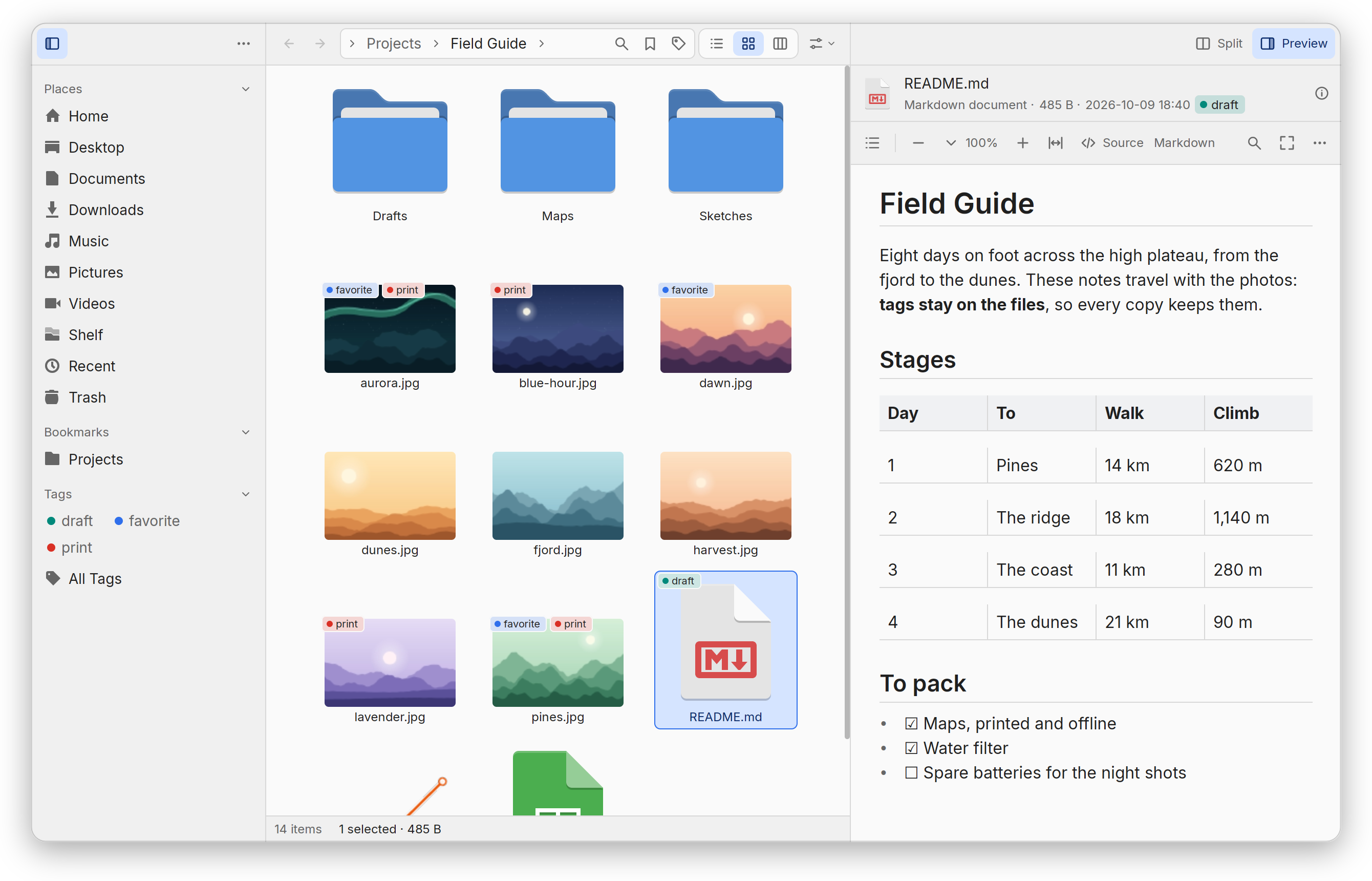
Skwir is written in Rust on gpui, Zed's GPU-accelerated toolkit. Its releases
are for Linux (Wayland or X11, with Vulkan). Each also offers builds to try on
Windows and macOS, made on Linux and never run on either system: see
how to help.
Features
- Fast on any folder: entries stream in as they are read, however many;
list, grid, columns, tree and board views; two panes and tabs. - Servers, phones and cameras: type an address (
sftp://,smb://,dav://,s3://…) and Skwir mounts it with a tool you have (sshfs, GVfs,
KIO, rclone), asking for a password in the window; servers nearby, phones and
cameras are listed in the sidebar, and copies to and from them go in batches. - Searches are places: names, kinds, sizes, dates, tags, ratings and
contents in one query, kept in the sidebar if you like. - Tags, ratings and comments kept on the files, where Dolphin, darktable,
Lightroom, a Mac's Finder and TagSpaces read them. - Previews of almost anything: code, Markdown, tables, PDFs, DjVu, office
documents, books, pictures, audio and video, fonts, 3D models, maps,
archives (the list). - Print and shrink: print what a preview shows, booklets included, or make
a PDF of it; make smaller copies of pictures and PDFs. - Every change undoable: copies, moves and renames are plans with
inverses; changes to many files are reviewed first; a name already taken is
asked about once. - Copies you can trust: pause and cancel, a USB drive's pace, room checked
before starting, speed and time left in the footer, and going on when the
window closes. - Views of data: disk usage, a timeline of changes, a map of where
pictures were taken. - Properties of anything selected: what a folder holds, the room a file
takes, who may use it in words (changed and undone like any change), the
application it opens with, its checksums. - Keys, scripts and agents: every action is a command, from the palette,
skwir cmdor an MCP client, with private folders that never leave the
machine. - Light: no daemon, no database; the desktop's thumbnails, icons and
bookmarks; everything beyond a small core is a plugin you can turn off.
Installing
Each release has packages for
x86-64 Linux. skwir holds the program and its helpers for PDFs, DjVu,
archives, 3D models, code's grammars, printing, WebAssembly plugins and the
phones KDE holds; the rest is optional:
| Package | Adds |
|---|---|
skwir-media |
Audio and video, through GStreamer |
skwir-poppler |
PDFs through Poppler (GPL), beside PDFium |
skwir-djvulibre |
DjVu through DjVuLibre (GPL), beside djvu-rs |
skwir-mermaid |
Mermaid diagrams in Markdown |
skwir-mupdf |
PDFs and books laid out in pages through MuPDF (AGPL) |
Some previews use programs you may already have, such as LibreOffice or
ffmpeg: Previews says which. Remote folders use the tools
you have for them (sshfs, GVfs, kio-fuse, rclone): the
guide says which opens what.
Each release also offers builds to try: for Windows, a zip and a per-user
installer; for macOS 12 or later on Apple silicon, an app in a disk image or a
zip. They are made on Linux and have never run on Windows or a Mac:
how to help says what to try, and how to report it.
Debian 13 and Ubuntu 24.04
Download the .deb files for your system from the release: Debian's end in-1_amd64.deb, Ubuntu's in -1ubuntu24.04_amd64.deb. Then, in the folder
holding them:
sudo apt install ./skwir_0.3.0-1_amd64.deb             # Ubuntu: ./skwir_0.3.0-1ubuntu24.04_amd64.deb
sudo apt install ./skwir-media_0.3.0-1_amd64.deb       # optional, and so on
Fedora 44
sudo dnf install ./skwir-0.3.0-1.x86_64.rpm
sudo dnf install ./skwir-media-0.3.0-1.x86_64.rpm      # optional, and so on
Arch Linux
From the AUR, with an AUR helper or by hand:
paru -S skwir                                          # or: yay -S skwir
git clone https://aur.archlinux.org/skwir.git && cd skwir && makepkg -si
Arch's skwir holds the player and the Poppler and DjVuLibre readers;
install gst-plugins-base, poppler-glib and djvulibre to use them. skwir-mermaid andskwir-mupdf are packages of their own.
Two other packages stand in for those: skwir-bin installs the release's
own build, the tarball below, in /opt/skwir, every reader and the player
with it; skwir-git builds the latest commit, in the same packages asskwir (skwir-mermaid-git, skwir-mupdf-git).
Any other distribution: AppImage or tarball
Both hold the same files, the optional readers and the player among them, and
need x86-64 Linux with glibc 2.35 or later. They were tried on Ubuntu 22.04 and
24.04 and on Fedora 44. The AppImage runs as it is:
chmod +x skwir-0.3.0-x86_64.AppImage
./skwir-0.3.0-x86_64.AppImage
The tarball needs no FUSE and goes where you like, here ~/.local/opt:
mkdir -p ~/.local/opt ~/.local/bin
tar -xzf skwir-0.3.0-linux-x86_64.tar.gz -C ~/.local/opt
ln -sfn ~/.local/opt/skwir-0.3.0-linux-x86_64/skwir ~/.local/bin/skwir
To list it among your applications, add its desktop entry and icon:
cd ~/.local/opt/skwir-0.3.0-linux-x86_64/usr/share
mkdir -p ~/.local/share/applications ~/.local/share/icons/hicolor/scalable/apps
sed "s|^Exec=skwir|Exec=\"$HOME/.local/bin/skwir\"|" applications/org.skwir.skwir.desktop \
  > ~/.local/share/applications/org.skwir.skwir.desktop
cp icons/hicolor/scalable/apps/org.skwir.skwir.svg ~/.local/share/icons/hicolor/scalable/apps/
A later version goes beside it; run the ln line again with its name.
NixOS and Nix
nix run github:skwir-org/skwir
The flake has a package, an overlay and a Home Manager module. The module
installs skwir and writes the settings you declare, checked by skwir while the
configuration builds; they are linked read-only, or with mutableSettings
merged into a writable file at each activation. Skwir keeps the window's state
and what you make in it (saved searches, pinned tags) in files of their own, so
both work
(ADR-056,
ADR-057):
imports = [ inputs.skwir.homeManagerModules.default ];
programs.skwir = {
  enable = true;
  settings = {
    core.startup = "last";
    plugins.control.enabled = true;
  };
};
mutableSettings needs a recent Home Manager, one with mutable settings. On
NixOS, the AppImage runs through appimage-run.
From source
With Rust 1.97 or later and the libraries flake.nix lists (the Nix flake has
everything):
direnv allow                # or: nix develop
just run ~/Documents        # or: cargo run --release -p skwir -- ~/Documents
Maintainers build and check the packages of a release withjust release-build v<version> (Releasing).
First steps
| Keys | Action |
|---|---|
Ctrl+Shift+P |
Command palette: every command, with its keys |
F1 |
The keys that work where you are |
Ctrl+L, Ctrl+F |
Type a path; search |
Ctrl+1, 2, 3 |
List, grid, columns |
Space, F11 |
Peek at a file; the preview panel |
F3, Tab |
Split into two panes; switch pane |
Ctrl+T, Ctrl+W |
New tab; close tab |
F2, Ctrl+Shift+N |
Rename; new folder |
Delete, Shift+Delete |
Move to Trash; delete for good |
Ctrl+Z, Ctrl+Shift+Z |
Undo; redo |
Ctrl+D |
Keep this place in the sidebar |
Ctrl+, |
Settings |
The user guide covers the rest.
Scripts and agents
Turn on Agents and scripts in Settings › Plugins. The open window then
listens on a channel only your user account can reach. It is off by default
because any program running as you can use it.
- Scripts:
skwir cmd [--apply] <command> [<JSON arguments>]runs one
command and prints its result as JSON (skwir cmd entrieslists what the
active pane shows). A command that changes files prints its plan;--apply
applies it as your own action, undoable in the window. - Agents: an MCP client starts
skwir mcp(Claude Code:claude mcp add skwir -- skwir mcp). Every command is a tool. Changes an
agent wants are proposed in the window for review; a command that acts without
a plan waits until you allow it.
Private folders (Settings › Privacy) never leave the machine: agents never
see their names or contents, and plugins from outside Skwir are never handed
them. ~/.ssh, ~/.gnupg and similar folders are private from the start, as is
any folder holding a file named .private.
Plugins from outside Skwir
A plugin can be a folder with a plugin.toml and either a WebAssembly module or
a program speaking JSON lines. It can provide fields, thumbnails, previews and
commands, stays off until you turn it on in Settings › Plugins (which shows what
it may do), and gets nothing it did not declare. The protocol is still
experimental: writing a plugin.
Documentation
The documentation is online at skwir.org/docs, and in
this repository (index):
- User guide: views, searching, tags, previews, files,
settings, where things are kept. - Previews: every kind of file Skwir previews, and what each
needs installed. - Writing a plugin and
its protocol. - Contributing and
AGENTS.md, the rules the
code follows, for people and agents. - The plan: status and what is left; decisions that
closed a door. - Helping with macOS and Windows.
License
Skwir is under the Apache License 2.0 (LICENSE), and so are
contributions to it (section 5 of the licence). The Poppler, DjVuLibre and
MuPDF readers are separate programs that link libraries under the GPL and the
AGPL; distributed, they are under the GPL version 3 (Poppler's and
DjVuLibre's) and the AGPL version 3 (MuPDF's). Skwir itself links none
(ADR-042). Each package carries the notices of the
crates its programs are built from (THIRD-PARTY-NOTICES).
Yorumlar (0)
Yorum birakmak icin giris yap.
Yorum birakSonuc bulunamadi