ccmux
Health Warn
- License — License: NOASSERTION
- Description — Repository has a description
- Active repo — Last push 0 days ago
- Low visibility — Only 7 GitHub stars
Code Fail
- rm -rf — Recursive force deletion command in docs/vhs/render.sh
- network request — Outbound network request in docs/vhs/render.sh
- rm -rf — Recursive force deletion command in scripts/install.sh
Permissions Pass
- Permissions — No dangerous permissions requested
No AI report is available for this listing yet.
One TUI for every AI coding session — Claude Code, Codex, Gemini CLI, in sync across every device.
ccmux
One TUI for every AI coding session — Claude Code, Codex, Antigravity CLI — on your Mac, on your phone, anywhere.





Why
Three things, mostly:
🔁 Seamlessly switch devices. Start a session on your laptop, get a push on your iPhone when it needs you, attach from the phone, answer, detach. The session keeps going. Pick it up on your laptop in the morning, exactly where you left it.
🎛️ One dashboard for every agent. Live view of every Claude Code / Codex / Antigravity CLI session across every project — active, idle, waiting for your input — color-coded, one key to attach. No more remembering tmux session names.
🤖 Three agents, one workflow. Pick per project which AI runs it — Claude Code, Codex, or Antigravity CLI — and ccmux starts, attaches, and supervises them identically. Switch agents on an existing project with one keystroke.
☕ Your laptop won't sleep while the agent is working. A small background daemon holds a caffeinate lock while sessions are active and releases it when they go quiet. Close the lid; the agent keeps thinking.
Built on tmux (durability), Mosh + Tailscale (mobile-friendly connectivity), and any of three AI coding agents (the workload). ccmux is the TUI that ties them together.
TUI-first, CLI when you want it. Everything in this README — new projects, attaching sessions, switching hosts, editing config, running the tour — works inside the TUI with discoverable keys and a
?help overlay. No commands to memorize. The CLI subcommands (ccmux new,ccmux list,ccmux update, …) are there for scripts, muscle memory, and pipelines, but they're optional.No
ccmux host addneeded. ccmux scans your Tailscale network on every refresh, probes each peer for accmuxd /v1/health, and adds the responders to your dashboard automatically. Install ccmux on a new device, start its daemon (ccmux daemon install,listen_tailnet = true), and it shows up on every other device on the tailnet within seconds. Theccmux host addcommand still exists for hosts outside Tailscale or for pinning a specific port — pure convenience.
🚀 60-second start
ccmux looks for projects under ~/Projects by default (configurable via projects.root in ~/.config/ccmux/config.toml, or a one-shot path like ccmux ~/code). Cloning ccmux itself into that directory keeps things tidy and means ccmux update finds the checkout without extra flags:
mkdir -p ~/Projects && cd ~/Projects
git clone https://github.com/skzv/ccmux.git
cd ccmux && make bootstrap
🛠️ make bootstrap is the friendliest path on a fresh machine: it checks the build chain (Go / git / make / Homebrew on macOS) and offers to install whatever's missing, then chains into make setup. ✨ make setup then compiles ccmux, installs to ~/.local/bin/, and runs the interactive wizard that checks tmux / mosh / tailscale / claude / gh and offers to brew-install whatever's missing. Both are idempotent — re-run any time.
🤖 Built with ccmux. ccmux was developed using ccmux. Almost every commit in this repo was produced by a Claude Code session managed through the very TUI you're about to install — sessions kept alive across laptop lid-closes via the daemon, attached from iOS over Moshi when away from the desk, supervised from the dashboard. It's the kind of tool you only really validate by living inside it; that's what we did.
Then:
ccmux                # launch the TUI (first-run tour included)
ccmux ~/code         # one-shot: scope this session to ~/code instead of ~/Projects
ccmux new my-app     # create a project directory + start its agent session
ccmux list           # what's running, everywhere
ccmux update         # pull latest, rebuild, reload daemon
👀 What it looks like
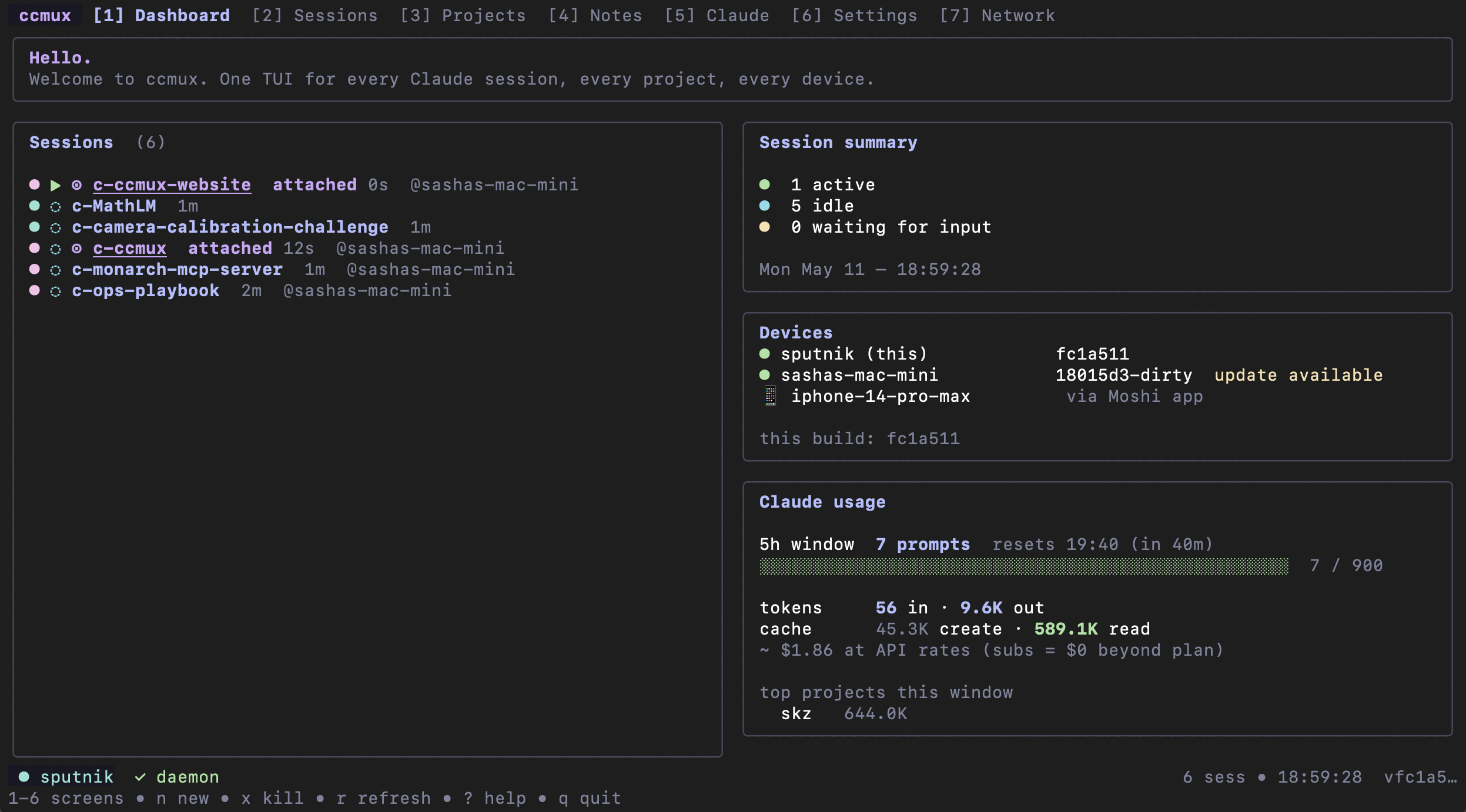
Dashboard — live sessions, host devices on your tailnet, and Claude's 5-hour quota in one pane.
Notes — every markdown file in the project, grouped by folder, on the left; Glamour-rendered markdown on the right. Ripgrep-backed / search.
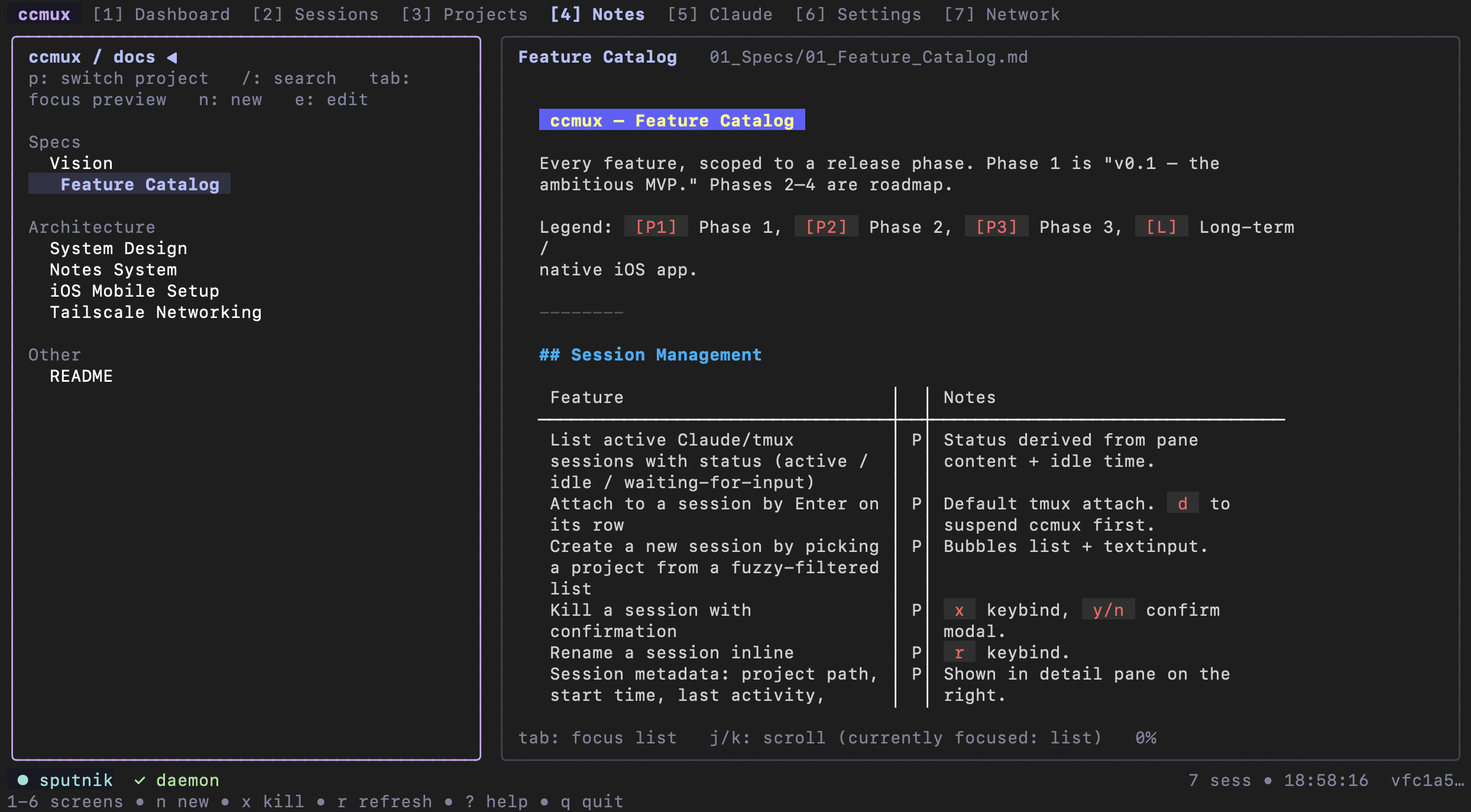
⌨️ 1-7 jump between screens (Dashboard, Sessions, Projects, Notes, Claude, Settings, Network), Enter attaches, ? opens contextual help, T re-runs the first-run tour.
📱 Mobile
ccmux moshi-setup
Installs moshi-hook on the Mac, runs Easy Pair (a QR code appears in your terminal — scan it with the Moshi iOS app, done), and wires the Claude Code hooks that turn needs_input events into categorized push notifications (approval_required vs task_complete). Tap the notification, the Moshi app shows your live tmux session list, pick one, attach, answer, detach. No tokens to copy.
Plain BEL fallback works in any iOS terminal client (Blink Shell, Termius) — you lose the categories, that's it. For headless / scripted setups: ccmux moshi-setup --token <token> bypasses the QR flow.
🛰️ Remote (always-on Mac Mini, auto-discovered)
# On the Mini:
ccmux daemon install                       # ccmuxd survives reboot
# edit ~/.config/ccmux/config.toml: listen_tailnet = true

# On the laptop — nothing to do:
ccmux                                      # dashboard already lists the Mini
Every refresh, ccmux runs tailscale status --json, probes each online non-mobile peer for a ccmuxd /v1/health, and merges the responders into the host list. New device on the tailnet running ccmux? It just appears.
The Devices panel on the Dashboard shows every device on your tailnet:
- 🟢 peers running ccmuxd — with their reported version + an "update available" tag whenever they lag this build
- ⚪ peers NOT running ccmuxd (Macs/Linux boxes you haven't installed on yet) — with a one-line "ccmux not installed" hint so you remember to bring them online with
make bootstrap - 📱 phones / iPads — with a "connect via Moshi app" hint, since the iOS Moshi app is their picker (and they don't run ccmux directly)
Attaching to an auto-discovered peer execs ssh -t <host> -- tmux attach -t <name> (with a cross-platform PATH prepend so Homebrew/Snap/Linuxbrew tmux is found). If you've pinned a host with ccmux host add --mosh <name> …, ccmux uses mosh instead — which tolerates roaming and stalls (close the lid, walk somewhere, open it back up, session is still attached). Your phone gets pushes from the Mini either way.
Manually pinning a host with
ccmux host addstill works — useful for non-Tailscale hosts, or to force a specific port. Discovered hosts and pinned hosts coexist on the dashboard without duplicates.
✨ Features
🎛️ Session management
- Live dashboard of every agent session across every project, with state (active / idle / needs_input) and a per-row agent tag for non-default agents
- One-key attach, kill, rename — applies a styled tmux status bar so you always know where you are
- Per-session "keep awake" pin — the daemon holds a sleep-prevention lock while any pinned or active session is alive, and releases it when they all go idle
- Three sleep-prevention modes —
safe(AC only — the macOS default; auto on Linux),dangerous(works on battery too, opt-in, auto-releases below a configurable low-battery threshold),very_dangerous(system-wide override that survives lid-close; sudo-gated and reverted on daemon exit)
🏗️ New projects
ccmux new <name>— creates the project directory and starts an agent session in it. That's all it does: noCLAUDE.md, nodocs/tree, nogit init. Run/init,openspec, orgit inityourself inside the session — bootstrapping is the agent's job, not ccmux's. The "n" form picker lets you choose Claude / Codex / Antigravity, andccmux new --agent <id>is the CLI equivalent.- Open a project = see its history. Pressing Enter on a project in the Projects tab opens a menu listing its running sessions and its past agent conversations, so you can attach, resume an earlier conversation, or start fresh in one place.
ccmux project <name>prints the same from the CLI. - Create on any device. In the Projects tab, press
nand pick which device should host the new project (local or any reachable peer runningccmuxd). The remote daemon creates the directory + starts the session natively, and ccmux ssh-attaches you in.
🤝 Multi-agent (Claude, Codex, Antigravity)
- Per-project agent stored in
<project>/.ccmux/agent— sticky, survives across sessions - New-project form's agent row (←/→ to cycle) picks Claude Code / Codex / Antigravity CLI for the new session
- Press
ain the Projects tab to switch the selected project's agent (cycles claude → codex → antigravity) - Dashboard rows on non-default agents get a small
[codex]/[antigravity]tag so a single glance tells you what's running where - Daemon's state-detection (active / idle / needs_input) dispatches per agent so each gets the right heuristic
ccmux doctorenumerates installed agents; setup wizard points at the right install command for each (Antigravity usescurl -fsSL https://antigravity.google/cli/install.sh | bash)- Mobile-push integration via Moshi is currently Claude-only — Codex / Antigravity sessions get the audible terminal bell (still triggers a generic iOS push); Phase-2 work to broaden categorized notifications is tracked in
docs/01_Specs/02_Multi_Agent.md
🤖 Claude Code config management
- Dedicated "Claude" screen for everything in
~/.claude/ - Model picker (Opus 4.7 / Sonnet 4.6 / Haiku 4.5 / opusplan / custom) — global or per-project
- Reasoning-effort picker (
low/medium/high/xhigh/max) and analwaysThinkingEnabledtoggle — writeseffortLevelto~/.claude/settings.jsonso every new Claude Code session inherits your default. Per-session override still available viaclaude --effort <level>at the CLI. - Browse + create slash-command aliases, manage MCP servers, hooks, permission allowlists
- View & edit global and per-project
CLAUDE.mdfrom the TUI
📝 Notes, terminal-native
- Per-project Notes tab — every markdown file in the project, grouped by folder, with inline markdown rendered by Glamour
- Ripgrep-backed
/search; plain markdown on disk is the source of truth (no required cloud) - Browse, preview, and edit-in-
$EDITOR— ccmux reads your notes; writing them is the agent's job
📲 Mobile workflow (Moshi / iOS / Android)
- Easy Pair via QR code —
ccmux moshi-setuprunsmoshi-hook host setup; scan the QR code with the Moshi app, you're paired. No token paste. - Categorized push notifications via
moshi-hookplugging into Claude Code's hooks system (approval_required, task_complete, …) - In-app session picker — the Moshi app lists every tmux session on the paired host; no need to memorize names
- Auto-detection — ccmuxd suppresses its own BEL trigger when moshi-hook is paired so you don't get duplicate notifications
🌐 Local & remote modes
- Local — manages tmux sessions on this machine; prevents sleep while sessions are active
- Server — daemon binds an HTTP API to your Tailscale interface so other devices can list/attach
- Mixed — dashboard shows local + remote sessions, color-coded by origin
🩺 Setup, doctor, update
ccmux setup— interactive wizard, checks every dep, offersbrew installfor missing piecesccmux doctor— non-interactive health check (great for scripting)ccmux update— pulls the git checkout, rebuilds, reloads ccmuxdccmux uninstall— clean removal, never touches your projects or~/.claude/
🎨 Quality of life
- Catppuccin Mocha by default; Dracula / Nord / Gruvbox / Tokyo Night planned
?opens contextual key help on every screen- Vim-style (
h/j/k/l) and arrow keys both work - Auto-switches to a curated narrow-terminal layout under 120 cols (phone mode) — reference detail is dropped so the essentials fit a phone screen
- Mouse support on by default (hold Option (⌥) while dragging to make a text selection inside tmux — that bypasses mouse reporting in iTerm2 and Terminal.app)
- Cross-device clipboard via OSC 52 — selecting text inside a remote tmux pane lands on your local clipboard. Works in iTerm2 (toggle: Preferences → General → Selection → "Applications in terminal may access clipboard"), Ghostty, WezTerm, Alacritty, kitty. Terminal.app does NOT support OSC 52 writes — install iTerm2 or Ghostty if you want this.
ccmux doctortells you exactly which side is missing. - No telemetry. Ever.
📚 Tutorials
Six hands-on walkthroughs. Each is self-contained — pick whichever maps to what you're trying to do.
1. Your first project, end-to-end (≈3 min)
The core loop: create → talk to your agent → take notes.
ccmux new auth-redesign # or: ccmux new auth-redesign --agent codex
That command does two things, and only two things:
- Creates
~/Projects/auth-redesign/— an empty directory. - Opens a tmux session named
c-auth-redesignand starts your agent inside it (Claude by default).
ccmux does not scaffold the project — no CLAUDE.md, no docs/ tree, no git init, no GitHub repo. Bootstrapping is the agent's job, done inside the session: run /init to have the agent write CLAUDE.md, openspec to set up specs, git init whenever you want version control. ccmux opens the door; what the project becomes is up to you and your agent.
To check on the session without joining the conversation: ccmux list. To attach: ccmux attach auth-redesign.
The session keeps running after you detach. Your laptop's lid can close (on AC power) and it'll still be there tomorrow.
2. Juggling multiple agent sessions (≈2 min)
You have three projects moving in parallel. Open the TUI:
ccmux
The Dashboard shows all sessions, color-coded by state:
- active — Claude is generating output right now.
- idle — Claude finished, no prompt visible.
- needs_input — Claude is showing its input box and the pane has been quiet for ≥ 3 seconds. This is the one to watch.
When any session transitions to needs_input, ccmuxd injects a terminal BEL. Any iOS terminal client that does BEL→notification raises a push.
Useful keys on the Sessions screen:
Enter— attachx— kill the highlighted sessionR— renamek— pin keep-awake (the daemon holds acaffeinate -swhile pinned)?— full keymap
3. Working from your phone (≈3 min, one-time setup)
Goal: your iPhone gets push notifications when Claude needs you, you tap, you're attached.
ccmux moshi-setup
That installs moshi-hook, then runs moshi-hook host setup — a QR code appears in your terminal. Open the Moshi iOS app, tap Add Host → Scan QR, point your phone at the terminal, done. The wizard also wires Claude Code's hook entries so notifications fire automatically.
After pairing, the Moshi app lists every tmux session on the Mac. Whenever Claude pauses on the host, your phone vibrates with a categorized push (approval_required / task_complete). Tap it, pick the session in the Moshi picker, attach, answer, swipe away.
For a non-Moshi setup, the BEL fallback still produces a generic notification — categories disappear, everything else works.
4. Configure ccmux (≈2 min)
~/.config/ccmux/config.toml — the knobs that matter:
[projects]
root = "~/Projects"                  # where ccmux looks for projects

[daemon]
poll_interval_seconds = 2
idle_seconds_for_needs_input = 3
listen_tailnet = false               # set true on your server-mode host
tailnet_port = 7474

[sleep]
mode = "safe"                        # "safe" | "dangerous" | "very_dangerous"
idle_release_minutes = 10
low_battery_cutoff = 20              # dangerous mode auto-downgrades below this

[notifications]
bell = true                          # ring local terminal BEL on needs_input
Notifications: the bell always rings on
needs_inputtransitions whenbell = true, regardless of whether moshi-hook is paired. The audible chime at your desk and the push on your phone are complementary, not duplicates. Setbell = falseif you'd rather rely on phone pushes alone.
Sleep-mode notes:
safe—caffeinate -son macOS (Apple's policy keeps it AC-only; safe to leave on).systemd-inhibit --what=sleep:idleon Linux.dangerous—caffeinate -d -i -m -son macOS, so the lock works on battery too. The daemon polls battery once a minute and downgrades tosafewhen belowlow_battery_cutoff(so a forgotten laptop doesn't run flat).very_dangerous— addssudo -n pmset -a disablesleep 1(macOS) /sudo -n systemctl mask sleep.target …(Linux) so lid-close no longer puts the system to sleep. Requires passwordless sudo for the specific command (add a line to/etc/sudoers.d/ccmux— example below); silently degrades todangerousif sudo asks for a password. Always reverted when ccmuxd exits cleanly.Example sudoers entry (run
sudo visudo -f /etc/sudoers.d/ccmux):# macOS %admin ALL=(ALL) NOPASSWD: /usr/bin/pmset -a disablesleep * # Linux %sudo ALL=(ALL) NOPASSWD: /bin/systemctl mask *, /bin/systemctl unmask *
projects.root and subscription.tier are also editable inline from the Settings screen — ↑/↓ to move, Enter to edit, e to open $EDITOR for the prose-heavy fields.
After editing, run ccmux update to reload the daemon with the new config.
5. Multi-machine: laptop + always-on Mac Mini (≈5 min)
The intended workflow for heavy users. Sessions live on the Mini; your laptop and phone are clients. No manual host configuration — ccmux auto-discovers every ccmuxd on your tailnet.
On the Mini:
# ~/.config/ccmux/config.toml
[daemon]
listen_tailnet = true
tailnet_port   = 7474
ccmux daemon install # registers ccmuxd under launchd so it survives reboot
On the laptop:
ccmux # the Mini already appears on the dashboard, tagged "discovered"
The Devices panel shows each peer's ccmuxd version. If the Mini is behind your laptop's build, it gets an "update available" tag — run ccmux update on the Mini (or SSH in and do it) to bring them in sync.
Attach to a discovered remote session and ccmux execs ssh -t mini -- tmux attach -t <name> (use ccmux host add --mosh mini … if you'd rather use Mosh for that pinned host).
6. Maintenance (≈1 min)
ccmux doctor          # one-shot health check
ccmux update          # git pull + rebuild + reinstall + restart daemon
ccmux uninstall       # clean removal
ccmux update auto-detects your git checkout (defaults to ~/Projects/ccmux). Flags: --dry-run, --skip-pull, --no-restart.
Install
From source (Homebrew tap coming with v0.1 release):
git clone https://github.com/skzv/ccmux.git
cd ccmux
make setup
make setup builds, installs ccmux + ccmuxd into ~/.local/bin/, then runs the wizard. Idempotent — re-run any time.
Requirements:
- Go 1.26+ (build only)
- macOS, Linux, or Windows via WSL2 (see Windows guide — native Windows tracks as an open TODO)
~/.local/binon your PATH
ccmux          # launch the TUI
ccmux setup    # re-run the wizard
ccmux doctor   # health check
Uninstall
ccmux uninstall            # interactive: shows what it'll do, asks y/N
ccmux uninstall --yes      # skip the prompt
ccmux uninstall --dry-run  # preview only
What gets removed:
- Running
ccmuxd(SIGTERM) ~/.local/bin/ccmuxand~/.local/bin/ccmuxd~/.local/state/ccmux/(socket, logs)~/.local/share/ccmux/(snapshots, daemon db)~/.config/ccmux/(unless--keep-config)- The ccmux-styled tmux status bar on every
c-*session (unless--keep-chrome)
What is never touched:
- Your project directories
- Notes under
<project>/docs/ ~/.claude/(Claude Code state + moshi-hook entries)
To also remove moshi-hook: brew services stop moshi-hook && brew uninstall moshi-hook && brew untap rjyo/moshi.
🏛️ Architecture
        LAPTOP (client + local)                MINI (local + server)
   ┌─────────────────────────────┐         ┌──────────────────────────────┐
   │  ccmux TUI                  │ ──http──►  ccmuxd HTTP                 │
   │   ├─ local sessions ◄─unix──┤ tailnet │   ├─ sessions (mini-foo)     │
   │   │   • laptop-bar          │ ────────►   │   • mini-foo (active)    │
   │   │   • laptop-baz          │         │   │   • mini-cas (waiting 🔔)│
   │   └─ remote: mini           │         │   └─ caffeinate -s while active
   │      • mini-foo             │         │                              │
   │                             │         │ ccmuxd Unix socket           │
   │                             │         │  (for local TUI on mini)     │
   └─────────────────────────────┘         └──────────────────────────────┘
                                                       ▲
                                                       │ Mosh
                                                       │ (when phone connects)
                                              ┌────────┴──────────┐
                                              │  iPhone (Moshi /  │
                                              │  Blink / Termius) │
                                              └───────────────────┘
Full design: docs/02_Architecture/00_System_Design.md.
🗺️ Roadmap
Phasing in ROADMAP.md. Headline:
- v0.1 — TUI, sessions, notes, setup wizard, daemon, local + server + mixed modes, terminal-bell notifications, Homebrew tap
- v0.2 — Snapshots, themes, command palette, tailnet web viewer for notes, cost tracking from Claude transcripts
- v0.3 — Multi-select session ops, activity heatmap, daily-journal rollups, mDNS host discovery
- Long term — Native SwiftUI iOS app talking directly to ccmuxd over Tailscale
Infrastructure follow-ups tracked in docs/01_Specs/03_Testing_And_CI.md:
- 🔁 CI integration — GitHub Actions matrix (test + cross-compile + integration) so PRs can't merge with regressions
- 💪 Stress testing —
cmd/ccmux-stress/harness for 20+ session loads, notification storms, 24h long-haul, with pprof + FD-leak detection - 🐛 Terminal crawling —
cmd/ccmux-crawl/monkey-tester + native fuzzers +rapidproperty tests to find the bugs no human would think to try
Design principles
- Terminal-first, not terminal-only. Must work in a Mosh pane on an iPhone.
- One source of truth: tmux. ccmux is a view; tmux is the database.
- Plain markdown on disk beats vendor lock-in. No required cloud, no required sync.
- Notifications by terminal bell. Reuses what every iOS terminal client already supports.
- Setup is a flow, not a README. First-run wizard installs what it can, instructs for what it can't.
- No telemetry. Ever.
Status
Alpha. Core flows (attach, new, kill, notes, daemon, Moshi) work end-to-end. Expect rough edges; file issues. Wait for v0.1 if you want it for real work.
Built with
Standing on the shoulders of Charm:
- Bubble Tea — the TUI framework
- Lipgloss — styling
- Bubbles — list, viewport, textinput, spinner, help
- Huh — forms for the setup wizard
- Glamour — markdown rendering
Plus Cobra for the CLI surface and SQLite for daemon state.
Contributing
Issues and PRs welcome. See CONTRIBUTING.md (TBD). The short version:
- Code style:
gofmt,go vet,staticcheck - Tests:
make test(unit) andmake test-e2e(integration — requirestmux) - Bug reports: include
ccmux doctoroutput - Feature requests: read
docs/01_Specs/01_Feature_Catalog.mdfirst
License
FSL-1.1-MIT — Functional Source License with MIT future grant.
In plain English: you can use, modify, and redistribute ccmux freely for any purpose except offering it (or a substantially-similar feature set) as a competing commercial product or managed service. Two years after each release, that version automatically relicenses to plain MIT.
If you want to commercialize a derivative work sooner, get in touch.
Acknowledgements
The workflow this tool wraps was developed in public by the AI-first software engineering community over 2024–2026. Particular thanks to:
- Charm for the best TUI stack in any language
- The Tailscale and Mosh teams for the connectivity layers
- Anthropic for shipping Claude Code
- The Blink Shell and Moshi maintainers for making mobile terminals actually good
Reviews (0)
Sign in to leave a review.
Leave a reviewNo results found