Deus
Health Uyari
- License — License: MIT
- Description — Repository has a description
- Active repo — Last push 0 days ago
- Low visibility — Only 5 GitHub stars
Code Basarisiz
- fs.rmSync — Destructive file system operation in .claude/skills/x-integration/agent.ts
- process.env — Environment variable access in .claude/skills/x-integration/host.ts
- fs.rmSync — Destructive file system operation in .claude/skills/x-integration/lib/browser.ts
- process.env — Environment variable access in .claude/skills/x-integration/lib/config.ts
Permissions Gecti
- Permissions — No dangerous permissions requested
This tool is a self-hosted, personal AI assistant designed to integrate with messaging apps and external projects. It features persistent semantic memory, automated scheduling, and a self-improving feedback loop, running locally inside sandboxed containers.
Security Assessment
The overall risk is rated as High. The automated scan detected destructive file system operations (`fs.rmSync`) in multiple agent and browser scripts. While the README claims that conversations are isolated in secure containers, the underlying codebase has the potential to delete files if those boundaries are bypassed or misconfigured. Additionally, the tool accesses environment variables, which poses a risk of accidental secret exposure if not properly managed. No hardcoded secrets or dangerous high-level permissions were found, but the file deletion capabilities require extreme caution.
Quality Assessment
The project is actively maintained, with its most recent push occurring today. It uses the permissive MIT license and has clear, comprehensive documentation. However, community trust and visibility are currently very low. With only 5 GitHub stars, the project is in its early stages, meaning it has not been widely tested or peer-reviewed by the open-source community for bugs or security vulnerabilities.
Verdict
Use with caution — while the project is actively maintained and licensed, early-stage visibility and destructive file operations in the code make it risky for production environments.
A token-efficient open-source AI assistant that remembers, adapts, and improves — secured, self-hosted, and entirely yours.



A personal AI assistant that lives in your messaging apps, remembers everything, and gets smarter over time. Built for developers who want a private, self-hosted assistant with container isolation, semantic memory, and a self-improvement loop — all running locally on your machine.
Features
- Memory — Remembers everything across all your conversations. Ask it something you discussed weeks ago and it'll recall it precisely, using semantic search to find the most relevant context.
- Messaging apps — WhatsApp, Telegram, Slack, Discord, and Gmail — each a standalone MCP package you install as needed. Switch between them freely — memory and context follow you everywhere.
- Voice — Send a voice message and it transcribes and responds. Runs locally on Apple Silicon — nothing leaves your machine.
- Vision — Send a photo or screenshot and it sees and responds to it.
- Calendar — Reads and creates Google Calendar events. Ask what's on your schedule, or tell it to book something.
- Web & video — Fetch YouTube transcripts, summarize videos, or browse the web — all from a chat message.
- Scheduled tasks — Set it to do things automatically on a schedule (daily summaries, weekly recaps, reminders).
- Self-improvement — Scores its own responses over time and learns from both failures and successes. Low-scoring responses generate corrective reflections; high-scoring ones extract positive patterns. Uses DSPy to optimize its own system prompt per domain once enough samples accumulate.
- Domain detection — Automatically tags conversations by topic (marketing, engineering, study, writing, strategy) so the self-improvement loop can learn per-domain patterns and optimize accordingly.
- Sandboxed & secure — Every conversation runs in an isolated Linux container. The AI can't access your host system beyond what you explicitly allow.
- External projects — Run
deusin any project directory to get a coding agent with your full Deus memory and preferences. Or register a project and work on it through your messaging apps — Deus mounts it into an isolated container, auto-detects the tech stack, and shadows sensitive files automatically.
Why Deus?
| Feature | Deus | OpenClaw | NemoClaw | Cortex |
|---|---|---|---|---|
| Persistent memory | Semantic + tiered | Basic hooks | Via OpenClaw | Neuroscience-grounded |
| Self-improvement | DSPy per-domain eval loop | No | No | No |
| Cross-session recall | Yes (sqlite-vec embeddings) | No | No | Yes |
| Container isolation | Yes (Linux VM per group) | No | No | No |
| Multi-channel | WhatsApp, Telegram, Slack, Discord, Gmail | No | No | No |
| Token efficiency | ~1,800 tokens at session start | Higher | Higher | Not measured |
| Local-first | Yes | Yes | Yes | Yes |
| Setup time | ~5 min (claude /setup) |
~15 min | ~20 min | ~10 min |
Quick Start
Prerequisites
- macOS (Apple Silicon recommended), Linux, or Windows
- Claude Code installed and authenticated
- Docker Desktop — the installer handles WSL 2 on Windows automatically
- Node.js 20+, Python 3.11+
- A Gemini API key (free tier is enough)
Setup
git clone https://github.com/sliamh11/Deus.git
cd Deus
claude
Inside the Claude Code prompt:
/setup # Install deps, configure runtime, build container, onboard
/setup includes a Personality Kickstarter at the end: choose from curated behavioral bundles (universal defaults, developer workflow, student/learner mode), pick individual behaviors à la carte, and optionally seed the self-improvement loop with battle-tested reflections so it isn't starting cold.
Switching from another AI? Give Deus a head start. Paste this prompt into your current AI (ChatGPT, Gemini, etc.) and send the output to Deus in your first conversation:
I'm switching to a new AI assistant called Deus. Generate a structured summary
about me that I can give it so it knows me from day one. Include:

1. **About me** — name, role/occupation, location, languages I speak
2. **What I use AI for** — the main topics and tasks I come to you with
3. **Communication style** — how I like responses (concise vs detailed, formal
   vs casual, code-heavy vs explanatory)
4. **Preferences** — things I've corrected you on or asked you to do differently
5. **Key context** — ongoing projects, goals, or background that shapes our
   conversations

Be specific and factual. Skip anything generic. Format as plain text.
Connect Channels
A fresh clone has zero channels — you add only the ones you need:
/add-whatsapp           # Scan QR code to connect WhatsApp
/add-telegram           # Paste bot token to connect Telegram
Start Talking
@Deus what's on my calendar tomorrow?
@Deus summarize the YouTube video at <url>
@Deus remind me every Monday morning what I worked on last week
Architecture
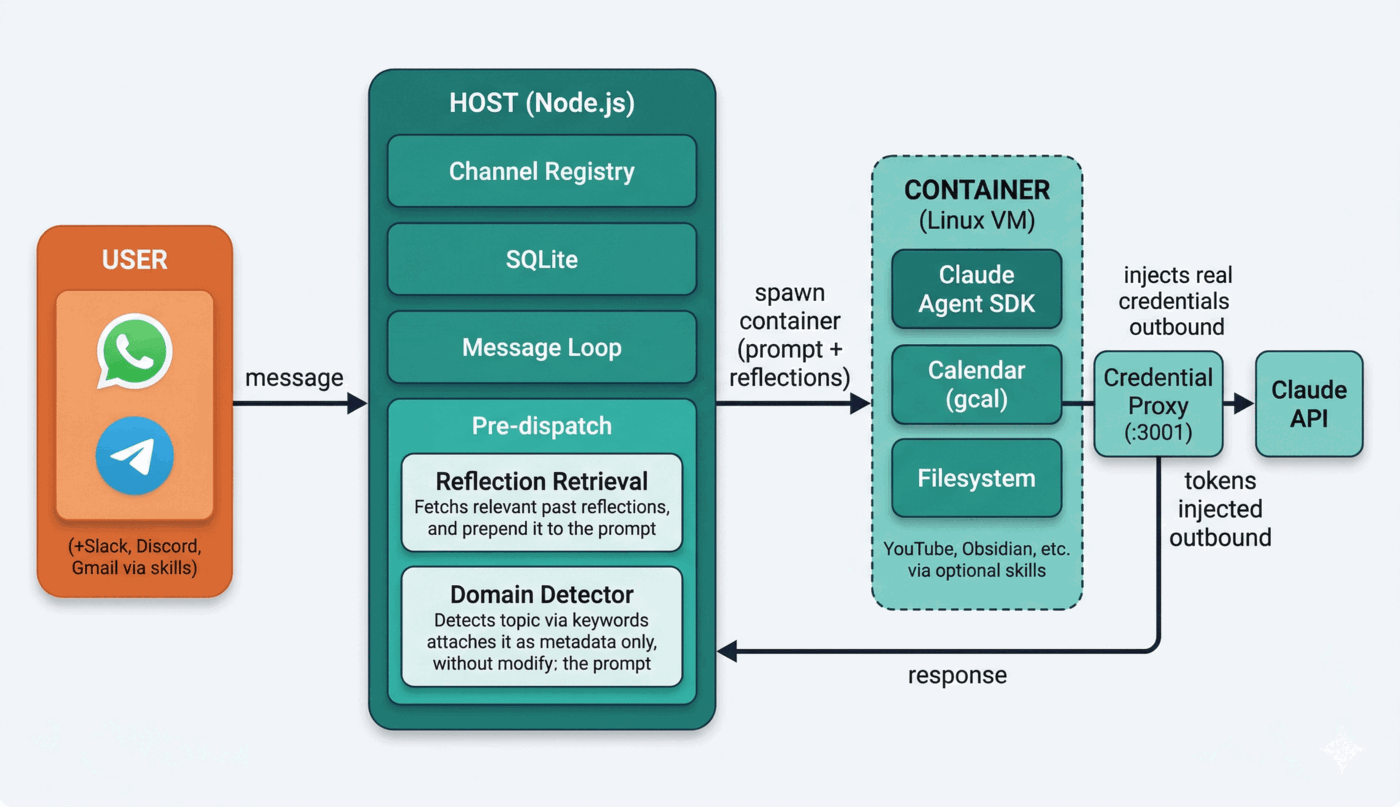
- One Node.js process on the host. No microservices.
- Each conversation group runs in its own container with an isolated filesystem.
- Domain detection tags conversations by topic so the self-improvement loop learns per-domain patterns.
Memory System
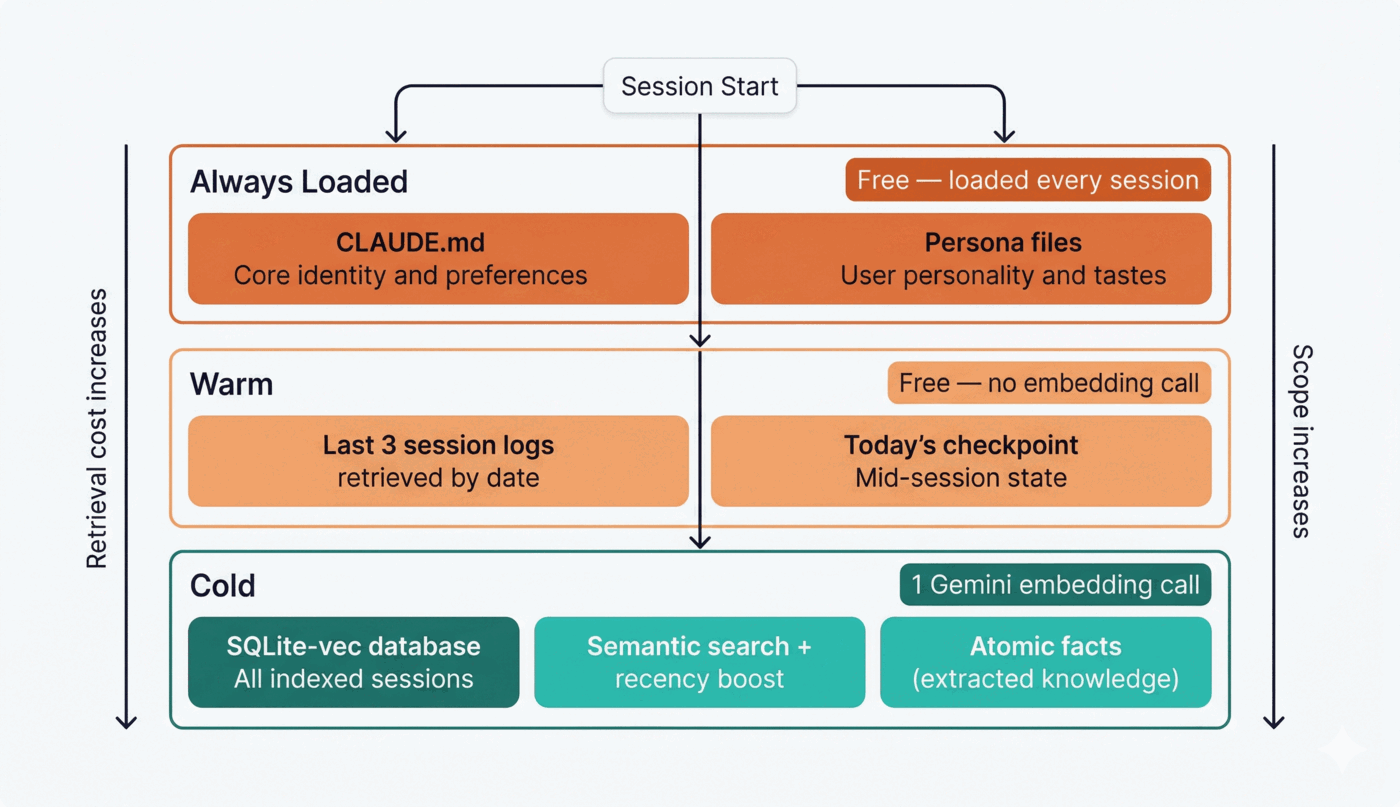
| Command | What it does |
|---|---|
/compress |
Save the current session to the vault and update the semantic index |
/resume |
Load core memory + warm tier (last 3 sessions, free) + cold tier (semantic search) |
A stop hook auto-saves a checkpoint at the end of every Claude Code session with no LLM calls.
Retrieval Benchmarks
Evaluated on LongMemEval-S (ICLR 2025) — a needle-in-a-haystack benchmark with multi-session reasoning across 500+ turn histories.
| Metric | Score |
|---|---|
| Recall@1 | 90% |
| Recall@3 | 95% |
| Recall@10 | 100% |
| MRR | 0.93 |
Internal recall@3 on real vault sessions: 95% (sampled 20 sessions, queried by topic).
Retrieval uses hybrid ANN + FTS5/BM25 with Reciprocal Rank Fusion — embeddings via local EmbeddingGemma (no API cost).
Channel Commands
These commands work inside any connected messaging app (WhatsApp, Telegram, etc.). Send them as a message — no Claude Code required.
| Command | What it does |
|---|---|
/settings |
Show current settings for this channel |
/settings session_idle_hours=N |
Reset session after N idle hours (0 = never) |
/settings timeout=N |
Set container timeout in seconds (min 30) |
/settings requires_trigger=true/false |
Toggle whether @Deus prefix is required |
/compact |
Compact the current conversation to free up context |
Settings are per-channel — each WhatsApp or Telegram group has independent settings. The global default for session_idle_hours can be set via SESSION_IDLE_RESET_HOURS in your .env file (default: 8 hours). Setting it to 0 disables idle reset entirely for that channel.
Commands require admin access (sent from the owner account, or from any sender in the main/control group).
CLI Commands
| Command | What it does |
|---|---|
deus |
Launch Claude Code in the current directory (external project mode if not ~/deus) |
deus home |
Launch in home mode (~/deus) regardless of current directory |
deus auth |
Rebuild and restart background services |
deus listen |
Record from mic, transcribe with whisper.cpp, copy to clipboard |
deus listen requires sox, whisper-cpp, and ffmpeg. On first run it auto-downloads the base Whisper model. Configure language and model path via WHISPER_LANG and WHISPER_MODEL environment variables.
Design Principles
| Principle | What it means |
|---|---|
| Machine-adaptive | Never hardcode thread counts or resource limits. Scale to available CPU/RAM with env var overrides. |
| Modular | Components connect and disconnect cleanly. Adding or removing a channel or integration shouldn't touch unrelated code. |
| Token-efficient | Minimize redundant API calls. Cache aggressively. Prefer local models (Ollama) for workloads where quality allows it. Tool lists are filtered per-query — Deus uses ~600 fewer tool tokens than vanilla Claude Code on personal-assistant queries. |
| Secure by default | Credentials never appear in code or git history. Use .env files + .gitignore. Designed as if the repo is already public. |
Token Efficiency
Compared to vanilla Claude Code, Deus adds ~920 tokens once per session (KV-cached after the first message, billed at ~10% of normal input cost). Per-turn overhead is effectively zero for most interactions — the only variable cost is the reflections block (+0–500 tokens), which fires only when the system has a relevant past learning to apply. Tool filtering saves ~600 tokens vs vanilla on every session. Self-improvement, container isolation, and the eval suite add zero tokens — they run outside the agent context entirely.
| When | Token delta vs vanilla | What you get |
|---|---|---|
| Session start (once) | +920T net | Per-group identity, memory context, formatting rules |
| Per-turn (typical) | +0T | Nothing — CLAUDE.md is cached |
| Per-turn (reflection fires) | +0–500T | Relevant past learning prepended to your message |
| Tool definitions (every session) | −600T saved | Filtered tool list vs vanilla's unfiltered default |
See docs/benchmarks.md for the full breakdown.
Self-Improvement
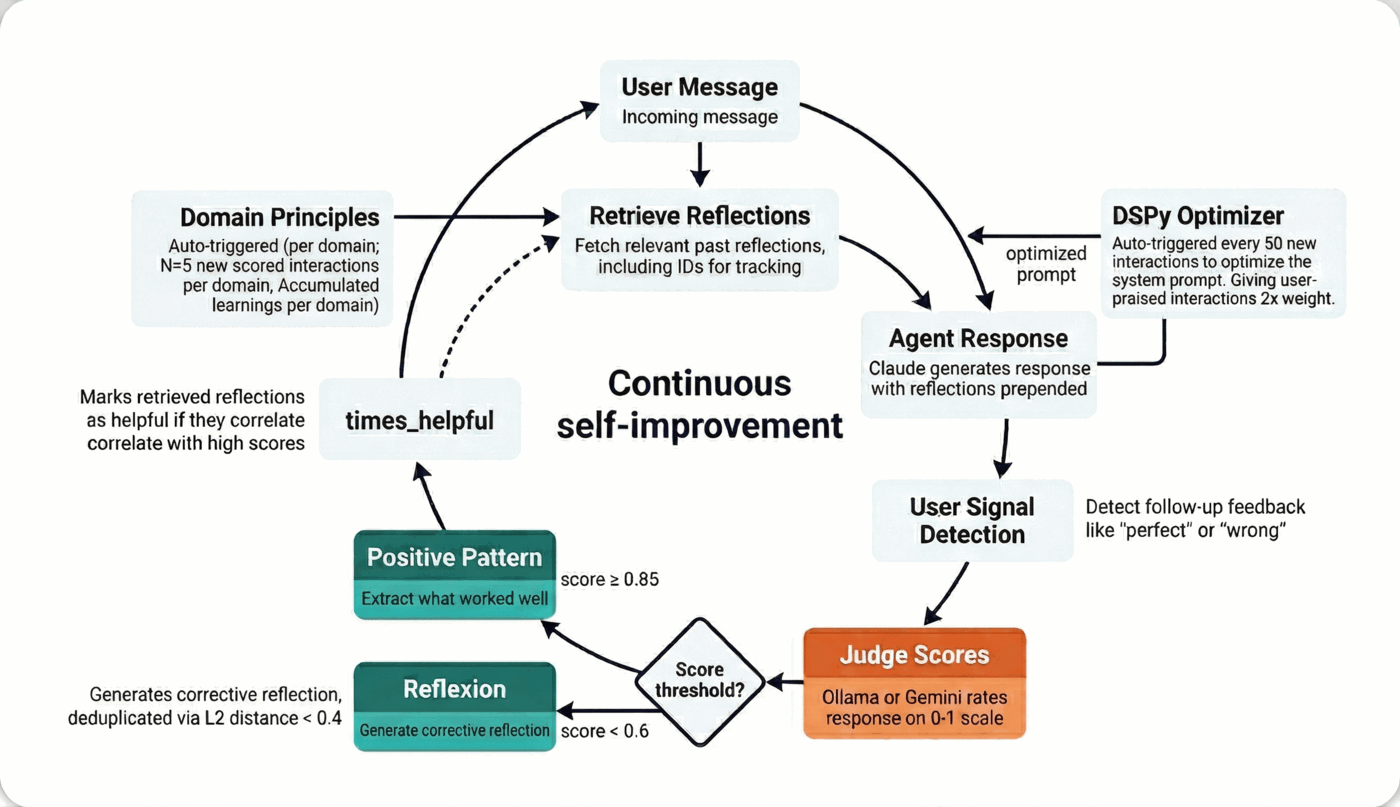
Every production interaction is scored by a local judge (Ollama or Gemini). Low scores trigger corrective reflexions; high scores extract positive patterns. Both feed into per-domain principles that accumulate over time. Once enough samples exist, DSPy optimizes the system prompt automatically.
Security & Privacy
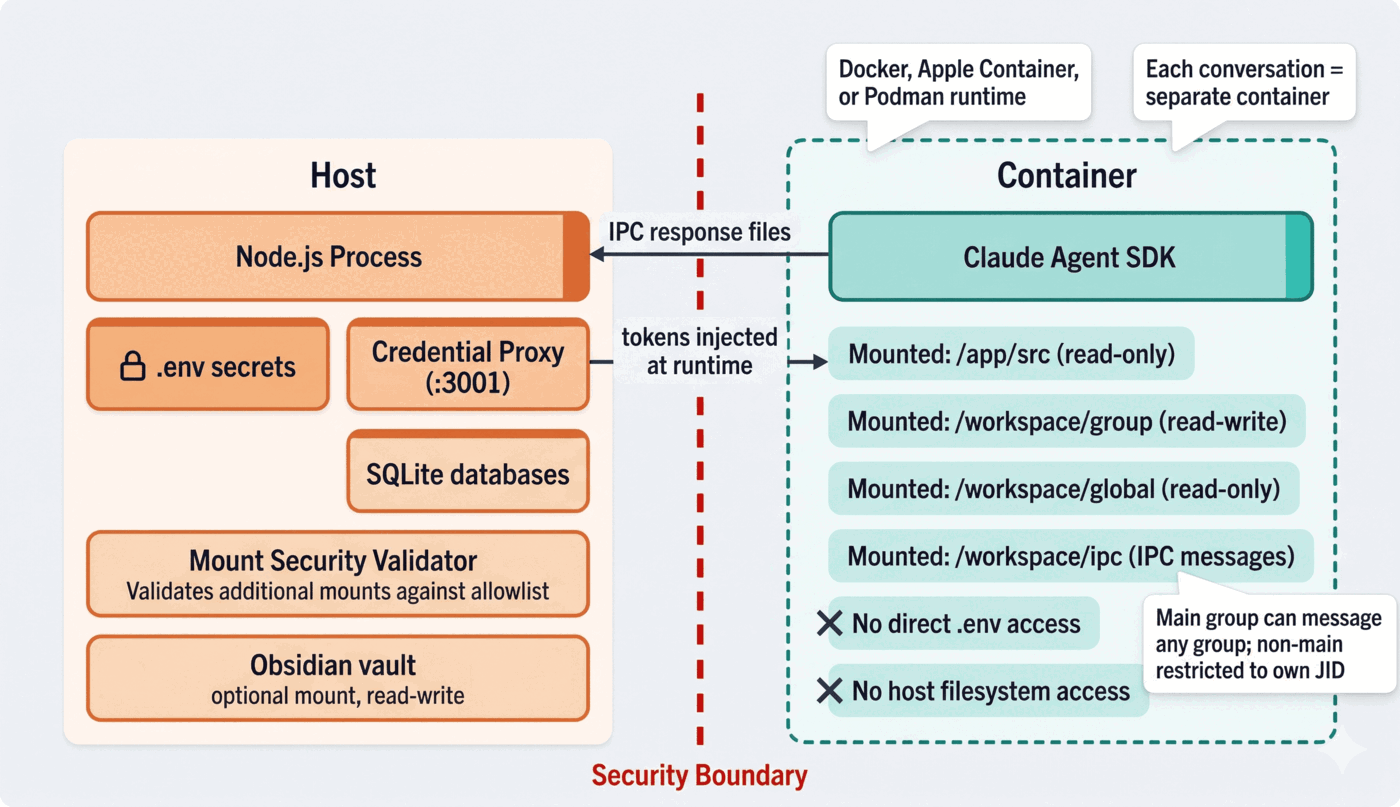
- Container isolation — Every agent runs in a Linux container (Docker). Agents cannot access your host filesystem beyond explicitly mounted directories.
- No credentials in code — All secrets live in
.envfiles that are gitignored. The codebase is designed as if the repo is always public. - Mount allowlist — Only directories you explicitly configure are visible to the agent. Everything else is inaccessible.
- Local-first — Memory lives in a local SQLite database. Voice transcription runs on-device. No data is sent to external services unless you configure it.
FAQ
How much does it cost?
Claude API usage (for the agent) plus optionally Gemini (free tier is sufficient for memory and scoring). Voice transcription is local and free. Deus adds ~920 tokens at session start compared to vanilla Claude Code — that covers the per-group persona and memory context. The self-improvement loop, container isolation, and eval suite add zero tokens (they run outside the agent context). See docs/benchmarks.md for the full breakdown.
What platforms are supported?
macOS (Apple Silicon recommended), Linux, and Windows (via Docker Desktop). Windows uses NSSM or Servy for service management instead of pm2/launchd.
Can I use a different LLM?
The core agent uses the Claude Agent SDK — this is architectural and not swappable. The evolution/eval judges can use Ollama (local, free) or Gemini.
Where is my data?
All local. Memory in SQLite, session logs in a local vault directory, no cloud sync.
How do I add a new channel?
Use the skill system: /add-whatsapp, /add-telegram, /add-slack, /add-discord, /add-gmail. Each channel is a standalone MCP package under packages/ — you can also build your own by implementing the ChannelProvider interface from @deus-ai/channel-core.
How do I customize behavior?
Send /settings in any connected chat to view and edit per-channel settings (idle reset, timeout, trigger requirement). For deeper changes — personas, trigger words, response style — tell Claude Code directly or run /customize.
Where are all the environment variables documented?
See docs/ENVIRONMENT.md for the full reference with defaults and descriptions.
Comparison
| Deus | OpenClaw | NemoClaw | ZeroClaw | Plain Claude | |
|---|---|---|---|---|---|
| Channels | 5 optional (WhatsApp, Telegram, Slack, Discord, Gmail) | 10+ (Signal, iMessage, Teams...) | Via OpenClaw | 20+ | None |
| Agent isolation | Container per conversation (default) | Opt-in Docker | Landlock + seccomp | Rust sandbox | None |
| Memory | Semantic vector search + tiered retrieval | Markdown files | Via OpenClaw | Basic persistence | Conversation only |
| Self-improvement | Judge → reflexion → DSPy optimization | No | No | No | No |
| Credential isolation | Proxy injection (keys never in container) | Keys in env | Policy-controlled | Keys in env | N/A |
| LLM support | Claude only | Any provider | Any (via OpenClaw) | Any | Claude only |
| Codebase | ~9.5K lines | ~430K lines | OpenClaw wrapper | Single binary | N/A |
Deus optimizes for depth (memory, self-improvement, security). OpenClaw optimizes for breadth (channels, community, model flexibility). See docs/benchmarks.md for a detailed comparison.
Project Structure
src/
  index.ts                # Entry point: startup gate, channel connect, IPC, scheduler
  message-orchestrator.ts # Message loop, trigger detection, cursor management, agent dispatch
  session-commands.ts     # Host-side slash command registry (/settings, /compact)
  auth-providers/         # AuthProvider interface, registry, and Anthropic provider
  channels/               # Channel registry and MCP adapter factories
  container-runner.ts     # Spawns and streams agent containers
  domain-presets.ts       # Keyword-based domain detection for evolution loop tagging
  user-signal.ts          # Detects user feedback signals (positive/negative)
  project-registry.ts     # External project registration for CLI mode
  task-scheduler.ts       # Runs scheduled tasks
  db.ts                   # SQLite operations
  router.ts               # Outbound message routing
  ipc.ts                  # File-based IPC watcher
packages/
  mcp-channel-core/       # Shared ChannelProvider interface and MCP adapter
  mcp-whatsapp/           # WhatsApp channel (Baileys)
  mcp-telegram/           # Telegram channel (node-telegram-bot-api)
  mcp-discord/            # Discord channel (discord.js)
  mcp-slack/              # Slack channel (@slack/bolt)
  mcp-gmail/              # Gmail channel (googleapis + OAuth polling)
  mcp-gcal/               # Google Calendar MCP server (tool server for container agents)
scripts/
  memory_indexer.py       # Semantic memory: index, query, extract, wander
  import_seeds.py         # Import curated seed reflections into evolution DB
  stop_hook.py            # Auto-checkpoint on session end
seeds/
  reflections.json        # Curated seed reflections for onboarding
evolution/
  judge/                  # Provider/registry pattern for judge backends (Ollama, Gemini, Mock, Claude)
  generative/             # Provider/registry pattern for text generation (Gemini, Ollama, Mock)
  storage/                # Provider/registry pattern for database backends (SQLite)
  reflexion/              # Reflexion + positive patterns + principles extraction
  optimizer/              # DSPy optimizer: per-domain prompt tuning
  ilog/                   # Interaction log: domain-tagged scored interactions
  db.py                   # Backward-compat shim (delegates to storage provider)
  cli.py                  # CLI: status, optimize, principles (with --domain)
eval/
  conftest.py             # Fixtures: agent cache, parallel pre-warm, dynamic concurrency
  judge_model.py          # make_judge(): delegates to JudgeRegistry for provider resolution
  test_core_qa.py         # Factual Q&A tests
  test_tool_use.py        # Tool-calling tests
  test_safety.py          # Refusal and safety tests
  datasets/               # JSONL test cases
groups/
  */CLAUDE.md             # Per-group memory (isolated per conversation)
Contributing
Every change goes through a pull request — no direct pushes to main. We use Conventional Commits for automated changelogs and versioning.
New features should be skills (markdown files in .claude/skills/). Source code PRs are accepted for bug fixes, security fixes, and simplifications.
Commit messages, formatting, and PR conventions are enforced automatically by pre-commit hooks and CI — npm install sets everything up. See CONTRIBUTING.md for the full guide.
Support
Deus is built and maintained solo — no company, no funding, just one developer and a lot of coffee. If it's useful to you, sponsoring helps keep it independent and actively developed.


Acknowledgments
Deus is built on NanoClaw — thanks to the NanoClaw team for the foundation.
License
MIT
Yorumlar (0)
Yorum birakmak icin giris yap.
Yorum birakSonuc bulunamadi