claude-tui
Health Uyari
- License — License: MIT
- Description — Repository has a description
- Active repo — Last push 0 days ago
- Low visibility — Only 9 GitHub stars
Code Gecti
- Code scan — Scanned 12 files during light audit, no dangerous patterns found
Permissions Gecti
- Permissions — No dangerous permissions requested
This tool provides a real-time dashboard, custom statusline, and analytics for Claude Code sessions. It monitors context and cost usage, displays live tool traces, and includes an API interceptor proxy for extended session tracking.
Security Assessment
The code scan reviewed 12 files and found no dangerous patterns or hardcoded secrets. However, this tool inherently interacts with your local shell environment and API calls to function. It also offers a remote installation method via `curl ... | bash`, which runs arbitrary scripts directly on your machine. While the automated scan passed cleanly and no dangerous permissions were requested, developers should be aware that the proxy ("sniffer") feature handles potentially sensitive session data. Overall risk: Low.
Quality Assessment
The project is highly active, with its last push occurring today. It uses the permissive MIT license and features a polished, well-documented README with clear installation and uninstall instructions. The main drawback is its low community visibility, currently sitting at only 9 GitHub stars. Because of the small user base, it lacks widespread community vetting, meaning bugs or security edge cases might not yet be caught by a larger audience.
Verdict
Safe to use, but inspect the `install.sh` script before running it, given the project's early stage.
Real-time statusline, live monitor, session analytics, and hooks for Claude Code







Real-time dashboard, statusline, API interceptor, and analytics for Claude Code sessions. Includes live service health monitoring from status.claude.com.
Website: slima4.github.io/claude-tui
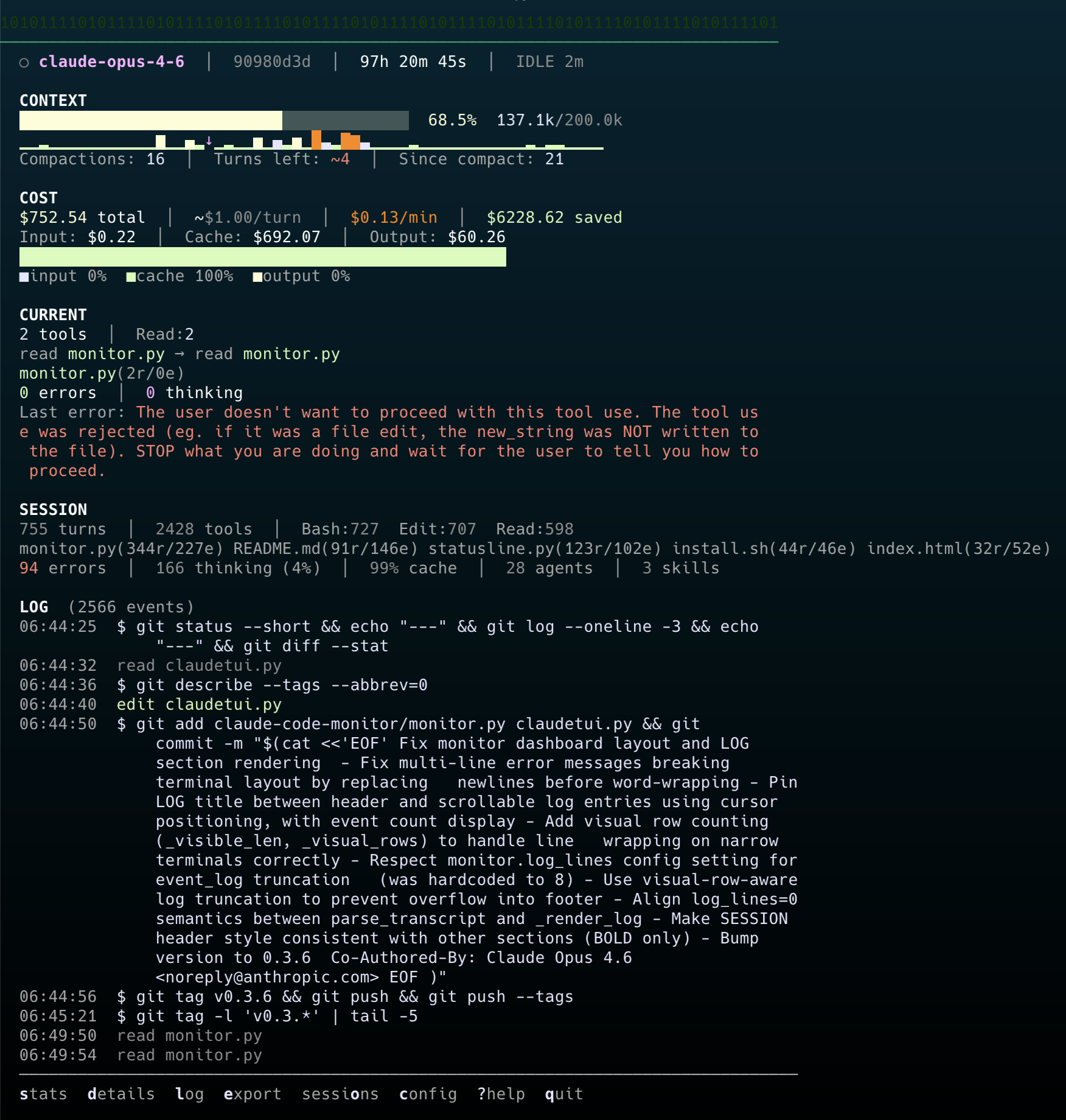
Statusline — context, cost, sparkline, and live tool trace right inside Claude Code:

Monitor — full dashboard in a second terminal:
Install
macOS (Homebrew)
brew tap slima4/claude-tui
brew install claude-tui
claudetui setup       # configure statusline, hooks, and commands
macOS / Linux (script)
curl -sSL https://raw.githubusercontent.com/slima4/claude-tui/main/install.sh | bash
Or clone and install locally:
git clone https://github.com/slima4/claude-tui.git && ./claude-tui/install.sh
Windows (WSL)
ClaudeTUI requires a Unix-like environment. On Windows, use WSL 2:
# inside WSL terminal
curl -sSL https://raw.githubusercontent.com/slima4/claude-tui/main/install.sh | bash
After install:
claude                    # statusline + hooks work automatically
claudetui monitor         # live dashboard in a second terminal
claudetui chart           # context efficiency chart
claudetui stats           # post-session analytics
claudetui sniffer         # start API call interceptor proxy
claudetui sniff           # launch claude through sniffer
claudetui sessions list   # browse all sessions
claudetui mode compact    # switch to 1-line statusline
claudetui mode full       # switch to 3-line statusline
claudetui mode custom     # interactive configurator
# inside Claude Code:
/tui:session           # deep session report
/tui:cost              # cost breakdown
Uninstall
claudetui uninstall       # clean settings, then uninstall
brew uninstall claude-tui
If you already ran brew uninstall first:
curl -sSL https://raw.githubusercontent.com/slima4/claude-tui/main/uninstall.sh | bash
Customize Statusline
Toggle individual components, pick a widget, or apply a preset — all from an interactive TUI:
claudetui mode custom
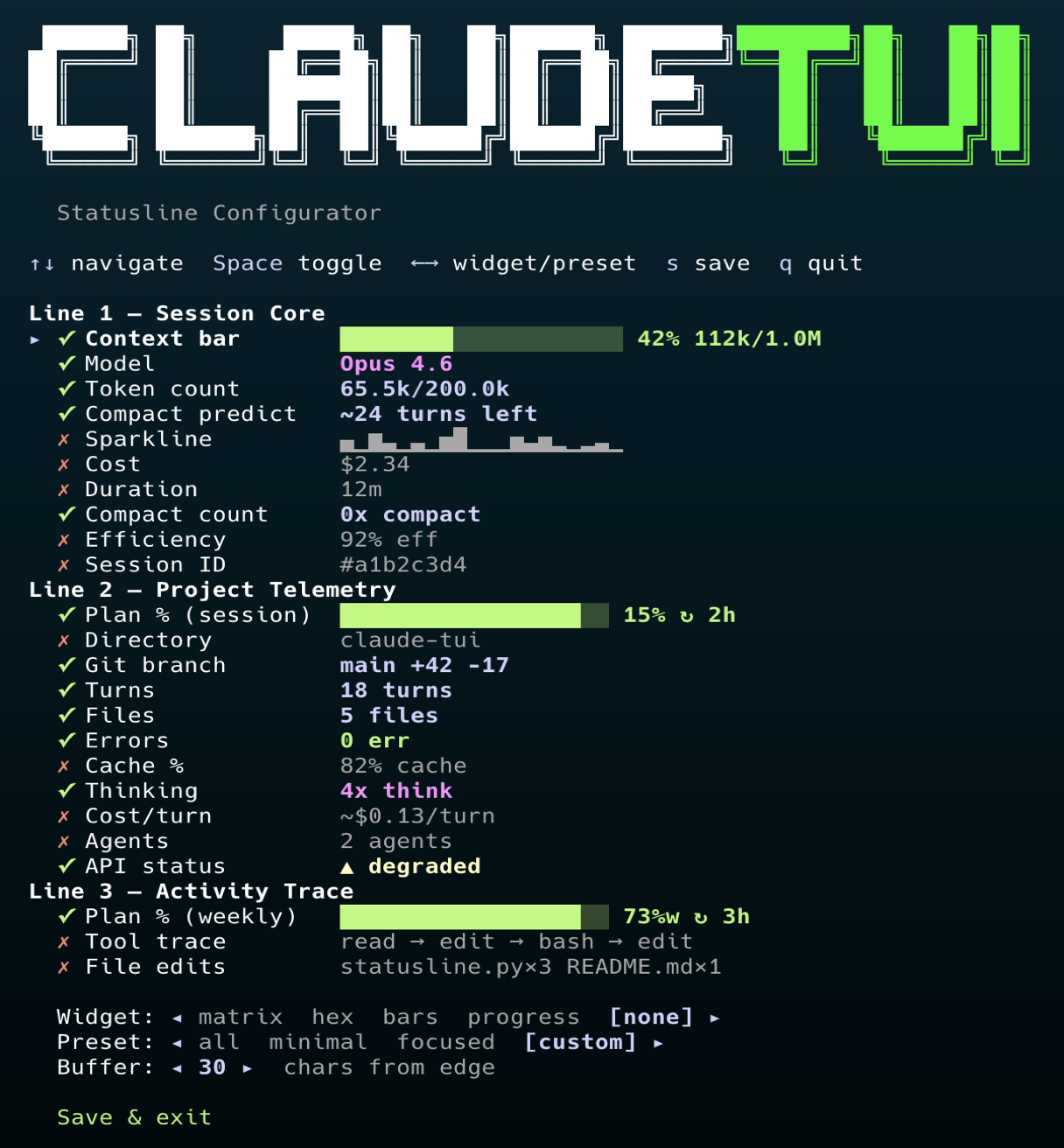
Or use CLI flags for non-interactive configuration:
claudetui mode custom -p focused          # apply preset
claudetui mode custom -w hex              # change widget
claudetui mode custom --hide model,cost   # hide specific components
claudetui mode custom -l                  # list current config
Three presets included: all (everything visible), minimal (essentials only), focused (hides noise like model, cost, session ID).
Settings
Customize behavior via ~/.claude/claudeui.json (hot-reloads, no restart needed):
{
  "sparkline": {
    "mode": "tail",
    "merge_size": 3
  },
  "monitor": {
    "log_lines": 8
  }
}
| Setting | Values | Default | Description |
|---|---|---|---|
sparkline.mode |
"tail", "merge" |
"tail" |
tail shows last N turns; merge combines turns into buckets |
sparkline.merge_size |
number | 2 |
Turns per bar in merge mode |
monitor.log_lines |
0–50 |
8 |
Number of log entries on monitor main screen (0 = off) |
status.enabled |
true, false |
true |
Enable/disable Claude status page monitoring |
status.ttl |
number (30–3600) | 120 |
Cache time-to-live in seconds for status page polling |
status.show_when_operational |
true, false |
false |
Show indicator even when all systems are operational |
usage.enabled |
true, false |
true |
Enable/disable plan usage tracking |
usage.rate_limit |
number (60+) | 60 |
Minimum seconds between API requests |
Tools
claude-code-statusline
Real-time status bar for Claude Code with context sparkline, session cost, cache ratio, thinking count, live tool trace, file edit tracking, and plan usage bars.
  0110100 Opus 4.6 │ ████████████████████ 42% 112k/1.0M │ ~24 turns left │ ▁▂▃▅▆▇↓▁▃▅ │ $2.34 │ 12m │ 0x compact │ #a1b2c3d4
  1001011 ████████████████████ 15%  ↻ 2h   │ main +42 -17 │ 18 turns │ 5 files │ 0 err │ 82% cache │ 4x think │ ~$0.13/turn
  0110010 ████████████████████ 73%w  ↻ 3h   │ read statusline.py → edit statusline.py → bash python3 → edit README.md │ statusline.py×3 README.md×1
Line 1: Context bar (progress + percentage + tokens)
Line 2: Session usage bar (5-hour limit) + project telemetry
Line 3: Weekly usage bar + tool trace + file edits
claude-code-session-stats
Post-session analytics — cost breakdown, token usage sparkline, tool and skill usage charts, most active files, and compaction timeline.
python3 session-stats.py              # latest session
python3 session-stats.py --days 7 -s  # summary table for the week
  Session Summary (6 sessions)
  ──────────────────────────────────────────────────────────────────────────────────────────
  ID       Date         Duration     Cost  Turns  Compact Model
  ──────────────────────────────────────────────────────────────────────────────────────────
  a1b2c3d4 2026-03-08        45m $  2.31     34        0 opus 4 6
  e5f6a7b8 2026-03-07     2h 10m $ 12.47    156        1 sonnet 4 6
  c9d0e1f2 2026-03-04        18m $  0.52     12        0 opus 4 6
  13a4b5c6 2026-03-03     5h 22m $ 45.80    287        2 opus 4 6
  d7e8f9a0 2026-03-02     1h 05m $  8.14     89        0 sonnet 4 6
  b1c2d3e4 2026-03-01     3h 40m $ 28.55    198        1 opus 4 6
  ──────────────────────────────────────────────────────────────────────────────────────────
  Total                  13h 20m $ 97.79
claude-code-session-manager
Browse, search, compare, resume, and export Claude Code sessions.
python3 session-manager.py list                       # recent sessions
python3 session-manager.py show abc123                 # session details
python3 session-manager.py diff abc123 def456          # compare two sessions
python3 session-manager.py resume abc123               # resume in Claude Code
python3 session-manager.py export abc123 > session.md  # export as markdown
  Recent Sessions
  ──────────────────────────────────────────────────────────────────────────────────────────────────────
  ID                   When Duration     Cost  Msgs   ⟳ Project              Branch            Model
  ──────────────────────────────────────────────────────────────────────────────────────────────────────
  a1b2c3d4      today 09:15      45m $  2.31    34   0 my-web-app           feature/auth      opus-4-6
  e5f6a7b8  yesterday 14:20    2h10m $ 12.47   156   1 my-web-app           main              sonnet-4-6
  c9d0e1f2     Mar 04 10:05      18m $  0.52    12   0 backend-app          fix/timeout       opus-4-6
  13a4b5c6     Mar 03 16:30    5h22m $ 45.80   287   2 my-web-app           feature/dashboard opus-4-6
  d7e8f9a0     Mar 02 09:00    1h05m $  8.14    89   0 docs-site            main              sonnet-4-6
  ───────────────────────────────────────────────────────────────────────────────────────────────
  Total cost: $69.24
python3 session-manager.py diff a1b2c3d4 13a4b5c6
  Session Comparison
  ────────────────────────────────────────────────────────────
                                Session A           Session B
  ────────────────────────────────────────────────────────────
  ID                             a1b2c3d4            13a4b5c6
  Project                      my-web-app          my-web-app
  Model                          opus-4-6            opus-4-6
  Branch                     feature/auth   feature/dashboard
  Date                         2026-03-08          2026-03-03
  Duration                           45m               5h 22m
  Messages                             34                 287
  Compactions                           0                   2
  Cost                              $2.31              $45.80
  ────────────────────────────────────────────────────────────
  Cost difference      +$43.49
claude-code-commands
Custom slash commands for deep session analytics on demand. Install to ~/.claude/commands/tui/ and use:
/tui:session    Full session report — context, cost, tools, thinking
/tui:cost       Cost deep dive — spending breakdown, cache savings, projections
/tui:perf       Performance analysis — tool efficiency, errors, file heatmap
/tui:context    Context window analysis — growth curve, compaction timeline, predictions
claude-code-monitor
Live session dashboard for a separate terminal. Live duration, activity status, cost burn rate, tool trace, error details, auto-follow, and interactive hotkeys — all in the alternate screen buffer.
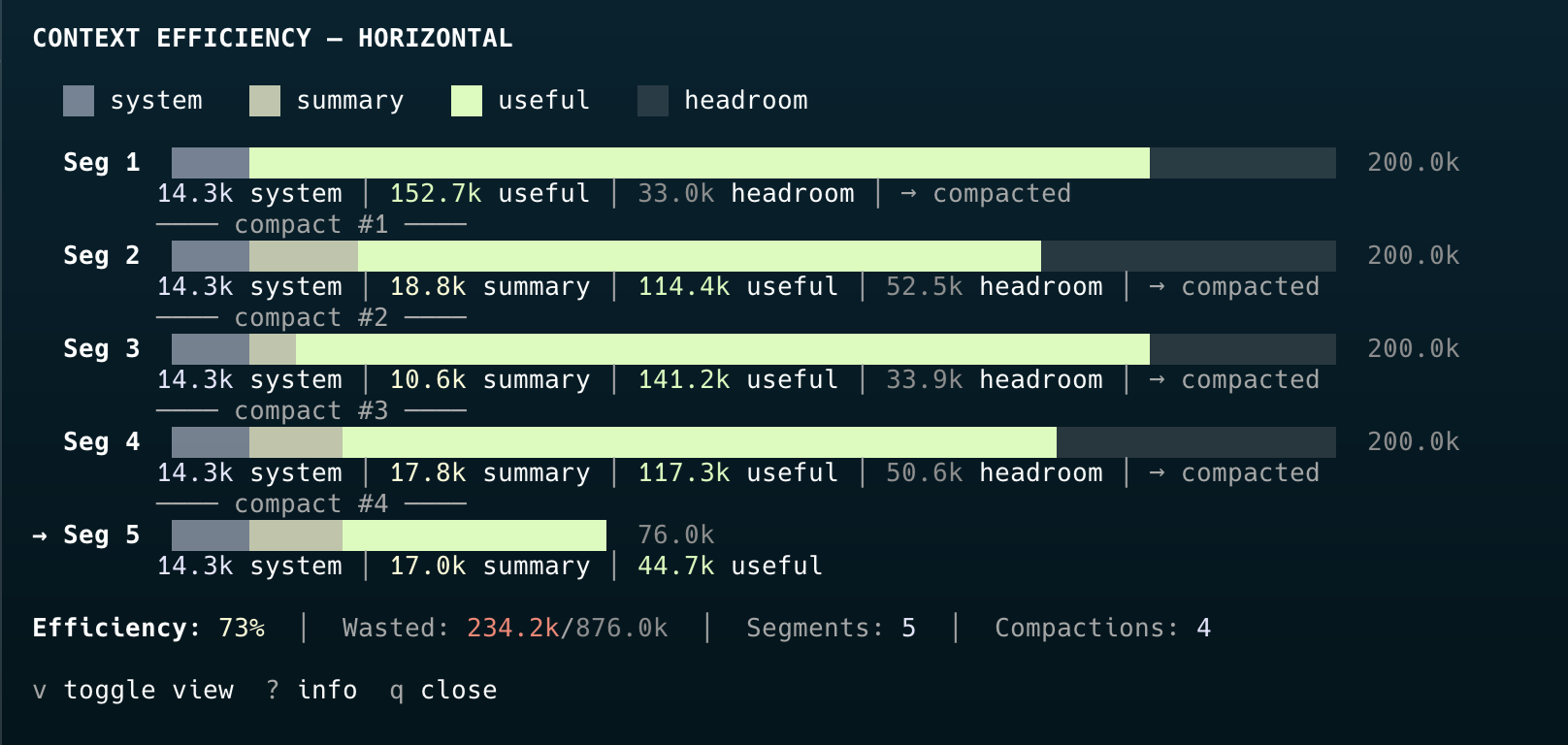
python3 claude-code-monitor/monitor.py           # auto-detect active session
python3 claude-code-monitor/monitor.py --list     # list recent sessions
claudetui chart                                   # context efficiency chart (standalone)
# While running: stats  details  log  chart  export  sessions  config  info  ?help  quit
claude-code-sniffer
API call interceptor proxy. Captures every request and response between Claude Code and Anthropic's servers — including raw system prompts, HTTP headers, latency, and the hidden compaction API call not logged in transcripts.
Claude Code  ──plain HTTP──▶  Sniffer (localhost:7735)  ──HTTPS──▶  api.anthropic.com
                                    │
                                    ▼
                          ~/.claude/api-sniffer/*.jsonl
# Terminal 1: Start the sniffer
claudetui sniffer

# Terminal 2: Launch Claude Code through the sniffer
claudetui sniff
claudetui sniff --resume abc123
  #1   POST /v1/messages  opus-4-6  45.2k->1.5k  $0.120  2312ms  740KB/4.2KB  98%c  [Tt]
  #2   POST /v1/messages  opus-4-6  48.1k->0.8k  $0.094  1134ms  741KB/2.1KB  99%c  [TU]  Edit
  #3   POST /v1/messages  opus-4-6  12.3k->2.1k  $0.041  3412ms  42KB/6.8KB   95%c  [Tt]  compaction
  #4   POST /v1/messages  sonnet-4-6  14.3k->2.1k  $0.008  2341ms  42KB/6.8KB  [Tt]  +agent.1
claude-code-hooks
Claude Code hooks that provide automatic context about file activity, dependencies, and code churn — right inside Claude Code sessions.
Session start — file activity heatmap:
📊 File hotspots (last 14 days, 8 sessions):
  ███ src/config.ts (43e/12r)
  ▆▆▆ src/pages/dashboard/index.vue (39e/8r)
  ▅▅▅ src/locales/en.json (21e/15r)
  ▄▄▄ src/utils/constants.ts (19e/5r)
After editing — reverse dependency check:
⚠️ 4 file(s) depend on validation.ts:
  → app/composables/useAuth.ts
  → app/composables/useNotifications.ts
  → app/components/ui/ChangePasswordForm.vue
  → app/pages/reset-password.vue
Consider checking these files for compatibility.
Before editing — high churn warning:
🔥 High churn: config.ts has been edited 43 times across 5 sessions
in the last 14 days. Consider if this file needs refactoring rather
than more patches.
License
MIT
Yorumlar (0)
Yorum birakmak icin giris yap.
Yorum birakSonuc bulunamadi