dsh-nested-followups
Health Pass
- License — License: MIT
- Description — Repository has a description
- Active repo — Last push 0 days ago
- Community trust — 16 GitHub stars
Code Pass
- Code scan — Scanned 12 files during light audit, no dangerous patterns found
Permissions Pass
- Permissions — No dangerous permissions requested
No AI report is available for this listing yet.
Ask about any earlier answer without polluting the main agent context. Real, nested session branches for DeepSeek Harness.
dsh-nested-followups
English | 中文
Ask about any earlier answer without polluting your main agent context.
A DeepSeek Harness plugin
that turns side questions into real, nested session branches. Each branch
inherits the conversation only through the answer you selected. The main task
stays linear and untouched.




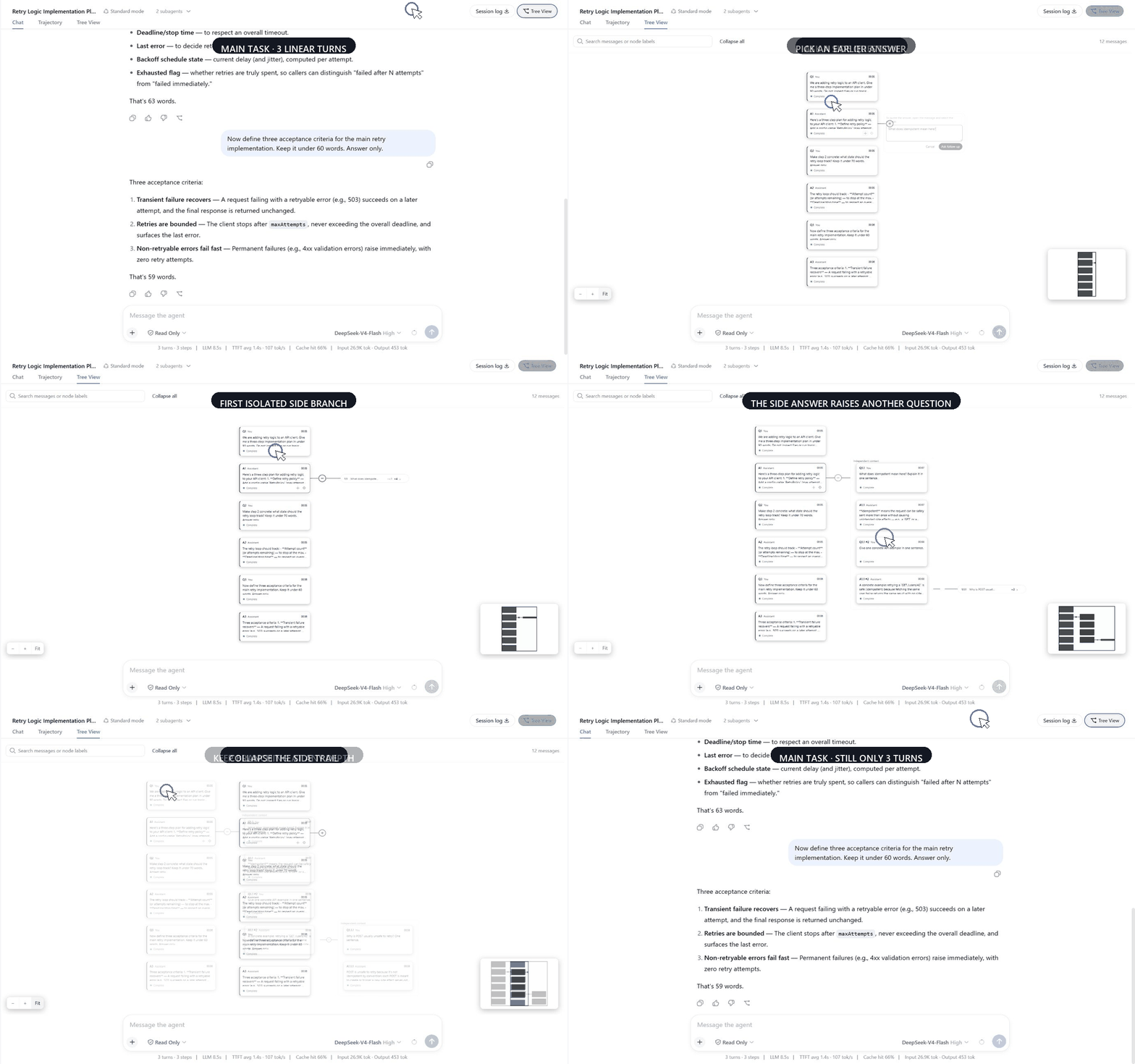
Recorded in an unmodified DeepSeek Harness 0.1.1-rc.2 web profile. The UI
and sessions are real; the captions and cursor are added in post.
LINEAR CHAT → ASK ABOUT AN EARLIER ANSWER → ISOLATED BRANCH
- Branch from any completed answer. The branch receives exactly the history
that existed at that point. - Keep the main task clean. Nothing asked or answered in a branch flows back
into the main conversation. - Keep going without flattening the tree. Continue downward inside a branch,
or branch right again at any depth.
Install
dsh plugin --profile web add dsh-nested-followups
Restart the DeepSeek Harness web profile if it is already running, open a
conversation, and select Tree View.
git clone https://github.com/sluminositys/dsh-nested-followups.git
cd dsh-nested-followups
pnpm install
pnpm run check
dsh plugin --profile web add .
Why not just open another chat?
| Approach | Relevant earlier context | Main task stays clean | Nested follow-ups | One visible tree |
|---|---|---|---|---|
| Ask in the main chat | Yes | No | No | No |
| Open a new conversation | Lost or copied manually | Yes | No | No |
| Typical temporary sidebar Q&A | Varies | Usually | Usually not | No |
| dsh-nested-followups | Exact history through the selected answer | Yes | Yes | Yes |
The point is not another place to type. It is a message-level branch that keeps
the useful context, isolates the detour, and remains attached to the root
conversation instead of becoming another session-list item.
Use it
- Chat normally. The standard DSH chat, sidebar, composer, and message
rendering remain unchanged. - Select Tree View, choose an earlier completed assistant answer, and
select Ask follow-up. The question grows to the right in a new branch. - On the latest answer in a branch, use Continue this branch to add the
next turn downward. Use Ask follow-up to create another isolated branch
to the right. - Return to Chat whenever you want to continue the main task. Its history
contains no branch messages.
| Action | Direction | Session effect |
|---|---|---|
| Ask follow-up | Right | Creates a new isolated child session at the selected answer |
| Continue this branch | Down | Adds the next exchange to the current branch session |
Continue this branch appears only on the latest completed answer in a
branch. Main-line nodes never offer it, so the two operations cannot be
confused.
Why this is a real branch
This is not a prompt that asks the model to pretend later messages do not
exist, and it is not a line drawn between unrelated chats.
- Every branch is a real DeepSeek Harness session with durable history.
- Its seed ends at the selected completed turn, using the same event-boundary
semantics as DSH's session fork path. - Main-line messages created after the branch point are absent from the branch.
- Branch messages never flow back to the main session, and sibling branches
cannot see one another. - Branch tools are enforced read-only when they execute, protecting the shared
workspace from side-question activity. - The request prefix remains byte-for-byte compatible with the parent at the
fork point, so the model provider can reuse its prefix cache.
What Tree View includes
- One card per user message and assistant answer, with the main conversation
running downward and isolated branches growing to the right. - Unlimited nested follow-ups and linear continuation within each branch.
- Search that reveals collapsed ancestors before centering a match.
- Focus mode, pan, zoom, fit-to-view, and a minimap for large trees.
- Progressive dot → capsule → card expansion, plus one-action collapse.
- Cascading branch deletion with an exact branch and message count.
- Durable branch metadata and per-conversation view state across restarts.
- No branch entries in the normal sidebar session list.
Progressive collapse
A tree opens fully folded on first visit: the main conversation plus one dot
per answer that has branches. Select ⊕ to reveal one capsule per branch,
then select a capsule to restore that branch's cards. Child anchors stay folded
until you open them, so one expansion never floods the canvas with every
descendant.
Alt-select ⊕ or a capsule to expand all descendants. Collapse all
returns top-level groups to dots. A pulsing blue marker means a folded
descendant is generating; red means one failed. The layout is restored per
conversation after a restart.
Read-only branch execution
Branches share the main conversation's working directory, so allowing a side
question to write would be unsafe. The plugin therefore checks tools when they
actually run. Read operations are permitted; writes and unknown tools are
refused by default.
Allowed tools are read, read_image, glob, grep, lsp, the session_*
query tools, job_list, job_output, terminal_list, terminal_read,list_agents, and get_goal. Code Mode's run_code remains available because
every tool it invokes is checked individually.
Provider prefix-cache reuse
A branch joins the same preset as its parent and does not rewrite tool
definitions, prompt sections, or presentation format. Its request therefore
starts with the same bytes as the parent request at the branch point. Providers
that cache request prefixes can reuse that context instead of reading the
inherited conversation again.
Requirements
| Requirement | Version |
|---|---|
| DeepSeek Harness | 0.1.x (verified on 0.1.0-rc.7, 0.1.0-rc.8, and 0.1.1-rc.2) |
| Node.js | 22.19 or later |
| Package manager | pnpm |
Compatibility notes
This release is verified against an unmodified @deepseek-ai/dsh0.1.1-rc.2 and keeps 0.1.0-rc.7 as its compatibility floor. DeepSeek
Harness is still in developer preview, so later prereleases may require an
adapter update.
Branches cannot be continued from the standard chat view. DSH currently
rejects user messages sent from the normal chat UI to a subagent-origin
session. Reading and continuing a branch therefore happen in Tree View. The
plugin probes for a future host capability that could safely restore native
continuation, but enables it only when DSH explicitly guarantees message
delivery.
Branches may appear in the built-in Subagent menu as disabled diagnostic
rows. They cannot be selected, are skipped by keyboard navigation, and do not
count as active child agents. This does not affect the root conversation or the
sidebar, where branch sessions remain hidden.
Uninstall
dsh plugin --profile web remove dsh-nested-followups
Uninstalling removes the plugin UI and services. It does not modify the main
conversation or delete persisted branch history.
Development
pnpm install
pnpm run check
pnpm run check runs linting, host and browser type checking, 156 unit and
integration tests, a production build, a smoke test, and package validation.
| Command | Purpose |
|---|---|
pnpm run lint |
Static analysis |
pnpm run typecheck |
Host, browser, and test type checking |
pnpm test |
Unit and integration tests |
pnpm run build |
Production build |
pnpm run check |
Complete release gate |
Contributing
Issues and pull requests are welcome. See CONTRIBUTING.md
and run pnpm run check before submitting a pull request.
License
Reviews (0)
Sign in to leave a review.
Leave a reviewNo results found