ProjectStore
Health Warn
- License — License: MIT
- Description — Repository has a description
- Active repo — Last push 0 days ago
- Low visibility — Only 8 GitHub stars
Code Pass
- Code scan — Scanned 12 files during light audit, no dangerous patterns found
Permissions Pass
- Permissions — No dangerous permissions requested
No AI report is available for this listing yet.
Decisions, specs and stories as plain markdown, for every coding agent. Code changes. Context stays.
ProjectStore
Not a memory plugin. ProjectStore is how your AI agent runs the project — decisions, specs, epics, stories and a kanban board as plain markdown in git — so the next agent, the next model, or you in six months know exactly why everything is the way it is.



A project workflow plugin for Claude Code and OpenAI Codex (experimental). Both are released together at one version, and each installs with one command.
Two months of agents, and nobody knows why
Agents write code fast. They re-decide settled questions even faster: every fresh session arrives empty, makes its own architectural call, and commits under its own assumptions. Two months later you have noodle code — every strand reviews fine on its own, and each was written under a different theory of the project. Ask "why is this a queue and not a cron job?" and nobody can answer. The agent that decided is long gone.
The fix is not a smarter agent. It is a loop with verification in it.
The loop
The thing that makes agentic coding work — the loop Claude Code's own creator keeps pointing at — is gather context, act, verify, repeat. ProjectStore runs that loop one level up: over the project, not just the code.
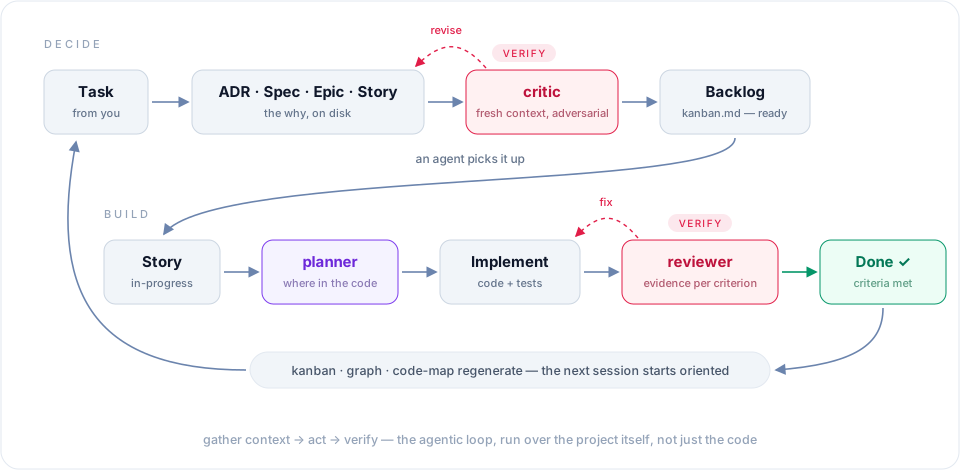
- You hand the agent a task. It opens an artifact before it opens an editor: an ADR if something needs deciding, an epic and stories for the work, a spec when the "how" is non-trivial.
- A fresh-context critic attacks the artifact. Expect revise — on this repo it has yet to pass anything on the first try, and that is the point.
- The fixed artifact lands in the backlog; the kanban regenerates itself.
- An agent picks up a story. A planner reads how earlier epics actually landed in the code and says where this change belongs.
- A reviewer matches the diff against the story's acceptance criteria — per criterion, with evidence — before anything gets called done.
- Done. Board, link graph and code map regenerate. The next session starts oriented instead of guessing.
Mechanisms hold this together, not discipline: an agent that starts coding with no story open gets nudged, artifacts are not final before review, and a deterministic doctor checks the mechanical consistency with zero AI involved. Every verify step is a separate fresh-context agent with no stake in the draft it is judging.
We build ProjectStore with ProjectStore. The feature that names your session went through exactly this loop — including a critic pass that killed the design's central claim, and a reviewer pass that caught a bug which would have shipped the feature silently dead for every real user.
What lands on disk
Say "let's go with Postgres, not Mongo — we need transactions", approve the draft, and a real file lands:
---
title: "Use Postgres for primary storage"
status: accepted
date: 2026-07-03
---
## Context
We need ACID transactions for order processing...
## Decision
Postgres 16 as the primary store...
## Alternatives Considered
### MongoDB — rejected because...
Six months later, "why Postgres?" has an answer with a date and the alternatives you rejected. Stories work the same way — status in frontmatter, board generated from it — and your status line always shows what this session is working on:

Open the vault in Obsidian and you get the graph view and the board for free. Don't use Obsidian? Everything renders on GitHub and in any editor.
Install — one message
Open Claude Code in your project and say:
Install the projectstore plugin from https://github.com/SmartAndPoint/ProjectStore and set it up for this project.
That's the whole setup. Claude adds the marketplace, installs the plugin, and walks you through binding a vault, scaffolding it and wiring the status line — every step previewed, nothing written without your Yes.
On Codex, run one command from a terminal in your project:
npx projectstore-codex install --project "$PWD"
Then restart Codex, approve the ProjectStore hooks when it asks, and run $projectstore-bind ~/Documents/my-project-vault. Codex support is newer and still labelled experimental: docs/harnesses.md says what has been verified and what has not. A project can be worked from both agents: they share the binding in .projectstore/, and each keeps its own overlay and session state beside it (running both over one project).
/plugin marketplace add SmartAndPoint/ProjectStore
/plugin install projectstore@SmartAndPoint
/reload-plugins
/projectstore:bind ~/Documents/my-project-vault
One switch worth flipping: Claude Code does not auto-update third-party plugins by default — /plugin → Marketplaces → SmartAndPoint → toggle auto-update on. If you skip it, /projectstore:doctor will remind you later with the exact setting.
Contributors: git clone this repo, then claude --plugin-dir ./ProjectStore.
Or from npm, in one command — from a terminal, not inside a Claude Code session:
npx projectstore-claude install --project "$PWD"
The same tree is published to npm as projectstore — one source package carrying every harness's manifest — and projectstore-claude is its Claude Code shell: the core pinned at the same version and bundled inside, the harness fixed, so the one command has the same shape on every harness. It registers the plugin with Claude Code: it writes a small local marketplace of its own under your Claude home, then drives claude plugin marketplace add / plugin install at local scope, so the registration lands in this checkout's .claude/settings.local.json and nowhere else. It prints its plan first — every file it writes and every host command, verbatim — and at a terminal asks Apply N changes? [Y/n]; then it shows each step as it runs and what to do next. Without a terminal (a script, CI, an agent's tool) naming the harness is the confirmation. plan prints the same plan and writes nothing; --verbose adds every row's reasoning; npx projectstore-claude <verb> --help lists a verb's options with examples. Restart Claude Code afterwards. A git-marketplace copy already enabled for the checkout is silenced there (not globally) so the plugin does not load twice; uninstall turns it back on. Pin or upgrade with npx projectstore-claude@<version> upgrade --project "$PWD" — the version you name is the version you run. The core's low-level form, npx projectstore <verb> --harness claude-code …, is exactly what the shell runs. bun works the same on the packed bin.
Codex has its own shell with the same one-command shape:npx projectstore-codex install --project "$PWD". It carries a Codex
plugin manifest, namespaced workflow and role skills, lifecycle hooks, and
the exact bundled core. It stages a stable marketplace under CODEX_HOME,
drives codex plugin marketplace add and codex plugin add, then reads the
installation back and verifies its version and payload digest. Before it
changes anything it asks Codex for that read-back (codex plugin list --json),
so a Codex too old to answer stops the registration before it changes anything
and tells you to upgrade Codex. Restart Codex,
approve the hooks, and run $projectstore-bind <vault-path>. For later
releases, npx projectstore-codex@<version> upgrade --project "$PWD". Because
Codex's plugin registry is user-global, ordinary uninstall removes only the
project's agents block; uninstall --global is the explicit machine-wide
removal. If npx answers could not determine executable to run, your
registry (often a company mirror) serves a stale index that knows only the
reserved 0.0.1 placeholder: name the version, and if that is not enough, the
public registry: npx --registry https://registry.npmjs.org projectstore-codex@<version> install --project "$PWD" (the same holds forprojectstore-claude). Codex is experimental until a live session has exercised every
surface it installs; docs/harnesses.md says what has
been measured and what has not. From a checkout, the same npx path runs against
a built tarball:
npm run shells:build -- --only projectstore-codex --dev --out dist
npx --package "./dist/projectstore-codex-$(node -p 'require("./package.json").version').tgz" projectstore-codex install --project "$PWD"
The package also carries a bin. Without a session — in CI, or in a shell — the same core answers token-free, with a --json envelope on every verb:
npx projectstore doctor --json
npx projectstore install --harness claude-code   # the low-level form the shell runs: shows the plan, asks at a terminal, then writes; without a terminal naming the harness is the confirmation — there is no --yes
npx projectstore reconcile --write --only kanban
Reads too — the same facts the agents get over MCP:
npx projectstore status --json
npx projectstore search "entry rule" --kind spec
npx projectstore show adr/README.md --section index
npx projectstore graph neighbors epics/PS-CORE/epic.md
npx projectstore codemap --for scripts/lib.mjs
The same eight reads are an MCP server. The plugin registers it through its own .mcp.json, so a Claude Code session has status, search, get_artifact, neighbors, lineage, code_refs, orientation and doctor as tools with no shell; every tool result is the CLI's --json for the same arguments. Elsewhere:
npx projectstore mcp --project "$PWD"
Binding, too — naming the vault is the confirmation, and changing it needs --rebind. init creates a whole vault in one step, with no mkdir first: the directory, its git repository, the layout's folders and their README indexes; scaffold --write adds the folders to a vault that was bound without them:
npx projectstore bind ~/vaults/my-project
npx projectstore init ~/vaults/new-project --language ru
npx projectstore scaffold --write
projectstore-claude, projectstore-codex and projectstore-opencode are this package's per-harness shells — the core pinned and bundled, the harness fixed. The Claude Code and Codex shells are published at the core's version; Codex stays labelled experimental until a live run has exercised every surface it installs (docs/harnesses.md). The opencode shell publishes after its plugin root is rendered. The other projectstore-* names are reserved placeholders pointing back here. One source package, one version, N tarballs.
Upgrading
/plugin update (or auto-update) and a restart, then one command per project
bound before 0.28. What an existing project sees afterwards, and why:
The project's files move to
.projectstore/..claude/projectstore.json
and.claude/.projectstore/become.projectstore/projectstore.json,.projectstore/harness/claude-code.jsonand.projectstore/state/. Nothing
breaks before you move them: every reader falls back to the old paths through
0.29, and the startup line names the command until the move is done. Close
every Claude Code session in the project, run that command from a terminal,
then restart. The command depends on how you installed:- From the git marketplace (every 0.27.x install): the installed copy's
ownbin/projectstore.mjs, with its path spelled out in the startup line —node "<plugin cache>/bin/projectstore.mjs" upgrade --harness claude-code --no-register --project "$PWD".--no-registerleaves your plugin registration as it is. - From npm:
npx projectstore-claude@<version> upgrade --no-register --project "$PWD".
Both forms move only the project's files, so neither touches your plugin
registration. The same run re-stamps the status-line launcher at its new path
and re-registers the agents block, whose template is now v4. A plainnpx projectstore-claude upgradeon a git-marketplace install does more: it
also registers the plugin from npm for this checkout and turns the
git-marketplace copy off here, so/plugin updatestops reaching the
checkout. The 0.28.0-rc.1 and rc.2 startup lines named that shell form
(npx projectstore-claude@<version> upgrade, without--no-register), so on
those, update first and run what the new startup line names. If it already
happened,npx projectstore-claude@<version> uninstall --surface plugin --project "$PWD"
(0.28.0 or later) turns the git-marketplace copy back on. That copy must be 0.28 or later — an
older one reads a moved project as unbound — so update it first if it is not.
Restart, then run/projectstore:doctor --fixin the new session, which re-stamps the status
line against that copy.- From the git marketplace (every 0.27.x install): the installed copy's
The status line keeps rendering. A launcher written by an earlier version
still works, but it carries no file stamp and its embedded fallback root is
frozen at the old version; the move above re-stamps it. Nothing rewrites that
file behind your back any more: first wiring and refresh areinstall's,
behind a preview./projectstore:statusand/projectstore:searchanswer differently:
facts from artifact frontmatter and the derived views' freshness instead
of anmtimewalk; a literal, bounded, grouped search instead of a shellgrep. Every other command prints what it printed before./projectstore:doctorhas new lines — the state of each installed
surface, a version-drift check across plugin versions, and one permanent
info line saying the MCP read tools are registered. Its exit code now
carries the verdict (1 = findings), so a red Bash result is findings, not
a crash.The plugin registers an MCP server (eight read-only tools over the
vault). Claude Code may ask you to approve it once.The agents block stays where Claude Code reads it. In a project with an
AGENTS.md, the block goes there andCLAUDE.mdcarries a one-line@AGENTS.mdimport; otherwise the block goes intoCLAUDE.md. A project with
anAGENTS.mdand noCLAUDE.mdnow gains that one-lineCLAUDE.md.The passive skills are published under the
projectstore-prefix
(projectstore-decision-detector,projectstore-peer-reviewer,projectstore-story-completion,projectstore-vault-communication). Nothing
in a project names them; only a skill listing shows the new names.Rolling back to 0.27.x before the move: everything keeps working, since
0.27.x still reads the old layout. It rewrites the status-line launcher in its
own form, as it always did; coming forward again, the startup line names the
move once more, and the move re-stamps the launcher. If a session already
re-stamped the status line or re-registered the agents block before the move
(rc.2's/projectstore:doctor --fixdid both), 0.27.x reports a foreign
status line and a v4 block and leaves both alone — unless you run its/projectstore:agents register, which rewrites the block; the status line
still renders, and the move settles both.Rolling back to 0.27.x after the move: 0.27.x looks for its binding under
.claude/, finds none and offersbind. Do not accept. A re-bind writes.claude/projectstore.jsonagain, and 0.28'sinstallandupgraderefuse
while two bindings exist. To come forward again, delete.claude/projectstore.json, then run the command the startup line names
once more: a 0.27.x session writes its welcome marker back under.claude/.Installed from npm? Then
/plugin updatehas nothing to fetch: the
registration is refreshed by the package itself — from a terminal outside
the session,npx projectstore-claude@<version> upgrade --project "$PWD"
rewrites the local marketplace and runs the host'splugin updatefor this checkout./projectstore:doctorsays when the
registration is behind the package, and names that command.
When an agent starts a task, it can find its way
Two generated views exist for exactly that moment. graph.md holds every artifact's links, typed, in both directions — one grep returns a document's whole neighborhood. code-map.md answers where the code for each epic actually lives, so new code lands where the old code already is. And before any architectural choice, the agent is pointed at the ADR index first — which is how settled questions stay settled.
Teams: many humans, many agents
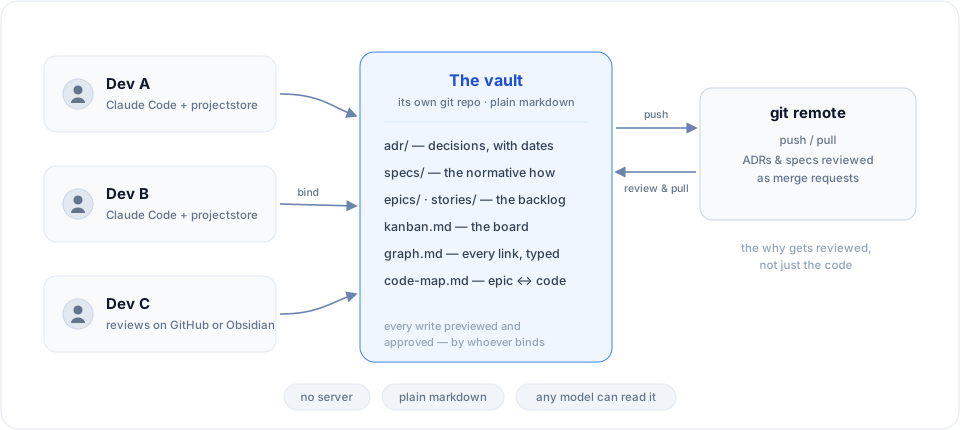
Put the vault in its own repository. Every teammate installs ProjectStore, binds to the same vault, and contributes through the same approval gates. ADRs and specs get reviewed like code — as merge requests, except what's under review is the reasoning. A teammate without an agent reviews on GitHub or in Obsidian: it is all just markdown.
Parallel sessions coordinate too: each registers itself, sessions warn each other on the same vault, every status line shows only its own work — and once a session's writing settles on an epic or a document, it gets offered a name to be addressed by. Measured before shipping: roughly one offer per session; the naive "rename on every change" fired 37 times in the worst recorded session, which is why it doesn't do that.
What it costs — measured, not promised
Running the loop is not free, and we will not pretend otherwise. On this very repository — the worst case we know, since here the tool builds itself and every change goes through the full loop — vault work measures 22.5% of total spend. On a typical project, budget 10–15% of your weekly limit.
What you get for it: a project manager and a systems analyst who never forget to file, made of the same agent you already pay for. The artifacts are not notes-to-self — they are the working backlog, the review record and the decision log of the project.
And they are the exit door. The vault is plain markdown in git — no server, no proprietary format, nothing to export. Move to Codex, Gemini or DeepSeek tomorrow and the project continues: the orientation a new agent needs is already on disk, so you spend no tokens re-teaching a model what the project is and why.
Fact sheet
20 commands · 6 agents — critic, planner, reviewer, librarian, archaeologist (the advisors: read-only, fresh-context) and clerk (the sole write-capable one — it executes approved writes, post-gate, and composes nothing) · 6 languages — en, ru, es, de, fr, zh · zero runtime dependencies
The deep dive — real session files, measured payloads, how every mechanism works and where its limits are: docs/how-it-works.md.
Philosophy
- Markdown + git is the source of truth. No proprietary format. The plugin can disappear; your project's decisions remain.
- Obsidian is a view, not a dependency. Files render on GitHub, in any editor, in
cat. - The agent is a methodologist, not a database. Skills nudge, commands gate, humans approve.
- Layouts are opinionated. v1 ships
engineering; community addsdata-analytics,product,chatbot,library. - One brain per project, not per person. The vault travels with the repo. Karpathy's LLM Wiki is its personal-research counterpart.
Uninstalling
/plugin uninstall projectstore@SmartAndPoint for a Claude git-marketplace install; npx projectstore-claude uninstall --project "$PWD" for its npm registration. For Codex, npx projectstore-codex uninstall --project "$PWD" removes only project-owned wiring; add --global only to remove the user-global Codex plugin and marketplace. Your vault is yours — plain markdown, untouched. One leftover of a host-managed plugin path can be the agents block in CLAUDE.md/AGENTS.md; remove it with the harness's agents unregister skill, or delete everything between <!-- projectstore:agents … --> and <!-- /projectstore:agents --> by hand. uninstall leaves a block that lives in AGENTS.md, because that file is read by other coding agents too, and removes the CLAUDE.md import when that file holds nothing else; uninstall --surface agents_block removes the block as well.
Extending
See docs/extending.md for adding layouts, templates, and skills, and docs/harnesses.md for which coding agents projectstore runs on — what "experimental" means there, and what adding one takes.
Contributing
Issues and discussions: https://github.com/SmartAndPoint/ProjectStore/issues. PRs welcome — adding a layout is a good first contribution (see scaffold/layouts/engineering.json for the format).
License
MIT — see LICENSE.
Reviews (0)
Sign in to leave a review.
Leave a reviewNo results found