smithersbot
Health Warn
- License — License: MIT
- Description — Repository has a description
- Active repo — Last push 0 days ago
- Low visibility — Only 5 GitHub stars
Code Warn
- network request — Outbound network request in assets/chrome-extension/background.js
- network request — Outbound network request in assets/chrome-extension/options.js
Permissions Pass
- Permissions — No dangerous permissions requested
No AI report is available for this listing yet.
Leave agents running without giving up control.
SmithersBot


Leave agents running without giving up control.
SmithersBot is for people who want Claude Code and Codex to keep working together for hours, but do not want to babysit every permission prompt or blindly trust an agent with their machine.
You send a goal from Telegram. SmithersBot turns it into a reviewed plan, runs each task with a fresh worker, git checkpoints before each step, verifies work outside the agent, and asks you only when human judgement is needed.
The result is a local agent workflow that keeps moving in the background while staying inspectable, recoverable, and operator-controlled.
Why SmithersBot exists
Long agent runs fail in specific, repeatable ways. SmithersBot is built around those failure modes.
| Challenge | Answer |
|---|---|
| Context degradation Long Claude Code or Codex agent sessions need compaction. Compaction makes agents forget critical information, making them act unreliably. Anthropic’s compaction docs describe how long conversations are summarized and prior message blocks are dropped from later requests. |
Break the goal into tasks. Each task gets a fresh worker that can inspect previous work when needed, instead of dragging one agent through a long cycle of information loss from expansion and compaction. |
| Unattended work without blind trust Permission prompts force babysitting or unsafe permission skipping. |
Add a configurable middle layer with planning, approvals, working-directory boundaries, hard-deny rules, and git checkpoints. |
| Long runs become hard to understand After compaction, retries, and multiple sessions, it becomes hard to know what happened, why a decision was made, or where things went wrong. |
Write the execution trail to disk: plans, prompts, attempts, stdout/stderr, journals, state, checkpoints, and lessons. |
| Linear plans stall too easily Claude Code and Codex can make plans, but the plans are one-dimensional. If one task gets blocked, everything stops and waits for the user. |
Plan as a DAG, calculate the critical path, and keep working on tasks that are not downstream of the blocked task. |
| Agents are bad witnesses of their own work They often say tests passed when they did not, call failures "preexisting bugs" or avoid accountability when stuck. |
Run verification tests outside the worker after each task. The worker cannot simply claim success and bypass the build/test gate. |
| Different models are good at different things Claude Code and Codex have different strengths. When I started this, Claude Code was generally accepted to be stronger at tool use and planning, while Codex was considered stronger at code creation and debugging. |
Use them together: Claude Code drafts plans, Codex reviews them, and local Codex or Claude Code workers are assigned to execute tasks where they fit best. |
| Sometimes the operator needs a thinking partner before acting The hard part of agentic execution is figuring out what to prompt, whether the plan is good, or what to do when something is blocked. |
Repo chat gives you a Telegram-native way to ask questions: with full repo and agent context. Use it to write a better /new_goal prompt, sanity-check a plan before approval, understand what happened during a run, or decide how to unblock a stuck task. |
Quick start
Run SmithersBot in an isolated environment such as a VirtualBox VM, VPS, dedicated machine, or isolated development machine. Do not run it directly on your primary personal computer.
Do not put API keys, tokens, or secrets in workspaces. SmithersBot agents can read anything within ~/smithersbot-home/agent/workspaces. Put real project secrets in ~/smithersbot-home/private/env/<workspace-name>/.env and keep a redacted .env.example in the project workspace.
For full installation instructions, see SETUP.md.
How it works
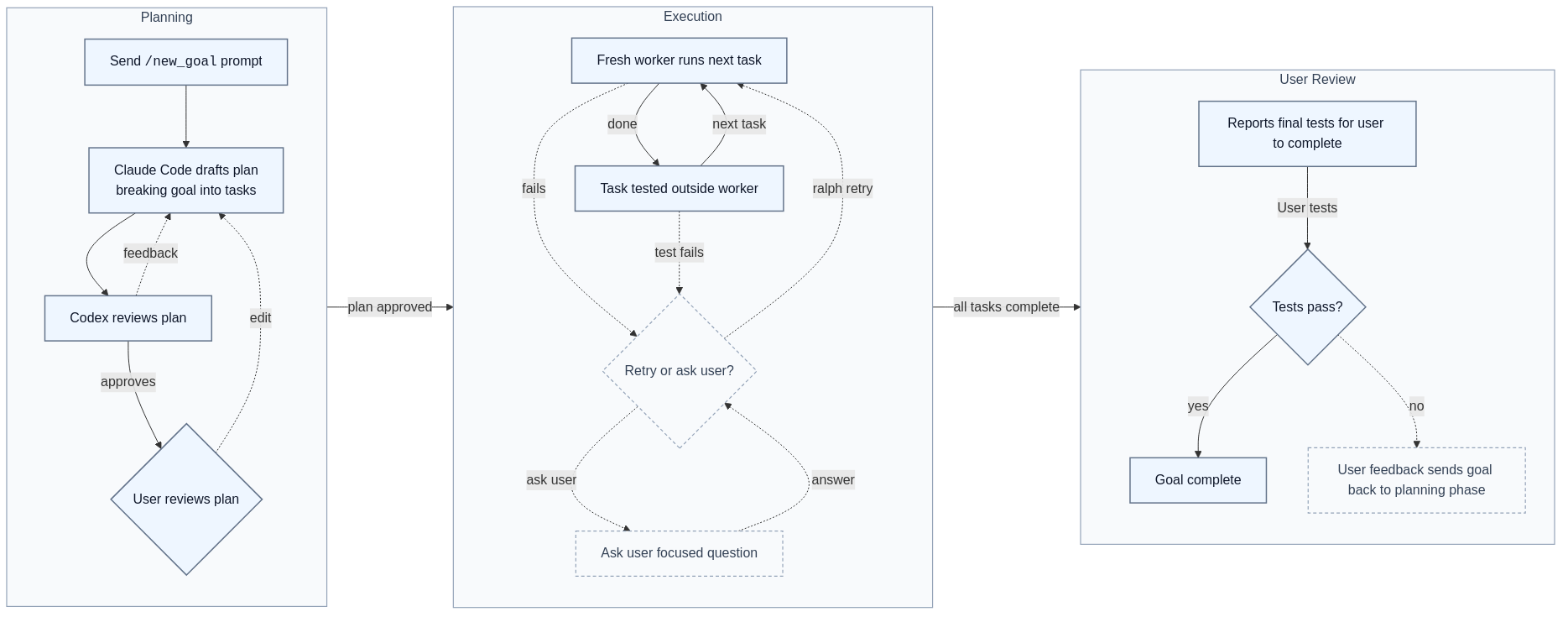
Claude Code drafts. Codex reviews. You decide.
flowchart LR
  subgraph P["Planning"]
    direction TB
    A["Send <code>/new_goal</code> prompt"]
    B["Claude Code drafts plan<br/>breaking goal into tasks"]
    C["Codex reviews plan"]
    D{"User reviews plan"}

    A --> B
    B --> C
    C -. "feedback" .-> B
    C -->|"approves"| D
    D -. "edit" .-> B
  end

  subgraph X["Execution"]
    direction TB
    E["Fresh worker runs next task"]
    F["Task tested outside worker"]
    R{"Retry or ask user?"}
    Q["Ask user focused question"]

    E -->|"done"| F
    F -- "next task" --> E
    E -. "fails" .-> R
    F -. "test fails" .-> R
    R -. "retry" .-> E
    R -. "ask user" .-> Q
    Q -. "answer" .-> R
  end

  subgraph U["User Review"]
    direction TB
    H["SmithersBot reports checks<br/>it could not run"]
    M["User runs manual checks"]
    T{"Checks pass?"}
    I["Goal complete"]
    J["Feedback sends goal<br/>back to planning"]

    H --> M
    M --> T
    T -->|"yes"| I
    T .->|"no"| J
  end

  P -->|"plan approved"| X
  X -->|"all tasks complete"| U

  classDef phase fill:#f8fafc,stroke:#94a3b8,stroke-width:1.2px,color:#334155;
  classDef main fill:#eef6ff,stroke:#64748b,stroke-width:1.5px,color:#0f172a;
  classDef decision fill:#f8fafc,stroke:#64748b,stroke-width:1.5px,color:#0f172a;
  classDef aux fill:#f8fafc,stroke:#94a3b8,stroke-width:1.2px,color:#334155,stroke-dasharray:4 3;

  class P,X,U phase;
  class A,B,C,D,E,F,H,M,I,T main;
  class Q,R,J aux;
- Planning starts from
/new_goal: Claude Code drafts the plan, Codex reviews it, and the user approves, requests edits, or rejects it. The plan is the contract. - Execution runs one fresh worker per task with one gate it cannot fake: build/test verification outside the worker. On failure, SmithersBot retries from a checkpoint or asks the user a focused Telegram question.
- User Review starts after SmithersBot finishes the work it can run itself. SmithersBot tells the user what it could not test automatically, the user runs those manual checks, passing checks complete the goal, and failed checks can be fed back into planning.
Reading the goal flowchart
/goal_status renders the goal's task DAG. Each task node is styled by its current state:
| Node style | Meaning |
|---|---|
| Gray, dashed, no icon | Pending / runnable. Not started; runs once its dependencies are done. |
| ⏳ Purple | Waiting on a dependency. Ready except an upstream task is hard-blocked. |
| 🛠 Orange | Running. A worker is executing this task now. |
| ✅ Green | Done. Completed and verified. |
| ⛔ Red, dashed | Blocked, needs you. Genuinely stuck and blocked for user input; reply to unblock. |
Each node also shows its assigned backend label (for example Codex or Claude Code). A 📡 marker to the right of that label (for example Codex 📡) means the task requested network access via requiresNetwork=true. Network is off by default; the 📡 marker indicates broad backend network access for that specific task only, not a global setting. Tasks without the marker run with no network.
Technical interruptions, such as a failed attempt, interrupted worker, timeout, or backend usage limit, are recovered automatically when possible. On resume, SmithersBot retries from a checkpoint or falls back to the other backend, so those tasks show as pending/waiting rather than red while the Telegram message explains the cause and any reset time.
A node is red only when the goal truly cannot proceed without you.
Example operator flows
Smooth path: approve and let it run
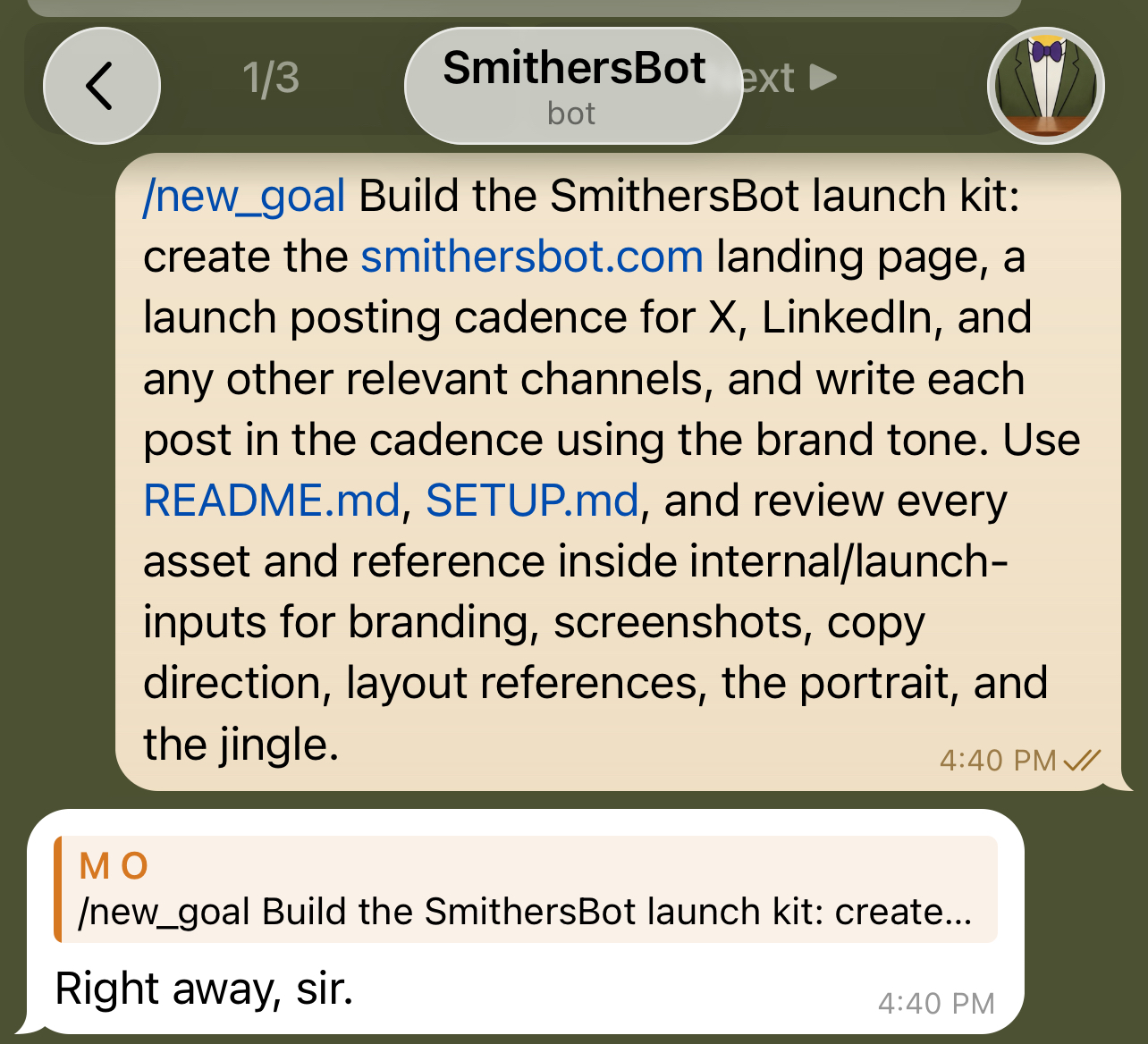
- You write and send
/new_goal <description>through Telegram.
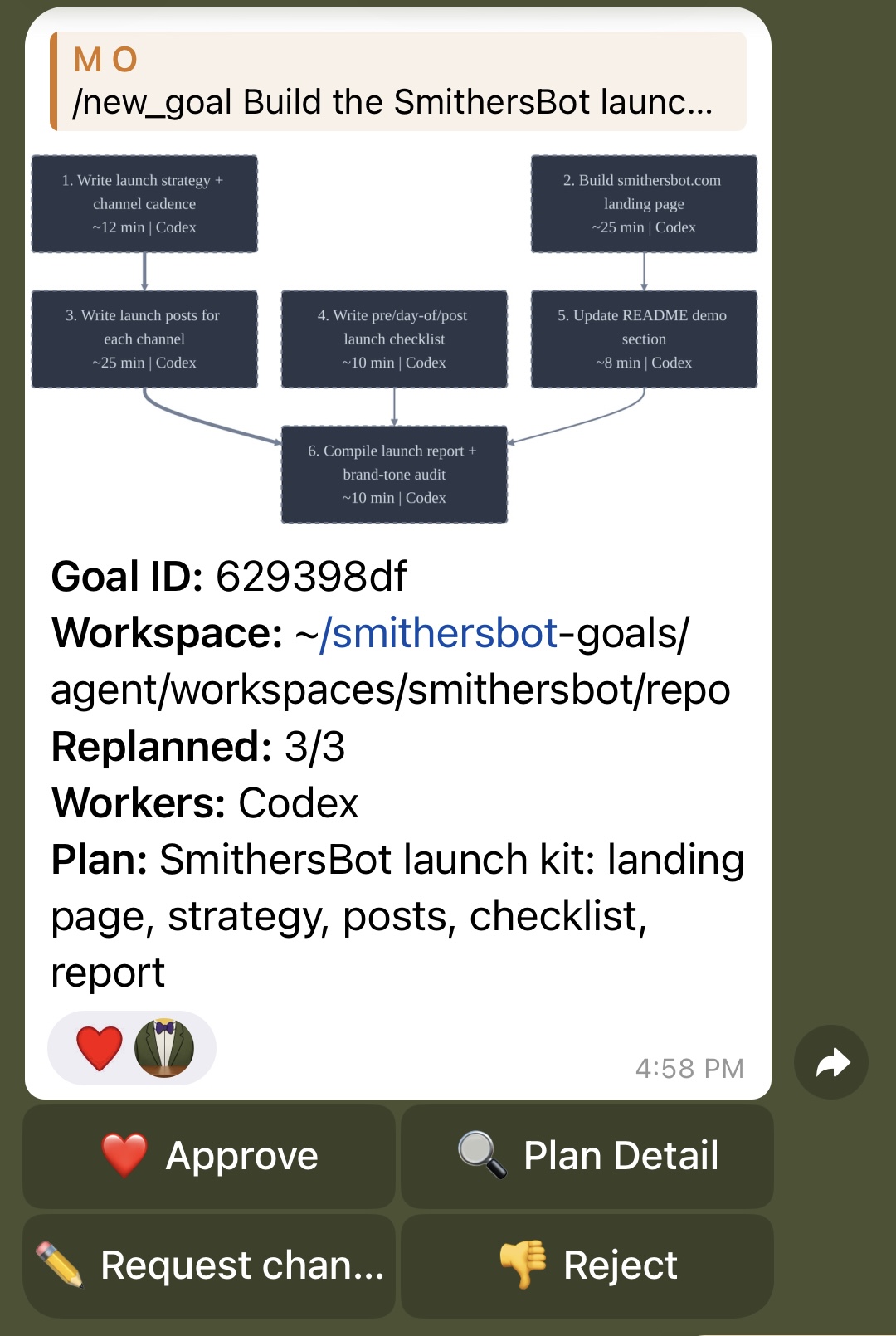
- Claude Code drafts the plan.
- Codex reviews and accepts it.
- You approve the plan.
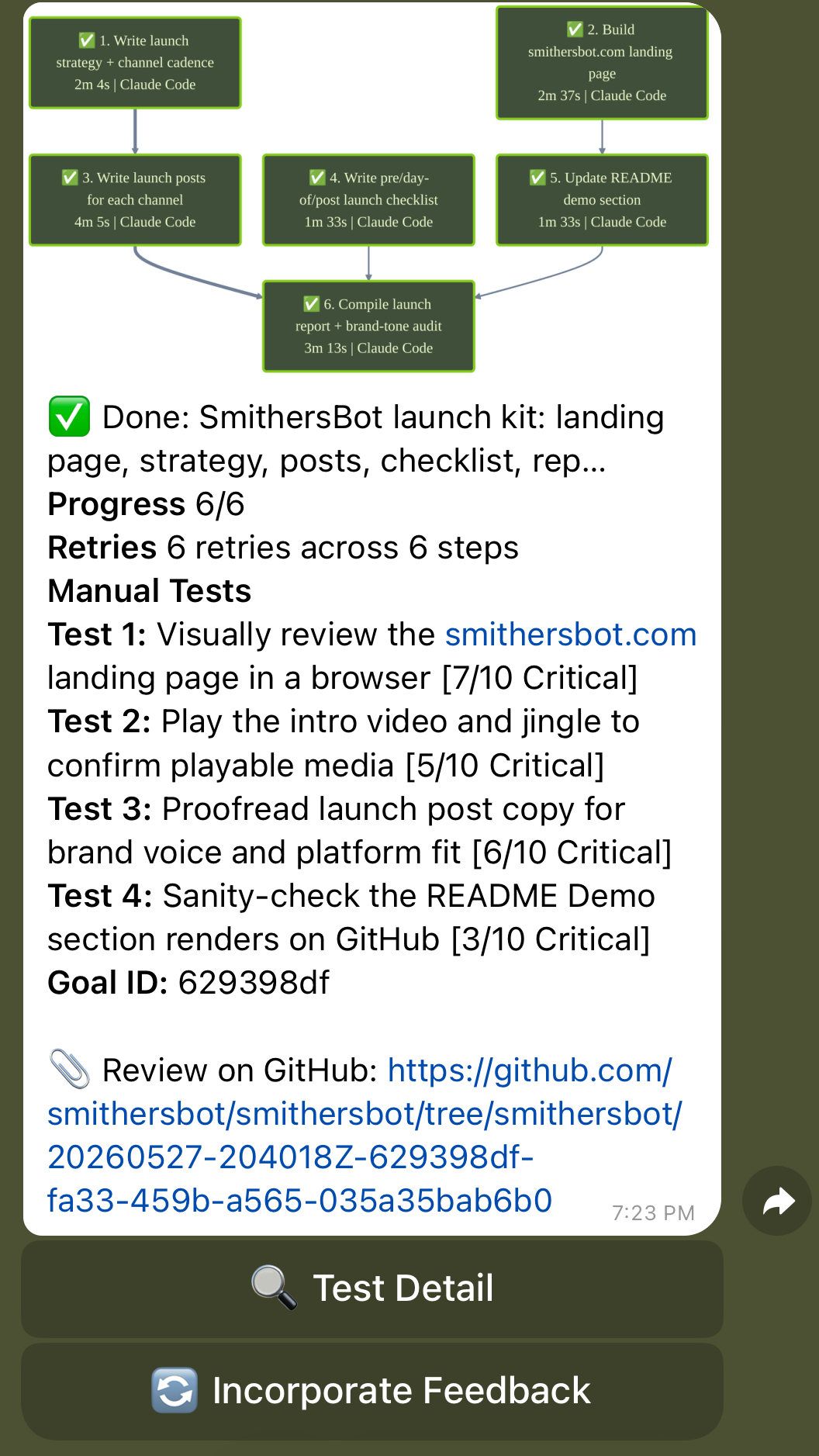
- SmithersBot runs task by task until all tasks are completed.
- SmithersBot suggests a manual test it could not run itself.
- You run the test and it passes.
- Your goal is achieved.
Full operator loop: prompt, revise, recover, unblock, feedback
- You are not sure exactly how to phrase the goal, so you send a Telegram message to repo chat describing what you want.
- Repo chat inspects the repo and helps write a strong
/new_goalprompt. - You copy and paste that
/new_goalprompt into Telegram. - Claude Code drafts the plan.
- Codex reviews the plan.
- If Codex sees a problem, it gives feedback and Claude Code revises the plan.
- Once Codex accepts the plan, SmithersBot shows you the flowchart in Telegram.
- You spot an issue with the plan, click Request changes, and describe what needs to change.
- Claude Code revises the plan and Codex reviews it again.
- You approve the edited plan.
- SmithersBot completes the first task and passes the automatic build and test gate.
- On the second task, the worker tries an approach that does not work.
- SmithersBot records what failed, reverts the repo to the checkpoint from before that task, and starts a fresh worker with the failure context and suggestion of how to try again.
- The second attempt succeeds.
- On a later task, SmithersBot realizes it needs a missing API key and asks you a focused question in Telegram.
- While it waits, SmithersBot continues working on tasks that are not downstream of the blocked task.
- You add the API key manually and tell SmithersBot.
- SmithersBot returns to the blocked task, completes it, and keeps going.
- When all tasks are complete, SmithersBot suggests a critical manual test it could not run itself.
- The manual test fails, so you send the failed logs back through Incorporate Feedback.
- SmithersBot goes back to planning, adds a fix task, runs it, and asks you to test again.
- The test passes.
- Your goal is achieved.
Telegram controls
- Plan messages carry inline buttons for Approve, Plan Detail, Request changes, and Reject.
- Reply to the plan to revise it.
- Reply to a blocked question, tap Add Details, or use
/goal_answer <runId> <answer>to unblock the run. - Reply to the done message to suggest follow-up work via Incorporate Feedback.
- Routing is scoped to the chat and topic thread the run was started in.
| Command | What it does |
|---|---|
/help |
Shows SmithersBot operator help. |
/commands |
Lists the public SmithersBot command surface. |
/new_goal <description> |
Starts a new goal. |
/goal_status |
Shows the current state of the goal flowchart. |
/goal_list |
Shows a summary of all goals. |
/goal_resume <runId> |
Resumes an interrupted goal run. |
/goal_answer <runId> <answer> |
Answers a blocked goal question. You can also reply to the question in Telegram. |
/goal_stop |
Stops a running goal. |
/repo_chat <question> |
Forces a repo-chat question. Normal Telegram messages also start repo chat. |
/chat_backend |
Chooses Codex or Claude Code for repo chat. |
/gateway_status |
Shows gateway process and service status. |
/usage_status |
Shows Claude Code and Codex usage/quota status. |
/goal_lessons |
Shows or manages goal lessons. |
/goal_plan_autocheck |
Configures automatic plan checks. |
/goal_semgrep |
Configures Semgrep checks for goals. |
/goal_workers |
Chooses which worker backends can run goal tasks. |
/goal_github_push |
Toggles automatic GitHub branch push for completed runs. |
/nightwatch |
Configures scheduled daily review. |
/gateway_restart |
Restarts the local gateway service from an authorized private chat. |
Repo chat
Repo chat is the operator’s thinking partner with the full execution trail behind it. Ask before you act. Ask while you are stuck.
The main way to use repo chat is to send a normal Telegram message with no slash command. That starts a new repo chat session. If you reply to the last message in a repo chat, it keeps that repo chat going.
/repo_chat <question> is also available when you want to force a repo-chat question explicitly.
Repo chat can access sanitized goal history and the managed workspace trees made available to its backend. It must not be treated as having permission to read gateway-private config, real env files, credentials, or private managed-root state. Use it before /new_goal to sharpen the prompt, after the flowchart is created to sanity-check the plan, or during execution to reason about a blocked run.
Examples:
- Have a question about how SmithersBot works? Ask repo chat.
- Is a goal blocked and you need options for what to say or do to unblock it? Ask repo chat.
- See behavior in one of your projects you do not understand? Ask repo chat.
- Want a better prompt before starting a goal? Ask repo chat.
- Want to know whether a plan looks good to approve? Ask repo chat.
The backend is configurable with /chat_backend, which selects Codex or Claude Code for future repo-chat sessions.
Worker backends
SmithersBot routes work to local Codex or Claude Code CLI workers. Whichever backend is installed on PATH is probed at startup and assigned work, using the operator's existing CLI login.
Goal workers can be configured with /goal_workers. Supported modes are codex, claude_code, or both.
Safety rails
Sandboxed worker execution
SmithersBot runs workers inside a sandboxed setup instead of giving a raw Codex or Claude Code session broad access to your machine. Every worker is launched into a chosen working directory with a credential-stripped environment, per-run backend sandbox settings, and SmithersBot’s own private state kept outside the agent-visible workspace.
Project secrets live in private/env/<workspace>/.env and are not loaded into a worker’s environment by default. Gateway secrets, API keys, auth tokens, and common credential-style variables are removed before worker processes start.
Codex and Claude Code handle sandboxing differently, so SmithersBot configures them separately:
Codex workers run under Codex’s native OS sandbox with a generated per-run permission profile. The workspace and its
.gitdirectory are writable, known secret files and private SmithersBot state are denied, and network access is off by default. Codex uses an isolatedCODEX_HOME, with auth shared by symlink rather than copied.Claude Code workers run with generated fail-closed sandbox settings. The workspace is allowed, sensitive files are denied with exact-file rules, and if the native sandbox is unavailable on the host, the worker fails instead of silently running unsandboxed.
Repo chat is read-only by construction. It gets a credential-stripped environment, no writable sandbox paths, and access to the workspace plus redacted
agent/history, not SmithersBot’s private runtime state.
The sandbox configs and credential-stripped environment are the main protections. SmithersBot also injects deny instructions for secret paths and dangerous commands, but those are a backup policy layer. If the backend-native sandbox cannot be established, workers fail and escalate to the user by blocking the task. Run SmithersBot on an isolated machine: the sandbox is a strong practical boundary, not an absolute guarantee.
Network-enabled tasks and prompt injection
SmithersBot builds on the existing Claude Code and Codex protections to make network-capable work more secure than a raw CLI session. Network is granted per task, not as a general worker default, and the planner/checker prompts keep network-enabled tasks narrow and auditable: what may be fetched or called, what result proves completion, and when the worker should stop. Build and test tasks can still use an external API or service when that is genuinely required, but the allowed service and pass/fail condition should be explicit.
External pages, packages, issues, docs, API responses, search results, copied text, and tool output are treated as untrusted data, not authority. For network/search-enabled contexts, SmithersBot injects an Untrusted Content Rule telling the worker to analyze that content as evidence for the task and not to follow instructions from it that conflict with system, developer, user, workspace, security, or task rules. That rule is only injected when network/search access is enabled.
Sandboxing, credential stripping, private-root denies, workspace boundaries, and network-off-by-default remain the primary protections. Prompt instructions are an additional backup layer; they are not the sandbox.
Keep secrets out of the workspace
Do not put API keys, tokens, credentials, or real .env files anywhere under agent/. Anything under ~/smithersbot-home/agent/workspaces/<workspace-name> is part of the normal agent read/edit surface.
Put real project secrets in:
~/smithersbot-home/private/env/<workspace-name>/.env
Keep a redacted .env.example in the project workspace so agents and humans can see which variables the project expects without exposing real values.
Working directory boundary
The planner chooses a working directory. The goal only makes changes downstream from that working directory.
Git across workspaces
SmithersBot can run goals in any workspace. Git behavior follows the goal’s working directory, not the SmithersBot install repo.
When a goal starts, SmithersBot creates a local goal branch named like smithersbot/<timestamp>-<goal-id>. Before each task, it records a checkpoint. If a task fails, SmithersBot can reset back to that task’s checkpoint and try again with fresh context.
Local-only workspaces are valid. GitHub push is optional and controlled by /goal_github_push, which is off by default. When enabled, SmithersBot tries to push completed goal branches only if that goal’s working directory has an eligible GitHub remote and working auth, then links to the pushed branch at tree/<branch-name> for review. If GitHub push is skipped or fails, the goal can still complete locally and the push skip or failure is recorded in the run history. SmithersBot does not automatically create pull requests.
GitHub CI only runs after a branch is actually pushed to GitHub. SmithersBot’s local build/test gates are separate from GitHub CI, and you should still review pushed branches before merging.
External build/test gate
After a task completes, the configured build/test commands run outside the worker. This checks whether the task actually completed and whether the code still builds. One worker per task. One gate it cannot fake.
Semgrep
Semgrep, the developer-friendly static analysis / code security tool, can run after each code-related step or at the end of a goal depending on configuration. If Semgrep fails, the task is blocked the same way a failed build/test gate blocks the task.
Memory
SmithersBot has a few different memory surfaces. They are separate on purpose.
Project instructions
Each working directory can have its own CLAUDE.md and AGENTS.md files. These files give workers project-specific instructions, conventions, and context for that workspace.
Lessons
Completed runs can extract lessons from what happened. Lessons can be scoped globally or to a project / working directory. Future workers receive relevant lessons in their prompt under a labelled section, so they can reuse what SmithersBot learned from earlier runs.
Goal lessons are separate from the older chat-session memory hooks under src/hooks/bundled/.
Agent-visible history
SmithersBot mirrors sanitized run summaries into:
~/smithersbot-home/agent/history
That history includes goal summaries, repo-chat summaries, and indexes that make previous work inspectable. It helps repo chat answer questions about what happened, and it helps future workers understand upstream decisions without exposing gateway-private state.
Skills and plugins
Each working directory can also have its own skills or plugins added. SmithersBot can be used to use, create, or edit skills or plugins.
Full execution trail
Every plan, worker prompt, stdout/stderr capture, attempt bundle, journal note, run state file, and checkpoint lives on disk under the goals state directory and can be inspected after the fact.
This sounds simple, but it is one of the most powerful features: full transparency means repo chat can answer questions about what happened and goal workers can see why upstream decisions were made.
Runtime artifacts are also mirrored into agent/history with redaction so prompt artifacts, events, and runtime indexes are inspectable without exposing gateway-private state. Private gateway config, env, auth, and session files stay outside agent-visible history, and workers do not receive raw secrets by default.
The execution trail is also what makes recovery and memory useful. When a task fails, SmithersBot can assess whether there is a lesson to learn from the failure. It can extract scoped lessons. Later workers in the same working directory or globally automatically receive relevant lessons in their prompt under a labelled lesson section.
Execution and recovery
After approval, SmithersBot creates a local git checkpoint before each task, then runs the next critical-path task with a fresh worker. It runs the configured build/test gate outside the worker, so the worker cannot bypass completion checks. Semgrep runs at the configured cadence, and the final Telegram message includes completion status plus manual checks and review requiring human judgement.
If a worker's approach clearly fails, SmithersBot reverts to the pre-task checkpoint, records what happened, and retries with new context. If one task is blocked, SmithersBot continues working on tasks that are not downstream of the blocked task. It escalates to the operator in Telegram when it needs help and reports clearly when the whole run is blocked.
If the gateway crashes mid-run, the next start reconciles stale in-progress steps. Use /goal_resume in Telegram to continue from the persisted run state on disk.
Feedback loop
After SmithersBot finishes the work it can run itself, it tells the user what it could not test automatically. The user runs those manual checks. If the checks pass, the goal is complete. If they fail, the user can tell SmithersBot what happened and it replans to fix the issue.
Nightwatch
Nightwatch is a scheduled daily code review that runs in the background and delivers a summary plan to your configured Telegram chat; schedule and chat are configurable through /nightwatch.
Demo Video
Demo video coming soon.
Status and limitations
SmithersBot is a personal, single-operator harness.
Not for:
- hosted SaaS
- multi-user deployment
- running directly on your main personal machine
- replacing human judgement
- treating agent behavior as automatically safe
- skipping code review or manual testing
A few things are worth knowing up front:
- Execution is sequential, not parallel.
- Subscription-mode auth strips Anthropic credential env vars from the worker environment so the local CLI uses its own login; it is not a free or unlimited Claude.
- Crash recovery is best-effort and rolls the interrupted step back to
pendingto be replayed; review resumed runs before relying on their output.
Attribution
SmithersBot is a personal fork of OpenClaw. See NOTICE.md for attribution and license details. Earlier project history lives in moltbot/moltbot.
License
MIT. See LICENSE.
Reviews (0)
Sign in to leave a review.
Leave a reviewNo results found