faryo
Health Warn
- License — License: MIT
- Description — Repository has a description
- Active repo — Last push 0 days ago
- Low visibility — Only 7 GitHub stars
Code Warn
- network request — Outbound network request in apps/gateway/gcp-gateway/static/projects.js
- network request — Outbound network request in apps/owner/local-tmux-owner/static/app.js
Permissions Pass
- Permissions — No dangerous permissions requested
No AI report is available for this listing yet.
Lightweight project/mobile workbench for same tmux-backed AI coding sessions; not remote desktop or a second AI chat.
Faryo
Documentation
- Launch guide: docs/launch/faryo-1.0.0.md
- Troubleshooting: docs/launch/faryo-1.0.0.md#troubleshooting--deployment-verification
Canonical repository: https://github.com/Snailflyer/faryo
Faryo is a lightweight phone and desktop workbench for the same livetmux-backed Codex CLI, Claude Code, or shell session.
Use it to check output, send one instruction, approve or interrupt an agent,
attach context, and return to the same desktop terminal. It is not remote
desktop, a hosted IDE, a browser terminal, or a second AI chat history.
Read the launch note:Faryo: mobile workbench for tmux-backed Codex and Claude sessions.
Use It For
- check a long-running terminal AI task from a phone
- send a short follow-up without opening a raw terminal
- approve, interrupt, attach files, or hand off notes
- keep phone and desktop on the same
tmuxsession history
Best-supported path:
Linux endpoint
  + tmux
  + Codex CLI
  + Chrome / Android Chrome PWA
macOS Owner packaging, iOS Safari, Claude Code session discovery, and generic
shell TUIs are supported but less polished.
Quickstart
curl -LO https://github.com/Snailflyer/faryo/releases/download/v1.0.0/faryo_1.0.0_all.deb
sudo dpkg -i faryo_1.0.0_all.deb
systemctl --user daemon-reload
systemctl --user enable --now faryo-owner-keepalive.timer
mkdir -p ~/.faryo/owner/config
cp /opt/faryo/apps/owner/config/faryo.env.example ~/.faryo/owner/config/faryo.env
$EDITOR ~/.faryo/owner/config/faryo.env
curl --noproxy '*' http://127.0.0.1:8765/health
Owner should bind to 127.0.0.1. Public access should go through Gateway, which
injects Owner tokens server-side so browsers do not receive raw Owner tokens.
How It Works
Faryo has two small components:
phone / desktop browser
  -> Faryo Gateway
  -> Owner endpoint
  -> tmux session
  -> Codex, Claude, or shell TUI
apps/gateway is the public workbench. It owns login, route authorization,
endpoint health, session selection, handoff packages, and proxying to Owner
endpoints. Owner tokens are injected server-side and are not exposed to the
browser.
apps/owner is the local execution surface. It binds to loopback, controls a
target tmux pane, captures terminal output, sends text, uploads attachments to
a configured inbox, and discovers resumable Codex/Claude history.
The browser UI stays thin. It renders the workbench, sends commands, uploads
attachments, and switches sessions; it does not replace the terminal runtime.
The endpoint package intentionally includes only Owner. Gateway is source
deployed because it is the public routing and policy layer.
Endpoint Fit
Faryo is built around a lightweight browser workbench, but endpoints and
browsers do not behave identically.
The most refined path today is:
Linux endpoint
  + tmux
  + Codex CLI
  + Chrome / Android Chrome PWA
That path has received the most tuning for mobile viewport behavior, PWA use,
compact output, command input, attachment handling, session switching, and
Codex history convergence.
Supported but less heavily polished paths:
- macOS Owner packaging through the launchd installer.
- iOS Safari as a browser surface.
- Claude Code session discovery and compact rendering.
- Generic shell TUIs controlled through tmux capture/send.
These paths are usable, but they may need additional refinement around browser
viewport behavior, backgrounding, paste/input edge cases, compact rendering, and
agent-specific session history mapping.
Agent Convergence
Faryo treats "session convergence" as the process of making four things line up:
active tmux session
  + visible terminal process
  + agent history record
  + workbench session card
Different agents expose different state, so Faryo uses different convergence
rules.
Codex is the most mature integration:
- reads the Codex local session database
- filters internal and subagent branches from normal history
- maps the active tmux process back to the current Codex thread
- resumes sessions through
codex resume - applies Codex-specific compact output rules
Claude is supported with a different path:
- reads Claude project JSONL history
- tracks managed Claude tmux sessions with Faryo tmux metadata
- resumes sessions through Claude session IDs
- applies Claude-specific compact output rules
Claude convergence is intentionally separate from Codex convergence. It is not
as heavily tuned yet, especially across macOS, iOS Safari, and less common
Claude output states.
Generic shell sessions are controlled through tmux only. They can be captured,
viewed, and sent input, but they do not have Codex/Claude-style semantic history
convergence.
UI Interaction Model
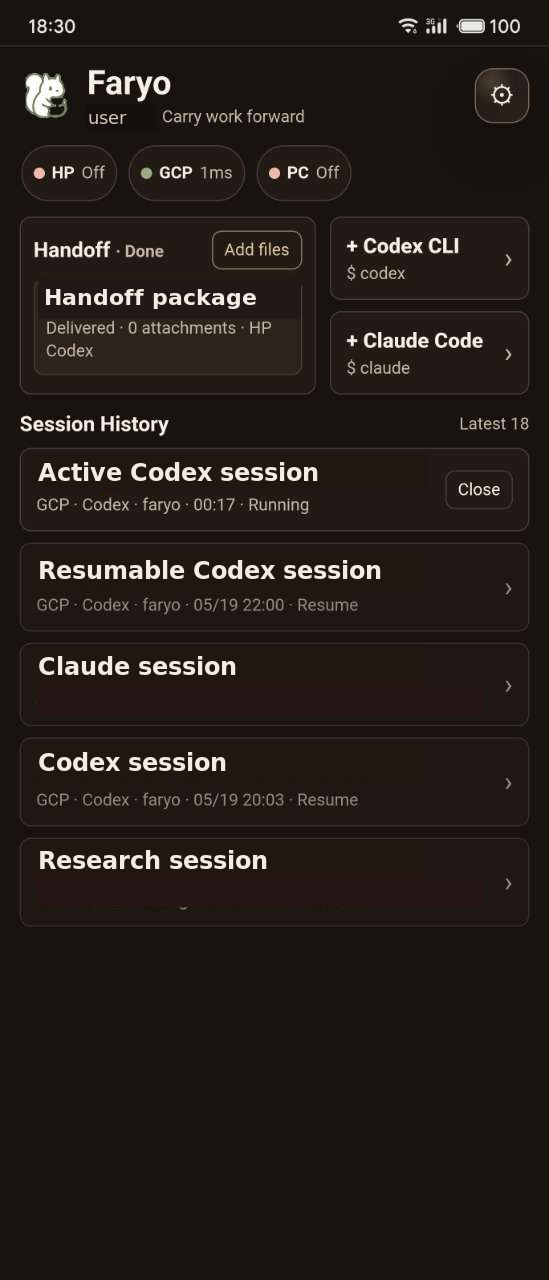
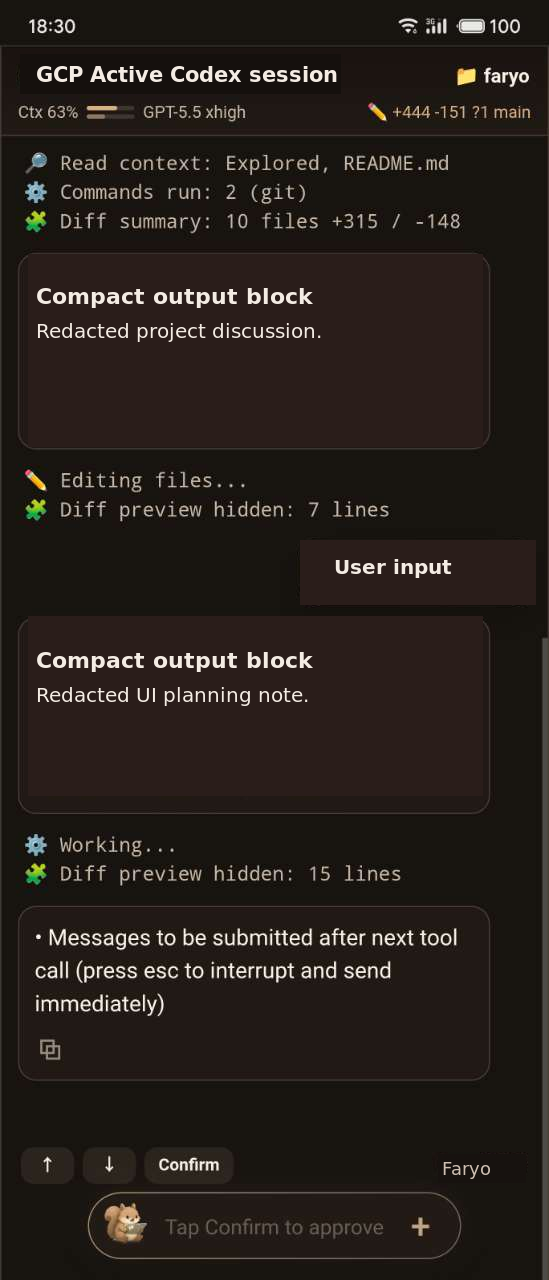
Faryo's UI is a workbench, not a document editor or chat clone. The main screen
is optimized for repeated mobile checks and short control actions. Screenshots
near the top are redacted examples.
Core interactions:
- Workbench first: Gateway opens to route status, active sessions, recent
history, and pending handoff packages. - Session cards: each card represents a resumable agent session or active tmux
session. Opening a card routes the browser to that endpoint and session. - Compact output: the default mobile view reduces noisy terminal output into
readable work blocks while keeping the session grounded in terminal history. - Raw output: full terminal capture is available when exact terminal evidence is
needed. - Latest control: when the user scrolls up, Faryo does not force-jump the view;
new output waits until the user taps the latest control. - Composer: the bottom input sends text into the active tmux pane. It works well
with mobile keyboards and system dictation. - Attachments: images and files can be uploaded into the configured inbox and
referenced in the active session. - Handoff packages: prompts, notes, screenshots, and files can be picked up and
injected into a selected session. - Agent controls: interrupt, approve, page up/down, resume, and close actions
are exposed as direct controls instead of hidden terminal shortcuts. - Thin state: the browser remembers display preferences, but the work session
itself remains in tmux and the agent history store.
The UI intentionally avoids heavyweight panels and IDE-style layout. It should
feel fast enough to open, inspect, dictate a command, attach context, and leave.
Core Features
- Mobile-first PWA workbench with compact and raw terminal views.
- Shared session history across phone and desktop through the same
tmux
session. - Codex and Claude session discovery, resume, interrupt, and approval controls.
- Multi-endpoint routing for local machines and cloud endpoints.
- Handoff packages for prompts, notes, images, and files.
- Lightweight attachment handling with local inbox paths.
- No browser automation, no remote desktop stack, and no database server in the
runtime path.
Runtime State
Source code lives in this repository. Runtime configuration and secrets do not.
~/.faryo/
  gateway/
    config/faryo.env
    config/gateway-auth.json
    state/
    logs/
  owner/
    config/faryo.env
    data/
Example configuration files live under:
apps/gateway/config/faryo.env.example
apps/owner/config/faryo.env.example
Requirements
Owner endpoint:
- Python 3.11 or newer
tmuxcurlzsh- optional:
git,openssh-client, Codex CLI, Claude Code
Gateway:
- Python 3.11 or newer
bcrypt- a reverse proxy such as Caddy or nginx for public HTTPS
Packaging
Endpoint releases are built from apps/owner/RELEASE.
scripts/package-client.sh check
scripts/package-client.sh release
The release target builds:
dist/faryo_<version>_all.deb
dist/faryo_<version>_macos.tar.gz
dist/SHA256SUMS
Install the Linux endpoint package on an Owner machine:
sudo dpkg -i dist/faryo_<version>_all.deb
systemctl --user daemon-reload
systemctl --user enable --now faryo-owner-keepalive.timer
After configuration, the Owner health and status endpoints should answer on
loopback. releaseVersion in /api/status is the endpoint version to use for
upgrade acceptance.
Repository Layout
apps/gateway/       Public gateway, login, routing, and handoff workbench
apps/owner/         Local tmux-backed execution endpoint
packages/shared/    Shared code and contracts as they are extracted
docs/               Product, launch, release, UI, and client sync notes
deploy/             Runtime unit templates
scripts/            Packaging, endpoint install, and verification tools
Security Model
Faryo is designed for a trusted operator running their own endpoints.
- Owner should bind only to
127.0.0.1. - Public access should go through Gateway.
- Tokens, password hashes, cookie secrets, and runtime env files are private
runtime state. - File preview and attachment APIs are token-protected and constrained by
supported file types. - Gateway bridge URL attachments reject private, loopback, link-local,
multicast, reserved, and unresolved hosts.
See SECURITY.md for the short disclosure and deployment guidance.
License
Faryo is released under the MIT License. See LICENSE.
Reviews (0)
Sign in to leave a review.
Leave a reviewNo results found