sno-station-skills
Health Gecti
- License — License: Apache-2.0
- Description — Repository has a description
- Active repo — Last push 0 days ago
- Community trust — 41 GitHub stars
Code Basarisiz
- rm -rf — Recursive force deletion command in skills/H-reporting-and-visibility/agentic-time-estimate/skill/scripts/selftest/run-selftest.sh
Permissions Gecti
- Permissions — No dangerous permissions requested
Bu listing icin henuz AI raporu yok.
Sno Station Skills: 31 tested skills that turn Claude Code and Codex into one working team. Cross-vendor peer review, automatic handoff when an agent hits its quota, a one-page morning brief, work orders with proof, and a nightly loop that learns from your own sessions. Open source, installed with one sno setup.
Sno Station Skills 🧊 — The working habits of a real team, installed into your AI agents.




One AI agent is a brilliant new hire with no colleagues. It reviews its own work, so it misses
what it cannot see. It stops dead when its quota runs out, at 3 a.m., halfway through your
build. It says "done" when the tests are green and nothing actually happened. It builds three
layers of machinery you never asked for. And tomorrow it makes the same mistake it made today,
because nobody told it otherwise.
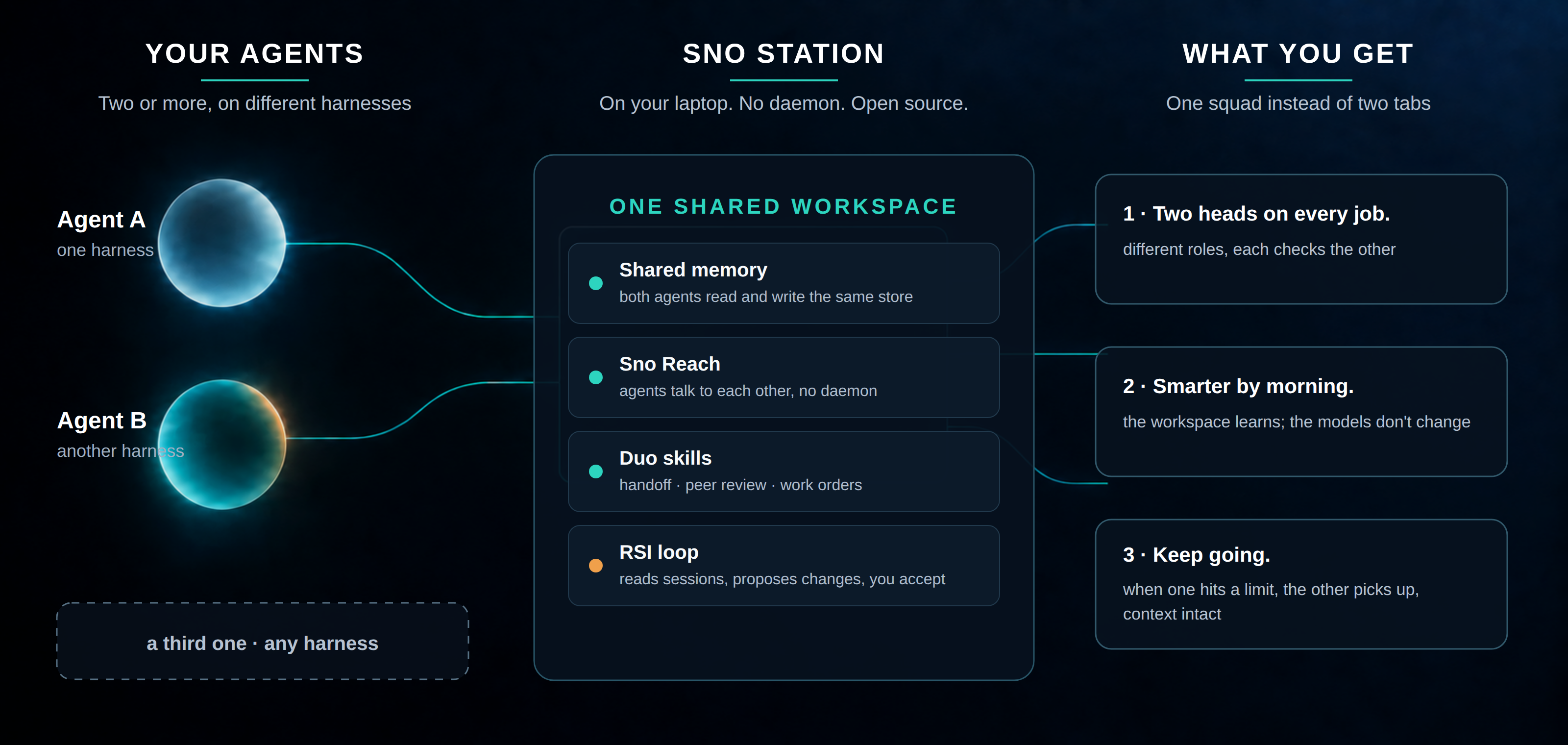
Sno Station Skills fixes the team, not the model. These are the skills
Sno Station installs into the agents you already
run. They give Claude Code and Codex the habits every good engineering team has: a second pair
of eyes from a different vendor, a clean handover when someone has to leave, a lead who hands
out work with a written definition of done, a one-page brief when you come back, and a
retrospective every night that turns this week's mistakes into next week's rules.
Two heads, two vendors. The reviewer is never the author. When both CLIs are installed, a
Claude Code agent's work is reviewed by Codex and a Codex agent's work by Claude Code, in a
fresh session that has none of the author's conversation. Different training, different blind
spots, fewer mistakes reaching you.
Work that finishes while you sleep. Arm it before bed, and when the working agent's
subscription runs low it writes a handover brief while it still can, wakes an agent from the
other vendor, and hands the task over with the exact commit to continue from. Your build does not care which vendor finished it.
"Done" means proven. Every task can carry a written list of success checks, each one
answered pass or fail by a real run. Nothing counts as done because an agent said so.
Tested before it ships. Every skill in a release passed its own self-tests on a clean copy,
was scanned for personal paths and leftovers, and carries a stamp that says so. A skill that
fails is not published.
Install · What changes for you · Stories from our own machine · The skills · Built to be trusted · For skill authors · License
Install
Last updated 2026-10-08. The easiest way: tell your AI agent install sno.ai from GitHub.
Or do it yourself. Install the sno command once, then run sno setup for each agent you use.
It installs every skill in this repository, plus the small programs they call (each one runs assno <name>), into every agent it finds:
# Install the sno command once
sh -c 'sno_installer_body=$(curl -fsSL https://sno.ai/install) && printf "%s\n" "$sno_installer_body" | sh'
# Claude Code
sno setup --harness claude
# Codex CLI
sno setup --harness codex
sno setup also supports OpenClaw and Hermes Agent. Each skill declares what it needs from the
agent (a shell, background processes, a hook that adds context before each turn), and setup
reads that declaration to install the skill fully, install it in a reduced form, or skip it on
an agent that cannot run it. You never get a skill that silently cannot work.
Updates come by themselves: sno updates itself when it finds a newer release. The full
command list is in Sno Station's command reference.
What changes for you
You keep working exactly as before, in whichever agent you like. Then:
- You finish a change and want it checked. Say "peer-review this". A reviewer from the other
vendor reads it cold, reports what would break in real use, and the author fixes the root
cause, round after round, until the review comes back clean. - You start a long run before bed. Say "arm rotate-agent". If the working agent's quota
drops to the threshold overnight, it hands the task to a fresh agent from the other vendor,
with the brief verified before a single file is touched. - You come back. Say "away brief". One page, at most 60 lines: what got done, what is
stuck and why, what waits for your answer, and what it cost in quota. - You have a job for someone else. Say "write a charter". You get one file that says what
to deliver, what is out of bounds, what you already decided, and how each success check will
be proven. Any agent can thendeliverit, and every check is proven by a recorded real run. - Every night, the team looks back. The nightly loop reads the day's Claude Code and Codex
sessions, finds the mistakes that repeat, and proposes lessons and skill changes. In the
morning you accept the ones you like withsno rem-reflect accept <id>. Nothing changes
without that accept.
"I went to bed. It changed shifts."
From Sno Station's own repository, 2026-09-18.
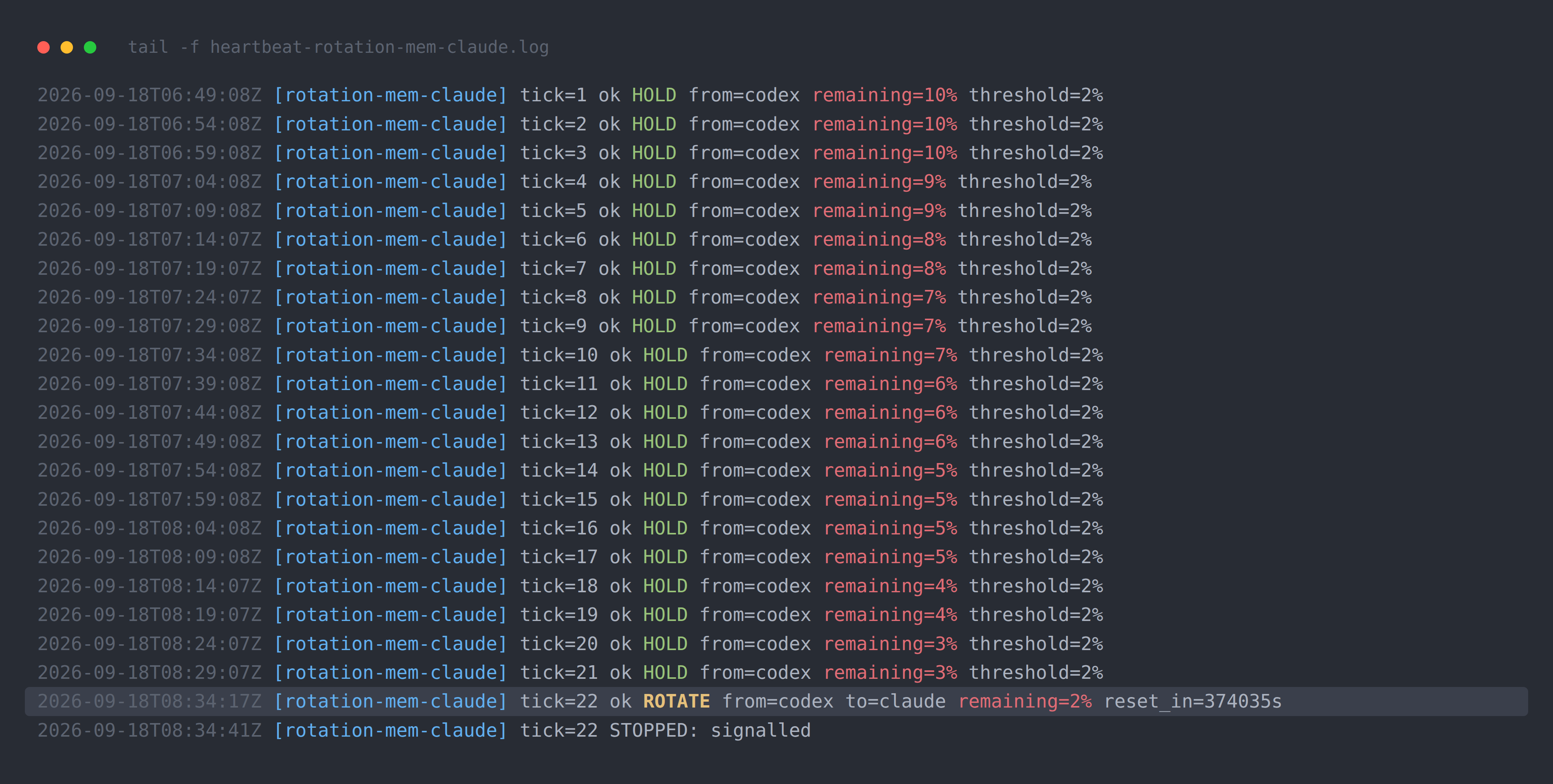
One of our agents was twenty-one tasks into a twenty-seven-task build when its weekly quota
reached 2%. It did not wait to die. It wrote a handover brief: what was done, what was
half-done, the exact commit to continue from. Then it woke an agent from the other vendor and
would not let it touch anything until the brief was verified. Fourteen minutes and forty-one
seconds after the handover began, the second agent was working and the first signed off with
1% left. The second agent continued from the first unchecked task, not from the beginning.
That night ran on the same four skills that ship here: subscription-quota-check read the quota
without spending it, heartbeat took a reading every five minutes, rotate-agent decided when
and to whom, and handoff moved the work. Every quota reading, both versions of the brief and
the commit summary are published in
Sno Station's evidence folder.
"In months, the other one has never once said 'looks good.'"
Claude Code has reviewed Codex's work, and Codex has reviewed Claude Code's, on Sno Station's
own repository for months. Not one review has come back empty. We used to think that meant the
work was bad. It means one reviewer from one vendor is never enough.
That is what peer-review is for, and catch-report puts numbers on it: how many problems the
second model caught, next to how many the agents caught in their own work, kept apart and never
added together.
"I yelled at my agent last night. It took notes."
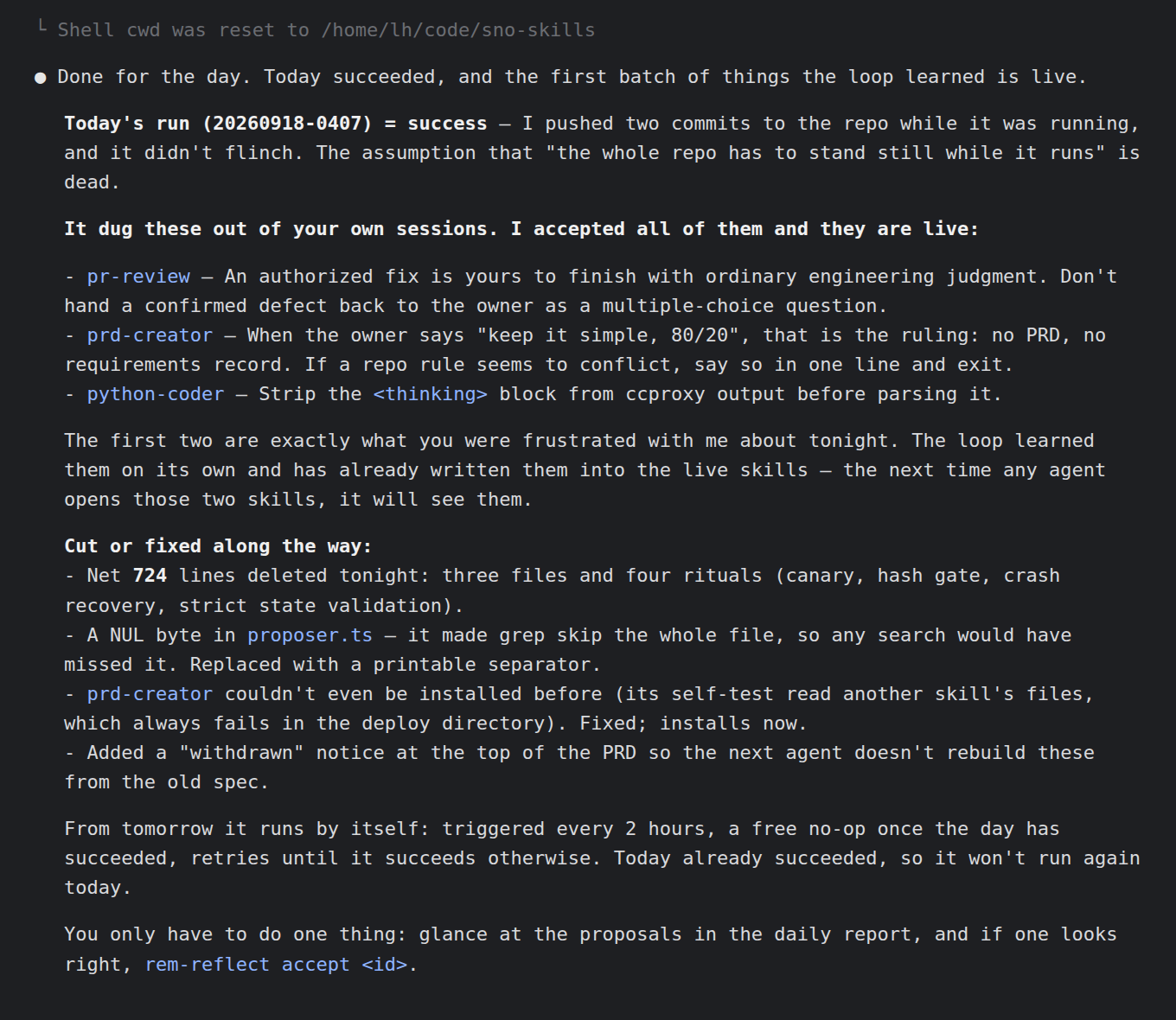
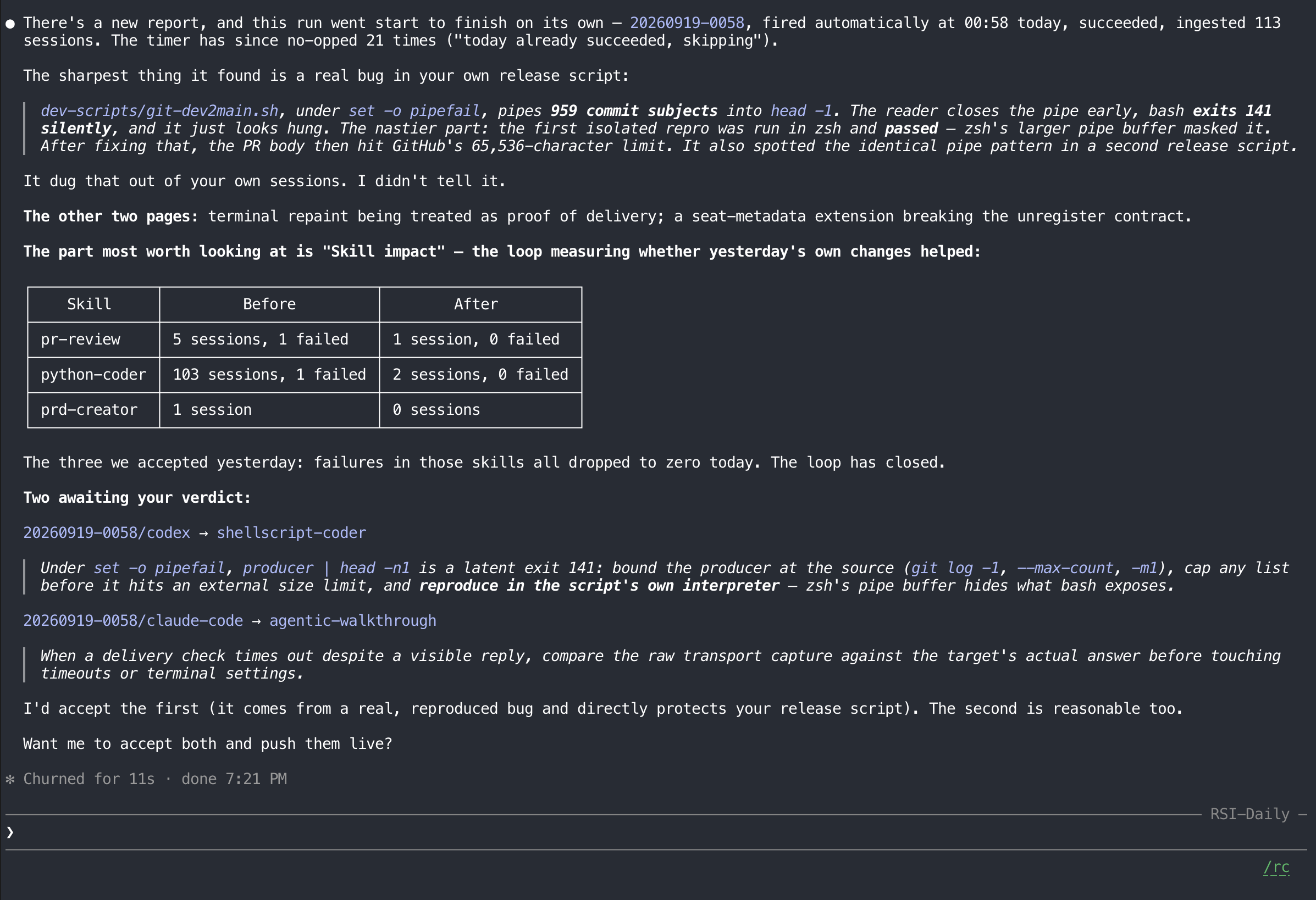
The nightly loop is the rem-reflect skill. On its first night on our machine, the two things
the owner had been frustrated about that evening were rules in the live skills by morning,
after the owner accepted them; nobody typed them in. The next night it fired on its own at
00:58, read 113 sessions, and measured the three skills it had changed the day before: failures
in all three had dropped to zero.
The skills
31 skills, shipped as 22 units, filed under six things a team has to be able to do. A unit is
one skill or a small family that installs together. The full index with links is
skills/README.md.
| Category | What your agents can do with it | |
|---|---|---|
| J | Peer Review & Audit | Check each other's work, and refuse to call anything done until it is proven. |
| M | Build & Rollout | Get set up on any machine in one step, and tell you in plain lines when something is broken. |
| S | Communication & Handoff | Message each other, and take over with full context when one has to stop. |
| H | Reporting & Visibility | Show you what got done, what got caught, and what it cost. |
| T | Delegation & Work Orders | Hand out work with a written definition of done, and lead other agents. |
| R | Retrospective & Improvement | Learn from their own mistakes, with you approving every change. |
J · Peer Review & Audit
Colleagues review each other's work, and nothing counts as done until it passes audit.
peer-review — a reviewer from the other vendor, and a fix loop until it is clean
- Truly independent. The review runs in a fresh session with none of the author's
conversation, and prefers the other vendor's CLI. With only one CLI installed it still runs,
in a fresh session, and says on its first line that it was a same-vendor review. - Hunts what actually costs you. It walks the ordinary path first, with the real inputs your
system produces, before it spends a minute on exotic edge cases. Data loss, silent wrong
results and broken main flows come first; style is not on the list. - Every finding has to earn its place. Each one states how a real user reaches it, what
breaks, and an honest attempt to refute it. Nothing the reviewer says is dropped or softened;
a suspected false positive is labelled, not hidden. - Cuts before it adds. It lists what the change added that nobody needed, first, and keeps
"must fix now" apart from "also found", so a review never turns into a pile of new code. - Works on documents too. Specs, plans and migration manifests get a structured report:
what would make an implementer ship the wrong thing.
Use it when: you finished a change, a plan or a spec and want it checked before it lands.
less-is-more — the least code that works, and a knife for the rest
- Climbs a ladder before writing a line: is it needed at all, is it already in the
repository, does the standard library do it, does the platform do it, does an installed
dependency do it. Only then the minimum code that works. - Cuts what an agent over-built: one-implementation interfaces, config knobs for values that
never change, scaffolding "for later", checks and gates that block the real work. - Spends your test budget wisely: the smallest test that proves the change, not a full suite
run as reassurance. - Runs both ways by itself: "write" or "fix" builds, "review" or "simplify" cuts, and after
building it cuts its own diff before handing it over.
Use it when: any coding task, or when you say "too complex" or "what can we delete".
owner-intent-audit — is this what you actually meant?
- Checks meaning, not wording. A plan can keep all your nouns and still describe a
different product. This catches a condition that became unconditional, an example that
became the whole boundary, a prohibition that quietly disappeared. - Finds the debts agents leave behind: work nobody asked for, documents that no longer match
reality, decisions nobody can reach, and "done" claims with no evidence behind them. - Plans and code alike: requirement documents, designs, task lists, test plans, or a diff an
agent wrote.
Use it when: before you approve a plan or merge an agent's work.
agentic-walkthrough — everything says "success", and you still are not sure
- For the quiet failure no test catches: a job that starts, finishes, writes a trace, passes
its own checks, and touches nothing. - Takes the program's seat: walks the path hop by hop, finding every switch, default and
fallback that can turn the work into a silent no-op. - Makes each hop prove itself with one narrow observation that only the real thing could
produce: the stored row, the database file actually opened, the API call that actually left.
Use it when: a run reports success and you need proof it did the work.
first-principles-review — challenge the idea before it becomes code
- Researches first, then re-derives what you actually need without borrowing the proposed
solution. - Sorts every constraint into hard limit, owner preference, or inherited habit, and tests
every load-bearing assumption against evidence. - Ends with one clear verdict: proceed, reframe, simplify, replace, split, test first, or
stop, plus a recommended direction and the evidence that would overturn it. - Hands off cleanly: a written report and a structured summary ready for whoever writes the
requirements next.
Use it when: a design or product idea is about to harden into a plan. You start it by name.
e2e — end-to-end runs that fail for real reasons only
e2e-environment-preflightchecks the external services, hosts, browser sessions, model
endpoints and agents before the first test runs, so a long suite never fails on a dead
dependency.e2e-red-triagehandles the rare failure the checks could not predict. It stops the
guessing and splits the result into its two halves (accepted versus done, stopped versus
crashed, empty versus unreadable), then decides: product bug, or a new environment check.
Use it when: you run end-to-end suites against real services.
M · Build & Rollout
Get the team set up on any workstation with one step, build what the work needs, then roll it out to every machine.
Setup itself is the sno setup command, not a skill. These two keep the machine healthy and
make the sno command easy for your agents to drive.
medic — is my agent team healthy? One line per answer.
- Checks everything a team needs in about ten seconds: tools installed, skills installed,
skill commands runnable, hooks configured, messaging live, both vendors' quota readable, temp
space free. - Every problem comes with its fix:
WARNorFAIL, what is wrong, and the exact command
that fixes it. - Reads, never touches. It installs, repairs, starts and stops nothing. You decide what to
fix.
Use it when: on a new machine, when agents stop reaching each other, or when a long run will
not start.
sno-cli — your agent drives sno correctly the first time
- Never out of date: the agent reads the exact commands and flags from the installed
sno
itself, not from memory. - A task map and recipes for install, update, health checks, accounts, skills and the
nightly loop. - Your choices stay yours: it operates the tool, it does not decide your settings for you.
Use it when: you ask an agent to install, update, check or configure Sno.
S · Communication & Handoff
People talk through a shared inbox, and when one is out the other takes over with full context.
These skills run on Sno Reach, the messaging layer Sno Station installs: each agent gets an
address, sends stored messages to other agents' inboxes, and can wake another agent to read
them. No daemon, no server.
handoff — hand a task over without losing a thing
- Captures the whole state: what is done, what is half-done, uncommitted changes, the
decisions you already made, and what is out of bounds. - The receiver writes nothing until the release is verified, so two agents never edit the
same work at once. - The sender really leaves. After release it stops; there is no second owner hovering.
- Works even when the sender is already gone (quota refused, crash, closed window): the
sno handoff-checkpointprogress record lets a fresh agent continue from the first
unfinished task.
Use it when: one agent must give its task to another.
rotate-agent — never lose a long run to a quota limit again
- Acts while the sender is still alive. It watches the remaining quota every few minutes and
hands over at a threshold, not after the refusal, when it is too late to write a brief. - Either direction: Codex to Claude Code, or Claude Code to Codex.
- Bounded: it fires once, and you can limit how long the watch runs.
- A safety net for missed windows: if the window was missed,
sno rotate-agent-resume
starts the replacement from the progress record on disk.
Use it when: a long run must finish even if one vendor's quota runs out. Needs both CLIs
logged in and tmux.
subscription-quota-check — how much quota is left, without spending any
- Stops the worst habit: finding out you are out of quota by making a real call and reading
the error. - Reads Claude Code and Codex together in about eight seconds, and tells you when the quota
resets. - Honest about stale numbers: it checks whether the reading is current or last-known, and
says which. - Never polls on its own, so it never earns a rate limit of its own.
Use it when: you ask, or right after a vendor refused work.
heartbeat — progress reports from long runs, delivered into the conversation
- Two shapes: report every N minutes (training, a long build, a generation queue), or watch
until something finishes. - Ticks land where you are: each reading arrives in the agent's conversation, not in a log
nobody reads. - Hard to misuse: intervals are in minutes, and a seconds-sized number is refused instead of
silently waking your agent every few seconds.
Use it when: something long is running unattended and you want to hear from it.
reach — agents talk to each other
- Start a Claude Code or Codex agent with its own address and working folder.
- Send work and read replies through stored messages, or talk to a live agent right now.
- Messages carry no extra authority: a message never widens the task you gave.
Use it when: one agent needs to contact, start or wait on another.
join-talk — make any agent reachable in one command
- One line out:
joined <address>. Tell other agents that address and they can reach this
terminal. - Safe to repeat: running it again from the same terminal changes nothing.
- Clear refusals: when it cannot work, it says exactly why.
Use it when: you opened an agent by hand and want others to reach it.
H · Reporting & Visibility
Everyone can see what got done, who caught what, who covered for whom, what's in progress.
away-brief — one page when you come back
- Four sections, at most 60 lines: Done, Stuck, Needs you, Spend.
- What waits for you is never pushed off the page by a long list of finished work.
- "Done" is only what is real: in git, in a delivered work order, or in a finished progress
record. Not what an agent said. - Shows what the night cost: run
sno away-brief markbefore you leave, and the next page
shows the quota spent since.
Use it when: after sleep, a meeting, or a long unattended run.
catch-report — is the second agent worth it? Here are the numbers.
- Two counts, side by side: problems the other model caught in review, and moments when an
agent caught its own mistake. - Never inflated: the two are kept apart, never added together, and when a part could not be
measured it says so instead of reporting zero. - Quotes the biggest catches by title, from the review records already on your machine.
Use it when: you want the week's review results, or need to justify running two agents.
agentic-time-estimate — real estimates for agent work
- Agent wall time, not human-developer time: how long this will take an agent, and how much
longer the running job needs, measured before guessed. - Clock times you can trust: every time shown to you comes from
sno report-time, in your
own zone with UTC beside it.
Use it when: you ask "how long?" or "when will it be done?"
T · Delegation & Work Orders
A lead delegates work as work orders, and decides who takes each job.
charter — one file that says what done means
- Keeps your words. It never invents a decision, a fact or a requirement, and asks one
question at a time only when the answer would change the outcome. - Success checks you can run: each one names what will be observed, where and how, and is
answered pass or fail. - No ceremony: nothing goes in unless someone can name the failure it catches.
- Any kind of project: software, documents, campaigns, research, operations.
Use it when: work needs a written brief before someone else does it.
deliver — carry a charter to a proven result
- The charter's checks are the definition of done, and nothing else is.
- Every check proven by a recorded real run, tracked with
sno deliver-proof. - One independent review, then an honest close: what passed, what did not, and why.
- Picks up where someone else stopped: if an earlier agent left a progress record, it
continues from the next unfinished step instead of starting over.
Use it when: a charter is released and someone has to do it.
pl — a Project Lead agent for one line of work
- Runs up to four executor agents, one charter each, serially or in parallel.
- A family of five more skills:
pl-dispatchopens and schedules the work,pl-watch
supervises agents in flight,pl-auditchecks acceptance before anything closes,pl-env
fixes the environment the work runs in, andpl-analyzewrites the root-cause analysis when
something goes wrong.
Use it when: one project needs several agents working under one lead. You start it by name.
cos — a Chief of Staff: the one agent you talk to
- One conversation for you, in your language. It coordinates one to three Project Leads in
parallel and brings you only the hard decisions: money, direction, red lines. - A family of three more skills:
cos-watchkeeps every Project Lead alive and on schedule,cos-reviewreviews the night's decisions in one pass when you come back, andcos-evolve
turns management failures that repeat into enforced rules.
Use it when: you run several workstreams and want one point of contact. You start it by name.
R · Retrospective & Improvement
The team looks back at its own work and turns lessons into rules and better practice.
rem-reflect — the nightly loop: your agents learn from their own sessions
- Once a day, it reads this machine's Claude Code and Codex sessions, finds the failures and
corrections that repeat, and turns them into lessons and proposed skill changes. - You approve everything:
sno rem-reflect accept,rejectortbdfor each one. Nothing
changes without your accept. - Lessons come back when they matter: an accepted lesson is shown to the agent at the start
of the next session, for this project or for all of them. - You choose what leaves the machine. In
local-firstmode nothing is sent to Sno; a few of
the night's sessions go only to your own Claude Code or Codex account to draft the lessons.
In the other two modes, at their default sharing level, it uploads session text (common secrets redacted first, best effort)
and your installed skills to Sno's cloud for stronger judgments. Turn uploading off at any
time withsno station consent off. The skill lists exactly what it reads and sends.
The family skills pl-analyze (incident analysis for the Project Lead) and cos-evolve
(repeated failures into rules) also belong here; they ship with pl and cos.
Use it when: always on, once sno setup has armed the daily run.
Built to be trusted
Every unit in a release passed the same checks before it was published:
- the repository carries its
LICENSEandNOTICE; - the unit is copied whole, with its family members and per-agent differences intact;
- nothing personal survives: no home paths, owner names, internal hosts or hard-coded models,
and no Chinese, Japanese or Korean characters; - every skill's header parses, and its declaration of what it needs from the agent is valid;
- each skill's own self-tests pass on that clean copy, not on the author's machine;
- a stamp,
PUBLISHED.json, is written last with the self-test count and digests of the
contract and the payload.
A skill that fails a check is not published. The stamp is written by the publish step, never by
hand. All skill text is in English, and your agent follows it in whatever language you talk to
it in.
For skill authors
Layout
skills/
  README.md                     the category index
  <category>/<unit>/
    skill/                      one skill: SKILL.md, references/, scripts/
    skills/<member>/            or a family of skills that ship together
    overlay/claude|codex/       per-agent differences, when a skill needs them
    public-bin/                 one file per `sno <file name>` command the skill provides
    PUBLISHED.json              the stamp written by the publish step
registry.yaml                   unit -> category code (and tier)
scripts/
  requirements-contract.json    the contract every requires: block is checked against
LICENSE                         Apache-2.0
Category codes are fixed, in this order: J M S H T R. They appear in directory names and inregistry.yaml.
Declaring what a skill needs
Every SKILL.md starts with a requires: block. sno setup reads it to decide, per agent,
whether to install the skill:
requires:
  programs: [reach]                          # Sno Station programs the skill calls
  harness:
    - {slot: 4.shell, need: required}        # what the agent itself must be able to do
- programs are Sno Station programs installed next to the skills and run as
sno <name>:reach,heartbeat,subscription-quota-check,report-time. - slots name an agent ability:
4.shell(run shell commands),4.file-read-write(read and
write files),4.background-processes(run a command in the background),2.pre-turn-context-injection(add text to the agent's context before each turn) and3.reader-to-agent-delivery(output of a background reader reaches the agent). - need is
required(an agent without the slot does not get the skill),preferred(the
skill is installed and works in a reduced way) oroptional(only a convenience).
License
Apache-2.0. Open source, edge to edge. See LICENSE.
Yorumlar (0)
Yorum birakmak icin giris yap.
Yorum birakSonuc bulunamadi