maitake
Health Uyari
- License — License: AGPL-3.0
- Description — Repository has a description
- Active repo — Last push 0 days ago
- Low visibility — Only 6 GitHub stars
Code Gecti
- Code scan — Scanned 12 files during light audit, no dangerous patterns found
Permissions Gecti
- Permissions — No dangerous permissions requested
Bu listing icin henuz AI raporu yok.
A self-hosted gateway that serves your Claude and ChatGPT subscriptions as OpenAI and Anthropic compatible APIs, with per-user keys, account pooling, live quota tracking and an admin dashboard.

maitake
mai·ta·ke · /maɪˈtɑːkeɪ/ · “my-TAH-keh”
舞茸, Japanese for the “dancing mushroom”
A multi-user proxy that serves AI subscriptions (ChatGPT, Claude and more) as Claude Messages, OpenAI Chat Completions and OpenAI Responses APIs, with a built-in admin dashboard. Inspired by CLIProxyAPI.
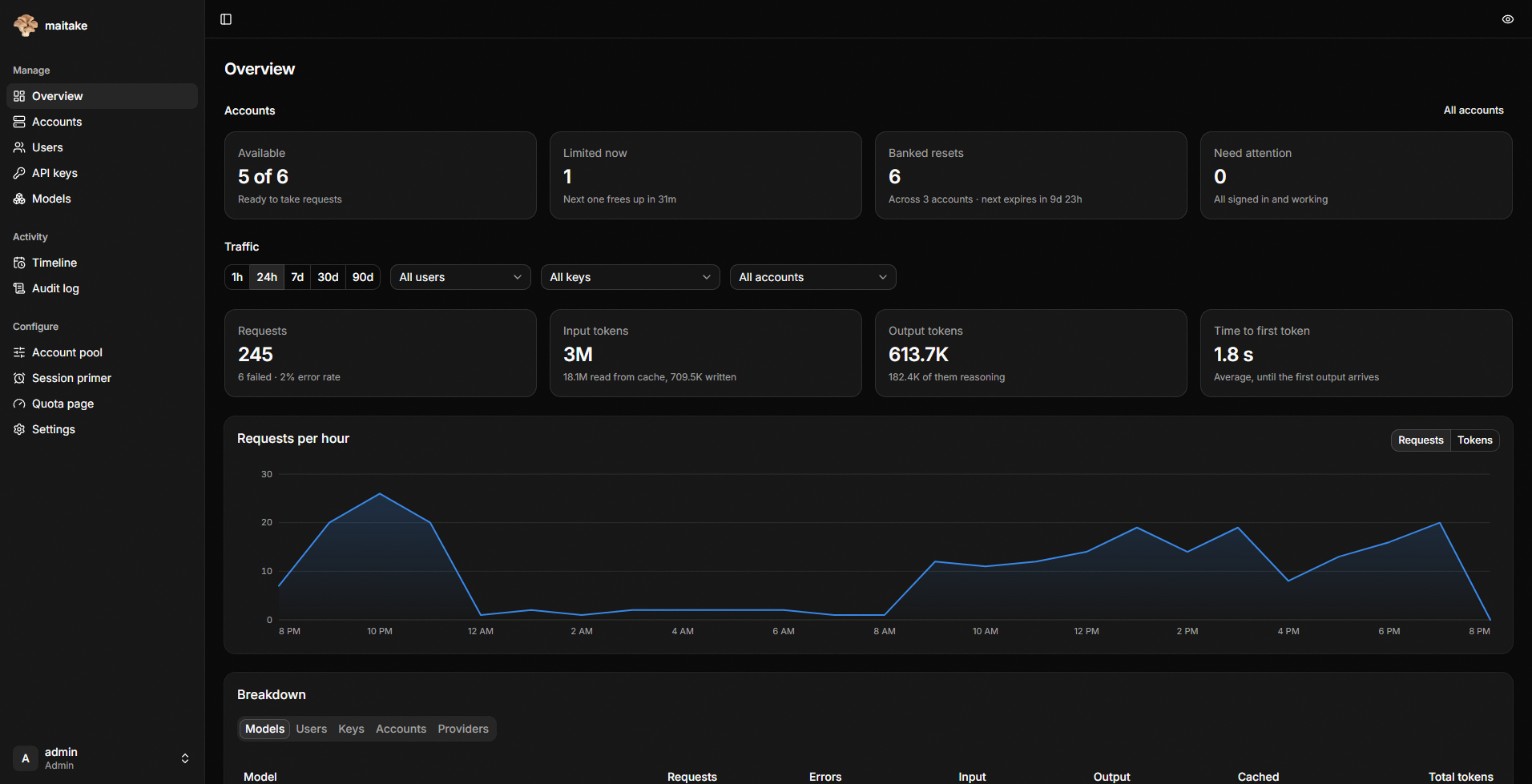
- Per-user API keys with allowed models, rate limits and expiry
- Account pool with priorities, automatic failover, cooldowns and token refresh
- Live quota tracking for every account, including banked resets (view and redeem; Codex can also auto-redeem)
- Usage logging per user, key, model and account
- A self-serve quota page: anyone with a key can check the remaining limits and reset times themselves, showing only what the admin chose for that key
- Announced global resets from claude-resets.com and codex-resets.com, plus upcoming and predicted Codex resets
How it compares to CLIProxyAPI
CLIProxyAPI supports far more providers and is the better fit if you want all of them for yourself. maitake is built for one instance that several people share, managed entirely from the dashboard.
| maitake | CLIProxyAPI | |
|---|---|---|
| Client keys | Per-user keys, each with its own allowed models, rate limits and expiry | A plain list of keys in config.yaml |
| Quota for key holders | Self-serve quota page per key, showing only what the admin allows | Only in the management panel, behind the management key |
| Configuration | Everything in the dashboard, stored in SQLite with credentials encrypted | config.yaml plus a JSON auth file per account; the panel edits them |
| Providers | Claude and Codex today, more planned | Claude, Codex, Gemini, Antigravity, Grok, Kimi and more |
Quick start
Run the published image with Docker Compose. docker-compose.yml is all it takes:
curl -O https://raw.githubusercontent.com/sobakintech/maitake/main/docker-compose.yml
docker compose up -d
docker compose logs maitake | grep "setup token"
Or with plain Docker:
docker run -d --name maitake -p 8317:8317 -v maitake-data:/data ghcr.io/sobakintech/maitake:latest
Open http://localhost:8317, paste the setup token from the logs and create the admin account. The token is only logged until the first admin exists.
Images are built for linux/amd64 and linux/arm64. Tags: latest is the newest release, X.Y.Z and X.Y pin a release, main follows the main branch and sha-<commit> pins an exact build.
To update, docker compose pull && docker compose up -d. The dashboard checks GitHub for new releases and shows their changelog under Settings → About; the check can be turned off there.
Configuration
Everything except a few bootstrap settings is managed from the dashboard. Those are read from environment variables:
| Variable | Default in the image | Description |
|---|---|---|
MAITAKE_HOST |
0.0.0.0 |
Listen address |
MAITAKE_PORT / PORT |
8317 |
Listen port |
MAITAKE_DATA_DIR |
/data |
SQLite database and encryption key; keep it on a volume |
MAITAKE_TRUSTED_PROXIES |
Comma-separated IPs or CIDRs of reverse proxies whose X-Forwarded-* headers are trusted |
|
MAITAKE_PROXY_URL |
HTTP(S) or SOCKS5 proxy for all upstream provider traffic |
The same settings, plus the admin login rate limit, can go in a config file: copy config.example.yaml to config.yaml, or mount it at /config.yaml in the container. Environment variables override the file.
Behind a reverse proxy, set MAITAKE_TRUSTED_PROXIES so client IPs and HTTPS are detected correctly.
Endpoints
| Path | Format |
|---|---|
POST /v1/messages |
Claude Messages (any model) |
POST /v1/messages/count_tokens |
Claude token counting |
POST /v1/chat/completions |
OpenAI Chat Completions (any model) |
POST /v1/responses |
OpenAI Responses (any model); GET upgrades to the WebSocket transport |
POST /v1/responses/input_tokens |
Responses token counting |
POST /v1/responses/compact |
Codex history compaction |
POST /v1/images/generations, /v1/images/edits |
OpenAI Images, drawn by Codex's image tool |
/backend-api/codex/responses[/compact], /models, /alpha/search |
Codex CLI's native paths |
POST /v1/alpha/search |
Codex CLI web search |
GET /v1/models?client_version=… |
Model list in the Codex CLI's format, Claude models included |
GET /v1/models |
Model list, filtered by the key's allowed models |
Append a reasoning level to any model, e.g. gpt-5.5(high) or claude-opus-5(max).
Planned
- More upstream providers: Gemini (AI Studio, Vertex, Antigravity), Kimi and xAI
- Plain API-key upstreams (Anthropic, OpenAI and OpenAI-compatible endpoints) alongside subscription accounts
- Token and spend budgets per key, on top of the existing rate limits
Development
Backend (port 8317):
go run ./cmd/maitake
Dashboard (port 3000, proxies /api to the backend):
cd web
pnpm install
pnpm dev
Build
pnpm -C web build
go build -tags embedui -o maitake ./cmd/maitake
Without -tags embedui the binary serves only the API.
A Docker image builds from the repo root with docker build -t maitake .. maitake -version prints the version a binary was built as.
Releases
Releases are automatic. Every push to main that passes CI works out the next semver version from the Conventional Commits since the last release, then tags it, pushes the Docker image and publishes a GitHub release with the changelog:
| Commits since the last release | Next version |
|---|---|
fix:, perf: or revert: |
patch, e.g. 0.4.1 → 0.4.2 |
feat: |
minor, e.g. 0.4.1 → 0.5.0 |
feat!: / BREAKING CHANGE: |
major, or minor before 1.0 |
only docs:, ci:, chore:, build:, refactor:, test: |
no release |
Layout
cmd/maitake/        entrypoint
internal/accounts/  account pool: selection, refresh, cooldowns, quota polling
internal/provider/  Claude and Codex logins, request shaping, quota parsing
internal/translate/ format translation between Chat, Messages and Responses
internal/proxy/     /v1 API
internal/quota/     quota snapshots and display-profile views
internal/resets/    claude-resets.com and codex-resets.com pollers
internal/server/    admin API, auth, SPA serving
internal/store/     SQLite storage and migrations
web/                SvelteKit dashboard (SPA, embedded into the binary)
Disclaimer
maitake is an independent project, not affiliated with or endorsed by Anthropic or OpenAI. It uses the same endpoints as the official Claude Code and Codex clients, some of them undocumented, so things can change or break without notice.
Using a subscription through maitake is subject to that provider's terms. Both Anthropic and OpenAI restrict sharing an account between several people, and an account that breaks their terms can be limited or suspended. Whether your setup is allowed is up to you to check. You use maitake at your own risk.
Contributing
Bug reports and feature requests are welcome as issues. Pull requests aren't open right now. If you have a fix, describe it in an issue and I'll take care of it.
License
AGPL-3.0. If you run a modified version of maitake as a service, you have to publish your changes.
Yorumlar (0)
Yorum birakmak icin giris yap.
Yorum birakSonuc bulunamadi