cowork-forge
Health Pass
- License — License: MIT
- Description — Repository has a description
- Active repo — Last push 0 days ago
- Community trust — 41 GitHub stars
Code Pass
- Code scan — Scanned 12 files during light audit, no dangerous patterns found
Permissions Pass
- Permissions — No dangerous permissions requested
No AI report is available for this listing yet.
AI-powered software development system that automates the entire lifecycle from requirements analysis to code delivery through specialized agent collaboration.
Cowork Forge
🚀 Full-Stack AI Development Team - Complete Collaboration from Idea to Delivery 🚀
Cowork Forge is not just a code generator, but a complete virtual development team. It includes professional roles like Product Manager, Architect, Project Manager, and Engineer, working together through AI agent collaboration to transform your ideas into production-ready software systems.


👋 What is Cowork Forge?
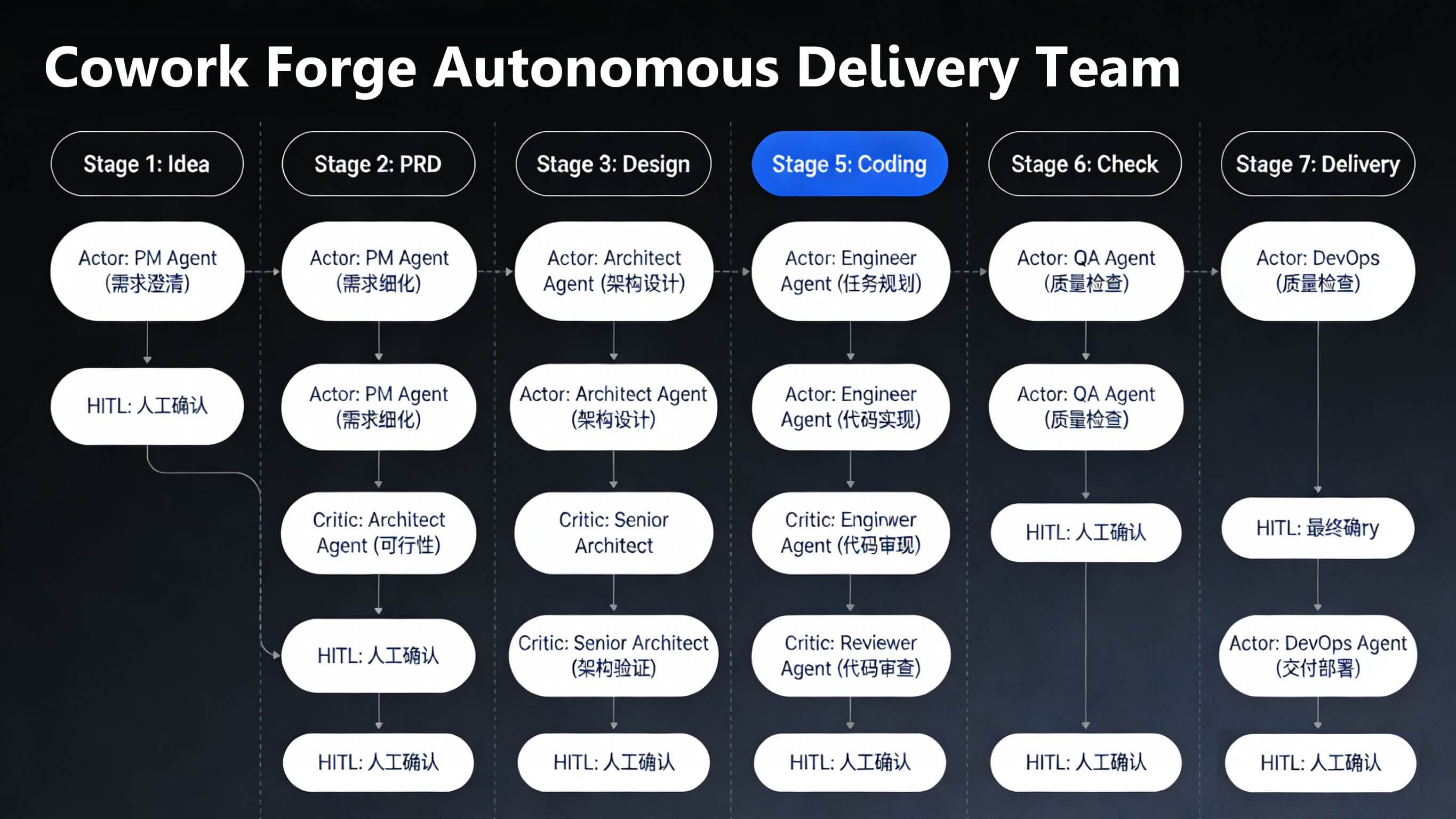
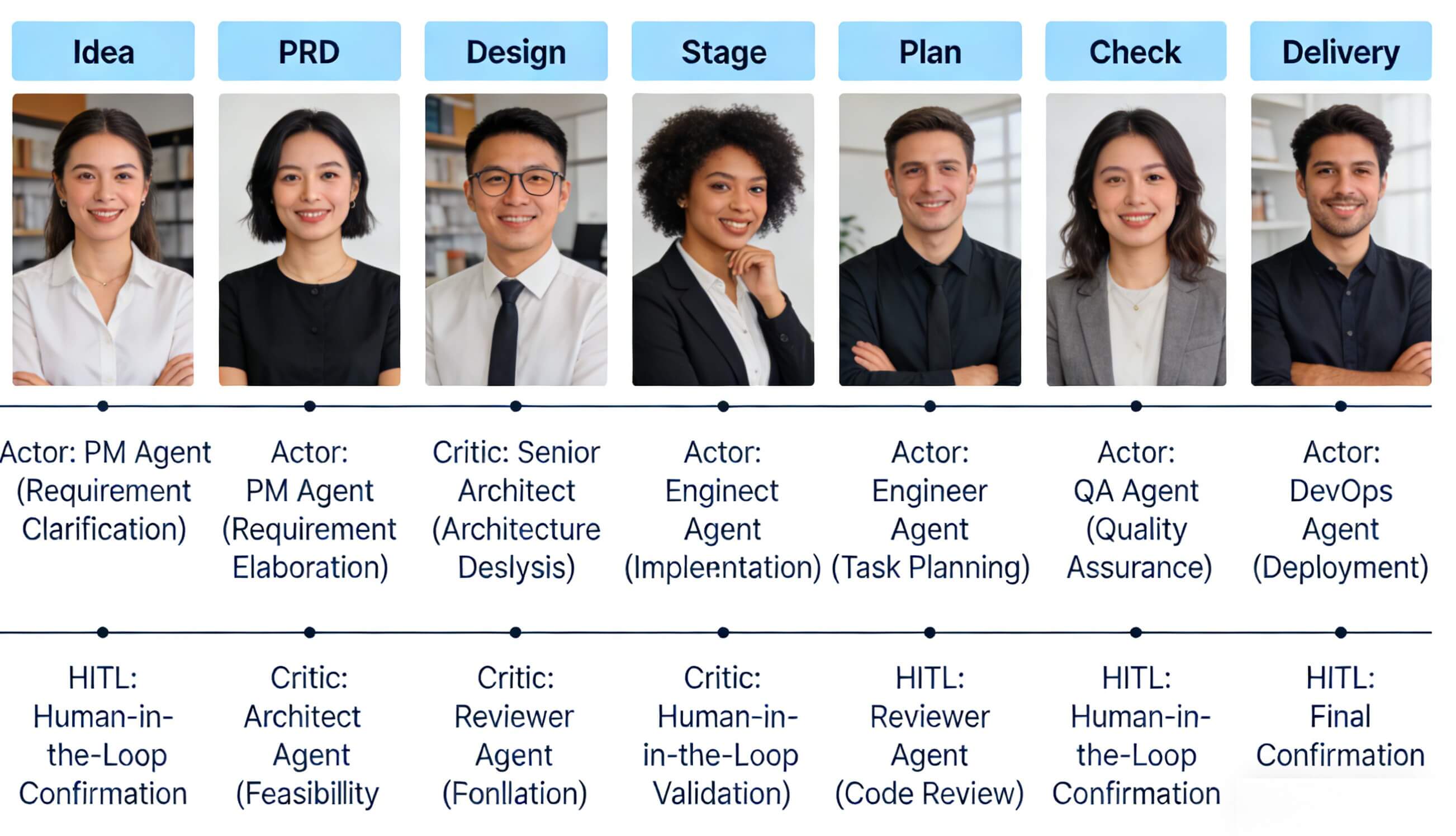
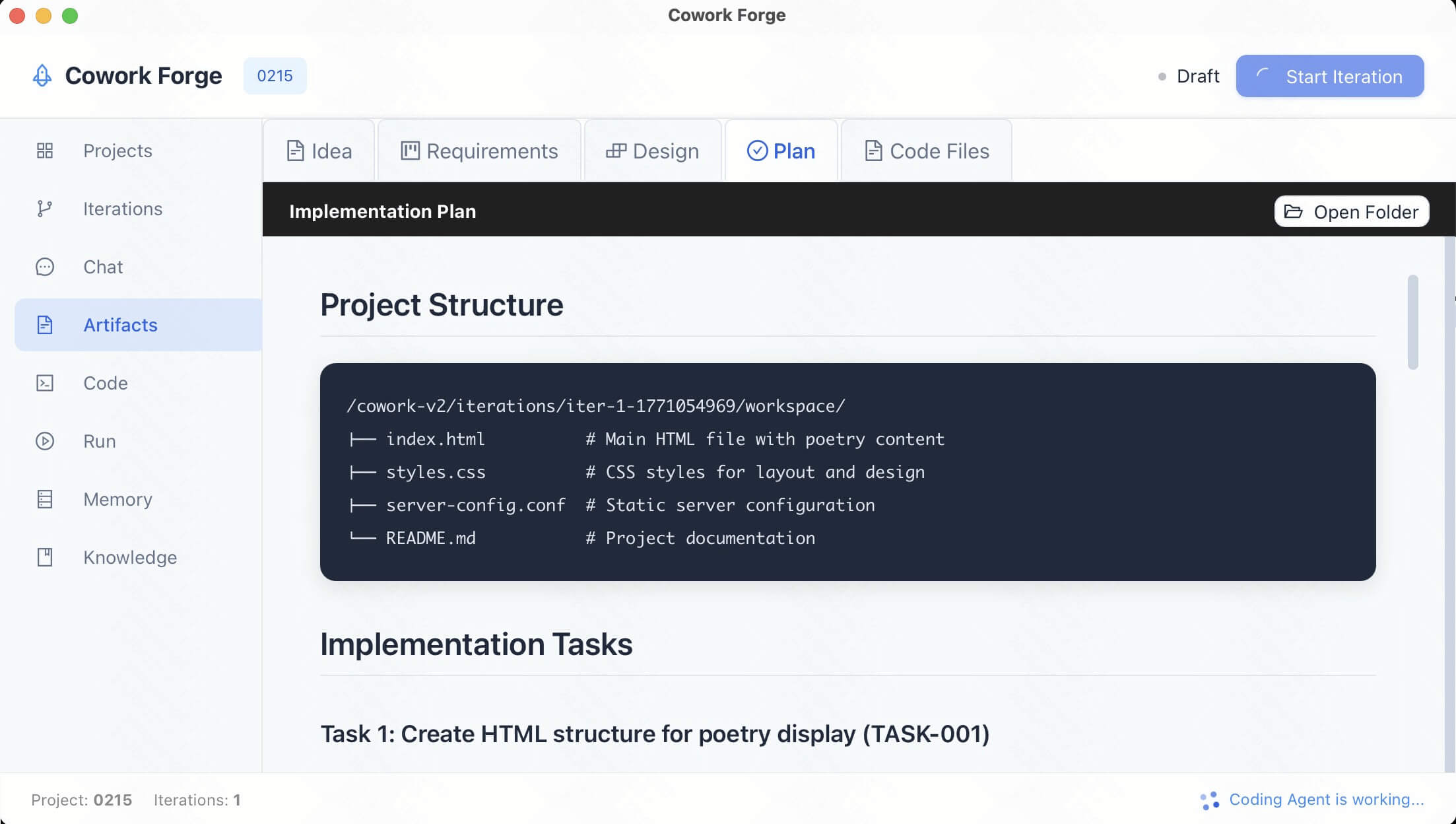
| Full-Role Agents COLLABORATION | A team that works together like HUMANS | High-quality product solutions with ARTIFACTS |
|---|---|---|
 |
 |
 |
Cowork Forge is a complete AI-powered development team system that simulates how real software teams collaborate. AI agents take on roles as Product Manager, Architect, Project Manager, and Engineer, working together to complete everything from ideation to delivery.
Unlike AI coding assistants that only generate code snippets, Cowork Forge provides end-to-end development lifecycle management:
- Product Manager AI: Transforms your ideas into detailed Product Requirements Documents (PRD)
- Architect AI: Designs complete technical architecture and system components
- Project Manager AI: Breaks down tasks, plans dependencies, and defines implementation paths
- Engineer AI: Implements code, ensures quality, and generates delivery reports
Each role uses Actor-Critic patterns for self-review and optimization, with human validation at critical decision points to ensure output quality and direction.
One person can have a complete development team - Cowork Forge makes AI agents work for you like a real team.
| Traditional Development | Development with Cowork Forge |
|---|---|
|
Requires Multiple Roles and Tools
|
One System Covers All Roles
|
✨ Visual Walkthrough
Cowork Forge is an intelligent development engine that can be called by various technology stacks (Python/Java/NodeJS) through FFI as the high-performance cowork-core library; easily integrated into workflows through cowork-cli; also includes a locally deployable GUI project that provides a friendly interactive interface.
📄 Live Artifact Preview:Watch documents being written in real-time. View formatted PRDs, System Designs, and Implementation Plans as they are generated. Support for Markdown rendering allows for clear, structured documentation reviews. 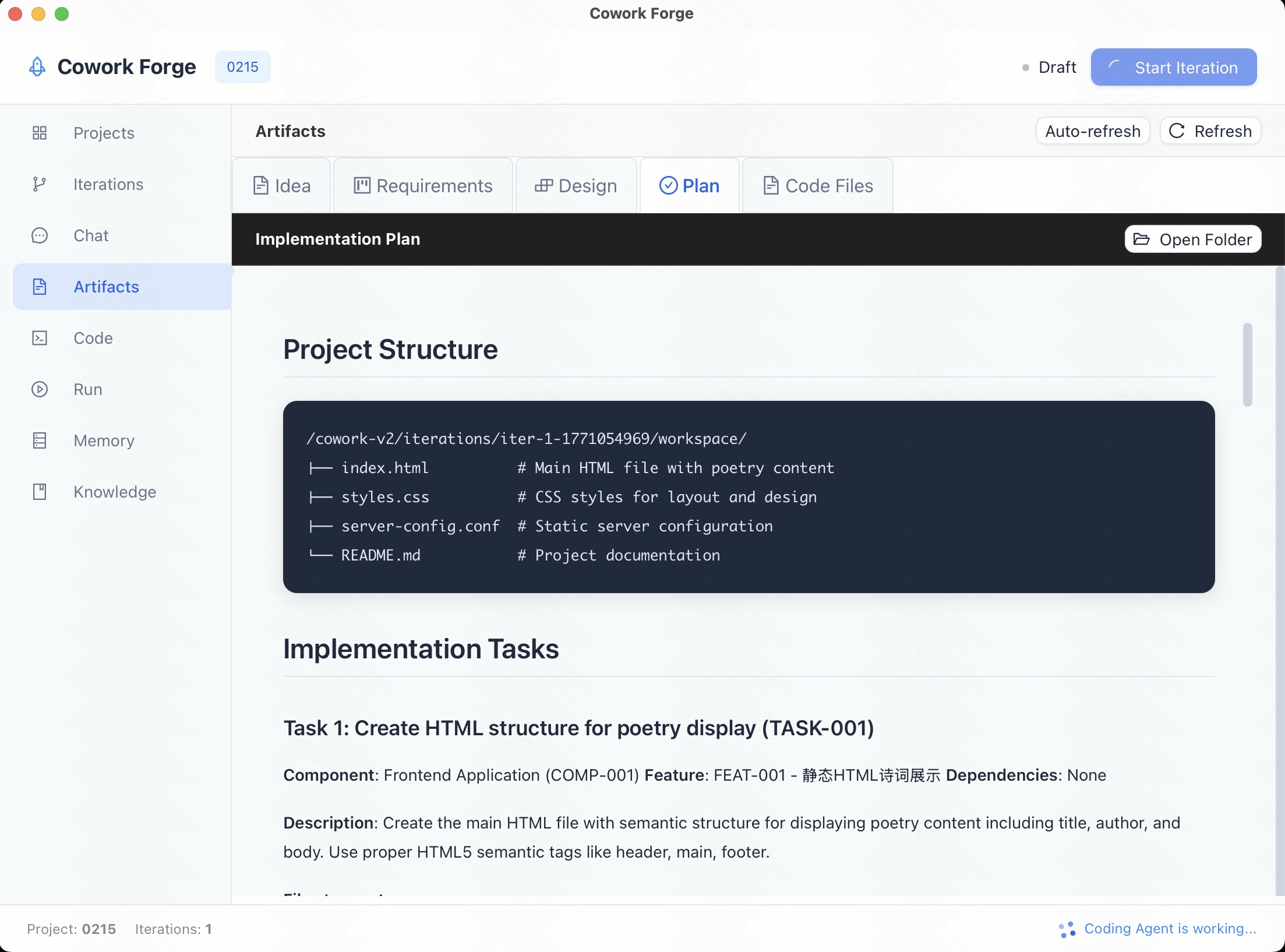 |
💬 Interactive Agent Chat:Collaborate directly with your AI team. Discuss requirements with the Product Manager, review architecture with the Architect, or give feedback to the Engineer. The chat interface keeps the context of your entire project history. 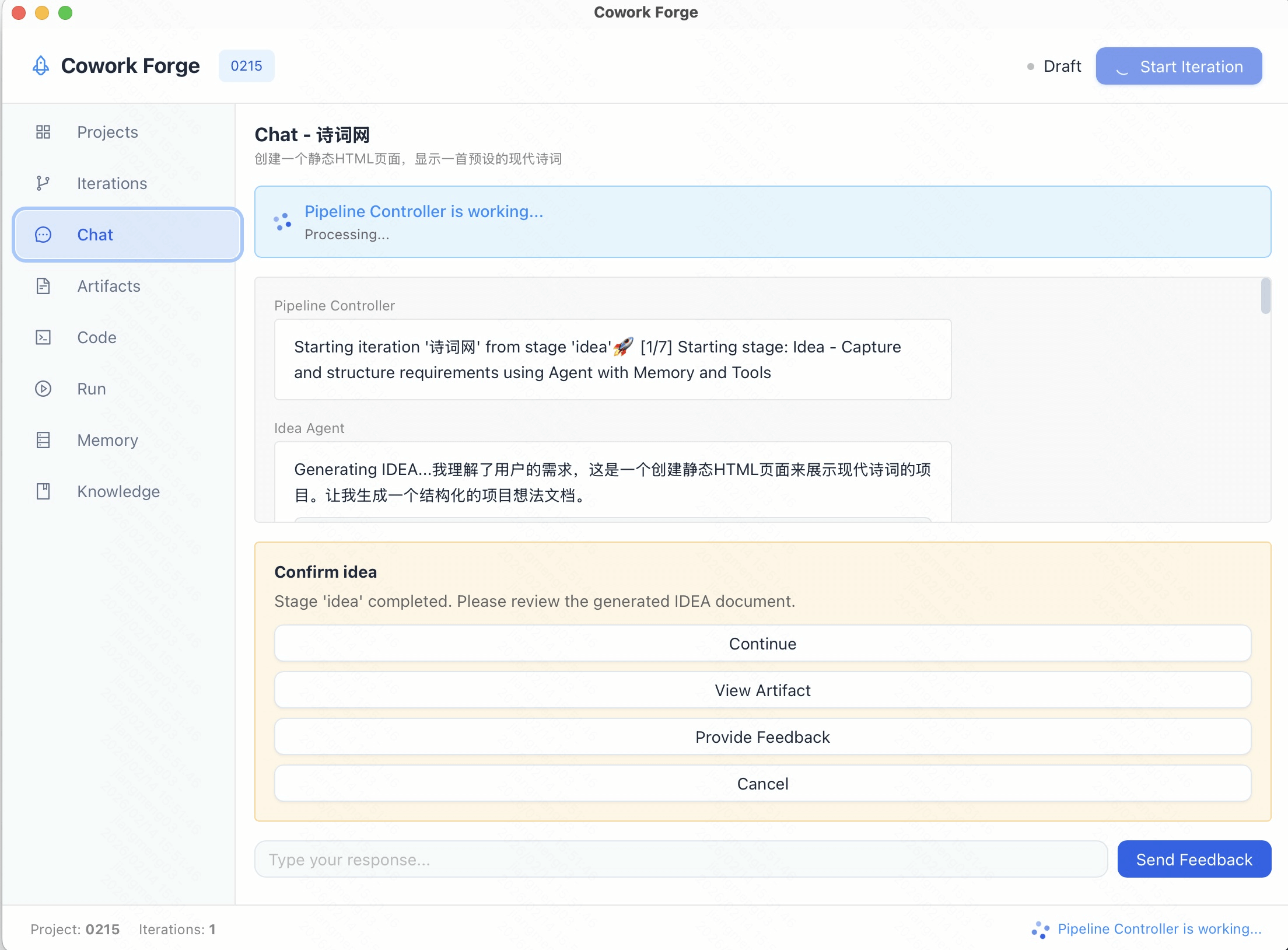 |
🌐 Built-in App Preview:See the result instantly. Cowork Forge GUI includes a web view to preview your generated web applications immediately after the build completes, without leaving the tool. 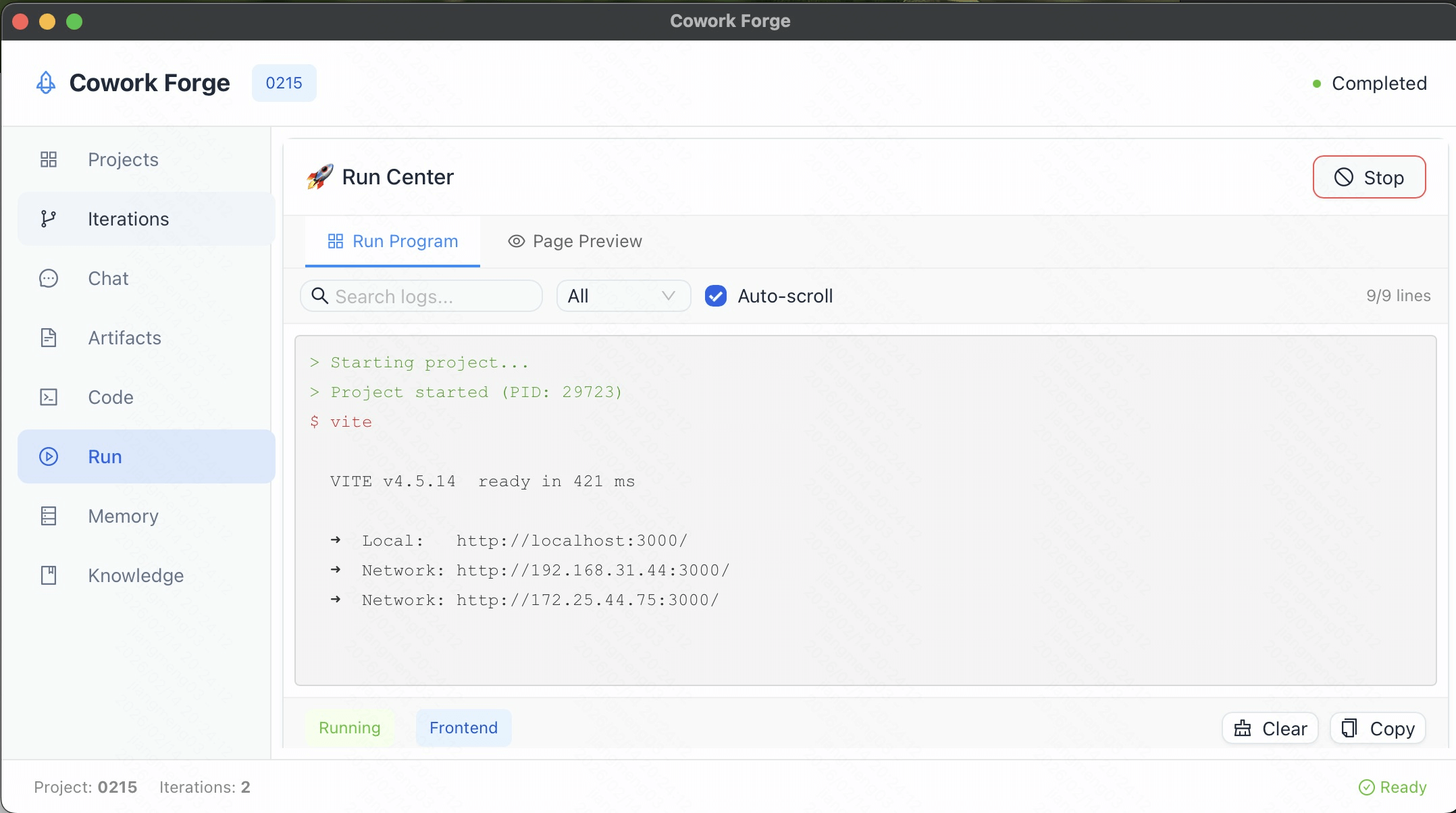 |
📝 Task & Todo Management:Keep track of progress. The system automatically generates and maintains a Todo list for the current iteration, checking off items as the agents complete them. 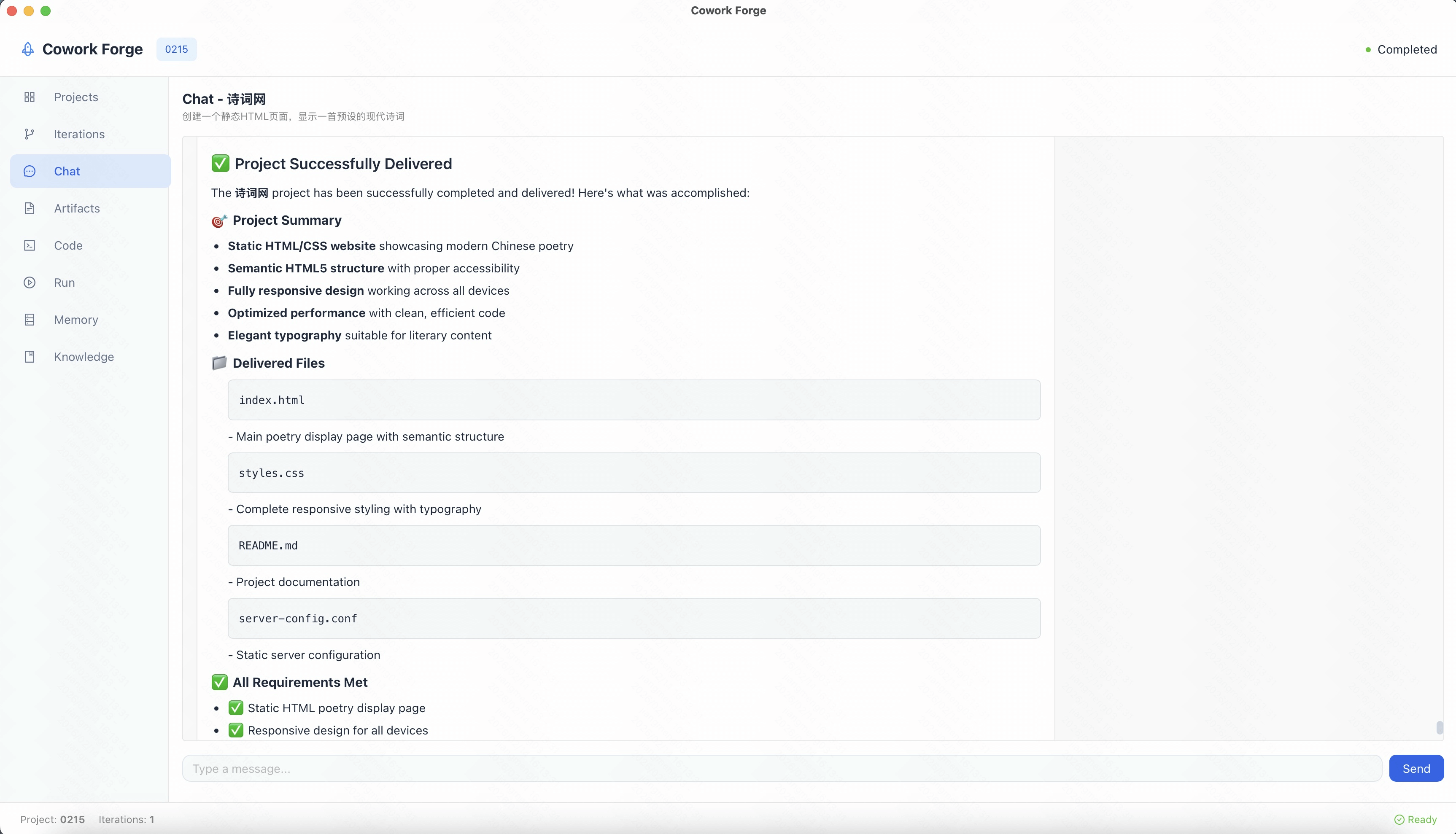 |
🚀 Project Dashboard:The central hub for all your development initiatives. View active projects, check their status (Running, Paused, Completed), and quickly launch new ones from a clean, modern interface.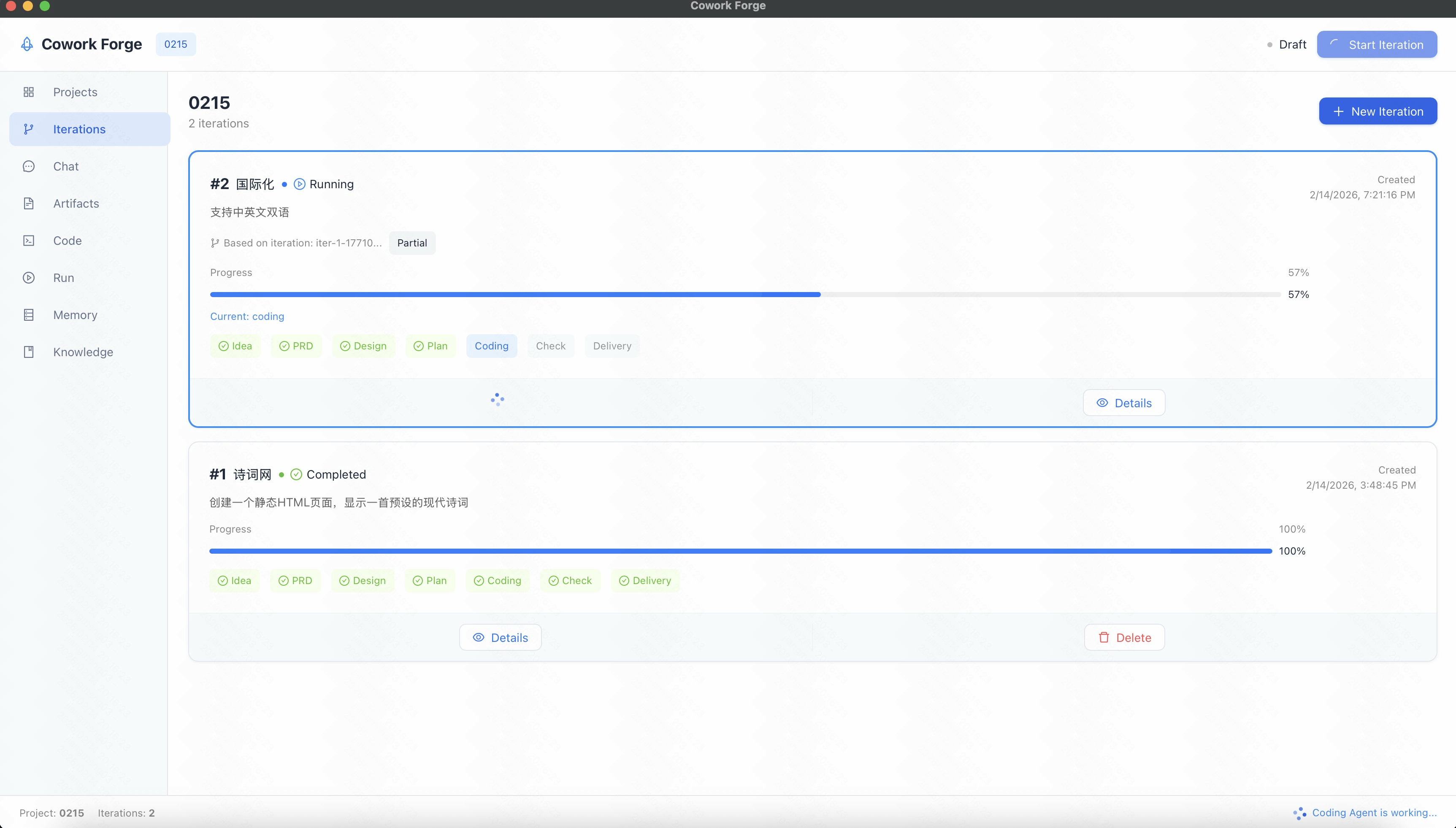 |
⚡ Real-time Code Execution:Monitor the Coding Agent as it writes files, runs builds, and executes tests. The built-in terminal view shows you exactly what commands are being run and their output, ensuring transparency and control. 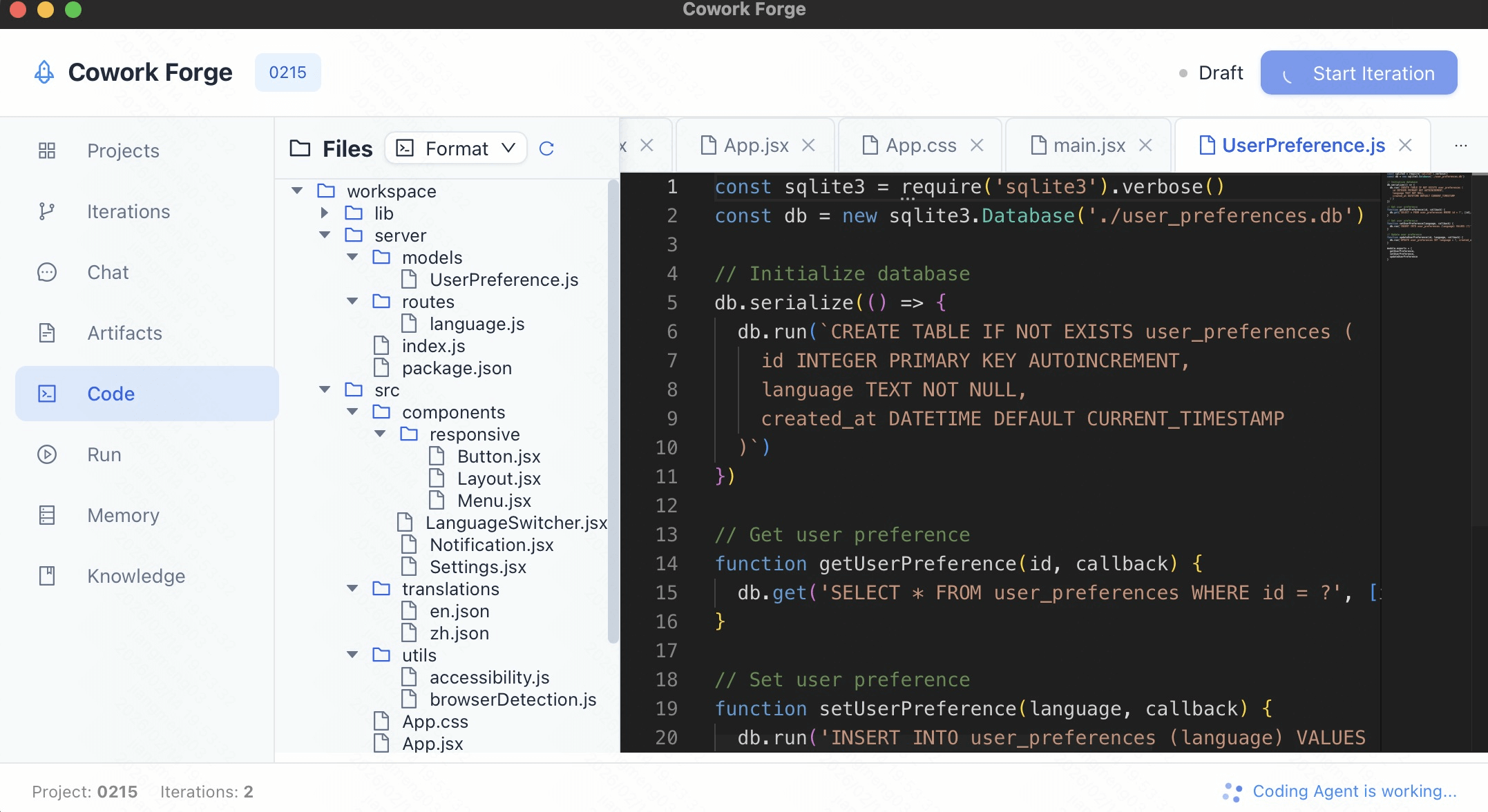 |
🛠️ Development Workflow
Cowork Forge GUI guides you through the standard 7-Stage Development Lifecycle:
- 💡 Idea Intake: Chat with the agent to define your concept.
- 📄 PRD Generation: Review the generated Product Requirements Document.
- 🏗️ Architecture Design: Approve the technical design and system boundaries.
- 📐 Implementation Planning: See the task breakdown and timeline.
- 💻 Coding & Testing: Watch code being written and tests passing.
- ✅ Quality Check: Verify the implementation against requirements.
- 📦 Delivery: Receive the final project report and artifacts.
📥 Import Existing Projects
Cowork Forge supports importing any existing project - even those not created with Cowork Forge. The import feature uses AI to reverse-engineer your project and generate comprehensive documentation:
What Gets Generated
| Artifact | Description |
|---|---|
| idea.md | Project overview, background, key features, and target users |
| prd.md | Functional requirements, non-functional requirements, and constraints |
| design.md | Technical architecture, technology stack, and module structure |
| plan.md | Implementation phases, task breakdown, and next steps |
How It Works
- Project Scan: Analyzes directory structure, configurations, and dependencies
- Tech Stack Detection: Identifies frameworks, languages, and tools
- Documentation Extraction: Reads README, docs, and key source files
- AI-Powered Generation: Uses LLM to synthesize information into structured artifacts
Using Import Feature
In the GUI, click "Import Project" on the dashboard and select any project directory. The system will:
- Preview the project structure
- Detect technology stack automatically
- Let you choose which artifacts to generate
- Create an initial iteration with all generated artifacts
This feature is perfect for:
- Onboarding existing codebases into Cowork Forge workflow
- Generating documentation for undocumented projects
- Understanding unfamiliar codebases quickly
- Migrating projects to use Cowork Forge's iterative development approach
🔄 Post-Delivery Support with PM Agent
After an iteration completes, the Project Manager Agent (PM Agent) becomes available for continued interaction. PM Agent acts as an intelligent project assistant that understands your intent and takes appropriate actions.
Supported Operations
- 🔀 Stage Navigation: Return to any previous stage (Idea, PRD, Design, Plan, Coding) for re-execution with user confirmation
- ➕ Create New Iteration: Start evolution iterations for new features with automatic inheritance (default: partial mode)
- 💬 Q&A Interaction: Answer questions about project architecture, artifacts, decisions, and memory
- 🤔 Clarification Request: Ask for more details when intent is ambiguous
Available Tools
pm_goto_stage: Navigate to a specific development stagepm_create_iteration: Create a new evolution iterationpm_respond: Respond to user questionspm_save_decision: Save project decisionsquery_memory: Query project memory for context
Iteration Completed
        ↓
[PM Agent Activated]
        ↓
User: "Fix the login bug" → PM Agent: Analyzes intent → Jumps to Coding stage
User: "Add payment feature" → PM Agent: Creates new iteration with partial inheritance
User: "What tech stack?" → PM Agent: Queries memory → Answers directly
User: "Modify the homepage" → PM Agent: Clarifies scope → Suggests options
🏆 Cowork Forge vs. Competitors
Core Capabilities Comparison
| Capability | Cowork Forge | GitHub Copilot | Cursor AI | Aider |
|---|---|---|---|---|
| End-to-End Workflow | ✅ Complete (Idea→Delivery) | ❌ Code completion only | ❌ Code editing focus | ❌ Code assistance only |
| Multi-Agent Architecture | ✅ 10+ specialized agents | ❌ Single model | ❌ Single model | ❌ Single model |
| PRD Generation | ✅ Automated | ❌ N/A | ❌ N/A | ❌ N/A |
| Technical Design | ✅ C4 architecture docs | ❌ N/A | ❌ N/A | ❌ N/A |
| Post-Delivery Support | ✅ PM Agent chat interface | ❌ N/A | ❌ N/A | ❌ N/A |
| External Agent Integration | ✅ ACP-compatible agents | ❌ N/A | ❌ N/A | ❌ N/A |
| Incremental Updates | ✅ Smart delta analysis | ❌ N/A | ❌ Limited | ❌ Limited |
| Human-in-the-Loop | ✅ Critical decision points | ❌ N/A | ❌ Limited | ❌ Limited |
| Open Source | ✅ MIT License | ❌ Proprietary | ❌ Proprietary | ✅ MIT License |
| Self-Hosted | ✅ Local execution | ❌ Cloud only | ❌ Cloud only | ✅ Local execution |
Key Differentiators
1. Complete Virtual Development Team
Unlike tools that only assist with writing code, Cowork Forge provides complete development team role coverage:
- Product Manager Role: Transforms vague ideas into structured Product Requirements Documents
- Architect Role: Designs complete technical architecture and system components
- Project Manager Role: Breaks down tasks, plans dependencies, and implementation paths
- Engineer Role: Implements code and performs quality verification
2. Multi-Agent Collaboration
Cowork Forge's specialized agents work together like a real development team:
- Idea Agent: Captures and structures user requirements
- PRD Loop Agent: Generates comprehensive PRDs with actor-critic refinement
- Design Loop Agent: Creates technical architecture with actor-critic refinement
- Plan Loop Agent: Breaks down implementation tasks with actor-critic refinement
- Coding Loop Agent: Plans and executes code changes with actor-critic refinement
- Check Agent: Verifies code quality and completeness
- Delivery Agent: Generates comprehensive delivery reports
- Knowledge Generation Agent: Extracts and summarizes project knowledge
- Project Manager Agent (PM Agent): Post-delivery assistant for modifications, new iterations, and project inquiries
- Legacy Project Analyzer Agent: Analyzes existing projects and reverse-engineers documentation (idea.md, prd.md, design.md, plan.md)
- Change Triage Agent: Analyzes and triages incremental change requests
- Code Patch Agent: Implements precise code patches for modifications
3. Human-in-the-Loop Validation
Critical outputs require human confirmation before proceeding, ensuring:
- Accurate requirement capture
- Sound technical decisions
- Feasible implementation plans
- Safe code changes
4. Incremental Code Updates
When requirements or designs change, Cowork Forge intelligently identifies affected files and updates only what's necessary.
5. Built-in Safety
Multi-layer security checks prevent:
- Dangerous command execution (rm -rf, sudo, etc.)
- Unauthorized file system access
- Malicious code injection
- Resource exhaustion
❤️ Like Cowork Forge? Star it ⭐ or Sponsor Me! ❤️
🌟 Features & Capabilities
Core Workflow
- 7-Stage Development Workflow: Comprehensive workflow covering Idea Intake → PRD Generation → Technical Design → Implementation Plan → Coding → Quality Check → Delivery.
- Specialized AI Agents: Each stage handled by a dedicated agent with domain expertise. Four critical stages (PRD, Design, Plan, Coding) use actor-critic loops for iterative refinement.
- Project Manager Agent: Post-delivery chat interface for continued project interaction with intelligent intent recognition. Supports bug fixes, requirement changes, new features, and project consultations.
- Legacy Project Import: Import any existing project and use AI to reverse-engineer comprehensive documentation (idea.md, prd.md, design.md, plan.md) from code structure and existing docs.
- Knowledge Generation: Automatic extraction of project knowledge including decisions, patterns, and insights after each iteration completion.
- External Coding Agent Support: Optionally integrate external ACP-compatible coding agents (OpenCode, iFlow, Codex, Gemini CLI, Claude CLI) for specialized coding tasks.
- Intelligent Code Planning: Analyzes project structure, dependencies, and generates precise code change plans.
- Incremental Code Updates: Smart delta analysis updates only affected files, preserving existing modifications.
- Automated Quality Verification: Multi-language build/test integration with comprehensive error analysis and reporting.
- Human-in-the-Loop Validation: Critical outputs (PRD, design, plans) require human confirmation before proceeding.
Agents Team Configuration System
Cowork Forge introduces a data-driven configuration system that transforms hardcoded Agent, Stage, Flow, and Skill definitions into configurable JSON formats, enabling unprecedented flexibility without code modifications.
Custom Workflows (Flow)
Create custom development pipelines with configurable stage combinations and execution order:
{
  "id": "quick-prototype",
  "name": "Quick Prototype Flow",
  "stages": ["idea", "prd", "coding", "delivery"],
  "config": {
    "stop_on_failure": false,
    "inheritance": { "default_mode": "partial" }
  }
}
Enterprises can define standardized process templates for different project types (Web apps, CLI tools, API services) to ensure consistent development practices.
Custom Agents
Define specialized AI agent roles with custom instructions, tool sets, and model parameters:
{
  "id": "code_reviewer",
  "name": "Code Reviewer",
  "instruction": "builtin://code_review",
  "tools": ["read_file", "query_memory"],
  "model": { "temperature": 0.3 }
}
Teams can create domain-specific agents like security reviewers, performance optimizers, or code quality specialists.
Skill Extensions
Skill packages inject domain-specific tools, prompts, and context into agents using the agentskills.io standard:
- Categories: web_frontend, web_backend, mobile, devops, testing, security
- Discovery: Automatic loading from
.skills/directory - Selection: Semantic matching based on user queries
<!-- .skills/react/SKILL.md -->
---
name: react-development
description: React and TypeScript development skills
categories: [web_frontend]
---

You are a React expert. Use functional components with hooks...
External Integrations
Configure integrations with external systems through REST APIs and webhooks:
- Deployment Platforms: Auto-deploy on delivery completion
- Requirement Management: Sync PRD with external tools
- CI/CD Pipelines: Trigger builds on stage completion
Configuration Locations
| Platform | User Config Directory |
|---|---|
| Windows | %APPDATA%\com.cowork-forge.app\config\ |
| macOS | ~/Library/Application Support/com.cowork-forge.app/config/ |
| Linux | ~/.config/com.cowork-forge.app/config/ |
Data Management
- Artifact-Based Storage: Versioned storage of all stage outputs with JSON and Markdown formats.
- Todo List Management: Automatic task tracking with status inference and progress reporting.
- Multi-Language Project Support: Automatic detection and handling of Rust, Python, JavaScript/TypeScript projects.
- Security & Safety: Command validation, path access control, and watchdog monitoring for safe execution.
🏗️ Architecture
Cowork Forge is built as a Rust workspace with modular, hexagonal architecture based on the adk-rust framework:
Key Components
Rust Workspace Structure
cowork-core: Core library with domain logic, pipeline orchestration, and toolscowork-cli: Command-line interface for interacting with the systemcowork-gui: Optional graphical user interface (Tauri + React + TypeScript)
Hexagonal Architecture
- Domain Layer: Pure business logic (Project, Iteration, Memory aggregates)
- Application Layer: Pipeline orchestration, stage execution
- Infrastructure Layer: Persistence, LLM integration, tools, ACP client
- Ports: InteractiveBackend trait for CLI/GUI abstraction
Iteration Architecture
- Genesis Iterations: Start new projects from scratch
- Evolution Iterations: Build upon existing iterations with inheritance modes
- Inheritance Modes: None (fresh start), Full (complete code + artifacts copy), Partial (artifacts only, regenerate code)
Pipeline Domain
Seven-stage development workflow with Actor-Critic pattern:
- Idea Stage: Capture and structure requirements
- PRD Stage: Generate product requirements with Actor-Critic refinement
- Design Stage: Create technical architecture with Actor-Critic refinement
- Plan Stage: Break down tasks with Actor-Critic refinement
- Coding Stage: Implement code with Actor-Critic refinement
- Check Stage: Verify quality and completeness
- Delivery Stage: Generate final delivery report
Tools Module
Secure tool execution with workspace validation:
- File operations within project boundaries
- Command execution with safety checks
- Interactive tools for human-in-the-loop validation
- PM tools for post-delivery interactions
- 30+ ADK tools for file, data, validation, and memory operations
ACP Integration
Agent Communication Protocol support:
- External coding agent integration via stdio or WebSocket
- Compatible with OpenCode, iFlow, Codex, Gemini CLI, Claude CLI
- Seamless fallback to built-in adk-rust agent
📋 Getting Started
Prerequisites
- Rust (edition 2024)
- LLM API Access (OpenAI or compatible provider)
- Git and language-specific build tools (cargo, npm, pip, etc.)
Installation
# Clone the repository
git clone https://github.com/sopaco/cowork-forge.git
cd cowork-forge

# Build the entire workspace
cargo build --release

# The CLI binary will be available at:
# target/release/cowork
Configuration
Cowork Forge uses a config.toml file stored in your system's application data directory:
| Platform | Config Location |
|---|---|
| Windows | %APPDATA%\CoworkCreative\config.toml |
| macOS | ~/Library/Application Support/CoworkCreative/config.toml |
| Linux | ~/.config/CoworkCreative/config.toml |
# LLM Configuration (Required)
[llm]
api_base_url = "https://api.openai.com/v1"
api_key = "sk-your-openai-api-key"
model_name = "gpt-4"

# Optional: Embedding Configuration
[embedding]
api_base_url = "https://your-embedding-api.com/v1"
api_key = "your-embedding-api-key"
model_name = "text-embedding-3-small"

# Optional: External Coding Agent
[coding_agent]
enabled = false
agent_type = "opencode"       # opencode, iflow, codex, gemini, claude
command = "bun"
args = ["x", "opencode-ai", "acp"]
transport = "stdio"           # stdio or websocket
workspace_path = ""           # optional, uses current project if empty
External Coding Agent Configuration
You can configure an external ACP-compatible coding agent for the Coding stage:
[coding_agent]
enabled = true
agent_type = "opencode"
command = "bun"
args = ["x", "opencode-ai", "acp"]
transport = "stdio"
Supported agent types:
- opencode: OpenCode AI agent
- iflow: iFlow CLI agent
- codex: OpenAI Codex CLI
- gemini: Gemini CLI
- claude: Claude CLI
🚀 Usage
🖥️ Cowork CLI
Iteration Management
# Initialize a new project
cowork init --name "My Project"

# Create a new iteration (Genesis)
cowork iter --project "my-project" "Build a REST API for task management"

# Create an evolution iteration
cowork iter --project "my-project" --base iter-1 --inherit partial "Add user profiles"

# List all iterations
cowork list

# Show iteration details
cowork show iter-1-1234567890

# Continue a paused iteration
cowork continue iter-1-1234567890

# Check status
cowork status
Inheritance Modes
| Mode | Description | Use Case |
|---|---|---|
none |
Fresh start, no inheritance | Complete rewrites, new projects |
full |
Copy workspace code + artifacts | Bug fixes, small enhancements |
partial |
Copy artifacts only, regenerate code | Large features, architecture change |
🖼️ Cowork GUI
Features
- Visual Dashboard: Overview of all your projects and iterations.
- Real-time Monitoring: Watch agents work in real-time with detailed logs and status updates.
- Interactive Chat: Communicate with agents directly through a chat interface.
- Post-Delivery Chat: Use the Project Manager Agent to continue working with completed projects.
- Built-in Preview: Preview your generated web applications directly within the app.
Running the GUI
cd crates/cowork-gui
npm install   # or: bun install
cargo tauri dev
🌐 The Cowork Forge Ecosystem
cowork-core: Core library containing domain logic, pipeline orchestration, tools, and persistence.cowork-cli: Command-line interface for iteration management and project interaction.cowork-gui: Graphical user interface based on Tauri framework with React + TypeScript frontend.
Core Modules
cowork-core is organized into the following domain modules:
pipeline: 7-stage pipeline orchestration managing iteration lifecycle and stage execution.domain: Core domain entities (Project, Iteration, Memory aggregates) with DDD patterns.persistence: JSON-based storage with workspace isolation.tools: 30+ ADK tools for file operations, command execution, and validation.llm: LLM integration with rate limiting (30 req/min, concurrency=1).interaction: InteractiveBackend trait for CLI/GUI abstraction.memory: Project memory system for cross-iteration knowledge retention.acp: Agent Communication Protocol client for external coding agents.
🔐 Security
Cowork Forge implements multiple layers of security:
- Command Validation: Dangerous commands are blocked before execution
- Path Access Control: Restricted access to sensitive system directories
- Build Tool Whitelist: Only authorized development tools can be executed
- Timeout Controls: Prevents resource exhaustion from long-running commands
- Watchdog Monitoring: Detects and prevents agent deviation from objectives
🤝 Contributing
We welcome all forms of contributions! Report bugs or submit feature requests through GitHub Issues.
Running Tests
# Run all tests
cargo test

# Run tests with coverage
cargo test --all-features

# Run specific module tests
cargo test -p cowork-core
📚 Documentation
Comprehensive documentation is available in the litho.docs directory:
- English Documentation - Complete system documentation
- 中文文档 - 完整系统文档
📄 License
This project is licensed under the MIT License. See the LICENSE file for details.
🙏 Acknowledgments
- Built with Rust
- Powered by OpenAI GPT models
- Inspired by modern software development practices and AI agent research
📧 Contact
- GitHub: sopaco/cowork-forge
- Issues: GitHub Issues
Transform your development workflow with Cowork Forge—the future of collaborative software development. 🚀
Reviews (0)
Sign in to leave a review.
Leave a reviewNo results found