tintpad
Health Uyari
- License — License: MIT
- Description — Repository has a description
- Active repo — Last push 0 days ago
- Low visibility — Only 5 GitHub stars
Code Basarisiz
- rm -rf — Recursive force deletion command in Scripts/dev-install.sh
- rm -rf — Recursive force deletion command in Scripts/package.sh
- rm -rf — Recursive force deletion command in Scripts/uitest.sh
Permissions Gecti
- Permissions — No dangerous permissions requested
Bu listing icin henuz AI raporu yok.
A macOS hotkey that opens your terminal at the right repo with your coding agent (Claude Code, Codex, …) already running. Free, open source, local-only.

Tintpad
Your agent. Your repo. One keystroke.
A macOS hotkey that opens your terminal at the right repo with Claude Code, Codex,
or whatever you run, already going.


Press ⌥⌘Space. Arrow or type to a repo. Hit ↵. Your real terminal
opens there with the agent running, in under two seconds, without the mouse.
Think ⌘Tab, for repos. A floating Liquid Glass strip of your projects, each with its
own tint, ranked by how you actually work. It hands off to the terminal you already use.
It doesn't try to be one.
Not a usage monitor. Not an IDE. Not a terminal. The launcher the agent menu-bar apps forgot.
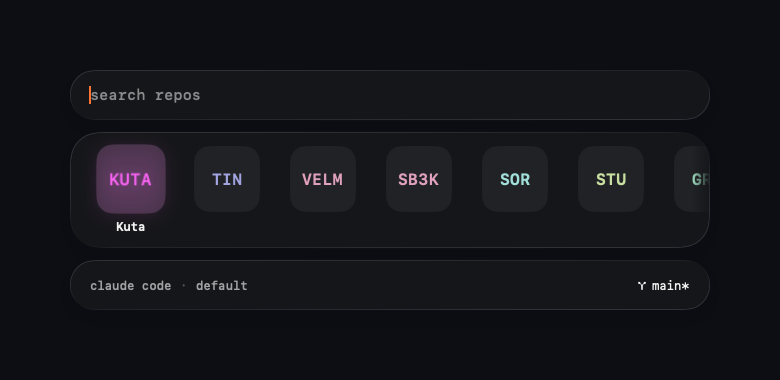
The bottom line is the contract: claude code · default · ⑂ main* — which agent, which
mode, which branch, and whether the tree is dirty. Nothing happens that this line didn't
announce, and a mode that skips permissions shows up red before you ever press ↵.
Why
GUI apps don't inherit your shell PATH, so double-clicking an app can't findclaude or codex. Repo-switching is friction. Tintpad fixes both: it resolves your
login-shell PATH once, ranks repos by frecency, and hands the command to your terminal
at the right directory. The boring 2-second thing you do twenty times a day, gone.
Install
Download the latest signed, notarized Tintpad.dmg,
drag it to Applications, and launch. macOS 14+.
(Or browse all releases.)
Or with Homebrew:
brew install --cask sorkila/tap/tintpad
Or build from source (macOS 14+, Swift 6 toolchain / Xcode 16+):
git clone https://github.com/sorkila/tintpad.git
cd tintpad
swift run                  # dev run
./Scripts/package.sh       # build Tintpad.app into .build/release
Features
- Frecency repo search, your most-used repos rise to the top, zoxide-style, and
Tintpad remembers how you opened each repo last (agent and mode), so ↵ repeats it. - Git-aware, the launch line shows the current branch with a
*when the working
tree is dirty, checked in the background so the palette never waits on git. - ⌘0 resume replays your last session exactly, from the palette or a
global hotkey. - Hands off to 7 terminals, Ghostty, iTerm2, kitty, WezTerm, Alacritty, Terminal, Warp.
- Run modes in each agent's own words, Default and Skip permissions for Claude
Code, Untrusted, Default, and Full access for Codex. A mode that skips permissions is
ringed red on its tile, red in the launch line, and (optionally) requires a confirm —
on every path, including dispatch and resume. - Worktrees, ⌃W spins up an isolated branch checkout and launches the agent in it.
- Headless dispatch, ⌃↵ runs an agent in the background and notifies you when it's done.
- Prompt library, per-repo presets, GitHub import, open-in-editor.
- Keyboard-first and accessible, Dynamic Type in the palette, VoiceOver labels and
announcements, Reduce Motion and Reduce Transparency honored, and Tab left alone for
focus traversal when assistive tech needs it. - Local-only. No accounts, no telemetry, nothing leaves your Mac.
Keys
| Key | Action |
|---|---|
| ⌥⌘Space | Summon (change in Settings → Hotkeys) |
| ← → / ↑ ↓ | Move through the strip |
| ↵ | Launch what the bottom line says |
| ⌘0 | Resume the last session exactly |
| ⌘1–⌘9 | Jump straight to the nth tile and launch it |
| ⌘↵ | Open repo in editor |
| ⌥↵ | Launch the dangerous mode |
| ⇧↵ | Launch the safest mode |
| ⌃↵ | Headless dispatch |
| ⌃W | New worktree |
| ⇥ / ⇧⇥ | Cycle agent / mode |
| ⌘L · ⌘P | Inline prompt · cycle saved prompt |
| ⌘R · Esc | Re-scan repos · close |
Configure
Agents are just command templates with variables, set them in Settings → Agents:
claude {mode} {prompt}
Variables: {repoPath} {repoName} {branch} {remote} {prompt} {mode} {shell} {worktreePath}.
Every interpolated value is sanitized and shell-quoted before it runs.
Contributing
PRs welcome, especially new terminal adapters, which are about one protocol and one
struct. See CONTRIBUTING.md and docs/ARCHITECTURE.md.
Support
Tintpad is free and MIT, the whole thing. If it earns a spot in your day, leave a tip:
Buy me a coffee →. Supporters get custom
accent tints and my thanks, that's the only difference. To claim the tints, tip then email
your receipt to [email protected] and I'll send you an unlock key
(it verifies offline, no account).
License
Yorumlar (0)
Yorum birakmak icin giris yap.
Yorum birakSonuc bulunamadi