wabcut
Health Gecti
- License — License: GPL-3.0
- Description — Repository has a description
- Active repo — Last push 0 days ago
- Community trust — 36 GitHub stars
Code Basarisiz
- rm -rf — Recursive force deletion command in cmake/packaging/linux/make-appdir.sh
Permissions Gecti
- Permissions — No dangerous permissions requested
Bu listing icin henuz AI raporu yok.
Free, open-source video editor for gaming videos, video essays and documentaries. Premiere Pro shortcuts and edit rules, GPU playback, local AI captions and smart search. Windows · C++23 · Qt 6 · FFmpeg

Wabcut
A free, open-source video editor for gaming videos, video essays and documentaries.
Premiere Pro's shortcuts and edit rules · round trips with Premiere, Resolve and Final Cut · AI that runs on your own machine






Download · Getting started ·
Roadmap · Documentation · Build from source
[!WARNING]
Wabcut is in development. This is an alpha version (0.4.0).
Expect bugs, missing features and changes between versions, including to shortcuts, settings and the project format.
Keep backups of your projects and media, and don't rely on it yet for deadline work or sensitive material.
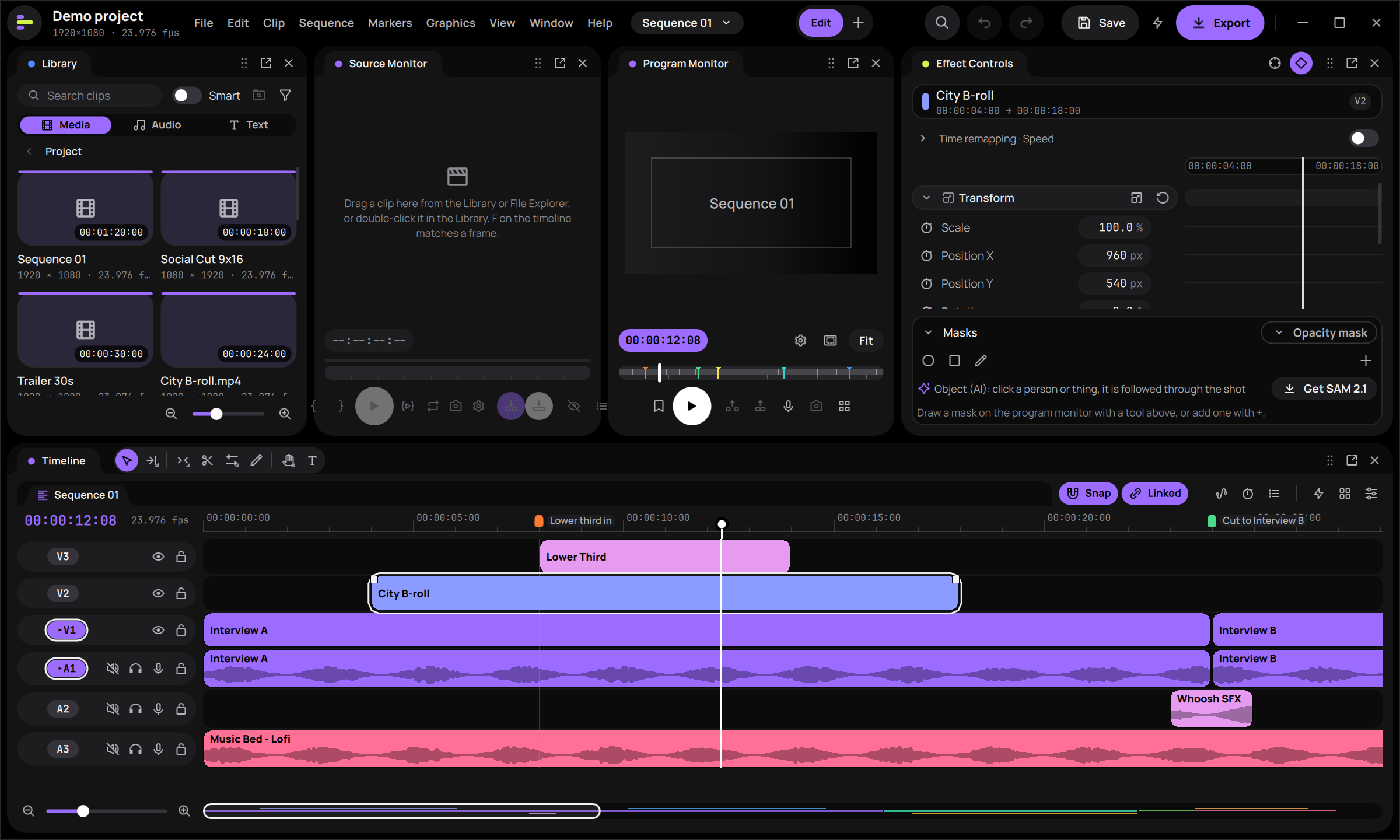
Why Wabcut
- Edit like Premiere. Premiere Pro's default shortcuts and tools,
.kysshortcut import and a Keyboard Trainer, so
your muscle memory carries over. Since 0.2, Premiere's transitions and effects, Optical Flow, Warp Stabilizer, a
Media Encoder-style export queue and the Project panel's metadata, search bins and Media Browser are there too
(how it compares). 0.3 adds Premiere's menu bar, its Window menu and the Effects panel's
folders, and 0.4 Alt-drag copy, Ctrl+Alt-drag rearrange and Premiere keys that did nothing before. - Bring your edit with you. Import timelines from Premiere Pro, DaVinci Resolve and Final Cut Pro (FCP7 XML,
FCPXML, OpenTimelineIO, EDL) and send them back the same way. - AI that stays yours. Transcription, speech enhancement, smart search and object masks run locally. Cloud features
use your own API keys and show the cost before every call. - Free and open source. GPL-licensed, with no account and no subscription.
Features
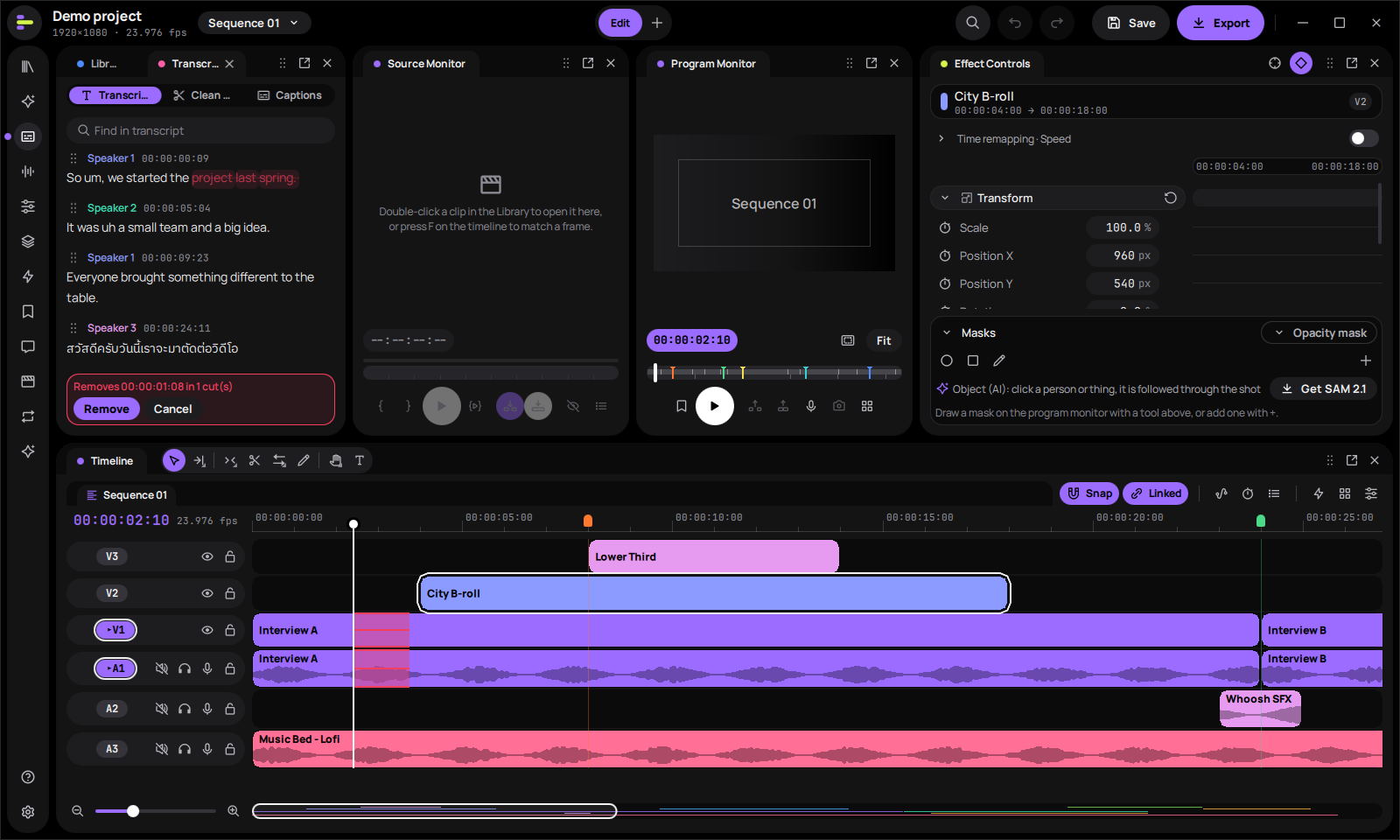
Edit by text. Strike words in the transcript and the cut lands on the timeline, through multicam clips too. Thai is supported. |
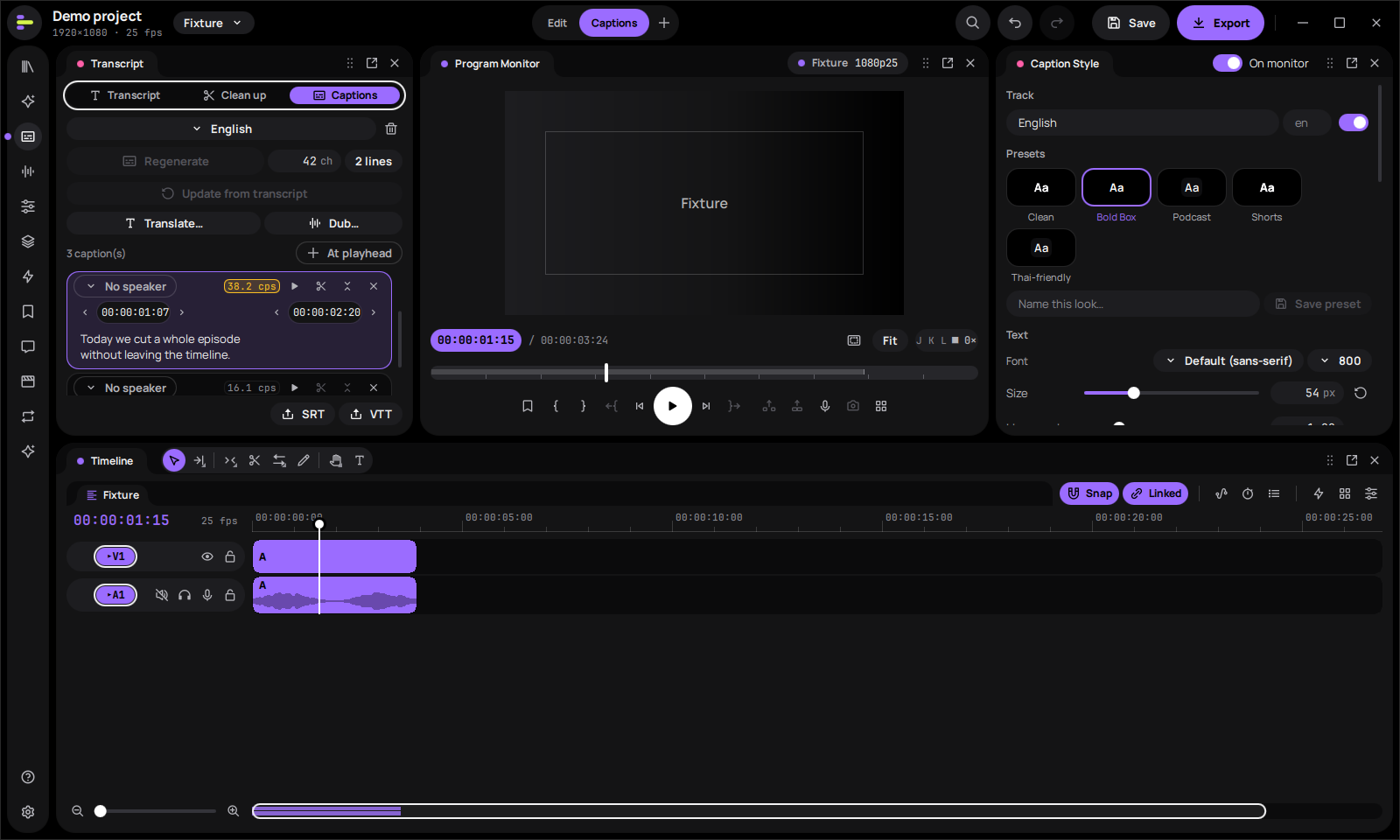
Animated captions. Style presets (Clean, Bold Box, Shorts, Thai-friendly), translation, dubbing and SRT/VTT export. |
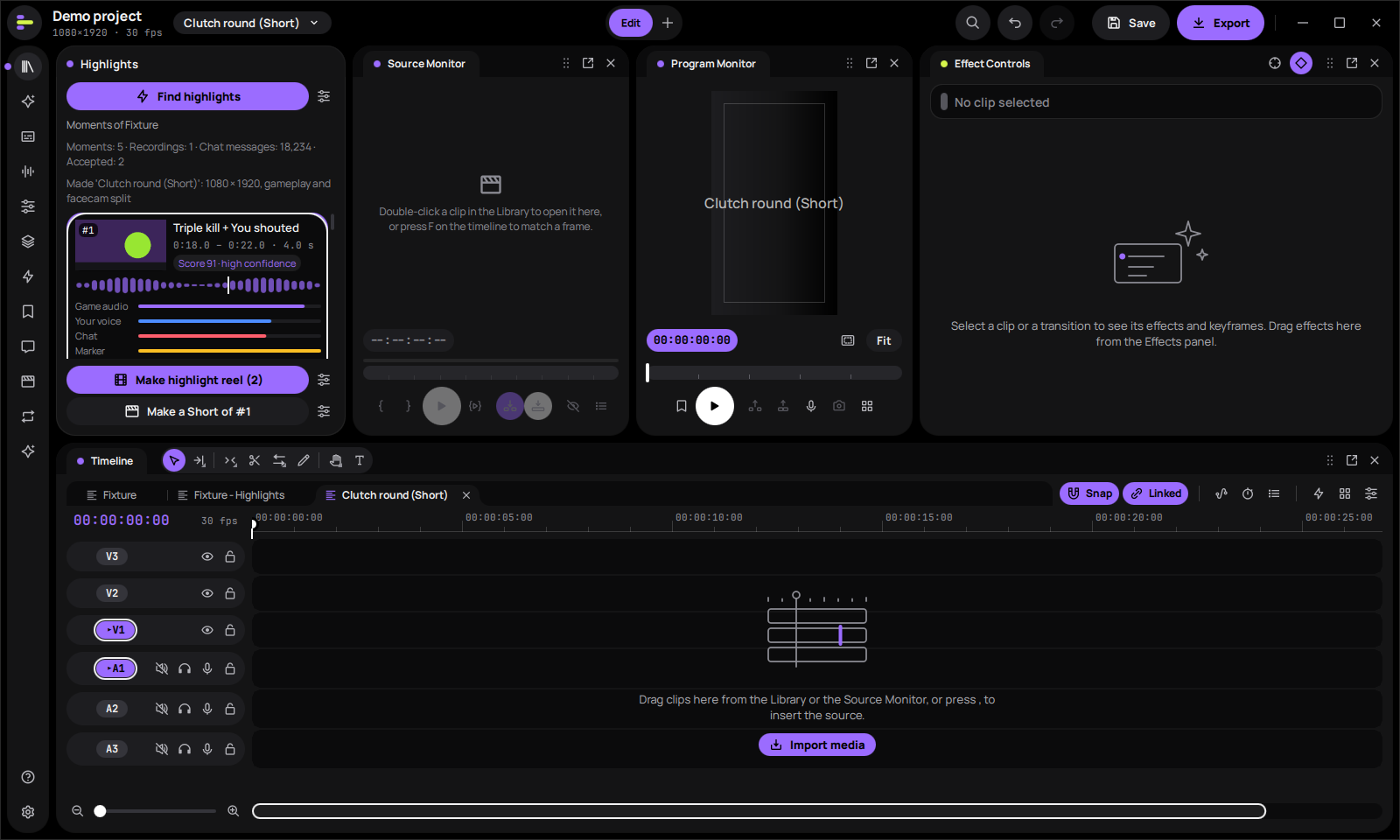
Highlight finder. Ranks moments in a game recording by game audio, your voice, chat and markers, then builds a highlight reel or a vertical Short. |
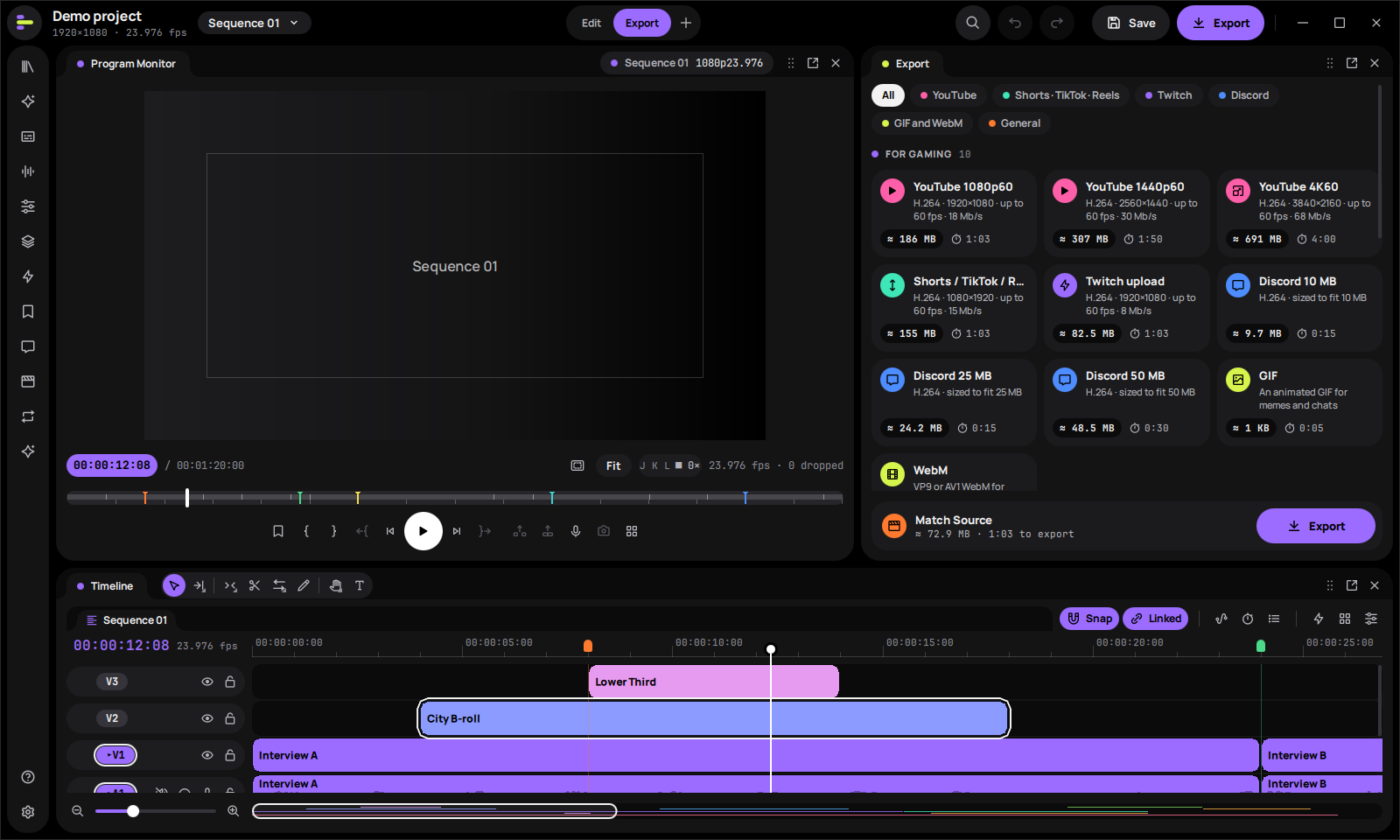
Export presets for creators. YouTube up to 4K60, Shorts/TikTok/Reels, Twitch, and Discord presets sized to fit the upload limit. |
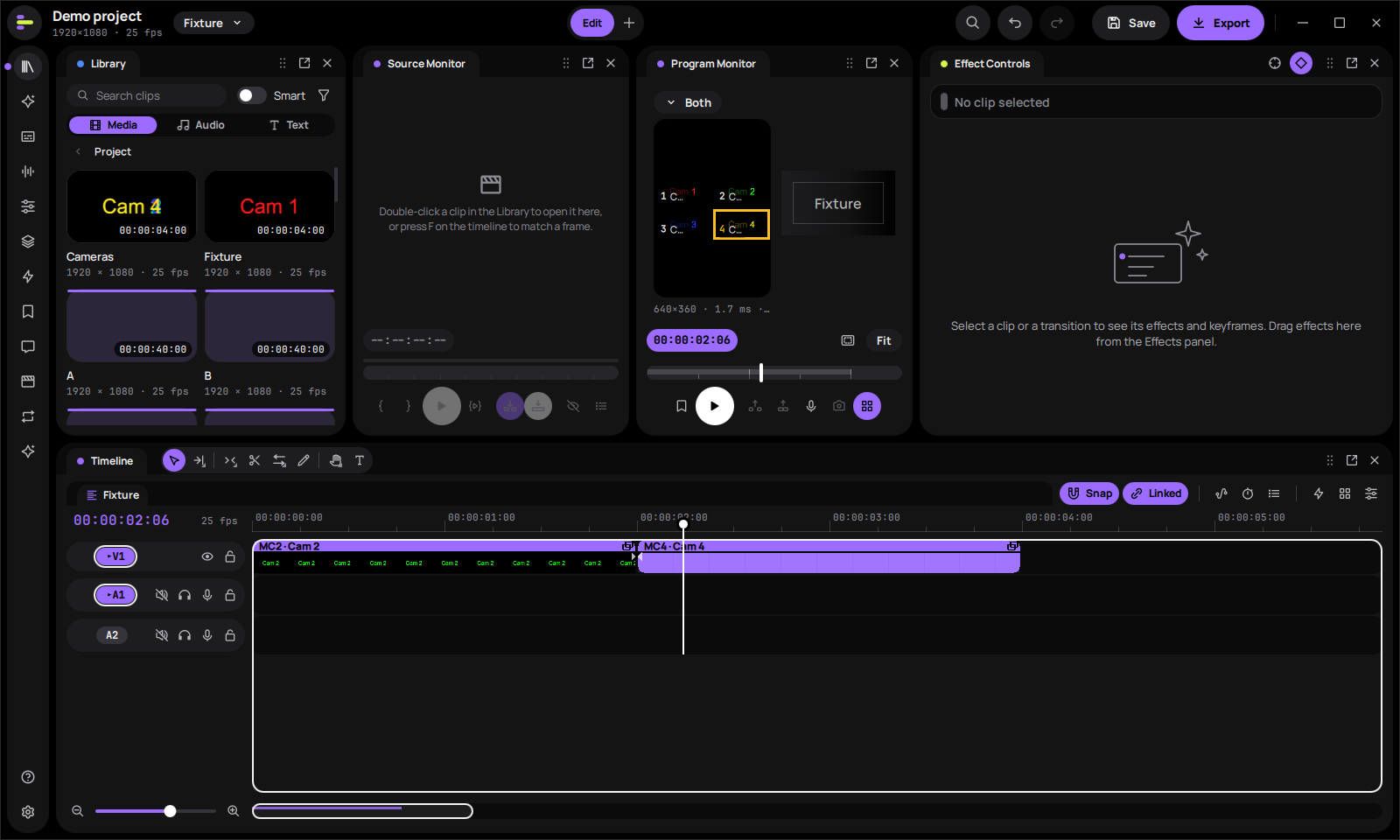
Multicam. Angles synced by audio, switched from a grid in the program monitor. |
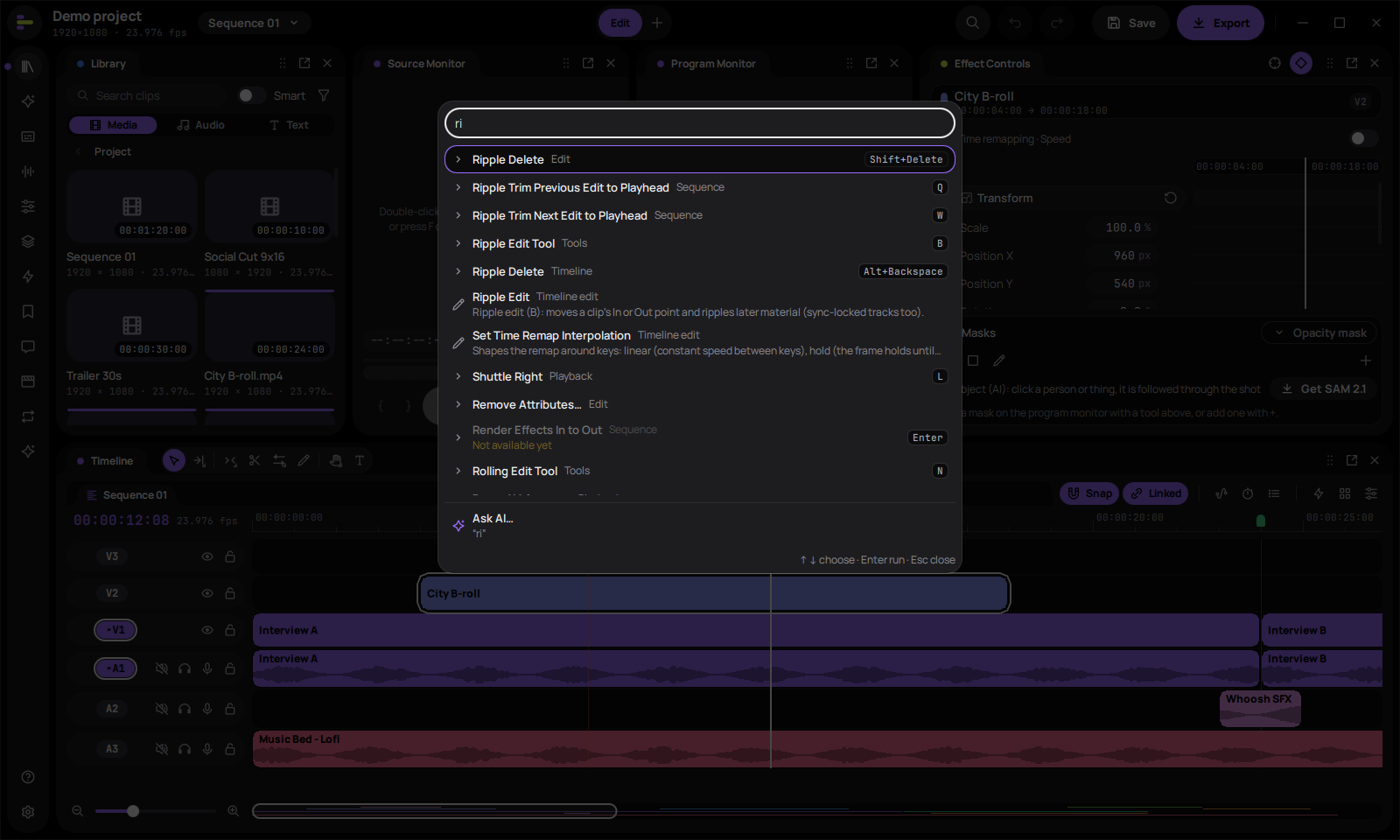
Command palette. Every command with its shortcut, one keystroke away, plus "Ask AI". |
Screenshots: the editor at the top from Wabcut 0.3.0, the others from 0.1.3, all with the built-in demo project,
captured by the automated UI tests.
Who it is for
- Gaming creators. Turn OBS, ShadowPlay and Xbox Game Bar recordings into YouTube videos, highlight reels and
vertical Shorts/TikToks:- named tracks for game, mic and Discord audio;
- 60–240 fps and variable frame rate;
- a highlight finder, instant replay and punch-in zoom;
- facecam layouts and 12 built-in gaming templates;
- YouTube, Twitch, Shorts and Discord-size export presets.
- Video essayists. Voice-over recording, transcripts, text-based editing, animated captions, titles, and music with
auto-ducking and loudness targets. - Documentary editors. Multicam synced by audio, editing by text, colour with scopes, privacy redaction that follows
the footage, and timeline round trips with Premiere and Resolve.
Project status
Wabcut is an alpha. The current release is 0.4.0: Alt-drag copy and Ctrl+Alt-drag rearrange on the timeline,
Premiere keys that did nothing before, clip speed and effects shown on the timeline, gaming Shorts and transcript work
in fewer steps, and no more silent losses on quit, autosave or a failed export
(release notes). 0.3 brought a new Home, Premiere's menu bar and Window menu and the
Effects panel in Premiere's folders (0.3 release notes); 0.2 most of what Premiere Pro has
for gaming videos, video essays and documentaries (0.2 release notes). Most of the editor
works, but it has only been tested on a small number of machines and projects. Known gaps in this version:
- Made and tested on Windows. Wabcut is built by a solo developer who works only on Windows 10 and 11. The Linux
and macOS (Apple silicon) downloads are previews: GitHub's machines build, install, start and smoke-test them
for every release, but nobody has edited real projects with them yet. Local transcription and audio plug-ins are
Windows-only for now. - Not code-signed and no auto-update. Windows SmartScreen may warn on first run, and macOS asks you to allow the
first start. - AI quality is not benchmarked yet. Local models and live cloud providers have not been measured on real projects.
- The features since 0.2 are tested by automated tests only. None has been through a release run with real
projects yet, and AAF / OMF files have not yet been opened in Pro Tools. - Not built yet: OpenFX video plug-ins, VR / 360 video, and cloud collaboration (review links, shared projects).
- Privacy redaction: check every redacted export by eye before you share it.
The full list is in the release notes.
Need something that isn't here? Open an issue and say what you're trying to make.
Install
Download the latest release from the Releases page:
| Platform | Download | First start |
|---|---|---|
| Windows 10 (22H2) or 11, x64 | per-user MSI (no administrator rights) or portable ZIP | Not code-signed yet: if SmartScreen stops it, choose More info, then Run anyway. |
| Linux x64, preview (Ubuntu 24.04 or as new) | AppImage or tar.gz | chmod +x the AppImage and run it, or unpack the tar.gz and run bin/wabcut. |
| macOS 13 or newer, Apple silicon, preview | DMG | Drag Wabcut to Applications. Not notarized yet: allow it once in System Settings > Privacy & Security > Open Anyway. |
You need a GPU with current drivers and 16 GB of RAM (8 GB minimum). Then follow
Getting started. It walks through four example projects: a gaming video, a Short, a
video essay and a documentary.
Privacy and AI
Nothing leaves your computer unless you turn on a cloud feature with your own key:
- every cloud call shows its cost first;
- a project can be locked to "no cloud";
- keys are kept in the system's credential store (Windows Credential Manager, the macOS Keychain, or the Secret
Service on Linux).
Local models (transcription, speech enhancement, stem separation, smart search, object masks) run on your GPU or CPU
after a one-time download. See AI with your own key and AI.
Documentation
| For editors | For agents and scripts | For contributors |
|---|---|---|
| Getting started | Commands: every edit as a typed, previewed, undoable command | Building |
Keymap: Premiere shortcuts, .kys import |
MCP: wabcut-cli mcp, a local server for Claude, Codex and other agents |
Architecture |
| Export | Extensions: add commands in JavaScript | Design language and design system |
| Interchange: Premiere, Resolve, Final Cut, OTIO, EDL | Performance | |
| Graphics and templates | Release process | |
| Colour | Roadmap | |
| Masks and redaction | ||
| Effects and transitions | ||
| Motion: Optical Flow, Morph Cut, Warp Stabilizer | ||
| Monitors | ||
| Audio: submixes, the clip mixer | ||
| Captions and transcripts | ||
| Audio plug-ins | ||
| Premiere Pro comparison |
Building from source
Stack: C++23 · Qt 6.11 Quick/QML · Qt RHI (Direct3D 11 on Windows) · FFmpeg 9 · miniaudio · whisper.cpp ·
ONNX Runtime · CMake + vcpkg.
Prerequisites are listed in docs/building.md. Quick start on Windows:
. .\tools\dev-env.ps1            # VS dev shell + VCPKG_ROOT + Qt path (override via env vars)
cmake --preset win-msvc
cmake --build --preset win-msvc
ctest --preset win-msvc
.\build\win-msvc\bin\wabcut.exe
The Qt-free core (edit engine, commands, interchange and AI logic) is written to build on any OS, but like the rest
of Wabcut it is only tested on Windows:
cmake --preset core && cmake --build --preset core && ctest --preset core
Contributing
Wabcut is early, so feedback is the most useful contribution right now.
- Bugs and ideas: open an issue. Include the Wabcut version (shown in the title bar), your Windows
version and GPU, and the steps that reproduce the problem. - Security problems: please report them privately, not as an issue; see SECURITY.md.
- Other platforms: reports from building or running Wabcut on macOS or Linux are welcome, since the solo developer
can only test on Windows. - Code: read building and architecture first. Keep each pull request
focused on one change, and runctest --preset win-msvc(or thecorepreset) before you open it.
License
Wabcut is licensed under GPL-3.0-or-later (see LICENSE). Third-party notices are in
THIRD-PARTY-NOTICES.md and are installed with the app.
The GPL lets builds include x264/x265 for high-quality software encoding. Codec patent licensing (H.264/HEVC/AAC) is
separate from copyright and is your responsibility when you distribute binaries.
Yorumlar (0)
Yorum birakmak icin giris yap.
Yorum birakSonuc bulunamadi