antigravity-proxy
Health Uyari
- License — License: MIT
- Description — Repository has a description
- Active repo — Last push 0 days ago
- Low visibility — Only 9 GitHub stars
Code Basarisiz
- rm -rf — Recursive force deletion command in scripts/render-illustrations.sh
Permissions Gecti
- Permissions — No dangerous permissions requested
Bu listing icin henuz AI raporu yok.
Antigravity proxy using native Gemini API in go. Dynamic model discovery and native video input support along with subscription limit tracking.
Antigravity is shit. Gemini isn't.
Antigravity Proxy brings your Antigravity account to Gemini-compatible applications. Run it locally or on your server, sign in with Google, and use a native Gemini-to-Gemini connection. It focuses on one thing: making Antigravity available through the Gemini API without converting requests and responses into another provider's format.
This is deliberately not a universal API translator. There is no OpenAI or Anthropic conversion layer inside the proxy. Video inputs, tool calls, thinking metadata, thought signatures, and streaming responses stay in Gemini's native format instead of being reshaped to fit another API.
The narrow scope is the point: fewer format conversions, fewer opportunities to lose model-specific features, and a clear job for the proxy to do well. Claude and other models available through Antigravity use the same interface.
Use a Gemini-compatible client directly. If your coding harness needs an OpenAI-compatible API, add a gateway such as Bifrost in front. Translation belongs in that optional layer, not in this proxy.
Bring video to your Gemini workflows
Native video input through your Antigravity account—not just text and images. Send video clips to Gemini and ask it to summarize recordings, explain what happens on screen, or answer questions about a scene.
The proxy passes the video itself to Gemini rather than turning it into a collection of screenshots. Use a Gemini model that supports video understanding and a client that can send video inputs.
See the video input guide for examples and supported payloads.
Features
- Native Video Input: Send video clips to compatible Gemini models through Antigravity for summaries, scene understanding, and questions about what happens in a recording.
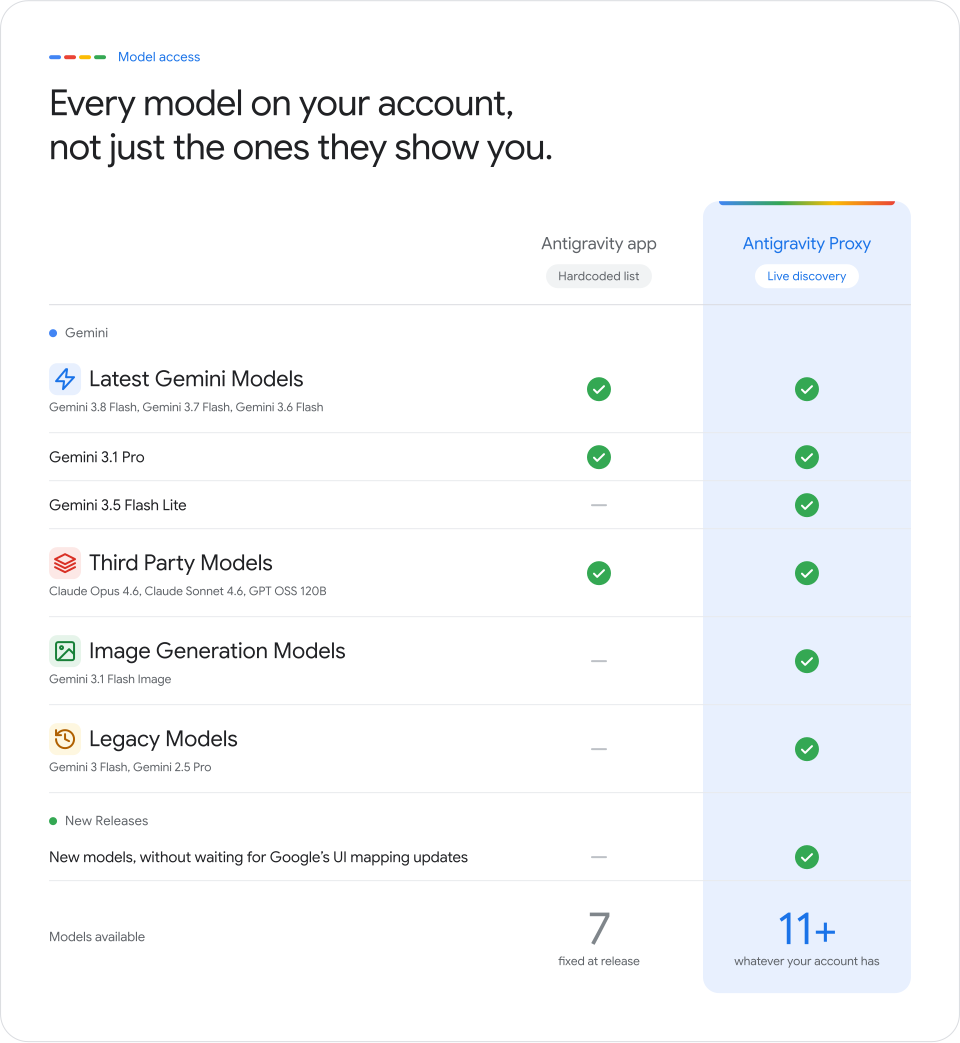
- No Hardcoded Model List: Discover models directly from Antigravity and use newly available models without waiting for model-specific patches or proxy releases.
- Optional Gateway Compatibility: Use Gemini-compatible clients directly, or add Bifrost to connect OpenAI-compatible coding harnesses such as Aider, OpenCode, and Cline.
- Live Quota & Limit Tracking: Built-in
/status/limitand/status/usageendpoints track your 5-hour and weekly bucket limits in real time. - One-Click Browser Login: Interactive
logincommand opens your browser, completes Google OAuth with PKCE, and handles token refresh automatically in the background. - Zero Leaks & Secure Auth: Protect the proxy with a custom local
API_KEY. Your Google OAuth tokens remain strictly on the proxy and are never exposed to clients. - Ultra Lightweight: Single static Go binary with zero external runtime dependencies. Also available as a hardened scratch Docker image.
Quick Start
1. Build the Binary
Requires Go 1.22+:
git clone https://github.com/sortedcord/antigravity-proxy.git
cd antigravity-proxy
go build -o antigravity-proxy ./cmd/antigravity-proxy
2. Authenticate with Google
Log into your Google account:
./antigravity-proxy login
This prints an authorization link and starts a local callback listener. Open the link in your browser, approve access, and the proxy automatically saves the OAuth credentials to ~/.config/antigravity-proxy/config.json.
3. Start the Server
./antigravity-proxy serve
By default, the server listens at http://127.0.0.1:8080.
To set an authentication key or listen on all interfaces:
API_KEY="my-secret-key" HOST="0.0.0.0" ./antigravity-proxy serve
You can also start the server before configuring a Google account:
API_KEY="my-secret-key" ./antigravity-proxy serve
curl http://127.0.0.1:8080/config/login -H "x-goog-api-key: my-secret-key" | jq -r '.login_url'
With jq installed, this prints a plain authorization URL to open in your browser. Without jq, omit the pipe and open the login_url value from the JSON response without surrounding quotes. If the browser cannot reach the proxy's loopback callback, submit the final redirect URL:
curl http://127.0.0.1:8080/config/login \
  -H "x-goog-api-key: my-secret-key" -H "Content-Type: application/json" \
  -d '{"url":"http://127.0.0.1:51121/oauth-callback?code=...&state=..."}'
Runtime login requires a configured API_KEY, no token environment overrides, and a writable private config directory. It can replace the active account without restarting; failed preparation leaves the old account usable. /health reports credential presence, while /status/account provides email/name and the provider-reported tier. See the runtime API contract and writable container setup.
4. Test Generation
curl http://127.0.0.1:8080/v1beta/models/gemini-3.8-flash-tiered:generateContent \
  -H "x-goog-api-key: my-secret-key" \
  -H "Content-Type: application/json" \
  -d '{
    "contents": [
      {
        "role": "user",
        "parts": [{"text": "Hello! Reply with one short sentence."}]
      }
    ]
  }'
Running with Docker
Run directly using Docker with your existing login config:
# Ensure the local history directory exists
mkdir -p "$HOME/.local/share/antigravity-proxy"

docker run -d \
  --name antigravity-proxy \
  --restart unless-stopped \
  -p 127.0.0.1:8080:8080 \
  -e API_KEY="my-secret-key" \
  -v "$HOME/.config/antigravity-proxy:/home/app/.config/antigravity-proxy:ro" \
  -v "$HOME/.local/share/antigravity-proxy:/home/app/.local/share/antigravity-proxy" \
  ghcr.io/sortedcord/antigravity-proxy:latest
See the Deployment Guide for full Docker Compose configurations, non-root user setup, and production hardening.
Connecting to Bifrost & AI Gateways
Need OpenAI Chat Completions (/v1/chat/completions) or Responses (/v1/responses)? Put Bifrost in front of the proxy. Bifrost accepts those formats and converts requests to the native Gemini API used by Antigravity Proxy. Cross-protocol translation stays in the gateway; the proxy remains Gemini-to-Gemini.
1. Configure Bifrost
Add Antigravity Proxy as a Gemini provider in Bifrost's config.json (or via the UI):
{
  "providers": {
    "antigravity-proxy": {
      "keys": [
        {
          "name": "antigravity-key",
          "value": "env.ANTIGRAVITY_PROXY_API_KEY",
          "models": ["*"],
          "weight": 1.0
        }
      ],
      "network_config": {
        "base_url": "http://127.0.0.1:8080/v1beta",
        "allow_private_network": true
      },
      "custom_provider_config": {
        "base_provider_type": "gemini"
      }
    }
  }
}
(Make sure base_url includes the /v1beta suffix and ANTIGRAVITY_PROXY_API_KEY matches your proxy's API_KEY.)
2. Use in Any Coding Harness
Point your favorite tool (Aider, OpenCode, Cline, etc.) to your Bifrost gateway:
export OPENAI_BASE_URL="https://your-bifrost-domain/v1"
export OPENAI_API_KEY="sk-bf-your-virtual-key"
Then select any available model with your provider prefix: gemini/model-name
Monitoring Quotas
Track your remaining 5-hour and weekly quotas at any time:
curl http://127.0.0.1:8080/status/limit -H "x-goog-api-key: my-secret-key"
Returns remaining percentages, active pools, and next reset timestamps:
{
  "observed_at": "2026-10-07T09:59:38Z",
  "pools": {
    "gemini": {
      "display_name": "Gemini Models",
      "five_hour": { "remaining_percent": 99.8, "reset_at": "2026-10-07T12:20:15Z" },
      "weekly": { "remaining_percent": 99.8, "reset_at": "2026-10-11T16:02:27Z" }
    },
    "third_party": {
      "display_name": "Claude and GPT models",
      "five_hour": { "remaining_percent": 93.1, "reset_at": "2026-10-07T14:18:50Z" },
      "weekly": { "remaining_percent": 95.3, "reset_at": "2026-10-13T04:42:09Z" }
    }
  }
}
Documentation
For comprehensive technical specifications and reference guides, check out:
- API Reference: Full endpoint listing, streaming format, pagination, and video understanding.
- Configuration Guide: Config schema, environment variable reference, and security controls.
- Deployment Guide: Standalone Docker, Docker Compose, permissions, and network setup.
- Architecture & Design: Deep dive into OAuth authentication, Cloud Code translation, and storage engine mechanics.
Disclaimer
Account Risk: This project is an unofficial integration with internal Google Antigravity endpoints. Google may enforce its Terms of Service, including account suspension. Use an account you can afford to lose. This project is not affiliated with or endorsed by Google.
Yorumlar (0)
Yorum birakmak icin giris yap.
Yorum birakSonuc bulunamadi