Ensembyte
Health Warn
- License — License: MIT
- Description — Repository has a description
- Active repo — Last push 0 days ago
- Low visibility — Only 5 GitHub stars
Code Pass
- Code scan — Scanned 12 files during light audit, no dangerous patterns found
Permissions Pass
- Permissions — No dangerous permissions requested
No AI report is available for this listing yet.
The open-source, local-first coding assistant and multi-agent IDE for macOS, Windows & Linux.
Ensembyte
The open-source multi-agent coding client.
A local-first desktop for AI coding agents.



What is Ensembyte?
Ensembyte is the unified open-source project that brings together two native desktop clients for working with AI coding agents. They integrate with local CLI tools and supported provider APIs, including Claude Code, Codex, Cursor, OpenCode, Grok, Pi, Devin, Hermes, DeepSeek, Antigravity, and more. Provider accounts and subscriptions stay yours. Requests to hosted providers are sent to those providers, and the Rust app can sync chat data when account-backed sync is enabled.
Built by Soumya Chakraborty with a focus on native performance, multi-agent orchestration, and a first-class desktop experience.
Two Native Clients. One Vision.
To deliver uncompromising native speed, memory efficiency, and platform-perfect UI, Ensembyte ships as two dedicated clients — each handcrafted for its platform:
| Ensembyte for macOS | Ensembyte Desktop | |
|---|---|---|
| Platform | macOS (Apple silicon & Intel, macOS 14+) | Windows & Linux (x86_64, ARM64) |
| Stack | Swift 6 / SwiftUI + Liquid Glass | Rust 2024 / GPUI (GPU-accelerated) |
| Source | Ensembyte-swift/ |
Ensembyte-rust/ |
| Packages | Signed & Notarized .dmg (arm64 & x86_64) |
.exe / .zip, .tar.gz |
| Multi-Agent | Hydra: Lead + parallel worktree heads | Dedicated local + synced sessions |
| Design | 26 tinted-glass themes, Liquid Glass | Minimalist dark/light, immediate-mode GPU |
| Sync | Local-first, hidden git checkpoints | Local-first, optional Loro CRDT sync |
macOS user? → Ensembyte for macOS — Liquid Glass, Hydra multi-agent, embedded terminal, GitHub cloning.
Windows / Linux user? → Ensembyte Desktop — GPU-accelerated, CRDT sync, lightweight.
Key Capabilities
Both clients deliver the same powerful, keyboard-first experience — optimized for their respective platforms:
Workspace & Streaming
Project and thread sidebars, search, pinning, and per-thread runtimes. Real-time streaming of thoughts, reasoning, tool execution, terminal outputs, and file diffs — all in one pane.
Inline Permission Prompts
Answer approval requests, tool execution dialogs, and decision questions right in the streaming output — no terminal switching required.
Diff for Every Turn
Automated git checkpoints let you inspect precise line-by-line file modifications across each model turn. Accept, reject, or navigate the full diff history.
Model Context Protocol (MCP)
Preloaded with MCP servers for system tools, web search, browser automation, and knowledge bases. Configure custom transports (stdio, HTTP, SSE) with an OAuth flow.
Spend & Quota Transparency
Live token expenditure and rolling rate-limit counters keep provider costs visible and honest.
Local-First
The apps run locally and do not send product analytics to Ensembyte. Local-first does not mean that no data leaves your device: hosted providers receive the prompts and context sent to them, and the Rust app can sync chat data when account-backed sync is enabled. Workspace files and provider credentials are stored locally; any file context included in a provider request is handled by that provider.
Supported Providers & Agents
Ensembyte connects to the CLI tools installed on your machine. Sign in once with each tool using your existing provider plan:
| Provider | CLI Tool | Protocol / Transport | macOS (Swift) | Windows & Linux (Rust) |
|---|---|---|---|---|
| Claude | claude |
stream-json + permission prompts | ✅ | ✅ |
| Codex | codex |
app-server JSON-RPC | ✅ | ✅ |
| Cursor | cursor-agent |
Agent Client Protocol (ACP) | ✅ | ✅ |
| Grok | grok |
Agent Client Protocol (ACP) | ✅ | ✅ |
| Antigravity | agy |
stream-json headless | ✅ | ✅ |
| Pi | pi |
JSONL over stdio | ✅ | ✅ |
| omp | omp |
RPC mode (oh-my-pi) | ✅ | — |
| OpenCode | opencode |
Agent Client Protocol (ACP) | ✅ | — |
| Devin | devin |
local agent | — | ✅ |
| Hermes | hermes |
local agent | — | ✅ |
| DeepSeek | DEEPSEEK_API_KEY |
Native API (OpenAI-compatible) | ✅ | — |
| Meta | MODEL_API_KEY |
Native API (Muse Spark) | ✅ | — |
| GitHub | gh / PAT |
GitHub API & Repo Cloning | ✅ | — |
Hydra: The Multi-Agent Orchestration Engine (macOS)
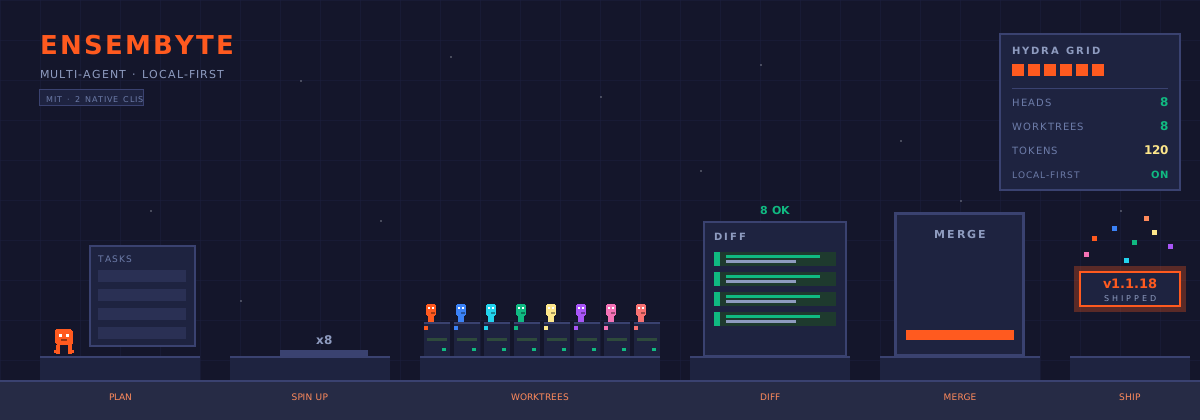
Ensembyte for macOS ships with Hydra — a unique multi-agent system where one lead agent plans, delegates, and synthesizes work across up to 8 parallel heads:
           Lead Agent (orchestrator)
          /       |       |       \
    Head-1     Head-2   ...    Head-8
      │          │               │
   worktree   worktree    ...   worktree
      │          │               │
    result     result    ...   result
          \       |       |       /
           Merged Result (auto)
- Lead agent plans the work and delegates to parallel heads
- Each head operates in its own isolated git worktree — no conflicts, no race conditions
- Automatic merge — completed work is merged back with a single review step
- Full visibility — monitor progress, output, and status of every head in real-time
No more sequential "fix → run → fail → repeat" loops. Fire off 8 agents and let them do the heavy lifting in parallel.
Architecture
Both implementations follow a strict four-layer, one-way dependency model:
macOS — Swift App
Ensembyte/
├── Core/          Models, state primitives, pure support
│                  (no dependencies on upper layers)
├── Services/      Git, Store, Provider Adapters, MCP
│                  (depends only on Core)
├── UI/            Chrome, Themes, Markdown, Audio, Common Views
│                  (depends only on Core)
└── App/           Entry, Runtime, Windows, Feature Views
                   (depends on everything)
Windows / Linux — Rust App
ensembyte/
├── core/              Models, state primitives, pure support
│                       (no dependencies on upper layers)
├── services/          Git, Store, Provider Adapters, MCP, Sync
│                       (depends only on core)
├── ui/                GPU-rendered views, themes, components
│                       (depends only on core)
└── app/               Entry, Runtime, Windows, Feature Views
                        (depends on everything)
Rule: A file in
Corenever reaches into upper layers. New capabilities go into the lowest layer whose dependencies satisfy the requirements.
See ARCHITECTURE.md for the full technical specification.
Installation
Ensembyte for macOS
Official signed and notarized .dmg packages are available at:
👉 Ensembyte Releases
- Download
Ensembyte.dmg - Mount the disk image and drag Ensembyte.app into
/Applications - Launch from Applications or Spotlight
Or install via Homebrew (if a tap is available):
brew install --cask ensembyte
Ensembyte Desktop (Windows / Linux)
Download the appropriate package for your platform from:
👉 Ensembyte Releases
| Platform | Package |
|---|---|
| Windows x86_64 | Ensembyte-Setup.exe |
| Windows x86_64 (portable) | ensembyte-windows-x86_64.zip |
| Linux x86_64 | ensembyte-linux-x86_64.tar.gz |
| Linux aarch64 | ensembyte-linux-aarch64.tar.gz |
Building from Source
Ensembyte for macOS
Requirements:
- Mac with Apple Silicon (M1 / M2 / M3 / M4 or later)
- Xcode 26+ with Swift 6 and the macOS 26 SDK
- The app targets macOS 26.0 and later
Build from CLI:
cd Ensembyte-swift
xcodebuild -project Ensembyte.xcodeproj \
  -scheme Ensembyte \
  -configuration Debug build
Ensembyte Desktop (Windows / Linux)
Requirements:
- Rust stable toolchain with Rust 2024 Edition support (install with
rustup) - Node.js 20+ (for the edge/worker component)
Build from CLI:
cd Ensembyte-rust

# Linux (x86_64)
cargo build --release --target x86_64-unknown-linux-gnu

# Linux (aarch64)
cargo build --release --target aarch64-unknown-linux-gnu

# Windows (x86_64)
cargo build --release --target x86_64-pc-windows-msvc
See Ensembyte-rust/README.md for detailed build instructions.
Packaging & Releases
macOS — DMG Packaging
cd Ensembyte-swift
scripts/release.sh
# Produces: build.noindex/Ensembyte-<version>.dmg
scripts/release.sh builds a production archive, verifies code signatures, notarizes with Apple notarytool, and creates a compressed DMG. It does not create the styled Finder window. To package an already-built app into the styled DMG, run:
cd Ensembyte-swift
scripts/package_dmg.sh \
  --app path/to/Ensembyte.app \
  --output path/to/Ensembyte.dmg
Rust — Platform Packages
cd Ensembyte-rust
scripts/package-linux.sh      # Produces .tar.gz
scripts/package-windows.ps1   # Produces .exe installer
Publishing
All releases are published to the designated GitHub Releases repository. For macOS, use Ensembyte-swift/scripts/publish_release.sh after packaging. Rust releases are built and attached by .github/workflows/release.yml when a version tag is pushed. After publishing, update the website's download links and changelog.
Repository Structure
Ensembyte/
├── Ensembyte-swift/          # macOS client — Swift 6 / SwiftUI / Liquid Glass
│   ├── Ensembyte/
│   │   ├── Core/            # Models, state, pure support
│   │   ├── Services/        # Git, Store, Provider Adapters, MCP
│   │   ├── UI/              # Chrome, Themes, Markdown, Audio, Common
│   │   └── App/             # Entry, Runtime, Windows, Feature Views
│   ├── Resources/           # Bundled assets
│   ├── scripts/             # Release automation
│   └── release/             # DMG packaging, signing, notarization
│
├── Ensembyte-rust/           # Windows/Linux client — Rust 2024 / GPUI
│   ├── crates/
│   │   ├── core/            # Models, state, pure support
│   │   ├── services/        # Git, Store, Providers, MCP, Sync
│   │   ├── ui/              # GPU-rendered views, themes
│   │   └── app/             # Entry, Runtime, Windows, Feature Views
│   ├── apps/ensembyte/       # The binary
│   ├── edge/                # Cloudflare Worker + Durable Objects (sync)
│   ├── scripts/             # Packaging scripts
│   └── dist/                # Platform distribution assets
│
├── website/                 # Marketing site & documentation
│   └── assets/app/          # Screenshots & media
│
├── ARCHITECTURE.md          # Full technical specification
├── CONTRIBUTING.md          # Contributor guidelines
├── CHANGELOG.md             # Release history
├── LICENSE                  # MIT License
└── AGENTS.md                # Agent workflow instructions
Technology
macOS Client
| Technology | Role |
|---|---|
| Swift 6 | Language — strict concurrency, full memory safety |
| SwiftUI | UI framework — declarative, reactive, Liquid Glass |
| SwiftTerm | Embedded terminal emulation |
| Hydra | Multi-agent orchestration engine |
| Liquid Glass | Apple's native design language — glassmorphism, vibrancy |
| Keychain Services | Secure credential storage |
| MCP (Swift) | Model Context Protocol integration |
Rust Client
| Technology | Role |
|---|---|
| Rust 2024 | Language — zero-cost abstractions, memory safety |
| GPUI | Immediate-mode GPU-accelerated UI framework |
| Loro CRDT | Conflict-free Replicated Data Types for multi-device sync |
| Cloudflare Durable Objects | Edge sync infrastructure |
| MCP (Rust) | Model Context Protocol integration |
| Tokio | Async runtime |
Design Philosophy
Ensembyte is built on three non-negotiable principles:
- Local-First — Everything runs on your machine. No cloud accounts, no data leaving your disk, no telemetry. Your code, your control.
- Native Performance — SwiftUI on Apple silicon, GPUI on Windows/Linux. No Electron. No webviews. No compromises. GPU-accelerated rendering, zero-copy data flow, and platform-perfect chrome.
- Keyboard-First — Every action has a keyboard shortcut. Ensembyte is built for developers who live in the terminal and want a UI that gets out of their way.
The Team
Ensembyte is designed, developed, and maintained by Soumya Chakraborty (@soumyachk101).
It is built upon incredible open-source foundations:
| Component | Project | License |
|---|---|---|
| Terminal Emulation | SwiftTerm by Miguel de Icaza | MIT |
| GPUI Toolkit | GPUI / Zed by Zed Industries | GPL / Apache 2.0 |
| CRDT Sync | Loro by Loro Dev | MIT / Apache 2.0 |
| Pulse Indicators | Ported by Wing | MIT |
| Icons | Lucide | ISC |
See THIRD_PARTY_NOTICES.md for complete attributions.
Contributing
Ensembyte is open source under the MIT License and actively welcomes contributions.
- Read the Docs — Study
ARCHITECTURE.mdand the README of the subproject you want to develop (Ensembyte-swift/orEnsembyte-rust/) - Open an Issue — For new features or significant changes, open a GitHub Issue first to align on design
- Keep PRs Focused — One concern per PR (bugfix, enhancement, refactoring)
- Follow Guidelines — Adhere to our Code of Conduct and Contributing Guide
- Sign Off — Follow the DCO instructions in
CONTRIBUTING.md
The macOS app uses worktrees for all experimental work. See
AGENTS.mdfor the workflow.
Changelog
See CHANGELOG.md for the full release history.
Latest documented version: v1.1.18. See CHANGELOG.md for the version history and GitHub Releases for downloadable builds.
License
Licensed under the MIT License. See LICENSE for full terms.
Copyright © Soumya Chakraborty (@soumyachk101).
Reviews (0)
Sign in to leave a review.
Leave a reviewNo results found