herdr-island
Health Uyari
- License — License: MIT
- Description — Repository has a description
- Active repo — Last push 0 days ago
- Low visibility — Only 5 GitHub stars
Code Gecti
- Code scan — Scanned 3 files during light audit, no dangerous patterns found
Permissions Gecti
- Permissions — No dangerous permissions requested
Bu listing icin henuz AI raporu yok.
Your herdr agents live in the MacBook notch: approve, answer and watch them from a Dynamic Island-style panel
English · 한국어
Herdr Island
Your herdr agents live in the MacBook notch.
Approve a command, answer a question, jump to a finished task, and watch what an agent is doing right now,
without leaving what you are working on.




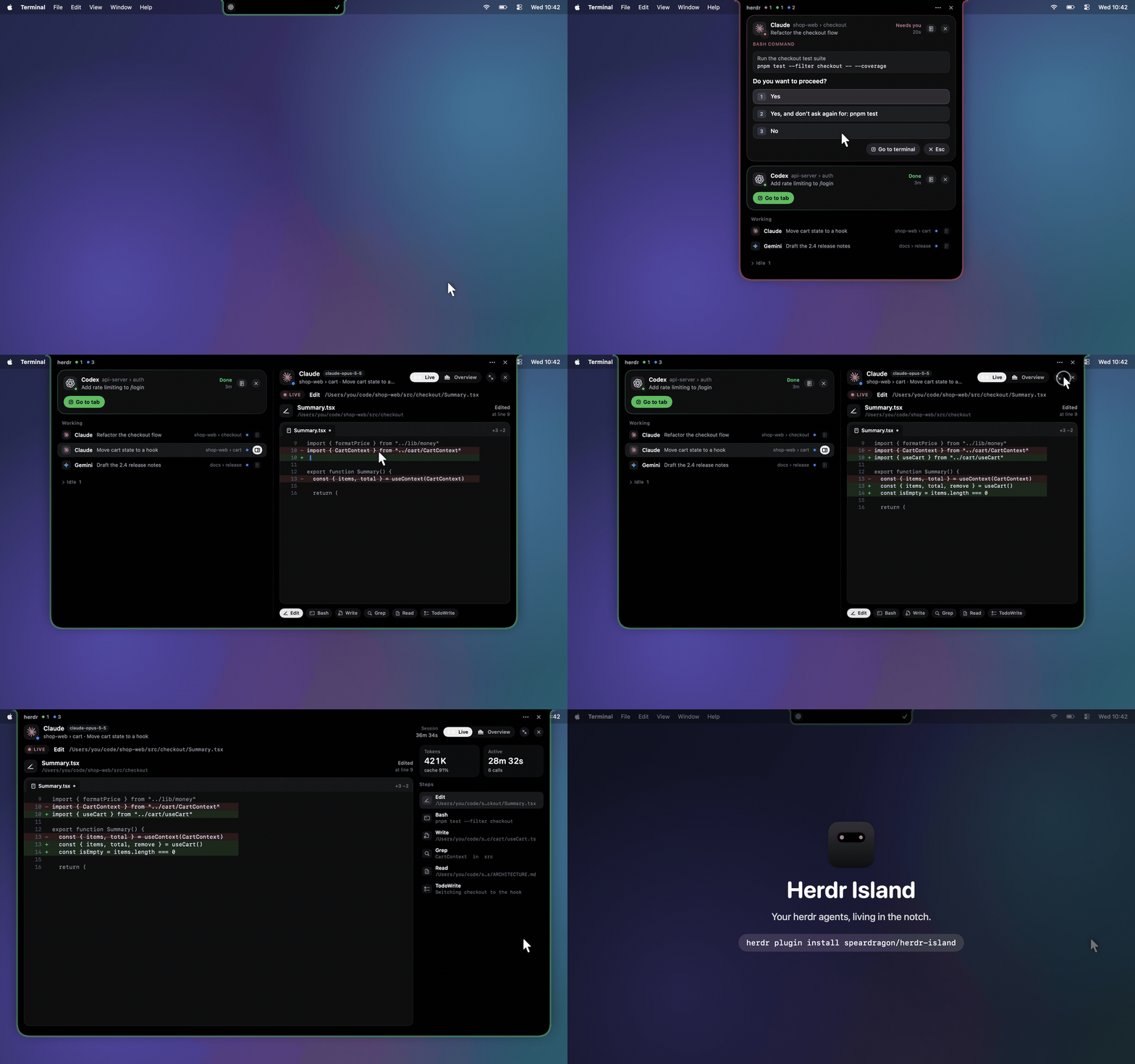
15 seconds · watch in full quality (MP4)
Just point at the notch. It opens instantly. No click, no shortcut, no window switching.
Why Herdr Island?
Run a few agents in herdr and the same chore comes up dozens of times a day:
find the tab that is waiting, switch to its terminal, press 1, and switch back.
Herdr Island moves that chore into the notch. When an agent needs you or finishes, the notch opens
like a Dynamic Island and you answer it right there. On a Mac without a notch, the same panel drops from the menu bar.
Features
Point at the notch, and it's open
Move the pointer up to the notch and the island opens right away, in about a tenth of a second.
Move away and it folds back. Checking on your agents is a flick of the mouse,
and you never leave the app you're working in. Prefer clicking? Turn hover off in settings and click the notch instead.
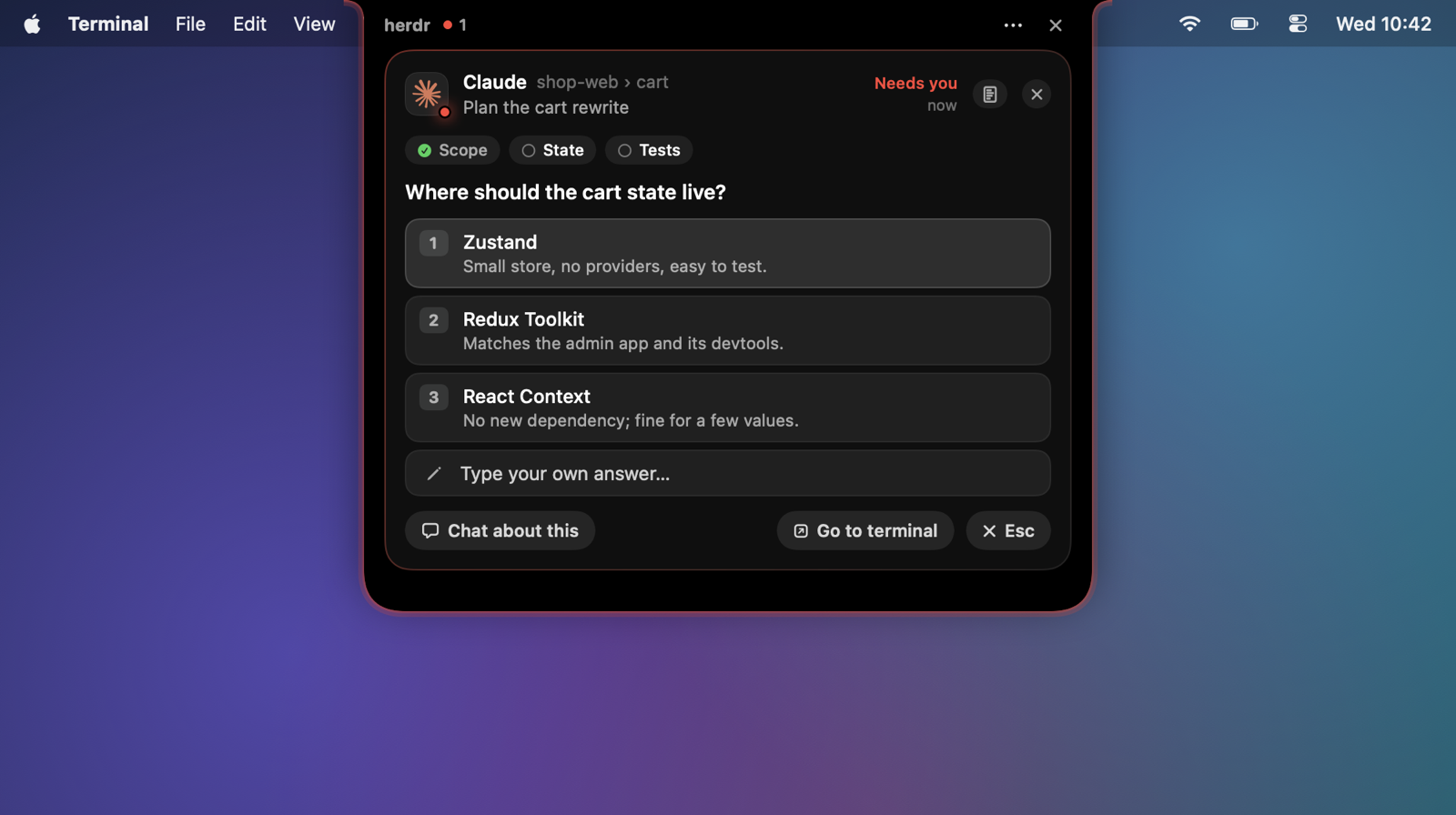
Answer permissions and questions in place
- Permission prompts show the command and its choices (
Yes/Yes, and don't ask again…/No); a click sends that answer to the agent. - Questions (AskUserQuestion): question tabs, options with descriptions, multi-select checkboxes, your own answer, and "Chat about this". Multi-question prompts move on to the next question.
- Finished agents: Go to tab focuses the herdr pane and brings your terminal app forward.
- Answered something in the terminal instead? The island re-reads the screen and follows along.
Visible even when closed

The closed island shows the leading agent's mark and a status dot beside the notch. Its edge breathes
red while an agent waits for you and green when one has finished. When Claude Code only printed a
recap of an idle session, it glows purple and the card shows the recap, so you can tell it from finished work.
New events open it for a moment; hover or click the notch to open it any time.
Session details: tokens, cache, tools, files
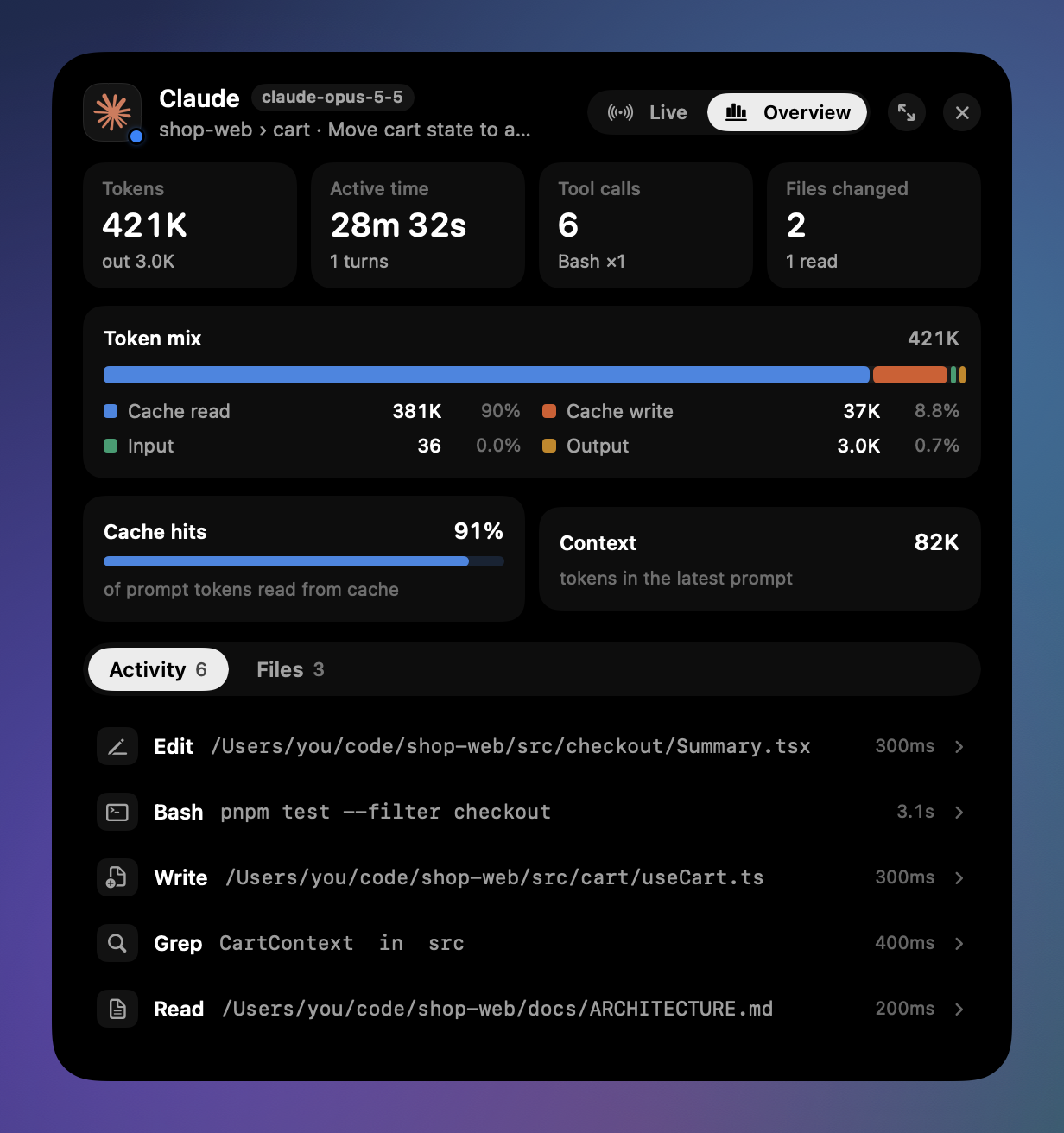 |
The details button beside an agent widens the island and opens that session.
|
Live stage: what it is doing right now
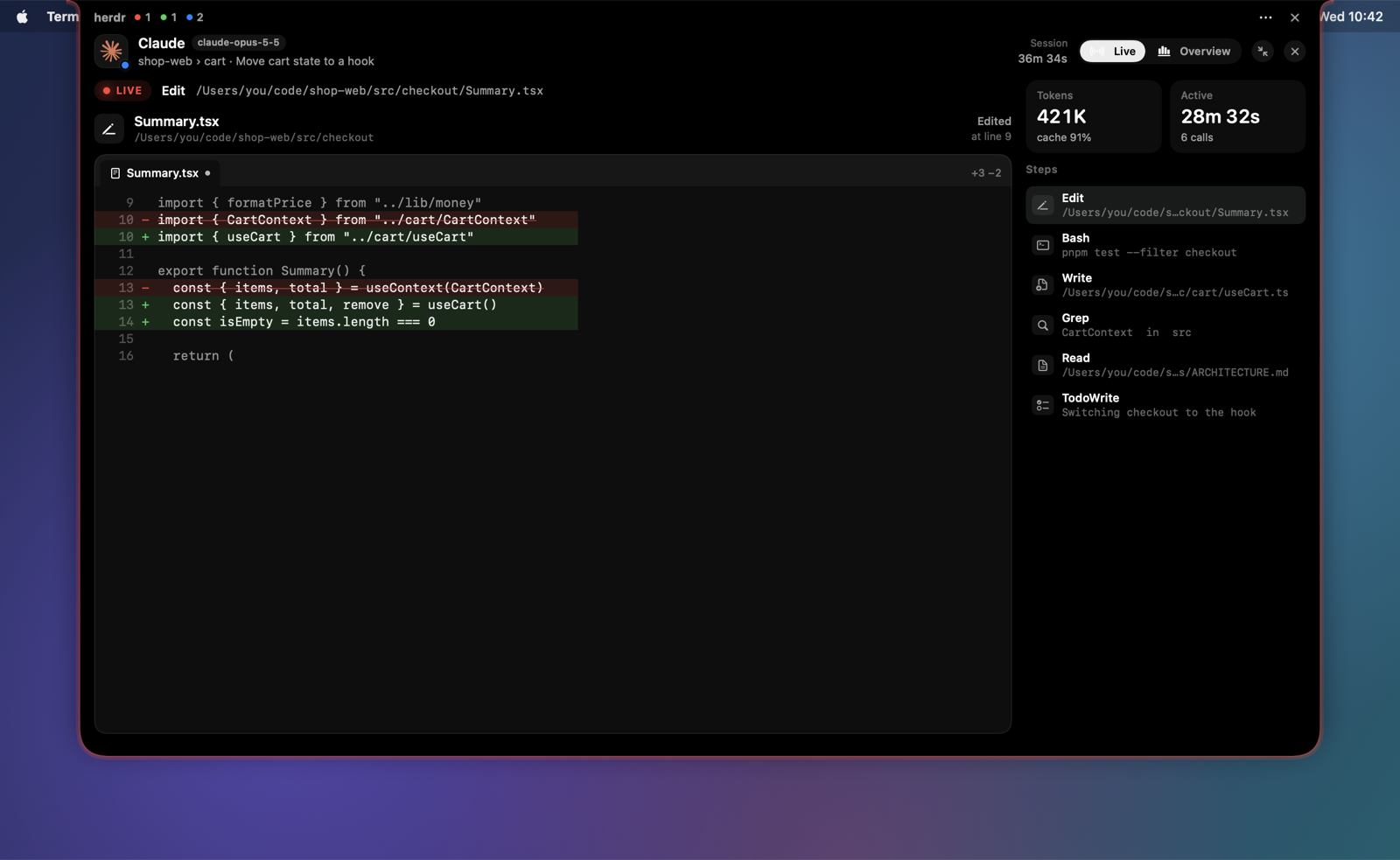
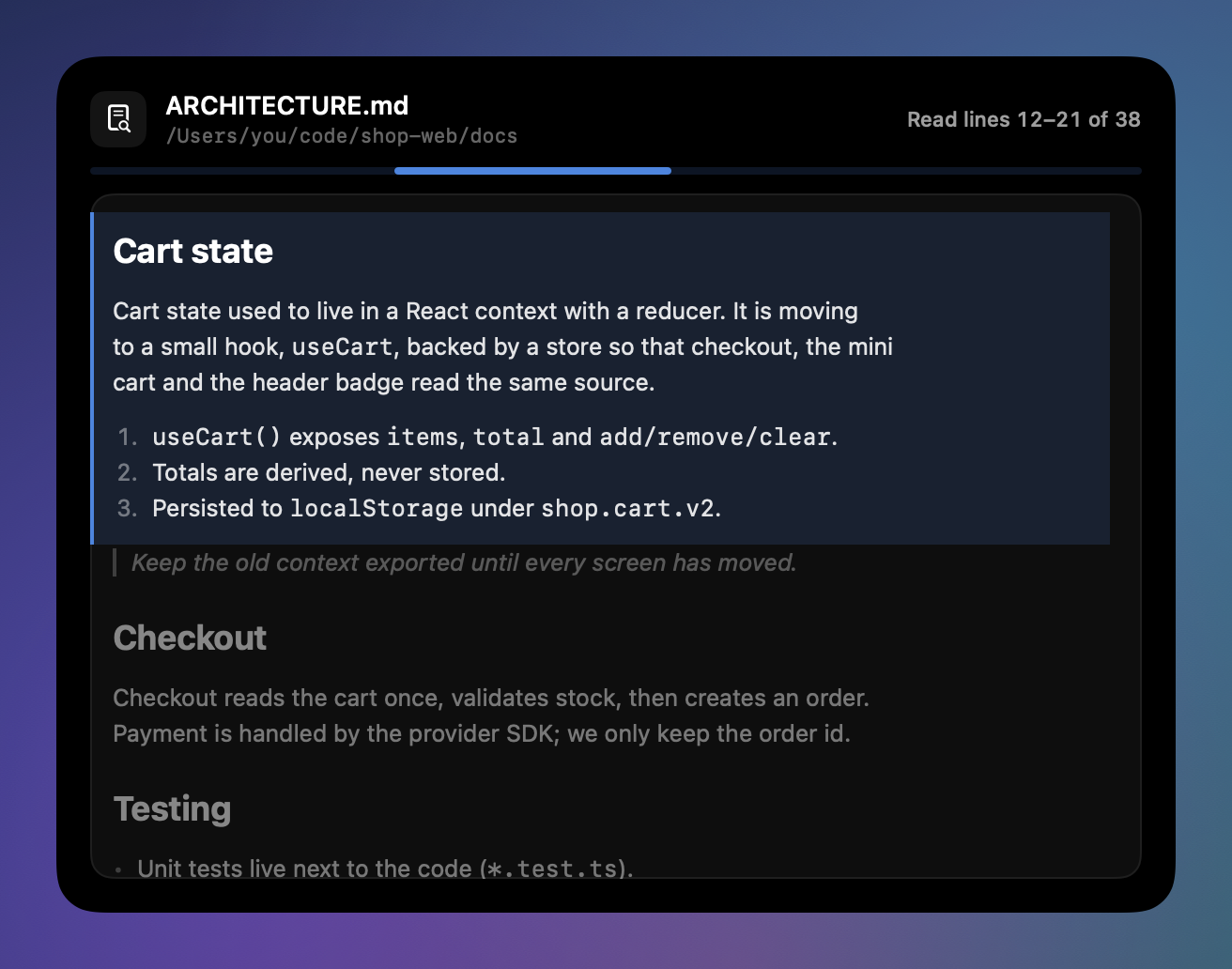
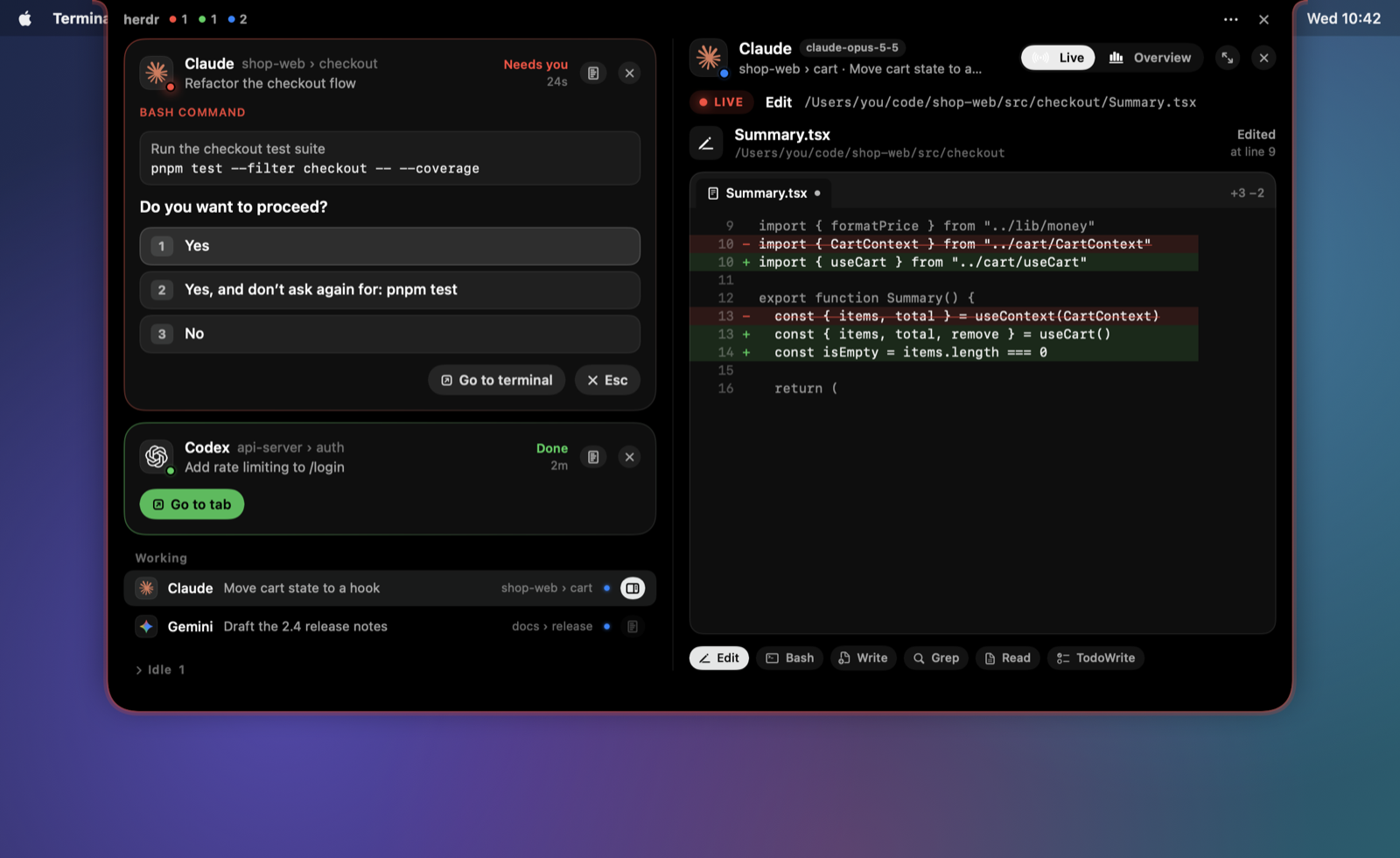
For a working agent, details open on the Live view: the current step, drawn the way that tool deserves.
Bigger grows the island to fit your display.
 |
 |
| Tool | How it is shown |
|---|---|
| Read | The whole file, with the lines being read lit up and scrolled into view. Markdown renders as a document, and a picture shows the picture itself with its format, size and dimensions. |
| Write | An editor with the new file typing itself in. |
| Edit | A diff with real line numbers; added lines type in. |
| Bash | A terminal: the command with quiet highlighting, elapsed time, output and failures |
| Grep / Glob | A search field and the hits, with matches highlighted |
| WebFetch / WebSearch | A browser: address bar, loading bar, the result |
| Task | A subagent card with its steps as they happen |
| TodoWrite | A checklist with progress |
| AskUserQuestion | Each question with its options; once answered, the picks light up, with any typed answer and notes |
| Skill | A skill badge |
| MCP tools | The server and tool, the arguments as key/value rows, and the result summarized: list items as rows with a title, status and key facts, or an object's fields (the raw text is one click away) |
| MongoDB MCP | Like a database viewer: database › collection, the filter or pipeline in mongosh style, documents as cards of typed fields (ObjectId, dates, numbers and strings in their own colors, nested values folded), counts and collection lists. List and JSON views. |
No notch? Use the menu bar
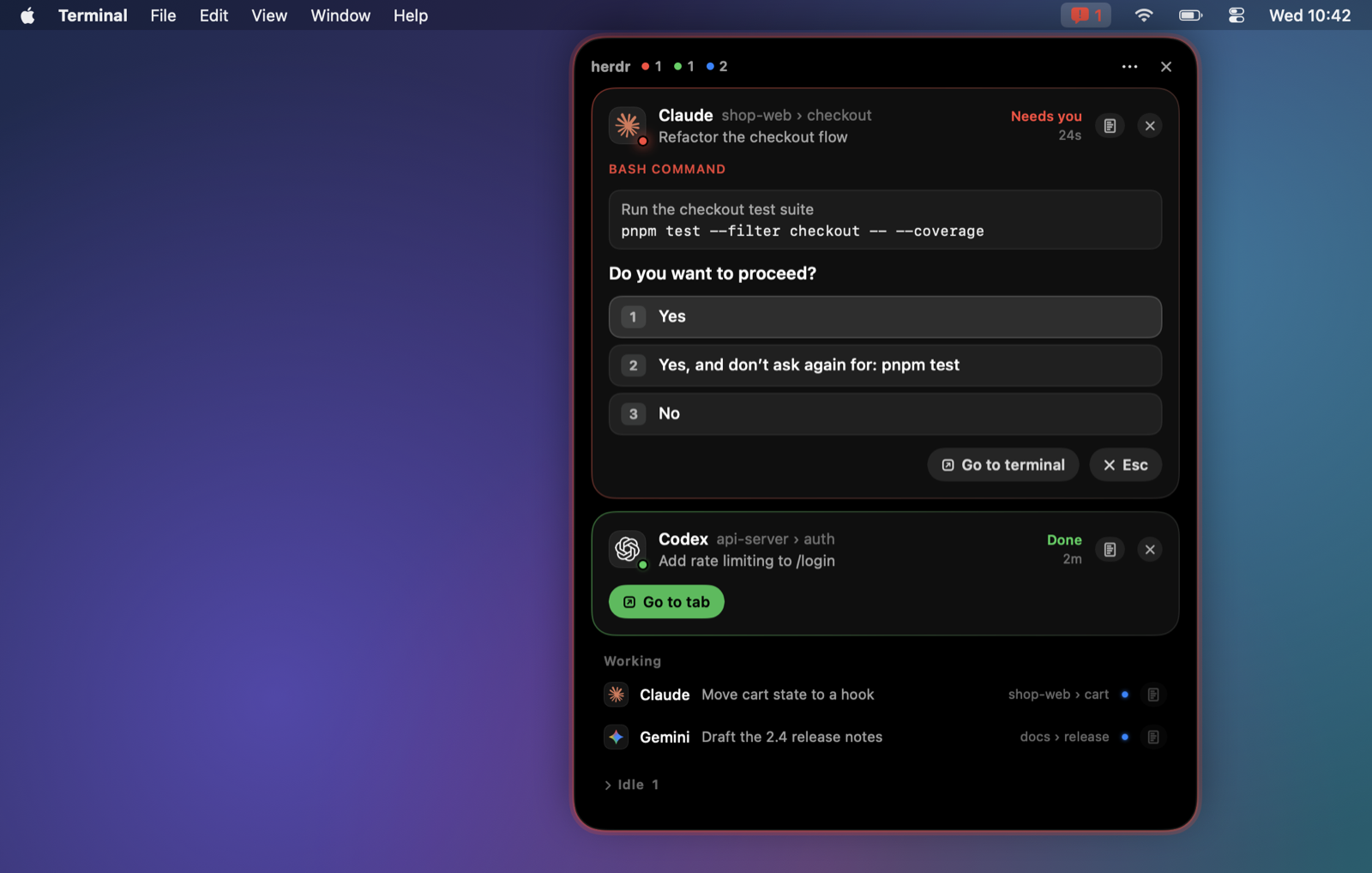
On external displays and Macs without a notch, the same panel opens from a menu bar icon.
Use the notch and the menu bar together, or put an island on every display.
Settings that feel like macOS
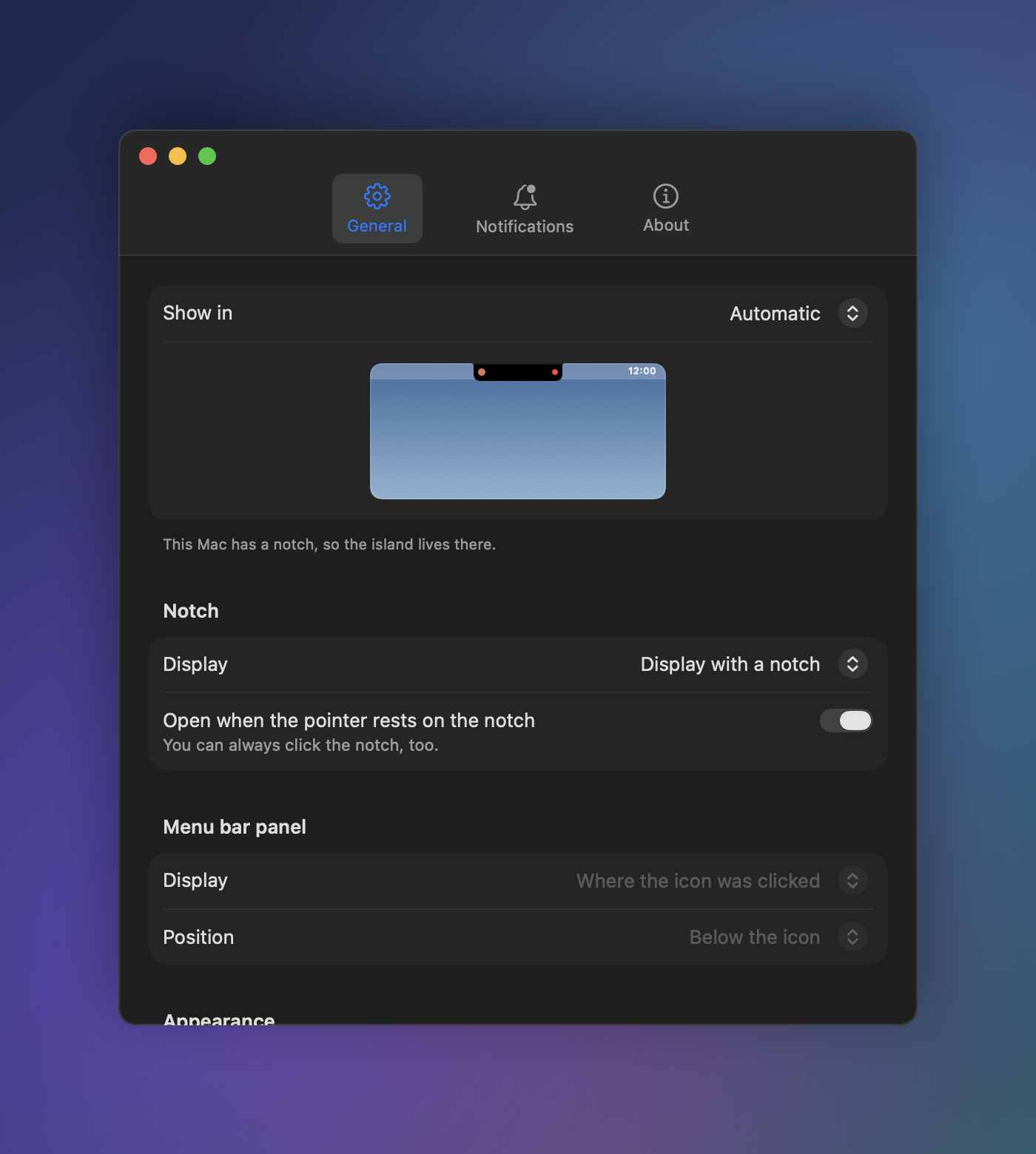 |
A regular settings window, with changes applied at once and saved to
|
Install
Requirements: macOS 13 or later · herdr 0.9.0 or later · Xcode Command Line Tools (xcode-select --install)
herdr plugin install speardragon/herdr-island
To run from source, clone the repository and link it as a local plugin:
git clone https://github.com/speardragon/herdr-island.git
herdr plugin link ./herdr-island
The Swift helper builds during install and starts with the next agent event. There is nothing else to launch.
What changed in each version is in the changelog and on the releases page.
Usage
| To | Do |
|---|---|
| Open the island | Hover or click the notch; in menu bar mode, click the icon |
| Answer a prompt | Click an option, or type your own answer and press Return |
| Go to a finished task | Go to tab on its card |
| See session details | The details button on a card or row |
| Make the live stage bigger | Bigger (↗) at the top of the details |
| Hide things | ✕ on a card hides it until its status changes; ✕ top right closes the island |
Keyboard shortcut
Bind an action in herdr's config.toml to open and close the island with one key:
[[keys.command]]
key = "prefix+i"
type = "plugin_action"
command = "speardragon.herdr-island.toggle"
description = "Herdr Island"
| Action | What it does |
|---|---|
toggle / open / close |
Open or close the island |
settings |
Open the settings window |
mode-notch / mode-menubar / mode-both / cycle-mode |
Change where it lives |
reload |
Re-read config.toml |
quit |
Quit (it starts again on the next agent event) |
herdr plugin action invoke speardragon.herdr-island.toggle
Configuration
The settings window (⋯ → Settings… in the island) is the easiest way. You can also edit~/.config/herdr/plugins/config/speardragon.herdr-island/config.toml directly.
[display]
mode = "auto"              # auto | notch | menubar | both
screen = "notch"           # where the notch island goes: notch | main | mouse | all
hover_to_expand = true     # open when the pointer rests on the notch (clicking always works)
show_working = true        # list working agents
language = "system"        # system | en | ko
fade_when_idle = true      # turn see-through while the pointer is away
fade_after_seconds = 5
fade_opacity = 0.35        # 0.1 – 0.9

[menubar]
screen = "icon"            # icon (where it was clicked) | main | mouse | all
position = "icon"          # icon (below it) | right (top right) | center (top centre)

[behavior]
expand_on_blocked = true   # open by itself when an agent needs you
blocked_auto_close = true  # false keeps it open
blocked_peek_seconds = 9
expand_on_done = true
done_auto_close = true
done_peek_seconds = 6
close_on_leave = true      # close when the pointer leaves
leave_delay_seconds = 0.5
close_on_click_outside = true
close_when_clear = true    # close a self-opened island once nothing needs you
blocked_sound = "none"     # "none" or a macOS alert sound (Glass, Ping, Pop …)
done_sound = "none"

[glow]
enabled = true             # edge light
blocked_color = "FF453A"
done_color = "30D158"
recap_color = "BF5AF2"     # done only because Claude Code printed a recap
intensity = 0.6            # 0.1 – 1
Run the reload action after editing the file.
Supported agents
| Agent | Status & alerts | Answer prompts | Details & live stage |
|---|---|---|---|
| Claude Code | ✅ | ✅ | ✅ |
| Codex | ✅ | Partial (approval prompts) | ✅ (matched to the newest session in the same folder; files via apply_patch only) |
| Gemini, Cursor, Copilot, OpenCode and other agents herdr detects | ✅ | Jump to the terminal | — |
How it works
herdr ──(socket events.subscribe)──▶ herdr-island daemon (Swift · AppKit + SwiftUI)
  ▲                                     │  blocked screen → parsed options
  └── agent.send_keys / send_text ◀─────┘  button → key presses
      agent.focus + terminal activation
                                        session transcript (JSONL) ──▶ details · live stage
- One resident daemon keeps a herdr socket subscription instead of starting a script per event; the plugin hook only makes sure it is running.
- The island is a transparent panel that never takes focus. It accepts clicks only on the drawn island; everything else passes through to the window below.
- When you click, it reads the terminal again and picks the keys for wherever the cursor is, so answers land correctly even if the cursor sits in the free-text field.
- Session details read only what was appended to the transcript, and only while the details are open.
Privacy
Everything stays on your Mac. Herdr Island reads the herdr socket and the transcripts your agents already
write (~/.claude/projects, ~/.codex/sessions), and sends nothing over the network.
FAQ
Is "live" really live?Agents write a tool call to their transcript once it is complete, so the stage follows 0.5–1 s behind,
and the typing in Write/Edit is a playback of the finished text (at most 1.8 s). Results such as output
or file contents arrive when the tool finishes.
It is probably a prompt format the parser has not seen. The card shows the bottom of the terminal so you can
still read it, and Read again retries. The screen is saved to ~/.local/state/herdr-island/unparsed-<pane>.txt;
attach it to an issue and the format can be added.
Almost none when nothing is going on. While an agent waits or has finished, the edge-light animation uses a few
percent, and a full-size live stage uses more while it is open. The edge light can be turned off in settings.
It closes all of them, and the same goes for notch + menu bar.
Development
swiftc -O src/*.swift -o bin/herdr-island     # build
./tests/run.sh                                # tests (parser, config, transcripts, live-stage logic)
./bin/herdr-island --demo docs/images/en en   # README screenshots (made-up data)
./bin/herdr-island --promo /tmp/promo en      # promo video frames (encode with ffmpeg; see docs/media)
./bin/herdr-island --snapshot /tmp/island en  # every view as PNG, from live state
./bin/herdr-island dump                       # window state and blocked screens
./bin/herdr-island quit; sleep 1; ./bin/ensure-running.sh   # restart after a rebuild
The daemon logs to ~/.local/state/herdr-island/daemon.log.
Credits
- Plugin structure and terminal activation follow herdr-glow (MIT).
- Provider marks: LobeHub Icons (MIT). Each mark is a trademark of its owner.
- Agents, projects and files in the screenshots are made-up demo data.
License
Yorumlar (0)
Yorum birakmak icin giris yap.
Yorum birakSonuc bulunamadi