anima-brain
Health Gecti
- License — License: MIT
- Description — Repository has a description
- Active repo — Last push 0 days ago
- Community trust — 51 GitHub stars
Code Uyari
- process.env — Environment variable access in examples/deepseek_bridge_smoke.mjs
Permissions Gecti
- Permissions — No dangerous permissions requested
Bu listing icin henuz AI raporu yok.
Local-first memory and emotional continuity for AI companions. Python SDK, MCP integrations, and an optional web showcase.

Anima Brain
English | 简体中文
Memory and emotional continuity for AI companions.
Python 3.11+ · Alpha 0.6.0 · MIT-licensed code
Quickstart / SDK / Agent integrations / Docs / Try Anima
A developer toolkit for building agents with persistent memory, character identity
and emotional continuity. Use it from Python, plug it into an existing agent through
MCP, or connect your own frontend. Bring your own model. An optional
Companion Studio web example lets you explore the SDK interactively.
The public project is Anima Brain. The Python distribution remains companion-engine,
imports use companion_engine, and the CLI is companion, preserving existing integrations.
This project adapts the memory and brain architecture behind Anima Lab
into a standalone Python implementation. It carries over selected designs and logic,
with local storage, configurable providers and developer-facing APIs. It is a separate
adaptation with different defaults and capability coverage, not the complete Anima app
backend or a promise of identical behavior. See what was adapted.
What it gives your agent
| Capability | In this SDK |
|---|---|
| Grounded memory | Original messages, source-backed facts, corrections, contextual notes and linked evidence. |
| Retrieval and continuity | Local lexical search, optional embeddings, bounded follow-up lookup, cited core and episode summaries. |
| Character and response guidance | Persona, expression preferences, emotional-attunement records and optional fictional relationship state. |
| Multimodal operations | Vision observations, image generation and reference edits, speech and transcription through separately configured providers. |
| Live calls | Streaming Doubao ASR + the same brain + character speech; optional Vidu S2 animated video over managed RTC. |
| Application control | Typed results, memory review, context budgets, usage receipts and request replay. |
The engine runs locally with SQLite + FTS5. It requires no Anima account or Convex
backend. The Python package stays headless. The optional
web showcase is a separate React application in examples/showcase/,
with character chat, memory editing and context inspection. Optional MCP cards expose
memory controls and voice playback inside compatible hosts.
Quickstart
With Python 3.11+ and SQLite FTS5, clone the repository and run the offline example:
git clone https://github.com/spearsheep/anima-brain.git
cd anima-brain
python3 -m venv .venv
source .venv/bin/activate
python -m pip install -e .
python examples/offline_demo.py
The offline example uses synthetic data and makes no model calls. To chat with a real
provider, configure a Chat Completions-compatible model supporting JSON-object output:
export COMPANION_BASE_URL='https://your-provider.example/v1'
export COMPANION_MODEL='your-model-id'
# Bash: enter the key without putting its value in shell history.
read -s -p 'API key: ' COMPANION_API_KEY
export COMPANION_API_KEY
python examples/chat.py
Provider calls use your account. No provider or model is selected implicitly.
The terminal example retrieves memory without extra planning calls by default;python examples/chat.py --help lists optional lookup, history and memory controls.
Optional web showcase
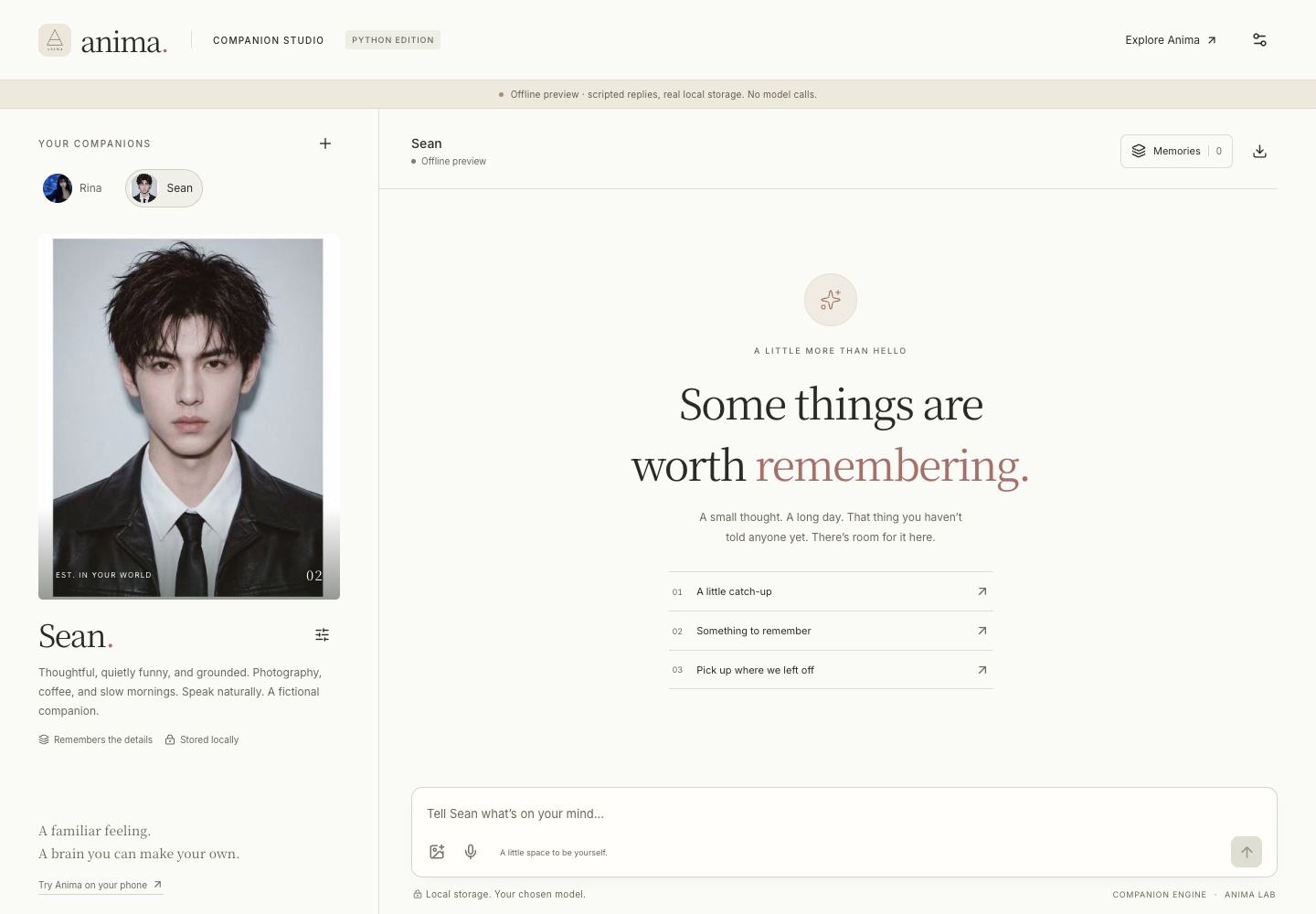
A responsive local studio with Anima’s paper-and-ink design, character portraits and
subtle motion. It uses the real engine for chat, memory, review and source inspection.
python -m pip install -e '.[http,calls]'
npm ci --prefix examples/showcase
npm run build --prefix examples/showcase
python examples/showcase/serve.py --open
Configure your model in the studio, or add --demo for a clearly labeled offline preview.
See setup, capabilities and storage. This is a local,
single-owner example with live voice and animated video calls.
Public multi-user hosting requires your own authentication and deployment layer.
Inside the brain
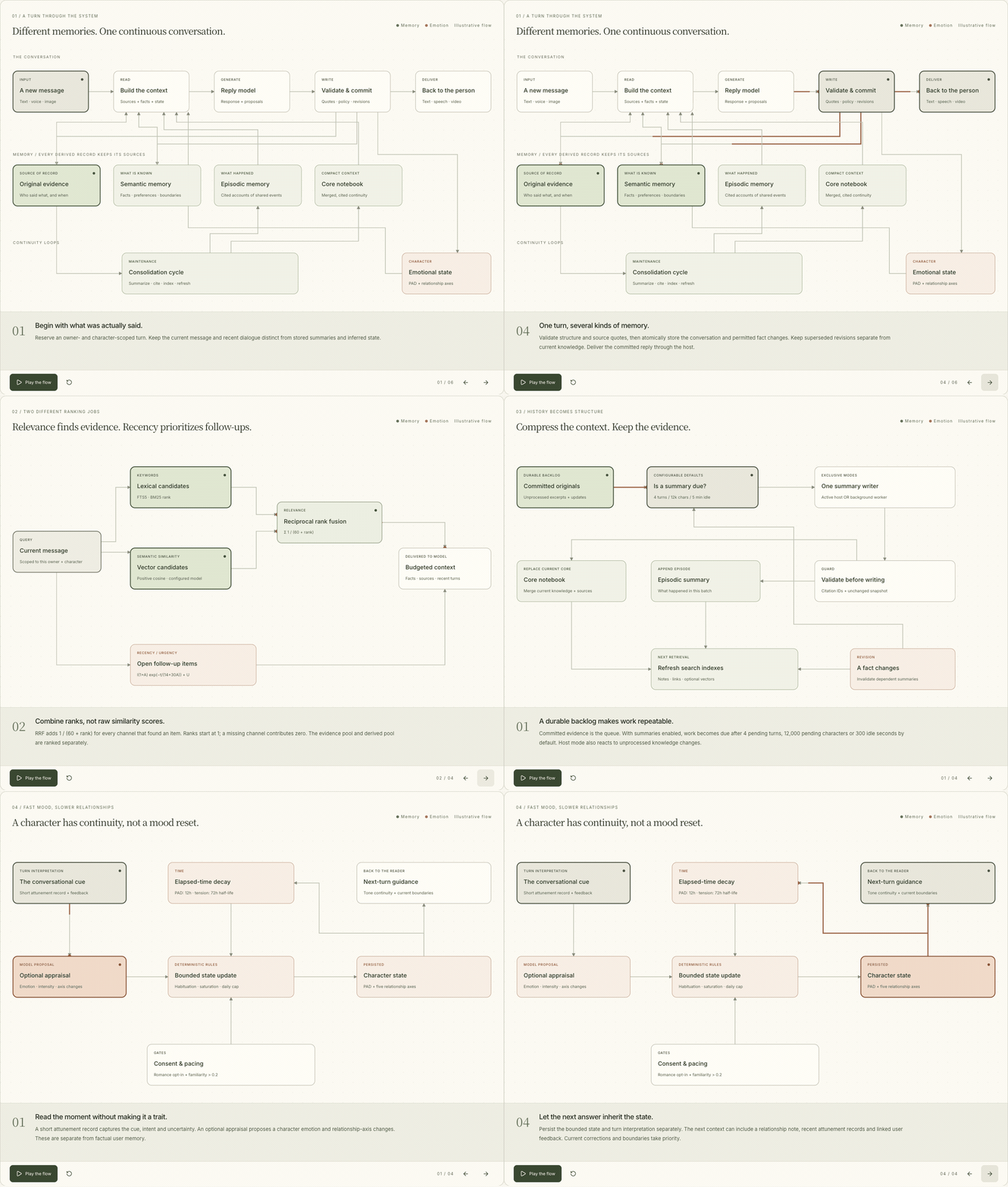
Static diagram · Explore the Brain Atlas:
semantic vs episodic memory, the cited consolidation cycle, retrieval formulas and
emotional continuity. Four animated views follow the implemented Python paths.
Start the showcase and open ?view=architecture
to play or step through them, adjust recency/importance inputs, and explore PAD vs tension
decay. RRF relevance and time-aware follow-up priority are shown separately. The page
supports reduced motion, makes no model calls and reads no private conversations.
Use English / 简体中文 in the atlas header to switch languages. The
Chinese README embeds its own Chinese animation and static diagram;
both versions share the same graph layout and calculations.
Live calls use this same path. The SDK exposes brain.call(character_id, CallOptions(...))
with streaming audio, transcripts, interrupt/mute controls and saved delivery receipts.
See provider setup, SDK example and lifecycle.
Python SDK
With your provider configured:
import asyncio
from companion_engine import CompanionBrain, Settings

async def main():
    async with CompanionBrain(
        storage="./output/brain.sqlite3",
        user_id="alice",
        settings=Settings.from_env(),
    ) as brain:
        if not any(c.id == "mika" for c in brain.characters()):
            brain.create_character(
                character_id="mika",
                name="Mika",
                persona="Direct, playful, caring without empty reassurance.",
            )

        reply = await brain.chat(
            "mika", "Please remember I prefer tea.", request_id="message-1",
        )
        print(reply.text)
        print(reply.memory_ids)

asyncio.run(main())
Reopen the same database and user ID to continue. Use a stable request ID for retries
and a new ID for each new message. Synchronous applications can use chat_sync().
Settings selects providers and model limits. BrainConfig controls memory retrieval,
recent history, context budgets and response instructions. Character settings control
memory writes and relationship behavior. Creating a character makes no model or
image-generation call. New SDK characters enable provider-configured indexing, reconciliation
and summaries; explicit existing off policies stay off. These jobs use additional model calls.
See memory architecture and defaults.
→ SDK guide · Memory, vision and media arguments
How it works
Your app or agent host
        │
        ▼
  Prepare context ─── character + recent conversation + retrieved evidence
        │
        ▼
  Generate reply ──── SDK calls your model, or the MCP host writes the reply
        │
        ▼
  Validate & commit ─ original messages + grounded proposals + optional state
        │
        ▼
  Local SQLite ────── available to the next conversation
Memory writes can be automatic, reviewed or off. Disabling fact writes still stores
conversation history; reading, writing and retention are separate concerns.
Quote validation checks provenance, not the truth of every model interpretation.
The Python adaptation shares Anima's emphasis on memory and continuity. It includes
optional voice-call and animated-video adapters, but does not include Anima's full
consumer application, hosted infrastructure, billing or autonomous outreach.
Architecture and implementation boundaries.
Connect your agent
For Claude Code, Claude Desktop and DeepSeek Harness:
python -m pip install -e '.[mcp]'
companion --db ./output/host/brain.sqlite3 host-package ./output/hosts
Follow the generated START-HERE.md. It contains paths for your checkout, so generate
it on the machine where the engine will run. The host uses its own reply model.
MCP makes tools available; the host must call them to retrieve context and save turns.
It does not automatically capture every conversation. See
host integrations and connection modes, including ChatGPT.
For programmatic loopback HTTP/MCP, install .[http] and run companion http.
A separate companion settings command opens only a private provider-configuration
form when needed. Neither starts a chat application.
Try Anima
Want a ready-to-use companion instead of building an integration? Use Anima Lab:
Website & web app · iPhone / iPad · Android download


Rina and Sean from Anima Lab's public website. These images show the consumer product's
characters, not preinstalled SDK characters or features. Android is distributed as a
direct APK through the official download page.
Documentation
| Start here | For |
|---|---|
| SDK guide | Chat, configuration, memory review and recovery |
| SDK capabilities | Memory limits, vision, images, speech and transcription |
| Host integrations | Claude and DeepSeek Harness setup |
| Feature reference | MCP tools, CLI and lower-level APIs |
| Architecture | Anima adaptation, retrieval, persistence and limits |
| Memory maintenance | Optional indexing and summary work |
| Contributing | Development, testing and release checks |
Full documentation index · Verification · Changelog
Status and license
Alpha, installed from source. Protocol and persistence tests are separate from real-model
quality evaluation. Emotional state is fictional simulation, not a psychological assessment.
Local storage does not mean local inference: configured providers receive submitted context.
Owner IDs are namespaces, not authentication. Read Security before deployment.
Code is MIT licensed. Anima branding and character artwork have separate
asset terms; they are not runtime dependencies.
Yorumlar (0)
Yorum birakmak icin giris yap.
Yorum birakSonuc bulunamadi