coder-studio
Health Gecti
- License — License: MIT
- Description — Repository has a description
- Active repo — Last push 0 days ago
- Community trust — 11 GitHub stars
Code Uyari
- process.env — Environment variable access in e2e-ui/playwright.config.ts
Permissions Gecti
- Permissions — No dangerous permissions requested
Bu listing icin henuz AI raporu yok.
Coder Studio is a modern AI-native coding workspace designed to bring file management, terminal operations, and intelligent agent workflows into one clean web-based environment. It helps developers build, manage, and collaborate faster with AI-assisted tools in a unified interface.
Coder Studio
AI Coding Workspace · Browser-Based · Cross-Device · Self-Hosted



Deploy once, code everywhere.
Deploy your coding workspace once, then keep working anywhere.
中文说明 | Documentation | GitHub
Coder Studio is a browser-based AI coding workspace that runs on your local machine. Access your development environment from any device with a web browser — continue coding on your phone during commute, review changes on a tablet, or switch between computers seamlessly.
✨ Key Features
- 🌐 Browser-Based Workspace — No desktop app needed, works in any modern browser
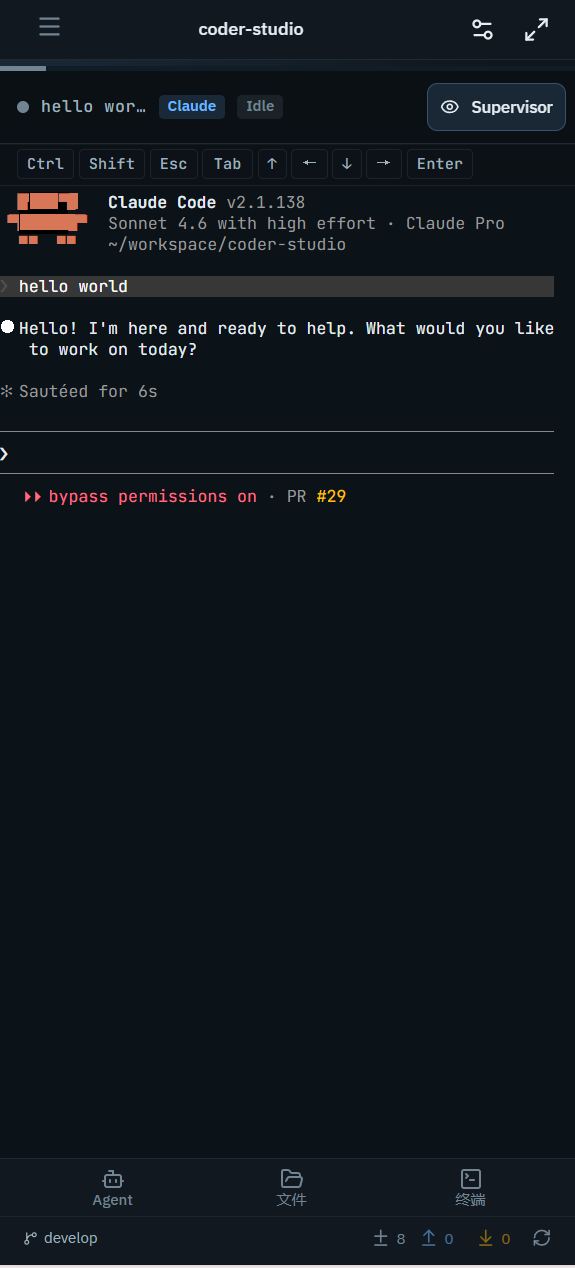
- 📱 Cross-Device Continuity — Start on desktop, continue on mobile, switch devices freely
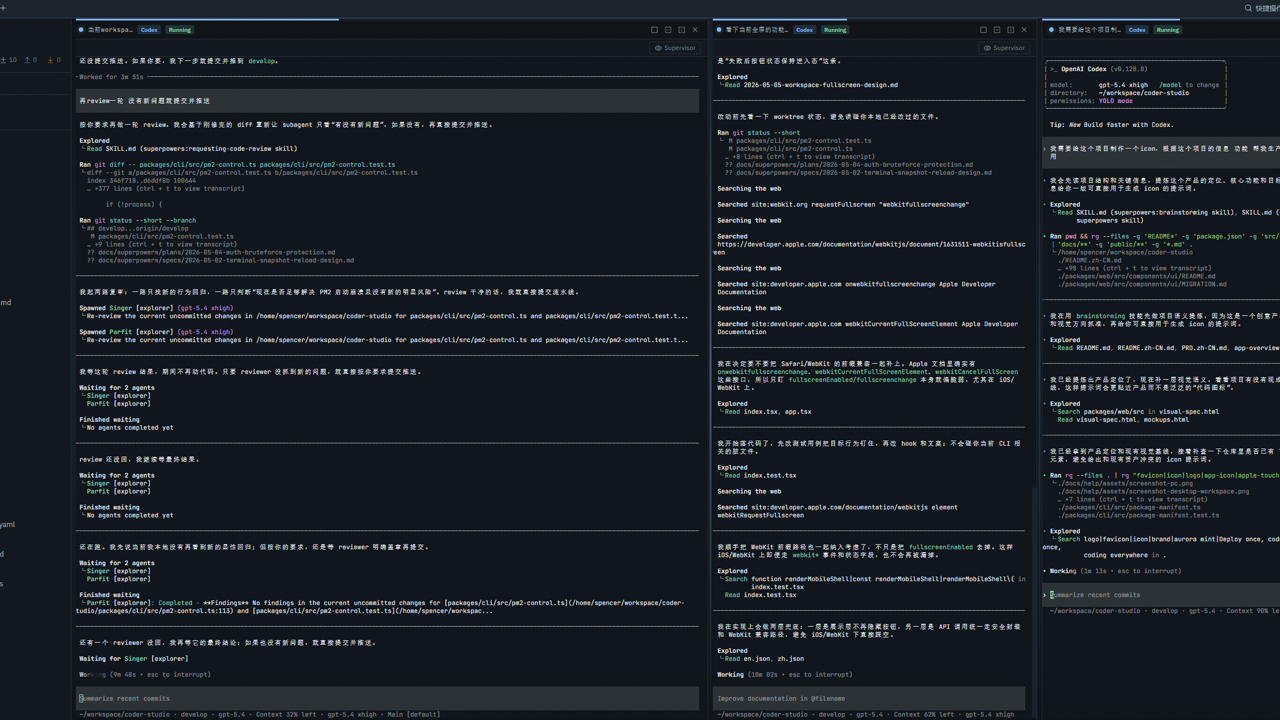
- 🤖 Multi-Agent Support — Run Claude Code and OpenAI Codex sessions side by side
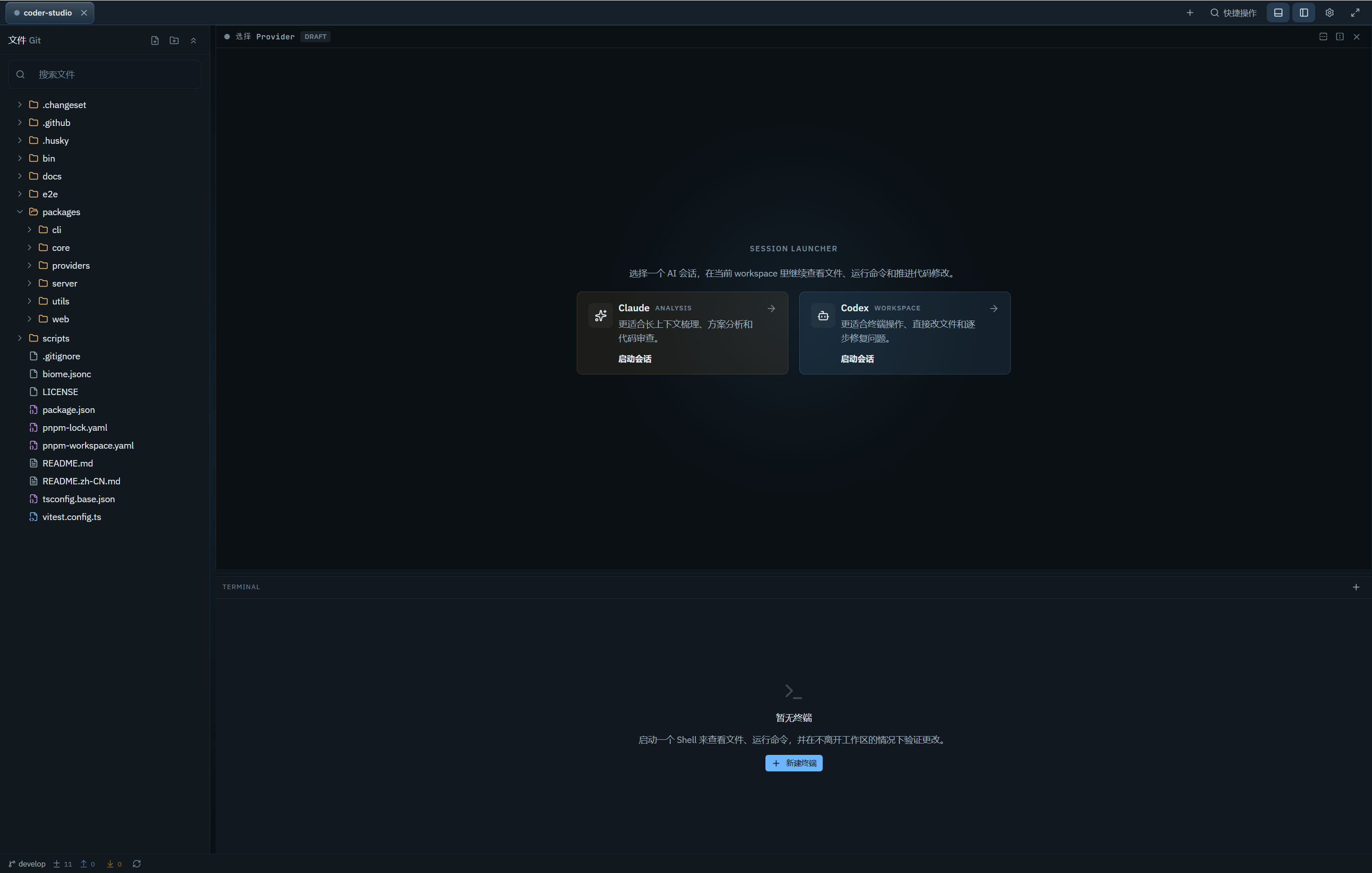
- 🔧 Integrated Environment — Terminal, file editor, Git viewer, and AI agents in one interface
- 🔒 Self-Hosted & Private — Code stays on your machine, no cloud IDE dependency
- ⚡ Real-Time Sync — Live workspace state across all connected devices
🎯 Why Coder Studio
| Feature | Benefit |
|---|---|
| Deploy once, continue anywhere | Start the service once, move between devices without breaking flow |
| Unified workspace | Agent, code, Git, and terminal in one place — no more app switching |
| Multi-Agent support | Run Claude Code and Codex sessions side by side |
| Local-first & private | Runs on your machine, code never leaves your device |
| Zero-config browser access | No desktop client, just open a URL from any device |
🚀 Quick Start
# Install globally
npm install -g @spencer-kit/coder-studio

# Launch the workspace
coder-studio open
Your browser opens automatically. Select your project folder and start working with Claude Code or OpenAI Codex.
No AI CLI installed yet? You can still browse files and use the terminal. Install Claude Code or Codex later when needed.
💡 Use Cases
Remote-Friendly Development
- Start an Agent task at the office, check progress on your phone during commute
- Review code changes on a tablet without opening your laptop
- Continue work from a home computer with zero setup
Team Collaboration
- Share workspace URL with teammates on the same network
- Code review without screen sharing — just open the link
- Real-time visibility into Agent progress for stakeholders
AI-Assisted Coding
- Run multiple Claude Code or Codex sessions in parallel
- Monitor Agent progress from mobile while away from desk
- Keep terminal, editor, and Git view in one unified interface
📱 Cross-Device Experience
| Device | Best For |
|---|---|
| 🖥️ Desktop | Full coding sessions, file editing, diff review, panel management |
| 📱 Tablet | Code review, Agent progress tracking, file browsing |
| 📲 Phone | Quick status checks, terminal output monitoring, session viewing |
The same workspace URL works across all devices — interface adapts automatically.
Desktop Interface
Mobile Interface
🛠️ Feature Overview
| Feature | Description |
|---|---|
| Multi-Agent Sessions | Run Claude Code and Codex sessions side by side |
| Integrated Editor | Monaco-powered code editor with syntax highlighting |
| Git Integration | View branches, diffs, and changed files without leaving workspace |
| Shell Terminal | Full PTY terminal for commands and validating Agent output |
| Responsive UI | Desktop, tablet, and phone layouts that adapt automatically |
| Session History | Resume previous sessions with full context preserved |
| Dark/Light Theme | Customizable appearance and keyboard shortcuts |
📋 Requirements
| Dependency | Version | Notes |
|---|---|---|
| Node.js | ≥ 24.0.0 | Required for running Coder Studio |
| Claude Code CLI | Latest | Optional — for Claude Agent sessions |
| OpenAI Codex CLI | Latest | Optional — for Codex Agent sessions |
📚 Documentation
| Resource | Description |
|---|---|
| Quick Start Guide | Installation to first workspace |
| App Overview | Core concepts and features |
| Provider Setup | Claude Code / Codex CLI installation |
| Desktop Guide | PC interface and shortcuts |
| Mobile Guide | Phone / tablet usage |
| Common Workflows | Task-based tutorials |
| Troubleshooting | FAQ and known issues |
| CLI Reference | Command-line options |
👥 Who Should Use Coder Studio
- AI Coding Power Users — Daily Claude Code / Codex users who want better session management
- Multi-Device Developers — Switch between office, home, and mobile devices frequently
- Remote-First Teams — Need to share work progress without screen sharing
- Privacy-Conscious Developers — Want code to stay on local machine, not cloud IDE
🔮 Roadmap
- Web-based terminal streaming optimization
- Session replay and history navigation
- Multi-workspace management
- Plugin system for custom integrations
- Cloud sync for workspace preferences
🤝 Contributing
We welcome contributions! See Contributing Guide for details.
Local Development
git clone https://github.com/spencerkit/coder-studio.git
pnpm install
pnpm dev
Tech Stack
| Layer | Technology |
|---|---|
| Frontend | React, Vite, Jotai |
| Backend | Fastify, WebSocket |
| Terminal | xterm.js, node-pty |
| Editor | Monaco Editor |
| Storage | SQLite (node:sqlite) |
Development Docs
📄 License
MIT License — see LICENSE for details.
🔍 Keywords
ai coding assistant browser ide claude code codex remote development web-based ide self-hosted ide cross-device coding ai agent workspace local-first development mobile coding tablet coding developer tools terminal in browser git web interface monaco editor websocket terminal ai pair programming coding anywhere cloud ide alternative
Yorumlar (0)
Yorum birakmak icin giris yap.
Yorum birakSonuc bulunamadi