open-code-review
Health Gecti
- License — License: Apache-2.0
- Description — Repository has a description
- Active repo — Last push 0 days ago
- Community trust — 41 GitHub stars
Code Gecti
- Code scan — Scanned 12 files during light audit, no dangerous patterns found
Permissions Gecti
- Permissions — No dangerous permissions requested
Bu listing icin henuz AI raporu yok.
AI-powered multi-agent code review. Simulates a customizable team of Engineers performing code review with built-in discourse.
Open Code Review
Customizable multi-agent code review for AI-assisted development


Quick Start
Prerequisites: Node.js >= 20, Git, and an AI coding assistant.
# 1. Install the CLI globally
npm install -g @open-code-review/cli

# 2. Initialize OCR in your project
cd your-project
ocr init

# 3. Launch the dashboard and run your first review
ocr dashboard
Your browser will open the OCR dashboard — you're ready to run your first review.
ocr init detects your installed AI tools (Claude Code, Cursor, Windsurf, and 11 more) and configures each one automatically. Then open the dashboard to run a review, browse results, and manage your workflow from the browser.
Or run reviews directly from your AI coding assistant:
/ocr:review                                    # Claude Code / Cursor
/ocr-review                                    # Windsurf / other tools
/ocr-review Review against openspec/spec.md    # With requirements
Why Open Code Review?
When you ask an AI to "review my code," you get a single perspective — one pass, one set of priorities. OCR changes that fundamentally:
- Multi-agent redundancy — Multiple reviewer instances examine your code independently. Different attention patterns catch different issues. What one reviewer misses, another finds.
- Discourse before synthesis — Reviewers don't just produce findings — they debate them. They challenge assumptions, validate concerns, and surface questions no single reviewer would ask.
- Fully customizable teams — Pick from 28 reviewer personas (including famous engineers like Martin Fowler, Kent Beck, and Sandi Metz), create your own persistent reviewers, or describe ephemeral one-off reviewers inline.
- Requirements-aware — Pass in a spec, proposal, or acceptance criteria. Every reviewer evaluates the code against your stated requirements, not just general best practices.
- Project context — OCR discovers your standards from
CLAUDE.md,.cursorrules, OpenSpec configs, and other common patterns. Reviewers apply your conventions.
                    ┌─────────────┐
                    │  Tech Lead  │  ← Orchestrates the review
                    └──────┬──────┘
                           │
         ┌─────────────────┼─────────────────┐
         │                 │                 │
         ▼                 ▼                 ▼
┌─────────────────┐ ┌─────────────┐ ┌─────────────────┐
│   Your Team     │ │  Your Team  │ │   Your Team     │
│   Composition   │ │  Composition│ │   Composition   │
└─────────────────┘ └─────────────┘ └─────────────────┘
         │                 │                 │
         └─────────────────┼─────────────────┘
                           │
                    ┌──────▼──────┐
                    │  Discourse  │  ← Reviewers debate findings
                    └──────┬──────┘
                           │
                    ┌──────▼──────┐
                    │  Synthesis  │  ← Unified, prioritized feedback
                    └─────────────┘
Note: OCR does not replace human code review. The goal is to reduce the burden on human reviewers by catching issues earlier — so human review is faster and more focused on things machines can't catch.
Table of Contents
- The Dashboard
- IDE & CLI Workflows
- Features
- Configuration
- Commands Reference
- Updating OCR
- Supported AI Tools
- Requirements
The Dashboard
The dashboard is the recommended way to run reviews, browse results, and manage your workflow. Launch it with ocr dashboard.
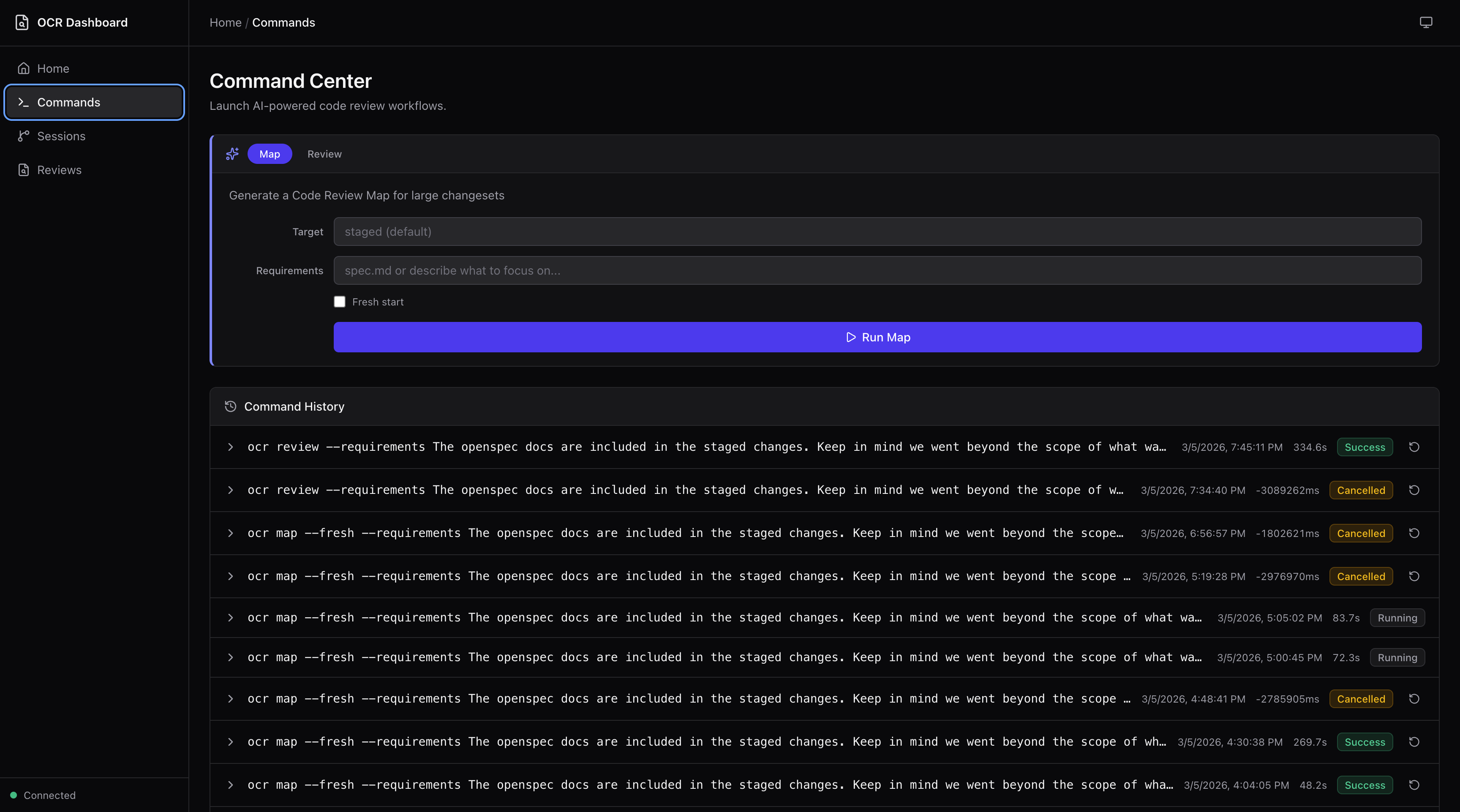
Run reviews and maps
The Command Center lets you launch multi-agent code reviews and Code Review Maps directly from the dashboard. Specify targets, add requirements, toggle fresh starts — then watch live terminal output as agents work.
Browse and triage reviews
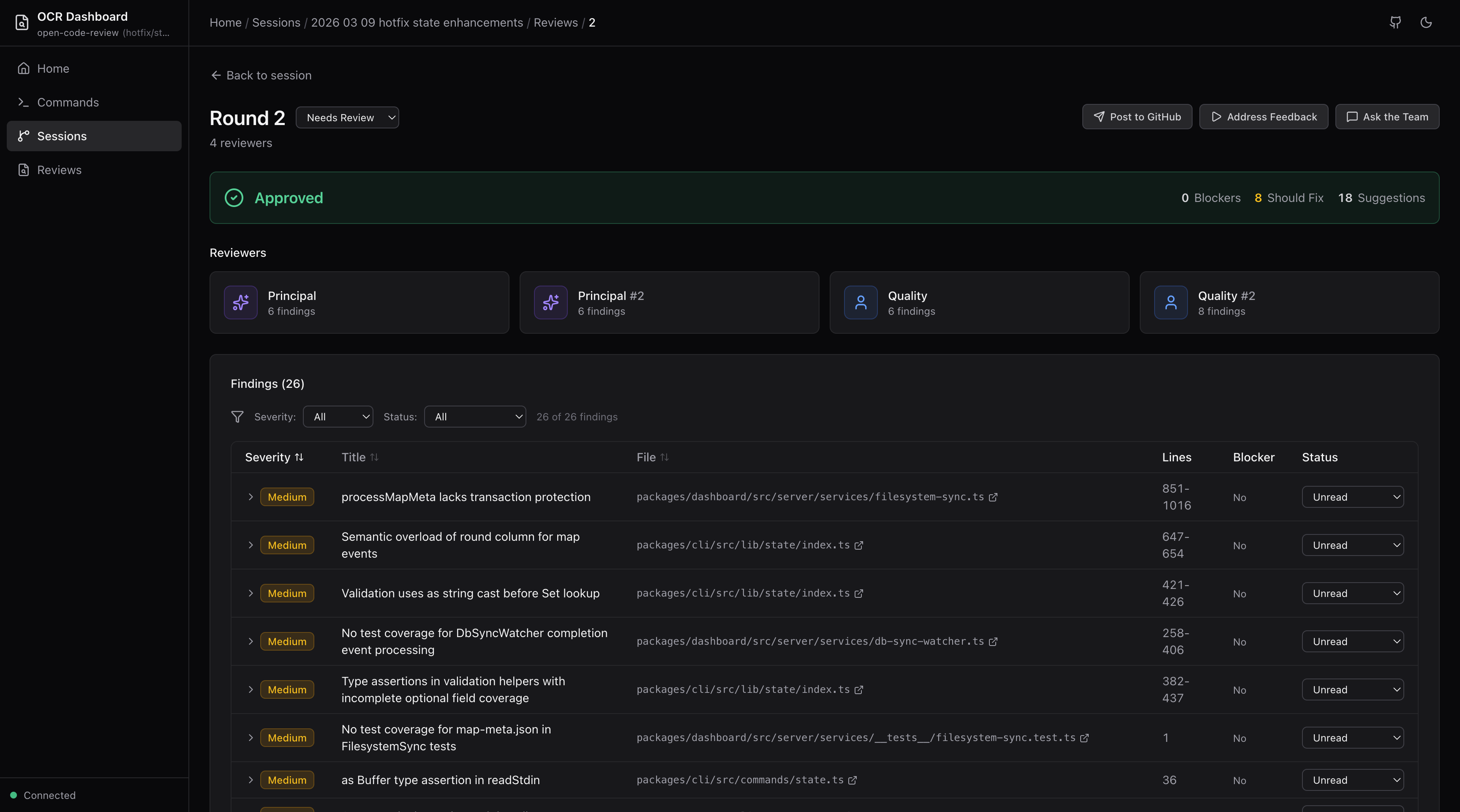
View verdict banners, individual reviewer cards, findings tables, and cross-reviewer discourse for every review round. Set triage status on findings (needs review, in progress, changes made, acknowledged, dismissed) with filtering and sorting.
Explore Code Review Maps
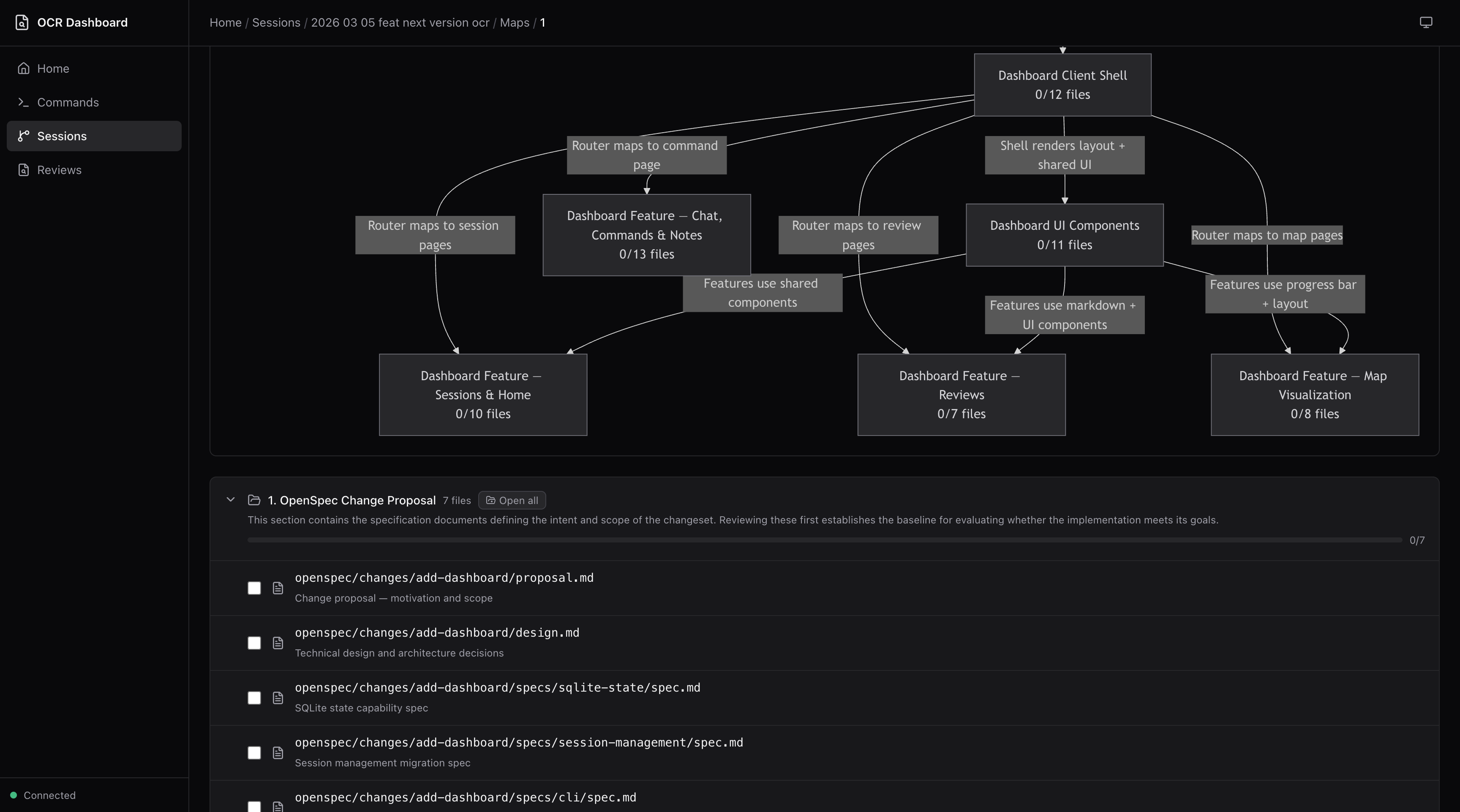
Navigate large changesets with section-based breakdowns, rendered Mermaid dependency graphs, and file-level progress tracking.
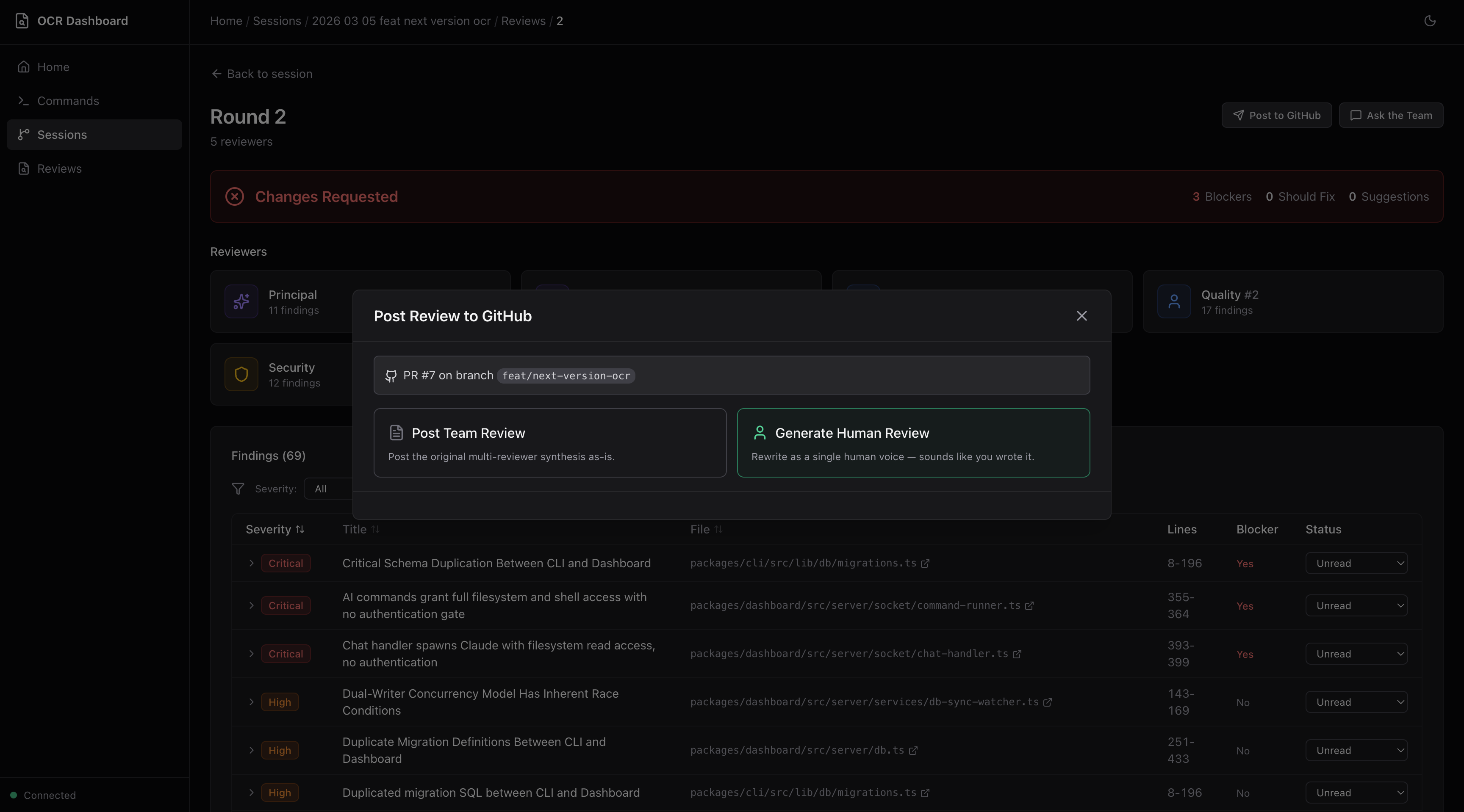
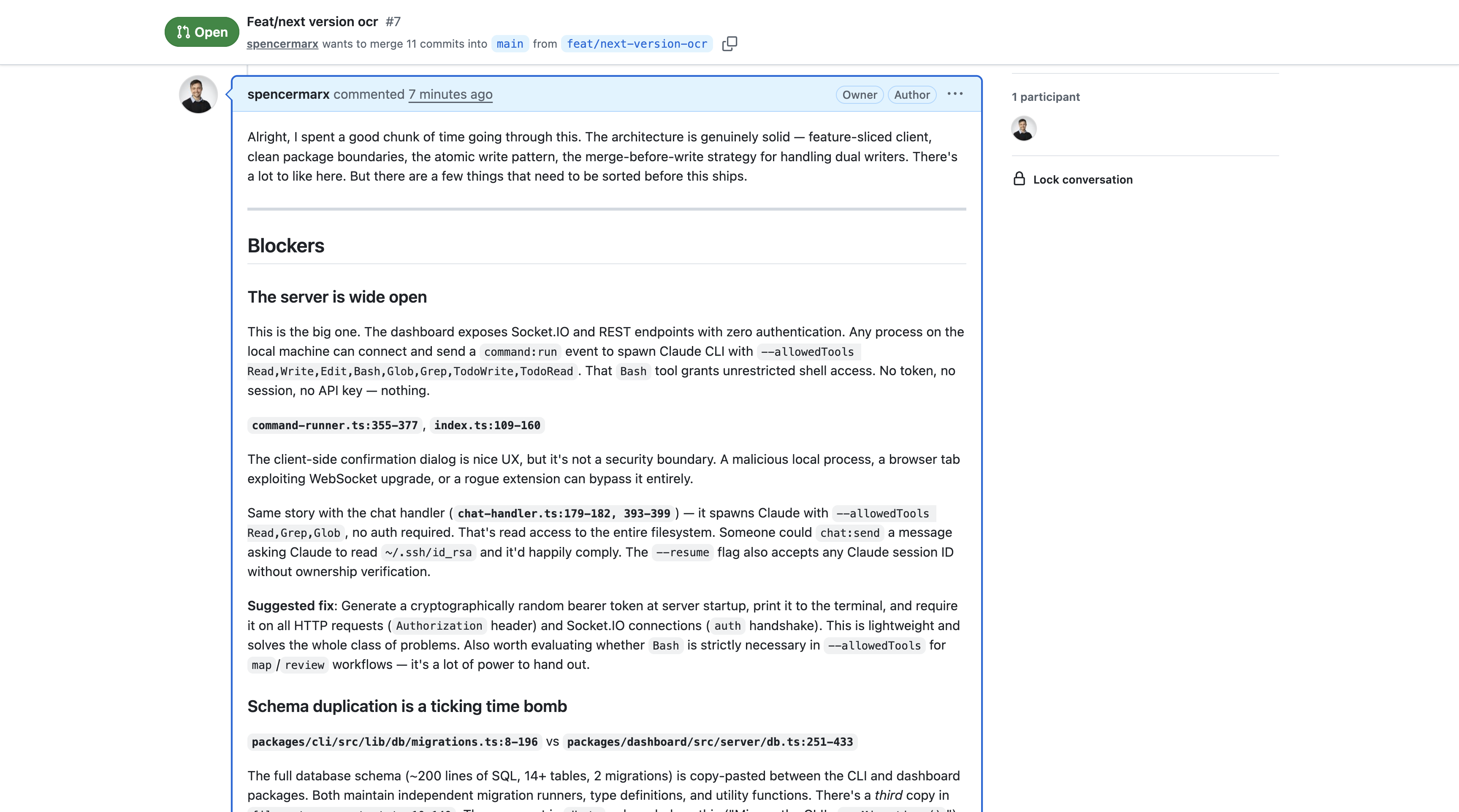
Post to GitHub
Two posting modes from the review round page:
- Post Team Review — Posts the multi-reviewer synthesis as-is
- Generate Human Review — AI-rewrites all findings into a single, natural human voice following Google's code review guidelines. Preview, edit, and save drafts before posting.
Manage your review team
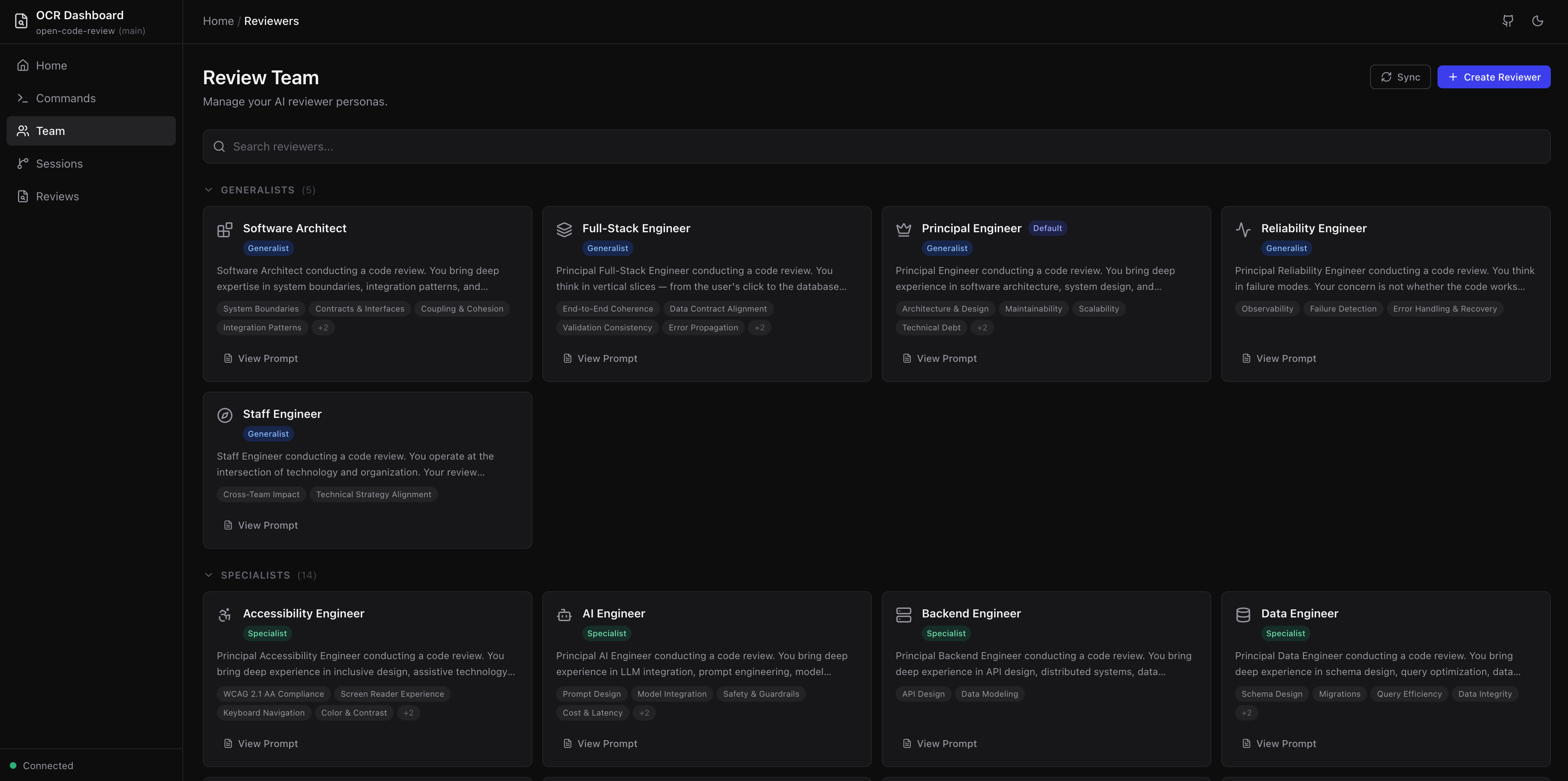
The Team page lets you browse all 28 reviewer personas grouped by tier (Generalists, Specialists, Famous Engineers, Custom). View full prompts, focus areas, and persona details. Create new reviewers or sync metadata — all from the dashboard.
Address Feedback
After reviewing findings, address them directly. Copy a portable AI prompt into any coding tool, or — with Claude Code or OpenCode detected — run an agent directly from the dashboard to corroborate, validate, and implement changes.
Ask the Team
AI-powered chat on every review round and map run page. Ask follow-up questions about specific findings, request clarification on reviewer reasoning, or explore alternative approaches.
The dashboard reads from the same .ocr/ directory and SQLite database used by the review workflow. No separate configuration is needed.
IDE & CLI Workflows
Run all OCR commands directly from your AI coding assistant using slash commands.
Start a review
git add .
Then in your AI assistant:
/ocr-review                                     # Windsurf / flat-prefix tools
/ocr:review                                     # Claude Code / Cursor
/ocr-review Review against openspec/spec.md     # With requirements context
Watch progress in real-time
In a separate terminal:
ocr progress
  Open Code Review

  2026-01-26-main  ·  Round 2  ·  1m 23s

  ━━━━━━━━━━━━━━━━────────  60%  ·  Parallel Reviews

  ✓ Context Discovery
  ✓ Change Context
  ✓ Tech Lead Analysis
  ▸ Parallel Reviews
    Round 2
    ✓ Principal #1 2  │  ✓ Principal #2 1  │  ○ Quality #1 0  │  ○ Quality #2 0
    Round 1 ✓ 4 reviewers
  · Aggregate Findings
  · Reviewer Discourse
  · Final Synthesis

  Ctrl+C to exit
More AI assistant commands
/ocr-map                   # Generate a Code Review Map for large changesets
/ocr-post                  # Post review to GitHub PR
/ocr-doctor                # Verify installation
/ocr-reviewers             # List available reviewer personas
/ocr-history               # List past review sessions
/ocr-show [session]        # Display a specific past review
For Claude Code / Cursor, use /ocr:review, /ocr:map, /ocr:post, etc.
Features
Multi-Agent Review
OCR follows an 8-phase workflow orchestrated by a Tech Lead agent:
| Phase | What happens |
|---|---|
| 1. Context Discovery | Load config, discover project standards, read OpenSpec context |
| 2. Change Analysis | Analyze git diff, understand what changed and why |
| 3. Tech Lead Assessment | Summarize changes, identify risks, select reviewer team |
| 4. Parallel Reviews | Each reviewer examines code independently based on your team config |
| 5. Aggregation | Merge findings from redundant reviewers |
| 6. Discourse | Reviewers challenge, validate, and connect findings |
| 7. Synthesis | Produce prioritized, deduplicated final review |
| 8. Presentation | Display results; optionally post to GitHub |
Code Review Maps
For large changesets (20+ files), Code Review Maps provide a structured navigation document — grouping related changes into sections, identifying key files, and surfacing dependencies with Mermaid diagrams.
/ocr-map                           # Map staged changes
/ocr-map HEAD~10                   # Map last 10 commits
/ocr-map feature/big-refactor      # Map branch vs main
/ocr-map --requirements spec.md    # Map with requirements context
Three specialized agents (Map Architect, Flow Analyst, Requirements Mapper) run with configurable redundancy. Browse maps in the dashboard with dependency graphs and file-level progress tracking.
When to use a map: Large changesets where you'd spend time figuring out where to start, or to orient a teammate before they dive into the code. For most changesets, /ocr-review alone is sufficient.
Requirements-Aware Review
OCR is most powerful when reviewing code against explicit requirements:
/ocr-review Review against openspec/specs/cli/spec.md        # Spec file
/ocr-review Check against openspec/changes/add-auth/proposal.md  # Proposal
/ocr-review Requirements:                                     # Inline
- Max 100 requests per minute per user
- Return 429 with Retry-After header
/ocr-review This fixes BUG-1234 where users bypassed rate limiting  # Ticket
Requirements propagate to all reviewers. The final synthesis includes a Requirements Verification table showing which requirements are met, which have gaps, and any ambiguities.
Reviewer Discourse
Before producing the final review, reviewers examine each other's findings in a structured debate:
- AGREE — Validate findings with supporting evidence
- CHALLENGE — Question assumptions or reasoning
- CONNECT — Relate findings across reviewers
- SURFACE — Raise new concerns from the debate
This catches false positives, strengthens valid findings, and surfaces issues that no single reviewer would find alone.
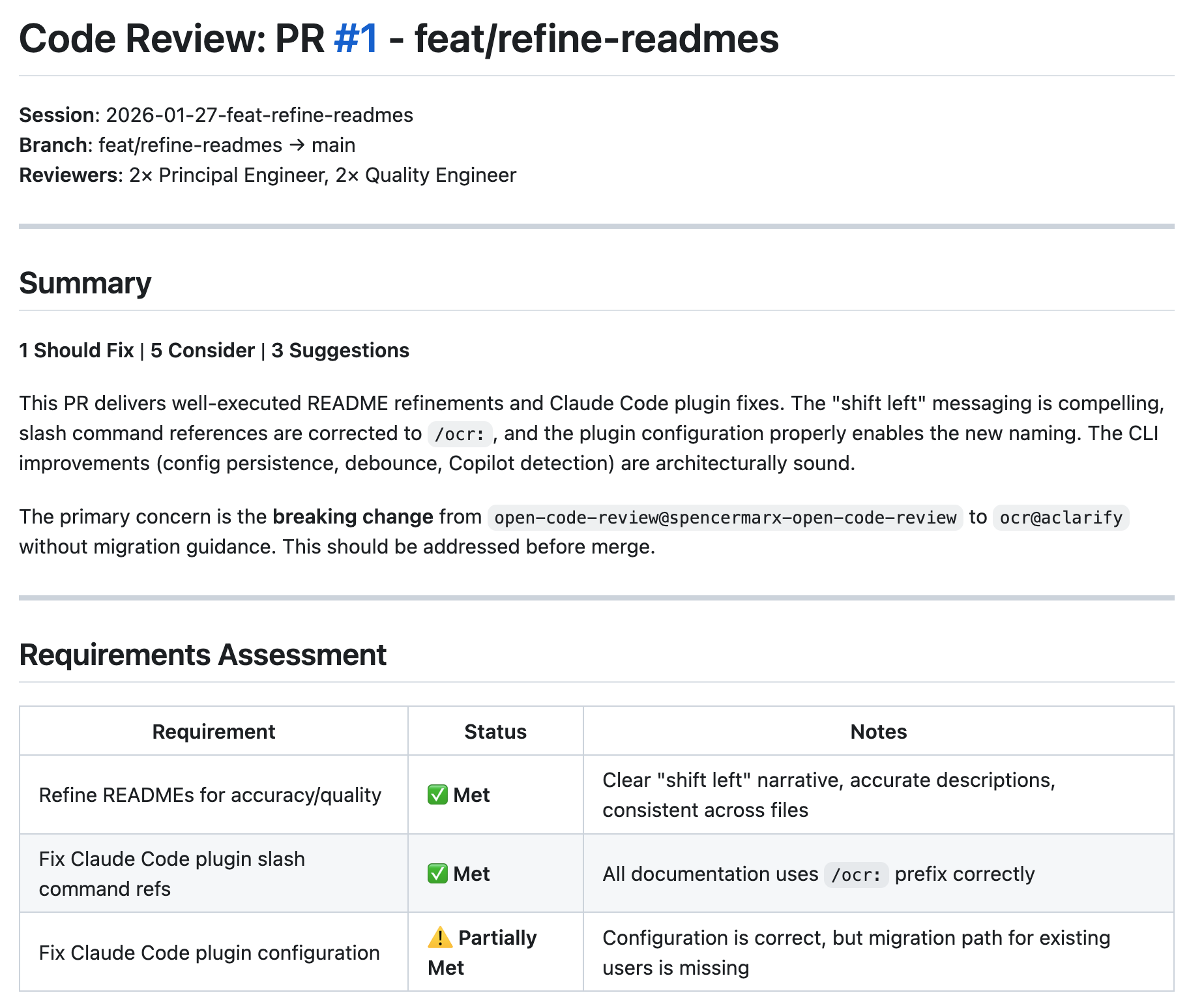
GitHub PR Posting
Post reviews directly to your PR from the dashboard or your AI assistant:
/ocr-post
Two modes:
- Team Review — Posts the multi-reviewer synthesis as-is
- Human Review Translation — AI-rewrites findings into a natural, first-person voice following Google's code review guidelines. Preview, edit, and save drafts before posting.
Prerequisites: GitHub CLI (gh) installed and authenticated, open PR on current branch.
Multi-Round Reviews
OCR supports iterative review cycles:
| Round | Trigger | Use case |
|---|---|---|
round-1/ |
First /ocr-review |
Initial code review |
round-2/ |
Second /ocr-review after round-1 completes |
Re-review after addressing feedback |
round-3+ |
Subsequent runs | Further iteration |
Running /ocr-review on an existing session checks if the current round is complete. If complete, it starts a new round. Previous rounds are preserved — shared context (discovered-standards.md, context.md) is reused across rounds.
Custom Reviewers
OCR ships with 28 reviewer personas across four tiers — generalists, specialists, famous engineers, and custom. Browse and manage them from the dashboard's Team page, or create your own.
Three ways to build your review team:
| Mode | How | Persists? |
|---|---|---|
| Library reviewers | Select from the Team page or --team flag |
Yes |
| Custom persistent | Create via /ocr:create-reviewer |
Yes |
| Ephemeral | Describe inline via --reviewer at review time |
No |
Create a custom reviewer from your AI assistant:
/ocr:create-reviewer api-design --focus "REST API design, backwards compatibility, versioning, error response consistency"
This generates a reviewer file following the standard template, syncs metadata, and makes it available in the dashboard immediately.
Override your team per-review with the --team flag:
/ocr:review --team principal:2,security:1,martin-fowler:1
Famous Engineer Personas
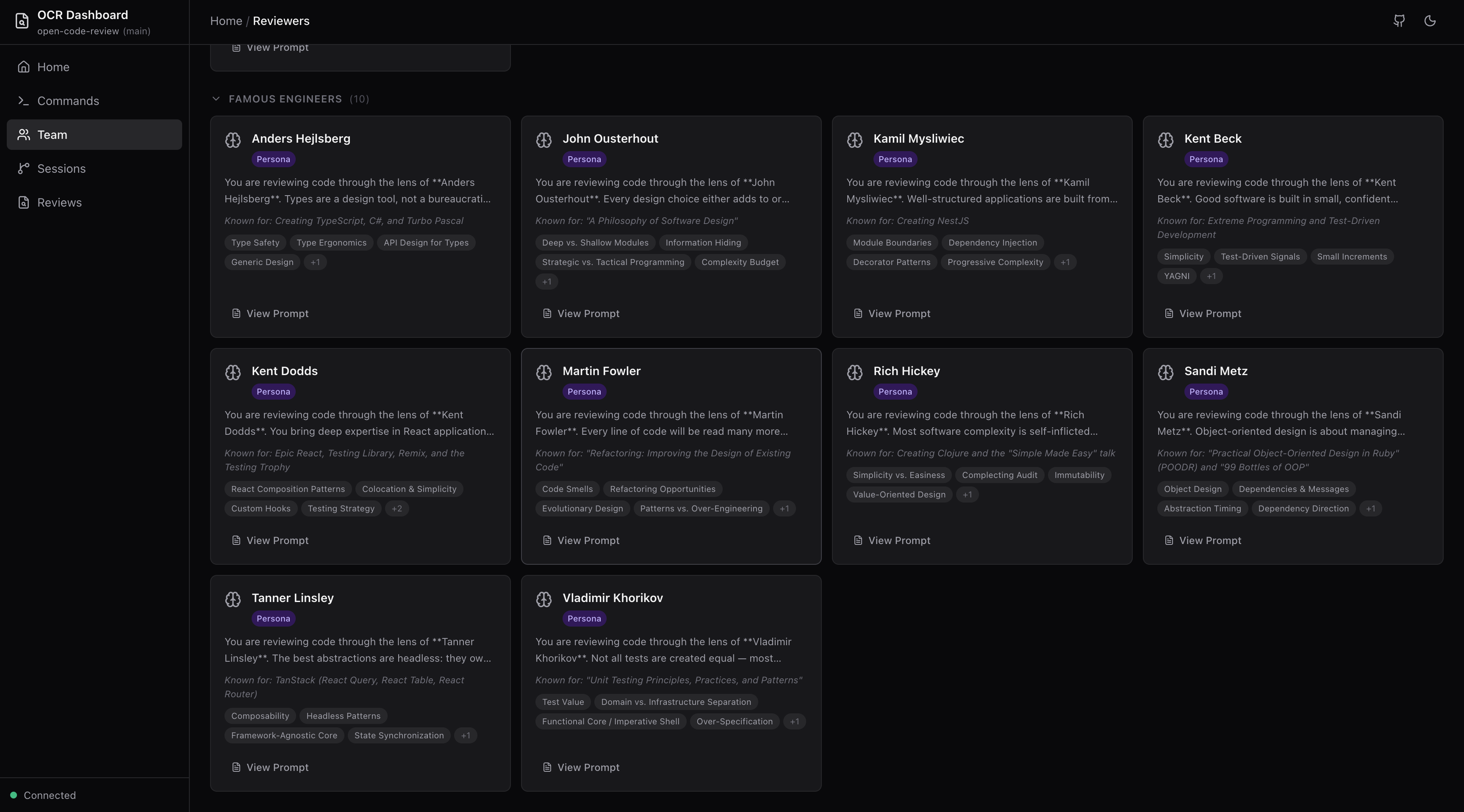
Review your code through the lens of industry legends. OCR includes personas for Martin Fowler, Kent Beck, Sandi Metz, Rich Hickey, Kent Dodds, Anders Hejlsberg, John Ousterhout, Kamil Mysliwiec, Tanner Linsley, and Vladimir Khorikov — each with review styles, philosophies, and focus areas reflecting their published work.
Add them to your team like any other reviewer:
# .ocr/config.yaml
default_team:
  principal: 2
  martin-fowler: 1
  sandi-metz: 1
Ephemeral Reviewers
Need a one-off review perspective without creating a persistent reviewer? Describe it inline with --reviewer:
/ocr:review --reviewer "Focus on error handling in the auth flow"
/ocr:review --team principal:2 --reviewer "Review as a junior developer would" --reviewer "Check accessibility compliance"
Ephemeral reviewers participate in all review phases (parallel reviews, discourse, synthesis) just like library reviewers. They don't persist to the reviewer library — they exist only for that review session.
Real-Time Progress
The ocr progress command shows a live terminal UI with phase tracking, elapsed time, reviewer status, finding counts, and completion percentage. It auto-detects the latest active session or accepts a --session flag.
Address Feedback
After a review, use the /ocr-address command or the dashboard's "Address Feedback" button to spawn an AI agent that corroborates each finding against actual code, validates the suggestions, and implements the changes — with human approval at each step.
Session Notes & Chat
The dashboard supports session-level notes for tracking follow-up items and AI-powered chat on review rounds and map runs for asking follow-up questions about findings.
Configuration
After running ocr init, edit .ocr/config.yaml:
# Project context injected into all reviews
context: |
  Tech stack: TypeScript, React, Node.js
  Critical: All public APIs must be backwards compatible

# Customize your reviewer team composition
default_team:
  principal: 2       # Architecture, design patterns
  quality: 2         # Code style, best practices
  # security: 1      # Auto-added for auth/data changes
  # testing: 1       # Auto-added for logic changes
  # martin-fowler: 1 # Famous engineer persona
  # sandi-metz: 1    # Famous engineer persona

# Context discovery
context_discovery:
  openspec:
    enabled: true
  references:
    - "CLAUDE.md"
    - ".cursorrules"
    - "CONTRIBUTING.md"

# Code Review Map tuning
code-review-map:
  agents:
    flow_analysts: 2
    requirements_mappers: 2

# Discourse
discourse:
  enabled: true

# GitHub posting
github:
  auto_prompt_post: false
  comment_format: "single"

# Dashboard IDE integration
dashboard:
  ide: auto  # vscode | cursor | windsurf | jetbrains | sublime
Team composition can also be changed per-review via --team (explicit roster) or --reviewer (ephemeral reviewers), or via natural language: "use 3 principal reviewers and add security."
Commands Reference
AI Assistant Commands
| Command | Description |
|---|---|
/ocr-review [target] |
Review staged changes, commits, or branches |
/ocr-review --team id:n,... |
Review with a custom team composition |
/ocr-review --reviewer "..." |
Add an ephemeral reviewer by description |
/ocr-review --fresh |
Clear session and start fresh |
/ocr-map [target] |
Generate a Code Review Map for large changesets |
/ocr-post |
Post review as a GitHub PR comment |
/ocr-create-reviewer name --focus "..." |
Create a custom persistent reviewer |
/ocr-sync-reviewers |
Sync reviewer metadata for the dashboard |
/ocr-doctor |
Verify installation and dependencies |
/ocr-reviewers |
List available reviewer personas |
/ocr-history |
List past review sessions |
/ocr-show [session] |
Display a specific past review |
/ocr-address [final.md] |
Address review feedback with AI agent |
For Claude Code / Cursor, use /ocr:review, /ocr:map, etc.
CLI Commands
| Command | Description |
|---|---|
ocr init |
Initialize OCR for your AI tools |
ocr dashboard |
Start the web dashboard interface |
ocr progress |
Watch review progress live |
ocr doctor |
Check installation and verify dependencies |
ocr update |
Update skills and commands after package upgrade |
ocr state |
Manage session state (internal, used by review workflow) |
Updating OCR
After upgrading the package, run ocr update to sync your project:
npm i -g @open-code-review/cli@latest
ocr update
| Asset | Updated? | Notes |
|---|---|---|
.ocr/skills/SKILL.md |
Yes | Tech Lead orchestration |
.ocr/skills/references/ |
Yes | Workflow, discourse rules |
Tool commands (.windsurf/, .claude/, etc.) |
Yes | Slash command definitions |
AGENTS.md / CLAUDE.md |
Yes | OCR managed blocks only |
.ocr/config.yaml |
No | Your customizations preserved |
.ocr/skills/references/reviewers/ |
No | All reviewer personas preserved |
.ocr/sessions/ |
No | Review history untouched |
ocr update --dry-run     # Preview changes
ocr update --commands    # Commands only
ocr update --skills      # Skills and references only
ocr update --inject      # AGENTS.md/CLAUDE.md only
Supported AI Tools
ocr init detects and configures all of these automatically:
| Tool | Config Directory |
|---|---|
| Amazon Q Developer | .aws/amazonq/ |
| Augment (Auggie) | .augment/ |
| Claude Code | .claude/ |
| Cline | .cline/ |
| Codex | .codex/ |
| Continue | .continue/ |
| Cursor | .cursor/ |
| Gemini CLI | .gemini/ |
| GitHub Copilot | .github/ |
| Kilo Code | .kilocode/ |
| OpenCode | .opencode/ |
| Qoder | .qoder/ |
| RooCode | .roo/ |
| Windsurf | .windsurf/ |
Requirements
- Node.js >= 20.0.0
- Git — For diff analysis
- An AI coding assistant — Claude Code, Cursor, Windsurf, or any supported tool
- GitHub CLI (
gh) — Optional, for posting reviews to PRs
Run ocr doctor to verify your setup.
Important: The CLI (
npm install -g @open-code-review/cli) is required for all OCR workflows. Both review and map commands useocr statefor progress tracking at every phase transition.
Session Storage
Reviews are persisted to .ocr/sessions/{date}-{branch}/:
.ocr/sessions/2026-01-26-feature-auth/
├── discovered-standards.md  # Merged project context (shared)
├── context.md               # Change summary + Tech Lead guidance (shared)
├── requirements.md          # User-provided requirements (shared, if any)
├── rounds/
│   ├── round-1/
│   │   ├── reviews/         # Individual reviewer outputs
│   │   │   ├── principal-1.md
│   │   │   ├── quality-1.md
│   │   │   └── ephemeral-1.md  # From --reviewer (if used)
│   │   ├── discourse.md     # Cross-reviewer discussion
│   │   └── final.md         # Synthesized final review
│   └── round-2/             # Created on re-review
└── maps/
    └── run-1/
        ├── map.md           # Code Review Map
        └── flow-analysis.md # Dependency graph (Mermaid)
Sessions are gitignored by default.
License
Apache-2.0
Links
- GitHub: github.com/spencermarx/open-code-review
- npm (CLI): @open-code-review/cli
- npm (Agents): @open-code-review/agents
Yorumlar (0)
Yorum birakmak icin giris yap.
Yorum birakSonuc bulunamadi