friday
Health Uyari
- License — License: MIT
- Description — Repository has a description
- Active repo — Last push 0 days ago
- Low visibility — Only 6 GitHub stars
Code Gecti
- Code scan — Scanned 12 files during light audit, no dangerous patterns found
Permissions Gecti
- Permissions — No dangerous permissions requested
Bu listing icin henuz AI raporu yok.
Open-source multi-agent coding harness. Coordinate Claude Code, Codex, Cursor, Gemini CLI, Copilot, and more to split work, communicate, and hand off tasks at limits. Local-first, no account required. Works on macOS, Windows, and Linux.

Friday
Run multiple coding agents together, locally.
Claude Code, Codex, Cursor, Gemini CLI, GitHub Copilot and more split the work on one repo, message each other as they go, and keep going when one hits its usage limit. You review everything before it ships.
Get started · How it works · Agents as a team · Work · Crew · Features · Automations · Privacy · FAQ




Mac (Apple silicon) ·
Mac (Intel) ·
Windows ·
Linux
or, with Node.js 22: npx github:splashxmoon/friday
- Uses the tools you already have. No API keys and no extra plan: Friday drives the coding tools signed in on your computer.
- Runs on your machine. No account, no server of ours, no model of its own. Your code stays where it is.
- Keeps the work moving. When one agent runs out of usage, the agent best placed to finish picks up where it stopped.
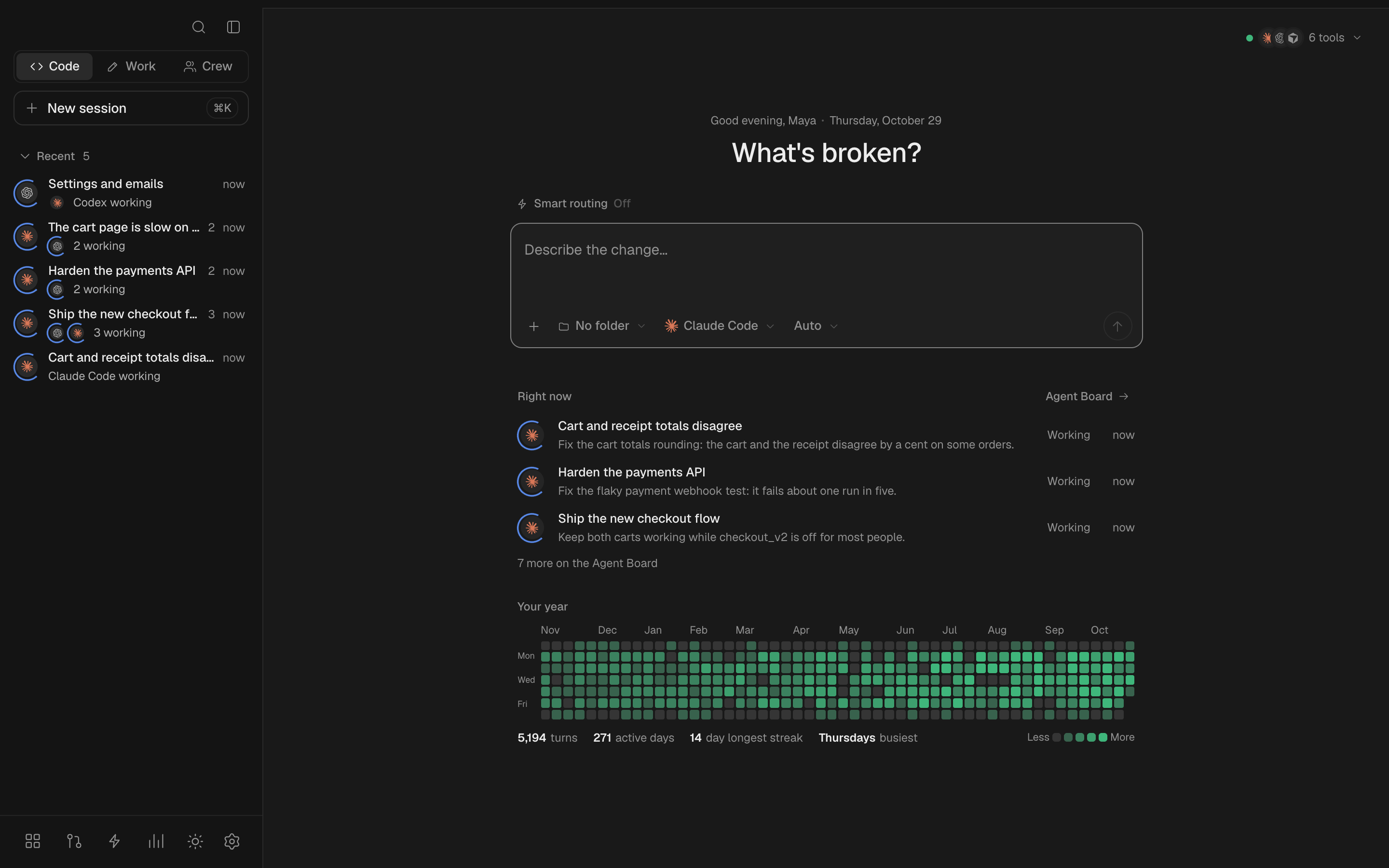
Works with the subscriptions you already have. If a coding tool is installed and signed in on your computer, Friday can drive it:
Claude Code
Codex
Cursor
GitHub Copilot
OpenCode
Gemini CLI
Devin
Junie
Kiro
Factory Droid
Grok Build
Cline
Kilo
Amp
Muse Code
Any ACP agent
Why Friday
Most of us use one AI coding tool at a time. It hits its usage limit halfway through a task, gets stuck on one approach, and works alone, while the other tools you already pay for sit idle. Friday puts them in one workspace on your computer: they split the job, check each other's work, and carry on for each other, so the work keeps moving and you stay in charge of what ships.
How it works
- Point a session at your repo. Friday finds the coding tools installed and signed in on your computer.
- Add one or more agents. Each can work in its own copy of the repo (a Git worktree), so they never overwrite each other.
- Give the session the job. One agent splits it into tasks on a shared board; the others take the ones that suit them.
- They work together. Agents message each other as they go. Every finished task has its tests run, and another agent reviews any change the tests don't settle.
- Nothing stalls on a limit. If an agent runs out of usage, its task moves to the next best agent with everything done so far.
- You review, then ship. Read every change, send notes back on any line, then commit or open a pull request.
Get started in five minutes
- Sign in to one coding tool you already use, for example
claude auth loginorcodex login(the full list). - Install Friday: download the app for Mac (Apple silicon), Windows or Linux, or run
npx github:splashxmoon/fridaywith Node.js 22. - Open it. Friday lists the tools it found and which are signed in.
- Start a session in your repo and give it a task.
- Review what it changed and keep what you like.
One tool is enough to start. Add a second agent to the session when you want them to split the work.
Your agents, working as a team
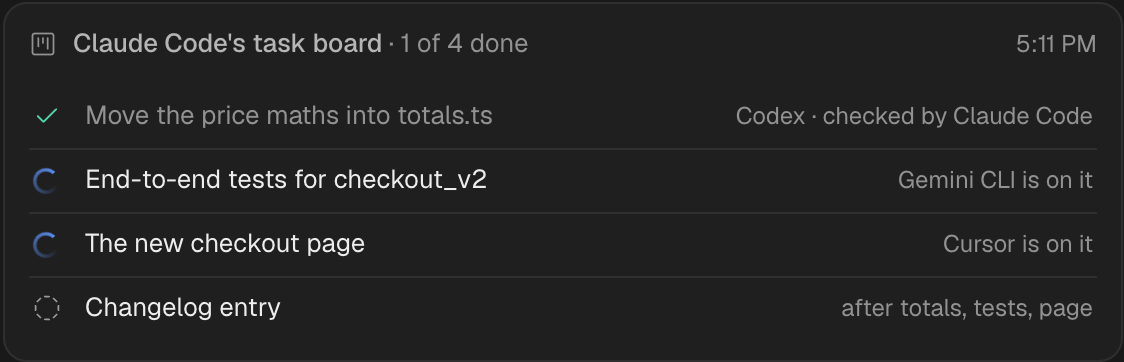
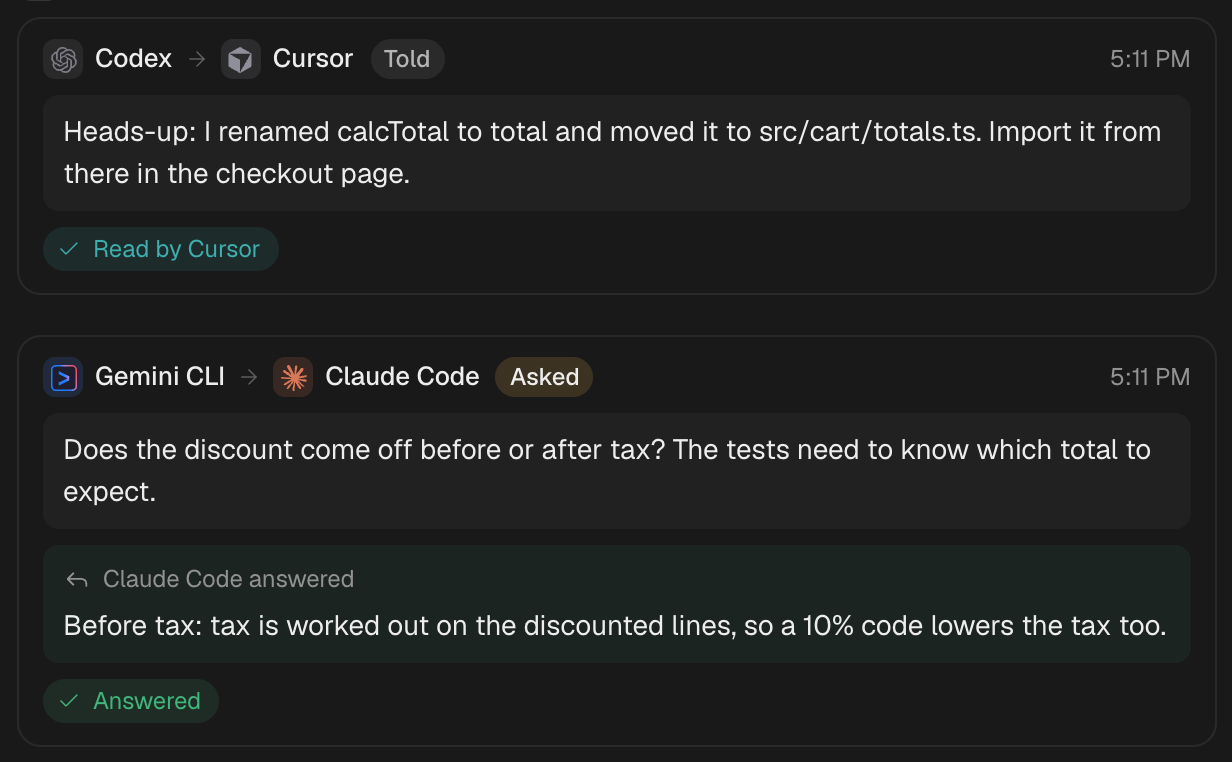
Friday doesn't just run your coding tools next to each other: it lets them work together. One agent can split a job into a task board; the others pick up the tasks that suit them, each in its own files, and every finished task is checked before it counts as done: its tests run, and another agent reviews it unless they already passed on a small change. Along the way they message each other directly: a heads-up about a rename, a question one of them waits on, an answer that comes back. You see every message as it happens.
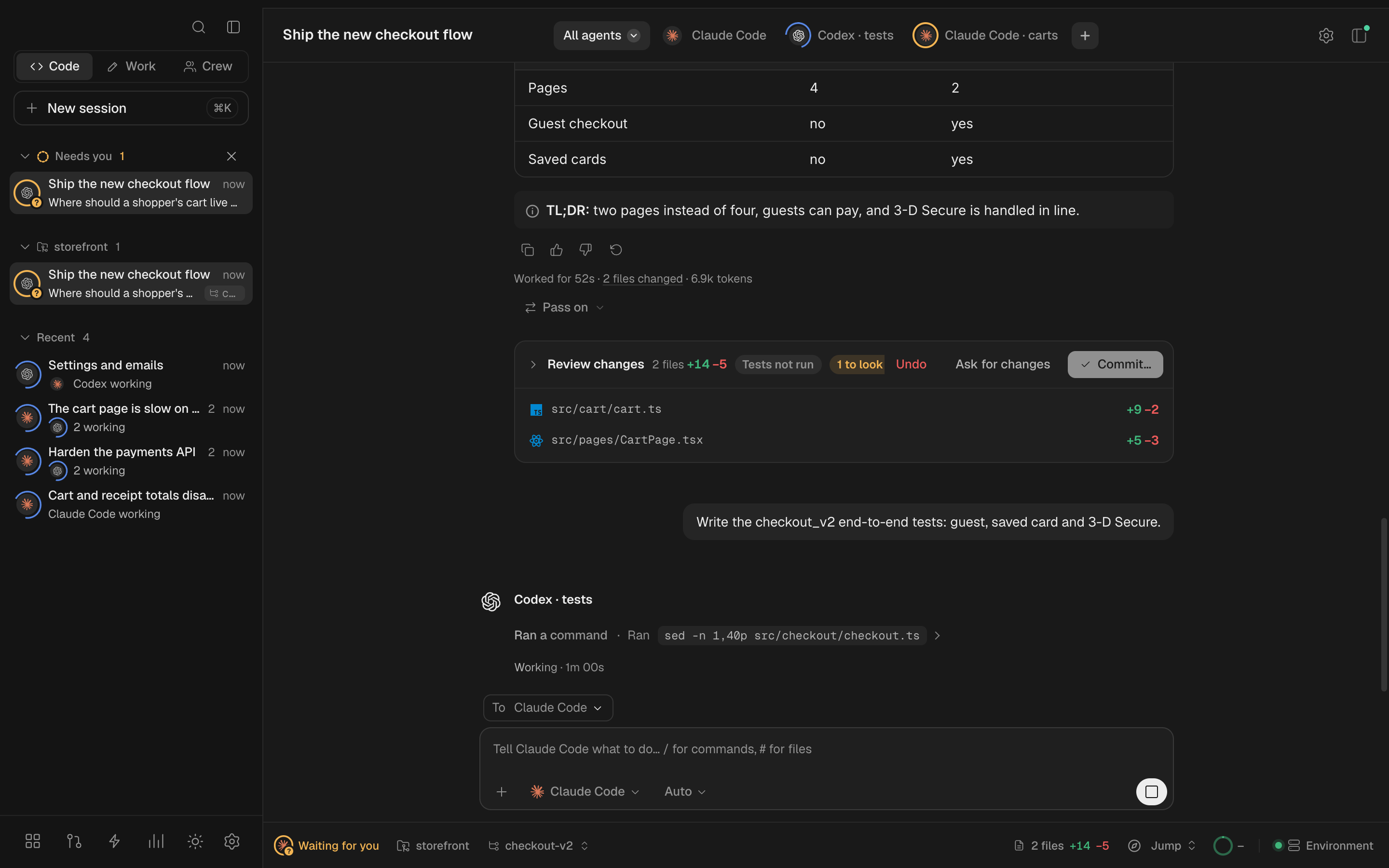
An agent you add to a session can work in its own copy of the repository, so three of them can change the same project at once without stepping on each other.
 |
 |
A shared task board. Claude Code split the work; Codex moved the price maths into totals.ts and Claude Code checked it; Gemini is on the tests and Cursor on the checkout page; the changelog waits for all three. |
Agents talking. Codex tells Cursor what it renamed before Cursor trips over it; Gemini asks Claude Code whether a discount comes off before or after tax, and goes on with the answer. |
Work: more than code
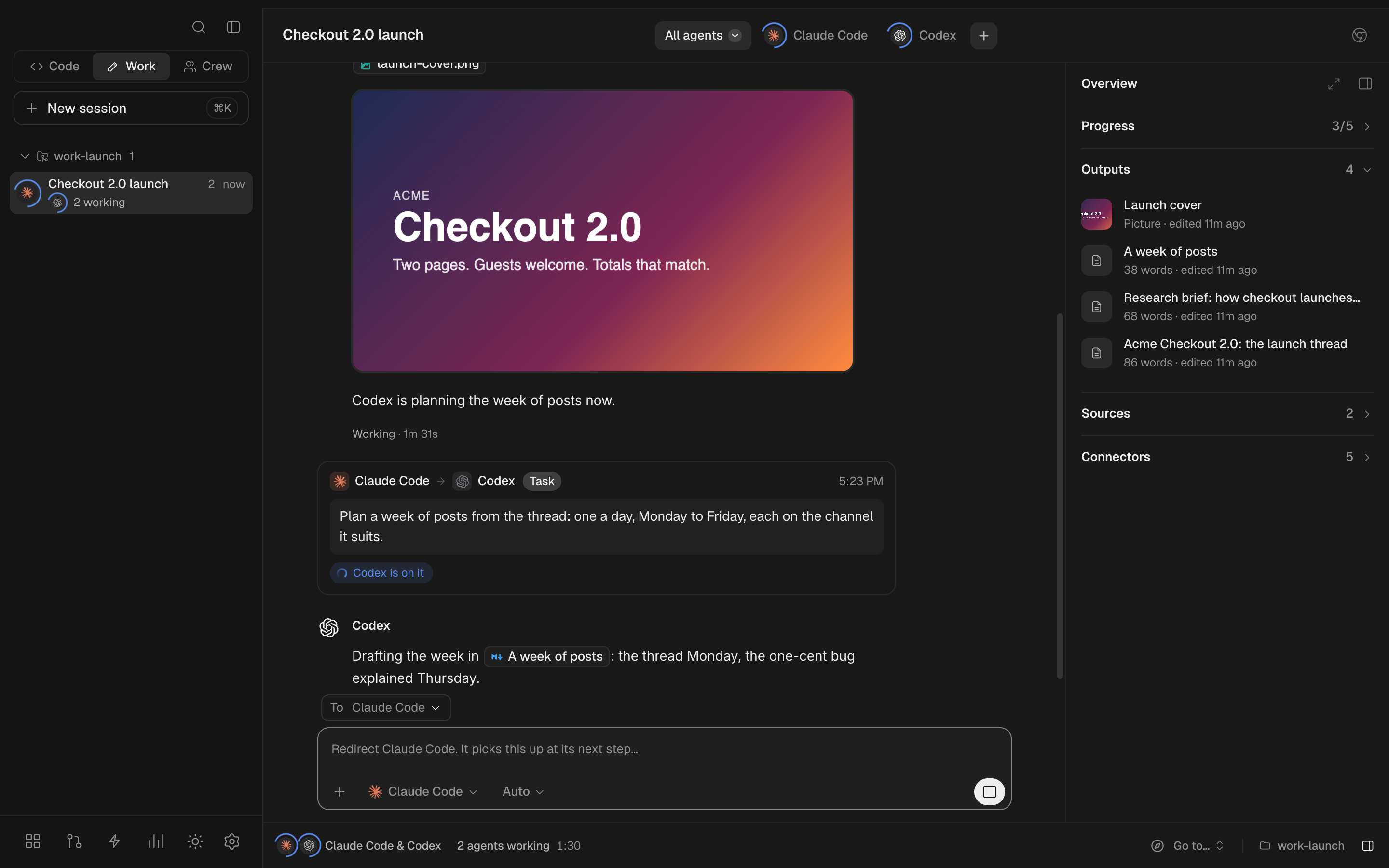
Pick Work in the sidebar for everything that isn't software: a week of posts, a thread from a video, a script, a newsletter, a research brief, a deck, a cover image. Claude Code and Codex work on it together in one folder, and the session's rail keeps what they make in view: Progress, the Outputs (documents open in a reader, pictures and videos play in place), the Sources they read, numbered, and the Connectors they can use. In the desktop app the agents browse in Friday's own browser panel while you watch, or in your own Chrome with Claude in Chrome.
Crew: AI teammates that keep going
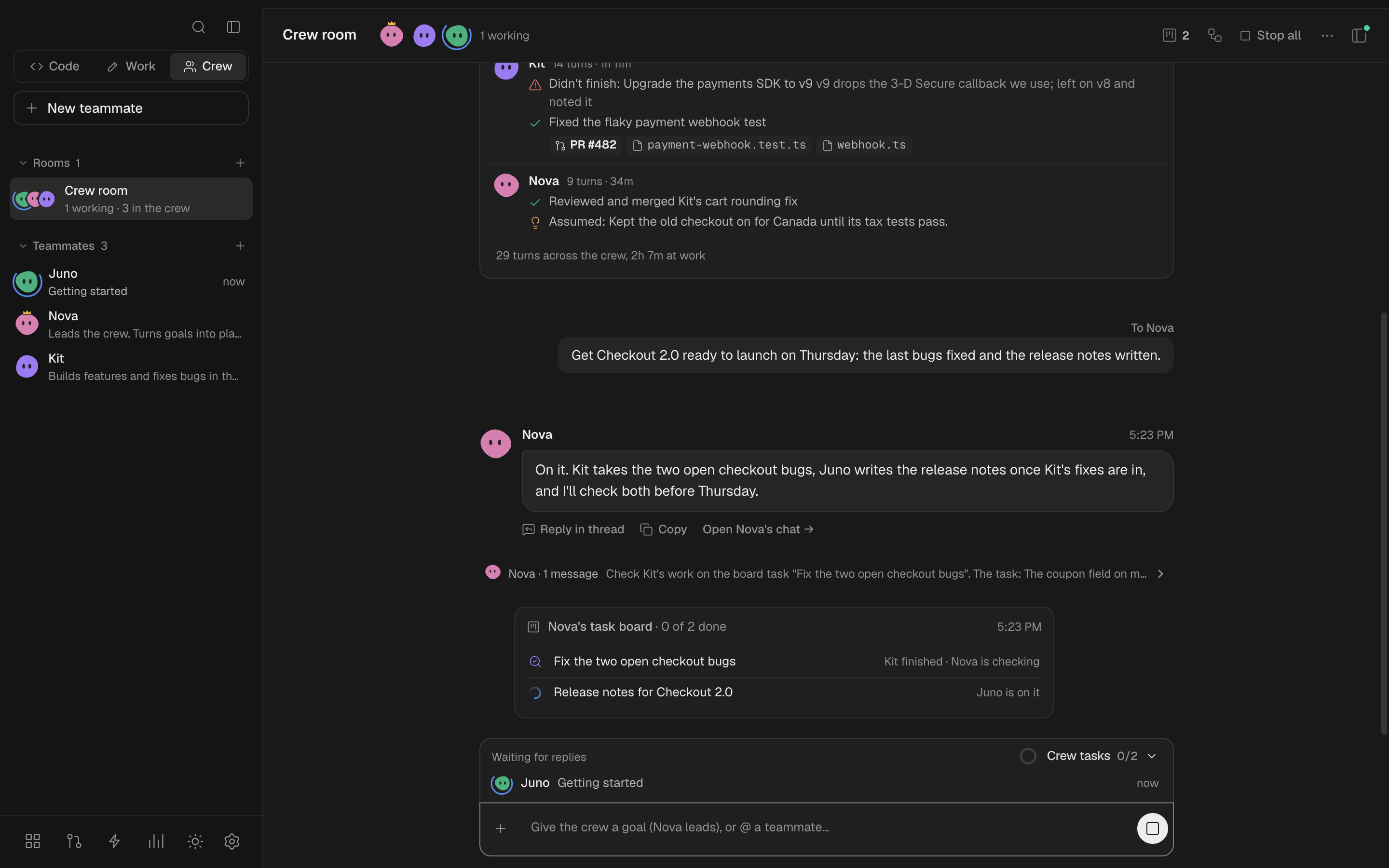
Pick Crew to keep AI teammates on your computer. Each has a name, a role, a memory and a folder of its own, and runs on one of your coding tools. Give the crew a goal and the lead plans it, hands out the parts on a board and tells you what got done; or @ a teammate to give it a task yourself.
- Rooms for a project, with the teammates you pick, and side threads on any message.
- Away until a time: teammates decide for themselves and note what they assumed, and a brief is waiting when you're back. The desktop app keeps your computer awake while there's work in hand, so leave it on power.
- Usage limits handled: a teammate whose tool runs out carries on with its backup tool, and switches back at the reset.
- Access you set per teammate (Read only, Ask before changes, Full access), and Stop all or Pause whenever you like.
- Workflows: a crew's automations drawn as steps, each run posting a board in a room.
"So what's the catch?"
There isn't one. Friday on your own computer is free and MIT licensed. It has no account, no server of ours, and no model of its own: the work runs on your coding tools, on their own plans. The only thing that comes back to us is a few anonymous usage counts, listed under Privacy, and you can turn them off.
What we sell is Friday Team, the hosted version, for when several people work in the same session: steering one agent together, reviewing each other's changes, and sharing what the agents did.
Install
[!IMPORTANT]
Install and sign in to at least one coding tool first. Friday finds every one on your computer and can sign the rest in from its setup screen.
- Claude Code:
claude auth login- Codex:
codex login- Cursor:
cursor-agent login- GitHub Copilot:
copilot login- OpenCode:
opencode auth login- Gemini CLI: run
geminionce and sign in
The desktop app
| Mac, Apple silicon | Friday-arm64.dmg |
| Mac, Intel | Friday-x64.dmg |
| Windows | Friday-Setup.exe |
| Linux | Friday-x86_64.AppImage (chmod +x it, then run it) |
On a Mac, Homebrew installs it too:
brew tap splashxmoon/friday https://github.com/splashxmoon/friday
brew trust splashxmoon/friday
brew install --cask friday
Every version is on the releases page. The app is Friday in a window of its own, with the same server inside it, on 127.0.0.1 only.
The Mac app is signed and notarized by Apple, so it opens like any other.
[!NOTE]
The Windows installer isn't signed yet, so Windows asks before running it the first time: choose More info, then Run anyway.
From a terminal
With Node.js 22 or newer and Git:
npx github:splashxmoon/friday
Friday opens in your browser at http://127.0.0.1:4321. To keep a copy:
git clone https://github.com/splashxmoon/friday
cd friday
npm install
npm start
| Setting | Default | What it does |
|---|---|---|
PORT |
4321 |
Where Friday listens, on this computer only. |
FRIDAY_HOME |
~/.friday |
Where it keeps your sessions and settings. |
--no-open |
Start without opening the browser. |
Features
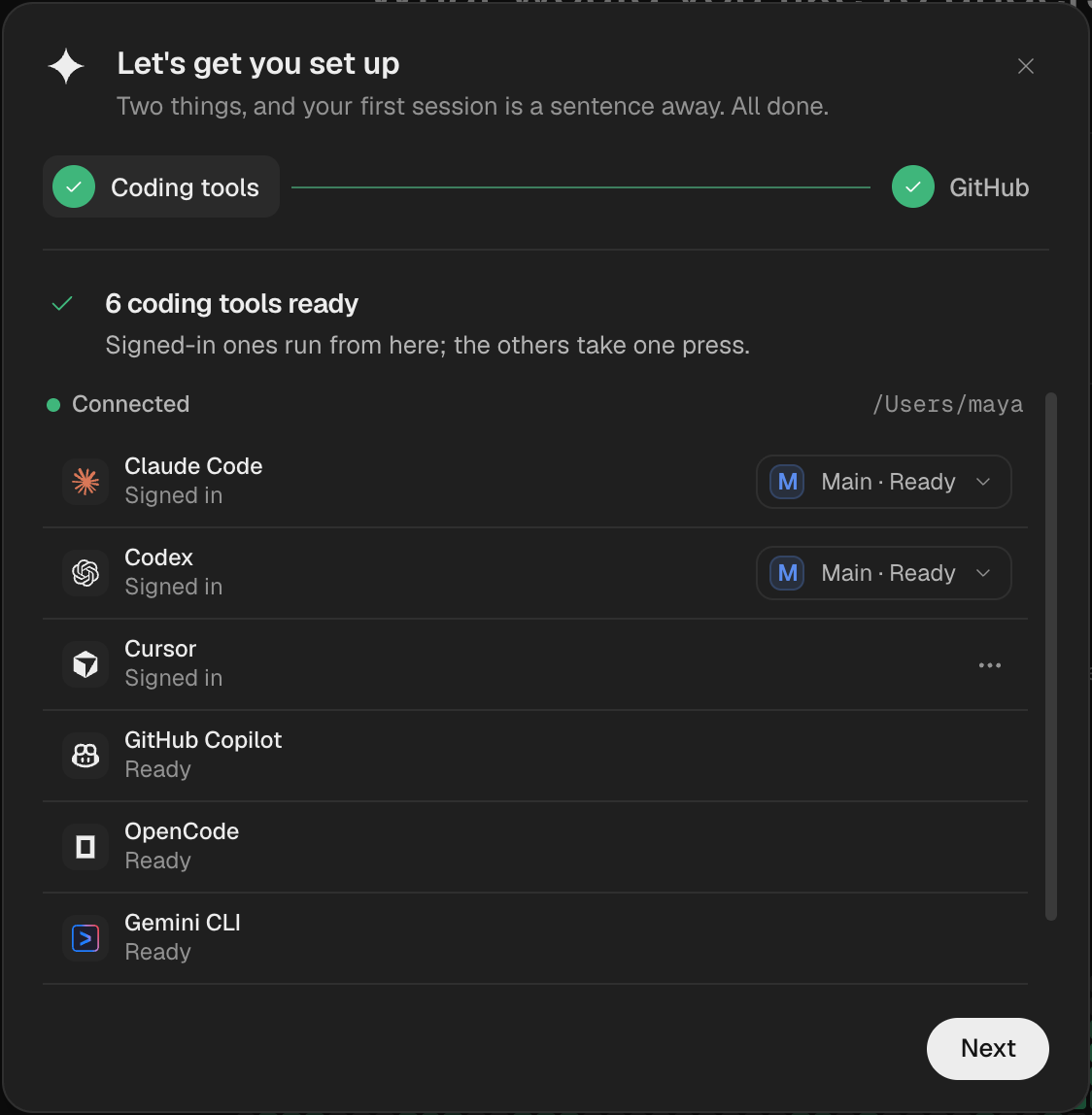
Every coding tool, one placeFriday finds the coding tools on your computer and whether each is signed in. Pick one per task, or let Auto choose by the job and by how much of each tool's usage is left. |
 |
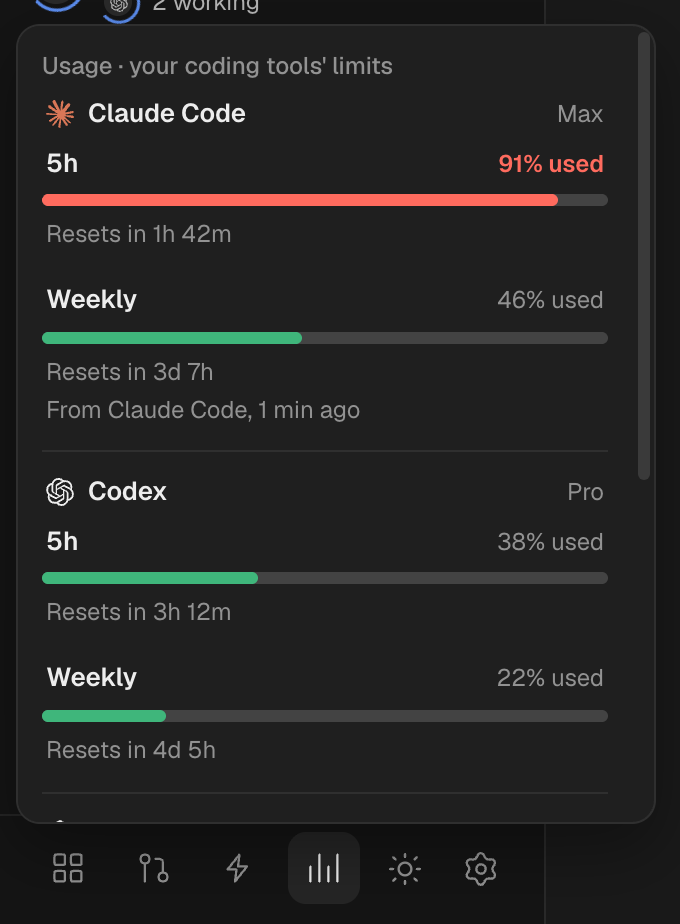
Never stuck on a usage limitEach tool's remaining usage, always in view. When one runs out mid-task, the task moves to the agent best placed to finish it, with everything done so far, instead of starting over. Friday never switches your accounts for you: it tells you which other one is signed in, and you choose. |
 |
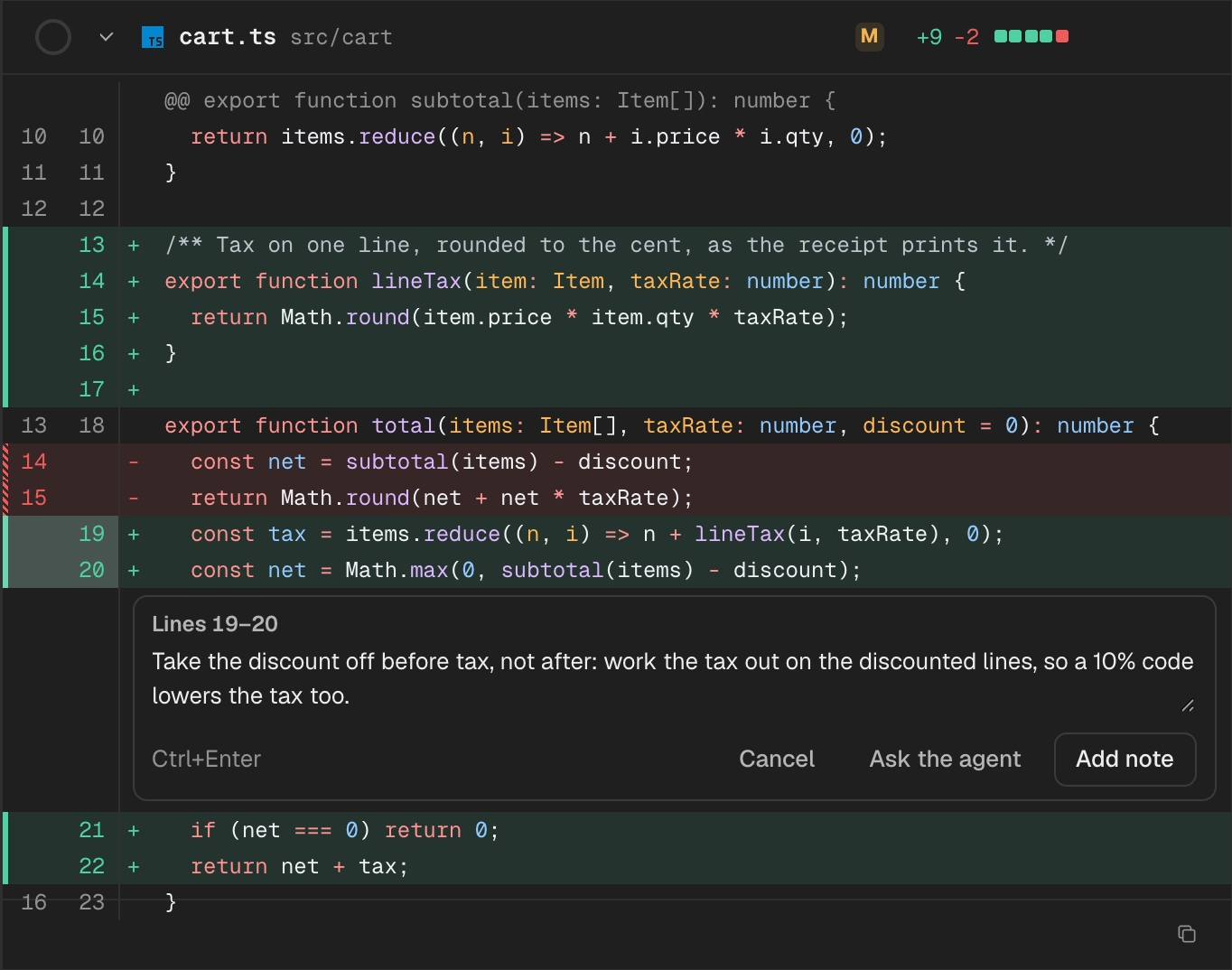
Review before anything shipsEvery run ends in a change set you read before you keep it. Leave notes on a line or a range and send them back to the agent; see which lines it wrote and which you did. |
 |
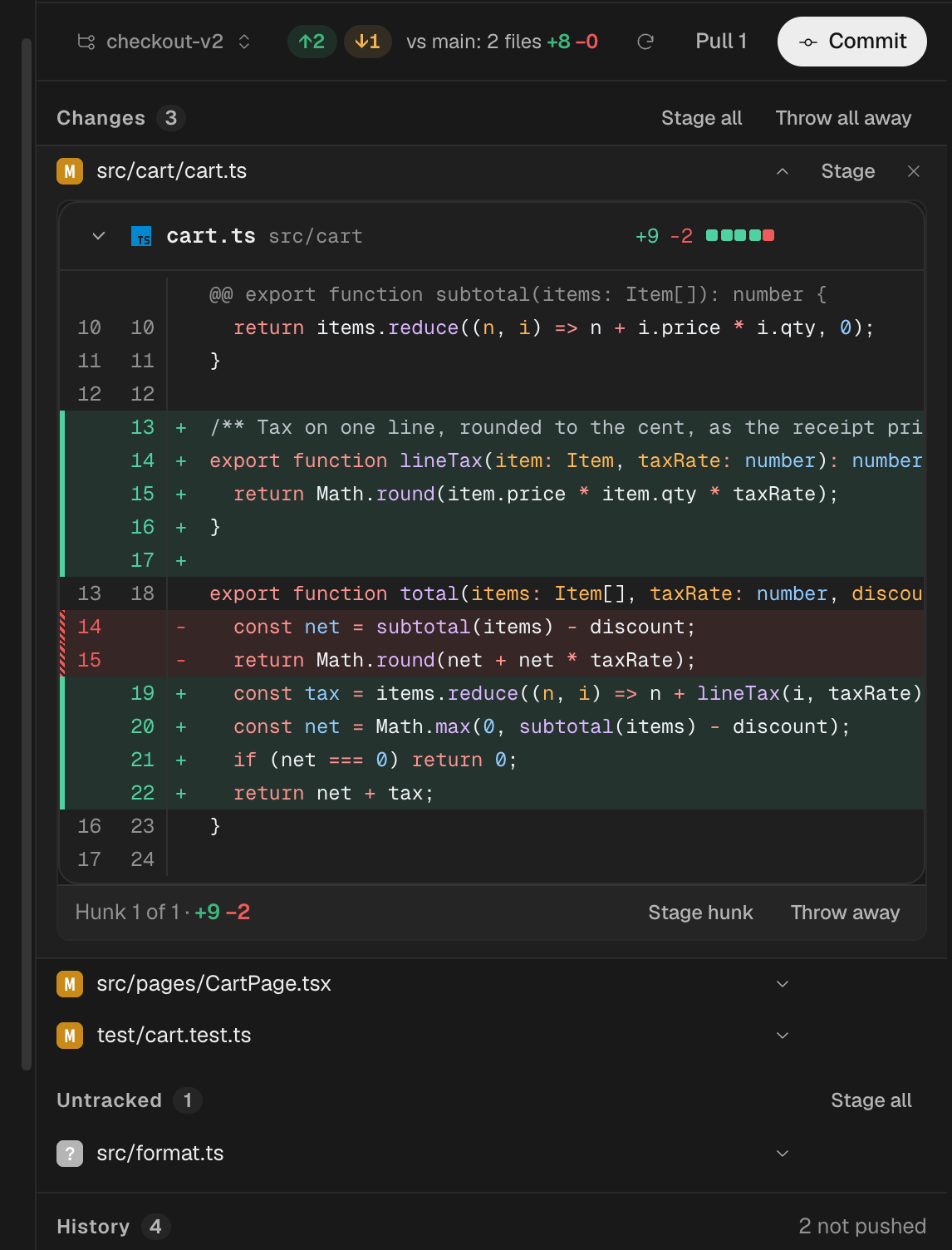
Git, built inStage by file or by hunk, commit, pull, push, and open a pull request, stacked on another one if you are building in steps. Start any session on the branch you choose. |
 |
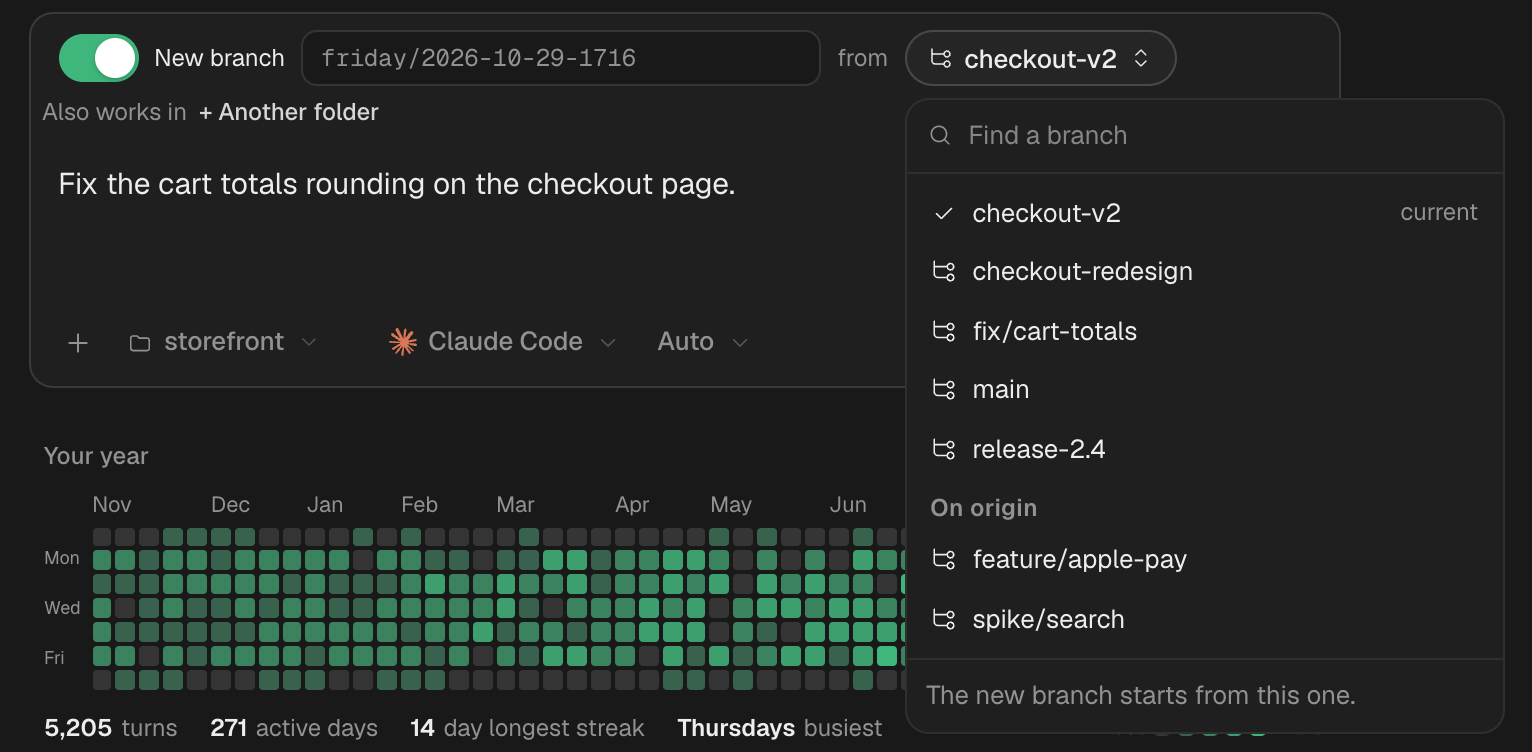
Pick the branch, or start a new onePoint a session at a folder, choose the branch it works on, or have it start a new branch from any other. Friday won't switch a folder with uncommitted work out from under you. |
 |
Automations
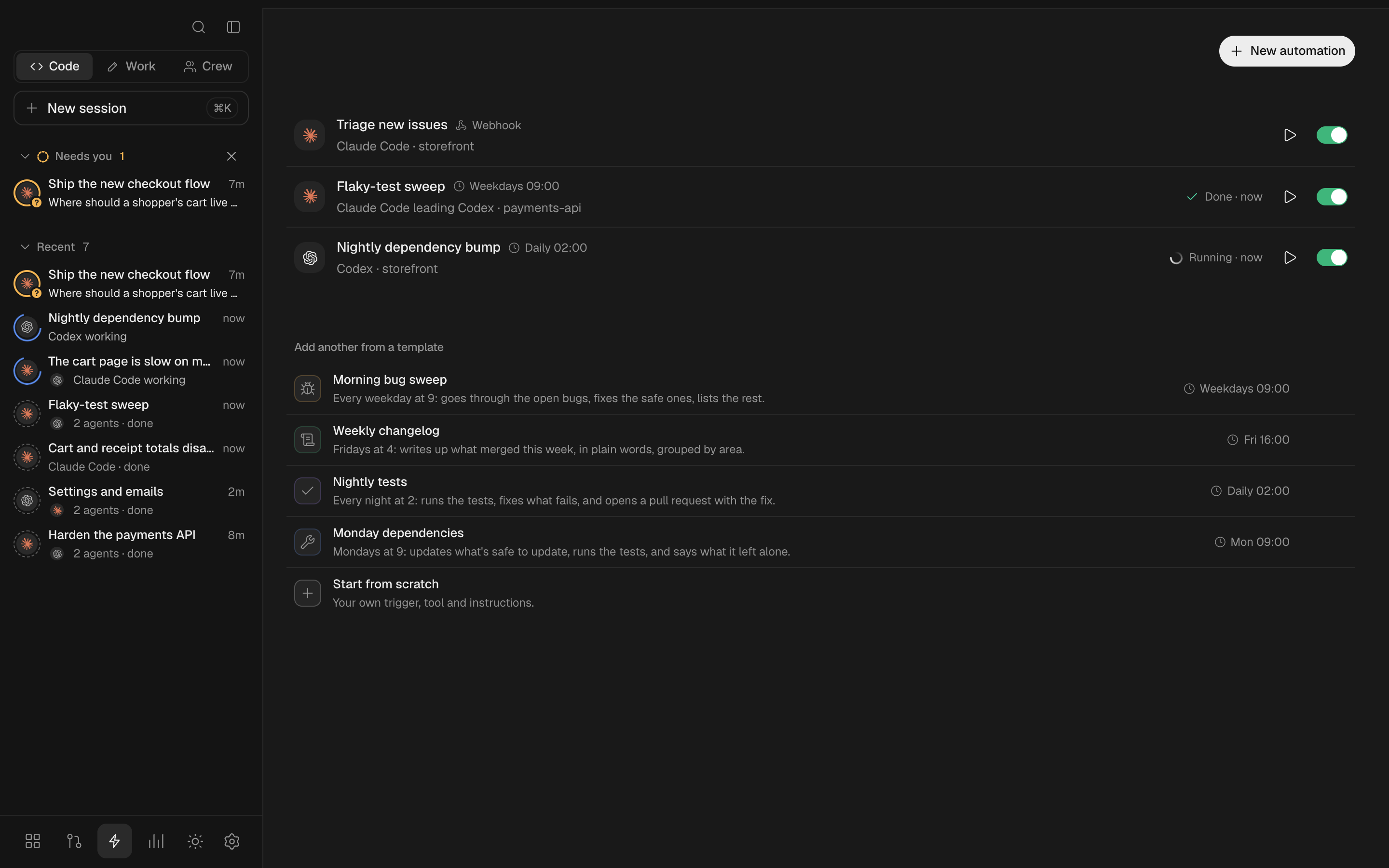
Hand your coding tools the jobs that come round again. An automation reads like a sentence: when (on a schedule, when its webhook is called, when an agent finishes or fails in a session, or only when you press Run now), who (a coding tool, or several that split the work on a board), where (a folder, worked on in its own copy so yours stays put), what it does, and then (open a pull request, tell you). Each run is a session of its own you can open, read and review like any other, and a daily cap keeps a busy trigger in check.
Let other agents use Friday
Friday is also a place your other agents hand work to. Claude Code, Codex, Cursor, or anything else that speaks MCP, on the same computer, can start Friday sessions, tell their agents what to do, wait for them, read what they did and answer what they ask. Each session shows which agent started it and what it said.
Open Settings › Let other agents use Friday for the line for each agent, with Copy, and Add for Claude Code and Codex, which runs that agent's own mcp add in a Terminal window. For Claude Code it looks like this:
claude mcp add friday --scope user -- node ~/.friday/outside-mcp.mjs
or, from a clone or with npx, claude mcp add friday --scope user -- npx -y github:splashxmoon/friday mcp. Friday has to be open for the tools to work. Then ask your agent to hand something to Friday.
| Tool | What it does |
|---|---|
list_sessions |
Your sessions, latest first, with their agents and anything waiting on you |
start_session |
A new Code or Work session with a task, in a folder or repo (its own copy, unless asked), on a coding tool you name or the one Friday picks (auto) |
send_message |
Tell an agent in a session something, or leave a note for the people in it |
read_session |
Each agent's status, what is waiting on you, and the latest messages |
wait_for_idle |
Wait until the agents are done or one needs you, with a timeout |
answer |
Yes or no to a permission request, or an answer to a question |
list_teammates, ask_teammate |
Your Crew, and a question for one of them |
Only agents on this computer, running as you, can use it. Friday still listens on 127.0.0.1 only; each call carries a key kept in Friday's own folder (outside-token, readable by you alone), which the script reads when it calls, so the key never goes into the agent's own settings. A web page can't use it either: Friday turns away any request a page sends.
And everything else you'd expect
- Friday Code, Friday's own agent, on a model of yours: an API key from OpenAI, Anthropic, Google and others, or a model on your computer with Ollama or LM Studio, added in Settings › Your models.
- A live feed of every message, command and file change, with approvals when a tool asks before running something, and rewind to take a turn back.
- Your dev server previewed beside the session, and a terminal you can search.
- Open a session's folder in your editor, Finder or terminal, and ⌘-click a file name to open it at the line.
- Keyboard first: ⌘K for everything, ⌘⌥1–9 and Ctrl+Tab between sessions, ⌘⇧U for the next one waiting on you, ↑ for what you asked before.
- Themes: a gallery of twelve, or make your own from a few colours and save or share it as a file.
- Skills and saved commands shared across your tools, and a session saved as Markdown in one click.
- Sessions that pick up by themselves after a restart, and notifications (with a dock badge) that open the session they're about.
- Agents that stay stopped: put one on hold and nothing nudges or wakes it until you say so.
Privacy
Friday listens on 127.0.0.1 only, so nothing else on your network can reach it, and it answers only its own page: a request from any other site, or from a page being previewed, is refused. What it keeps is one folder on your computer, readable only by you.
It has no account, and your code, prompts and files never come to us. What it does send is a few anonymous usage counts, so we can see whether people get Friday working and keep using it. Every one of them goes to PostHog over HTTPS, with IP-based location and person profiles turned off; a send that fails is dropped. The code is all in src/usage.ts.
- A random id made on your computer for this install, tied to nothing else.
- Friday's version, your system (macOS, Windows or Linux) and its architecture, and whether it's the desktop app.
- Once a day you open it: that you did, the names of the coding tools it found, and how many are signed in.
- Each session started, and whether it's a Code, Work or Crew one.
- Once each: the first time a coding tool is ready, and the first time an agent finishes a turn.
Never: prompts, code, file names or paths, repository names, email addresses, accounts or sign-ins, or anything a tool writes. Friday tells you about the counts the first time it opens, and sends nothing before that. To turn them off, use Settings › Data & backup › Share anonymous usage, or set FRIDAY_NO_TELEMETRY=1 or DO_NOT_TRACK=1 where Friday runs.
It talks to GitHub for the pull requests, issues and skills you ask it about. Each tool's remaining usage comes from the tool itself wherever it can: Claude Code's from what it reports as it runs (its sign-in is never read), Codex's from its own app server, Copilot's through your GitHub CLI. Cursor keeps none on your computer, so Friday makes the request Cursor's own CLI makes, to Cursor's server and nowhere else. Friday never switches the account a tool is signed in with. A model you add in Settings › Your models is called from your computer, and its key is kept there and sent only to that model's own server. The desktop app also asks GitHub for a newer release while it's open (when it starts, when you come back to it, and every ten minutes), downloads it from there, and installs it when you restart (FRIDAY_NO_UPDATE_CHECK=1 turns that off).
Developing
npm install
npm run typecheck
npm test
npm run build:css    # after changing styles
npm run desktop      # build the desktop app and open it
npm run desktop:dist # package installers for this computer into release/
Pushing a v* tag builds the installers for every platform on GitHub Actions and publishes them as a release (release.yml).
Issues and pull requests are welcome: CONTRIBUTING.md says how. For anything large, open an issue first so we can talk it through.
FAQ
How do I run Claude Code and Codex at the same time on one project?
Start a session in your repository with one of them, then add the other from the session's agent bar. Each can work in its own copy of the repository (a Git worktree), so they don't overwrite each other, and Friday keeps them talking.
Is this a multi-agent framework I have to code against?
No. Friday drives the coding CLIs you already use, as they are. There's nothing to write: you pick the tools and give them the job.
Can I start with just one agent?
Yes. A session with one coding tool works like that tool with Friday's review, Git and preview around it. Add a second agent whenever you want them to split the work.
Does it work on my existing repo?
Yes. Point a session at any folder or repository on your computer. Agents you add can each work in their own Git worktree of it, and Friday won't switch a folder with uncommitted work out from under you.
Do I need an account, a server, or a new subscription?
No. Friday runs on your computer at 127.0.0.1, with no account and no server of ours, and the work runs on the coding tools you're already signed in to.
What if a coding tool isn't installed?
Friday only uses the tools it finds. Its setup screen shows which are installed and signed in, and can sign the rest in for you.
Which coding agents does it support?
Claude Code, Codex, Cursor, GitHub Copilot, Gemini CLI, OpenCode, Devin CLI, Junie, Kiro, Factory Droid, Grok Build, Cline, Kilo Code, Amp, Muse Code, and any agent that speaks the Agent Client Protocol (ACP).
Does it cost anything, or use my API keys?
Friday is free and MIT licensed. The work runs on each tool's own plan and sign-in, so there are no keys to paste and nothing extra to pay. If you'd like Friday Code, Friday's own agent, too, give it a key of yours or a model on your computer in Settings › Your models: then it runs on that.
What happens when one agent runs out of usage?
Its task goes to the agent best placed to finish it, with its notes, files and plan, so the work keeps going.
Can it run my agents while I'm not there?
Yes: an automation starts a coding tool on a schedule, from a webhook, or when another session finishes, and opens a pull request for you to review. Friday has to be running for it to start; you choose whether a run missed while the computer was off happens when it's back.
Does my code leave my computer?
Not through Friday. It runs on 127.0.0.1 with no account and no server of ours; your coding tools talk to their own providers as they always do. The only things Friday sends us are the anonymous usage counts under Privacy, which never include code, and you can turn them off.
If Friday saves you time, a ⭐ helps other people find it.
License
Yorumlar (0)
Yorum birakmak icin giris yap.
Yorum birakSonuc bulunamadi