spool
Health Gecti
- License — License: NOASSERTION
- Description — Repository has a description
- Active repo — Last push 0 days ago
- Community trust — 532 GitHub stars
Code Uyari
- process.env — Environment variable access in packages/app/build/notarize-dmg.js
Permissions Gecti
- Permissions — No dangerous permissions requested
This tool acts as a personal, local search engine for your machine. It indexes AI chat sessions, coding history, and bookmarks from over 50 platforms into a single local database, allowing both you and your AI agents to instantly search through your past data.
Security Assessment
Overall risk: Low. The tool accesses highly sensitive data, specifically your local Claude and Codex session files, which can contain your private source code and conversational history. However, the project explicitly states that all data remains locally on your machine without making external network requests. The codebase does not request dangerous system permissions, nor does it contain hardcoded secrets. There is a standard warning regarding environment variable access (`process.env`), but this is isolated to an end-to-end testing helper and is entirely safe. The primary security consideration is its installation method; the default recommended install uses a piped bash script (`curl | bash`), which is common but less secure for strict environments than cloning and building from source.
Quality Assessment
This is a healthy, active project. It is licensed under the highly permissive MIT license. The repository shows strong signs of active maintenance with a push occurring just today. It has built moderate community trust, currently sitting at 221 GitHub stars. The only caveat is that the developers explicitly note the project is in its "early stage," so users should expect potential bugs and rough edges.
Verdict
Safe to use, provided you review the install script or build from source.
Your local AI session library. Collects sessions from Claude Code, Codex CLI, Gemini CLI (and more) — browsable and ⌘K-searchable.
Spool
Your local AI session library.
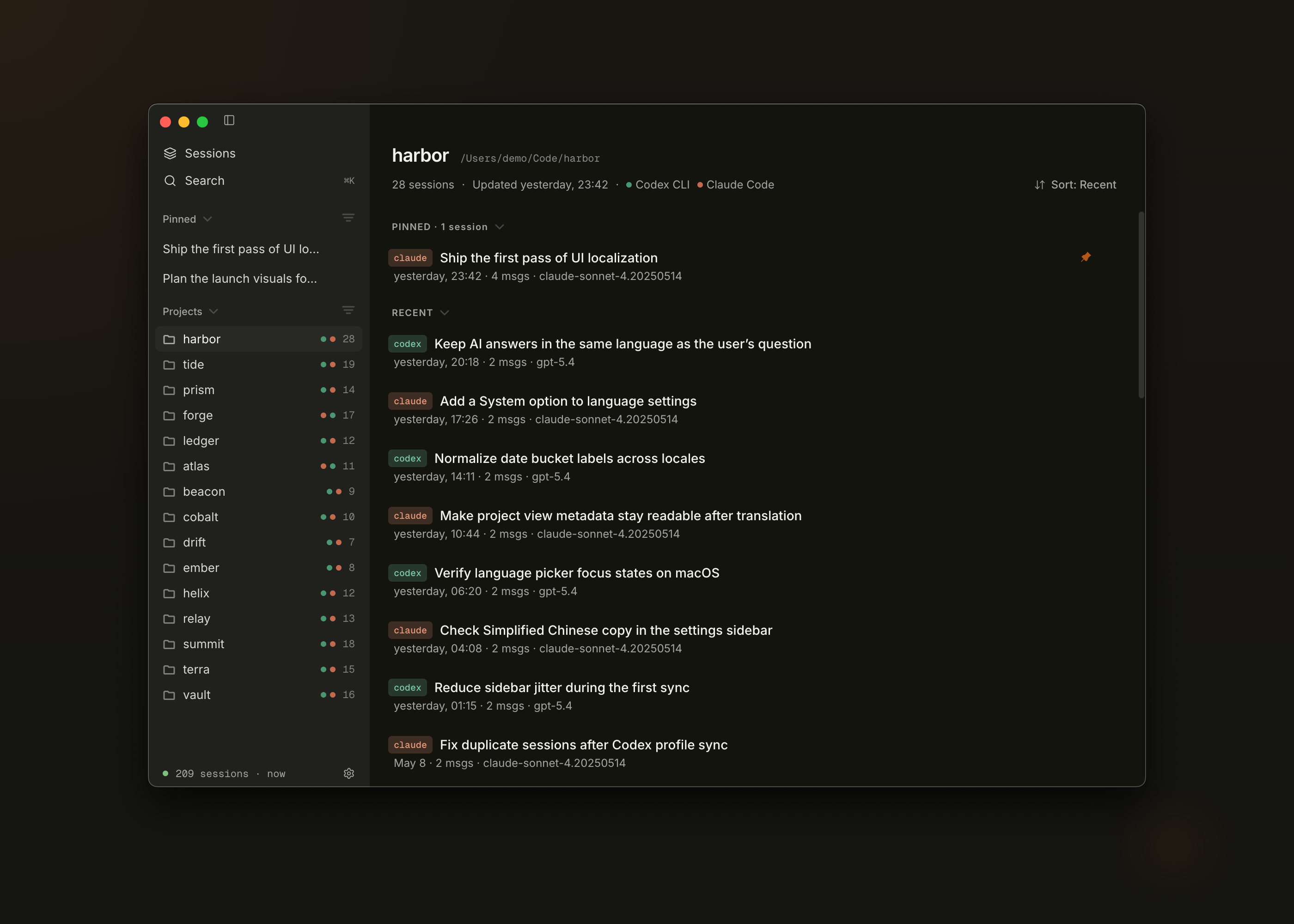
Spool collects every Claude Code, Codex CLI, Gemini CLI, and OpenCode session you've ever had into a sidebar of projects you can browse, pin, and revisit. Press ⌘K to search across the whole archive.
Early stage. Spool is under active development — expect rough edges. Feedback, bug reports, and ideas are very welcome via Issues or Discord.
Install
curl -fsSL https://spool.pro/install.sh | bash
macOS / Apple Silicon only. Or build from source:
pnpm install
pnpm build
# DMG is in packages/app/dist/
What it does
Spool turns the pile of AI sessions sitting on your disk into a browsable library.
- Library shell — sidebar of projects (derived from working-dir paths across agents) and a main pane that shows recent + pinned sessions for whatever you've selected
- Session indexing — watches Claude/Codex/Gemini session dirs and OpenCode's SQLite database in real time, including profile-based paths like
~/.claude-profiles/*/projects,~/.codex-profiles/*/sessions, Gemini's project temp dirs under~/.gemini/tmp/*/chats, and~/.local/share/opencode/opencode.db - Pin — keep important sessions on top of their project and on the global Library Home
- ⌘K search — fast full-text search scoped to All or the current project; AI mode synthesizes answers across fragments
- Agent search — a
/spoolskill inside Claude Code (and any ACP agent) feeds matching fragments back into your conversation
Everything stays on your machine. Nothing leaves.
Looking for connectors (Twitter / GitHub / Reddit / etc.)? They now live in Spool Daemon, a sibling app focused on syncing platform data.
Architecture
packages/
  app/      Electron macOS app (React + Vite + Tailwind)
  core/     Indexing engine (SQLite + FTS5)
  cli/      CLI interface (`spool search ...`)
  landing/  spool.pro website
Development
pnpm install
pnpm exec electron-rebuild -f -w better-sqlite3   # rebuild native modules for Electron
pnpm dev          # starts app + landing in dev mode
pnpm test         # runs all tests
Note: The
electron-rebuildstep is required whenever you runpnpm installor switch Node.js versions. Without it, the Electron app will crash at launch with aNODE_MODULE_VERSIONmismatch error frombetter-sqlite3.
If you switch between Node-side tests and Electron app/e2e runs, rebuild better-sqlite3 for the matching runtime:
pnpm run rebuild:native:node      # before @spool/core / Node-based tests
pnpm run rebuild:native:electron  # before launching the Electron app or e2e tests
Dev DB isolation
pnpm dev points Spool at ~/.spool-dev/ instead of your real ~/.spool/,
so iterating on schema migrations or destructive maintenance never touches the
database you actually use. The dev DB starts empty; seed it from your real one
only when you want realistic data:
pnpm --filter @spool/app dev:seed-from-prod   # copies ~/.spool/ → ~/.spool-dev/
pnpm --filter @spool/app dev:reset-db         # wipes ~/.spool-dev/
Override the dev location with SPOOL_DATA_DIR=/some/path pnpm dev. The
isolation kicks in automatically in dev mode; production builds always use the
real ~/.spool/.
Release
./scripts/release.sh # bump version, push tag, dispatch CI release workflow
Build + signing happen in GitHub Actions (see .github/workflows/release.yml) so
releases are never tied to a local developer certificate. The script blocks
until CI finishes; artifacts appear on the release page when it returns.
To test a local build without cutting a release, use pnpm --filter @spool/app build:mac.
License
MIT
Trademark
"Spool" and the Spool logo are trademarks of TypeSafe Limited. The MIT License above covers the source code only and does not grant permission to use the Spool name or logo. See the trademark notice in LICENSE for details.
Yorumlar (0)
Yorum birakmak icin giris yap.
Yorum birakSonuc bulunamadi