zenii
Health Gecti
- License — License: MIT
- Description — Repository has a description
- Active repo — Last push 0 days ago
- Community trust — 15 GitHub stars
Code Gecti
- Code scan — Scanned 12 files during light audit, no dangerous patterns found
Permissions Gecti
- Permissions — No dangerous permissions requested
This is a Rust-powered local MCP server that provides a centralized AI brain for your machine. It allows scripts, cron jobs, and various applications to share memory, context, and tools through a unified local API.
Security Assessment
The tool exposes 114 local API routes and executes a daemon listening on localhost. While the light audit found no hardcoded secrets or dangerous code patterns, its core design inherently involves system-wide access. It explicitly intends to run automated scripts, cron jobs, and interact with your local environment. This requires granting broad execution permissions and passing prompts through multiple model providers over the network. Overall risk is rated as Medium. You are essentially trusting a local proxy with broad machine access and routing your AI inputs/outputs through it.
Quality Assessment
The project appears highly functional, well-documented, and actively maintained (last pushed 0 days ago). It is licensed under the standard MIT license. Community trust is currently minimal due to a low star count (15 stars). However, the repository compensates by demonstrating a highly professional setup, including a robust CI pipeline and an impressive suite of over 1,500 tests, which indicates strong code hygiene.
Verdict
Use with caution — the codebase passes basic security checks, but you should review the script and understand the broad local access required before running the automated install.
Your machine's AI brain. One 20MB binary gives every tool, script, and cron job shared AI memory + 114 API routes. Desktop app, CLI, Telegram — all connected. Rust-powered.
Zenii (zen-ee-eye)

Zenii: 20 megabytes. AI everywhere.
Every tool on your machine shares one AI brain.
If Zenii looks useful, star the repo to help others find it.
20 MB desktop · 114 API routes · 18 tools · 6+ model providers · 1,500+ tests · One shared brain
Install one binary. Now your scripts have AI memory. Your cron jobs reason. Your Telegram bot thinks.
And they all share the same brain — same memory, same tools, one address.
A private AI backend for everything on your machine — native desktop app, plugins in any language, and an API your curl can call. Powered by Rust.
https://zenii.sprklai.com
https://docs.zenii.sprklai.com




"ChatGPT is a tab you open. Zenii is a capability your machine gains."
"Every tool you use is smart in isolation. Zenii makes them smart together."
Try It in 30 Seconds
curl -fsSL https://raw.githubusercontent.com/sprklai/zenii/main/install.sh | bash
zenii-daemon &
curl -s -X POST http://localhost:18981/chat \
  -H "Content-Type: application/json" \
  -d '{"session_id":"hello","prompt":"What can you do?"}' | jq .response
That's it. One binary, one address, AI everywhere. Now read on for what you can build with it.
Quick Start
Download the latest installer for your platform from GitHub Releases:
| Platform | Desktop App | CLI + Daemon + TUI |
|---|---|---|
| Linux | .deb .rpm .AppImage |
zenii-linux zenii-daemon-linux zenii-tui-linux |
| macOS | .dmg |
zenii-macos-arm64 zenii-daemon-macos-arm64 zenii-tui-macos-arm64 |
| Windows | .msi .exe (NSIS) |
zenii.exe zenii-daemon.exe zenii-tui.exe |
| ARM | -- | zenii-arm64 zenii-daemon-arm64 |
Or install via script (Linux/macOS):
# Download & install CLI + daemon + TUI
curl -fsSL https://raw.githubusercontent.com/sprklai/zenii/main/install.sh | bash

# Start the daemon
zenii-daemon &

# Your first AI request
curl -X POST http://localhost:18981/chat \
  -H "Content-Type: application/json" \
  -d '{"session_id": "hello", "prompt": "What can you do?"}'
Or use the desktop app, CLI, or TUI — they all talk to the same backend.
Why Zenii?
| Your pain | How Zenii fixes it |
|---|---|
| AI tools are islands — ChatGPT, Telegram, scripts, cron all have separate memory and context | One shared brain: every interface, channel, and script shares the same memory, tools, and intelligence via localhost:18981 |
| Context resets every AI session | Semantic memory persists across sessions and survives restarts |
| AI can't do things, only talk | 18 built-in tools (15 base + 3 feature-gated): web search, file ops, content search, shell, memory, config, and more. Workflow pipelines and parallel delegation for complex tasks |
| Locked into one AI provider | 6 built-in providers, switch with one config change |
| AI tools are cloud-only | 100% local, zero telemetry, encrypted credential storage |
| "Works on my machine" for AI | Same binary on macOS, Linux, Windows — desktop, CLI, or daemon |
| Plugin systems require learning a framework | JSON-RPC over stdio — write plugins in Python, Go, JS, or anything |
| AI doesn't learn your patterns | Experimental self-evolving skills with human-in-the-loop approval |
| AI can't run tasks while you sleep | Built-in cron scheduler for autonomous recurring tasks |
One Address. Everything Connects.
Every AI tool you use today is an island. ChatGPT doesn't know what your Telegram bot discussed.
Your Python scripts can't access the memory your CLI built. Your cron jobs reason in isolation.
Zenii changes that. One address — localhost:18981 — serves every interface, every channel,
every automation, every language. Desktop app, CLI, TUI, Telegram, Slack, Discord,
your Python scripts, your Go services, your shell one-liners — all sharing the same memory,
same tools, same AI providers, same learned behaviors.
Write a memory from Telegram. Recall it from Python. Schedule a task from the CLI.
Get notified on Discord. Nothing is siloed. Everything converges.
What Zenii is NOT
- Not a chatbot wrapper — it's a full API backend with 114 routes
- Not Electron — native Tauri 2, under 20 MB
- Not a framework you learn — it's infrastructure you call via
curl - Not cloud-dependent — runs fully offline with Ollama
- Not opinionated about your stack — any language, any tool, JSON over HTTP
- Not a walled garden — built-in MCP server lets Claude Code, Cursor, and any MCP client use Zenii's tools natively. A2A Agent Card at
/.well-known/agent.json. See AGENT.md for integration details.
What Can I Automate?
# Schedule a daily morning briefing
curl -X POST http://localhost:18981/scheduler/jobs \
  -H "Content-Type: application/json" \
  -d '{"name":"briefing","schedule":{"Cron":{"expr":"0 9 * * *"}},"payload":{"AgentTurn":{"prompt":"Summarize system status and news"}}}'

# Store knowledge the AI should remember
curl -X POST http://localhost:18981/memory \
  -H "Content-Type: application/json" \
  -d '{"key":"deploy", "content":"Production DB is on port 5433, deploy via ssh prod"}'

# Ask a question that uses stored memory
curl -X POST http://localhost:18981/chat \
  -H "Content-Type: application/json" \
  -d '{"session_id":"ops", "prompt":"How do I deploy to production?"}'

# List what tools the agent has
curl http://localhost:18981/tools | jq '.[].name'

# Send a message via Telegram
curl -X POST http://localhost:18981/channels/telegram/send \
  -H "Content-Type: application/json" \
  -d '{"content":"Deploy complete", "recipient":"123456"}'
Follow the Memory
# 9 AM — Store from desktop/CLI
curl -X POST localhost:18981/memory \
  -H "Content-Type: application/json" \
  -d '{"key":"deploy","content":"Prod DB moved to port 5434"}'

# 10 AM — Your Python deploy script asks
curl -X POST localhost:18981/chat \
  -H "Content-Type: application/json" \
  -d '{"session_id":"deploy","prompt":"What port is prod DB on?"}'
# → "5434"

# 2 PM — Teammate asks via Telegram → same answer

# 3 PM — Cron job generates status report → includes the update
# One memory. Four interfaces. Zero configuration.
MCP: Use Zenii from Claude Code, Cursor, or Any AI Agent
Zenii ships a standalone MCP server binary. Any MCP-compatible client — Claude Code, Cursor, VS Code, Windsurf — can use Zenii's 18 tools natively.
Setup (Claude Code) — add to your project .mcp.json:
{
  "mcpServers": {
    "zenii": {
      "command": "zenii-mcp-server",
      "args": ["--transport", "stdio"]
    }
  }
}
Now Claude Code can search the web, read/write files, execute shell commands, store/recall persistent memory, and more — all through Zenii's tool registry with security policy enforcement.
What MCP clients see:
# Tools exposed (with zenii_ prefix):
zenii_system_info, zenii_web_search, zenii_file_read, zenii_file_write,
zenii_file_list, zenii_file_search, zenii_content_search, zenii_shell,
zenii_process, zenii_patch, zenii_memory, zenii_learn, zenii_config, ...
A2A Agent Card — other agents can discover Zenii at GET /.well-known/agent.json.
See AGENT.md for full integration docs, tool schemas, and multi-agent examples.
How It Fits
Zenii is a local AI infrastructure layer — not a chatbot, not a framework, not an API wrapper.
It gives your machine a shared AI backend that any tool can call via HTTP.
The Self-Evolution Story
Most AI tools are static — they do exactly what they did on day one. OpenClaw self-modifies without asking. Zenii takes a third path:
- Zenii observes your patterns and preferences over time
- Zenii proposes skill modifications ("I notice you always want code reviews on Fridays. Want me to schedule that?")
- You approve or reject — like a PR from your AI
- Zenii learns — approved changes become permanent skills
Your AI gets smarter. You stay in control. No surprises.
Note: Self-evolution is experimental. Pattern detection quality depends on your LLM provider
and how you use Zenii. It works best with capable models (GPT-4, Claude) and consistent usage patterns.
Features
- Self-evolving agent — proposes skill changes based on your patterns, learns only with your approval
- Plugin system — write plugins in Python, Go, JS, or any language. A plugin is any program that speaks JSON-RPC 2.0 over stdio (~15 lines of Python)
- 114 API routes — full REST + WebSocket gateway. Interactive docs at
localhost:18981/api-docs - 6 AI providers built-in (OpenAI, Anthropic, Google Gemini, OpenRouter, Vercel AI Gateway, Ollama) + custom providers
- 18 built-in tools (15 base + 3 feature-gated) — websearch, sysinfo, shell, file ops, content search, memory, config, learn, skill proposal, agent self, patch, process + channel_send, scheduler, workflow
- Semantic memory — SQLite FTS5 + vector embeddings, persists across sessions and restarts
- Native desktop app — Tauri 2 + Svelte 5, under 20 MB, not Electron
- Multilingual UI — 8 languages (EN, ZH, ES, JA, HI, PT, KO, FR) with browser auto-detection
- Compact prompts — plugin-based prompt strategy with ~65% token reduction
- Unified diagnostic logging — all binaries write daily-rotated logs to OS-appropriate directories with auto-cleanup
- Token usage tracking — date-rotated JSONL logs for cost visibility
- Messaging channels — Telegram, Slack, Discord (feature-gated)
- Workflow engine — TOML-defined multi-step automation pipelines with DAG execution, inter-step templates, retry/timeout, DB-persisted history (feature-gated)
- Agent delegation — parallel sub-agents for complex tasks with dependency waves, tool filtering, cancellation
- Cron scheduler — automated recurring AI tasks
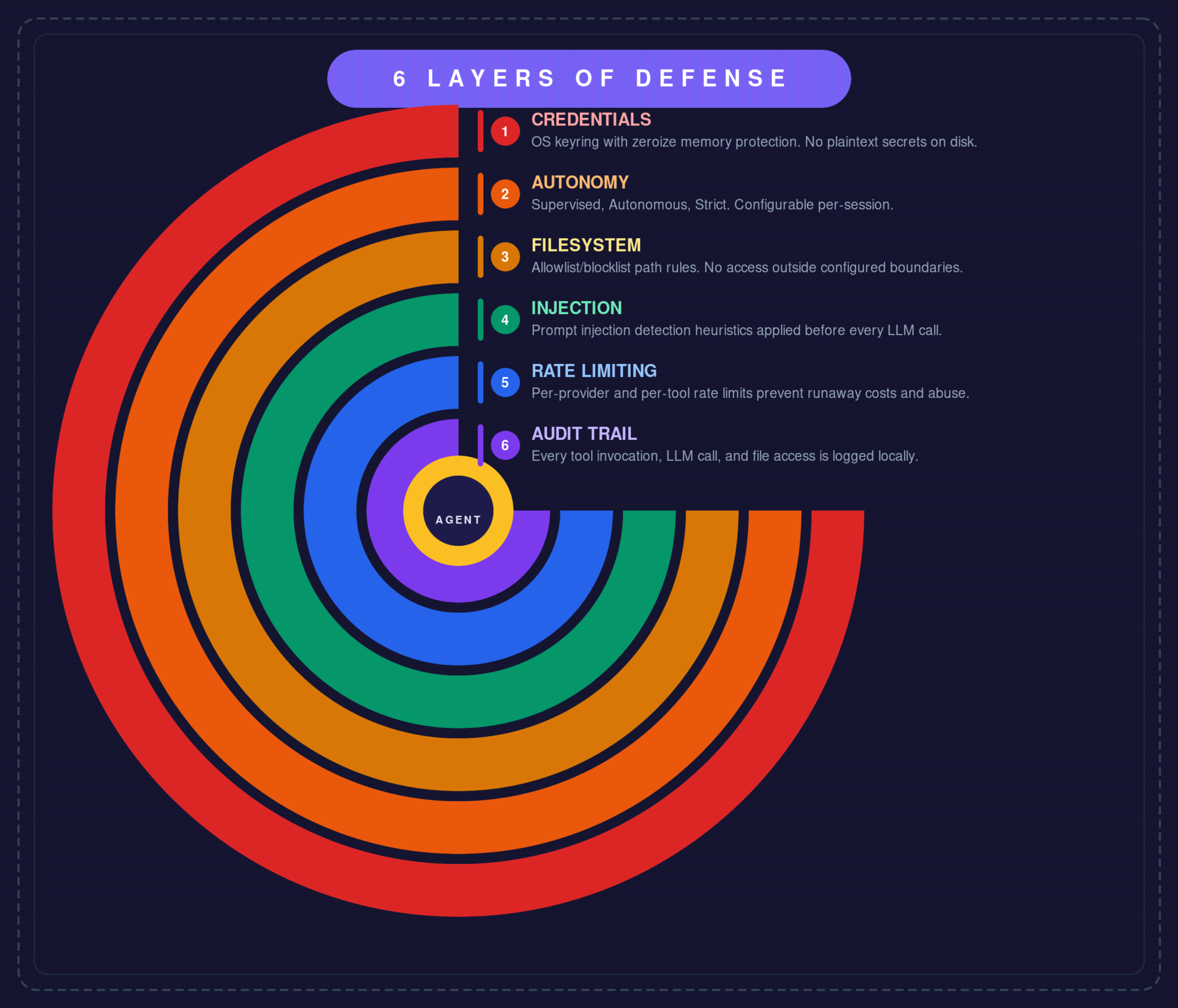
- 6-layer security — OS keyring with encrypted file fallback, autonomy levels, FS sandbox, injection detection (9 blocked commands + pipe patterns), rate limits, audit trail, agent timeout + abort on disconnect
- MCP server — expose all tools to Claude Code, Cursor, and any MCP client via
zenii-mcp-serverbinary (stdio transport). Feature-gatedmcp-server - A2A Agent Card —
/.well-known/agent.jsonendpoint for agent-to-agent discovery - Cross-platform — Linux, macOS, Windows, ARM (Raspberry Pi)
- Tool calling with 18 built-in tools (15 base + 3 feature-gated) via DashMap-backed ToolRegistry: websearch, sysinfo, shell, file read/write/list/search, content_search, patch, process, learn, skill_proposal, memory, config, agent_self + channel_send, scheduler, workflow
- Workflow engine -- TOML-defined multi-step automation pipelines with 5 step types (Tool, LLM, Condition, Parallel, Delay), petgraph DAG execution, minijinja inter-step templates, retry/timeout policies, failure policies (Stop/Continue/Fallback), DB-persisted run history. Feature-gated behind
workflows - Agent delegation -- Coordinator decomposes complex tasks into parallel sub-agents via LLM, executes in dependency waves with JoinSet, aggregates results. Each sub-agent gets an isolated session with tool allowlist filtering and per-agent timeout. Cancellation via
POST /agents/{id}/cancel - Plugin system -- external process plugins via JSON-RPC 2.0 protocol, installable from git or local paths, with automatic tool and skill registration. Managed via CLI, Web/Desktop UI, and TUI. See zenii-plugins for official community plugins
- Autonomous reasoning -- ReasoningEngine with tool-aware ContinuationStrategy and per-request tool call deduplication cache
- Context-driven auto-discovery -- keyword-based domain detection (Channels/Scheduler/Skills/Tools) filters context injection and agent rules to only relevant domains per query
- Self-evolving agent -- AgentSelfTool (
agent_notes) for agent-writable behavioral rules by category, stored in DB and auto-injected into context; SkillProposalTool for human-in-the-loop skill evolution - Model capability validation --
supports_toolspre-check prevents tool-calling errors with incompatible models - Context-aware agent -- 3-tier adaptive context injection (Full/Minimal/Summary) with hash-based cache invalidation
- Efficient prompt system -- plugin-based prompt strategy with CompactStrategy (~65% token reduction), 6 built-in plugins, and token budget trimming
- Onboarding wizard -- multi-step first-run setup across Desktop (2-step wizard), CLI (
zenii onboardinteractive flow), and TUI (4-step overlay modal) collecting AI provider selection, API key, default model, and user profile (name, location, timezone) - LLM-based auto fact extraction -- automatically extracts structured facts (preferences, knowledge, context, workflow) from conversations via a configurable LLM, persisted to user observations for progressive learning
- User location awareness -- timezone and location injected into agent context for location-sensitive queries (weather, events, news)
- OpenAPI interactive docs -- Scalar UI at
/api-docs+ OpenAPI 3.1 JSON spec (feature-gatedapi-docs, built with utoipa) - Streaming responses via WebSocket
- Semantic memory with SQLite FTS5 + vector embeddings (sqlite-vec), OpenAI and local FastEmbed embedding providers
- Soul / Persona system -- 3 identity files (SOUL/IDENTITY/USER.md) with dynamic prompt composition
- Skills system -- bundled + user markdown skills loaded into agent context (Claude Code model)
- Progressive user learning -- SQLite-backed observations with category filtering, confidence scoring, and privacy controls
- Tool permission system -- per-surface, risk-based tool permissions with 3 risk levels (Low/Medium/High), surface-specific overrides, and settings UI
- Secure credentials via OS keyring with AES-256-GCM encrypted file fallback and zeroize memory protection. Fallback chain: KeyringStore → FileCredentialStore → InMemoryCredentialStore. Credentials persist even when the OS keyring is unavailable (macOS code-signature revocation, Linux without Secret Service, headless boards)
- Messaging channels -- Telegram, Slack, Discord with lifecycle hooks (typing indicators, status messages) and end-to-end channel router pipeline (feature-gated, trait-based with DashMap registry)
- Cron scheduler -- automated recurring tasks with real payload execution (Notify, AgentTurn, Heartbeat, SendViaChannel)
- Notifications -- desktop OS notifications (tauri-plugin-notification) + web toast notifications (svelte-sonner) via WebSocket push
- Cross-platform -- Linux, macOS, Windows, ARM (Raspberry Pi)
Tech Stack
| Layer | Technology |
|---|---|
| Language | Rust 2024 edition |
| Async | Tokio |
| AI | rig-core |
| Database | rusqlite + sqlite-vec |
| Gateway | axum (HTTP + WebSocket) |
| Frontend | Svelte 5 + SvelteKit + shadcn-svelte + Tailwind CSS |
| Desktop | Tauri 2 |
| CLI | clap |
| Plugins | JSON-RPC 2.0 external processes |
| MCP | rmcp (server + client) -- feature-gated |
| Channels | Telegram (teloxide), Slack, Discord (serenity) -- feature-gated |
| Content | serde_yaml (YAML frontmatter parsing) |
| i18n | paraglide-js -- 8 languages (EN, ZH, ES, JA, HI, PT, KO, FR) |
| Mobile | Tauri 2 (iOS + Android) -- future release |
| TUI | ratatui |
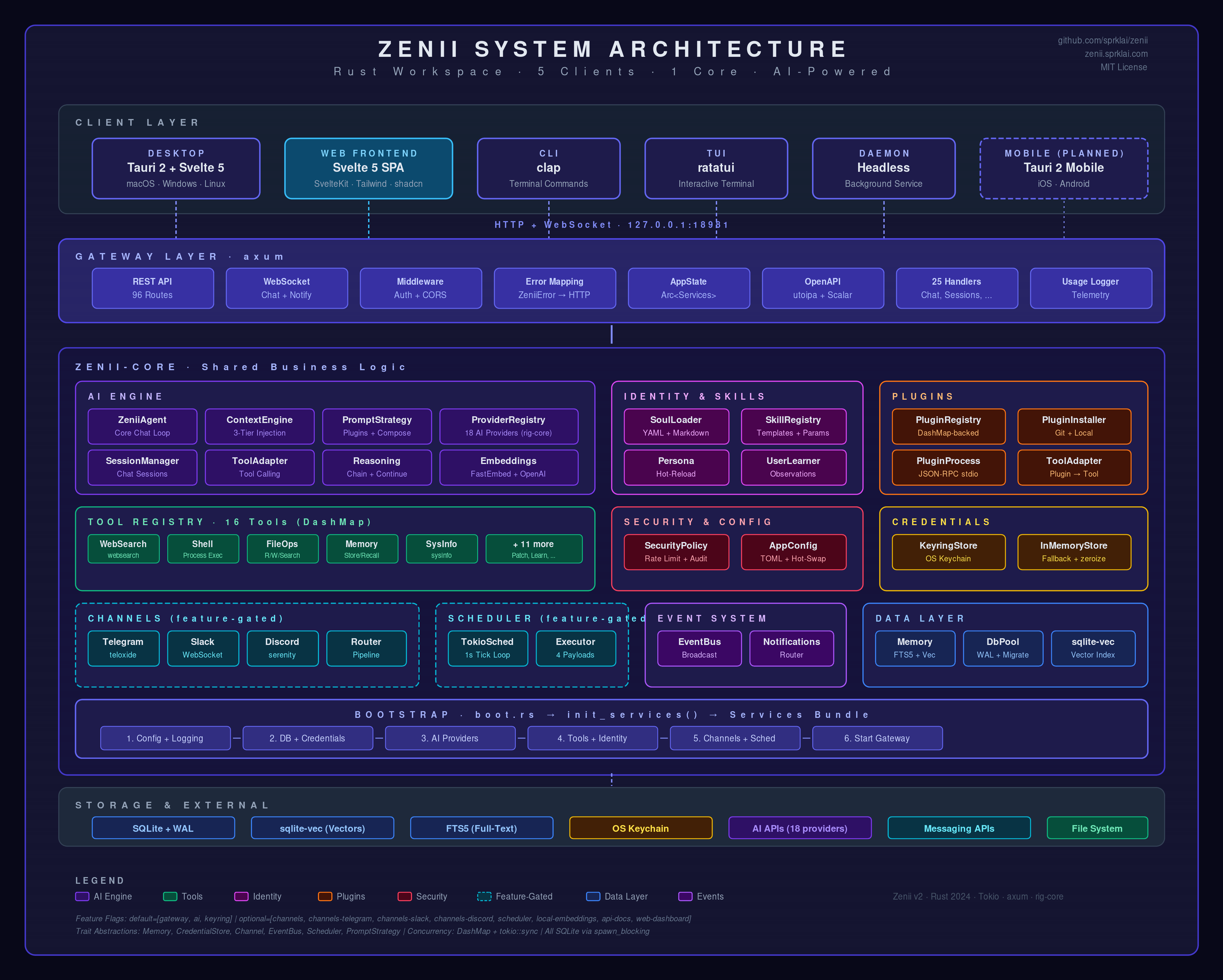
Architecture (click to expand)
System Architecture
6 Layers of Defense
Crate Dependency Graph
graph TD
    desktop[zenii-desktop] --> core[zenii-core]
    mobile["zenii-mobile<br>#40;future#41;"] -.-> core
    cli[zenii-cli]
    cli --> reqwest["reqwest<br>#40;HTTP client#41;"]
    cli --> tungstenite["tokio-tungstenite<br>#40;WS#41;"]
    tui[zenii-tui] --> core
    daemon[zenii-daemon] --> core
    mcpserver[zenii-mcp-server] --> core

    core --> axum["axum<br>#40;gateway#41;"]
    core --> rusqlite["rusqlite<br>#40;database#41;"]
    core --> rigcore["rig-core<br>#40;AI#41;"]
    core --> tokio["tokio<br>#40;async#41;"]
    core --> keyring["keyring + aes-gcm<br>#40;credentials#41;"]
    core --> serdeyaml["serde_yaml<br>#40;YAML frontmatter#41;"]
    core -.-> teloxide["teloxide<br>#40;Telegram, feature-gated#41;"]
    core -.-> serenity["serenity<br>#40;Discord, feature-gated#41;"]
Chat Request Flow
sequenceDiagram
    participant U as User
    participant G as Gateway (axum)
    participant AI as AI Engine (rig-core)
    participant M as Memory (sqlite-vec)
    participant LLM as LLM Provider
    participant T as Tools

    U->>G: Send message (REST/WS)
    G->>M: Query relevant context
    M-->>G: Context results
    G->>AI: Dispatch with context + tools
    AI->>LLM: Stream prompt

    loop Tool calling loop
        LLM-->>AI: Response (may include tool calls)
        alt Tool call detected
            AI->>T: Execute tool
            T-->>AI: Tool result
            AI->>LLM: Feed result back
        end
    end

    LLM-->>AI: Final response
    AI-->>G: Stream tokens
    G-->>U: Stream via WS
    G->>M: Store conversation
Startup Sequence
sequenceDiagram
    participant App as Application
    participant Cfg as Config
    participant DB as SQLite
    participant Cred as Keyring
    participant AI as AI Providers
    participant Ctx as Context Engine
    participant Plug as Plugins
    participant GW as Gateway

    App->>Cfg: Parse CLI args + load TOML
    App->>App: Initialize tracing
    App->>DB: Open/create database + migrations
    App->>Cred: Initialize credential store (keyring → file → memory)
    App->>AI: Register providers + load API keys
    App->>AI: Register 15 base + 3 feature-gated agent tools
    App->>Ctx: Init ContextEngine + BootContext (OS, location, timezone)
    App->>Plug: Scan plugins directory + register tools/skills
    App->>GW: Start axum server (:18981)

    alt Desktop
        App->>App: Open Tauri window
    else CLI
        App->>App: Enter REPL loop
    else TUI
        App->>App: Render ratatui UI
    else Daemon
        App->>App: Wait for connections
    end
WebSocket Message Flow
sequenceDiagram
    participant C as Client
    participant S as Server

    C->>S: WS Connect /ws/chat
    C->>S: { type: "chat", content: "hello" }
    Note over S: Query memory + prompt + LLM
    S-->>C: { type: "token", content: "Hi" }
    S-->>C: { type: "token", content: " there" }
    S-->>C: { type: "tool_call", name: "websearch" }
    S-->>C: { type: "tool_result", result: "..." }
    S-->>C: { type: "done" }
How Everything Connects
graph TD
    subgraph Clients["Entry Points"]
        Desktop[Desktop App]
        CLI[CLI]
        TUI[TUI]
        Telegram[Telegram]
        Slack[Slack]
        Discord[Discord]
        Python[Python Script]
        GoSvc[Go Service]
        Cron[Cron Job]
        Curl[curl / HTTP]
        Plugin[Plugin]
    end

    subgraph Core["Zenii Core — localhost:18981"]
        GW[Gateway]
        Mem[Memory]
        Tools[Tools]
        Prov[Providers]
        Sched[Scheduler]
        EvBus[Event Bus]
    end

    Desktop --> GW
    CLI --> GW
    TUI --> GW
    Telegram --> GW
    Slack --> GW
    Discord --> GW
    Python --> GW
    GoSvc --> GW
    Cron --> GW
    Curl --> GW
    Plugin --> GW

    GW --> Mem
    GW --> Tools
    GW --> Prov
    GW --> Sched
    GW --> EvBus
Feature Flag Composition
graph TD
    Daemon[zenii-daemon] --> Default[default]
    Daemon --> Ch["--features channels"]
    Daemon --> Sc["--features scheduler"]
    Daemon --> Wf["--features workflows"]
    Daemon --> Wd["--features web-dashboard"]
    Daemon --> Mcp["--features mcp-server"]

    Default --> GW["zenii-core/gateway"]
    GW --> Axum[axum + tower-http]
    Ch --> ChCore[zenii-core/channels]
    Sc --> ScCore[zenii-core/scheduler]
    Wf --> WfCore[zenii-core/workflows]
    Wd --> WdCore[zenii-core/web-dashboard]
    WdCore --> GW
    Mcp --> McpCore[zenii-core/mcp-server]
    McpCore --> rmcp["rmcp<br>#40;MCP protocol#41;"]
Project Structure
zenii/
├── Cargo.toml              # Workspace root (5 members)
├── CLAUDE.md               # AI assistant instructions
├── README.md               # This file
├── scripts/
│   └── build.sh            # Cross-platform build script
├── docs/
│   ├── architecture.md     # Detailed architecture diagrams
│   ├── processes.md        # Process flow diagrams
│   ├── api-reference.md    # All 114 REST/WS routes
│   ├── configuration.md    # All 70+ config fields
│   ├── cli-reference.md    # CLI command reference
│   ├── deployment.md       # Deployment guide
│   └── development.md      # Development guide
├── crates/
│   ├── zenii-core/         # Shared library (NO Tauri dependency)
│   ├── zenii-desktop/      # Tauri 2.10 shell (macOS, Windows, Linux)
│   ├── zenii-mobile/       # Tauri 2 shell (iOS, Android) (future release)
│   ├── zenii-cli/          # clap CLI
│   ├── zenii-tui/          # ratatui TUI
│   ├── zenii-daemon/       # Headless daemon
│   └── zenii-mcp-server/   # MCP server (stdio transport)
└── web/                    # Svelte 5 SPA frontend (shared by desktop + mobile)
Building from Source
Prerequisites
- Rust 1.85+ (2024 edition support)
- Bun (for frontend development)
- SQLite3 development libraries
Platform-specific
Linux (Debian/Ubuntu):
sudo apt install libsqlite3-dev libwebkit2gtk-4.1-dev libappindicator3-dev \
  librsvg2-dev patchelf libssl-dev
macOS:
brew install sqlite3
Windows:
# SQLite is bundled via rusqlite's "bundled" feature -- no extra install needed
Build & Run
# Check everything compiles
cargo check --workspace

# Run tests
cargo test --workspace

# Lint
cargo clippy --workspace

# Start the daemon
cargo run -p zenii-daemon

# Start the CLI
cargo run -p zenii-cli -- chat

# Start the TUI
cargo run -p zenii-tui

# Start the desktop app (dev mode with hot reload)
cd crates/zenii-desktop && cargo tauri dev

# Start the desktop app connecting to external daemon
cd crates/zenii-desktop && ZENII_GATEWAY_URL=http://localhost:18981 cargo tauri dev

# Frontend dev server (hot reload)
cd web && bun run dev
Building Executables
Native builds (current platform)
./scripts/build.sh --target native                  # Debug build
./scripts/build.sh --target native --release         # Release (optimized, smallest binary)
./scripts/build.sh --target native --release --crates "zenii-daemon zenii-cli"  # Specific crates only
./scripts/build.sh --target native --release --all-features  # With all features
Output goes to dist/native/release/.
Tauri desktop app (with GUI)
./scripts/build.sh --tauri --release                 # Release bundle (.deb/.AppImage, .dmg, .msi)
./scripts/build.sh --tauri --release --bundle deb,appimage  # Specific bundle formats
./scripts/build.sh --dev                             # Dev mode (Vite + Tauri hot reload)
Cross-compilation
./scripts/build.sh --list-targets                    # Show all available targets

# Linux targets
./scripts/build.sh --target linux-x86 --release --install-toolchain
./scripts/build.sh --target linux-arm64 --release --install-toolchain
./scripts/build.sh --target linux-armv7 --release --install-toolchain   # Raspberry Pi
./scripts/build.sh --target linux-musl --release --install-toolchain    # Static binary

# macOS (must run on macOS)
./scripts/build.sh --target macos-x86 --release      # Intel
./scripts/build.sh --target macos-arm --release       # Apple Silicon
./scripts/build.sh --target macos-universal --release  # Universal (x86_64 + ARM via lipo)

# Windows (from Linux)
./scripts/build.sh --target windows --release --install-toolchain

# All targets at once
./scripts/build.sh --target all --release --install-toolchain
Cross-compilation prerequisites (Linux):
sudo apt install gcc-aarch64-linux-gnu      # ARM64
sudo apt install gcc-arm-linux-gnueabihf    # ARMv7
sudo apt install gcc-mingw-w64-x86-64       # Windows
Docker-based cross-compilation (no local cross-compilers needed)
./scripts/build.sh --target linux-arm64 --release --docker
./scripts/build.sh --target windows --release --docker
Build profiles
| Profile | Flag | Use Case |
|---|---|---|
debug |
(default) | Development |
release |
--release |
Production (full LTO, smallest binary) |
ci-release |
--profile ci-release |
CI builds (thin LTO, faster compile) |
release-fast |
--profile release-fast |
Profiling (thin LTO + debug info) |
Note: Tauri desktop builds cannot cross-compile -- each platform must build on its native OS. Use the GitHub Actions CI workflow for automated multi-platform Tauri builds.
See scripts/build.sh for full options.
Feature Flags
cargo build -p zenii-daemon                          # Core only (gateway + ai + keyring)
cargo build -p zenii-daemon --features local-embeddings  # + local FastEmbed ONNX embeddings
cargo build -p zenii-daemon --features channels      # + channel core traits + registry
cargo build -p zenii-daemon --features channels-telegram  # + Telegram (teloxide)
cargo build -p zenii-daemon --features channels-slack     # + Slack
cargo build -p zenii-daemon --features channels-discord   # + Discord (serenity)
cargo build -p zenii-daemon --features scheduler     # + cron jobs
cargo build -p zenii-daemon --features workflows     # + workflow engine (DAG pipelines)
cargo build -p zenii-daemon --features api-docs      # + Scalar UI + OpenAPI spec at /api-docs
cargo build -p zenii-daemon --features web-dashboard # + embedded web UI
cargo build -p zenii-daemon --all-features           # Everything
Testing
cargo test --workspace                    # All tests
cargo test -p zenii-core               # Core only
cargo test -p zenii-core -- memory     # Memory module
cargo test -p zenii-core -- db         # Database module
cd web && bun run test                    # Frontend tests
Configuration
Zenii uses a TOML configuration file. Paths are resolved via directories::ProjectDirs::from("com", "sprklai", "zenii"):
| OS | Config File | Database File | Log Directory |
|---|---|---|---|
| Linux | ~/.config/zenii/config.toml |
~/.local/share/zenii/zenii.db |
~/.local/share/zenii/logs/ |
| macOS | ~/Library/Application Support/com.sprklai.zenii/config.toml |
~/Library/Application Support/com.sprklai.zenii/zenii.db |
~/Library/Application Support/com.sprklai.zenii/logs/ |
| Windows | %APPDATA%\sprklai\zenii\config\config.toml |
%APPDATA%\sprklai\zenii\data\zenii.db |
%APPDATA%\sprklai\zenii\data\logs\ |
Example config.toml (flat structure, all fields optional with defaults):
gateway_host = "127.0.0.1"
gateway_port = 18981
log_level = "info"
# log_dir = ""                         # Override log directory (default: {data_dir}/logs/)
# log_keep_days = 30                   # Days to keep log files before auto-cleanup
# data_dir = "/custom/data/path"       # Override default data directory
# db_path = "/custom/path/zenii.db" # Override database file path
identity_name = "Zenii"
identity_description = "AI-powered assistant"
default_provider = "anthropic"
default_model = "claude-sonnet-4-6"
security_autonomy_level = "supervised"  # supervised | autonomous | strict
max_tool_retries = 3
# gateway_auth_token = "your-secret-token"  # Optional bearer token for auth
# agent_max_turns = 8                        # Max tool-calling turns per request (1-32)
# agent_max_continuations = 1               # Max autonomous reasoning turns
# tool_dedup_enabled = true                 # Deduplicate identical tool calls per request
# embedding_provider = "none"               # none | openai | local
# user_name = "John"                        # Display name for greetings
# user_timezone = "America/New_York"        # IANA timezone (auto-detected on first run)
# user_location = "New York, US"            # User location for context-aware queries
# credential_file_path = "/custom/path/credentials.enc"  # Override encrypted credential file location
# plugins_dir = "/custom/plugins/path"      # Override default plugins directory
# plugin_auto_update = false                # Auto-update git-sourced plugins
CLI Commands
zenii onboard                             # First-run onboarding wizard
zenii daemon start|stop|status            # Manage the daemon process
zenii chat [--session ID] [--model M]     # Interactive WS streaming chat
zenii run "prompt" [--session] [--model]  # Single prompt, print response
zenii memory search|add|remove            # Semantic memory CRUD
zenii config show|set                     # View/update configuration
zenii key set|remove|list                 # Manage API keys
zenii key set-channel|remove-channel      # Manage channel credentials
zenii provider list|test|add|remove|default  # AI provider management
zenii embedding activate|deactivate|status|test|download|reindex  # Embedding management
zenii plugin list|install|remove|update|enable|disable|info       # Plugin management
zenii workflow list|create|run|get|show|history|delete|cancel      # Workflow management
zenii schedule list|create|update|toggle|delete|history|status     # Scheduler management
zenii channel list|messages               # View channel conversations
Global options: --host, --port, --token (or ZENII_TOKEN env var)
Full reference with all options, arguments, and examples: docs/cli-reference.md | docs.zenii.sprklai.com/cli-reference
Gateway Routes (86 base + 28 feature-gated = 114 total)
| Group | Count | Description |
|---|---|---|
| Health | 1 | GET /health (no auth) |
| Sessions & Chat | 7 | CRUD, title generation, POST /chat |
| Messages | 3 | List, create, delete-and-after |
| Memory | 5 | Semantic memory CRUD |
| Config & Setup | 4 | Config get/set, file view, setup status |
| Credentials | 5 | Keyring-backed credential management |
| Providers & Models | 12 | Multi-provider AI management, model CRUD |
| Tools | 2 | List tools, execute by name |
| Permissions | 4 | Per-surface tool permission management |
| System | 1 | System info |
| Identity | 4 | Persona management + reload |
| Skills | 6 | Skill CRUD + reload |
| Skill Proposals | 4 | Self-evolving skill approval/rejection |
| User | 6 | Observations CRUD + profile |
| Embeddings | 5 | Status, test, embed, download, reindex |
| Plugins | 9 | Install, remove, toggle, update, config, available |
| Agent Delegation | 2 | Active agents, cancel |
| Approvals | 3 | Rule-based approval management |
| Channels Test | 1 | POST /channels/{name}/test (always available) |
| WebSocket | 2 | GET /ws/chat, GET /ws/notifications |
| Feature-gated | ||
| Workflows | 10 | TOML pipeline engine (workflows feature) |
| Channels | 9 | Messaging channels (channels feature) |
| Scheduler | 7 | Cron job management (scheduler feature) |
| API Docs | 2 | Scalar UI + OpenAPI spec (api-docs feature) |
Full route reference with request/response schemas: docs/api-reference.md | docs.zenii.sprklai.com/api-reference
Documentation
docs.zenii.sprklai.com -- Full documentation site
- Installation & Usage -- Get up and running
- CLI Reference -- All commands, options, shell completions, recipes
- API Reference -- All 114 REST/WS routes with request/response schemas
- Configuration -- All 70+ config.toml fields with types and defaults
- Deployment Guide -- Native, Docker, systemd, Raspberry Pi, reverse proxy
- Development Guide -- Prerequisites, building, testing, how-to guides
- Architecture -- System diagrams, crate dependencies, project structure
- Process Flows -- Chat request, startup, error handling, WebSocket flows
- Changelog -- Release history
Contributing
See CONTRIBUTING.md for detailed guidelines. Quick summary:
- Fork the repository
- Create a feature branch:
git checkout -b feature/my-feature - Write tests first, then implement
- Ensure
cargo test --workspaceandcargo clippy --workspace -- -D warningspass - Submit a pull request
Star History
Disclaimer
Zenii uses large language models (LLMs) to generate responses and can execute system-level actions (shell commands, file operations) on your behalf. LLM outputs may be inaccurate, incomplete, or inappropriate. System actions run with your user permissions. Always review AI-suggested actions before confirming. Use at your own risk.
License
MIT
Yorumlar (0)
Yorum birakmak icin giris yap.
Yorum birakSonuc bulunamadi