superpowers-zh-adapters
Health Uyari
- License — License: MIT
- Description — Repository has a description
- Active repo — Last push 0 days ago
- Low visibility — Only 8 GitHub stars
Code Basarisiz
- os.homedir — User home directory access in vendor/superpowers/.opencode/plugins/superpowers.js
- process.env — Environment variable access in vendor/superpowers/.opencode/plugins/superpowers.js
Permissions Gecti
- Permissions — No dangerous permissions requested
This tool is a Chinese-language adapter for the obra/superpowers skills framework. It wraps upstream capabilities to enable Chinese trigger phrases and Chinese documentation output across popular AI coding agents like Cline, Claude Code, and Codex.
Security Assessment
The tool is vendored entirely in PowerShell and JavaScript. Automated scans flagged two issues: the vendored JavaScript plugin accesses the user's home directory (`os.homedir`) and reads environment variables (`process.env`). In context, this behavior is expected—the installation script needs `homedir` to create automatic backups in `~/.superpowers-backups/`, and it likely reads environment variables to detect agent-specific configurations. The project is licensed under MIT, and no hardcoded secrets or dangerous permission requests were found. Overall risk is rated Low.
Quality Assessment
The repository is actively maintained, with its most recent push occurring today. The codebase is transparent about its approach: it restricts high-risk scenarios (such as preventing blind Git worktree creation) and avoids silently overwriting existing configuration files during installation. However, it currently has low community visibility, sitting at only 8 GitHub stars. Developers should be aware that the upstream obra/superpowers dependency is vendored directly into the repository (currently synced to v5.1.0), meaning you are trusting this adapter's maintainer to safely bundle and update the upstream code.
Verdict
Use with caution — The tool itself appears safe and well-intentioned, but its low community adoption and reliance on a vendored upstream dependency mean you should review the bundled code before deploying it in sensitive environments.
为 Cline、Codex、Claude Code、Droid、OpenCode 和 CodeBuddy 提供 obra/superpowers 的中文友好适配,更放心安全使用,支持中文触发、中文文档输出和更稳的安装更新体验。
Superpowers Skill Adapters
把 obra/superpowers 接到 Cline、Claude Code、Codex、Droid、OpenCode、CodeBuddy,补上中文触发、中文文档输出和更稳的安装更新流程。
它不是重写一套中文 skill,而是保留上游能力,再把中文使用体验补齐。
像 Codex 这种不能直接照搬上游默认做法的工具,我们会把高风险场景直接限制住,例如不盲目再建 worktree、不假装 branch / push / PR 已经成功。
vendored 上游
obra/superpowers当前已同步到v5.1.0
下文把 Cline、Claude Code、Codex、Droid、OpenCode、CodeBuddy 统称为“工具”。
主流程
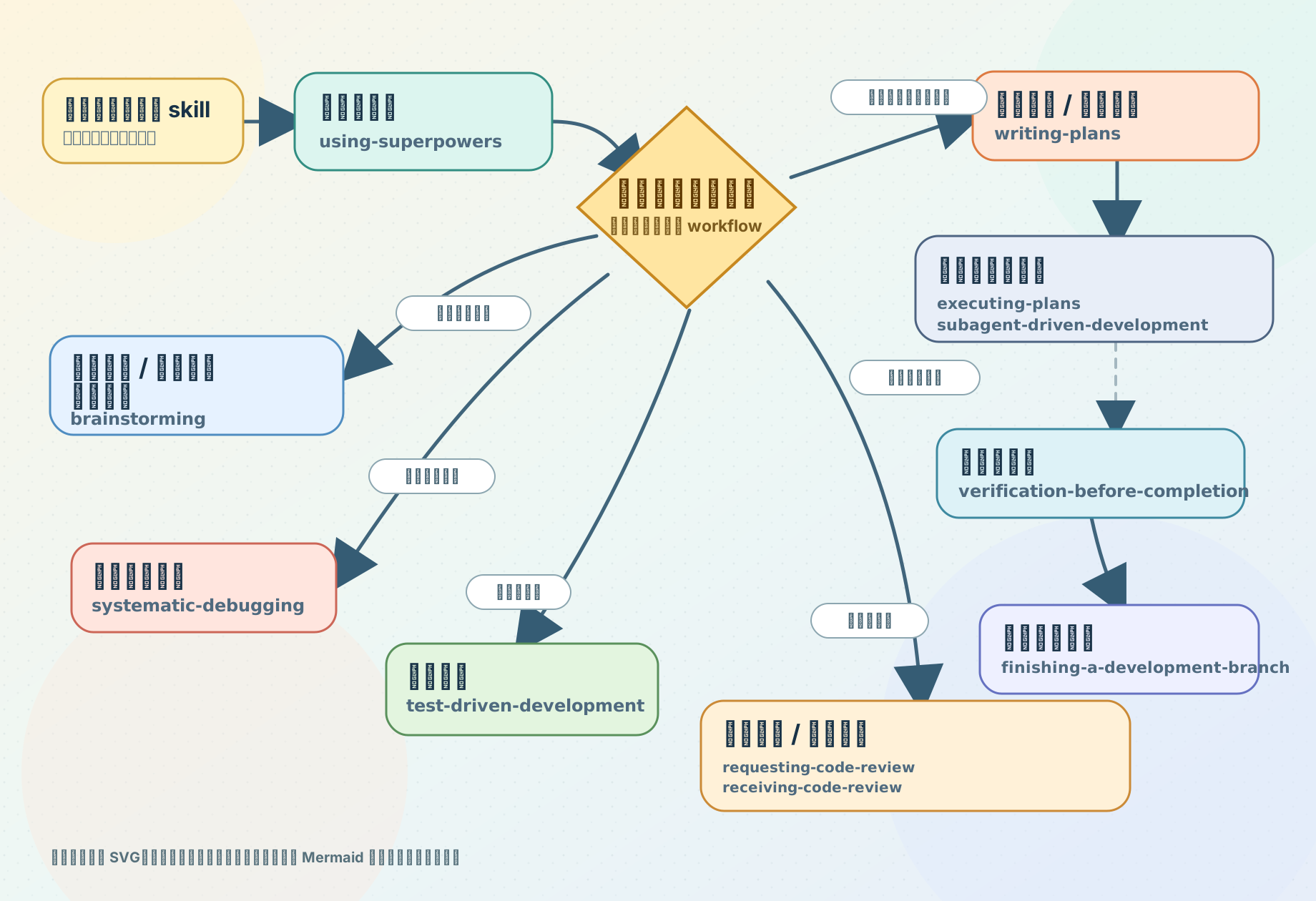
首页这张图改成了静态 SVG,方便做更清楚的视觉层级;对应 Mermaid 源码保留在 docs/assets/readme-skill-flow.mmd。
更详细的 skill 速查,看这里:
功能
- 14 个上游 skill 仍然保留,核心做法还是以上游英文
SKILL.md为准 - 用中文说“需求分析”“总体设计”“详细设计”“实施计划”“代码审查”“单元测试”“集成测试”等,更容易命中对应 skill
- 新建计划、评审、总结、方案这类文档时,优先放到仓库里原本就放文档的位置;如果项目里没有明显约定,再选一个清晰、好找的位置
- 没指定文件名时,默认优先用中文文档名
- 文档正文默认用简体中文,技术术语保留准确表达,但整体尽量写得通俗易懂
- 目前支持
Cline、Claude Code、Codex、Droid、OpenCode、CodeBuddy
让 AI 安装
如果你想让别的 AI agent 直接帮你安装,先让它读:
如果 AI 是直接从仓库首页开始看的,就让它继续看上面的安装说明链接;如果它已经打开安装说明文档,就直接按文档里的规则执行,不需要反复来回读同一篇文档。
仓库地址是:
https://github.com/squallopen/superpowers-zh-adapters.git
安装说明文档直链是:
https://github.com/squallopen/superpowers-zh-adapters/blob/main/docs/ai-agent-install.md
你可以直接把这句提示词发给它:
请阅读 https://github.com/squallopen/superpowers-zh-adapters/blob/main/docs/ai-agent-install.md ,然后用 User 模式帮我安装到 Cline、ClaudeCode、Codex、Droid、OpenCode、CodeBuddy。不要覆盖非 superpowers 专用说明段;如果需要更新已有安装,先明确告诉我会覆盖哪些内容。
核心 Skill 怎么理解
brainstorming:需求还没聊清楚,先把目标、边界、方案讲明白writing-plans:需求已经比较清楚,直接把实施计划、接口设计、数据结构、Redis / S3 设计、字段说明写出来executing-plans:照着已经写好的计划或设计文档开始实现,最好明确说清楚“按哪一份文档执行”test-driven-development:先写失败测试,再写代码systematic-debugging:先定位根因,再决定怎么修
如果你只是想直接产出 接口设计.md、Redis设计.md、S3设计.md 这类文档,一般更接近 writing-plans;如果你还在犹豫怎么做、要先比较方案,一般更接近 brainstorming。
writing-plans 和 executing-plans 最好连着理解:
- 前者先写出一份可执行的计划或设计文档
- 后者明确按那份文档继续推进
- 不要求固定放在某个目录里,关键是你要说清楚“用哪一份”
这只是中文适配层里的使用分工,不是重写上游 skill 本体。上游原始 SKILL.md 仍然保留,我们只是把中文触发词和落地习惯整理得更顺手。
自动备份后安装
- 一次安装、更新或重装,只会生成一个备份批次目录
- 备份统一进
~/.superpowers-backups/<时间戳>/...或<项目根>/.superpowers-backups/<时间戳>/... CLAUDE.md、AGENTS.md和CODEBUDDY.md只更新本适配仓库写入的专用说明段,不整文件覆盖- 安装前会先显示“当前已装版本”和“准备安装版本”
- 发现已有安装时会先确认;删不掉旧文件时会直接停下,不会硬装
CodeBuddy已有language配置时不会被硬改Codex如果当前已经在应用自己管理的 linked worktree / detached HEAD 里,或 sandbox 挡住 branch / push / PR,就会改用当前环境能安全执行的做法,不会假装成功
默认输出
如果你没有单独指定路径和文件名,常见结果通常会是这些中文文件名:
需求分析.md
总体设计.md
详细设计.md
接口设计.md
数据结构设计.md
实施计划.md
Redis设计.md
S3设计.md
默认规则是:
- 如果你指定了保存位置,就按你的要求来
- 如果项目里已经有固定的文档放置习惯,就沿用现有习惯
- 如果项目里没有明显约定,再放到一个清晰、好找的文档位置
- 优先用中文文件名
- 做接口、表结构、Redis、S3 这类设计时,优先用贴近内容的名字,例如
接口设计.md、表结构设计.md、Redis设计.md、S3设计.md - 正文默认用简体中文
- 代码、命令、路径、日志、接口字段这些保留原文
- 能用直白中文讲清楚时,不故意堆太多术语
安装
当前官方支持环境:
WindowsPowerShell 7,命令是pwshGit for Windows
说明:
- 这里说的
Claude Code/Codex是支持的接入工具,不代表这个仓库额外承诺Linux/macOS安装脚本 - 当前仓库的官方脚本链路仍然只维护
Windows + PowerShell 7 + Git for Windows
第一次安装到当前用户:
pwsh .\scripts\powershell\install-all.ps1 -Targets All -Scope User
安装到当前项目:
pwsh .\scripts\powershell\install-all.ps1 -Targets All -Scope Project -ProjectRoot E:\path\to\project
只装单个工具:
pwsh .\scripts\powershell\install-all.ps1 -Targets Cline -Scope User
pwsh .\scripts\powershell\install-all.ps1 -Targets ClaudeCode -Scope User
pwsh .\scripts\powershell\install-all.ps1 -Targets Codex -Scope User
pwsh .\scripts\powershell\install-all.ps1 -Targets Droid -Scope User
pwsh .\scripts\powershell\install-all.ps1 -Targets OpenCode -Scope User
pwsh .\scripts\powershell\install-all.ps1 -Targets CodeBuddy -Scope User
说明:
User是当前登录用户,不是整台机器所有账号- 不是整台电脑所有用户都生效的“全局安装”
- 默认安装名带前缀
superpowers- - 如果电脑里还没有
pwsh或git,先装PowerShell 7和Git for Windows
支持的工具
| 工具 | 你会得到什么 | 细节文档 |
|---|---|---|
Cline |
更容易用中文触发 skill,也更容易产出中文计划和评审文档 | Cline 使用说明 |
Claude Code |
最接近上游原生 workflow,用中文触发和中文文档输出更顺手 | Claude Code 使用说明 |
Codex |
保留原生 skill / subagent 能力,并对 worktree / 分支收尾场景加硬限制,避免假兼容 | Codex 使用说明 |
Droid |
中文触发更稳,安装时只改 superpowers 自己那段说明 | Droid 使用说明 |
OpenCode |
保留原版 skill 结构,用中文触发也更顺手 | OpenCode 使用说明 |
CodeBuddy |
中文触发、中文文档输出,并尽量不碰你现有的其他设置 | CodeBuddy 使用说明 |
这些文档里会单独讲:
- 哪些中文说法更容易命中
- 什么时候直接写
superpowers-writing-plans - 如果这个工具支持显式调用形式,怎么写成
/superpowers-writing-plans或$superpowers-writing-plans
自定义触发词
看这里:
最常见的做法就是改:
改完后,重新执行一次安装脚本就会生效。
更新
更新这个适配仓库并重装:
pwsh .\scripts\powershell\update-all.ps1 -Targets All -Scope User
刷新原版 skill 到最新 tag 再重装:
pwsh .\scripts\powershell\refresh-upstream-and-reinstall.ps1 -Targets All -Scope User
如果你手上已经有新的原版 skill 本地目录:
pwsh .\scripts\powershell\refresh-upstream-and-reinstall.ps1 -SourcePath E:\path\to\superpowers -Targets All -Scope User
更多说明
许可证
- 本仓库自己的适配层代码和文档使用 MIT License
- vendored 原版
obra/superpowers也使用 MIT,见 NOTICE.md 和vendor/superpowers/LICENSE
Yorumlar (0)
Yorum birakmak icin giris yap.
Yorum birakSonuc bulunamadi