threatweave-ai
Health Warn
- License — License: MIT
- Description — Repository has a description
- Active repo — Last push 0 days ago
- Low visibility — Only 5 GitHub stars
Code Pass
- Code scan — Scanned 12 files during light audit, no dangerous patterns found
Permissions Pass
- Permissions — No dangerous permissions requested
No AI report is available for this listing yet.
AI-powered security agent that correlates vulnerabilities, CIS misconfigurations, and business context to prioritize risk with evidence-backed Decision Replay. Agent + Claude skill. Team ThreatWeave, Tenable SWARM
ThreatWeave AI


Which fix should we investigate first, why did that answer change, and can we prove it?
A vulnerability scanner tells you what is wrong on each host. A CIS audit tells you
which controls failed. The CMDB tells you which hosts matter to the business. Analysts
still stitch those three together by hand, then struggle to explain why yesterday's
top priority is not today's. ThreatWeave is a read-only Claude agent that does the
stitching, ranks candidate fix groups with a deterministic policy engine, and writes a
Decision Receipt for every run, so any priority can be traced back to the exact
findings and policy rules that produced it.
Validated on the Tenable Partner Lab (read-only, operator-reported): 1,394 assets,
18,974 vulnerability and 4,483 compliance records ingested with zero rejections;
2,863 candidate same-asset correlations; and a 5,909-group Decision Receipt
reproduced byte-for-byte on a second run. See build status.
ThreatWeave AI Architecture
Unified Vulnerability and Compliance Prioritization by Correlating Exposure, Compliance, and Business Context
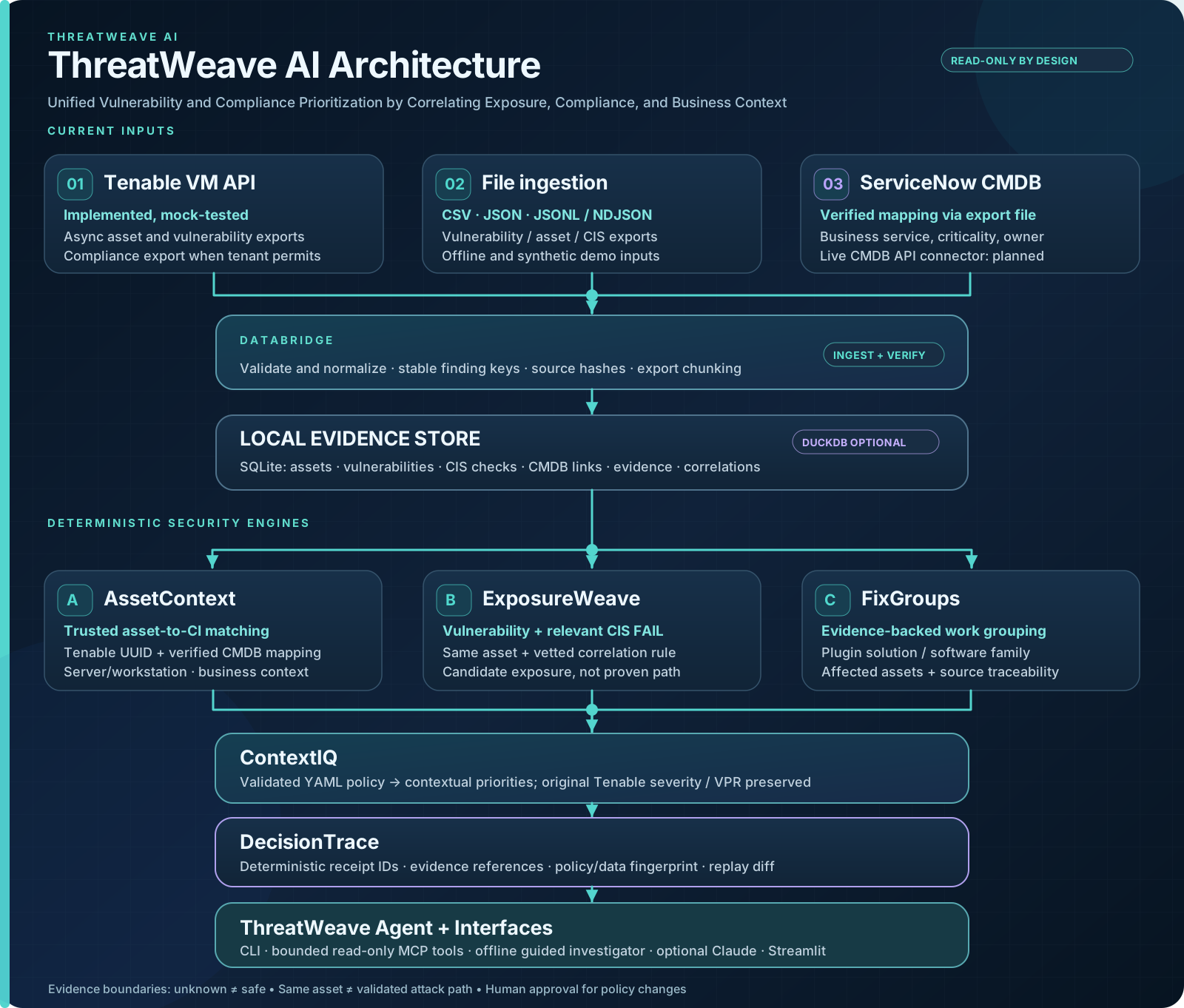
See architecture details and the correlation logic guide.
Why I built this
My day job includes running enterprise CIS compliance scanning on Tenable Nessus Manager and
Security Center across Linux, Windows and workstation fleets. The scanning is the easy part.
The hard part is the meeting afterward: vulnerability findings, CIS failures and asset
ownership live in three different places, somebody stitches them together in a spreadsheet,
and nobody can explain why last week's top priority dropped to number twelve.
I built ThreatWeave for Tenable SWARM Global
(November 2026) to see whether an agent could do that stitching without becoming another
black box. That is why the design is split the way it is: a deterministic engine owns every
score, Claude only explains and proposes, and every run leaves a receipt you can replay.
It is also a working testbed for the agent security questions I care about: bounded tool
use, untrusted evidence, prompt-injection handling, and an MCP server that cannot write
anywhere.
How it works
- Gather (read-only). Import Tenable VM exports,
.nessusfiles, Security Center
analysis results, CIS compliance results, and ServiceNow CMDB exports. Every record
keeps its source hash. Vendor severity and VPR are stored unchanged. - Correlate. Pair a vulnerability with a failed CIS check only when both sit on
the same Tenable asset UUID and a vettedsoftware_familytocontrol_idrule
links them. A CIS failure next to an unrelated finding is not treated as extra risk. - Add business context. A CMDB row affects priority only after a human approves
its mapping to a Tenable asset UUID. A matching hostname or IP is not enough. - Decide. A restricted, schema-checked YAML policy turns evidence into a ranked
list of candidate fix groups. This step is fully deterministic: Claude never scores
or ranks anything. - Advise. Claude writes a decision brief for each top group, proposes new
correlation rules for pairs no rule covers yet, answers questions through read-only
tools, and drafts policy rules. Every output cites finding IDs and stays advisory
until a human acts on it. See How Claude fits. - Prove. Each run produces a Decision Receipt fingerprinting the dataset, the
policy, and the ranking. Decision Replay compares two receipts and attributes every
rank change to a policy change, a data change, or both.
What you get
| Output | What it contains |
|---|---|
| Ranked candidate fix groups | Rank, contextual priority, matched rule IDs with their score contributions, affected assets, cited finding IDs, and the original vendor severity and VPR |
| Decision Receipt | Dataset fingerprint, policy fingerprint, and the full ranking. The same inputs always produce the same receipt ID |
| Decision Replay | Which groups moved, by how much, and whether the cause was policy, data, or both |
| Decision briefs | For each top group, Claude's recommended next action (INVESTIGATE_NOW, SCHEDULE, NEEDS_EVIDENCE, or MANUAL_REVIEW) with confidence, cited finding IDs, evidence gaps, and validation steps, bound to the receipt ID |
| Correlation proposals | Draft software_family to control_id rules for same-asset pairs no rule covers yet, each with Claude's rationale and cited findings, never applied automatically |
| Investigation brief (offline) | Next human review steps for the top groups from the guided agent, with no API key |
| OWASP audit | 20 OWASP LLM and Agentic AI controls, each reported as TESTED, DESIGN, or FAIL |
Example: the same policy, three evidence stages
threatweave demo --staged replays one synthetic payment web server through three
stages under an unchanged policy:
| Stage | "Upgrade OpenSSH package" | Rules that fired | Why |
|---|---|---|---|
| 1. Vulnerabilities only | rank 3, score 55.53 (high) | none | Baseline scanner evidence |
| 2. Plus CIS results | rank 2, score 69.53 (high) | TW-COMPOUND |
A vetted SSH control failed on the same asset |
| 3. Plus verified CMDB | rank 1, score 93.53 (urgent) | TW-COMPOUND, TW-PAYMENTS |
The asset is a verified payments system |
Each stage writes its own receipt, and the replay shows the source fingerprint
changing (compliance, correlations, then cmdb) while the policy fingerprint stays
fixed. All demo hosts, identifiers, and CIS controls are synthetic.
Setup and How to Run
Requires Python 3.11 or newer and Git. The demo needs no Tenable account or API key.
macOS / Linux
git clone https://github.com/sreedhar51/threatweave-ai.git
cd threatweave-ai
python3 -m venv .venv
source .venv/bin/activate
python -m pip install -e '.[ui,dev]'
Windows PowerShell
git clone https://github.com/sreedhar51/threatweave-ai.git
cd threatweave-ai
py -3.13 -m venv .venv
.\.venv\Scripts\python.exe -m pip install -e ".[ui,dev]"
Replace py -3.13 with your installed Python version. On Windows, use.\.venv\Scripts\python.exe -m threatweave.cli wherever this README says threatweave
if the command is not on your PATH.
Then run the offline demo:
threatweave --db runtime/demo.db demo            # load synthetic data, rank, write receipts
threatweave --db runtime/demo.db investigate     # offline guided investigation
threatweave compare runtime/receipts/demo-before.json runtime/receipts/demo-after.json
threatweave demo --staged                        # same policy, three evidence stages
threatweave --db runtime/demo.db check-owasp     # OWASP LLM and Agentic AI audit
Every command prints JSON. Receipts are written to runtime/receipts/.
Dashboard
streamlit run dashboard/app.py
Open http://localhost:8501. The sidebar offers four isolated data sources:
| Mode | Data |
|---|---|
| Tenant | Your imported evidence, from the database in THREATWEAVE_DB |
| Synthetic demo | The bundled demonstration in runtime/demo.db |
| Enterprise demo | Five fictional assets with vulnerabilities, CIS failures and verified business context; load using the sidebar button |
| Staged demo | Vulnerabilities, then CIS evidence, then verified synthetic CMDB context |
The Asset 360 & Fix Groups tab starts with a unified, UUID-scoped
asset dossier (vulnerabilities, CIS outcomes, matched controls, business context
and contextual scores). Search by hostname but never merge by hostname or IP.
It then shows the cross-asset candidate Fix Group queue.
Policy & Investigation and Decision Replay display policy drafts,
source evidence and reproducible decision changes. See the
Asset 360 demo walkthrough.
The fictional Enterprise demo is written only to its isolated local database,
never to an authorized tenant dataset.
How Claude fits
The deterministic engine owns every score, rank, and correlation, so the same inputs
always produce the same Decision Receipt. Claude adds judgment around that core, and
the code checks everything it returns:
| Layer | Command | What Claude does | What the code enforces |
|---|---|---|---|
| Decide | brief |
Recommends the next human action for each top fix group | Fixed output schema; every cited finding ID must be in that group's evidence; INVESTIGATE_NOW and SCHEDULE must cite evidence; ranks and scores are copied from the receipt, never changed |
| Correlate | propose-correlations |
Judges whether an unlinked same-asset pair is a real security relationship | Only pairs found by the engine can be proposed; pairs whose evidence looks like prompt injection are skipped without calling Claude; a link must cite one vulnerability and one compliance finding; drafts pass the engine's rule validation; the rules file is never written |
| Assess a pair | assess-correlation --ai-correlation-analysis |
Reviews one selected same-asset vulnerability and failed compliance finding | Explicit opt-in; bounded evidence; related assessments cite both supplied finding IDs; advisory only, with no score or rule changes |
| Investigate | ask |
Answers questions using four read-only evidence tools | Strict tool schemas, input validation, 5-turn and 5-tool budgets, untrusted-evidence wrapping |
| Policy | draft-rule |
Turns a plain-English request into a policy rule | Fixed output schema plus the policy validator; always approved: false |
These Claude features use claude-opus-5-5 by default, with an automatic fallback model when
Claude declines a request. Evidence that looks like a prompt-injection attempt is
flagged in the output for the reviewer. For correlation proposals, which could become
permanent rules, such pairings are not sent to Claude at all.
Use it with Claude
ThreatWeave offers several Claude-assisted workflows over read-only evidence. They
do not patch, scan, open tickets, or change anything in Tenable.
From the command line (Claude API)
python -m pip install -e '.[agent]'
export ANTHROPIC_API_KEY=...        # never commit this
threatweave --db runtime/demo.db brief --limit 3 --out runtime/briefs/demo.json
threatweave --db runtime/demo.db propose-correlations
threatweave --db runtime/demo.db ask "Which fix group should we investigate first, and why?"
threatweave draft-rule "Raise priority for internet-exposed production assets"
briefprints one decision brief per top fix group with its status (accepted,rejectedwith the reason,refused,truncated, orinvalid_json) and the
Decision Receipt it is bound to.propose-correlationsprints Claude's decision for each unlinked pairing and adraft_rules_yamlblock to review. A pairing whose evidence looks like prompt
injection is reported asskipped_injection, with the finding IDs to review by hand.
On the synthetic demo it reviews one pairing.askruns a bounded tool-use loop and reports how it ended (completed,refused,truncated, orbudget_exhausted) plus any warnings.draft-rulereturns a schema-checked policy rule withapproved: false.
--out also writes the JSON to a file. Exit codes: 0 completed, 1 bad input,2 Claude unavailable, 3 the run did not fully complete.
Assess one vulnerability and compliance pair (Claude API)
Choose an active vulnerability finding ID and a failed compliance finding ID
for the same asset from Asset 360 or the underlying finding evidence. These are
ThreatWeave finding IDs, not plugin IDs or the asset UUID. After installing theagent extra and setting ANTHROPIC_API_KEY in your shell, run:
threatweave --db runtime/demo.db assess-correlation \
  --vulnerability-id VULNERABILITY_FINDING_ID \
  --compliance-id COMPLIANCE_FINDING_ID \
  --ai-correlation-analysis
Windows PowerShell, from the repository root (replace both placeholders):
.\.venv\Scripts\python.exe -m threatweave.cli --db runtime/demo.db assess-correlation --vulnerability-id VULNERABILITY_FINDING_ID --compliance-id COMPLIANCE_FINDING_ID --ai-correlation-analysis
The flag explicitly opts in for this request and sends bounded, scrubbed finding
evidence to Anthropic. The result is advisory, requires human review, and
never modifies correlation links, policies, scores, or receipts. accepted means
response and citation checks passed, not that the relationship is correct. The
assessment does not establish exploitability, reachability, or lateral movement.
Use only data authorized for the configured model provider. See the
correlation logic guide
for limitations and the Streamlit option.
Dashboard (Claude API)
With ANTHROPIC_API_KEY set, the Policy & Investigation tab can generate decision
briefs, review unlinked correlation pairings, ask Claude to investigate bounded
evidence, assess a selected same-asset finding pair after explicitly opting in, or
draft a policy rule. Drafts go to the YAML editor as unapproved proposals.
Claude Code (agent and MCP server)
The repository ships .mcp.json, which registers the MCP server, and.claude/agents/threatweave.md, a subagent that can use only the six ThreatWeave
tools. It cannot read files, run commands, or browse the web.
Start Claude Code from the repository root in the same shell where you activated
ThreatWeave's virtual environment. .mcp.json launches bare python, so Claude Code
must inherit the environment's PATH to find both ThreatWeave and the MCP SDK.
Activate it again in each new shell before running claude.
macOS / Linux (after creating .venv in Setup above)
source .venv/bin/activate
python -m pip install -e '.[mcp]'
threatweave --db runtime/demo.db demo     # the MCP server reads this database
claude                                 # launch from this activated shell
Windows PowerShell (after creating .venv in Setup above)
.\.venv\Scripts\Activate.ps1
python -m pip install -e ".[mcp]"
python -m threatweave.cli --db runtime/demo.db demo
claude                                 # launch from this activated shell
If you launch a client outside the activated shell, configure its MCP command
with the absolute path to this environment's Python executable (.venv/bin/python
on macOS/Linux or .venv\Scripts\python.exe on Windows). Installing with an
explicit Python path alone does not update the PATH inherited by Claude Code.
Then ask: "Use the threatweave agent: which fix group should we investigate first,
and why did it move?"
Claude Desktop or any MCP client
Desktop clients are not started from your activated shell, so point command at the
virtual environment's Python after installing the mcp extra into that environment.
On Windows that is .venv\Scripts\python.exe; JSON needs each backslash doubled, for
example "C:\\path\\to\\threatweave-ai\\.venv\\Scripts\\python.exe".
{
  "mcpServers": {
    "threatweave": {
      "command": "/absolute/path/to/threatweave-ai/.venv/bin/python",
      "args": ["-m", "threatweave.mcp_server"],
      "env": {
        "THREATWEAVE_DB": "/absolute/path/to/threatweave-ai/runtime/demo.db",
        "THREATWEAVE_POLICY": "/absolute/path/to/threatweave-ai/policies/business-context.yaml"
      }
    }
  }
}
| Tool | Purpose |
|---|---|
get_security_overview |
Imported assets, findings, compliance results, and context coverage |
list_fix_groups |
Ranked candidate fix groups with evidence references |
get_asset_exposure |
Same-asset vulnerabilities, CIS failures, and CMDB context for one asset |
get_group_evidence |
Bounded source evidence for one fix group |
evaluate_policy_dry_run |
Validate and preview a proposed policy without activating it |
compare_decision_receipts |
Replay two receipts from the configured receipts directory |
Configuration
Copy .env.example to .env (git-ignored) or set the variables in your shell. Every
variable is optional.
| Variable | Used for | Default |
|---|---|---|
ANTHROPIC_API_KEY |
Claude features (brief, propose-correlations, assess-correlation, ask, draft-rule, dashboard) |
none (Claude features off) |
THREATWEAVE_CLAUDE_MODEL |
Claude model ID | claude-opus-5-5 |
THREATWEAVE_CLAUDE_EFFORT |
Claude effort level: low, medium, high, xhigh, max |
high |
THREATWEAVE_CLAUDE_FALLBACKS |
off disables automatic fallback when Claude declines a request |
on, for models that support it |
TENABLE_ACCESS_KEY, TENABLE_SECRET_KEY |
Read-only Tenable VM exports | none |
TENABLE_BASE_URL |
Tenable VM API base URL | https://cloud.tenable.com |
SC_ACCESS_KEY, SC_SECRET_KEY |
Read-only Security Center analysis | none |
THREATWEAVE_DB |
Tenant database (dashboard and MCP server) | runtime/threatweave.db |
THREATWEAVE_POLICY |
Active policy file (MCP server) | policies/business-context.yaml |
THREATWEAVE_RECEIPTS |
Directory receipt comparisons may read | runtime/receipts |
Connect real, authorized data
Use authorized, currently valid credentials, entered through a secret manager or a hidden prompt.
Never commit secrets, tenant exports, or SQLite databases.
Windows PowerShell
$ak = Read-Host "Tenable access key" -AsSecureString
$sk = Read-Host "Tenable secret key" -AsSecureString
$env:TENABLE_ACCESS_KEY = [System.Net.NetworkCredential]::new("", $ak).Password
$env:TENABLE_SECRET_KEY = [System.Net.NetworkCredential]::new("", $sk).Password

$python = ".\.venv\Scripts\python.exe"
& $python -m threatweave.cli --db runtime/tenant-lab.db tenable-export asset
& $python -m threatweave.cli --db runtime/tenant-lab.db tenable-export vulnerability
& $python -m threatweave.cli --db runtime/tenant-lab.db tenable-export compliance
& $python -m threatweave.cli --db runtime/tenant-lab.db correlate
& $python -m threatweave.cli --db runtime/tenant-lab.db receipt --policy policies/business-context.yaml --out runtime/receipts/tenant-lab.json

Remove-Item Env:TENABLE_ACCESS_KEY,Env:TENABLE_SECRET_KEY -ErrorAction SilentlyContinue
Files you already exported (any platform)
threatweave --db runtime/local.db import asset assets.json
threatweave --db runtime/local.db import vulnerability vulns.jsonl
threatweave --db runtime/local.db import compliance compliance.csv
threatweave --db runtime/local.db import nessus scan.nessus
threatweave --db runtime/local.db cmdb-propose servicenow.csv --out mappings.csv
# Review mappings.csv and set mapping_verified=yes only on rows you have confirmed
threatweave --db runtime/local.db import cmdb mappings.csv --provider servicenow-export
threatweave --db runtime/local.db correlate
Scope exports deliberately: without filters, Tenable may export everything in its
default scope. Pass documented filters with --body-file. Before a live run,python scripts/tenant_preflight.py checks read access and coverage without printing
hostnames, IPs, plugin output, or credentials. See Connectors,
Tenant preflight, and On-prem Security Center.
Security model
- Read-only by construction. No tool writes to Tenable, Security Center, ServiceNow,
or any other system. There are no patch, scan, ticket, or remediation tools. - Claude explains; the engine decides. Scores come only from the deterministic
policy engine. Claude-drafted rules are proposals withapproved: false. - Untrusted evidence. Scanner and CMDB text is scrubbed of credentials and wrapped
as non-executable data before Claude sees it. If evidence contains text that looks
like a prompt-injection attempt, the result is markedinjection_flaggedand the
answer carries a warning for the reviewer. - Bounded agent. At most 5 tool-use turns and 5 tools per turn, with strict tool
schemas and input validation. Tool results are capped at 16,000 characters and
return a validTRUNCATEDmarker instead of partial evidence. - Conservative claims. No cross-host attack paths, no unknown-as-safe, no identity
joins on IP addresses.
Details: OWASP controls,
Architecture and trust boundaries, Security policy.
Outbound network calls
ThreatWeave makes no network calls unless you configure one of these:
| Destination | When | What is sent |
|---|---|---|
cloud.tenable.com (or TENABLE_BASE_URL) |
tenable-export, tenant_preflight.py |
Read-only export and status requests |
| Your Security Center URL | securitycenter-export |
Read-only analysis queries |
api.anthropic.com |
brief, propose-correlations, assess-correlation, ask, draft-rule, or the dashboard's Claude buttons, with ANTHROPIC_API_KEY set |
Your question or request, the engine's group summary, and bounded evidence: hostnames, finding titles and excerpts, control IDs, and CMDB context, with credentials scrubbed |
Setting ANTHROPIC_API_KEY is the opt-in for sending evidence to Claude. The offline
demo, investigate, the MCP server itself, and check-owasp send nothing off the
machine. (An MCP client such as Claude Code sends tool results to its own model
provider.)
Verify it yourself
python -m pytest -q                          # unit, safety, and mocked-Claude tests
python scripts/ship_check.py --repeat 3      # three clean runs must produce identical receipts
threatweave --db runtime/demo.db check-owasp # exits 1 if any TESTED control fails
python scripts/bench.py --assets 50000       # synthetic ingest and ranking timings
ship_check builds three independent databases, runs the full three-stage workflow in
each, and fails if any ranking, receipt ID, or source fingerprint differs. CI runs the
tests and the ship check on Python 3.11 and 3.12. On synthetic data, the benchmark
ingested 50,000 assets in 4.7 seconds and ranked them in 1.5 seconds on one machine;
that is not a production throughput claim. See the
SWARM readiness gate.
Repository layout
| Path | Responsibility |
|---|---|
src/threatweave/ingest.py, nessus.py |
CSV, JSON, JSONL, and .nessus normalization; identity and CMDB mapping checks |
src/threatweave/tenable.py, securitycenter.py |
Read-only Tenable VM export and Security Center connectors |
src/threatweave/correlate.py |
Vetted same-asset vulnerability-to-CIS correlation |
src/threatweave/policy.py |
Restricted, schema-checked policy evaluator |
src/threatweave/engine.py |
Fix groups, Decision Receipts, and Decision Replay |
src/threatweave/agent.py |
Claude tool-use loop, rule drafting, and the offline guided agent |
src/threatweave/briefs.py |
Claude decision briefs for the top fix groups |
src/threatweave/correlation_proposals.py |
Unlinked same-asset pairings and Claude-proposed correlation rules |
src/threatweave/llm_output.py |
Structured Claude calls and validation shared by both layers |
src/threatweave/mcp_server.py |
Read-only MCP tool surface |
src/threatweave/owasp_guardrails.py |
Secret scrubbing, prompt sanitizing, tool allowlist, OWASP audit |
.claude/agents/threatweave.md, .mcp.json |
Claude Code subagent and MCP registration |
dashboard/app.py, src/threatweave/ui_workflows.py |
Streamlit dashboard and its workflows |
policies/ |
Sample policies and vetted correlation rules |
examples/ |
Synthetic inputs, sample receipts, and an HTML demo report |
scripts/ |
Ship check, tenant preflight, and benchmark |
Limitations
- Candidates, not validated fixes. Fix groups come from normalized plugin solutions
and software families. Confirm applicability before scheduling work. - Live validation is partial. Tenable VM ingestion was validated on the Partner Lab
by the operator. Security Center is tested against mocked API responses only.
ServiceNow is supported through exports, not a live API connector. - Claude clients not yet smoke-tested. The MCP server is verified end to end with
MCP Python SDK 2.3.0 over stdio, and the Claude API path is verified through the
Anthropic SDK with mocked responses. The Claude Code subagent and Claude Desktop setup
have not yet been exercised in those clients. - Claude's judgment is checked for traceability, not correctness. The code rejects
briefs and proposals that are malformed or cite evidence Claude was not given, but a
well-formed recommendation can still be wrong. A human reviews every one. Neither
layer has yet been run against the live Claude API. - Synthetic correlation rules. The sample
software_familytocontrol_idrules
illustrate the method and are not production-approved mappings. - Score ties. A fix group's score is capped at 100, so large estates produce ties.
Ties break deterministically on compounded, critical, and production asset counts. - No measured time savings. No hours-saved or risk-reduced figure is claimed until
it is measured on a real analyst workflow.
What's next
- Run the decision briefs and correlation proposals against the live Claude API on a
larger authorized dataset, and publish what holds up and what does not. - Smoke-test the Claude Code subagent and Claude Desktop setup end to end.
- Replace the illustrative correlation rules with a reviewed starter set.
- Measure analyst time on a real triage workflow before claiming any savings.
Author
Built by Sreedhar Ellisetty, a cloud and AI security architect in Dallas, TX.
LinkedIn · issues and pull requests welcome.
License
MIT. See LICENSE. Use only data you are authorized to access, and never
commit tenant exports, credentials, or licensed CIS benchmark content.
Reviews (0)
Sign in to leave a review.
Leave a reviewNo results found