claude_ai_usage_widget
Health Pass
- License — License: MIT
- Description — Repository has a description
- Active repo — Last push 0 days ago
- Community trust — 20 GitHub stars
Code Pass
- Code scan — Scanned 12 files during light audit, no dangerous patterns found
Permissions Pass
- Permissions — No dangerous permissions requested
No AI report is available for this listing yet.
2-in-1 for Claude Code: a live system-tray usage widget (5h/7d plan limits) + local token & cost analytics — per project/model/tool, budgets, forecasts. Unofficial; not affiliated with Anthropic.
Claude Usage Widget & Token Tracker
Two tools in one. A live tray usage widget that watches how close you are to your Claude plan limits, and a persistent local token tracker that shows where your tokens and dollars actually go — per project, per model, per tool.
MIT · Linux GTK dashboard + cross-platform CLI · Python 3.8+ · zero Python dependencies
Unofficial project. Claude Usage Widget & Token Tracker is a third-party
tool and is not affiliated with, endorsed by, or sponsored by Anthropic.
"Claude", "Claude Code", and "Anthropic" are trademarks of Anthropic, PBC,
used here only to describe what the tool works with. Please read
Disclaimer & trademarks — especially the note on
the live usage feature, which uses your Claude OAuth token.
Two halves, one app
| 🟢 Usage Widget (live) | 📊 Token Tracker (local) | |
|---|---|---|
| Question it answers | "How close am I to my plan limit right now?" | "Where did my tokens and money go?" |
| Data source | Your Claude plan's live 5h / 7d utilization (claude.ai usage API) | Your on-disk Claude Code logs (~/.claude/projects) |
| Surface | System-tray gauge + escalation notifications | CLI (ctt) + GTK dashboard + SQLite history |
| Needs network/token? | Yes — reads the claude CLI OAuth token (see the risk note) |
No — 100% offline, never touches your token |
| Platforms | Linux tray (GTK) | CLI on Linux/macOS/Windows; dashboard on Linux |
The widget is the spiritual successor to claude_ai_usage_widget; the tracker
is the new half built on top of it. You can use either half on its own — disable
the live polling and it's a pure local analytics tool; ignore the dashboard and
the tray gauge behaves like the original widget.
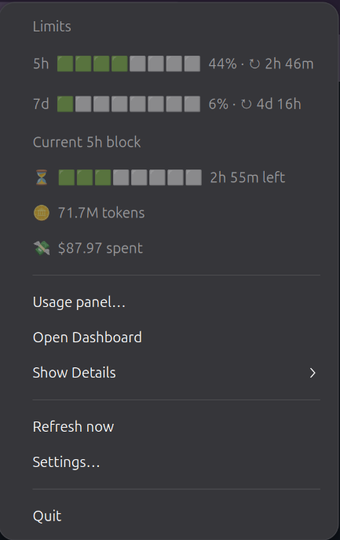
1 · The usage widget — live 5h / 7d plan limits, current-block burn & spend, and quick actions, straight from the system tray.
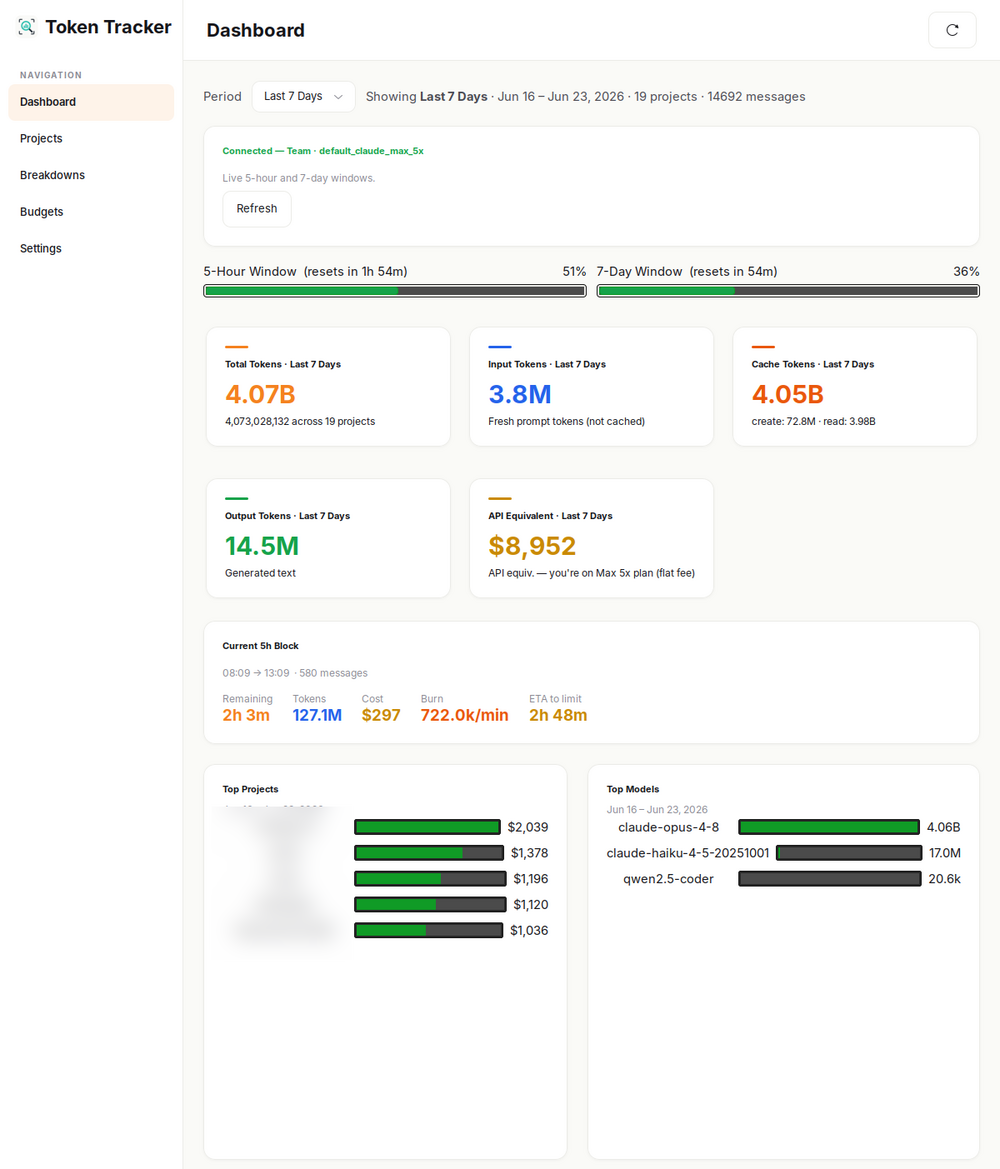
2 · The token tracker — local history: per-project / per-model spend, budgets, and 5-hour block forecasts (project names blurred).
Features
Usage Widget (live plan limits)
- Tray gauge — a color-coded ring showing your current 5-hour plan
utilization at a glance, mirroring Anthropic'sclaude /usagesemantics. - 5h + 7d rolling windows — see both the short and weekly limit usage, with
reset countdowns. - ETA-to-limit — projects when you'll hit your cap at the current burn rate.
- Escalation notifications — desktop alerts at 75% / 90% / 100% of a window.
- Multi-account — track several Claude logins at once, each with its own
tray readout; hide any account from the tray or disable its polling.
Token Tracker (local analytics)
- SQLite history at
~/.config/claude-token-tracker/history.dbthat
survives~/.claude/projectscleanup — the live widget only ever saw
current state; this keeps months of it. - Per-project / per-model / per-tool attribution — see which projects, which
model, and which tool calls (Bash,Read,Edit,Agent, …) drive spend. - Cost estimates — priced from a built-in rate card you can override.
- Local 5-hour block + forecast — a self-computed rolling block with
burn-rate and time-to-block-end, derived entirely from your logs (no token
required). - Budgets — daily / weekly / monthly USD or token caps, scoped globally,
per-project, or per-model; plus optional plan-utilization % budgets that
ride the live 5h/7d windows. Desktop notification when crossed. - Cross-platform CLI (
ctt) — table or--jsonoutput for shell prompts,
status bars, and CI checks. - GTK dashboard (Linux) — Dashboard, Projects, Breakdowns, Budgets, and
Settings views, with a System / Light / Dark theme switch; backs off live
polling when hidden.
Install
One-line install (any Linux distro)
curl -fsSL https://github.com/StaticB1/claude_ai_usage_widget/raw/main/install.sh | bash
The script installs GTK3 bindings via your distro's package manager
(apt / dnf / pacman / zypper), drops the app into~/.local/share/claude-token-tracker, registers claude-token-tracker (GUI)
and ctt (CLI) in ~/.local/bin, installs hicolor icons, and adds a login
autostart entry. Skip autostart with:
curl -fsSL https://github.com/StaticB1/claude_ai_usage_widget/raw/main/install.sh | bash -s -- --no-autostart
From a clone
git clone https://github.com/StaticB1/claude_ai_usage_widget.git
cd claude_ai_usage_widget
bash install.sh                    # add --no-autostart to skip login startup
Upgrading from the old widget
v2 is a rebrand, not a drop-in update. The original single-file
claude_ai_usage_widget installed asclaude-usage-widget(binariesclaude-widget-start/-stop, config in~/.config/claude-usage-widget).
v2 is Claude Usage Widget & Token Tracker, installed asclaude-token-tracker(+ thecttCLI) under all-new paths. Because the
paths differ, installing v2 doesn't remove v1 — the old widget would
keep auto-starting on login alongside the new one until you clear it.
If you installed the old widget with the one-line installer (no repo folder),
just run the installer again — it now detects the old claude-usage-widget,
stops it, and removes its files (dir, claude-widget-start/-stop binaries,
and autostart entry) before installing v2:
curl -fsSL https://github.com/StaticB1/claude_ai_usage_widget/raw/main/install.sh | bash
If you have a clone, one command pulls the latest and runs the same migration:
cd claude_ai_usage_widget
git pull        # or: bash upgrade.sh, which pulls + reinstalls + relaunches for you
bash install.sh
Either way your data carries over automatically: the live widget re-reads the
OAuth token from ~/.claude/.credentials.json, and the new local history DB
backfills from ~/.claude/projects on the first ctt scan. The old config dir~/.config/claude-usage-widget is left in place in case it holds a manually
pasted token — once v2 is confirmed working you can rm -rf it.
macOS / Windows / headless servers (CLI only)
The CLI (ctt) is pure-Python stdlib and works without GTK:
pip install --user git+https://github.com/StaticB1/claude_ai_usage_widget.git
ctt --help
Quick start
ctt scan                 # import new logs into the local store (fast, incremental)
ctt summary --period 7d  # where did my tokens & $ go this week?
ctt block                # how much of my current 5-hour block have I burned?
ctt cloud                # live plan utilization from claude.ai (needs token)
claude-token-tracker     # launch the GTK dashboard + tray widget (Linux)
The Usage Widget (live)
Launch claude-token-tracker and a gauge appears in your system tray:
- The ring/percentage is your live 5-hour plan utilization (0–100% of your
Pro/Max/Team limit). Green → amber → red as you approach the cap. - Right-click the tray icon for the full readout: the LIMITS section (5h and
7d windows + resets), per-ACCOUNT utilization, and your CURRENT 5H
BLOCK burn (this part is local and works even without a token). - Open Dashboard for the full tracker UI; Refresh now forces a poll.
- Notifications fire as you cross 75% / 90% / 100% of a window.
Polling backs off automatically while the dashboard is hidden, and honors a
per-account "disable polling" switch in Settings.
The live widget needs the OAuth token that the
claudeCLI stores in~/.claude/.credentials.json. See the risk note
before relying on it. Everything in the Token Tracker works without it.
The Token Tracker (local)
CLI reference (ctt)
| Command | What it does |
|---|---|
ctt scan |
Import new turns from ~/.claude into the store (incremental — only re-parses changed session logs). |
ctt summary [--period P] [--limit N] [--account A] [--json] |
Per-project token & cost totals. |
ctt models [--period P] [--account A] [--json] |
Per-model breakdown. |
ctt tools [--period P] [--account A] [--json] |
Per-tool attribution (Bash, Read, Edit, Agent, …). |
ctt accounts [--period P] [--json] |
List configured accounts and their totals. |
ctt block [--account A] [--json] |
Current 5-hour rolling block, burn rate, and ETA. |
ctt cloud [--account A] |
Live cloud usage from claude.ai (raw JSON). |
ctt prompt [--no-cloud] [--account A] |
One-line status for shell prompts / status bars. |
ctt export [--period P] [--project …] [--model …] [--account A] [--format json|csv] |
Dump rows. |
ctt reprice |
Recompute stored costs after editing the rate card. |
ctt budget add|list|remove |
Manage budgets (see below). |
ctt gui |
Launch the GTK dashboard (Linux). |
--period accepts: today, 5h, 7d, 30d, NNd, NNh, or all.
Budgets
# USD or token caps, scoped globally / per project / per model:
ctt budget add --name "Monthly cap"   --usd 100   --period month
ctt budget add --name "Opus tokens"   --tokens 50000000 --period week --scope model:claude-opus-4-8
ctt budget add --name "Proj X daily"  --usd 10    --period day  --scope project:my-app

# Plan-utilization budget (rides the live 5h/7d window — needs an OAuth token):
ctt budget add --name "5h headroom"   --pct 90    --period 5h

ctt budget list
ctt budget remove 1
--notify-pct (default 80) sets when the desktop alert fires relative to the limit.
Examples
Show live status in your shell prompt:
PS1='$(ctt prompt --no-cloud) \$ '
# Renders e.g. '4h 17m $1.24 \$' while Claude Code is active.
CI guardrail — fail a build if today's spend exceeds $20:
COST=$(ctt summary --period today --json | jq '.totals.cost_usd')
[ "$(echo "$COST > 20" | bc)" -eq 1 ] && { echo "Daily Claude budget blown: \$$COST"; exit 1; }
Dashboard (Linux)
claude-token-tracker (or ctt gui) opens a window with:
- Dashboard — live limits, current block, headline totals.
- Projects — per-project spend and recent sessions.
- Breakdowns — per-model and per-tool attribution.
- Budgets — create/track budgets with progress bars.
- Settings — accounts, polling, notification thresholds, OAuth token,
Appearance (System / Light / Dark theme, switches live).
The tray menu itself also shows the 5h/7d limits and the current block as
inline progress bars rather than plain numbers, and a Usage panel… entry
opens a small standalone card with the same bars plus cloud connection status
— handy on desktops (or window managers) where the AppIndicator dropdown
itself can't be restyled.
Configuration
| Path | What it is |
|---|---|
~/.claude/projects/ |
Read — Claude Code's session JSONL (source of truth for the tracker). |
~/.claude/.credentials.json |
Read — OAuth token managed by the claude CLI (used by the live widget). |
~/.config/claude-token-tracker/history.db |
SQLite — long-term token/cost history. |
~/.config/claude-token-tracker/config.json |
Accounts, settings, and an optional fallback OAuth token. |
~/.config/claude-token-tracker/rate_card.json |
Optional pricing override. |
Multi-account
Configure several Claude logins (each is just a ~/.claude-style directory).
The installer can set these up interactively, or edit config.json:
{
  "accounts": [
    { "label": "work",     "claude_dir": "~/.claude",          "disable_polling": false, "hide_from_tray": false },
    { "label": "personal", "claude_dir": "~/.claude-personal", "disable_polling": true,  "hide_from_tray": false }
  ]
}
Rate-card override
{
  "models": {
    "claude-fable-5":    [10.0, 12.50, 20.0, 1.00, 50.0],
    "claude-opus-4-8":   [5.0,  6.25,  10.0, 0.50, 25.0],
    "claude-opus-4-7":   [15.0, 18.75, 30.0, 1.50, 75.0],
    "claude-sonnet-4-7": [3.0,  3.75,   6.0, 0.30, 15.0]
  }
}
Tuple is [input, cache_write_5m, cache_write_1h, cache_read, output] in USD per
million tokens. Run ctt reprice after editing to re-cost stored history.
How it works
cct/
├── parser.py    JSONL → Turn (tool_use extraction, sidechain flag)
├── pricing.py   Rate card + override loader
├── store.py     SQLite store: incremental scan state, budgets, summaries
├── blocks.py    Anthropic-style 5h rolling blocks + burn-rate forecast
├── budgets.py   Period evaluation (day/week/month/5h/7d, scoped)
├── cloud.py     OAuth + claude.ai usage API (the live widget)
├── cli.py       `ctt` commands
└── gui.py       GTK3 dashboard + tray (Linux)
Scanning is incremental: each pass skips session logs whose size/mtime are
unchanged, so the every-10-seconds refresh only re-parses the active session
instead of your whole history.
Platform support
| Linux | macOS | Windows | |
|---|---|---|---|
CLI (ctt) |
✅ | ✅ | ✅ |
| Tray widget + dashboard | ✅ (GTK3) | — | — |
The GUI needs PyGObject + GTK3, installed via your distro (the installer handles
it). The library and CLI are pure stdlib with no Python dependencies.
Tests
pip install pytest
pytest
Uninstall
# From a clone — one command (also clears the legacy widget):
bash uninstall.sh

# No clone? The installer doubles as its own uninstaller:
bash <(curl -fsSL https://github.com/StaticB1/claude_ai_usage_widget/raw/main/install.sh) --uninstall

# CLI-only (pip) install:
pip uninstall claude-token-tracker
The uninstaller removes the app dir, both binaries, the .desktop entries, the
autostart entry, and the hicolor icons. It keeps~/.config/claude-token-tracker/ (history, budgets, rate-card override) so you
don't lose months of data on reinstall — delete that directory manually for a
true clean wipe.
Contributing & contact
Contributions welcome!
- Bug reports / feature requests — Open an issue
- Discussions / collaboration — GitHub Discussions
- Email — [email protected]
Disclaimer & trademarks
Claude Usage Widget & Token Tracker is an independent, community project. It is
not affiliated with, endorsed by, sponsored by, or supported by Anthropic.
"Claude", "Claude Code", and "Anthropic" are trademarks of Anthropic, PBC; they
are used here only nominatively, to describe interoperability. The software is
provided "as is", without warranty of any kind (see LICENSE).
About the live usage feature
⚠️ The usage widget (the ctt cloud command and the live 5h/7d gauge in the GUI)
reads the OAuth token that the official claude CLI stores in~/.claude/.credentials.json and calls Anthropic's usage endpoint to report your
plan-utilization %.
- Anthropic's Consumer Terms restrict these subscription OAuth tokens to use with
Claude Code and claude.ai only. Using them from a third-party tool may
violate those terms and could put your Claude account at risk. - In the GUI this polling is enabled by default whenever a token is present.
Turn it off per account with the "disable polling" switch in the Settings
tab. The CLI never calls the cloud unless you runctt cloud, and other
commands accept--no-cloud. - The entire Token Tracker half — local history, per-project / per-model /
per-tool spend, cost estimates, budgets, and the local 5-hour block forecast —
works entirely from your own on-disk logs and never uses your token.
Use the live feature only if you understand and accept that risk.
Changelog
See CHANGELOG.md for the full release history.
License
MIT.
Authors & acknowledgments
- Usage widget + token tracker — Statotech Systems, in partnership with
Ebenworks. - Built on the original
claude_ai_usage_widget
by StaticB1 — the live Claude.ai 5h/7d tray widget whose gauge,
escalation notifications, and plan-utilization view are the foundation of this
project's widget half. Thanks to StaticB1 for the original work and for taking
this upgrade upstream.
Reviews (0)
Sign in to leave a review.
Leave a reviewNo results found