Claudesk
Health Warn
- License — License: MIT
- Description — Repository has a description
- Active repo — Last push 0 days ago
- Low visibility — Only 9 GitHub stars
Code Warn
- fs module — File system access in probe/measure.sh
Permissions Pass
- Permissions — No dangerous permissions requested
No AI report is available for this listing yet.
Many Claude Code projects. One window. Zero hunting. A lean, dark, macOS-native lite IDE for the power Claude Code user.
Claudesk
Many Claude Code projects. One window. Zero hunting.
A lean, dark, macOS-native shell for the power Claude Code user juggling many
projects at once: every project is one click to a live CC session, every session
shows its status at a glance, and your attention lands where it's needed instead of
getting lost in a pile of terminal windows.
The problem: When you've got several Claude Code sessions running across
different projects, finding the one that's stalled waiting on you means clicking
through windows and hopping Spaces — a constant attention tax on top of the
setup tax.
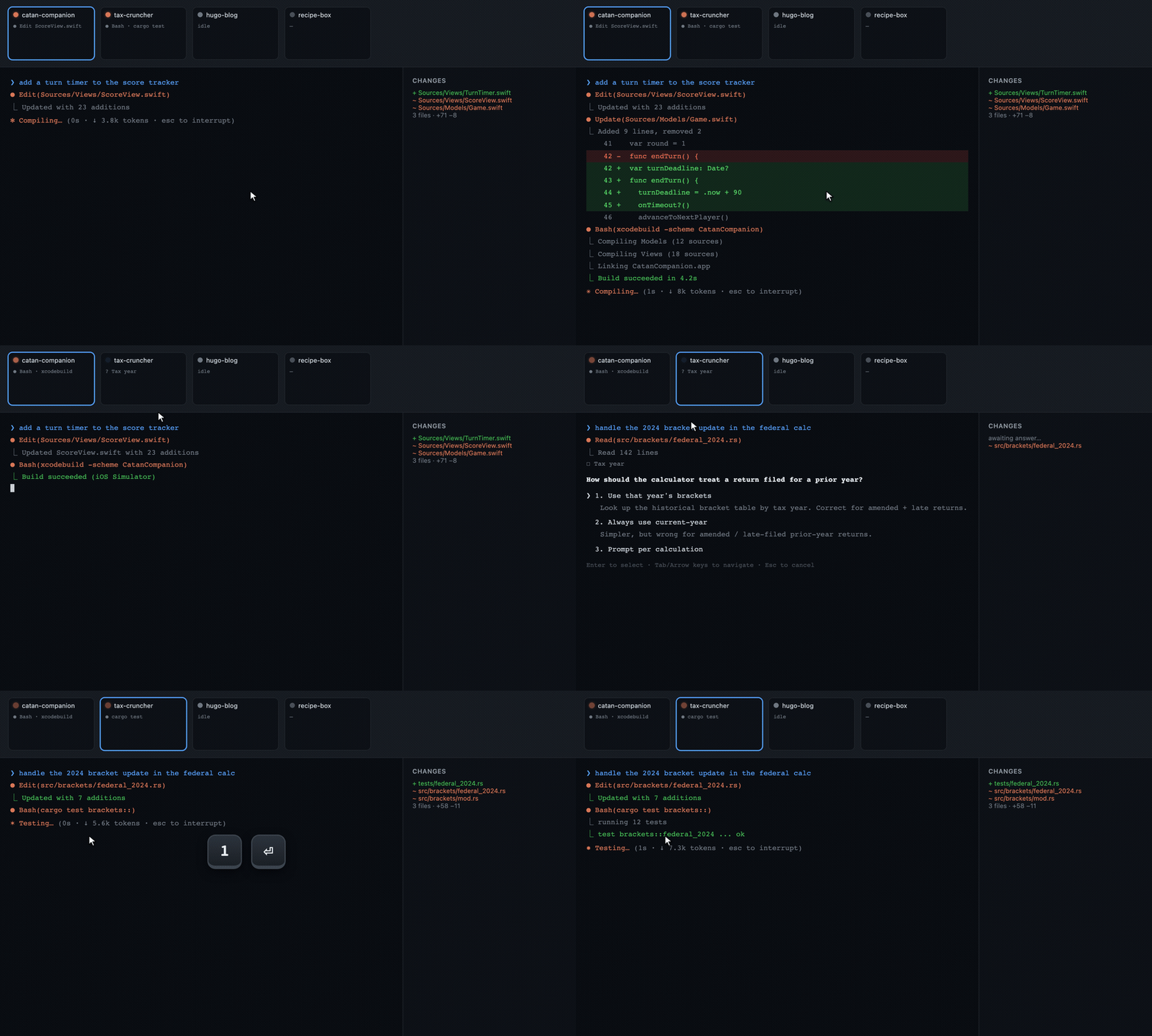
The filmstrip: Every open project is a live tile across the top with an
idle / running / awaiting-input / working-in-background status dot. One glance
shows which one needs you; one click jumps there.
The problem: Real work means leaving the IDE — you're heads-down in another
app, reading docs, in a meeting — but a CC session you left running can finish or
hit a prompt at any moment, and you won't know unless you keep switching back.
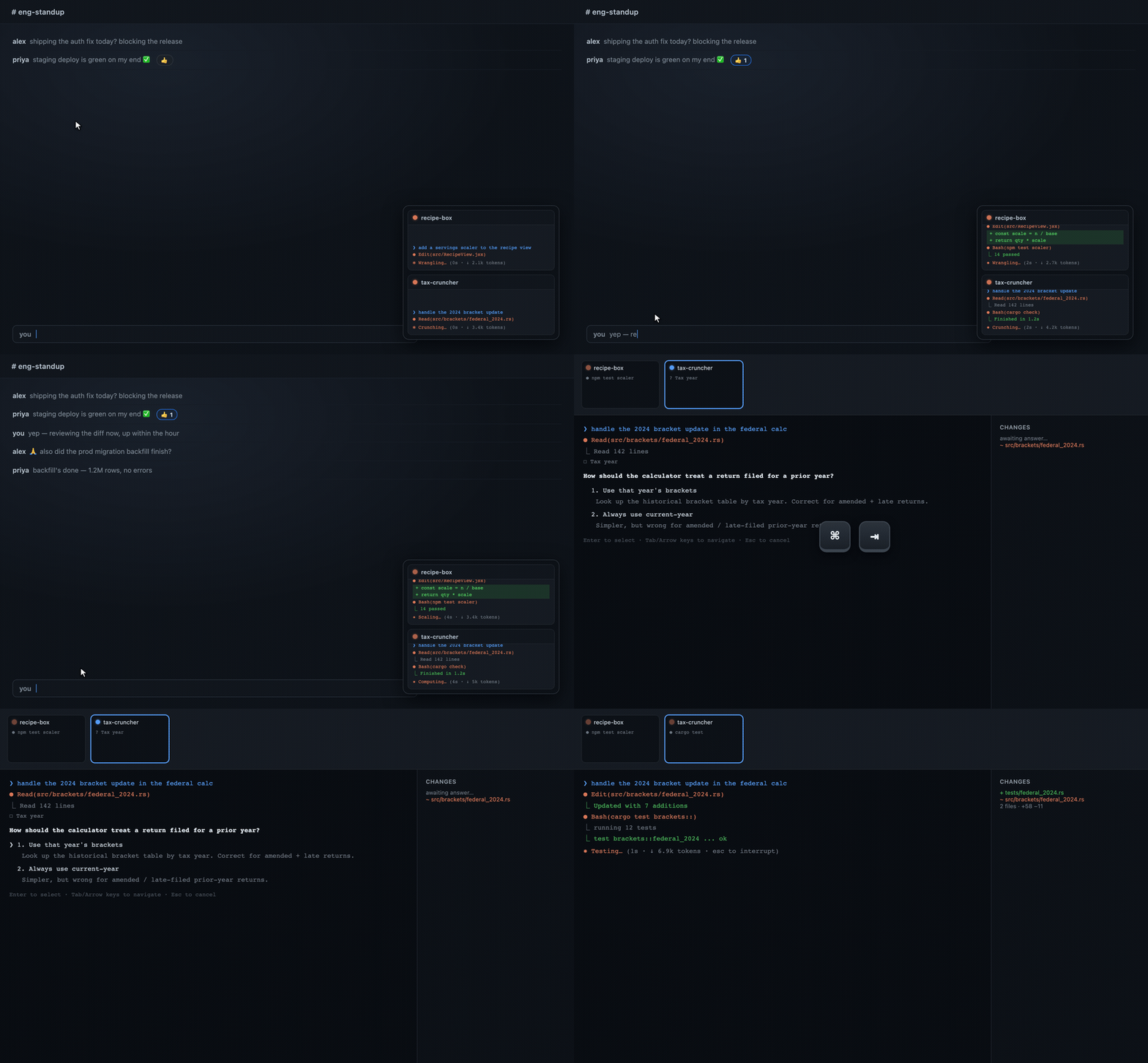
The picture-in-picture: A small always-on-top panel keeps your sessions
watchable from the corner of the screen while you work in any other app — and it
pings you the moment one needs input.
A macOS-only, single-user "lite IDE" that puts the daily Claude Code + Sublime Text
workflow in one window with multiple virtual workspaces inside it. Pick a project
→ a PTY-backed Claude Code session fires up in that project's directory, in seconds,
inside a workspace — no more "open terminal → cd → claude" every time, across 20+
rotating projects.
Status: daily-driver ready. Click a project → a working CC session in the project
dir inside a workspace; a built-in lite editor + git-diff viewer in the right half;
Sublime Text / Sublime Merge / Reveal-in-Finder one click away; N projects open
concurrently as workspaces switched via a live filmstrip with per-workspace status; an
always-on-top picture-in-picture panel that keeps sessions watchable from any other app;
a menu-bar status item that lights up when any project needs input; time analytics; a
workflow-docs viewer; smart auto-resume; skill buttons; and in-app auto-update.
Installable via a Homebrew tap.For what shipped when, see
CHANGELOG.mdand the
releases. Still ahead: a settings UI
for project-list management and hotkeys, Developer-ID signing + notarization, and a
workflow supervisor that enforces drive-mode chaining mechanically.
Install
Requires: macOS on Apple Silicon (M1 or later — the build is
aarch64;
Intel Macs are not supported andbrewwill refuse the cask), and
Homebrew. You'll also need the
Claude Code CLI installed + authenticated
and Sublime Text / Merge to actually use it — see Prerequisites.
Claudesk is distributed through a personal Homebrew tap:
brew tap StaymanHou/claudesk
brew trust --cask StaymanHou/claudesk/claudesk
brew install --cask claudesk
xattr -dr com.apple.quarantine /Applications/Claudesk.app
Why each step:
brew trust— recent Homebrew refuses casks from third-party taps until you
explicitly trust them ("Refusing to load cask … from untrusted tap"). One-time
per tap.brew install --cask claudesk— downloads the.dmg, checks its SHA-256, and
installsClaudesk.appto/Applications.xattr -dr com.apple.quarantine …— Claudesk is unsigned, so macOS
quarantines it and Gatekeeper blocks it at launch ("Apple cannot check it for
malicious software"). This clears the flag once. (Homebrew 6.x removed the old--no-quarantineinstall flag, so this manual step is the reliable path.)
Updating:
brew update
brew upgrade --cask claudesk
xattr -dr com.apple.quarantine /Applications/Claudesk.app   # re-attaches on each new build
Your state — remembered projects, Claude Code hook registration, etc. under~/Library/Application Support/com.claudesk.app/ — carries across updates automatically.
Before first launch, make sure you have the Claude Code CLI
(claude) installed and authenticated, plus Sublime Text / Sublime Merge for the
in-app launcher buttons. See Prerequisites for the full list.
Prefer to build it yourself? See Build from source below.
What it is
Claudesk is a macOS-only, single-user "lite IDE" that puts the daily
Claude Code + Sublime workflow into one window with multiple virtual
workspaces inside it. Each workspace = one project = one live Claude Code (CC)
session: a true terminal on the left, a lite code-editor + git-diff viewer on the
right. A Mission-Control-style layout runs the show — one workspace is the
full-size center stage, and a filmstrip of live thumbnails/status-tiles across
the top shows every other open project at a glance, each with an
idle / running / awaiting-input / working-in-background status dot. Click a tile (or press a hotkey)
to promote that project to center stage. It replaces the old routine of juggling
terminal tabs, Sublime Text, and Sublime Merge across many windows and macOS Spaces.
Tech feel: Tauri 2 (a tiny ~3 MB native app, not Electron), dark-mode only —
always, fast (<500 ms startup), lean. The aesthetic is quiet, dark,
keyboard-driven, dense-but-calm — a tool for a power user running 20+ rotating
projects, 3–4 in flight on any given day.
What it does, and why it matters
- One window, many project workspaces (Mission-Control layout). A single window
holds N concurrent project workspaces — one full-size center stage + a
filmstrip of the rest across the top. No window-juggling, no Spaces-hopping;
every in-flight project is one glance and one click away, so you instantly see
which project needs you and switch without breaking flow. - Per-workspace status at a glance (idle / running / awaiting-input /
working-in-background). Every filmstrip tile carries a live status dot driven by
Claude Code's real lifecycle (not guesswork). The "which of my 4 running agents is
waiting on me?" question is answered in under a second, zero clicks — no more hunting
through windows for the one stalled on a prompt. A session that hands control back
while a backgrounded job keeps running reads working in background rather than
falsely idle, so "done" and "still churning" are never the same dot. - Instant project launch. Pick a project → its full environment (CC session
cd'd in, editor, diff) fires up in seconds as a new workspace, eliminating the
minutes of repetitive setup (open terminal →cd→claude, open Sublime, load
project, open Merge, …) per project, per day. Starting work on any of 20+ projects
is one click, not a ritual. - Split workspace: terminal + editor side by side. Left half = a true
PTY-backed Claude Code terminal (the real interactive TUI); right half = a lite
code editor + git-diff viewer. Drive the AI and read the code without leaving the
window — the whole edit-review-converse loop in one calm surface. - Lean, fast, dark, native. Tauri 2 native app — ~3 MB, ~30–40 MB RAM idle,
<500 ms launch, always dark. A daily driver that disappears into the work instead
of competing with it.
Philosophy & design choices
Claudesk is deliberately opinionated software. It is not meant to fit every
developer's needs in every circumstance, and it never will. Read these as the why
behind the product — if your situation contradicts them, Claudesk is probably the
wrong tool, and that's by design.
Opinionated by intent, narrow by intent. This is a personal tool built against
one workflow (heavy Claude Code use, the customstayman-claude-code-customization
workflow system installed at~/.claude/skills/, Sublime, macOS, 20+ rotating
projects). A tool that fits one workflow exactly beats a tool that fits every
workflow approximately, and no feature is built for a secondary user at the primary
user's expense — the roadmap is not distorted for them.Two tiers, one app. That narrowness is not a wall, because the product splits
cleanly in two. The lite-IDE core — project picker, tabbed workspaces, PTY
terminals, editor/diff, and the status surfaces (filmstrip / PiP / menu-bar, all built
on Claude Code's native hook channel) — is workflow-independent and works for any
Claude Code user out of the box, zero config. The workflow-orchestration layer
(docs viewer, smart auto-resume, drive-mode selector, skill buttons) assumes the
companion workflow system and is opt-in, default off behind a single setting. With
it off the app is byte-identical to one that never had those features — no dead
affordances, no controls pointing at files you don't have.Tuned for Claude Code specifically — not OpenAI, not Gemini. Portability across
models was attempted and abandoned: not all models are created the same, and the
workflow system + Claudesk are specifically tuned against Claude's behavior. The
hook channel, the skill/orchestrator conventions, the drive modes, the
resume/recycle rituals — all assume Claude Code. Running this against another
model's CLI is out of scope.Parallelism across projects, not across agents within a project. The whole layout
optimizes for deliverable output per engineer-hour by keeping many projects in
flight at once — but with one agent / one CC session per project (subagents
within that session are still fair game). This is a conscious rejection of the
multi-agent-on-a-single-project approach: per The Mythical Man-Month, throwing more
concurrent actors at one problem introduces coordination overhead that eats the gains.
Claudesk parallelizes the projects, where the work is genuinely independent and the
overhead is near zero, rather than the agents, where it isn't.Built for flexible timelines, not for rushing. The model assumes you're rotating
among projects with relatively elastic deadlines — picking up whichever one is ready
for you, letting the others run or sit. If you need to rush a single project to a
hard deadline, the right move is multi-agent concurrency on that one project, and
Claudesk is not the fit. It optimizes throughput across a portfolio, not latency
on any single item.Human-in-the-loop, surfaced not hidden. Every CC session keeps a real, visible
status (idle / running / awaiting-input / working-in-background) precisely because the bottleneck in this
model is operator attention — the scarce resource is the one human steering N
sessions. The filmstrip, PiP, and menu-bar surfaces all exist to answer "which
project needs me right now?" in under a second. Claudesk doesn't try to remove the
human from the loop; it tries to make the human's attention land where it's needed
with minimal cost. (Hence also: yolo mode by default, but recycle/resume on operator
judgment, never automatically.)Lite over featureful. If it isn't a daily friction, it doesn't get built.
Claudesk consciously refuses to grow into a general-purpose IDE — the wins come from
eliminating the repeated setup tax and the cross-project attention tax, not from
feature breadth. Reuse the real tools (Sublime Text, Sublime Merge) for the long tail
instead of reimplementing them.Wrap the official tools, don't fork them. Claudesk drives the real
claudeCLI
and pops the real Sublime apps. It's an orchestration layer, not a replacement — so
it inherits every upstream improvement for free and never has a fork to maintain.Designed for a single screen — the laptop scenario. Claudesk assumes you may be
working on one display: a laptop on the move, not a multi-monitor desk. That's why
the whole product collapses into one window (no window-juggling), and why the
filmstrip, the collapsible-to-status-tiles layout, and the always-on-top
picture-in-picture all exist — they put N projects' worth of attention onto a single
screen without forcing you to spread windows across monitors or Spaces you don't have.
Multi-monitor setups still work fine; they're just never required.Local dev environment, not cloud. Claudesk runs your Claude Code sessions in real
PTYs against your real local filesystem and toolchain — no remote VM, no cloud
workspace, no syncing your code up to someone else's machine. It's a native ~3 MB
macOS app, not a browser tab pointed at a server. The work stays on your hardware:
zero latency, your own environment and secrets, full offline capability, and nothing
to pay for or trust beyond the tools you already run.
See workflow-system/product/vision.md for the full vision, principles,
and anti-goals.
Prerequisites
To run Claudesk (whether installed via Homebrew or built from source):
- macOS on Apple Silicon (this project is macOS-only; the release is
aarch64) - Claude Code CLI (
claude) installed, on yourPATH, and authenticated before launching Claudesk - Sublime Text with
sublonPATH(or the app installed for theopen -afallback) - Sublime Merge — for the in-app "open in Merge" launcher button
Additionally, to build from source:
- Rust stable ≥ 1.77 via
rustup - Node 20 LTS+ and pnpm (
corepack enableornpm i -g pnpm) - Xcode Command Line Tools —
xcode-select --install
See CLAUDE.md → "Getting Started" for the full setup notes and ecosystem
gotchas (pnpm v11 pnpm-workspace.yaml, ESLint v9 pin, etc.).
Develop / contribute
Make sure you have the build prerequisites (Rust, Node + pnpm,
Xcode CLT), then:
git clone [email protected]:StaymanHou/Claudesk.git
cd Claudesk
pnpm install
Run the debug build (hot-reload):
pnpm tauri:dev # native debug build with Vite hot-reload
pnpm tauri:dev builds the unoptimized debug target and runs it under a separate
identity (com.claudesk.app.dev, window titled "Claudesk (dev)", magenta "DEV" badge
on the Dock icon). It's fully isolated from an installed production build — separate
project list, hook socket, and Claude Code hook registration — so you can run the
installed app and pnpm tauri:dev at the same time without interference (i.e.
develop Claudesk with Claudesk). Use pnpm tauri:dev, not a bare pnpm tauri dev,
or the dev build will collide with a production install.
Front-end-only work (no Rust rebuild) can iterate even faster against the Vite dev
server alone — but note it has no Tauri IPC, so anything calling the backend won't work:
pnpm dev # Vite only, http://localhost:1420 — UI iteration, no backend
Checks — run these before opening a PR (they're the same gates CI would enforce):
pnpm test                       # frontend unit tests (Vitest)
cd src-tauri && cargo test      # backend tests (Rust); then `cd -`
pnpm lint                       # ESLint (TypeScript strict)
pnpm format:check               # Prettier (use `pnpm format` to auto-fix)
cd src-tauri && cargo clippy -- -D warnings && cargo fmt --check
See CLAUDE.md → "Development Conventions" for code style, the workflow
system, and ecosystem gotchas (pnpm v11 pnpm-workspace.yaml, the ESLint v9 pin,
dark-mode-only UI, the CcSession seam, etc.).
Build from source
For development, or to install your own build instead of the Homebrew cask. Claudesk
is a self-built, unsigned macOS app — building produces both a .app and a .dmg:
pnpm tauri build
cp -R src-tauri/target/release/bundle/macos/Claudesk.app /Applications/
xattr -dr com.apple.quarantine /Applications/Claudesk.app   # clear Gatekeeper (unsigned)
The .dmg lands at src-tauri/target/release/bundle/dmg/Claudesk_<version>_aarch64.dmg
— this is the same artifact published to the Homebrew tap.
Updating a from-source install = rebuild and replace (quit the running app first):
git pull && pnpm install        # if there are upstream changes / dep updates
pnpm tauri build
cp -R src-tauri/target/release/bundle/macos/Claudesk.app /Applications/
xattr -dr com.apple.quarantine /Applications/Claudesk.app
The production bundle id (com.claudesk.app) is stable across updates, so your state
(projects.json, the Claude Code hook registration, etc. under~/Library/Application Support/com.claudesk.app/) carries over automatically. The
Gatekeeper xattr step reappears on each replaced unsigned build.
Cutting a release (maintainer): the build → tag → GitHub release → tap-cask bump
flow is driven by the project-local/releaseskill — see.claude/skills/release/SKILL.md. In-app
auto-update has shipped: an installed build checks for new versions and updates
itself. Proper Developer-ID signing + notarization — which is what would remove thexattrstep entirely — is still deferred to a later polish milestone.
More
CLAUDE.md— project overview, conventions, and current phaseworkflow-system/product/vision.md— full product visionworkflow-system/product/arch.md— architecture and key decisionsCHANGELOG.md— what has shipped
License
MIT © Stayman Hou
Reviews (0)
Sign in to leave a review.
Leave a reviewNo results found