agentbus
Health Pass
- License — License: NOASSERTION
- Description — Repository has a description
- Active repo — Last push 0 days ago
- Community trust — 25 GitHub stars
Code Fail
- rm -rf — Recursive force deletion command in install.sh
Permissions Pass
- Permissions — No dangerous permissions requested
No AI report is available for this listing yet.
Cross-vendor middleware for coding agents: every model call, its cost and the full conversation, through one gateway.
A cross-vendor middleware framework for coding agents.


Quickstart • Demo • Docs • Cockpit • Releases
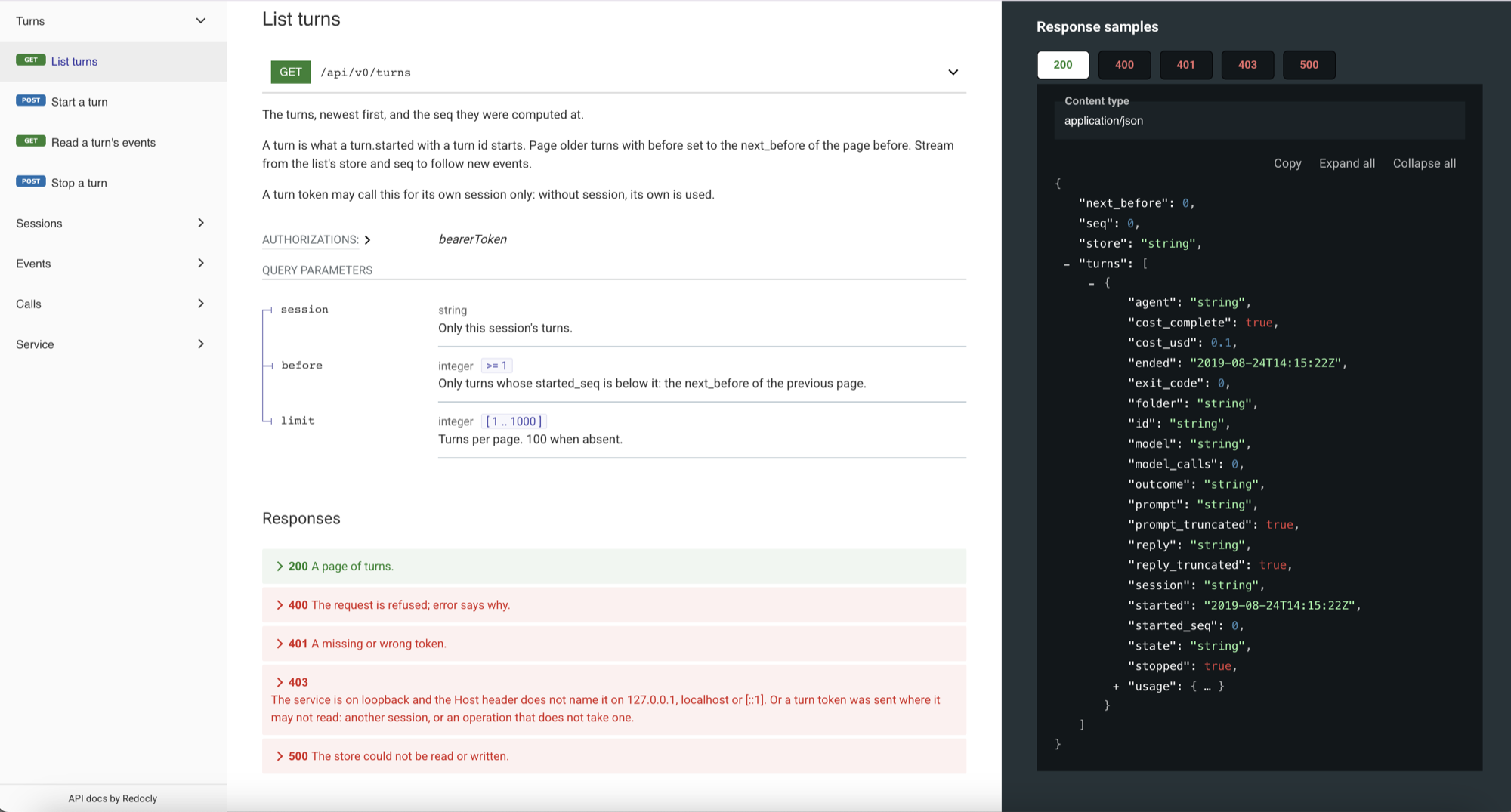
AgentBus is a cross-vendor middleware framework for coding agents. It sits between your agents and every model vendor.
Demo
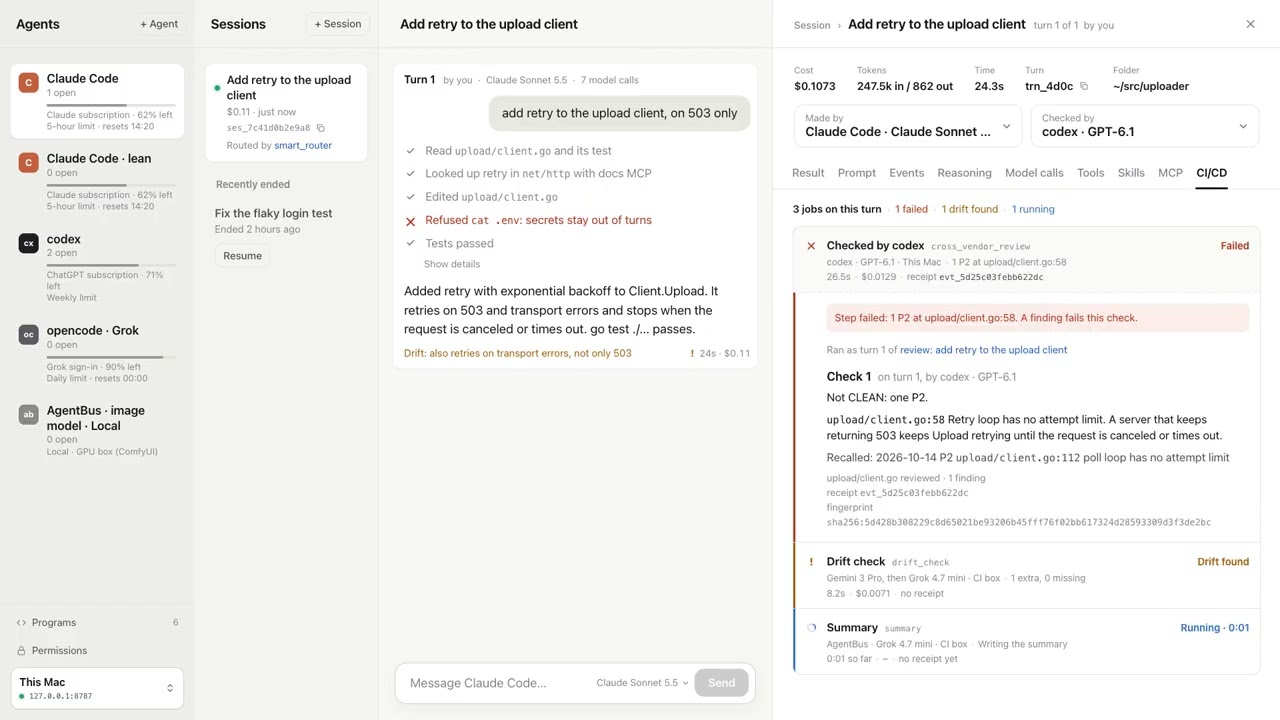
Click to watch on YouTube.
Why
- You see every model call. Each request and reply an agent makes passes through AgentBus and
is stored on your machine. - You see the cost. Every call is priced, and each turn and session shows its total.
- The conversation is kept. Each turn is a fresh one-shot agent run. AgentBus keeps the history
and continues the conversation from its own store. - Any vendor. Claude Code and codex today, through one API. Every vendor tomorrow.
AgentBus runs the agents you already have, signed in as you.
Prerequisites
claude(Claude Code) orcodex, or both, installed and signed in.- macOS or Linux.
- Go 1.27.1 or later, only if you install with
go installor build from source.
Install
Pick one.
Homebrew:
brew install staysup/tap/agentbus
Install script (puts agentbus in ~/.local/bin):
curl -fsSL https://raw.githubusercontent.com/staysup/agentbus/main/install.sh | sh
Go:
go install github.com/staysup/agentbus/cmd/agentbus@latest
Build from source:
git clone https://github.com/staysup/agentbus.git
cd agentbus
go install ./cmd/agentbus
On Linux, a build with cgo (the default where gcc is installed) and one without it (CGO_ENABLED=0, as
releases are built) both run agentbus up in a user namespace of their own, where a session's copy
can be an overlay mount without root. The service's first log line says whether it got one, and why
not.
Both Go routes put agentbus in $(go env GOPATH)/bin. That folder must be on your PATH:
export PATH="$PATH:$(go env GOPATH)/bin"
Check the install with agentbus version.
Quickstart
1. Start the service
agentbus up
It listens on http://127.0.0.1:8787 and prints its data folder:
agentbus: 2026/11/06 12:00:00 listening on http://127.0.0.1:8787, data folder /Users/you/.local/share/agentbus
The data folder is $AGENTBUS_HOME if set, else $XDG_DATA_HOME/agentbus, else~/.local/share/agentbus. On first start AgentBus writes a random token to token in that folder,
readable only by you. Every API request needs it.
Flags:
| Flag | Default | What it does |
|---|---|---|
-listen |
127.0.0.1:8787 |
The address: an IP, with or without a port. With no port it uses 8787. 0.0.0.0 can be reached from the network. |
-origin |
none | An optional lock: allow only this browser origin, such as http://localhost:5173. Without it any origin may call the API. |
-replay |
true |
Continue Claude and codex sessions from AgentBus's own store. false uses the agent's own resume. |
-max-runs |
4 |
How many turns run at once, 1 to 64. More wait in the queue. |
2. Open a cockpit
A cockpit is any client of the API. The browser cockpit is in its own repository,
staysup/agentbus-cockpit. It works with the plainagentbus up from step 1. Follow the cockpit's README, and paste the token from the token file
when it asks.
A page from any origin may call the API, because every call needs the token in a header and a
foreign page does not have it. AgentBus uses no cookies, so there is nothing for the browser to
send on your behalf. To lock the API to one origin anyway, start it withagentbus up -origin http://localhost:5173.
Reach it from another machine or a container
By default the service answers this machine only. To reach it from elsewhere, listen on every
address:
agentbus up -listen 0.0.0.0
In Docker, run that inside the container and publish the port to your own machine only:
docker run -p 127.0.0.1:8788:8787 ...
The cockpit then uses http://127.0.0.1:8788 with the same token.
On 0.0.0.0 the service can be reached from the network. The token guards every API call. The
agents' model traffic answers callers on the service's own machine only. There is no HTTPS, so
across a network use an SSH tunnel or a private network. If you put a reverse proxy in front, pass
on /api and /docs only: the proxy's requests look local to the service.
3. Or start a turn with curl
Open a second terminal in any folder. First check that the service finds your harnesses:
TOKEN=$(cat ~/.local/share/agentbus/token)

curl -s -H "Authorization: Bearer $TOKEN" http://127.0.0.1:8787/api/v0/harnesses
Each one says found, its version and signed_in. GET /api/v0/agents lists your saved
agents; a new data folder has claude and codex, each on its own subscription.
found means the harness's program is on the service's PATH. signed_in is the harness's own
answer, and it is left out when it gives no clear one. Start a turn only with an agent whose
harness is found and signed in.
Then start a turn:
curl -s http://127.0.0.1:8787/api/v0/turns \
  -H "Authorization: Bearer $TOKEN" \
  -H "Content-Type: application/json" \
  -d '{"agent":"claude","folder":"'"$PWD"'","prompt":"Say hello in five words.","model":"haiku","read_only":true}'
Use your own token path if the data folder is elsewhere. folder must be an absolute path to a
folder that exists. The agent works in its own copy of it, made exactly as the folder is now,
under the data folder, so your folder is not changed; send "isolate":false to work in the folder
itself. isolation in permissions.toml picks how the copy is made: auto (the default: one
APFS clone on macOS; on Linux an overlay mount, without root in a user namespace of its own,
else a reflink or plain copy), overlay, copy, git (a worktree, in a repo) or none. The
table of what auto picks, the AppArmor step Ubuntu 24.04 needs for overlay without root, andshare_read_only for a big node_modules, are in docs/CLIENT_API.md ("Isolation").model is passed to the agent as --model; a small
model keeps this first turn cheap. read_only gives the agent read tools only. For codex, use"agent":"codex" and one of its models, or leave model out.
The reply names the new session (id), the turn (turn) and the job that runs it (job):
{"id":"8c1f…","turn":"t_5d0c19a2e7b3f481","job":"job_3b3d…","base_url":"http://127.0.0.1:8787/s/8c1f…/t/t_5d0c19a2e7b3f481"}
If the service cannot find the agent's program, the reply is HTTP 400 and nothing is stored:
{"error":"agent claude cannot start: the program claude is not on the service's PATH. Install Claude Code and run claude once to sign in, then try again. If it is installed, start agentbus from a shell where claude runs."}
Read the turn back, with its reply, state and cost (GET /api/v0/turns/<turn> reads just one):
curl -s "http://127.0.0.1:8787/api/v0/turns?session=<id>" -H "Authorization: Bearer $TOKEN"
To make a retry safe, add "idempotency_key":"<your id>". Sending the same body again returns the
same turn and starts nothing.
To continue the conversation, send the next prompt with "session":"<id>" and no agent or folder.
To stop a running turn, and every process it started:
curl -s -X POST "http://127.0.0.1:8787/api/v0/turns/<turn>/stop" -H "Authorization: Bearer $TOKEN"
The next turn of the session continues after it, and the agent is told that you stopped it.
Talking to agents
A session is one conversation. You write; an agent answers. Everything else is asked for in the
chat, in plain words.
- Saved agents. An agent is a saved setup: a harness (
claudeorcodex), its access (your
subscription, or an OpenRouter key read from a variable by name), a model and a name. A new data
folder hasclaudeandcodex. Add more withPOST /api/v0/agents
(Agents), or with "+ Agent" in the cockpit. - Switch model or agent on any message. Each message may name a
model, anagent, or both.
The conversation carries on with the new one. A message that names neither keeps the last ones. - Messages queue. Send the next message while a turn runs. It waits and runs after it.
- Ask other agents. An agent can hand work to another agent, or to many at once. It does not
wait: it starts the work and ends its turn. Each answer comes back as the next turn of its
session. Inside a turn the agent usesagentbus-api, which sends its turn's own token. You can
ask in the chat: "have codex review this", "ask all three". The asked agent works in a new copy of
your folder, without the asking session's unapplied changes. It is told which session and turn
asked it, and reads that turn's changes, with each file's diff, through the API. - A copy per conversation. Each new session works in its own copy of your folder, made as the
folder is now, uncommitted edits included. Your folder does not change while agents work.
Several sessions on one folder never touch each other's files. How the copy is made:
Isolation. - Every turn has a diff.
GET /api/v0/turns/<turn>/diffshows each file the turn added,
changed or removed, with each text file's own diff. Git is not asked. - Apply up to a turn, all or nothing.
POST /api/v0/turns/<turn>/applymakes your folder
match the session at that turn. It applies every turn not yet applied, up to that one, in one
step. It checks every file first. If a file changed in your folder since, it writes nothing and
answers 409 with each file and why. - Review is optional. Reading the diff and saying "apply" is a review. To have an agent check
the work, ask for it. A review runs read-only in the author's copy, on another agent, and ends
with a verdict (pass, fail or unknown) and its findings. Any P1 makes it fail.
A turn is a job, so programs and CI can do all this too: Jobs.
With curl, using the session from step 3:
# The next message, on another model:
curl -s http://127.0.0.1:8787/api/v0/turns -H "Authorization: Bearer $TOKEN" \
  -d '{"session":"<id>","prompt":"Now add a test for it.","model":"sonnet"}'

# A saved agent on OpenRouter (the key stays in OPENROUTER_API_KEY, in the service's environment):
curl -s http://127.0.0.1:8787/api/v0/agents -H "Authorization: Bearer $TOKEN" \
  -d '{"name":"DeepSeek","harness":"claude","access":"openrouter","model":"deepseek/deepseek-v4.1-flash"}'

# Hand the session to it for the next message:
curl -s http://127.0.0.1:8787/api/v0/turns -H "Authorization: Bearer $TOKEN" \
  -d '{"session":"<id>","prompt":"Check the test.","agent":"<the new agent id>"}'

# What a turn did, then make your folder match the session at that turn:
curl -s http://127.0.0.1:8787/api/v0/turns/<turn>/diff -H "Authorization: Bearer $TOKEN"
curl -s -X POST http://127.0.0.1:8787/api/v0/turns/<turn>/apply -H "Authorization: Bearer $TOKEN"
Three roles, one or more machines
One program has three roles:
- Control keeps the API, the job queue, the record, the settings, the saved agents, the
gateway, and a store of file contents. It never reads or writes your folder. - A connector owns the folders of its machine. It takes their snapshots and applies changes
into them. - A runner runs agents, each session in its own copy.
| Command | What runs | For |
|---|---|---|
agentbus up |
Control, a connector and a runner, in one process | One person on one machine. The default. |
agentbus server |
Control alone | The machine that holds the record. |
agentbus connector -server <url> -folder DIR... |
A connector alone | The machine that holds the code. |
agentbus runner -server <url> |
A runner; with -folder DIR, a connector beside it |
Any machine that should run agents. |
On one machine, agentbus up is all you need. Its copy is a clone or an overlay of your folder,
and nothing goes over HTTP. Its runner uses each harness's own sign-in, as you do.
More machines. Keep control and the connector on the machine with your code. Run runners
anywhere, such as in a Linux VM. Runners and connectors pull their work and are never called, so
they work behind a router.
# On the machine with the code: control, then a connector for your folders.
agentbus server -listen 0.0.0.0
agentbus connector -server http://127.0.0.1:8787 -folder ~/code/app

# On each runner machine, with the server's enroll_token file copied over (mode 0600):
agentbus runner -server http://devbox:8787 -enroll-token-file ./enroll_token
A runner on the same machine as its server needs its own data folder (AGENTBUS_HOME). For a
runner in a Lima VM and a server on the Mac's loopback, start the server with-host host.lima.internal. go run ./tools/remote runs the whole path that way.
agentbus server has no folders of its own. A session names its folder by reference:GET /api/v0/folders lists them, and a turn sends folder_ref, connector and"isolate": true in place of folder. A cockpit does this for you.
File contents go through control's store, by the SHA-256 of each file, so each side sends only
what the other lacks. A runner builds a session's copy from a snapshot the connector took. At the
end of each turn it puts what changed in the store. An apply is a job of the folder's connector.
Runners hold no secrets. Control gives each runner turn a token of its own. The agent uses it
as its model credential. Control's gateway swaps it for the real one on the way out:
- An OpenRouter agent: control reads the key from its own environment, by the variable's name
(key_env). - A subscription agent: your own subscription, for runners on your own machines. Connect it once
on control withagentbus connect claude(or Connect in the cockpit), and setsubscriptions_on_runners = "own"in control'spermissions.toml. It is off by default.
agentbus runner -gateway local makes a runner use its own machine's sign-in and keys instead.
A runner's turn reaches control's record while it runs: its events, model calls and replies. A
cockpit pointed at control shows it live. The runner reads its policy and instructions from
control before each turn (Permissions). -capacity sets how many jobs it runs at
once (1 to 64, default 4).
Network control (Linux)
Network control is off by default: agents reach any host. Turn it on in control'spermissions.toml with contain = "on" and an allow list:
[network]
contain = "on"
allow = ["github.com", "*.npmjs.org"]
Then each agent reaches only its runner's gateway, control, and the hosts in allow, through a
proxy. Anything else is refused and recorded as network.refused. It works the same foragentbus up and agentbus runner.
It is Linux only. A runner that cannot close an agent off, such as one on a Mac, refuses the turn
with the reason. Details: docs/CLIENT_API.md, "Network control".
Known limits
- OpenRouter turns show a cost of $0. The price table has no OpenRouter prices yet.
- A session stays on one runner. Its copy lives there, so its later turns go to the same
runner. Moving a session between runners comes later. - Copies on shared or network disks are slow. A copy is a clone (APFS) or a reflink (xfs,
btrfs) only when the folder and the data folder are on the same disk that can make one.
Elsewhere, such as a network disk, every file is copied byte by byte. - Keep the data folder on a disk that keeps exact file times. Some disks keep a file's time
only to the second, such as a Mac folder shared into Docker, a network share or FAT. With the
data folder there, every apply of a changed file is refused as "changed in your folder", even
when it is not. Put the data folder (AGENTBUS_HOME) on the machine's own disk. - A first transfer of a big folder is slow. A runner on another machine gets a 50,000-file
folder (414 MB) in about 30 s the first time. Later sessions send only what changed: about 4 s. - Network control is Linux-only, and off by default. On macOS,
contain = "on"refuses
every turn. - Not yet tested on Ubuntu 24.04, which restricts user namespaces. Network control and the
rootless overlay may need its AppArmor profile there (install.shprints the command). - An asked agent reads the asker's changes but cannot run them. Its copy is made from your
folder, so "have codex review this" gets the diff of the asking turn through the API, not those
files in its copy. Tests it runs run on your folder as it is. A copy started from the asking
session's latest checkpoint is a later option. - codex on a subscription cannot run on a remote runner yet. Control cannot add codex's
ChatGPT sign-in, so such a turn is refused before it starts. Use an OpenRouter agent there, oragentbus up.
Docs
The running service describes its own API. None of these need the token or the internet:
http://127.0.0.1:8787/docs: an interactive reference.http://127.0.0.1:8787/api/v0/openapi.json: the OpenAPI 3.1 description. Generate a client from
it in any language. There are no client SDKs.http://127.0.0.1:8787/docs/llms.txt: one plain file for coding agents.
The contract in words is docs/CLIENT_API.md.
Your data
Everything stays on your machine, in the data folder: events.db (a SQLite file, the record),jobs.db (the job queue), token, turns_token, enroll_token, runner.json,connector.json, folders.json, permissions.toml, instructions.md, agents.json, blobs/,worktrees/ and logs/. turns_token is a second token for a program that only starts, stops
and reads turns. enroll_token adds a runner or a connector; the built-in ones read it, and keep
their identities in runner.json and connector.json. blobs/ is control's store of file
contents. worktrees/ holds the copies and git worktrees sessions run in. subscriptions/
appears once you connect a subscription; its files are readable by you only. Nothing is sent
anywhere except the model calls themselves, to the vendor your agent already uses.
events.db holds each turn's model requests and replies, so it holds whatever your agent read or
printed during a turn, such as a file it opened or a command's output. It is not encrypted, and it
is kept until you remove it. Request headers, including your sign-in, are never stored.
To clear it, stop agentbus up and delete the data folder. A new one is made on the next start.
Permissions
A turn runs with no person to click "allow". So a claude turn is refused anything that needs a
"may I?", such as go test or reading a folder outside its own. permissions.toml in the data
folder says what turns may do:
read_folders = ["~/.agents"]           # claude may Read, Grep and Glob there
allow = ["go test", "make test"]       # claude gets --allowedTools Bash(go test:*),...
forbid = ["git push", "git checkout"]  # the gateway refuses these, for claude and codex
edit = "session"                       # where a turn may edit files: "session" or "none"
subagents = true                       # false: no turn starts the agent's own subagents

[limits]                     # work agents ask other agents for
max_depth = 2                # levels of asking below your turn
max_jobs_per_turn = 10       # jobs one turn may ask for
max_jobs_per_tree = 30       # jobs everything started from one of your sessions may ask for
max_cost_usd_per_tree = 0.0  # dollars that work may cost before asking stops; 0 is off

[agent_api]                  # what a turn's own token may do
scope = "tree"               # "tree": its request tree; "session": its own session only
read = true                  # read sessions, turns, calls and jobs
list_agents = true           # list saved agents and harnesses
start = true                 # start a session on a saved agent
continue = true              # continue a session its tree started
review = true                # ask for a review
cancel = true                # cancel what it asked for
rename = true                # rename sessions
agentbus up makes it with empty lists and every other value at its default, as above. A key you
leave out reads as its default, so an older file keeps working. Every turn reads the file when it
starts, and the API reads it for every request a turn's token sends, so an edit applies at once.
A broken file stops the turn with the line and the problem.
Through the API. GET /api/v0/settings/permissions reads the policy as JSON, and PUT writes
it back. A PUT sends the ETag of its GET in If-Match, so it never undoes a hand edit made in
between: that gets 412. Only the main token may do this. A turn's own token can never read or
change the policy. Details: docs/CLIENT_API.md.
On a runner. agentbus runner -server <url> reads the server's policy before each turn, not a
file of its own, so one policy holds on every machine. If it cannot reach the server, the turn
does not start and the job fails with that reason. It never runs on an older copy.
Edits. With edit = "session", a turn edits files in its own session folder (its copy)
without asking: claude gets Edit(//<folder>/**), codex runs with --sandbox workspace-write."none" edits nothing: claude is denied Edit, Write and NotebookEdit, whatever your own Claude
Code settings allow, and codex runs read-only, with no network. A read_only turn never
edits. No turn may edit the data folder's own files (this file, instructions.md, agents.json,
the tokens): a turn that could would raise its own limits. That rule is not a setting. It covers
the tools that edit files: a command in allow that runs any code (python3, node, sh) can
still write them, so allow only commands you would let change your policy.
Subagents. With subagents = false, a turn cannot start the agent's own subagents. claude
gets --disallowedTools Task,Agent,Workflow, and codex runs with --disable multi_agent --disable multi_agent_v2. Both are flags of that turn only: your ~/.claude/settings.json and~/.codex/config.toml are never changed. The default, true, changes nothing.
Limits. A request past a limit is refused, and the refusal names the limit.
read_folders grants reads only in the default and acceptEdits modes. Under your own Claude Code
"auto" mode, claude may still write there.
A read_only turn stays read-only.
forbid works for claude and codex. The gateway reads each model reply. When a shell command in
it matches an entry, the agent never gets that call, and the model is told a rule refused it. Each
command in a chain is checked on its own, so cd repo && git -C repo push matches git push.
Every refusal is stored as a tool.refused event. claude also gets --disallowedTools.
The guard reads the command text. It cannot see a command built while the agent runs, or one run
from a script the agent wrote earlier. For a hard rule, also take away what the command needs. For
"never push", give the agent no push credentials.
codex gets nothing from read_folders and allow. Its sandbox can read every folder already.
Details: docs/CLIENT_API.md.
Instructions
Every turn gets the same short instructions, as an instruction of its agent's own (Claude Code's--append-system-prompt, codex's developer_instructions), never inside your prompt. They are the
text of instructions.md in the data folder. agentbus up writes it with the default: how to
search the session's earlier turns and ask other agents with agentbus-api. Edit it to change what
every agent is told; {session} becomes the session id. An empty file gives no instructions, and a
missing one the default. Each turn reads it when it starts. Keep it the same within a session, so
the prompt cache holds. GET and PUT /api/v0/settings/instructions read and write it through the
API, and a runner on another machine uses its server's.
How it works
- The agent changes one setting, its API address. It also gets the instructions in
instructions.md(Claude Code's--append-system-prompt, codex'sdeveloper_instructions),
saying how to search its session's earlier turns and ask other agents with the turn's own token.
Your prompt is never changed. - Traffic passes through. Requests go to the vendor with their headers, so the agent's own
sign-in is used. Headers are never stored. The one change: a turn that continues a session gets
the earlier turns' history put in front of its requests. For codex, the earlier turn's thread id
also replaces the new one, so the vendor reads the history from its cache. - Adapters read a copy of each body and turn the vendor's format into the same events.
- Your sign-in stays on your machine. Agents reach the service on loopback, even when it
listens on0.0.0.0, and the model traffic answers callers on that machine only.
| Path | What it is |
|---|---|
cmd/agentbus/ |
The agentbus command |
api/ |
The client API and its generated docs |
run/ |
Starts one turn of a stock agent CLI, watches it and stops it |
queue/ |
Jobs, attempts, runners and reviews, in jobs.db beside the record |
jobs/ |
The jobs API and the runner protocol |
runner/ |
Takes jobs through the runner protocol and runs each one with run/ |
isolation/ |
The runner's side: a session's own copy, from a clone or a snapshot; checkpoint, diff, changeset, close |
connector/ |
The folder side: a folder's snapshot, and applying a session's changes into it |
folders/ |
The folders of one machine, known to control by reference only |
blobs/ |
The content-addressed store every file travels through, and its HTTP client |
workspace/ |
What a job changed, and git worktrees |
gateway/ |
The pass-through proxy that feeds adapters |
adapter/ |
One adapter per API format: Anthropic, OpenAI |
event/ |
The vendor-neutral events |
store/ |
The SQLite store |
replay/ |
Own replay: continues Claude and codex conversations from the store |
cost/ |
Prices every model call |
Third-party code shipped in the binary is listed in THIRD_PARTY.md.
License
Free to use, change and run, including inside your business. You can't sell it as a competing product or service. Each release becomes Apache 2.0 two years after it is published.
Licensed under the Functional Source License (FSL-1.1-ALv2). See LICENSE.
Reviews (0)
Sign in to leave a review.
Leave a reviewNo results found