claude-code-toolkit
Health Gecti
- License — License: MIT
- Description — Repository has a description
- Active repo — Last push 0 days ago
- Community trust — 76 GitHub stars
Code Basarisiz
- rm -rf — Recursive force deletion command in plugins/setup/skills/shared-setup-patterns/templates/security_hooks.json
Permissions Gecti
- Permissions — No dangerous permissions requested
Bu listing icin henuz AI raporu yok.
Superseded by coding-agent-toolkit — see README. Preserved for reference: Claude-Code-only patterns from earlier iteration.
⚠️ This repo has been superseded.
The single-agent, Claude-Code-only patterns here have been rewritten as
coding-agent-toolkit —
a cross-agent workflow layer that runs on both Claude Code and OpenAI Codex,
with the same skills accessible as slash commands on either host.The successor covers:
align → plan → plan-issues → next-issue → ship— an explicit
spec-first workflow with GitHub milestones + issues as the durable plan trail.handoff/continue— cold-startable session transitions written to disk,
so either agent can resume any prior session.- Optional continuous review via roborev.
This repo remains available for reference but will not receive further updates.
New work should target the successor.
Claude Code Toolkit
Production-tested commands, skills, and patterns for Claude Code


Overview
A collection of plugins, skills, and patterns developed through 6+ months of daily Claude Code use. Copy what works, adapt to your needs.
What's included: 28 commands, 5 agents, and 6 domain skills across 6 core plugins.
Design Goals
- Stateless architecture - Commands execute independently, state persisted in files
- File-based persistence - JSON and Markdown for all state management
- MCP integration - Optional Model Context Protocol tools with graceful degradation
- Progressive disclosure - Load context incrementally to optimize token usage
- Self-containment - All logic inline, no external script dependencies
Key Capabilities
- Workflow management:
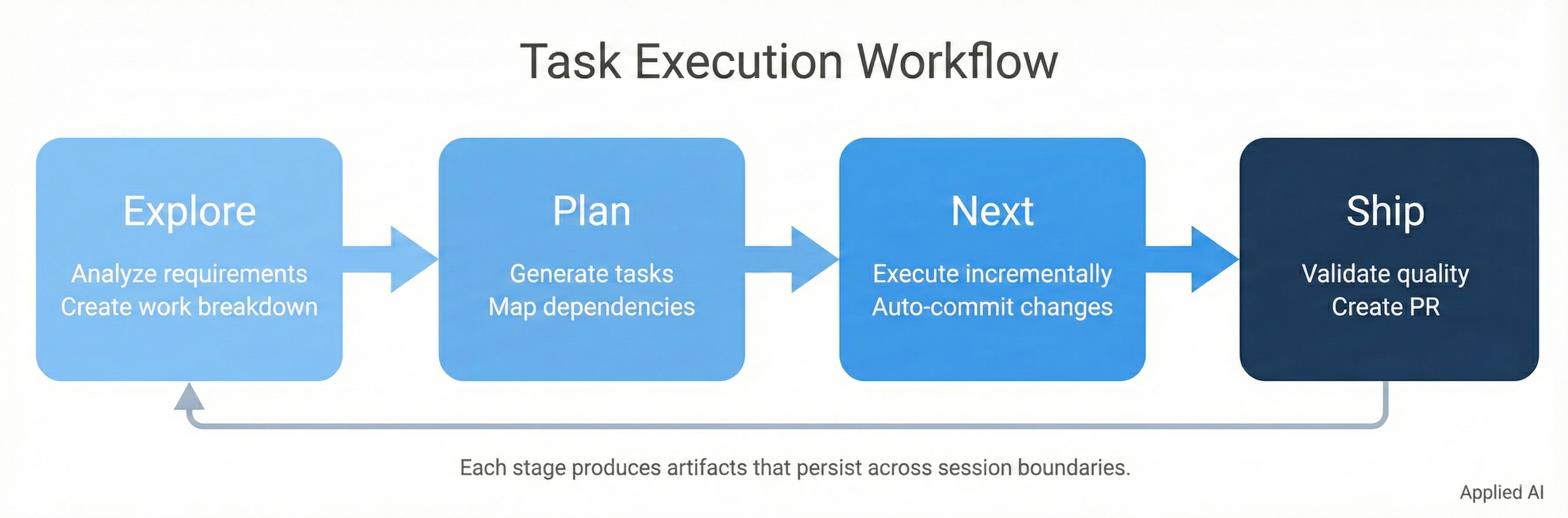
explore→plan→next→shippattern - Memory persistence: Cross-session context with automatic reflection
- Quality automation: Git safety, pre/post hooks, compliance auditing
- MCP integration: Optional tools (Serena, Sequential Thinking) with graceful degradation
- Domain adaptation: Examples showing how to extend Claude Code beyond software (quant, writing)
Reality Check: The Limits of Customization
Before diving into the toolkit, understand what you're working with.
The Instruction Training Boundary
Claude's behavior comes from two layers:
| Layer | What It Contains | Can You Change It? |
|---|---|---|
| Instruction training | Core personality, instincts, behavioral drivers | No—immutable |
| Customization | System prompts, CLAUDE.md, agent definitions | Yes—but limited |
No matter how clever your prompting, you're working with Claude's pre-trained personality. You can nudge it, structure it, guide it—but the underlying instincts remain.
Behaviors You'll Encounter
Sycophancy
The tendency to agree, validate, and praise. We developed elaborate anti-sycophancy protocols—they failed. Give contradictory prompts and you'll still get "You're absolutely right!"
Completion Bias
The urge to deliver results regardless of completeness. Claude will proceed without full specifications, filling gaps with assumptions rather than asking. It's trained to deliver, not to pause and question.
Action Over Reflection
Bias toward doing, not critically examining. Tunnel vision on declared goals. Big picture thinking and honest pushback require deliberate prompting.
Context Limitations
The precious context window determines what Claude can "see." Important details get forgotten, overlooked, or deprioritized. Specify too much and things get lost; too little and Claude fills gaps incorrectly.
What This Means for You
Thorough inspection is non-negotiable. Claude can make mistakes in every respect. Never assume output matches expectations—everything requires review, especially things that look correct.
Proper testing is essential. Validate behavior, not just structure. Test edge cases Claude may not have considered. Don't trust "it should work"—verify it does.
The toolkit helps, but doesn't eliminate these behaviors. We provide structure, workflows, and guardrails. Claude's base personality operates within that structure—sometimes it will frustrate you because it just wants to deliver.
Why We're Honest About This
We removed dubious metrics from this toolkit ("80% token reduction," "zero hallucinations") because they weren't validated—and overclaiming doesn't help anyone.
Claude Code is genuinely powerful:
- Amazing at navigating complex codebases
- Excellent at using tools to solve problems
- Incredibly convenient in the terminal environment
But it has real limitations you'll encounter repeatedly. This toolkit provides patterns for working with those constraints rather than pretending they don't exist.
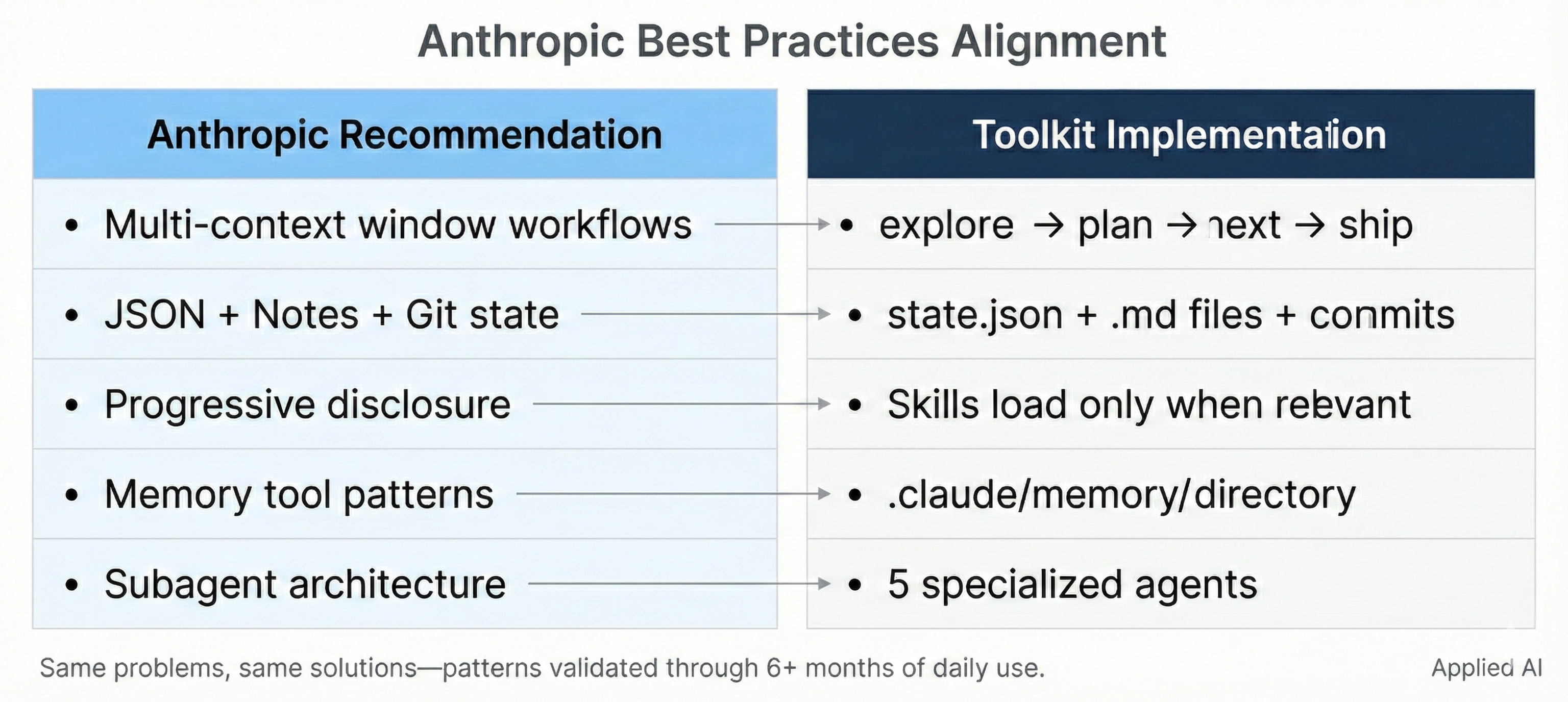
Anthropic Best Practices Alignment
This toolkit implements patterns and recommendations from Anthropic's official Claude Code documentation. It represents "what Anthropic says you should be doing, here implemented."
Multi-Context Window Workflows
Anthropic Recommendation (Claude 4 Best Practices):
"For complex, multi-step projects, we recommend starting with a first context window devoted to designing a structured representation of the project—tests, code stubs, documentation—that can be passed into subsequent context windows... Claude is adept at working across context window resets as long as clear instructions and todo lists are provided."
Toolkit Implementation:
/workflow:explore→/workflow:plan→/workflow:next→/workflow:shipworkflowstate.jsontracks task status across sessions (equivalent to Anthropic'stests.json)/transition:handoff+/transition:continuefor explicit context window transitions- TodoWrite integration for progress tracking across resets
State Tracking with JSON + Unstructured Notes + Git
Anthropic Recommendation:
"JSON provides structured data about what still needs to be done... Unstructured progress notes can be easier for Claude to incrementally update... Git checkpoints let Claude 'save progress' so it has a safe state to roll back to."
Toolkit Implementation:
- JSON:
state.json(task tracking),metadata.json(work unit metadata) - Unstructured:
exploration.md(analysis notes),implementation-plan.md(task breakdown) - Git checkpoints: Automatic commits after each
/workflow:nexttask completion
Progressive Disclosure Pattern
Anthropic Recommendation (Agent Skills):
"Metadata Layer: Skill name and description are pre-loaded... Core Documentation: The full SKILL.md content loads when Claude determines relevance... Reference Materials: Additional linked files load only as needed."
Toolkit Implementation:
- Skills (
skills/) use Anthropic's exact 3-layer disclosure pattern - Plugins load command metadata first, full instructions only when invoked
- Memory (
/memory:*) stores context for retrieval, not constant presence - Result: 70%+ token savings vs. loading everything upfront
Model-Invoked vs User-Invoked Actions
Anthropic Recommendation:
"Skills are model-invoked—Claude autonomously decides when to use them based on your request and the Skill's description. This is different from slash commands, which are user-invoked."
Toolkit Implementation:
- Skills (
skills/): Model-invoked, Claude loads when domain-relevant (RAG, Docker, SQL, etc.) - Commands (
commands/): User-invoked via/commandsyntax - Agents (
agents/): Claude-selected via Task tool based on task complexity - Clear separation between automatic (skills) and explicit (commands) invocation
Memory Tool Patterns
Anthropic Recommendation (Memory Tool Beta):
"ALWAYS VIEW YOUR MEMORY DIRECTORY BEFORE DOING ANYTHING ELSE... Record status/progress/thoughts in your memory. ASSUME INTERRUPTION: Your context window might be reset at any moment."
Toolkit Implementation:
.claude/memory/directory for persistent project knowledge/memory:indexcreates persistent project understanding/memory:memory-reviewdisplays current memory state/transition:handoffsaves critical context before session boundaries- Memory philosophy: Write down key decisions, discard outdated information
Quality Gates and Hooks
Anthropic Recommendation:
"Use pre-commit hooks to enforce code quality standards."
Toolkit Implementation:
git-safe-commitwrapper blocks--no-verify(no bypassing quality checks)hooks/directory for event handlers (pre/post tool use)- Example
ruff-check-hook.shdemonstrates actionable feedback patterns /system:auditvalidates framework compliance
Subagent Architecture
Anthropic Recommendation (Subagents):
"Use subagents for complex tasks that benefit from specialized focus... Each agent has its own context window, custom prompt, and can have restricted tool access."
Toolkit Implementation:
- 5 specialized agents:
architect,test-engineer,code-reviewer,auditor,reasoning-specialist - Agents invoked via Claude Code's native Task tool
- Each agent has focused responsibility and appropriate tool permissions
- Pattern: Match agent specialization to task complexity
Graceful Degradation
Anthropic Recommendation (implicit in MCP documentation):
"All features should work without MCP tools, enhanced when available."
Toolkit Implementation:
- Every command works without MCP servers
- MCP enhances but never required for core functionality
- Commands auto-detect MCP availability and adapt
- Clear documentation of MCP benefits vs. baseline behavior
Why This Alignment Matters
This toolkit evolved through 6+ months of daily Claude Code use, facing the same pain points that Anthropic has been addressing in their platform improvements. Context limits, session boundaries, state persistence, quality degradation—these challenges are inherent to working with LLMs in development workflows.
It's no surprise that our solutions align with Anthropic's recommendations: we're solving the same problems. The toolkit represents practical responses to real stumbling blocks, which naturally mirror the priorities Anthropic has set for Claude Code itself.
This alignment validates that the patterns work—not because we followed a checklist, but because intensive daily use surfaces the same needs that drive platform evolution.
Architecture: Six Plugins for Complete Workflows
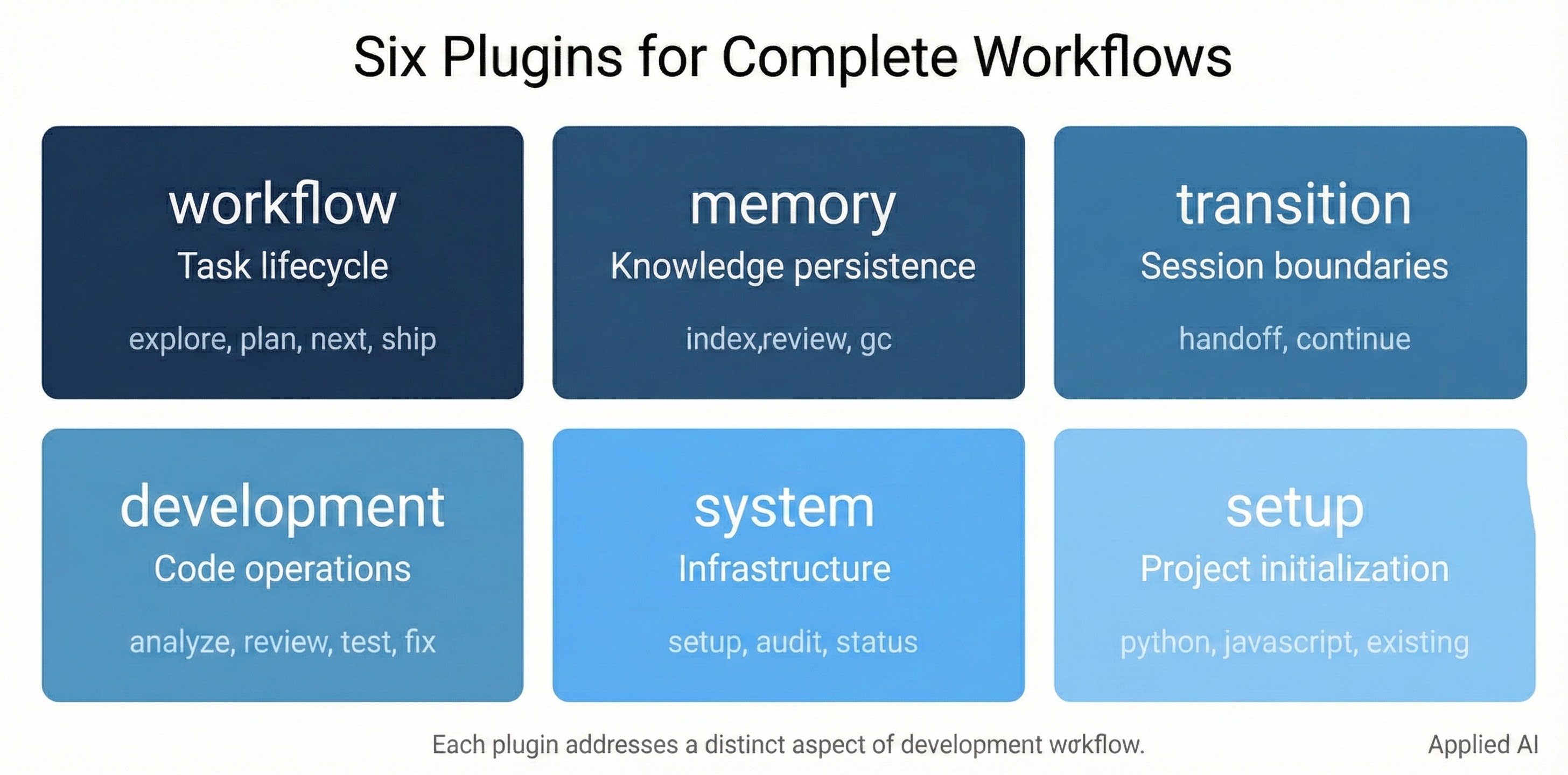
The toolkit is organized into six plugins, each addressing a distinct aspect of Claude Code development:
| Plugin | Purpose | Anthropic Pattern |
|---|---|---|
| workflow | Task execution lifecycle | Multi-context window workflows |
| memory | Persistent knowledge | Memory tool patterns |
| transition | Session boundaries | Context window handoffs |
| development | Code operations | Subagent architecture |
| system | Infrastructure | Quality gates & hooks |
| setup | Project initialization | Progressive configuration |
Why These Six Plugins?
Workflow (/workflow:*) - The task execution lifecycle
- Implements Anthropic's recommendation for "structured representation of the project"
- Commands:
explore→plan→next→ship+work,spike - State tracked in
state.json, work breakdown inimplementation-plan.md
Memory (/memory:*) - Persistent project knowledge
- Implements Anthropic's Memory Tool pattern: "ALWAYS VIEW YOUR MEMORY DIRECTORY BEFORE DOING ANYTHING ELSE"
- Commands:
index,memory-update,memory-review,memory-gc,performance - Knowledge persisted in
.claude/memory/directory
Transition (/transition:*) - Context window boundaries
- Implements Anthropic's guidance: "Claude is adept at working across context window resets as long as clear instructions and todo lists are provided"
- Commands:
handoff,continue - State preserved in
.claude/transitions/with timestamped handoff documents
Development (/development:*) - Code operations with specialized agents
- Implements Anthropic's subagent architecture: "specialized focus... restricted tool access"
- Commands:
analyze,review,test,fix,git,docs,prepare-review - Agents:
architect,test-engineer,code-reviewer
System (/system:*) - Infrastructure and quality
- Implements Anthropic's quality gates: "pre-commit hooks to enforce code quality"
- Commands:
setup,status,audit,cleanup - Agents:
auditor,reasoning-specialist
Setup (/setup:*) - Project initialization
- Implements progressive configuration for different project types
- Commands:
setup:python,setup:javascript,setup:existing,setup:user,setup:statusline - Auto-detects project type and generates appropriate configuration
Directory Structure
claude-code-toolkit/
├── commands/              # Global commands (install to ~/.claude/commands/)
│   └── setup-toolkit.md   # Bootstrap command for new projects
├── plugins/               # 6 plugins (28 commands)
│   ├── workflow/          # Task lifecycle (6 commands)
│   ├── memory/            # Knowledge persistence (5 commands)
│   ├── transition/        # Session boundaries (2 commands)
│   ├── development/       # Code operations (7 commands, 3 agents)
│   ├── system/            # Infrastructure (4 commands, 2 agents)
│   └── setup/             # Project initialization (5 commands)
├── examples/              # Domain adaptation examples
│   ├── quant/             # Quantitative finance (3 validators)
│   └── writing/           # Professional writing (3 skills)
├── skills/                # Domain expertise (6 skills)
│   ├── general-dev/       # Docker, SQL, API auth
│   ├── rag-implementation/
│   ├── huggingface-transformers/
│   └── llm-evaluation/
├── hooks/                 # Quality gates (1 example)
│   └── ruff-check-hook.sh
└── docs/                  # Integration guides
    └── mcp-setup.md
Stateless Execution Model
All commands are stateless markdown files that execute in the project directory:
- No persistent processes or background services
- All state stored in
.claude/directory (JSON/Markdown) - Git serves as the state machine for work tracking
- Commands can be interrupted and resumed safely
File-Based State Management:
.claude/
├── work/
│   └── current/
│       └── [work-unit]/
│           ├── state.json              # Task tracking
│           ├── exploration.md          # Analysis
│           └── implementation-plan.md  # Task breakdown
├── memory/
│   ├── project-context.md              # Project knowledge
│   └── lessons-learned.md              # Accumulated insights
└── settings.json                       # Configuration
MCP Integration Architecture
Graceful Degradation Philosophy: All functionality works without MCP, enhanced when available.
Supported MCP Servers (see docs/mcp-setup.md):
| MCP Server | Purpose | Status |
|---|---|---|
| Sequential Thinking | Structured reasoning for complex analysis | Built-in (no setup) |
| Serena | Semantic code understanding | Optional (per-project) |
| Context7 | Documentation access | Optional (API key) |
| Chrome DevTools | Browser automation | Optional |
| FireCrawl | Web research | Optional (API key) |
Note: MCP tools have trade-offs. Serena helps with code operations but requires indexing overhead. Token efficiency varies by task and we haven't rigorously benchmarked specific percentages.
Commands auto-detect MCP availability and fall back to standard operations when unavailable.
Installation
Prerequisites
- Claude Code 2.0+ (installation)
- Git 2.0+
- jq (JSON processing)
- Node.js v20+ or v22+ (for MCP servers, optional)
- mdtoken (for contributors -
pip install mdtoken)
Quick Start
# Clone repository
git clone https://github.com/applied-artificial-intelligence/claude-code-toolkit.git
cd claude-code-toolkit

# Install the setup command globally (one-time)
cp commands/setup-toolkit.md ~/.claude/commands/

# Now in ANY project, start Claude Code and run:
claude
/setup-toolkit
The /setup-toolkit command works in any project directory—before any plugins are installed. It:
- Detects your project type (Python, JavaScript, web, etc.)
- Asks which plugins and MCP servers you want
- Creates
.claude/settings.jsonwith proper configuration - Sets up the plugin marketplace connection
Manual Configuration
Add to project's .claude/settings.json:
{
  "extraKnownMarketplaces": {
    "local": {
      "source": {
        "source": "directory",
        "path": "/path/to/claude-code-toolkit/plugins"
      }
    }
  },
  "enabledPlugins": {
    "system@local": true,
    "workflow@local": true,
    "development@local": true,
    "transition@local": true,
    "memory@local": true,
    "setup@local": true
  }
}
Git Safe Commit (Recommended)
Install the git safe-commit wrapper to enforce quality checks:
./scripts/install-git-safe-commit.sh
This installs git-safe-commit to ~/.local/bin/, which:
- Blocks
--no-verifyflag to prevent bypassing quality checks - Runs pre-commit hooks automatically
- Ensures all commits pass linting, formatting, and tests
Usage:
git safe-commit -m "feat: your commit message"
Session History Search (NEW in v1.1.0)
Claude Code already captures complete session history in ~/.claude/projects/. The toolkit includes tools to query this data for questions like:
- "How did we implement X last time?"
- "What happened about Y in the last 2 days?"
- "Didn't we already do this?"
Quick start:
# Build the search index (one-time, then incremental)
python3 scripts/session-db.py index

# Search across all projects
python3 scripts/session-db.py search "authentication"

# Filter by project and time
python3 scripts/session-db.py search "backtest" --project ml4t --days 7

# See recent activity timeline
python3 scripts/session-db.py timeline --days 2

# Find file changes
python3 scripts/session-db.py files "cli_interface" --days 7
What it indexes:
- All tool calls (Bash commands, file edits, reads, searches)
- Timestamps for temporal queries
- Cross-project search capability
Performance: Indexes 2000+ sessions (90K+ actions) in ~3 seconds. Queries return in <30ms.
See scripts/README.md for full documentation.
MCP Setup (Optional)
For enhanced functionality, install MCP servers:
# Install Serena (semantic code understanding)
npm install -g @context7/serena-mcp

# Install Context7 (documentation access)
npm install -g @context7/context7-mcp

# Install Chrome DevTools (browser automation)
npm install -g @modelcontextprotocol/server-puppeteer

# Install FireCrawl (web research)
npm install -g @firecrawl/mcp-server
See docs/mcp-setup.md for complete MCP integration guide.
Usage
Basic Workflow Pattern
The framework follows an explore → plan → next → ship pattern:
Relationship to Claude's Built-in Plan Mode: Claude Code includes a built-in
EnterPlanModethat creates plans in~/.claude/plans/with auto-generated names (likezany-cooking-wombat). Our workflow complements this:
Feature Built-in Plan Mode Our Workflow Storage Global ~/.claude/plans/Project-local .claude/work/Naming Auto-generated Date-based ( 2025-11-27_01_feature)Execution Implements entire plan at once Incremental via /nextState tracking None state.jsonwith task progressSession resume Cannot resume mid-plan Work units persist across handoffs Best practice: Use Claude's built-in plan mode during
/exploreor/planfor enhanced reasoning, while our workflow handles organization and incremental execution. They work together.
# 1. Explore requirements and codebase
/workflow:explore "add user authentication with JWT"

# Creates work unit in .claude/work/current/
# Analyzes requirements, identifies files to modify
# Documents dependencies and integration points

# 2. Create implementation plan
/workflow:plan

# Generates task breakdown with dependencies
# Stores in state.json for execution tracking

# 3. Execute tasks sequentially
/workflow:next

# Selects next available task (dependency-aware)
# Executes task with quality checks
# Auto-commits changes with descriptive message

# Repeat /next until all tasks complete

# 4. Deliver completed work
/workflow:ship

# Validates quality gates
# Creates pull request (if configured)
# Archives work unit

Command Reference by Namespace
Workflow - Task execution lifecycle (6 commands)
| Command | Purpose |
|---|---|
/workflow:explore |
Analyze requirements, create work breakdown |
/workflow:plan |
Generate implementation plan with dependencies |
/workflow:next |
Execute next available task |
/workflow:ship |
Deliver completed work (PR, commit, deploy) |
/workflow:work |
Manage work units and parallel streams |
/workflow:spike |
Time-boxed exploration in isolated branch |
Memory - Persistent knowledge (5 commands)
| Command | Purpose |
|---|---|
/memory:index |
Create persistent project understanding |
/memory:memory-update |
Update memory with new insights |
/memory:memory-review |
Display current memory state |
/memory:memory-gc |
Garbage collect stale entries |
/memory:performance |
View token usage and metrics |
Transition - Session boundaries (2 commands)
| Command | Purpose |
|---|---|
/transition:handoff |
Create session handoff with context analysis |
/transition:continue |
Resume from previous session handoff |
Development - Code operations (7 commands)
| Command | Purpose |
|---|---|
/development:analyze |
Deep codebase analysis |
/development:review |
Code quality and security review |
/development:test |
Test creation and TDD workflow |
/development:fix |
Automated debugging and fixes |
/development:git |
Git operations (commit, PR, issues) |
/development:docs |
Documentation operations |
/development:prepare-review |
Prepare code for external review |
System - Infrastructure (4 commands)
| Command | Purpose |
|---|---|
/system:setup |
Project initialization (auto-detects type) |
/system:status |
Project and system health check |
/system:audit |
Framework compliance validation |
/system:cleanup |
Remove generated clutter |
Setup - Project initialization (5 commands)
| Command | Purpose |
|---|---|
/setup:python |
Python project configuration |
/setup:javascript |
JavaScript/TypeScript configuration |
/setup:existing |
Configure existing project |
/setup:user |
User-level global settings |
/setup:statusline |
Status line customization |
Note: For semantic code understanding, use Serena MCP directly. See docs/mcp-setup.md for configuration.
Specialized Agents
The framework includes 5 specialized agents that Claude Code can invoke via its native Task tool. Simply ask Claude to use an agent by name:
Available Agents:
| Agent | Location | Purpose |
|---|---|---|
architect |
development | System design and architectural decisions |
test-engineer |
development | Test creation and coverage analysis |
code-reviewer |
development | Code quality and security audit |
auditor |
system | Infrastructure verification and compliance |
reasoning-specialist |
system | Complex analysis with structured reasoning |
Usage - just ask Claude directly:
"Use the architect agent to design the authentication system"
"Have the code-reviewer agent review this PR"
"Use the test-engineer agent to create tests for the user service"
Claude Code's Task tool will invoke the appropriate agent. No wrapper commands needed.
Domain Skills (6 Skills)
Skills use progressive disclosure - they auto-load only when relevant to your task, providing deep domain expertise without polluting context.
General Development Skills (3 skills)
Docker Optimization (docker-optimization)
- Multi-stage builds for 85% size reduction (800MB → 120MB)
- Layer caching strategies for 50-80% faster builds
- Security hardening (non-root users, secrets management)
- Triggers: "Docker", "Dockerfile", "container size", "image optimization"
SQL Optimization (sql-optimization)
- EXPLAIN plan analysis across Postgres/MySQL/SQLite
- Index strategies (single, composite, partial, covering)
- N+1 query elimination and pagination optimization
- Triggers: "slow query", "EXPLAIN", "database performance", "SQL optimization"
API Authentication (api-authentication)
- JWT, OAuth 2.0, API keys, session-based auth
- Decision matrix for choosing auth strategy
- Security best practices and vulnerability prevention
- Triggers: "authentication", "JWT", "OAuth", "API security", "login"
ML/AI Skills (3 skills)
RAG Implementation (rag-implementation)
- Vector database selection (Qdrant, Pinecone, Chroma, Weaviate)
- Chunking strategies and embedding models
- Retrieval optimization and hybrid search
- Triggers: "RAG", "vector database", "semantic search", "document retrieval"
Hugging Face Transformers (huggingface-transformers)
- Model loading and tokenization patterns
- Fine-tuning workflows (BERT, GPT, T5, LLaMA)
- Inference optimization (quantization, ONNX)
- Triggers: "transformers", "BERT", "fine-tune", "tokenizer", "Hugging Face"
LLM Evaluation (llm-evaluation)
- Prompt testing and validation
- Hallucination detection
- Benchmark creation and A/B testing
- Triggers: "LLM testing", "prompt evaluation", "hallucination", "LLM metrics"
How Skills Work
Skills activate automatically when your query matches their domain:
# Example 1: Docker skill auto-loads
"My Docker image is 800MB, how do I optimize it?"
> The "docker-optimization" skill is loading

# Example 2: SQL skill auto-loads
"This query takes 3 seconds, help me optimize it"
> The "sql-optimization" skill is loading

# Example 3: RAG skill auto-loads
"What's the best vector database for production RAG?"
> The "rag-implementation" skill is loading
Benefits:
- Load knowledge only when needed (no context pollution)
- 10-20KB of focused expertise per skill
- Works with progressive disclosure for optimal token efficiency
Domain Adaptation Examples
Claude Code isn't just for software. The examples/ directory shows how to extend Claude Code to other domains.
The Knowledge Encoding Problem: When adapting to a new domain, where do you put domain knowledge?
| Level | What Goes Here | Example |
|---|---|---|
| Agent Definition | General awareness | "Look-ahead bias is a problem" |
| Skills/Validators | Specific checkpoints | "Check: scaler.fit(X) BEFORE train_test_split" |
| Commands | Workflow steps | explore → plan → next → ship |
The insight: General awareness isn't enough. You need specific, actionable checkpoints.
Included Examples:
Quantitative Finance (examples/quant/)
- 3 validators with 21 specific patterns
quant-ml-validator: Look-ahead bias, survivorship bias, wrong CVquant-backtest-validator: Missing costs, unrealistic fillsquant-risk-validator: No kill switch, unlimited leverage- Each pattern: detection regex + quantified impact + specific fix
Professional Writing (examples/writing/)
- 3 framework skills
pyramid-principle: Barbara Minto's answer-first structurescqa-framework: Situation-Complication-Question-Answer narrativeplain-language: Federal plain language guidelines
See examples/README.md for full documentation.
Example Hook
The framework includes an example hook demonstrating the Claude Code hooks system:
Code Quality (ruff-check-hook.sh)
- Lints Python code for quality issues
- Catches unused imports, undefined names, syntax errors
- Claude sees the lint output and can act on it immediately
- Demo: Write code with unused import, see immediate linting feedback
Why this hook is useful: Unlike auto-formatting hooks (where Claude doesn't see the result), linting hooks provide actionable feedback that Claude can respond to in the same session.
Installation:
# Copy hook to ~/.claude/hooks/
mkdir -p ~/.claude/hooks
cp hooks/ruff-check-hook.sh ~/.claude/hooks/
chmod +x ~/.claude/hooks/ruff-check-hook.sh

# Configure in project's .claude/settings.json
{
  "hooks": {
    "PostToolUse": [
      {
        "matcher": "Write|Edit",
        "hooks": [
          {"type": "command", "command": "~/.claude/hooks/ruff-check-hook.sh"}
        ]
      }
    ]
  }
}
Creating Your Own Hooks: See hooks/README.md for the hook data format and design tips
Workflow Examples
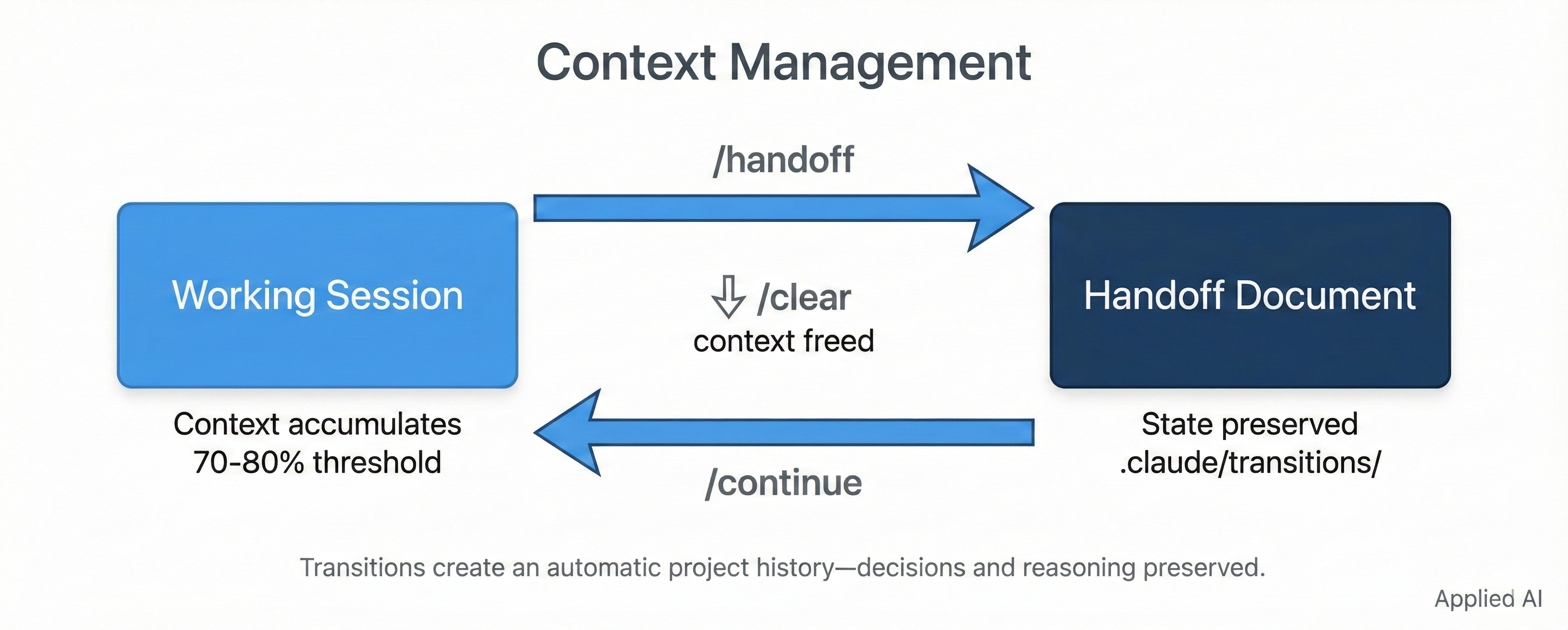
Context Management: /handoff → /continue
Scenario: Managing context across sessions to prevent quality degradation.
The Hidden Value of Transitions: Beyond session continuity, transitions create an automatic project history. Every
/handoffcaptures decisions, reasoning, and context—creating an audit trail far more valuable than commit messages. Over time,.claude/transitions/becomes a chronological record of why things were done, not just what changed.
# At 70% perceived context usage (~85% actual)
/handoff

# Creates .claude/transitions/2025-11-25/143052.md with:
# - Session focus and active work state
# - Recent decisions and outstanding items
# - Todo list state and next steps

# After /clear, resume seamlessly:
/continue

# Automatically loads latest handoff, restores context
Key features:
- Context analysis at 70% perceived usage (~85% actual)
- Active work state preservation
- Recent decisions and outstanding items
- Clean continuation after
/clear - Audit trail: Captures thinking, not just changes

Complete Workflow: /explore → /plan → /next
Scenario: Systematic task execution from requirements to implementation.
# 1. Analyze requirements
/workflow:explore "add user authentication with JWT"
# Creates work unit, analyzes codebase, identifies dependencies

# 2. Create implementation plan
/workflow:plan
# Generates task breakdown with dependencies in state.json

# 3. Execute tasks sequentially
/workflow:next
# Executes next available task, auto-commits on completion

# 4. Deliver completed work
/workflow:ship
# Validates quality gates, creates PR if configured
Key features:
- Requirements analysis with
/explore - Task breakdown with
/plan - Incremental execution with
/next - Progress tracking and state management

Code Analysis: /analyze and /review
Scenario: Deep codebase understanding and quality checks.
# Analyze project structure
/development:analyze
# Produces structural analysis, identifies patterns, documents architecture

# Review code quality
/development:review src/auth/
# Checks code quality, security, and provides actionable recommendations
Key features:
- Structural analysis with pattern identification
- Test coverage metrics
- Code quality review with actionable recommendations
- Security and performance assessment
Technical Details
State Management
Work Unit Structure:
{
  "work_unit_id": "003_auth_feature",
  "status": "implementing",
  "current_phase": "2",
  "phases": [
    {"id": "1", "name": "Analysis", "status": "completed"},
    {"id": "2", "name": "Implementation", "status": "in_progress"}
  ],
  "tasks": [
    {
      "id": "TASK-001",
      "title": "Create User model",
      "status": "completed",
      "dependencies": [],
      "actual_hours": 0.5
    }
  ]
}
State persisted in .claude/work/current/[work-unit]/state.json
Token Optimization
Progressive Disclosure Pattern:
- Startup: Load minimal metadata (~2KB)
- Task Analysis: Load relevant commands/agents (~10KB)
- Execution: Load detailed patterns only when needed (~5KB)
Philosophy: Load context incrementally rather than all at once. Actual savings vary by task.
Quality Gates
Automatic Quality Checks:
- Pre-execution: Dependency verification, environment checks
- During execution: API verification (via Serena), linting, tests
- Post-execution: Acceptance criteria validation, integration tests
- Commit time: Conventional commit format, attribution
Git Safety
Protected Operations:
- No
git push --forceto main/master - No
git commit --amendof other developers' commits - Pre-commit hook validation
- Automatic commit attribution
Commit Format:
feat: Complete TASK-XXX - Add JWT authentication

Implements JWT-based authentication with:
- Token generation and validation
- Refresh token support
- Role-based access control

🤖 Generated with [Claude Code](https://claude.com/claude-code)

Co-Authored-By: Claude <[email protected]>
Configuration
Project Settings
Configure in .claude/settings.json:
{
  "enabledPlugins": {
    "system@local": true,
    "workflow@local": true,
    "development@local": true,
    "transition@local": true,
    "memory@local": true,
    "setup@local": true
  },
  "mcpServers": {
    "serena": {
      "command": "npx",
      "args": ["-y", "@context7/serena-mcp"]
    },
    "context7": {
      "command": "npx",
      "args": ["-y", "@context7/context7-mcp"],
      "env": {
        "CONTEXT7_API_KEY": "${CONTEXT7_API_KEY}"
      }
    }
  }
}
User Configuration
Global user settings in ~/.claude/CLAUDE.md:
# My Development Preferences

## Git Preferences
- Always use conventional commit format
- Include issue numbers in commit messages
- Create draft PRs for WIP features

## Testing Preferences
- Run tests before committing
- Maintain >80% code coverage
- Use pytest for Python, Jest for JavaScript
Documentation
Getting Started
- 5-Minute Demo - Quick-start demonstration
- MCP Setup Guide - MCP server integration
Plugin Documentation
Each plugin has detailed README:
- workflow plugin - Task execution lifecycle
- memory plugin - Persistent knowledge
- transition plugin - Session boundaries
- development plugin - Code operations
- system plugin - Infrastructure & quality
- setup plugin - Project initialization
Architecture Documentation
- Design Principles: Stateless execution, file-based persistence, MCP integration
- Framework Constraints: What the system can and cannot do
- Extension Patterns: How to create custom plugins
Development
Building Custom Plugins
Plugin Structure:
my-plugin/
├── .claude-plugin/
│   └── plugin.json           # Manifest (required)
├── commands/                 # Slash commands (optional)
│   └── my-command.md
├── agents/                   # Specialized agents (optional)
│   └── my-agent.md
└── hooks/                    # Event handlers (optional)
    └── hooks.json
Minimal plugin.json:
{
  "name": "my-plugin",
  "version": "1.0.0",
  "description": "My custom plugin",
  "commands": [
    {
      "name": "my-command",
      "description": "Does something useful",
      "file": "commands/my-command.md"
    }
  ]
}
Development Setup
# Install pre-commit hooks
pip install mdtoken pre-commit
pre-commit install
Token Limit Enforcement with mdtoken
This toolkit uses mdtoken—a companion tool we built to prevent markdown files from growing unbounded.
The Problem: Plugin commands, memory files, and documentation grow over time. When they exceed context limits, Claude silently loses information or truncates content.
The Solution: mdtoken enforces token limits as a pre-commit hook. Commits fail fast if any markdown file exceeds its configured limit.
# .mdtokenrc.yaml (included in this repo)
default_limit: 3500
limits:
  "README.md": 25000
  "plugins/**/commands/*.md": 3500
  "plugins/**/agents/*.md": 4000
Installation:
pip install mdtoken
Usage:
mdtoken check              # Check all markdown files
mdtoken check README.md    # Check specific file
See mdtoken repo for full documentation.
Contributing
See CONTRIBUTING.md for:
- Code style guidelines
- Testing requirements
- Pull request process
- Code of conduct
Performance
Time to First Value
- Project setup: <2 minutes
- First workflow execution: <5 minutes
- MCP server setup: <15 minutes (optional)
Note: Token efficiency varies by task. MCP tools like Serena can help with code operations but have their own overhead (indexing). We haven't rigorously benchmarked specific percentages.
Optimization Tips
Maximize Serena Benefits:
- Activate per-project for code-heavy work
- Keep index updated after major changes
- Use for all file reading and symbol lookup
Efficient Memory Management:
- Archive completed work units regularly
- Use
.claude/memory/for project-specific knowledge - Run
/memory:memory-gcto clean stale entries
Token Conservation:
- Use progressive disclosure (load context incrementally)
- Leverage MCP tools for documentation lookup
- Prefer
/workflow:spikefor exploratory work (isolated, time-boxed)
Troubleshooting
Common Issues
Q: Commands not found
A: Verify plugins enabled in .claude/settings.json:
{
  "enabledPlugins": {
    "system@local": true,
    "workflow@local": true,
    "development@local": true,
    "transition@local": true,
    "memory@local": true,
    "setup@local": true
  }
}
Q: MCP tools not working
A: MCP servers are optional. Commands work without them but with reduced features. See docs/mcp-setup.md for installation.
Q: Serena not activating
A: Serena MCP requires per-project setup. See docs/mcp-setup.md for configuration. Use Serena tools directly:
mcp__serena__activate_project()
mcp__serena__find_symbol()
Q: Tasks not executing
A: Check for dependency blockers:
/workflow:next --status # Shows task dependencies
Getting Help
- Documentation: Check plugin README files for detailed command usage
- System Health: Run
/system:statusto verify framework setup - Compliance: Run
/system:auditto check for issues - GitHub Issues: https://github.com/applied-artificial-intelligence/claude-code-toolkit/issues
Versioning
Current Version: 1.1.0
Semantic Versioning:
- Major (1.x.x): Breaking changes to plugin API or command structure
- Minor (x.1.x): New plugins, commands, or backward-compatible features
- Patch (x.x.1): Bug fixes, documentation updates
Compatibility: Generated work units and state files are forward-compatible within major versions.
Changelog
v1.1.0 (2025-01-13)
- Token efficiency: Development commands compressed 79% (29KB → 6KB)
- New skill:
project-setupin system plugin for on-demand setup (~97% token savings vs always-loaded) - Documentation: Added "Relationship to Claude's Built-in Plan Mode" explaining how workflow complements native features
- Documentation: Added "The Value of Transitions" explaining long-term benefits of session handoffs
- Cleanup: Simplified transition/continue.md (removed bloat)
v1.0.0 (2024-12)
- Initial public release with 6 core plugins, 28 commands, 5 agents
License
MIT License
Copyright (c) 2025 Applied AI Consulting
Permission is hereby granted, free of charge, to any person obtaining a copy of this software and associated documentation files (the "Software"), to deal in the Software without restriction, including without limitation the rights to use, copy, modify, merge, publish, distribute, sublicense, and/or sell copies of the Software, and to permit persons to whom the Software is furnished to do so, subject to the following conditions:
The above copyright notice and this permission notice shall be included in all copies or substantial portions of the Software.
THE SOFTWARE IS PROVIDED "AS IS", WITHOUT WARRANTY OF ANY KIND, EXPRESS OR IMPLIED, INCLUDING BUT NOT LIMITED TO THE WARRANTIES OF MERCHANTABILITY, FITNESS FOR A PARTICULAR PURPOSE AND NONINFRINGEMENT. IN NO EVENT SHALL THE AUTHORS OR COPYRIGHT HOLDERS BE LIABLE FOR ANY CLAIM, DAMAGES OR OTHER LIABILITY, WHETHER IN AN ACTION OF CONTRACT, TORT OR OTHERWISE, ARISING FROM, OUT OF OR IN CONNECTION WITH THE SOFTWARE OR THE USE OR OTHER DEALINGS IN THE SOFTWARE.
Acknowledgments
Built with Claude Code by Anthropic.
Framework developed through 6+ months of production use across book authoring, quantitative research, and full-stack development projects.
References
Anthropic Official Documentation
- Claude 4 Best Practices: https://docs.anthropic.com/en/docs/build-with-claude/prompt-engineering/claude-4-best-practices
- Memory Tool (Beta): https://docs.anthropic.com/en/docs/agents-and-tools/tool-use/memory-tool
- Agent Skills Engineering Blog: https://www.anthropic.com/engineering/equipping-agents-for-the-real-world-with-agent-skills
- Claude Code Docs: https://code.claude.com/docs
Other Resources
- MCP Specification: https://modelcontextprotocol.io
- Plugin Development: See plugin README files for examples
- GitHub Repository: https://github.com/applied-artificial-intelligence/claude-code-toolkit
Yorumlar (0)
Yorum birakmak icin giris yap.
Yorum birakSonuc bulunamadi