cctop
Health Uyari
- License — License: Apache-2.0
- Description — Repository has a description
- Active repo — Last push 0 days ago
- Low visibility — Only 7 GitHub stars
Code Basarisiz
- rm -rf — Recursive force deletion command in .github/workflows/release.yml
- rm -rf — Recursive force deletion command in package.json
- process.env — Environment variable access in src/app.ts
Permissions Gecti
- Permissions — No dangerous permissions requested
Bu listing icin henuz AI raporu yok.
Live top-style monitor for Claude Code sessions
cctop
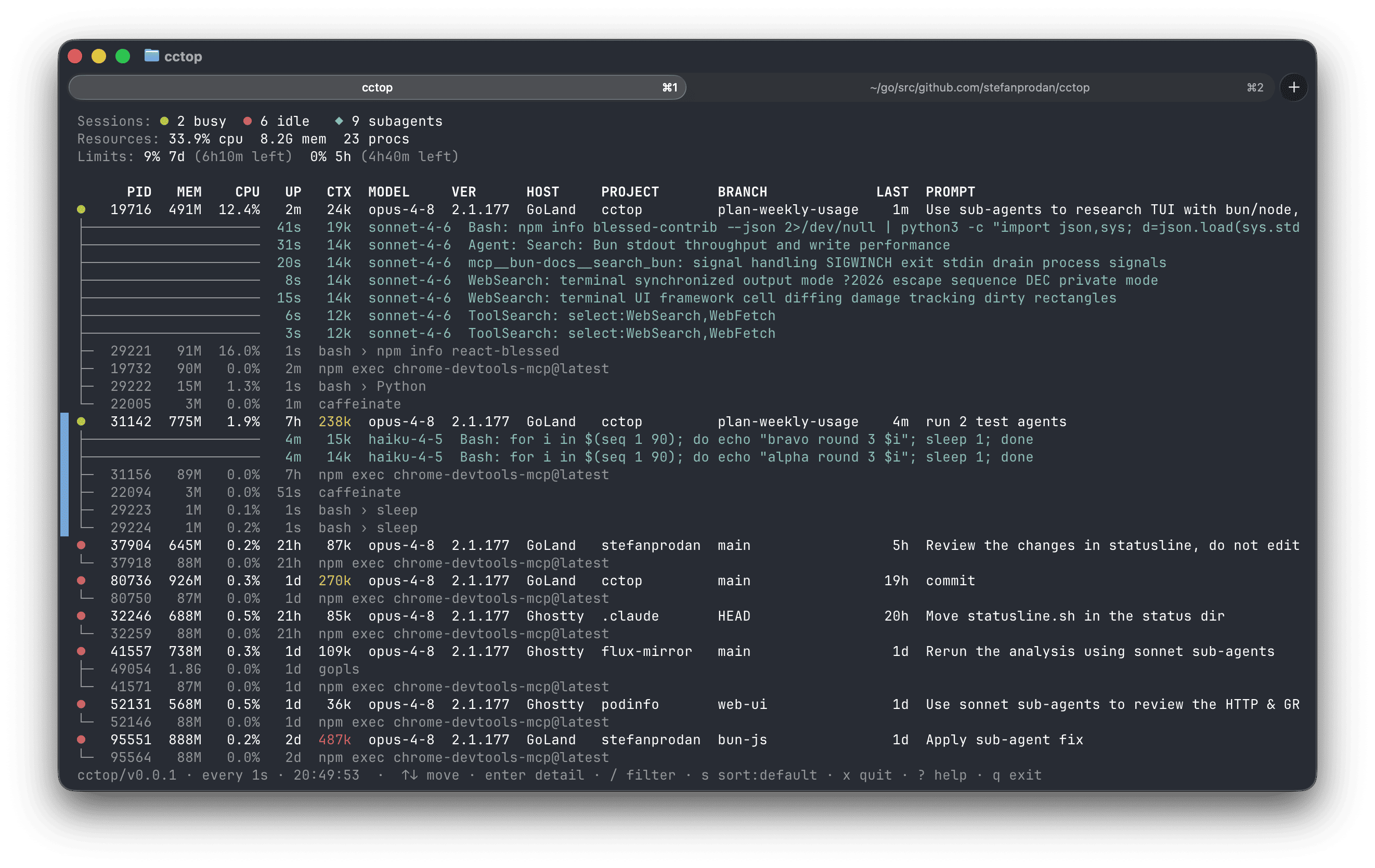
Interactive top-style monitor for Claude Code sessions. Know at a glance what
Claude is working on, how much context it has left, and which sessions are
waiting for input.
Features
- All your sessions at a glance — every running Claude Code session in one
table: process stats (PID, memory, CPU, uptime), busy/idle state, context
size, model, host app (terminal or IDE), project, git branch, and last prompt. - Sub-agent & process tree — live sub-agents (with their latest turn) and
each session's sub-processes, open and orphaned TCP ports. - Live TUI — navigate with the keyboard, open a per-session detail view, and
filter and sort on the fly; piped or run with--onceit prints a single frame. - Status at a glance — busy sessions are green, idle red; CPU and context
heat toward red as they climb; the selected session is marked with a blue bar. - Weekly usage limits (opt-in) — show your Claude subscription's 5h/7d
rate-limit usage in the summary line. - Quit a runaway session in place (
x→SIGTERM, with confirm), or
free ports held by a session's leftover dev server
(fin the detail view). - Read-only and local — the TUI reads only
~/.claudeand the process table,
spawns no processes. - Zero dependencies — a single Bun program with no npm packages;
it uses only the Bun runtime and OS built-ins.
Install
On macOS or Linux, install the standalone binary with Homebrew:
brew install stefanprodan/tap/cctop
Or install it as a script with Bun:
bun install -g github:stefanprodan/cctop#v0.3.0
Usage limits (opt-in)
To display the subscription's rate-limit usage, add the following to
your Claude Code status-line script:
input=$(cat)

# persist the account-wide 5h/7d rate limits
printf '%s' "$input" | cctop --capture-usage || true
With --capture-usage the rate limits stats are persisted to~/.claude/cctop/usage.json from which the cctop TUI reads.
See docs/usage-limits.md for more details.
Update
With Homebrew:
brew upgrade stefanprodan/tap/cctop
Or upgrade the scrip to the latest release with Bun:
bun install -g github:stefanprodan/cctop#v0.3.0
Uninstall
With Homebrew:
brew uninstall stefanprodan/tap/cctop
Or with Bun:
bun uninstall -g cctop
If you enabled usage limits, also remove the cctop --capture-usage line from
your Claude Code status-line script.
Usage
On an interactive terminal cctop runs as a live TUI (like top); when piped,
redirected, or run with --once it prints a single frame and exits.
Keys
While the TUI is running:
| Key | Action |
|---|---|
↑/k ↓/j |
move the selection |
PgUp/PgDn |
jump 10 rows |
g / G |
jump to top / bottom |
enter |
open the detail view for the selected session |
esc |
leave the detail view / close an overlay |
/ |
filter sessions (type, enter to apply) |
s |
cycle the sort column (default, cpu, mem, ctx, pid) |
x |
quit the selected session (SIGTERM, with confirm) |
f |
reclaim the detail view's orphan ports (SIGTERM, with confirm) |
? |
toggle the help overlay |
q / Ctrl-C |
quit cctop |
Options
cctop [filter] [options]

  filter                 only show sessions whose project, host, branch,
                         model, or session id contains this
  -w, --watch[=seconds]  set the refresh interval (default: 1s, min 0.25s)
  --once                 render once and exit (default when piped)
  --json                 print full session details as JSON
  -v, --version          show version
  -h, --help             show this help
Examples:
cctop flux         # start filtered to sessions matching "flux"
cctop --watch=0.5  # refresh twice a second
cctop --once       # single frame, then exit
cctop --json       # machine-readable snapshot
Contributing
cctop is open source and contributions are welcome — open an issue or send a
pull request on GitHub. See
docs/CONTRIBUTING.md to get set up.
License
Yorumlar (0)
Yorum birakmak icin giris yap.
Yorum birakSonuc bulunamadi