omnivue
Health Uyari
- License — License: MIT
- Description — Repository has a description
- Active repo — Last push 0 days ago
- Low visibility — Only 6 GitHub stars
Code Gecti
- Code scan — Scanned 12 files during light audit, no dangerous patterns found
Permissions Gecti
- Permissions — No dangerous permissions requested
Bu listing icin henuz AI raporu yok.
Omnivue is a 100% local multi-agent session manager for OpenCode, Copilot, Cursor, Pi, Claude Code, and Codex.
Omnivue
Multi-Agent Session Manager for OpenCode, Copilot, Cursor, Pi, Claude Code, and Codex.

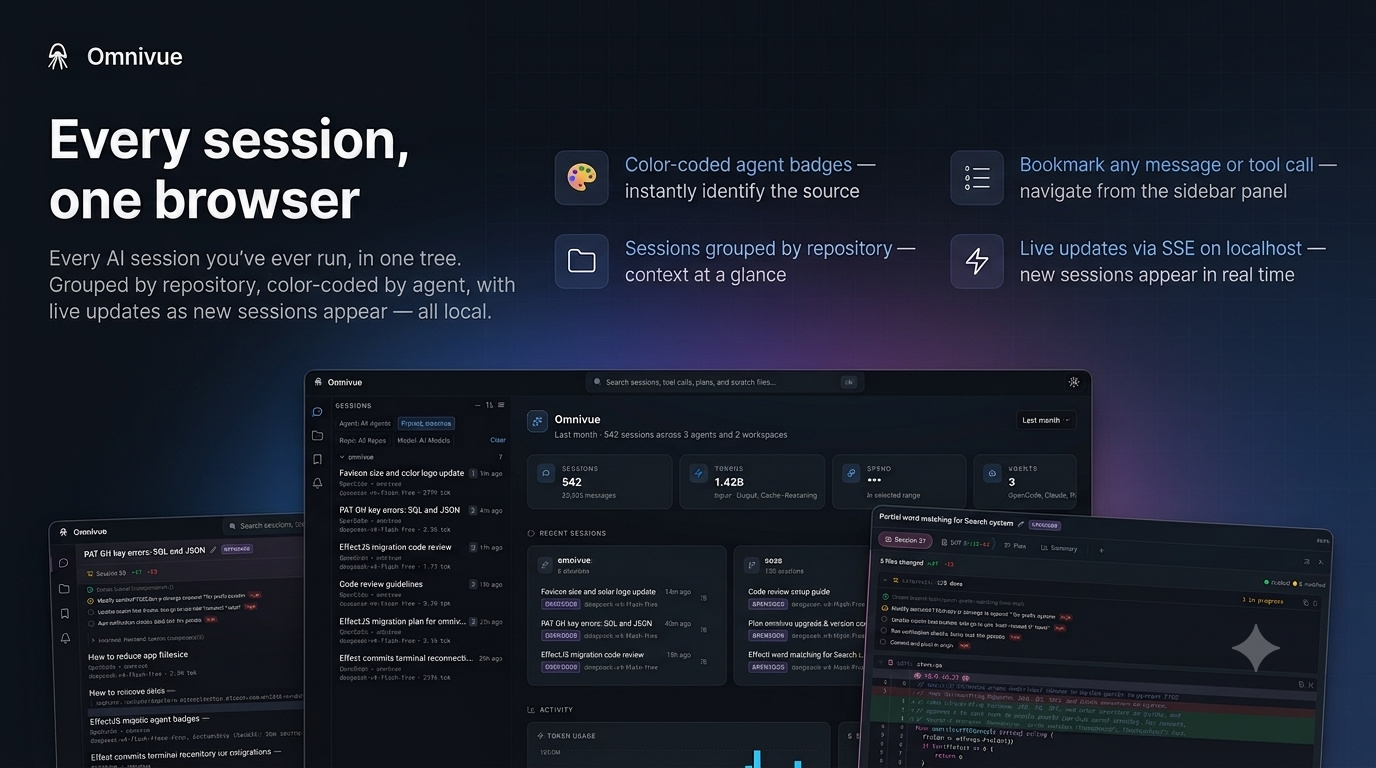
Omnivue is a 100% local multi-agent session manager for your AI coding sessions. It reads the session data already on your machine and presents it all in one place — conversation history, file diffs, implementation plans, and more.
Features
- Multi-agent support — OpenCode, Copilot, Cursor, Pi, Claude Code, and Codex out of the box
- Embedded terminal — In-browser PTY that runs the agent's resume command (xterm.js + WebSocket)
- Conversation viewer — Full message history with tool calls, reasoning, and step events
- File diffs — Unified diff view of every file change made during a session
- Plan tracking — Implementation plans and checkpoints with status indicators
- Live updates — Adaptive SSE-based polling (5s when active, 30s when idle) with notification events
- Full-text search — FTS5 index across all session content and tags, scoped or global
- Notifications — In-app toasts and OS notifications for new messages, questions, task completions, and status changes; configurable kinds, scope, quiet hours, and channels
- Bookmarks — Toggle bookmarks on any message or tool call; navigate from a sidebar panel
- User tags — Virtual organization with unique names, custom colors, and searchable grouping
- Scratch notes — Per-session markdown notes with rich text or code editor
- Session renaming — Override display names from the sidebar
- Overview screen — Analytics dashboard with session activity charts, model/agent breakdown, and time-range filtering
- Settings UI — Add/remove session sources from the browser
- Resume sessions — One-click copy of the CLI command to resume
- Keyboard-driven —
j/knavigate,⌘1/⌘2tabs,⌘Fsearch - Deep linking — Shareable URLs
#/session/{id}/step/{n} - Multi-theme — Ayu, Nord, Catppuccino, Tokyo Night, and GitHub themes with light/dark modes
- Read-only access — Never writes to agent databases (enforced at driver level)
- Single binary — Go + embedded React SPA, zero runtime dependencies
Local by Design
Omnivue keeps your workflow on your machine:
- 100% local — Reads local session stores and writes only to its own local state database
- No cloud sync — Nothing is uploaded, indexed remotely, or sent to a hosted service
- Read-only adapters — Agent databases are opened in read-only mode and never modified
- localhost UI — The browser app runs against a local server on your machine
Getting Started
1. Pre-built binary (recommended)
macOS (Apple Silicon)
curl -fsSL https://github.com/stevencrawford/omnivue/releases/latest/download/omnivue_darwin_arm64.zip -o omnivue.zip && unzip omnivue.zip && rm omnivue.zip
macOS (Intel)
curl -fsSL https://github.com/stevencrawford/omnivue/releases/latest/download/omnivue_darwin_amd64.zip -o omnivue.zip && unzip omnivue.zip && rm omnivue.zip
Linux (amd64)
curl -fsSL https://github.com/stevencrawford/omnivue/releases/latest/download/omnivue_linux_amd64.tar.gz | tar xz
Linux (arm64)
curl -fsSL https://github.com/stevencrawford/omnivue/releases/latest/download/omnivue_linux_arm64.tar.gz | tar xz
Windows (amd64)
curl -fsSL https://github.com/stevencrawford/omnivue/releases/latest/download/omnivue_windows_amd64.tar.gz | tar xz
2. Build from source
Requires Go 1.26+, Node.js, and pnpm.
git clone https://github.com/stevencrawford/omnivue.git
cd omnivue
make build
./omnivue --foreground --port 16275
Post-install
$ ./omnivue
Keyboard shortcuts
| Key | Action |
|---|---|
j / ArrowDown |
Select next session |
k / ArrowUp |
Select previous session |
⌘1 / Ctrl+1 |
Conversation tab |
⌘2 / Ctrl+2 |
Diff tab |
⌘F / Ctrl+F or ⌘K / Ctrl+K |
Open search (scoped to active session) |
⌘B / Ctrl+B |
Toggle sidebar |
⌘D / Ctrl+D |
Toggle terminal panel |
Escape |
Close search / results |
Documentation
For detailed documentation, API reference, adapter guide, and frontend overview, see the docs/ directory.
License
MIT License — see LICENSE.
Yorumlar (0)
Yorum birakmak icin giris yap.
Yorum birakSonuc bulunamadi