watch-em-code
Health Uyari
- License — License: MIT
- Description — Repository has a description
- Active repo — Last push 0 days ago
- Low visibility — Only 5 GitHub stars
Code Basarisiz
- rm -rf — Recursive force deletion command in app/macos/build.sh
- rm -rf — Recursive force deletion command in app/windows/build.sh
- network request — Outbound network request in public/app.js
- exec() — Shell command execution in public/base/highlight.js
- exec() — Shell command execution in public/buddy.js
- exec() — Shell command execution in public/highlight.js
- fs module — File system access in server/claude.js
Permissions Gecti
- Permissions — No dangerous permissions requested
Bu listing icin henuz AI raporu yok.
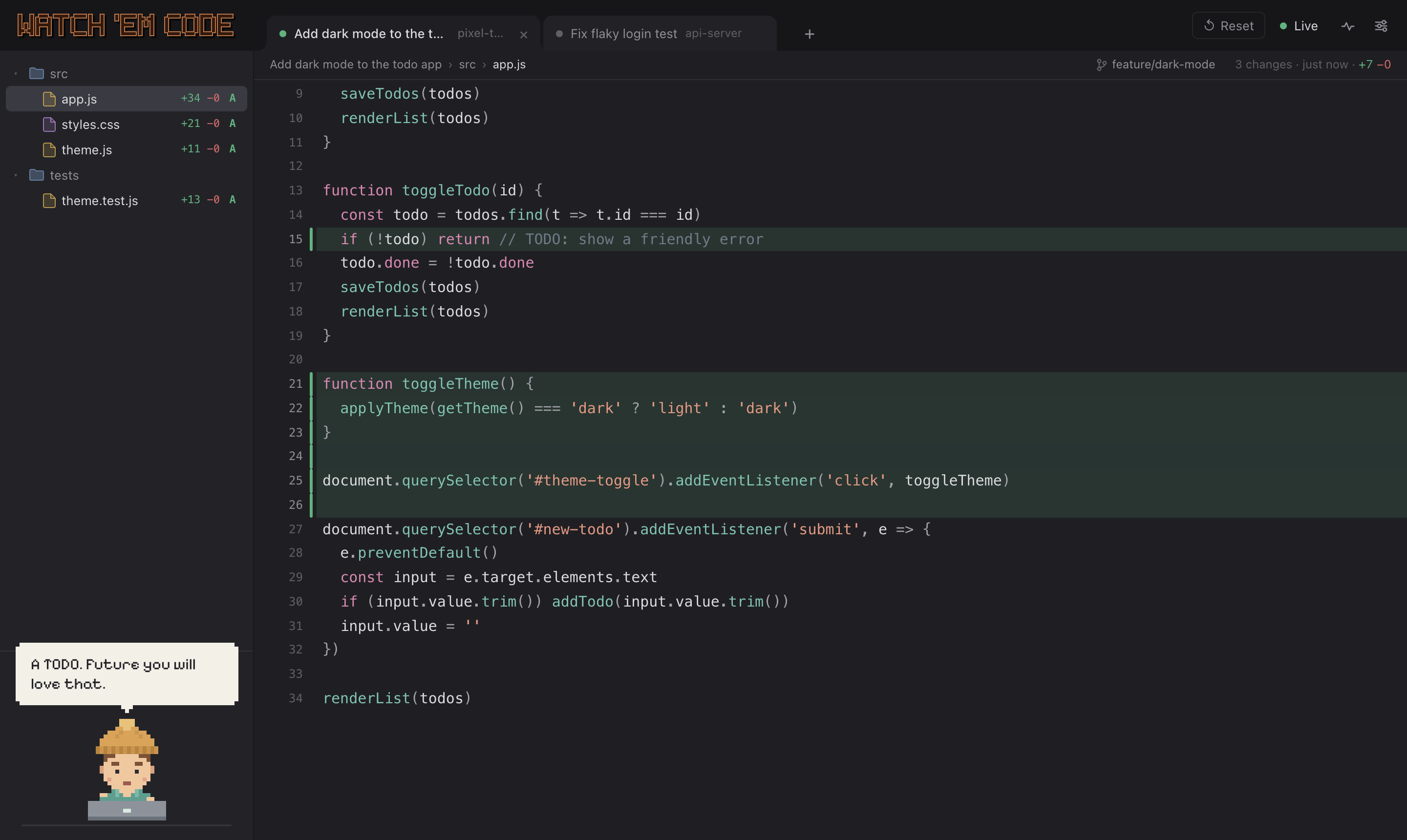
Watch your AI coding agents write code, live – Claude Code sessions automatically, any other agent via any folder. A tiny zero-dependency viewer for your second monitor, with a pixel junior who has opinions.

Your AI agents write the code. You supervise. Professionally. From a second monitor.
Watch 'Em Code is a tiny window that shows you, live, every file your coding agents create or
change – like a senior developer looking over a junior's shoulder, except the junior types 4,000
words per minute, never asks for a raise and occasionally there are five of them.
It follows Claude Code sessions automatically, and it watches
any folder you point it at – so Cursor, Codex, Aider, Gemini CLI, your colleague or that
script you forgot was running all show up too.
No thoughts. No token counts. No costs. No chat history. Just the code, appearing in front of
your eyes, so you can nod thoughtfully and occasionally say "hmm".
Why does this exist?
Because "let the agent cook" is a great philosophy until you realise you have no idea what it
put in the oven.
The existing tools were either full-blown dashboards with seventeen tabs, charts about your
charts and a settings page that needs its own settings page – or they showed you git history,
which means you only find out what happened after it happened. Like a security camera that
only shows you yesterday.
Watch 'Em Code shows every single edit the moment it lands. It is deliberately small,
deliberately quiet and deliberately has zero dependencies. npm install is not part of this
story.
Two ways to watch
Claude Code sessions – automatic. Watch 'Em Code reads Claude Code's session logs, so every
session gets its own tab the moment it starts editing, with its title, its branch and every
single edit as the agent makes it. Nothing to set up.
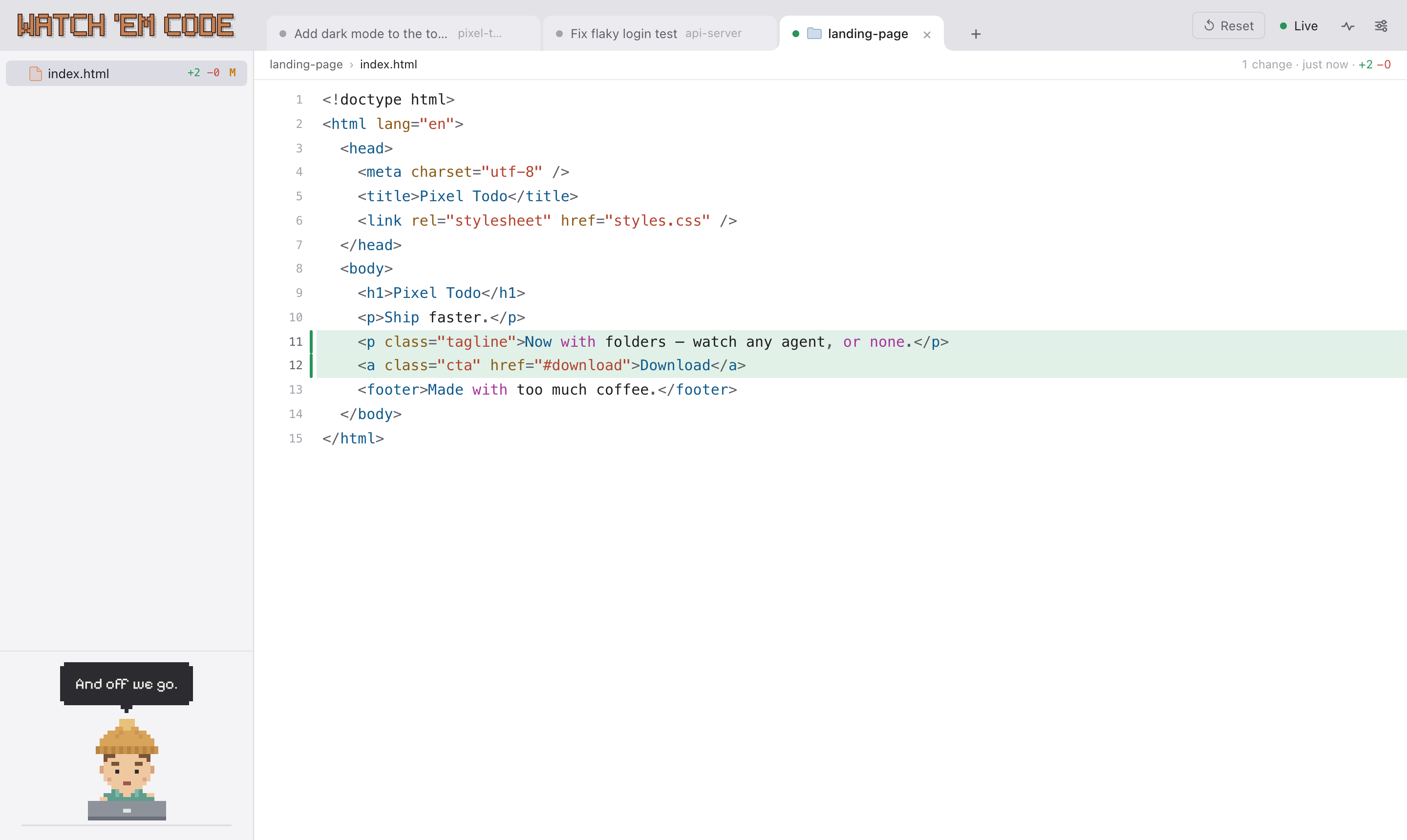
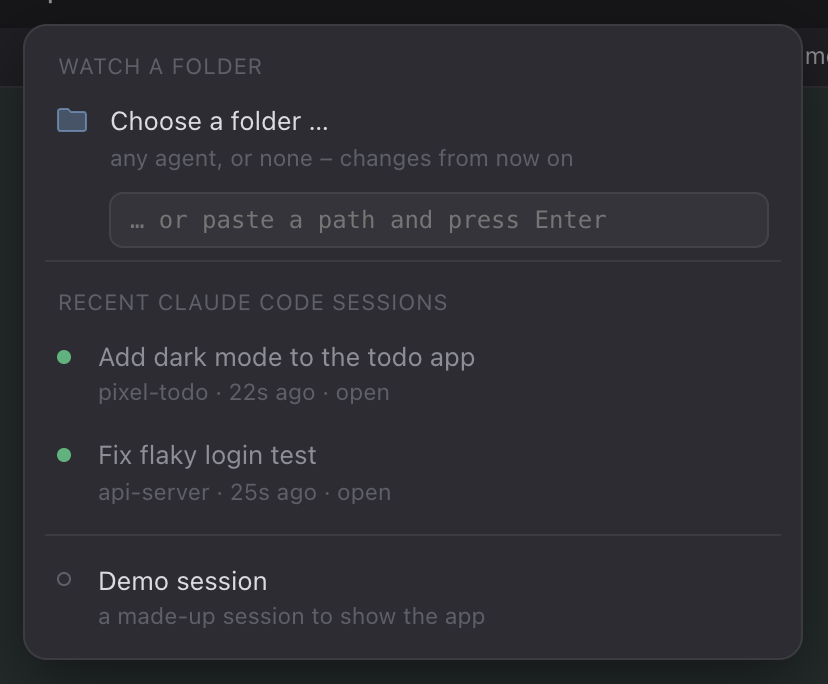
Any folder – one click. Press + → Choose a folder … (or paste a path). From then on,
every file that changes in it shows up – no matter who or what changed it. Inside git repos, git
decides what counts (so .gitignore keeps node_modules out of your face); outside git, the
folder is remembered as it was when you started watching. Close the tab to stop watching.
Features
Watch
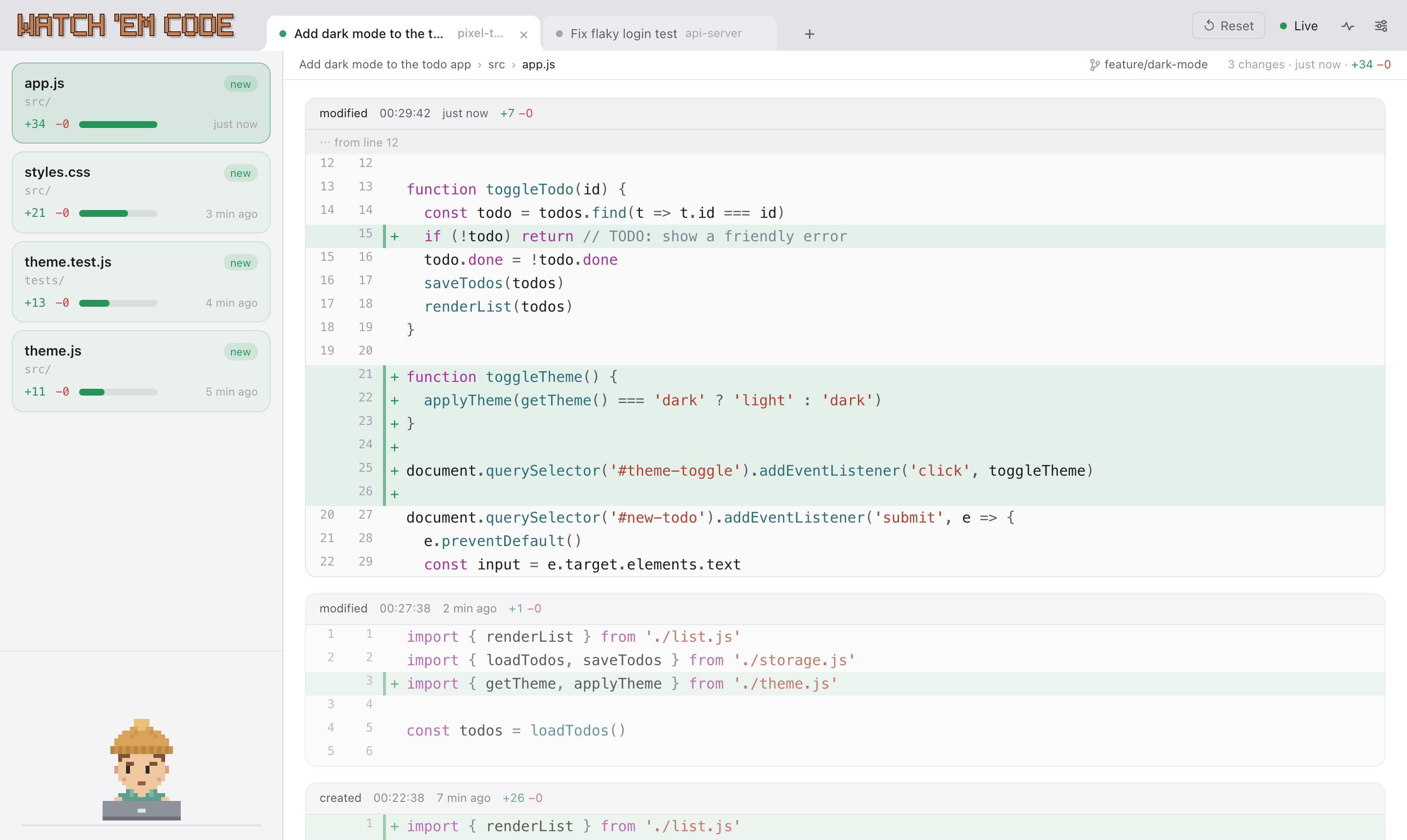
- Live, file by file. New and modified files appear the moment they land. The view follows
the latest change, like a very loyal dog – and keeps each change on screen for a moment
(Show each change, 0–10 s) so it doesn't jump around like a caffeinated squirrel. Files
changed meanwhile queue up and play in order;Escjumps to the newest. - Two views, same powers.
- Editor – Xcode-flavoured: folder tree, the whole file, changes marked in the gutter.
Deleted lines briefly appear struck through, then politely collapse. - Cards – file cards with growing +/− bars and a stack of diffs per file.
- Editor – Xcode-flavoured: folder tree, the whole file, changes marked in the gutter.
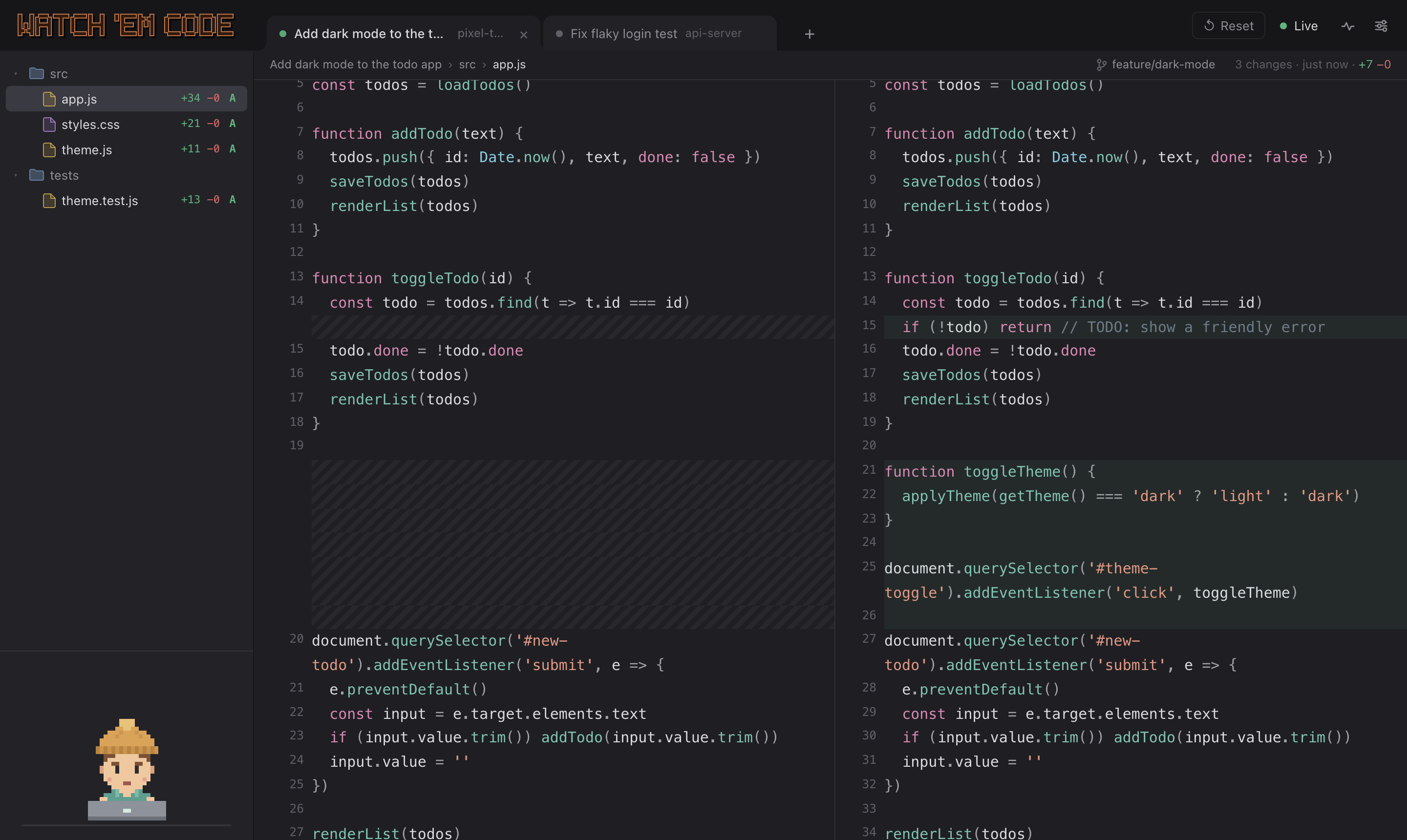
- Three diff modes. New (just the result), Inline (old and new stacked) or Side by
side (old left, new right, gaps hatched like a 90s textbook). - Catches shell edits too. Claude sneaks a
sed -ipast you? Watch 'Em Code asks git what
changed in the session's repos (subrepos included) and shows it anyway, marked via shell.
Understand what changed
- What really changed, like
git diff. Each file shows everything that changed in it as
one diff – several edits combined. Tree, cards and the bar above the file show the net +/−.
The newest edit is still the one that animates. - Compare with session start or last commit. By default you see what the whole session did.
Switch to Last commit and each repo compares against its latest commit – exactly like VS Code;
commits are picked up automatically. - ↺ Reset. Long session, then a PR, then review comments? Click Reset (or press
c) and
the tab only shows what changes from now on. Nothing is deleted – the orange since … pill
brings everything back. - Git branch awareness. Shows the branch of the repo each file lives in – including nested
repos and submodules, so you know which repo it's breaking.
Many tabs
- Every Claude session and every watched folder gets a tab. A pulsing dot tells you which one
is currently busy rewriting your life. - + opens a folder or an older Claude session – your 40 most recent ones, with title or first
prompt. - Session tabs stay open until you close them (or set Close idle tabs → After 1 h), and come
back by themselves when that session gets busy again. Folder tabs stay until you close them –
even across restarts. - Resizable file tree. Drag its edge; double-click resets it.
Live with it
- The Pixel Junior – or Werner. See below. They're the best part. They know it.
- Light, dark or system. Both are muted. Your retinas have suffered enough.
- Status check. The pulse icon (or
i) checks Node, logs, git, folder access and whether
edits are actually visible – and opens by itself if something's off. - Real apps. A native Mac app (DMG) and a Windows app, about 1 MB each. Closing the window
keeps them watching in the background (Dock / tray); quit to really stop. - Updates itself – when you say so. A new release shows up as a little ↑ button (and in the
settings). One click on Install & restart and the app replaces itself. - Demo. Nothing running? Press
dand a made-up session plays in its own tab – handy for
showing the app to colleagues.
Meet the Pixel Junior (and Werner)
 |
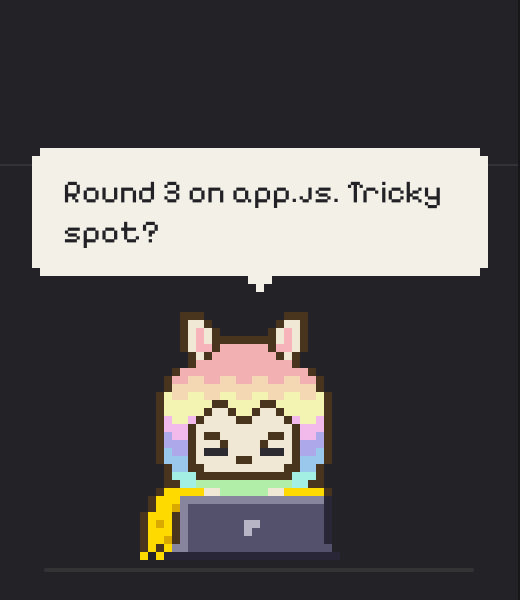 |
The Pixel Junior sits in the corner, types along when code comes in, throws a little sheet of
paper when a new file is born, sweeps up crumbs when code gets deleted, falls asleep after two
minutes of silence and startles awake when work resumes. Just like a real developer.
Prefer an alpaca? Settings → Avatar → Werner swaps him for Werner Sauer, our team mascot:
rainbow wool, yellow scarf, permanently unimpressed brows – and sparks flying off the laptop while
he types. Same desk, same opinions.
Occasionally they comment on what they see. Rarely, briefly, and based only on facts:
"+240 lines in one go. Bold."
"A TODO. Future you will love that."
"console.log debugging. A classic."
"Writing tests? Who ARE you?"
"CSS time. Good luck centering that div."
"I was NOT asleep."
Press d for the demo to see the whole repertoire. Don't want company? Settings → Buddy →
Off. They won't take it personally. (They will.)
Settings
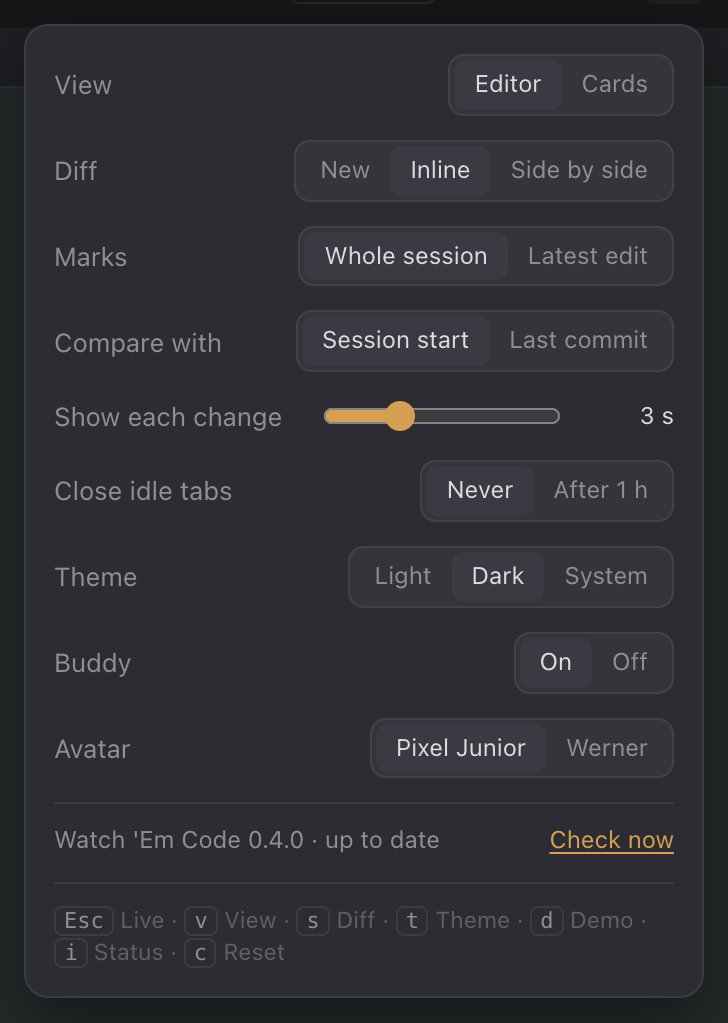
| View | Editor or Cards |
| Diff | New, Inline or Side by side |
| Marks | Whole session – everything that changed in a file; Latest edit – only the newest edit |
| Compare with | Session start or Last commit (like VS Code) |
| Show each change | how long a change stays on screen before the next one, 0–10 s |
| Close idle tabs | Never or After 1 h without activity |
| Theme | Light, Dark or System |
| Buddy / Avatar | Pixel Junior or Werner, or nobody |
At the bottom: the version you're running, with Check now for updates.
Getting started
You need Node.js 18+ (20+ on Linux for watching folders). That's it. That's the list.
Download
Grab the ready-made apps from the latest release:
- macOS (Apple Silicon + Intel):
WatchEmCode-macOS.dmg– open it, drag the app onto
Applications, start it from there. (Starting it straight out of Downloads makes macOS run a
temporary copy that can crash once you move the app.)
The app isn't notarized by Apple, so the first launch gets blocked. Go to System Settings →
Privacy & Security and click Open Anyway. Or, if you like terminals:xattr -dr com.apple.quarantine "/Applications/Watch 'Em Code.app" - Windows (10/11, x64):
WatchEmCode-windows.zip– unzip, runWatchEmCode.exe.
SmartScreen will complain, see below.
Coming from Watch Him Code? Just update from inside the app – settings, window size and
watched sessions carry over, and the Mac app renames itself on its first start.
Prefer to build it yourself? Read on.
Mac
./app/macos/build.sh
Drag dist/Watch 'Em Code.app into Applications and double-click it. It starts its own little
server, shows everything in a native window and cleans up after itself when you quit – even if
it crashes, because we were raised right.
Windows
./app/windows/build.sh # works on a Mac too, needs the .NET SDK
Unzip dist/WatchEmCode-windows.zip on your Windows machine and run WatchEmCode.exe.
SmartScreen will warn you about an "unknown publisher". That's us. We're the unknown publisher.
Click More info → Run anyway.
Without the apps
node server.js
Opens a chromeless app window via Chrome/Edge (--app mode) or falls back to your default
browser at http://127.0.0.1:4777.
Keyboard shortcuts
| Key | Does |
|---|---|
Esc |
Back to live (follow the latest change) |
v |
Switch view: Editor ↔ Cards |
↑ ↓ |
Previous / next file (after clicking into the tree or cards) |
s |
Cycle diff mode: New → Inline → Side by side |
t |
Cycle theme: Light → Dark → System |
d |
Demo: plays a made-up session in its own tab |
i |
Status: does everything work? |
c |
Reset: hide this tab's earlier changes, show only new ones |
How it works
Claude Code sessions. Claude Code writes every session to~/.claude/projects/<project>/<session>.jsonl – both the terminal and the desktop app.
Watch 'Em Code:
- watches every session that was active in the last hour (plus the tabs you keep open),
- reads new lines as they arrive (every 0.6 s),
- picks out every file the agent created or edited (
Write,Edit,MultiEdit,NotebookEdit) – and asks git about everything else (see Shell edits below), - per file, compares the content at the session start (or the last commit, or your reset)
with what's on disk now, and streams it all to the window via Server-Sent Events.
Watched folders. The folder is watched with the operating system's file events (fs.watch).
Inside git repos, a change makes it ask git status what changed and diff that against the last
version it knew – .gitignore applies, and a few usual suspects (.DS_Store, node_modules,dist, editor temp files …) are left out on top. Outside git, every text file is remembered when
watching starts (up to 5,000 files), and changes are diffed against that. Like with sessions,
only what changes after you start watching shows up. The list of folders is kept in~/.watch-em-code/folders.json.
It listens on 127.0.0.1 only. Your code, logs and sessions never leave your machine, nothing
is uploaded, nothing is "synced to the cloud for a better experience". Endpoints that change
something only accept requests from its own page.
The one thing that does go out: every 6 hours it asks GitHub's public API for the latest release
(no login, no data about you or your code – GitHub just sees your IP, like any download). Turn
it off with WHC_UPDATE_CHECK=0.
Updates: if there's a newer release, a ↑ button appears in the title bar. In the Mac and
Windows app, Install & restart downloads the release ZIP from this repository's GitHub
releases, swaps the app and restarts it – only when you click. Running it withnode server.js? Then you get a link to the release (or just git pull).
On a Mac, macOS may ask again for folder access after an update – the app is only signed
locally, so every new version looks like a new app to it.
Shell edits (Claude sessions): if the agent changes files via shell commands (sed, scripts,
MCP tools …), there's no diff in the log. So after every tool call (and every 8 s while a session
is busy) the server runs git status in the session's repos – nested subrepos included – and
diffs changed files against the last version it knew. Uncommitted work that was already there
when it started is left alone. Outside git repos, or in .gitignored files, shell edits stay
invisible in session tabs – the agent's last alibi. (Watch the folder instead and they show up.)
Optional – finer diffs: shell edits show up as one change per command, while Claude's own
file tools give you every single edit as it happens. If you'd rather watch it that way, add
this line to your ~/.claude/CLAUDE.md (it's a gentle hint, nothing gets blocked):
Prefer the Edit/Write tools over shell commands (sed, echo >, heredocs, scripts) for changing files.
Options
| Variable | Effect |
|---|---|
WHC_PORT |
Different port (default 4777) |
WHC_NO_OPEN=1 |
Don't open a window |
WHC_BROWSER=default |
Default browser instead of app window |
WHC_GIT=0 |
No git fallback for shell edits |
CLAUDE_CONFIG_DIR |
Read logs from there instead of ~/.claude |
WHC_UPDATE_CHECK=0 |
Don't check GitHub for new versions |
(WHC is what this project was called before it learned to watch more than one agent. The
variables keep their names so nothing breaks.)
Releasing: bump the version in server/config.js (VERSION), app/macos/Info.plist andapp/windows/WatchEmCode.csproj, run both build scripts and attach WatchEmCode-macOS.dmg,WatchEmCode-macOS.zip and WatchEmCode-windows.zip from dist/ to a GitHub release taggedvX.Y.Z. The DMG is for people, the two ZIPs are what the updater downloads – they must end inmacOS.zip and windows.zip.
Project layout
server.js               entry point (node server.js)
server/                 the backend, Node built-ins only – one module per job
  claude.js             source: Claude Code session logs
  folders.js            source: watched folders (fs.watch)
  shellwatch.js         git fallback for shell edits in Claude sessions
  sessions.js           tabs and their changes, whatever the source
  git.js, repos.js      asking git, branches
  diff.js, text.js      line diffs, text helpers
  http.js, bus.js       the server, endpoints, live connection
  update.js, status.js  update check, status check
  window.js, main.js    opening a window, start-up
public/                 the UI (plain HTML, CSS, JS – no framework, no build step)
  app.js                live logic, tabs, views, diffs
  buddy.js              the Pixel Junior, Werner and their opinions
  demo.js               the made-up demo session (key d)
  highlight.js          a tiny home-made syntax highlighter
  logo.js               the pixel logo, letter by letter
app/macos/              Swift + WKWebView wrapper
app/windows/            C# + WebView2 wrapper (.NET Framework 4.8, built into Windows)
tools/screenshots.js    regenerates these screenshots from a fake demo project
FAQ
Can I edit code in it?
No. You're the senior now. Seniors don't type, they observe.
Does it show my prompts or the agent's thinking?
No. Only code. What the agent was thinking stays between the agent and its context window.
Does it work with agents other than Claude Code?
Yes – watch their project folder (+ → Choose a folder …). You get every file change, from
anyone. What you don't get for them: automatic tabs per session and session titles, because
those come from Claude Code's logs.
Will it show markdown files and other non-code files too?
Yes – anything that gets written shows up. In watched folders, .gitignore and a short list of
usual suspects keep the worst noise out.
Why "'Em"?
It used to be Watch Him Code. Then it learned to watch every agent at once – and several at a
time. "Them" was more accurate. "Watch It Code" sounded like a nature documentary.
Built with Claude Code, watched with Watch 'Em Code. It's turtles all the way down.
License
MIT – do whatever you want, just keep the notice. The software comes "as is",
which, given that it was written by an AI and supervised by a human from a second monitor,
seems only fair.
The pixel font is Pixelify Sans (SIL Open Font
License, bundled in public/fonts/ with its own license).
Yorumlar (0)
Yorum birakmak icin giris yap.
Yorum birakSonuc bulunamadi