7-24-IDE
Health Warn
- License — License: NOASSERTION
- Description — Repository has a description
- Active repo — Last push 0 days ago
- Low visibility — Only 5 GitHub stars
Code Fail
- child_process — Shell command execution capability in desktop-gui/build.js
- spawnSync — Synchronous process spawning in desktop-gui/build.js
- process.env — Environment variable access in desktop-gui/build.js
- fs module — File system access in desktop-gui/build.js
- exec() — Shell command execution in desktop-gui/src/lib/codeUtils.ts
- exec() — Shell command execution in desktop-gui/src/lib/mcp.ts
- process.env — Environment variable access in desktop-gui/src/lib/mcp.ts
- exec() — Shell command execution in desktop-gui/src/main.ts
- fs.rmSync — Destructive file system operation in desktop-gui/src/main.ts
Permissions Pass
- Permissions — No dangerous permissions requested
No AI report is available for this listing yet.
🤖 Local AI-powered developer agent that reads files, writes code, runs terminal commands, and renders live previews. Secure, offline-ready with Ollama, MCP-extensible, and Git auto-commits.
 7/24 IDE
Always On. Always Coding.
An autonomous, local AI developer agent for Windows.
Describe what you want — it reads your files, writes precise edits, runs commands, and shows you a live preview, all inside your own project folder.



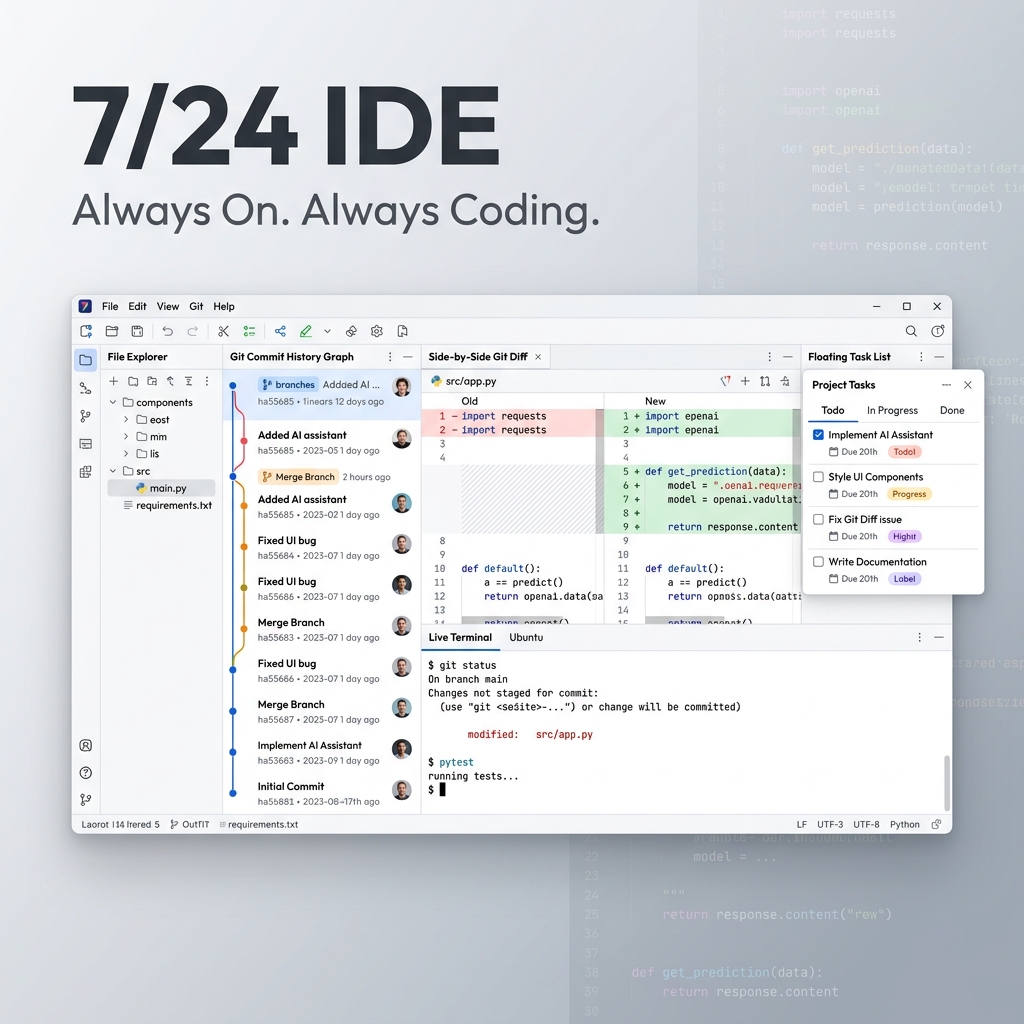
Why 7/24 IDE?
Standard AI chats make you copy-paste code blocks endlessly. Browser sandboxes trap you in tiny web demos with no way to install native packages or run real backends.
7/24 IDE is different. It's a focused, local workspace built around an autonomous developer agent. You describe a task; the agent reads your files, makes precise modifications, runs install/build scripts, and renders a live preview — like a junior developer working directly in your project folder, 24/7.
Everything runs locally. Your code, chats, settings and snapshots never leave your machine.
Plan & Build — two ways to work
| Mode | Best for | How it works |
|---|---|---|
| ⚡ Build | Fixes, refactors, incremental changes | The agent edits files and runs commands immediately. A live activity bar shows what it's doing, which files changed, and token usage. |
| 🗺️ Plan | Whole features from scratch | The agent drafts a step-by-step plan you approve. Each step runs in an isolated micro-agent inside a shadow workspace, merged only on success, with a sticky progress bar and self-healing on build errors. |
Key Features
⚡ Native Rust Engine
An optional bundled Rust core builds real Tree-sitter syntax trees (Rust, TypeScript/TSX, JavaScript/JSX, Python, HTML, CSS, JSON) and ranks workspace code search with BM25 relevance. The workspace is indexed in the background. If the binary isn't present, the app falls back transparently to its TypeScript implementation — no loss of functionality.
🤖 Smart Model Picker
Search hundreds of OpenRouter models in a clean dropdown with FREE badges, context-window and price labels, and tabs for All / Free / ★ Favorites. Pin favorites with a single star. Configure a fallback model for transient provider failures.
🦙 Ollama Offline Mode
Run fully private, offline builds. Select the Ollama provider, point it at your local endpoint (http://localhost:11434), fetch local models and tune the context window (num_ctx) — no cloud, no API key.
🛠️ Model Context Protocol (MCP)
Extend the agent with external stdio JSON-RPC MCP servers added straight from settings — database inspectors, search engines, web readers, formatters and more.
🛡️ Safety & Absolute Control
- Auto-Checkpoints — a silent snapshot is taken before every agent run; roll the whole project back in one click from the Snapshots tab.
- Monaco Diff Reviews — inspect every change side-by-side in a fullscreen diff before it touches disk.
- Permissions Panel — per-operation rules (Always Allow / Ask / Deny) for file reads, writes and command execution.
- Folder-Scoped Sandbox — the agent is locked inside your chosen workspace folder.
💬 2026-Ready Reasoning Chat
Collapsible reasoning blocks, clean tool-call cards, anti-truncation auto-continue, copy & Markdown export, and a readable centered chat column. Tool parsing tolerates model quote-style variations so actions keep running instead of leaking raw XML.
🖼️ Image Paste, Branching & Run-from-Chat
Paste (Ctrl+V) or drag-and-drop images as context. Branch any conversation to experiment without losing history. Run JavaScript/TypeScript/Python/Shell code blocks directly from chat with one click.
🤖 Smart Git Auto-Commits
Optionally stage and commit after each plan step with AI-generated messages. Verify/edit the message before it lands, and customize the prefix (defaults to [AI]).
🌍 Localized Interface
Full UI available in English, Russian and Chinese.
⌨️ Keyboard Shortcuts
| Shortcut | Action |
|---|---|
Ctrl+K |
Quick chat search |
Ctrl+L |
Clear chat / new |
Ctrl+Shift+M |
Toggle Build / Plan |
Ctrl+N |
New project |
Ctrl+, |
Open Settings |
Quick Start
- Download & Install the latest installer from the Releases page (
7-24-IDE-Setup-x.y.z.exe), or grab the portable build. - Pick a Workspace — choose any folder on your computer where you want to build.
- Connect a Model — paste an OpenRouter API key for cloud models (Claude, GPT-4o, Gemini, Llama, etc.), or point to a local Ollama endpoint for fully offline work.
- Start Building — describe what you want (e.g. "Build a weather dashboard with city search"), pick Build or Plan, and watch it come together.
Your API key is encrypted with the OS keychain (Windows DPAPI). All data lives locally in %APPDATA%\7-24 IDE\. No telemetry, no cloud storage, no lock-in.
Under the Hood
- Native Rust Core (
core-backend): spawned on startup over JSON-RPC stdio for Tree-sitter AST parsing and BM25 code search. Build it withcargo build --releaseincore-backend/— or justnpm run buildindesktop-gui/, which auto-detectscargoand bundles the binary asextraResources. Skipped gracefully ifcargois absent. - Dual-mode workspace: Build (direct edits) and Plan (step-by-step checklist executed by isolated micro-agents in a shadow workspace).
- AST compression: large files are folded to signatures so they don't consume the whole context budget.
- Self-evolving skills: after a successful build the agent reflects on the session and compiles reusable rule sets that auto-activate on similar tasks.
- Atomic writes: files are written to a temp sibling and renamed, preventing corruption on interruption.
- Prompt caching: optimized system prompts for Anthropic models lower latency and cost.
Building from Source
# Desktop app (Electron + TypeScript)
cd desktop-gui
npm install
npm run build      # bundles main/preload/renderer + Monaco (+ Rust core if cargo present)
npm start          # launch the app
npm test           # run the test suite
npm run dist       # build the Windows NSIS installer into ../dist-installer

# Native engine (optional, requires Rust toolchain)
cd core-backend
cargo build --release
License
Released under the MIT License.
Reviews (0)
Sign in to leave a review.
Leave a reviewNo results found