Agent_View_Controller-AVC
Health Gecti
- License — License: Apache-2.0
- Description — Repository has a description
- Active repo — Last push 0 days ago
- Community trust — 13 GitHub stars
Code Basarisiz
- rm -rf — Recursive force deletion command in install.sh
Permissions Gecti
- Permissions — No dangerous permissions requested
Bu listing icin henuz AI raporu yok.
👁️ The visual layer for CLI coding agents. Pipe JSON → interactive native UI → modified JSON back. Like fzf, but for visual decisions.
🎉 Featured in Ruan Yifeng's Weekly (Issue #397) — huge thanks for the shoutout! 🙏
👁️ AVC — Agent View Controller
The Visual Dimension Elevator in Unix Pipes
Agent outputs JSON in → Human's visual decision JSON out
🇬🇧 English · 🇨🇳 中文
More README translations welcome — see CONTRIBUTING.
The Problem
AI Agents (Codex CLI, Claude Code, Cursor, Gemini CLI...) are blazing fast in the terminal. They read code, generate plans, and execute commands at machine speed.
But when they need human approval — a refactoring plan, an architecture change, a multi-step deployment — they dump walls of text into the terminal. Humans are forced to read 50+ lines of monospace text, mentally parse the structure, and type "yes" or "no."
This is insane. Humans are visual creatures. Our brains process images 60,000× faster than text.
The Solution
AVC is a 3MB single binary that does one thing perfectly:
echo '{"view":"plan","data":{...}}' | avc
- Reads JSON from
stdin - Pops up a native WebView window with a beautiful interactive UI
- Human drags, edits, reorders — making decisions visually
- Outputs modified JSON to
stdout - Window closes. Agent continues.
Like fzf gave CLI users interactive selection, AVC gives all CLI agents visual interaction.
Traditional pipe:   agent | grep | jq | awk       (text processing)
AVC pipe:           agent | avc                    (visual processing)
What's new in v0.3.0
- 🌍 7-language UI —
en,zh,ja,ko,es,fr,devia thelangJSON field- 🍺 Homebrew tap —
brew install study8677/tap/avc- 📚 6 new example scenarios — refactoring, CI/CD, incident response, K8s, data migration, code review
- 🧪 Test suite + macOS CI — 14 cases, runs headless
- 🐛 Critical
.gitignorefix —install.shnow actually works on fresh clonesSee the full release notes or the CHANGELOG.
Quick Start
Install
🍺 Homebrew (macOS / Linuxbrew, recommended)
brew install study8677/tap/avc
After install, brew info avc prints one-line copy commands to wire the skill into Claude Code / Codex / Gemini.
🚀 One-line installer (builds from source + auto-installs skills for every detected agent)
curl -sSL https://raw.githubusercontent.com/study8677/Agent_View_Controller-AVC/main/install.sh | bash
Installs to ~/.local/bin (no sudo) when it's on your PATH, otherwise falls back to /usr/local/bin. Requires Go ≥ 1.24.
git clone https://github.com/study8677/Agent_View_Controller-AVC.git
cd Agent_View_Controller-AVC
go build -o avc .
install -m 755 avc ~/.local/bin/   # or sudo cp avc /usr/local/bin/

# Install skill for your agent
mkdir -p ~/.codex/skills/avc  && cp skills/avc/SKILL.md ~/.codex/skills/avc/   # Codex CLI
mkdir -p ~/.claude/skills/avc && cp skills/avc/SKILL.md ~/.claude/skills/avc/  # Claude Code
mkdir -p ~/.gemini/skills/avc && cp skills/avc/SKILL.md ~/.gemini/skills/avc/  # Gemini CLI
Try It
cat examples/execution-plan.json | ./avc
A native window pops up:
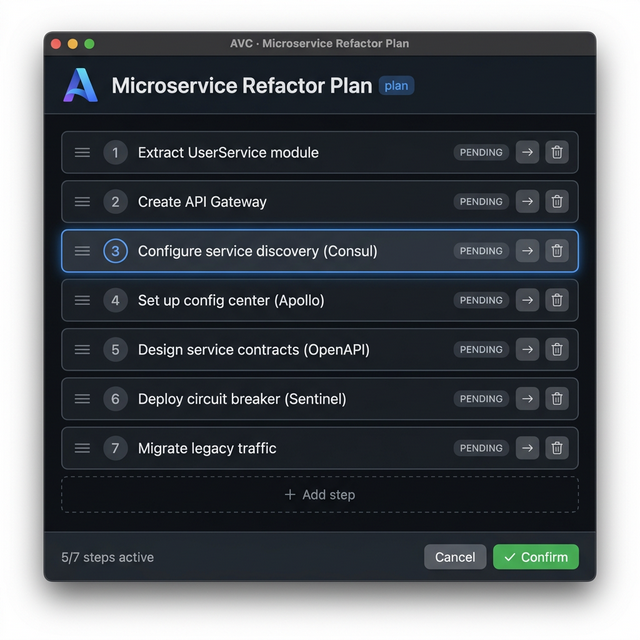
Drag steps to reorder, edit text, skip steps, add new ones, then click ✅ Confirm — the modified JSON appears in your terminal.
Usage Examples
Example 1: Database Migration Plan
echo '{
  "view": "plan",
  "title": "Database Migration v3 → v4",
  "editable": true,
  "data": {
    "steps": [
      {"id": 1, "label": "Backup production database", "status": "pending"},
      {"id": 2, "label": "Run migration scripts on staging", "status": "pending"},
      {"id": 3, "label": "Verify data integrity checks", "status": "pending"},
      {"id": 4, "label": "Switch DNS to maintenance page", "status": "pending"},
      {"id": 5, "label": "Execute production migration", "status": "pending"},
      {"id": 6, "label": "Run smoke tests", "status": "pending"},
      {"id": 7, "label": "Remove maintenance page", "status": "pending"}
    ]
  }
}' | ./avc
💡 Human can reorder steps (e.g., move smoke tests before DNS switch), skip backup if already done, or add a "Notify team on Slack" step.
Example 2: API Refactoring Plan
echo '{
  "view": "plan",
  "title": "REST → GraphQL Migration",
  "editable": true,
  "data": {
    "steps": [
      {"id": 1, "label": "Set up GraphQL server with Apollo", "status": "pending"},
      {"id": 2, "label": "Define schema types for User, Post, Comment", "status": "pending"},
      {"id": 3, "label": "Implement resolvers with existing service layer", "status": "pending"},
      {"id": 4, "label": "Add authentication middleware", "status": "pending"},
      {"id": 5, "label": "Set up DataLoader for N+1 prevention", "status": "pending"},
      {"id": 6, "label": "Write integration tests", "status": "pending"},
      {"id": 7, "label": "Deploy with REST fallback route", "status": "pending"},
      {"id": 8, "label": "Deprecate REST endpoints", "status": "pending"}
    ]
  }
}' | ./avc
Example 3: Capture and Use the Result
# Agent captures the human-approved plan
RESULT=$(cat examples/execution-plan.json | ./avc)

if [ $? -eq 0 ]; then
  echo "✅ Human approved:"
  echo "$RESULT" | jq '.data.steps[] | select(.skipped != true) | .label'
  # Agent proceeds to execute only the approved, non-skipped steps
else
  echo "❌ Human cancelled the plan"
fi
More examples
The examples/ folder ships 7 ready-to-pipe scenarios covering refactoring, CI/CD, incident response, Kubernetes deploys, data migration, and code review — across 4 UI languages (en/zh/ja/fr). Each has a realistic token_count so the popup fires without --no-threshold:
cat examples/incident-response.json | avc   # zh — production DB outage runbook
cat examples/kubernetes-deploy.json | avc   # ja — stateless service rollout
cat examples/data-migration.json   | avc   # fr — PostgreSQL → MongoDB
See examples/README.md for the full index.
Supported Views
| View Type | Description | Interaction | Status |
|---|---|---|---|
plan |
Execution plans / step lists | Drag to reorder, edit, skip, add/delete | ✅ Ready |
graph |
Architecture topology / dependency map | Drag nodes, connect/disconnect edges, edit labels, keyboard nav | ✅ Ready |
diff |
Code diff review | Accept/reject per line | 🚧 Planned |
table |
Data tables | Edit cells, sort columns | 🚧 Planned |
JSON Schema
{
  "view": "plan",
  "title": "Microservice Refactor Plan",
  "lang": "en",
  "editable": true,
  "token_count": 4500,
  "data": {
    "steps": [
      { "id": 1, "label": "Extract UserService", "status": "pending" },
      { "id": 2, "label": "Create API Gateway", "status": "pending" },
      { "id": 3, "label": "Configure service discovery", "status": "pending" }
    ]
  },
  "actions": ["confirm", "cancel"]
}
Notes:
token_countis optional. If omitted, AVC estimates from byte length.langis optional (default"en"). Set it to localize UI chrome — see the next section for all 7 supported languages.
🌍 UI Languages
AVC's WebView UI (buttons, status bar, tooltips) is translated into 7 languages. Set the top-level lang field on your JSON input to pick one:
lang |
Language | Confirm button | Cancel button | Status: "pending" |
|---|---|---|---|---|
en |
English | Confirm | Cancel | pending |
zh |
中文 | 确认执行 | 取消 | 待执行 |
ja |
日本語 | 実行を確定 | キャンセル | 保留中 |
ko |
한국어 | 실행 확인 | 취소 | 대기 중 |
es |
Español | Confirmar | Cancelar | pendiente |
fr |
Français | Confirmer | Annuler | en attente |
de |
Deutsch | Bestätigen | Abbrechen | ausstehend |
Example — render the UI in Japanese:
{
  "view": "plan",
  "title": "ユーザー認証のリファクタリング",
  "lang": "ja",
  "editable": true,
  "data": {
    "steps": [
      { "id": 1, "label": "認証ミドルウェアを抽出", "status": "pending" },
      { "id": 2, "label": "JWT サービスを作成", "status": "pending" },
      { "id": 3, "label": "ルートハンドラーを更新", "status": "pending" }
    ]
  }
}
The
langfield defaults to"en"and only affects UI chrome (buttons, status labels, tooltips). It does not translate your step content — keeplabeltext in whatever language matches your audience.
🎚️ Token Threshold
AVC has a built-in smart filter: only when the content exceeds a token threshold (default: 3000 tokens) will the WebView window pop up. Short content passes through directly without interrupting the human.
How It Works
stdin JSON ──→ AVC reads ──→ Check token count
                              │
                   ≤ 3K token │ > 3K token
                      ↓               ↓
              Output to stdout    Pop up WebView
              (pass-through)      Interactive review
- If the JSON contains a
token_countfield → use that value - Otherwise → estimate from byte length (
bytes / 3) - If token count ≤ threshold → pass-through (exit code
0, original JSON on stdout)
CLI Options
# Always show WebView (bypass threshold)
echo '<json>' | avc --no-threshold

# Set a custom threshold
echo '<json>' | avc --threshold=5000
Include Token Count in JSON (Recommended)
For accurate control, have the Agent include token_count in the JSON:
{
  "view": "plan",
  "title": "Your Plan",
  "token_count": 4500,
  "data": { "steps": [...] }
}
Using AVC with AI Agents
AVC is agent-agnostic — it works with any AI coding agent that can execute shell commands.
⭐ Method 1: Install as a Skill (Recommended)
The easiest way. Copy the skill folder into your agent's skills directory — works globally across all projects:
# For Gemini CLI / Antigravity
cp -r skills/avc/ ~/.gemini/skills/avc/

# For any project with a skills/ directory
cp -r skills/avc/ your-project/skills/avc/
Once installed, the agent automatically knows when and how to use AVC. No per-project configuration needed.
Method 2: Per-Project Config Files
With OpenAI Codex CLI
Add the included AGENTS.md to your project root (already provided in this repo).
## Visual Decision Tool

When you generate a complex execution plan (>3 steps), architecture change,
or multi-file refactoring plan, output it as AVC-compatible JSON and pipe
it through `avc` for human visual review:

    echo '{"view":"plan","title":"...","data":{"steps":[...]}}' | avc

The command blocks until the human confirms. Capture stdout to get the
human-modified plan, then execute accordingly.
Then Codex will automatically use AVC when it generates complex plans:
# Codex generates a plan → pipes to AVC → waits for human → continues
echo '{"view":"plan","title":"Refactor Auth Module","data":{"steps":[
  {"id":1,"label":"Extract auth middleware","status":"pending"},
  {"id":2,"label":"Create JWT service","status":"pending"},
  {"id":3,"label":"Update route handlers","status":"pending"},
  {"id":4,"label":"Add integration tests","status":"pending"}
]}}' | avc
With Claude Code
In your project's CLAUDE.md or system prompt:
## AVC Integration

For complex execution plans, use the `avc` visual tool instead of
printing plain text. Construct a JSON object with view type and data,
then pipe it through `avc`:

    echo '<json>' | avc

This opens a visual UI for the human to review and modify the plan.
The modified JSON is returned via stdout. Wait for it before proceeding.
With Cursor (AI IDE)
In Cursor's terminal, AVC works as a standard Unix pipe tool. Configure via .cursorrules:
## Visual Planning

When generating multi-step plans, use `avc` for visual human review:
1. Construct plan as JSON with view:"plan" schema
2. Run: echo '<json>' | avc
3. Read stdout for the human-approved plan
4. Execute the approved steps
With Any Agent
The pattern is universal — any tool that can:
- Write JSON to a process's stdin
- Read the process's stdout
- Wait for the process to exit
...can use AVC. It's just a Unix pipe.
Design Philosophy
| Principle | Description |
|---|---|
| Agent is CPU, AVC is Display | Agents do the thinking. AVC does the showing. |
| Agent-agnostic | Works with Codex, Claude, Gemini, Cursor, or any CLI tool |
| Unix Philosophy | stdin in, stdout out. Compose with any pipe |
| Zero Dependencies | Single binary. Uses system-native WebView |
| < 100ms Startup | Native binary, no Node.js / npm overhead |
Tech Stack
- Go + webview/webview_go — system-native WebView bindings
- Vanilla JS — embedded via
go:embed, zero frontend dependencies
Platform Support
| Platform | WebView Backend | Status |
|---|---|---|
| macOS | WKWebView | ✅ Verified in CI |
| Linux | WebKitGTK | ⚠ Should work — not yet tested. Reports welcome. |
| Windows | WebView2 | ⚠ Should work — not yet tested. Reports welcome. |
If you successfully run AVC on Linux or Windows, please open an issue or PR
so we can mark the platform as verified.
Architecture
        ┌──────────┐     stdin      ┌──────────┐     render     ┌──────────┐
        │ AI Agent │ ──── JSON ───→ │   AVC    │ ────────────→  │ WebView  │
        │ (Codex,  │                │ (3MB Go  │                │ (Native  │
        │  Claude, │ ←── JSON ────  │  Binary) │ ←── confirm ─  │  Window) │
        │  Cursor) │     stdout     └──────────┘     callback   └──────────┘
        └──────────┘                                              ↕ Human
Roadmap
AVC's vision is to become the universal visual layer for all CLI agents. Every type of structured data an agent produces should have a beautiful, interactive view.
Phase 1 — Foundations ✅
| View | What Agent Outputs | What Human Sees | Status |
|---|---|---|---|
plan |
Steps with order & status | Draggable step list with edit/skip/delete | ✅ Done |
Phase 2 — Core Views 🚧
| View | What Agent Outputs | What Human Sees |
|---|---|---|
graph |
Nodes + edges (services, modules) | Interactive topology — drag nodes, edit labels, add/remove connections |
diff |
File paths + hunks | Side-by-side diff with per-line Accept / Reject / Edit |
table |
Rows + columns | Sortable, filterable, editable data grid |
Phase 3 — Rich Visual Content 🔮
| View | What Agent Outputs | What Human Sees |
|---|---|---|
tree |
File/directory structure | Interactive file tree — rename, move, create, delete |
timeline |
Events with timestamps | Gantt-chart-style timeline — drag to adjust scheduling |
kanban |
Cards with columns | Kanban board — drag cards between columns |
form |
Fields + validation rules | Multi-step wizard form — fill in configs, select options |
mindmap |
Hierarchical ideas | Expandable mind map — restructure by dragging branches |
Phase 4 — Advanced Visualization 🌟
| View | What Agent Outputs | What Human Sees |
|---|---|---|
metrics |
Numbers + time series | Live dashboard with charts and gauges |
flow |
Pipeline stages + conditions | CI/CD flow diagram — reorder stages, toggle gates |
compare |
Multiple options with pros/cons | Side-by-side comparison cards — vote & rank |
3d-graph |
Complex dependency graphs | 3D force-directed graph — rotate, zoom, filter |
The goal: Any structured JSON → one
| avc→ instant visual interaction. No more reading walls of terminal text.
Contributing
Contributions welcome! We especially need help with:
- New view types — Pick any from the roadmap above and implement it
- UI polish — Animations, themes, accessibility
- Platform verification — Linux (WebKitGTK) and Windows (WebView2) are unverified;
successful runs (or fixes) would let us turn ⚠ into ✅ - Agent integration examples — Show how AVC works with different agents
License
Apache 2.0
Yorumlar (0)
Yorum birakmak icin giris yap.
Yorum birakSonuc bulunamadi