polar-flow-server
Health Warn
- No license — Repository has no license file
- Description — Repository has a description
- Active repo — Last push 0 days ago
- Community trust — 20 GitHub stars
Code Pass
- Code scan — Scanned 12 files during light audit, no dangerous patterns found
Permissions Pass
- Permissions — No dangerous permissions requested
No AI report is available for this listing yet.
Self-hosted health analytics for Polar devices — sync everything, keep it forever, and let your AI read it over MCP
polar-flow-server
Self-hosted health analytics server for Polar devices. Own your data, analyze it yourself.


Full Documentation · Integration Guide · API Reference
What This Does
Polar devices collect health data: sleep, HRV, activity, exercises. The Polar API provides access to this data, but only for the last 28-30 days.
This server:
- Syncs all 9 Polar API endpoints automatically
- Stores everything in PostgreSQL (your data, your server)
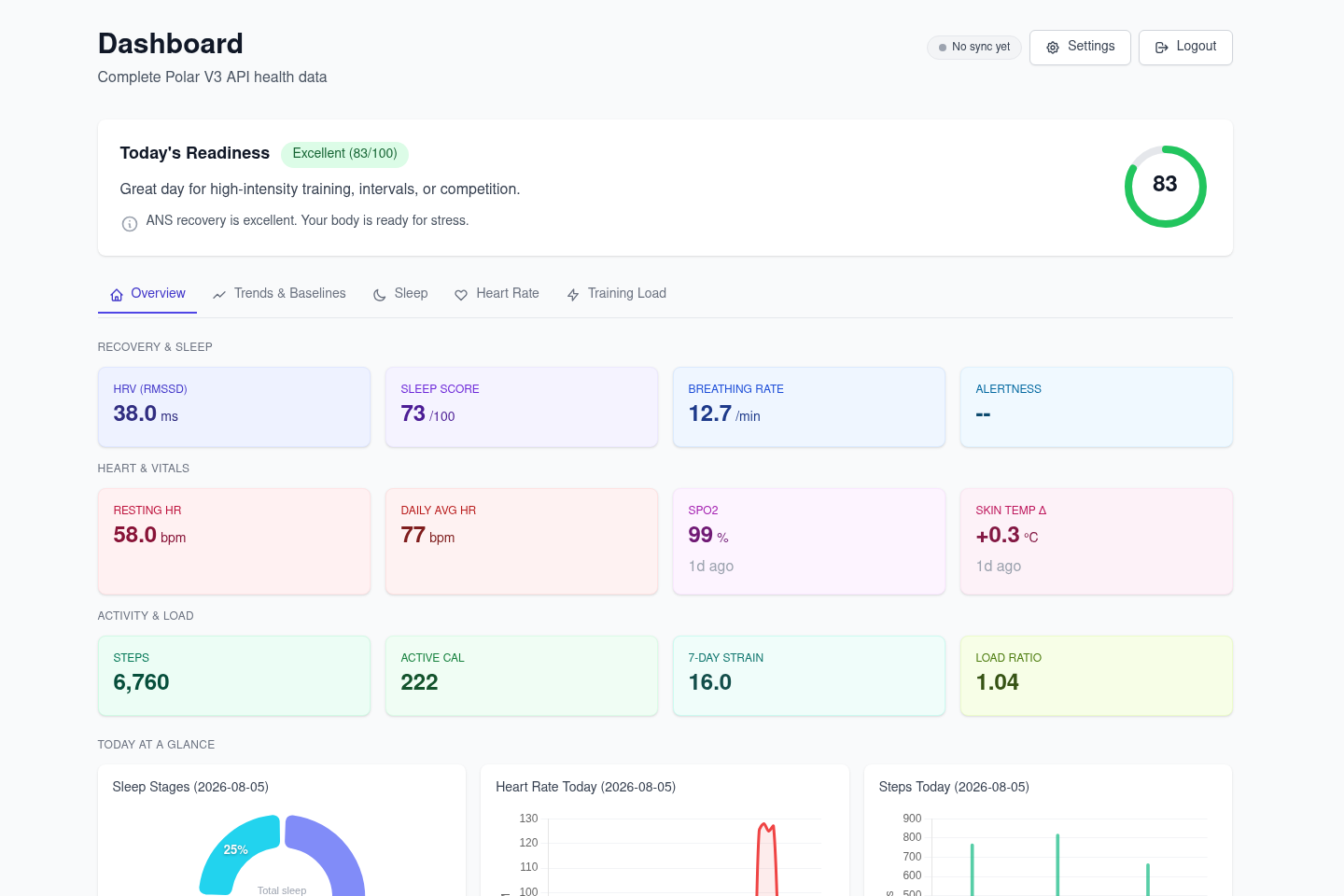
- Provides an HTMX-powered admin dashboard
- Exposes REST API for custom integrations
- Multi-user ready with per-user API keys
Architecture
Polar API → polar-flow SDK → Sync Service → PostgreSQL
                                                  ↓
                                           Admin Dashboard (HTMX)
                                                  ↓
                                             REST API
Stack:
- Litestar (async web framework)
- SQLAlchemy 2.0 (async ORM)
- PostgreSQL
- HTMX + Tailwind (admin UI)
- polar-flow SDK v1.3.0
Quick Start
Option 1: Docker (Recommended)
# Pull and run
curl -O https://raw.githubusercontent.com/StuMason/polar-flow-server/main/docker-compose.prod.yml
docker-compose -f docker-compose.prod.yml up -d

# That's it. Open http://localhost:8000/admin
Option 2: From Source
git clone https://github.com/StuMason/polar-flow-server.git
cd polar-flow-server
docker-compose up -d
Setup
- Open http://localhost:8000/admin
- Get Polar credentials from admin.polaraccesslink.com (set redirect URI to
http://localhost:8000/admin/oauth/callback) - Enter credentials and click "Connect with Polar"
- Hit "Sync Now" to pull your data
The server syncs data every hour automatically.
Dashboard
The admin panel at /admin/dashboard is organised into tabs (with a
floating tab bar on mobile):
- Overview - stat tiles (HRV, resting HR, SpO2, skin temp, steps, strain,
sleep score, alertness...), Today's Readiness recommendations, and
"Today at a Glance" mini-charts (sleep stages, heart rate, steps) - Trends & Baselines - personal baselines and detected patterns
- Sleep - sleep score and stage-duration charts
- Heart Rate - daily HR, HRV and ANS charge charts, biosensing panel
- Training Load - activity and cardio load charts
Charts have a selectable 7/14/30-day range and CSV export. API keys are
managed from the settings page, with rate limit tracking.
Data Synced (13 Endpoints)
| Endpoint | Data |
|---|---|
| Sleep | Score, stages (light/deep/REM), duration |
| Nightly Recharge | HRV, ANS charge, recovery status |
| Daily Activity | Steps, distance, calories, active time |
| Exercises | Sport, duration, HR zones, training load |
| Cardio Load | Strain, tolerance, load ratio, status |
| SleepWise Alertness | Hourly alertness predictions |
| SleepWise Bedtime | Optimal sleep timing recommendations |
| Activity Samples | Minute-by-minute step data |
| Continuous HR | All-day heart rate (5-min intervals) |
| SpO2 | Blood oxygen tests (compatible devices) |
| ECG | Electrocardiogram tests (compatible devices) |
| Body Temperature | Continuous body temperature |
| Skin Temperature | Nightly skin temperature with baseline deviation |
MCP Server (AI Assistants)
A built-in Model Context Protocol server
(protocol revision 2026-07-28, streamable HTTP) lets AI assistants query your
health data directly - "how has my sleep trended vs my baseline?", "should I
train hard today?". It runs inside the main server at /mcp.
With BASE_URL set, the server is its own OAuth 2.1 authorization server:
add it as a custom connector in Claude Desktop / claude.ai, click
Connect, sign in on your server, approve — no keys to paste. Connected
apps are listed (and revocable) in Settings. API keys also work for
headless clients:
claude mcp add polar-health https://your-server.example.com/mcp \
  --transport http \
  --header "X-API-Key: pfk_your_key_here"
Ten tools cover insights, sleep, recovery, activity, workouts, biosensing
streams, personal baselines, patterns/anomalies, and sync control. See
docs/mcp-server.md.
Configuration
Required Environment Variables
| Variable | Description | Required |
|---|---|---|
DATABASE_URL |
PostgreSQL connection string | Yes |
ENCRYPTION_KEY |
32-byte Fernet key for token encryption | Yes (production) |
Generate an encryption key:
python -c "from cryptography.fernet import Fernet; print(Fernet.generate_key().decode())"
Optional Environment Variables
| Variable | Description | Default |
|---|---|---|
DEPLOYMENT_MODE |
self_hosted or saas |
self_hosted |
SYNC_INTERVAL_HOURS |
Auto-sync frequency | 1 |
SYNC_ON_STARTUP |
Sync when server starts | false |
SYNC_DAYS_LOOKBACK |
Days of history to sync | 28 |
LOG_LEVEL |
Logging verbosity | INFO |
API_KEY |
Master API key (bypasses rate limits) | None |
API Authentication
API endpoints require authentication. Health data should never be publicly accessible.
Authentication Methods
- Per-User API Keys (recommended) - Create from the admin dashboard or via OAuth flow
- Master API Key - Set
API_KEYenv var for full access (bypasses rate limits)
Using API Keys
# With per-user API key (includes rate limit headers)
curl -H "X-API-Key: pfk_your_api_key_here" \
  http://localhost:8000/api/v1/users/{user_id}/sleep?days=7

# Response headers include:
# X-RateLimit-Limit: 1000
# X-RateLimit-Remaining: 999
# X-RateLimit-Reset: 1704067200
Rate Limiting
- Default: 1000 requests per hour per API key
- Rate limits reset hourly
- Master API key (
API_KEYenv var) bypasses rate limiting - Rate limit info returned in response headers
OAuth Integration (SaaS / Multi-User)
For applications that need to integrate with polar-flow-server (e.g., Laravel, mobile apps, web frontends).
This allows any Polar user to connect their account to your application.
OAuth Flow
┌─────────────────┐     ┌─────────────────────┐     ┌─────────────────┐
│  Your App       │────▶│  polar-flow-server  │────▶│  Polar Flow     │
│  (Laravel etc)  │     │                     │     │  (OAuth)        │
│                 │◀────│                     │◀────│                 │
└─────────────────┘     └─────────────────────┘     └─────────────────┘
Step 1: Redirect user to start OAuth
GET /oauth/start?callback_url=https://yourapp.com/callback&client_id=your-app-name
| Parameter | Required | Description |
|---|---|---|
callback_url |
Yes | Where to redirect after OAuth (your app's callback endpoint) |
client_id |
No | Identifier for your app (validated during exchange) |
Step 2: User authorizes on Polar
User is redirected to Polar, logs in with their credentials, and authorizes your app.
Step 3: User redirected to your callback
https://yourapp.com/callback?code=TEMP_CODE_HERE
Step 4: Exchange temp code for API key (server-to-server)
POST /oauth/exchange
Content-Type: application/json

{
  "code": "TEMP_CODE_HERE",
  "client_id": "your-app-name"
}
Response:
{
  "api_key": "pfk_abc123...",
  "polar_user_id": "12345678",
  "expires_at": null
}
Step 5: Store and use the API key
Store api_key and polar_user_id for this user. Use the API key for all data requests:
curl -H "X-API-Key: pfk_abc123..." \
  "https://your-polar-server.com/api/v1/users/12345678/sleep?days=7"
Polar Admin Setup
In admin.polaraccesslink.com, set your app's redirect URI to:
https://your-polar-server.com/oauth/callback
Key Management
# Get key info
GET /api/v1/users/{user_id}/api-key/info
X-API-Key: pfk_...

# Regenerate key (invalidates old key)
POST /api/v1/users/{user_id}/api-key/regenerate
X-API-Key: pfk_...

# Revoke key
POST /api/v1/users/{user_id}/api-key/revoke
X-API-Key: pfk_...
API Endpoints
# Health check (no auth required)
curl http://localhost:8000/health

# Get sleep data (last 7 days)
curl -H "X-API-Key: pfk_..." \
  "http://localhost:8000/api/v1/users/{user_id}/sleep?days=7"

# Get activity data
curl -H "X-API-Key: pfk_..." \
  "http://localhost:8000/api/v1/users/{user_id}/activity?days=7"

# Get nightly recharge (HRV)
curl -H "X-API-Key: pfk_..." \
  "http://localhost:8000/api/v1/users/{user_id}/recharge?days=7"

# Get exercises
curl -H "X-API-Key: pfk_..." \
  "http://localhost:8000/api/v1/users/{user_id}/exercises?days=30"

# Export summary
curl -H "X-API-Key: pfk_..." \
  "http://localhost:8000/api/v1/users/{user_id}/export/summary?days=30"
Development
# Install dependencies
uv sync --all-extras

# Start PostgreSQL
docker-compose up -d postgres

# Run server with hot reload
uv run uvicorn polar_flow_server.app:app --reload

# Run tests
uv run pytest

# Type check
uv run mypy src/polar_flow_server

# Lint
uv run ruff check src/
Production Deployment
Deploy anywhere that runs Docker:
# Download and run
curl -O https://raw.githubusercontent.com/StuMason/polar-flow-server/main/docker-compose.prod.yml
docker-compose -f docker-compose.prod.yml up -d
Coolify, Railway, Render, etc. - Point at the GitHub repo, it builds from the Dockerfile.
Required for production:
- Set
ENCRYPTION_KEYenvironment variable (tokens won't persist across restarts otherwise) - Set
DATABASE_URLto your PostgreSQL instance
Database migrations run automatically on startup.
Multi-Tenancy
The server supports multiple users out of the box:
- Every table includes
user_idcolumn - All queries scoped by
user_id - Per-user API keys ensure users can only access their own data
- Self-hosted: typically one user
- Multi-user: many users, same codebase
Built With
- polar-flow - Python SDK for Polar AccessLink API
- Litestar - Async web framework
- SQLAlchemy - Async ORM
- HTMX - Admin UI interactions
- Tailwind CSS - Styling
License
MIT
Reviews (0)
Sign in to leave a review.
Leave a reviewNo results found