devops-agent-harness
Health Warn
- License — License: NOASSERTION
- Description — Repository has a description
- Active repo — Last push 0 days ago
- Low visibility — Only 5 GitHub stars
Code Pass
- Code scan — Scanned 12 files during light audit, no dangerous patterns found
Permissions Pass
- Permissions — No dangerous permissions requested
No AI report is available for this listing yet.
Model-agnostic DevOps AI agent harness: policy, approvals, audit and rollback enforced outside the LLM. Works with Claude Code, OpenCode, Cursor, Copilot and any MCP client.
DevOps Agent Harness
A production-grade, model-agnostic harness that turns any AI coding agent into a governed DevOps engineer.
Policy, approvals, audit logging, secret redaction and rollback are enforced outside the model.





Quick start ·
Production install ·
IDE integrations ·
Safety model ·
Architecture ·
Docs
Overview
The harness lets Claude Code, OpenCode, GitHub Copilot, Cursor, Windsurf, Codex CLI, Gemini CLI, or any OpenAI/Anthropic-compatible model operate as a semi-autonomous DevOps engineer: troubleshooting Kubernetes, Docker, Linux, AWS, Terraform, Ansible, CI/CD and Git, working Jira tickets end to end, running incident response and producing evidence-backed reports.
It behaves like an engineering platform, not a chatbot. Every task follows a fixed lifecycle, every tool call passes through a policy engine, and the agent stops whenever an operation is unsafe, ambiguous, unavailable or requires human approval.
USER REQUEST → TASK UNDERSTANDING → CONTEXT DISCOVERY → INSPECTION → ROOT CAUSE ANALYSIS
             → PLAN → RISK ASSESSMENT → APPROVAL GATE → IMPLEMENTATION → VALIDATION
             → DOCUMENTATION → JIRA / PR UPDATE → FINAL REPORT
Key capabilities
| Capability | Details | |
|---|---|---|
| 🔍 | Evidence-backed diagnosis | Every conclusion is built from FACT → HYPOTHESIS → INFERENCE → RECOMMENDATION, each fact tagged with the tool that produced it. No root cause without evidence. |
| 🎫 | Jira ticket to pull request | Read the ticket, stage the repo, diagnose, plan, get approval, fix, run tests and security scans, branch, commit, push, open the PR, update Jira. |
| 🚨 | Incident response | Triage, severity, metrics/logs/deployment correlation, approved mitigation (rollback), verification and a postmortem with timeline, impact and actions. |
| 📋 | Change planning | Complete plans (files, infrastructure, risks, rollback, validation, permissions, cost notes) from runbooks plus live evidence, with zero mutation. |
| 🛡️ | Policy outside the model | Permission levels, command classification, environment identity, protected branches and approval rules that the LLM cannot override. |
| 🔌 | Model-agnostic | Rule-based specialists work with no model at all. Adapters for OpenAI-compatible, Anthropic, Claude Code, OpenCode and Copilot; MCP server for every IDE. |
| 🧪 | Fully testable offline | --mock swaps all 15 backends for deterministic fakes with 8 scenarios and 11 failure flags. 176 tests, no credentials. |
Commands
| Command | Behaviour |
|---|---|
devops-agent "why is my pod crashing?" |
Read-only investigation with an evidence-backed root cause |
devops-agent jira DEVOPS-382 |
Full ticket workflow through to PR and Jira update |
devops-agent incident "production API is returning 503" |
Structured incident investigation, mitigation and postmortem |
devops-agent plan "upgrade our Kubernetes worker nodes" |
Complete change plan, nothing modified |
devops-agent diagnose kubernetes deployment/api -n production |
Targeted diagnosis |
devops-agent fix DEVOPS-382 --dry-run |
Plan and diffs without executing anything |
devops-agent execute TASK-ID / resume TASK-ID |
Continue a paused task; only approved, policy-permitted actions run |
devops-agent mcp-serve |
Expose all 115 governed tools to any MCP client |
Specialist agents: Kubernetes · Docker · Linux · Jira · Git/PR · CI/CD · AWS · Terraform · Ansible · Networking · Observability · Security · Incident Response · Documentation
🚀 Quick start
Five minutes, no credentials, no infrastructure.
git clone https://github.com/stwins60/devops-agent-harness.git
cd devops-agent-harness
python -m venv .venv && . .venv/bin/activate      # Windows: .venv\Scripts\activate
pip install -e ".[dev]"
devops-agent --mock "Why is my Kubernetes API deployment failing?"
devops-agent --mock --yes jira DEVOPS-382
devops-agent --mock --approve-all incident "production API is returning 503"
devops-agent --mock plan "upgrade our Kubernetes worker nodes"
devops-agent --mock fix DEVOPS-382 --dry-run
make test
FACT: Deployment production/api: 0/3 replicas ready, image registry.example.com/sample-app/api:1.4.2, revision 7.
FACT: Pod api-7c98d9b55c-abc12: phase Running, ready=False, restarts=12, waiting reason CrashLoopBackOff, last exit code 137 (Error).
FACT: Event Unhealthy (41x): Readiness probe failed: dial tcp 10.0.1.21:8000: connect: connection refused
FACT: Application log shows it listens on port 8080.
FACT: Container api: containerPorts=[8080], probes=readinessProbe->8000/healthz, livenessProbe->8000/healthz.

HYPOTHESIS (confirmed, confidence 95%):
Probe port mismatch: readinessProbe checks port 8000 but the container listens on 8080; kubelet kills/never readies the pod.

HYPOTHESIS (rejected, confidence 40%):
Container was killed with exit 137 (SIGKILL); possible OOM kill (limit 512Mi, usage 48Mi) or liveness-probe kill.

CONCLUSION: Confirmed - Probe port mismatch ... (confidence 95%)
RECOMMENDATION: Set readinessProbe port to 8080 in the deployment manifest.
Mock scenarios: --scenario probe-port-mismatch | oom | image-pull | pending | config-error | healthy | ci-failure | disk-full
Failure injection: --flag jira_unavailable | k8s_unreachable | aws_creds_expired | git_push_rejected | pr_create_fails | terraform_plan_fails | tool_timeout | rollback_fails | partial_deploy | permission_denied
📦 Installation for production
Requirements: Python 3.10+, git. Optional CLIs used when present: kubectl, docker, aws, terraform, ansible-playbook, trivy, semgrep, gitleaks, checkov. Missing tools degrade gracefully.
# 1. Install from PyPI into an isolated environment
pipx install devops-agent-harness
# or: pip install devops-agent-harness

# 2. Initialise the repository the agent should operate on
cd /path/to/your/service-repo
devops-agent init        # creates .agent/config.yaml, .agent/{memory,decisions,runbooks,...} and an AGENTS.md skeleton

# 3. Provide credentials through the environment only (never in config files)
export JIRA_URL=https://your-company.atlassian.net [email protected] JIRA_API_TOKEN=...
export GITHUB_TOKEN=...              # or GITLAB_TOKEN + GITLAB_URL
export KUBECONFIG=~/.kube/config     # contexts are bound to environments in .agent/config.yaml
export AWS_PROFILE=readonly          # standard AWS credential chain

# 4. First run in read-only mode to confirm environment resolution
devops-agent --mode read-only "why is deployment api failing in production?"
A complete go-live checklist (read-only identities, environment bindings, hardening, upgrades) is in docs/production.md. Docker-based local development is described in docs/development.md.
⚙️ Configuration
.agent/config.yaml lives in the target repository. Full reference: examples/config.example.yaml.
mode: approval                 # read-only | plan | approval | autonomous
environment: dev               # declared; trusted bindings below can only make it stricter
provider: auto                 # auto | mock | none | openai | anthropic | claude-code | opencode | copilot | ollama
jira_url: https://your-company.atlassian.net
github_repo: your-org/service-repo
git_provider: github           # or gitlab (+ gitlab_project)
default_namespace: production
prometheus_url: http://prometheus.monitoring:9090

environments:                  # trusted identity -> environment; anything unbound == production
  production: { kube_contexts: [prod-eks], aws_accounts: ["123456789012"], namespaces: [production] }
  staging:    { kube_contexts: [staging-eks], namespaces: [staging] }
  dev:        { kube_contexts: [kind-dev, docker-desktop], namespaces: [dev, default] }

mcp_preapproved: [git_create_branch, git_add, git_commit, jira_add_comment]   # low-risk writes allowed over MCP
mcp_servers: []                # consume other MCP servers as governed tools
| File | Purpose |
|---|---|
.agent/config.yaml |
Integrations, environment bindings, limits, providers. No secrets. |
.agent/policy.yaml |
Optional. Makes the built-in policy stricter (never looser). See examples/policy.example.yaml. |
AGENTS.md |
Project architecture, conventions and rules. Discovered hierarchically and read natively by Claude Code, OpenCode, Codex and Copilot. |
.agent/runbooks/ |
Project runbooks, consulted before the agent improvises. |
Environment variable overrides: DEVOPS_AGENT_MODE, DEVOPS_AGENT_ENV, DEVOPS_AGENT_PROVIDER, DEVOPS_AGENT_NAMESPACE, DEVOPS_AGENT_GITHUB_REPO, DEVOPS_AGENT_TASKS_DIR, DEVOPS_AGENT_NON_INTERACTIVE, DEVOPS_AGENT_MOCK.
🧩 Using it from your IDE or coding agent
There are two integration directions and you can use both.
| Direction | How | Best for |
|---|---|---|
| Your agent uses the harness (recommended) | Run devops-agent mcp-serve as an MCP server. The agent gets 115 governed tools; every call is policy-checked, audited and redacted. |
Day-to-day work inside Claude Code, OpenCode, Cursor, VS Code, Windsurf, JetBrains |
| The harness uses your agent as its model | devops-agent --provider claude-code | opencode | copilot | openai | anthropic | ollama … |
Scripted or CI runs of the full lifecycle where the harness owns the workflow |
The MCP server command is identical for every client:
devops-agent --project-root /path/to/repo --mode approval mcp-serve
| Flag | Effect |
|---|---|
--project-root |
Repository containing .agent/config.yaml and AGENTS.md |
--mode read-only |
Investigation only; mutating tools are refused |
--mode approval |
Default. Investigate freely; mutations need approval (pre-approve a few via mcp_preapproved) |
--mode autonomous |
Low-risk mutations run per environment policy; production always needs a human |
--mock |
Try any IDE integration with no infrastructure |
Over MCP there is no terminal, so an operation that needs approval is refused with an explanatory error and the task stays resumable. Approve it from a terminal with
devops-agent execute TASK-ID.
Ready-to-use configuration files for every client are in examples/ide/. Full details, prompts and troubleshooting: docs/integrations.md.
claude mcp add devops-agent --scope project -- devops-agent --project-root . --mode approval mcp-serve
Equivalent .mcp.json (example):
{ "mcpServers": { "devops-agent": { "command": "devops-agent",
    "args": ["--project-root", ".", "--mode", "approval", "mcp-serve"] } } }
Copy or symlink AGENTS.md to CLAUDE.md, run /mcp to confirm the connection, then ask for example: "Use devops-agent to find out why deployment api in production is failing."
Reverse direction: devops-agent --provider claude-code jira DEVOPS-382.
Add to ~/.config/opencode/opencode.json or a project opencode.json (full example with a read-only agent):
{
  "$schema": "https://opencode.ai/config.json",
  "mcp": {
    "devops-agent": {
      "type": "local",
      "command": ["devops-agent", "--project-root", "/path/to/repo", "--mode", "approval", "mcp-serve"],
      "enabled": true
    }
  },
  "agent": {
    "devops": {
      "description": "DevOps engineer using the governed devops-agent tools",
      "mode": "primary",
      "prompt": "{file:/path/to/repo/AGENTS.md}",
      "tools": { "devops-agent*": true, "atlassian*": false, "github*": false, "gitlab*": false }
    }
  }
}
opencode mcp list should report devops-agent connected. Press tab in the TUI and choose the devops agent. Disabling the raw Jira/GitHub MCPs for that agent prevents the model from bypassing the harness policy. Tool names appear as devops-agent_<tool>. On Windows use the full path to .venv\Scripts\devops-agent.exe.
Reverse direction: devops-agent --provider opencode "why is my pod crashing?".
.cursor/mcp.json or ~/.cursor/mcp.json (example), enabled under Settings → MCP. Add AGENTS.md as a rule in .cursor/rules.
.vscode/mcp.json (example):
{ "servers": { "devops-agent": { "type": "stdio", "command": "devops-agent",
    "args": ["--project-root", "${workspaceFolder}", "--mode", "approval", "mcp-serve"] } } }
Open Copilot Chat in Agent mode and enable devops-agent in the tools picker. Reference AGENTS.md from .github/copilot-instructions.md.
Reverse direction: devops-agent --provider copilot ….
~/.codeium/windsurf/mcp_config.json (example), enabled under Cascade → MCP servers. Add AGENTS.md to .windsurfrules.
Settings → Tools → AI Assistant → Model Context Protocol → Add: command devops-agent, arguments --project-root <repo> --mode approval mcp-serve. Junie and the AI chat then list the tools.
Codex ~/.codex/config.toml (example):
[mcp_servers.devops-agent]
command = "devops-agent"
args = ["--project-root", ".", "--mode", "approval", "mcp-serve"]
Gemini ~/.gemini/settings.json (example) uses the standard mcpServers shape. Codex reads AGENTS.md natively; copy it to GEMINI.md for Gemini.
The server speaks MCP over stdio (initialize, tools/list, tools/call). Verify it outside any IDE:
printf '%s\n%s\n' '{"jsonrpc":"2.0","id":1,"method":"initialize","params":{}}' \
  '{"jsonrpc":"2.0","id":2,"method":"tools/list","params":{}}' | devops-agent --mock mcp-serve
🤖 Using it as a model-driven CLI
The rule-based specialists diagnose without any model. A model is consulted only when they cannot conclude, and its tool requests still pass through policy and approval.
devops-agent --provider anthropic   jira DEVOPS-382                 # ANTHROPIC_API_KEY
devops-agent --provider openai      incident "…"                    # OPENAI_API_KEY (+ OPENAI_BASE_URL for Azure / vLLM)
devops-agent --provider ollama      "why is my pod crashing?"       # local OpenAI-compatible server
devops-agent --provider claude-code plan "…"                        # claude CLI
devops-agent --provider opencode    "…"                             # opencode CLI
devops-agent --provider copilot     "…"                             # copilot CLI
Interactive approvals show the operation, environment, risk, expected impact and rollback, and accept y / n / skip / diff / plan / rollback. DESTROY-class and production operations require typing approve <tool>. --yes auto-approves non-explicit prompts, --approve-all is for demos only, and --non-interactive (CI) denies and pauses so the task can be resumed from a terminal.
🛡️ Safety model
| Control | What it guarantees |
|---|---|
| Permission levels | READ < ANALYZE < MODIFY < DEPLOY < DESTROY declared on every tool |
| Command classification | Shell commands are SAFE / CAUTION / DANGEROUS / FORBIDDEN. rm -rf /, curl | sh and credential dumps are refused outright; terraform destroy, kubectl delete, IAM changes, DB migrations and force pushes always need explicit approval |
| Environment identity | Resolved from trusted bindings (kube context, AWS account, namespace, host). Request or ticket text can only make it stricter. Unknown equals production |
| Policy | policies/default.yaml per environment; project policy can only tighten it |
| Protected branches | main, master, production, release/* are never pushed to; changes go through feature branches and PRs |
| Secrets | Redacted from every log, artifact, comment and memory write; child processes receive a sanitised environment |
| Audit log | .agent/audit/audit.jsonl records tool calls, approvals, stages, rollbacks, model usage and metrics |
| Rollback | A rollback plan is recorded for every mutation; validation failures roll back automatically; impossible rollbacks are stated explicitly |
| Loop guards | Tool-call budget, repeated-call detection and model iteration limits |
Details: docs/security.md · docs/approvals.md · SECURITY.md
🏗️ Architecture
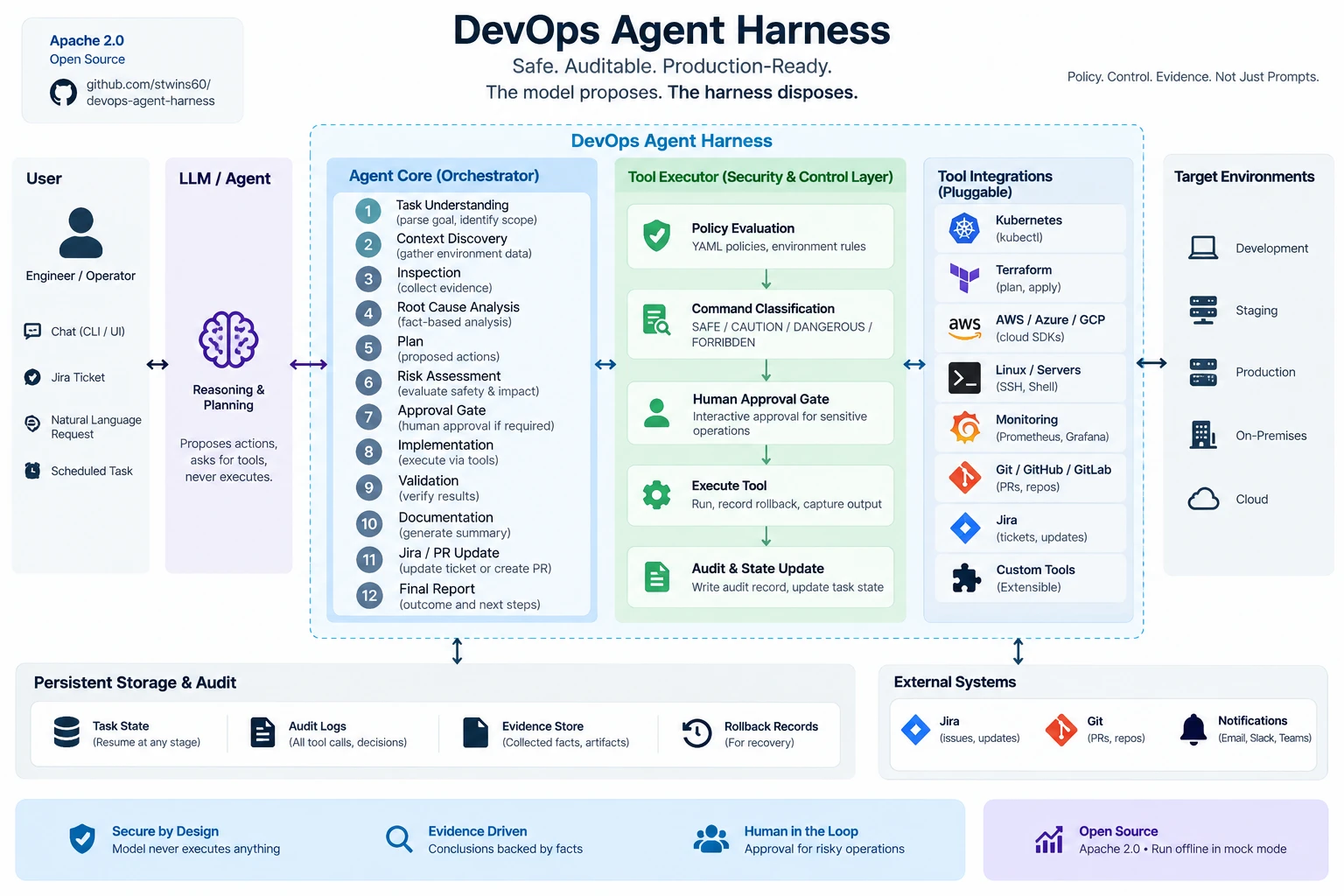
                    ┌──────────────────────────┐
                    │   USER · IDE · MCP CLIENT │
                    └─────────────┬────────────┘
                                  ▼
                    ┌──────────────────────────┐
                    │      AGENT HARNESS       │  agent/harness.py
                    └─────────────┬────────────┘
            ┌─────────────────────┼─────────────────────┐
            ▼                     ▼                     ▼
      Orchestrator          Policy Engine         Approval Engine
      (lifecycle)         (YAML, outside LLM)   (interactive · allowlist · auto)
            │
            ▼
      Specialist Agents
      kubernetes · docker · linux · jira · git · cicd · aws · terraform
      ansible · networking · observability · security · incident · documentation
            │
            ▼
      Tool Executor  →  policy → approval → tool → audit log + task state + rollback plan
            │
            ▼
      Tool Registry (115 tools)
      Native · CLI · REST · MCP · SDK backends, each with a real and a mock implementation
| Layer | Location |
|---|---|
| CLI and mock API server | apps/cli, apps/mockserver |
| Orchestrator, planners, specialists, decider | agent/orchestrator, agent/planners, agent/specialists |
| Policy, approvals, audit, state, context, memory, RCA, rollback, reports | agent/policies, agent/approvals, agent/audit, agent/state, agent/context, agent/memory, agent/rca, agent/rollback, agent/reports |
| Tool registry, adapters and integrations | tools/ (one package per integration) |
| Model provider adapters | adapters/openai, adapters/claude, adapters/opencode, adapters/copilot, adapters/generic |
| Policy and runbooks | policies/, runbooks/ |
Extension points: add a Tool (package build_tools()), an Agent (Specialist subclass), a Policy (.agent/policy.yaml), a Runbook (YAML) or a Provider adapter without touching the orchestrator. See docs/architecture.md and CONTRIBUTING.md.
🔧 Operations
| Concern | Where |
|---|---|
| Durable task state | tasks/<ID>/task.json plus plan.md, evidence.md, changes.md, validation.md, final-report.md, incident-report.md |
| Resume | devops-agent resume ID or execute ID continues from the recorded stage |
| Audit and metrics | .agent/audit/audit.jsonl; each final report embeds tool calls, failures, approvals, policy blocks and model calls |
| Project memory | .agent/{memory,decisions,runbooks,architecture,incidents,conventions} as secret-checked markdown |
| Runbooks | devops-agent runbooks list | show NAME | find "text" |
| Task inspection | devops-agent tasks list | show ID, devops-agent tools list |
📚 Documentation
| Topic | Document |
|---|---|
| IDE and agent setup | docs/integrations.md |
| Production checklist | docs/production.md |
| Architecture and lifecycle | docs/architecture.md |
| Agent model and specialists | docs/agent-model.md |
| Tool catalogue and manifest format | docs/tools.md |
| Security model | docs/security.md |
| Approvals | docs/approvals.md |
| Jira workflow | docs/jira.md |
| Kubernetes, AWS, Terraform agents | docs/kubernetes.md · docs/aws.md · docs/terraform.md |
| Runbooks | docs/runbooks.md |
| Troubleshooting | docs/troubleshooting.md |
| Development and testing | docs/development.md |
| Architecture decision records | docs/adr/ |
| Contributing and security policy | CONTRIBUTING.md · SECURITY.md |
Roadmap
| Phase | Status |
|---|---|
| 1 CLI, orchestrator, registry, policy, approvals, audit, filesystem/git/jira/docker/kubernetes/linux/github/gitlab, AGENTS.md, task state | ✅ Implemented |
| 2 AWS, Terraform, Ansible, GitHub Actions, GitLab CI, Trivy, Semgrep, Gitleaks, Checkov | ✅ Implemented (real + mock backends) |
| 3 Prometheus/Loki correlation, incident response, runbook engine, memory, multi-agent coordination | ✅ Implemented |
| 4 Multi-repository graph, autonomous remediation policies, pricing-based cost analysis, enterprise RBAC, web UI | 🔜 Extension points documented in docs/architecture.md |
Licensed under the Apache License 2.0.
Reviews (0)
Sign in to leave a review.
Leave a reviewNo results found