agf
Health Pass
- License — License: MIT
- Description — Repository has a description
- Active repo — Last push 0 days ago
- Community trust — 112 GitHub stars
Code Pass
- Code scan — Scanned 4 files during light audit, no dangerous patterns found
Permissions Pass
- Permissions — No dangerous permissions requested
Security Assessment: Overall risk is Low. The application acts as a local session manager and executes local shell commands to launch or resume your AI agents. It reads your local filesystem to discover existing projects, sessions, and Git branches. The automated code scan found no hardcoded secrets, dangerous patterns, or outbound network requests. Additionally, it does not request any dangerous system permissions.
Quality Assessment: The project demonstrates strong quality indicators. It is actively maintained, with the most recent code push occurring today. It is distributed under the highly permissive and standard MIT license. With over 100 GitHub stars, it shows a healthy and growing level of community trust. The Rust foundation and continuous integration setup also suggest a stable and reliable codebase.
Verdict: Safe to use.
AI Agent Session Finder — TUI to find, resume and manage sessions across Claude Code, Codex, Gemini, Kiro, OpenCode, Cursor, pi
agf




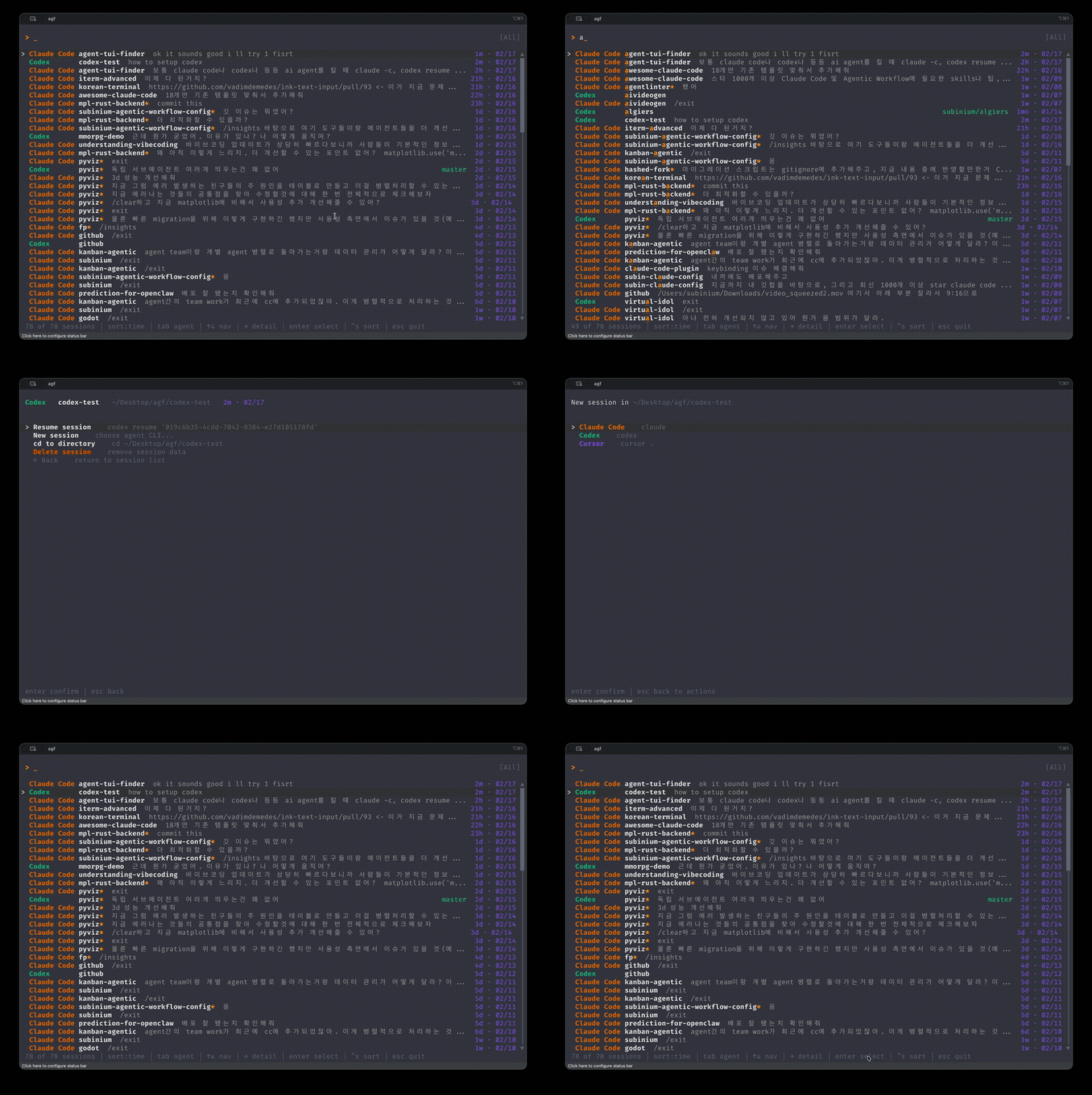
A fast TUI to find, resume, and manage your AI coding agent sessions.
Supports Claude Code, Codex, OpenCode, pi, Kiro, Cursor CLI, and Gemini — all in one place.
Built with SuperLightTUI (SLT) — an immediate-mode terminal UI library for Rust.
Quick Start
# Homebrew (macOS/Linux)
brew install subinium/tap/agf

# Cargo (any platform)
cargo install agf
Then run agf setup and restart your shell. Type agf to launch.
Quick Resume (no TUI)
agf resume project-name # fuzzy-matches and resumes the best match directly
Why agf?
If you use AI coding agents, you've probably done this:
- Forget which project you were working on
cdinto the wrong directory- Try to remember the session ID
- Give up and start a new session
agf fixes that. It scans all your agent sessions, shows them in a searchable list, and lets you resume with one keystroke.
Features
- Unified view — Claude Code, Codex, OpenCode, pi, Kiro, Cursor CLI, and Gemini sessions in one list
- Fuzzy search — find any session by project name or summary
- One-key resume — select a session and hit Enter
- Agent filter — Tab to cycle through agents
- Smart cd — jump to any project directory
- Bulk delete —
Ctrl+Dto multi-select and batch-delete sessions - New session — launch a new agent session with optional permission mode
- Quick resume —
agf resume <query>to skip the TUI and resume directly - Unicode search — Korean (한글) and CJK input supported
- Mouse support — click to select sessions, scroll wheel navigation
- Resume mode picker — Tab on Resume to choose permission/approval mode (yolo, plan, etc.)
- Auto-detection — only shows agents installed on your system
- Git branch — shows the current branch of each project's working directory
- Worktree support — detects Claude Code
--worktreesessions; shows worktree name in the list and parent branch in the detail view
Keybindings
Browse
| Key | Action |
|---|---|
| Type anything | Fuzzy search |
↑ ↓ / Ctrl+K Ctrl+J |
Navigate |
[ ] |
Cycle session summary |
Enter |
Open action menu |
→ / Ctrl+L |
Preview session details |
Tab / Shift+Tab |
Cycle agent filter |
Ctrl+S |
Cycle sort (time / name / agent) |
Ctrl+D |
Enter bulk delete mode |
? |
Help / settings |
Esc |
Quit |
Bulk Delete (Ctrl+D)
| Key | Action |
|---|---|
Space |
Toggle selection + move down |
↑ ↓ / Ctrl+K Ctrl+J |
Navigate |
Enter |
Confirm deletion (when items selected) |
Esc |
Cancel and return to browse |
New Session (Agent Select)
| Key | Action |
|---|---|
1-9 |
Quick select agent |
Tab |
Open permission/approval mode picker |
Enter |
Launch with default mode |
Esc |
Back |
Config
Optional. Create ~/.config/agf/config.toml:
sort_by = "time"            # "time" | "name" | "agent"
max_sessions = 200
search_scope = "name_path"  # "name_path" (default) | "all" (include summaries)
summary_search_count = 5    # number of summaries included when search_scope = "all"
You can also edit search_scope and summary_search_count interactively by pressing ? in the TUI.
Supported Agents
| Agent | Resume Command | Data Source |
|---|---|---|
| Claude Code | claude --resume <id> |
~/.claude/history.jsonl + ~/.claude/projects/ |
| Codex | codex resume <id> |
~/.codex/sessions/**/*.jsonl |
| OpenCode | opencode -s <id> |
~/.local/share/opencode/opencode.db |
| pi | pi --resume |
~/.pi/agent/sessions/<cwd>/*.jsonl |
| Kiro | kiro-cli chat --resume |
~/Library/Application Support/kiro-cli/data.sqlite3 |
| Cursor CLI | cursor-agent --resume <id> |
~/.cursor/projects/*/agent-transcripts/*.txt |
| Gemini | gemini --resume <id> |
~/.gemini/tmp/<project>/chats/session-*.json |
Session Storage Paths
| Agent | Format | Default Path |
|---|---|---|
| Claude Code | JSONL | ~/.claude/history.jsonl (sessions)~/.claude/projects/*/ (worktree detection) |
| Codex | JSONL | ~/.codex/sessions/YYYY/MM/DD/rollout-*.jsonl |
| OpenCode | SQLite | ~/.local/share/opencode/opencode.db |
| pi | JSONL | ~/.pi/agent/sessions/--<encoded-cwd>--/<ts>_<id>.jsonl |
| Kiro | SQLite | macOS: ~/Library/Application Support/kiro-cli/data.sqlite3Linux: ~/.local/share/kiro-cli/data.sqlite3 |
| Cursor CLI | SQLite + TXT | ~/.cursor/chats/*/<id>/store.db~/.cursor/projects/*/agent-transcripts/<id>.txt |
| Gemini | JSON | ~/.gemini/tmp/<project>/chats/session-<date>-<id>.json<project> is a named dir or SHA-256 hash of the project pathProject paths resolved via ~/.gemini/projects.json |
Install (other methods)
From sourcegit clone https://github.com/subinium/agf.git
cd agf
cargo install --path .
agf setup
Upgrading
After upgrading, run agf setup again (or restart your shell) to apply the latest shell wrapper.
See CHANGELOG.md for full details.
Requirements
- macOS or Linux
- One or more of:
claude,codex,opencode,pi,kiro-cli,cursor-agent,gemini
Contributing
Issues and PRs are welcome.
Contributors
License
Agent Support Roadmap
Amp is not yet supported. Amp stores sessions on a remote server, making it difficult to reliably resolve project paths from session metadata. We are monitoring upstream changes and will add support when feasible.
Reviews (0)
Sign in to leave a review.
Leave a reviewNo results found