AskKey
Health Uyari
- License — License: MIT
- Description — Repository has a description
- Active repo — Last push 0 days ago
- Low visibility — Only 6 GitHub stars
Code Basarisiz
- Hardcoded secret — Potential hardcoded credential in Tests/Automation/test_hook_probes.py
- Hardcoded secret — Potential hardcoded credential in Tests/Automation/test_package_release.py
Permissions Gecti
- Permissions — No dangerous permissions requested
Bu listing icin henuz AI raporu yok.
Ask Key: the Mac key manager for AI agents. API keys stay encrypted on your Mac; Claude Code, Codex and Cursor find them over MCP, you approve each use, and the value goes only to the program, never to the AI. | 请旨:给 AI 用的 Mac 密钥管家。AI 自己找得到密钥,普通密钥直接放行,敏感密钥由你审批,密钥只交给目标程序,AI 看不到明文。
Ask Key




The Mac key manager for AI. Your keys stay encrypted on your Mac, and AI agents use them only through Ask Key:
- Find keys: agents look up what they need in Ask Key's catalog, so you stop pointing the way.
- Your rules: everyday keys pass, sensitive ones wait for your approval, and some stay hidden.
- Locked down: a key goes only to the program that needs it; the agent never sees the value.
Download for Mac (free, notarized, Apple silicon, macOS 14 or later) · Website
Ask Key has no backup or recovery yet, so keep the originals of your credentials somewhere else.
Why it exists
Coding agents need real secrets to deploy code, call APIs or log in to servers. The usual shortcuts are pasting a key into a chat, writing it into a prompt or leaving it in a .env file. Each of those hands plaintext to every tool, transcript and log that can read it, and you rarely see which agent used what.
Ask Key takes the secret out of that path. The agent never holds the stored value. It asks, you decide, and the value goes only to the program that needs it.
Install
Download AskKey.dmg and AskKey.dmg.sha256 from the latest release.
In the download directory, verify the checksum before opening the DMG:
shasum -a 256 -c AskKey.dmg.sha256Continue only if the check reports
OK.Open the DMG and drag
Ask Key.appinto Applications. It must stay at exactly/Applications/Ask Key.app, under that name, or agents cannot connect.Launch Ask Key and follow the three steps below.
To upgrade or remove it later, see Upgrade and Uninstall.
Start in three steps
The welcome page walks you through the same steps.
- Store a credential. Choose New Credential, or Import from File… to bring in a
.envfile. New credentials default to Ask every time. - Connect your Agent. Open the Agent access page and choose Connect… next to Claude Code, Codex, Cursor or Grok CLI. See Supported clients.
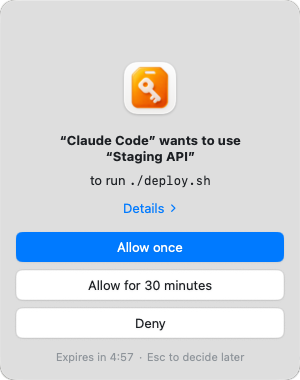
- Try it once. Send your Agent the sample prompt from Agent access, for example "Use Staging API from Ask Key to run a command that checks its variables are set, without printing their values". Ask Key shows an approval prompt; choose Allow once. The Agent sees only the command's output, and the use appears in Access records. In your projects, ask for real commands such as
./deploy.shthe same way.
How it works
Ask Key stores text credentials (API keys, tokens, passwords) and files (SSH keys, .p8, PEM, service-account JSON). One credential can have several parts, each mapped to an environment variable name. You add credentials by hand or import a .env file in the app.
flowchart LR
    A[Agent] --> H["askkey helper"]
    H --> B["Broker in the app"]
    B --> P{"Your approval"}
    P -->|approved| T["Target process (environment)<br/>or short-lived private file"]
    P -->|denied| X["Nothing delivered"]
An agent first reads a catalog of credential names, usage instructions and variable mappings. The catalog never contains values. When the agent needs a credential, it runs its command through the helper, and the Broker inside the app decides whether to ask you. After approval, text parts become environment variables of the target process, and file parts are written to a random file in a private directory that is removed after a short time. The agent gets the target's output (through the helper) or just its exit status (through MCP), never the stored value.
askkey run --wait-for-approval \
  --credential "Staging API" \
  --operation-id deploy-001 \
  --caller-name "Codex" --caller-purpose "Deploy staging" \
  -- ./deploy.sh
The helper ships inside the app bundle at Contents/Helpers/askkey. The target gets only the selected credentials, under the variable names set on each part, plus a filtered copy of the inherited environment.
Permissions
Each credential has one permission:
| Permission | Effect on agents |
|---|---|
| Allow | Agents can use it without a prompt. Delivery still goes through the Broker. |
| Ask every time (default) | Every use waits for your approval. |
| Hidden | Not in the agent catalog; agents cannot request it. |
When you approve a read, you choose Once or a Timed allowance: a number of minutes during which that credential can be read without asking again, until it ends or you revoke it. Pending requests expire after five minutes.
Agents can also write: create, modify or delete a credential, set its usage instructions and group, or move credentials and create, rename or delete groups in one batch. Every write needs your approval for that operation (a batch is approved once), the approval is tied to the exact content you were shown, and it cannot be reused for another change. Permanent deletion stays in the app.
Supported clients
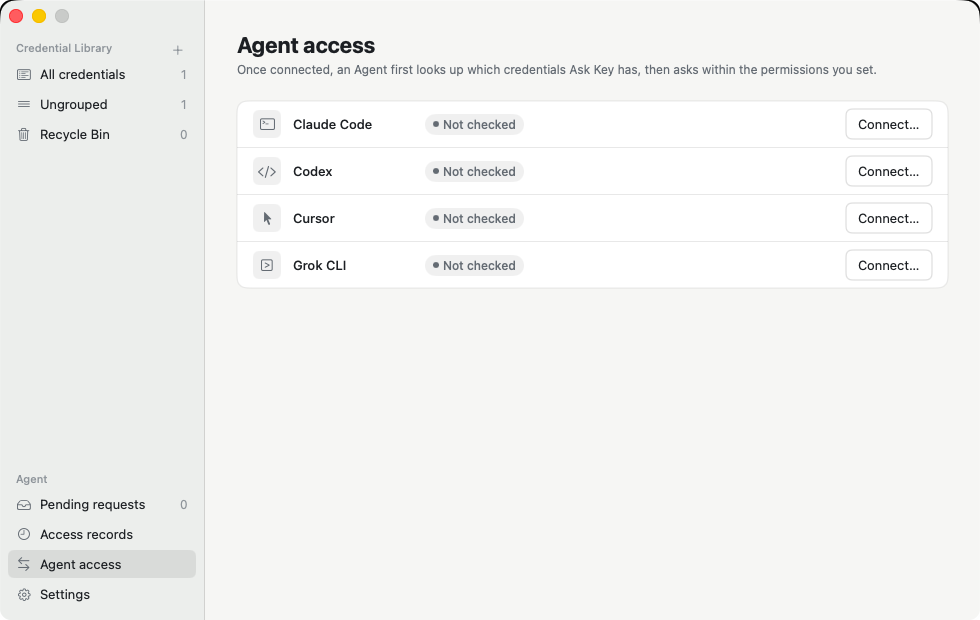
Claude Code, Codex, Cursor and Grok CLI. Open the app's Agent access page, check a client, then confirm. For each client, setup:
- adds Ask Key as an MCP server in the user-level configuration, keeping a private backup and your other settings;
- installs a discovery hook that reminds the agent to look up the catalog before common direct SSH commands;
- verifies the configuration, the bundled helper and the Broker before it reports the client as connected.
Setup runs only when you ask for it, and writing a client's configuration needs system authentication. Discovery hooks are reminders, not authorization.
Other MCP clients
Any client that supports standard MCP stdio servers can connect to Ask Key by defining a server with:
command:/Applications/Ask Key.app/Contents/Helpers/askkeyargs:["mcp"]
Manual setup does not include automatic discovery reminders before SSH commands or connection verification in the app. Broker permissions, approval prompts, and credential delivery protections still apply.
Security model
The full policy, including how to report a vulnerability privately, is in SECURITY.md. In short:
- Credentials are encrypted locally. Responses from Ask Key's management, MCP and helper interfaces do not contain stored plaintext.
- Revealing or copying a stored value in the app requires fresh system authentication.
- Revoking, expiring or pausing stops deliveries that have not started and cleans up temporary files.
What Ask Key does not guarantee:
- An approved target can print, copy or forward what it receives.
- Caller names and purposes are declared by the agent. They help you read a request; they are not verified identity.
- Another process running as the same macOS user may be able to read material after an approved delivery. Hidden keeps a credential out of the agent catalog but does not defend against that.
- A timed allowance covers the credential for the whole local user, not one agent client.
Upgrade
Quit Ask Key, download and verify the new DMG as described in Install, then replace /Applications/Ask Key.app with the app from the new DMG and relaunch. Your credential library and settings are kept. Watch GitHub Releases for new versions; there is no automatic update.
Uninstall
Quit Ask Key and delete /Applications/Ask Key.app. For each connected client, remove only the Ask Key entries and owned files listed in What setup writes, including MCP configuration, discovery Hooks and Ask Key-specific Hook trust settings (for example, for Claude Code, run claude mcp remove askkey --scope user and remove Ask Key handlers from ~/.claude/settings.json). Preserve unrelated client settings and Hooks. There is no in-app way to disconnect a client.
You can optionally erase the local credential library as well. This permanently destroys all stored credentials and cannot be undone; Ask Key has no backup or recovery. To do so, delete ~/Library/Application Support/AskKey and use Keychain Access to delete the keychain item with service com.sudohg.askkey.vault.
Build from source
Requirements: macOS 14 or later, and Xcode with a Swift 6 toolchain.
swift build
swift test
make run
make run builds a Debug app and starts it with separate development data, key material and socket, so it never touches an installed copy of Ask Key. Use synthetic credentials when trying it out. See CONTRIBUTING.md for the full requirements, UI test flow and pull request checks.
Documentation
The documentation index lists every guide and architecture decision. To find your way around the code, start with the architecture guide; testing.md explains the local checks and the desktop flows that run in CI.
License and credits
MIT. See LICENSE and NOTICE. Ask Key started as a fork of Lokalite by Ruben González Alonso; the product and most of the code have since been rewritten. The Chinese product name is 请旨.
Yorumlar (0)
Yorum birakmak icin giris yap.
Yorum birakSonuc bulunamadi