agentgraphed
Health Uyari
- License — License: MIT
- Description — Repository has a description
- Active repo — Last push 0 days ago
- Low visibility — Only 5 GitHub stars
Code Uyari
- process.env — Environment variable access in bin/agentgraphed.js
- fs module — File system access in bin/agentgraphed.js
- network request — Outbound network request in bin/agentgraphed.js
- network request — Outbound network request in scripts/fetch-pricing.mjs
Permissions Gecti
- Permissions — No dangerous permissions requested
Bu listing icin henuz AI raporu yok.
Local-first analytics dashboard for AI coding sessions. See what you built with Claude Code & Codex CLI.
AgentGraphed
The Claude Code usage monitor. Local-first analytics dashboard for Claude Code & Codex CLI sessions.
See every session, every project, every dollar — across your whole machine. No login. No cloud. Nothing leaves your computer.


Install & run — one command
npx agentgraphed
That's the whole install. No clone, no signup, no config file. The dashboard opens at http://localhost:3737 the moment it's ready. Re-run any time to scan for new sessions.
Prefer a global install?
npm install -g agentgraphed
agentgraphed
Don't have npx / Node? Install Node 20+ from https://nodejs.org (the LTS version is fine). Check yours with node --version.
What to expect on first run
npx agentgrapheddownloads the package once (~15 MB, takes 30-60s on a typical connection). Subsequent runs start in seconds — npm caches the package.- You'll see one
npm warn execline and a couple ofnpm warn deprecatedwarnings from transitive dependencies. These are harmless; they'll go away in a future release. - The dashboard server boots. You'll see:
› Starting AgentGraphed on http://localhost:3737 › Scanning local AI coding sessions… Found 142 Claude + 8 Codex sessions (14821 messages indexed in 1943ms) › Ready. Press Ctrl+C to stop. - Your browser opens to the dashboard automatically.
- To stop the server, hit
Ctrl+Cin that terminal. Your indexed data stays at~/.agentgraphed/agentgraphed.sqlitefor next time.
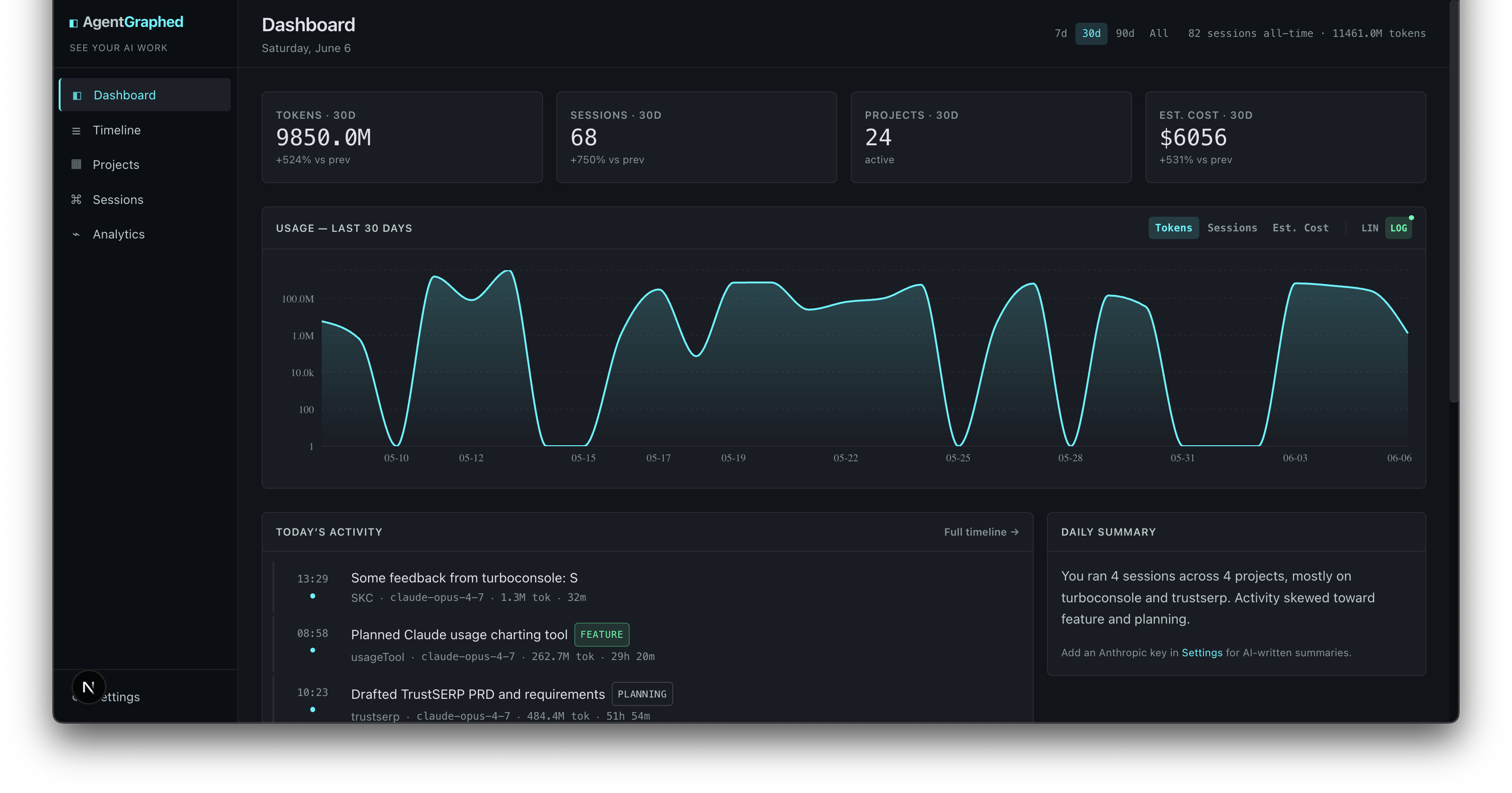
What it does
AgentGraphed reads your local Claude Code (~/.claude/projects/) and Codex CLI (~/.codex/sessions/) JSONL logs and turns them into a real dashboard. There's no agent to install on each session, no API key required to get started — it just reads files your CLI tools were already writing.
After npx agentgraphed, here's how to use it:
- Browse your work — Timeline groups every session by day. Multi-day sessions show
STARTED · SPANS Nd/CONTINUED/CLOSEDbadges so nothing hides on a single bucket. Click any session to read the full conversation in a chat-bubble view. - Resume a session — On any session page, click Resume session to copy
cd <cwd> && claude --resume <id>to your clipboard. Paste it in your terminal to pick up where you left off. - Find a specific project — Projects ranks every git repo you've worked in by activity, tokens, and cost. Click one to see only that repo's sessions.
- Refresh after more coding — Re-run
npx agentgraphed. It re-scans your CLI logs incrementally; already-ingested sessions are skipped. - Get clean titles and categories (optional, BYO key) — Open Settings → LLM provider, paste an Anthropic or OpenAI key, then click Classify uncategorized. Past-tense titles like "Fixed Stripe checkout bug" replace the raw first prompt. Cost is typically $0.01-0.03 for a few hundred sessions.
- Live quota probe (optional, opt-in) — On the dashboard, click Probe now (or toggle Poll every 60s) for live 5h & 7d rate-limit utilization read straight from Anthropic. Each probe costs a single token (~$0.00006).
Features
- Dashboard — 30-day usage chart, KPIs, top projects, work categories at a glance
- Timeline — every session grouped by day, searchable, filterable by project or provider
- Projects — auto-detected from git repo roots; see which projects pull the most AI time
- Sessions — read past conversations in a clean chat-bubble view
- Resume — one click copies
cd <cwd> && claude --resume <id>to your clipboard - Copy context (optional, BYO LLM key) — generates a primer for a fresh chat
- Multi-label classification (optional, BYO LLM key) — auto-categorizes sessions as Feature / Debugging / Planning / Refactor / Styling / DevOps / Data / Payments / Docs / Content
- Cost estimates — uses LiteLLM's auto-updating pricing data (2700+ models covered)
- Range picker — 7d / 30d / 90d / all-time on every chart
Screenshots

Timeline — every session, grouped by day. Multi-day sessions get |

Session detail — read past conversations in a clean chat-bubble view. One click to resume in Claude Code or copy a primer for a fresh chat. |

Projects — every git repo you've worked in, ranked by activity. See which projects are eating your week. |

Analytics — sessions per day, provider split, model breakdown with cost per model. |
Privacy
- Everything lives in
~/.agentgraphed/agentgraphed.sqliteon your machine. - Nothing is uploaded unless you click "Copy context" or "Classify sessions," and even then only to your LLM provider with your API key.
- API keys are stored in plaintext in the SQLite file — same threat model as
~/.aws/credentialsor a.env. Don't commit your home folder to git.
Supported sources
- Claude Code — reads
~/.claude/projects/*/*.jsonl - Codex CLI — reads
~/.codex/sessions/YYYY/MM/DD/*.jsonl
More adapters coming. If you want a specific one, open an issue.
Optional: LLM session titles & categories
Without an API key, sessions show the first line of the first prompt as the title. With a key:
- Anthropic — Haiku 4.5 (default) gives clean past-tense titles like "Fixed Stripe checkout double-decimal bug"
- OpenAI — GPT-5 mini works equally well, often cheaper
Click Settings → LLM provider, paste your key, then Classify uncategorized. Cost is fractions of a cent per session — typically $0.01–0.03 for a few hundred sessions.
Configuration
Environment variables:
| Variable | Default | What it does |
|---|---|---|
AGENTGRAPHED_PORT |
3737 |
Starting port (auto-increments if in use) |
AGENTGRAPHED_DATA_DIR |
~/.agentgraphed |
Where to store the SQLite DB |
AGENTGRAPHED_CLAUDE_DIR |
~/.claude/projects |
Override Claude Code log location |
AGENTGRAPHED_CODEX_DIR |
~/.codex/sessions |
Override Codex log location |
Log directories can also be edited at Settings → Data sources without restarting.
Development
git clone https://github.com/sudomichael/agentgraphed.git
cd agentgraphed
npm install
npm run dev
Open http://localhost:3737. Hot reload, source under src/.
To produce a publishable build:
npm run build         # builds Next.js standalone bundle
npm pack              # creates agentgraphed-X.Y.Z.tgz
License
MIT © Michael Patrick
Yorumlar (0)
Yorum birakmak icin giris yap.
Yorum birakSonuc bulunamadi