windlass
Health Gecti
- License — License: Apache-2.0
- Description — Repository has a description
- Active repo — Last push 0 days ago
- Community trust — 28 GitHub stars
Code Basarisiz
- rm -rf — Recursive force deletion command in .github/workflows/change-checks.yml
- process.env — Environment variable access in .github/workflows/change-checks.yml
- network request — Outbound network request in install/get-worker/worker.js
Permissions Gecti
- Permissions — No dangerous permissions requested
Bu listing icin henuz AI raporu yok.
Lightweight self-hosted Docker Compose control plane: Git deployments, HTTPS domains, logs and backups, plus an MCP server so AI agents can deploy with scoped tokens. Wraps the real docker compose, so containers keep running if Windlass stops.
Windlass
A self-hosted panel for Docker Compose that never rewrites your compose file.


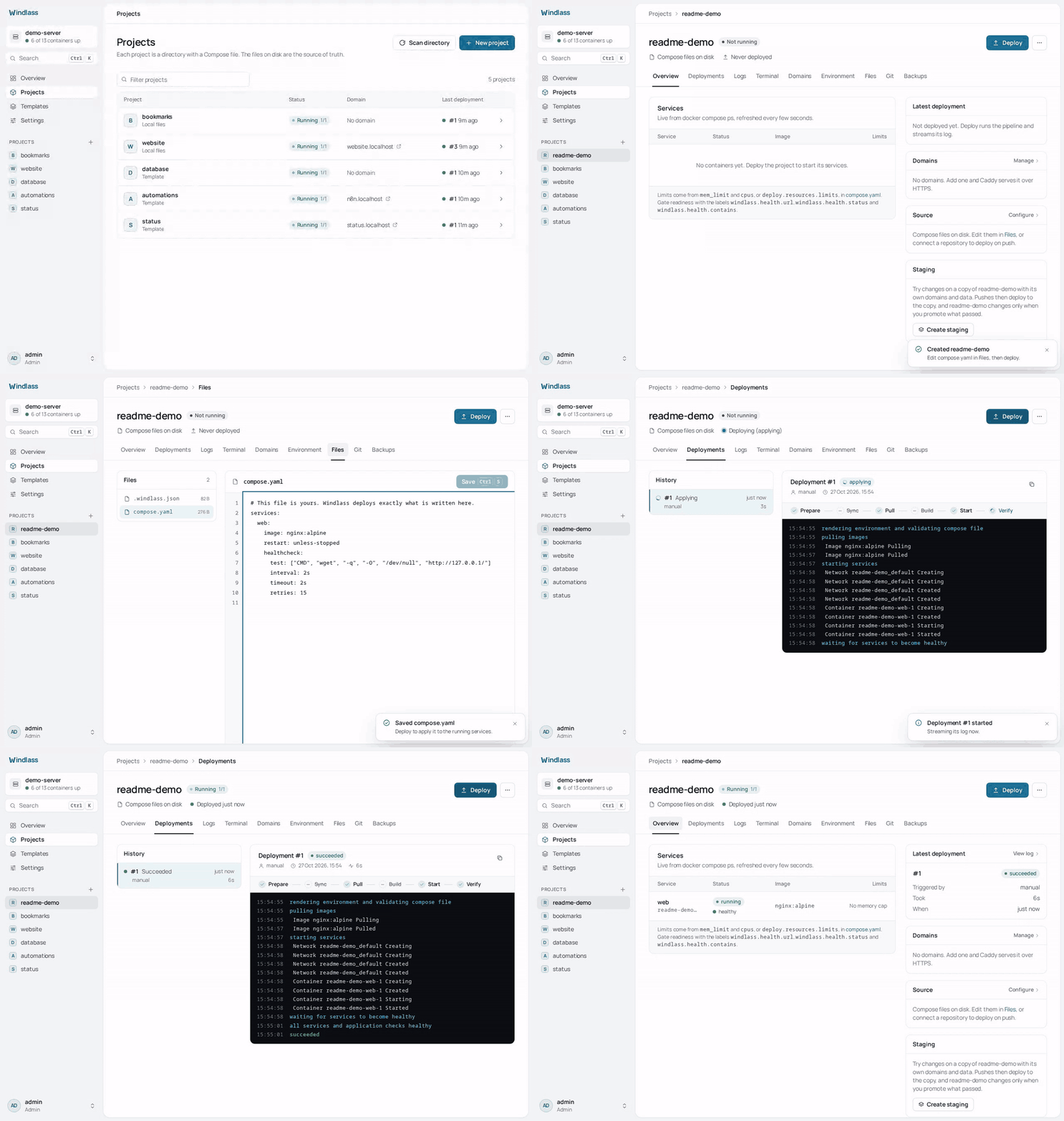
Windlass gives one server Git deployments, HTTPS domains, logs, a terminal, metrics,
backups and users, and does all of it by running the real docker compose CLI on your owncompose.yaml. No Swarm, no Postgres, no Redis: one Go binary, one SQLite file and Caddy.
The process idles at about 24 MB, and CI fails any build that reaches 40 MB.
curl -fsSL https://get.windlass.run | sudo sh
Runs on Linux, x86_64 or arm64. Claiming the instance and setting the panel domain are under
Install.
Why Windlass
- Your compose file stays yours. Windlass adds no labels, networks or renamed volumes to
it. Routes go to Caddy through its API, sodocker compose up -dby hand still works, and
the panel reads the same files you edit. - The panel is not in the request path. Stop Windlass and your sites keep serving: the
containers are ordinary Compose containers with a restart policy, and Caddy keeps its
routes. See life without the panel. - Nothing to migrate off. Everything that defines an app is a plain file in
/var/lib/windlass/projects/<name>/. Uninstall Windlass and you keep a folder of Compose
projects that run withdocker composealone. - Small enough for the cheapest VPS. No database server or cache to feed besides your apps.
- Staging that promotes what it tested. A project can have a staging copy with its own
domains,.envand data. Pushes reach staging first, and Promote deploys the same commit
and image digests to live. See Staging. - An MCP server for AI agents. Claude Code, Cursor, VS Code or Codex can read projects,
logs and deployments, and with a Deploy only token can deploy, roll back and promote. The MCP
server cannot edit a compose file or.env. Its eval results across Claude models are
published. See AI agents (MCP) and Evals.
Status
Windlass is in production use: real projects are deployed and served with it. It is still
0.x, so a release can contain a breaking change; when one does, its release notes say so and
what to do. The plugin SDK is held stable. Version 1.0 will mean the/api/v1 API, the plugin SDK and the project directory layout are frozen, and an outside
security review has been done. Until then, read Security before putting it
on a server you cannot rebuild.
How it compares
Checked against each project's own docs and source on 30/10/2026. Corrections welcome.
| Windlass | Coolify | Dokploy | CapRover | Dokku | |
|---|---|---|---|---|---|
| Deploys your compose file with | docker compose, file unchanged |
its own labels, networks and volume names added ("Raw" mode leaves it mostly alone) | docker compose, Traefik labels written into the file |
converted into CapRover apps; build, networks and deploy ignored |
no compose support; git push, image or archive |
| Runs alongside | Caddy and a restricted Docker socket proxy; SQLite is built in | Postgres, Redis, Traefik or Caddy | Docker Swarm, Postgres, Traefik | Docker Swarm, nginx | nginx (other proxies optional) |
| Stated server minimum | none; the panel idles at about 24 MB | 2 GB RAM | 2 GB RAM | 1 GB RAM recommended | 1 GB RAM |
| Licence | Apache-2.0 | Apache-2.0 | Apache-2.0, except /proprietary |
Apache-2.0 | MIT |
If you want a Heroku-style git push workflow, Dokku is the better fit. If you already write
Compose files and want a panel that leaves them alone, that is what Windlass is for.
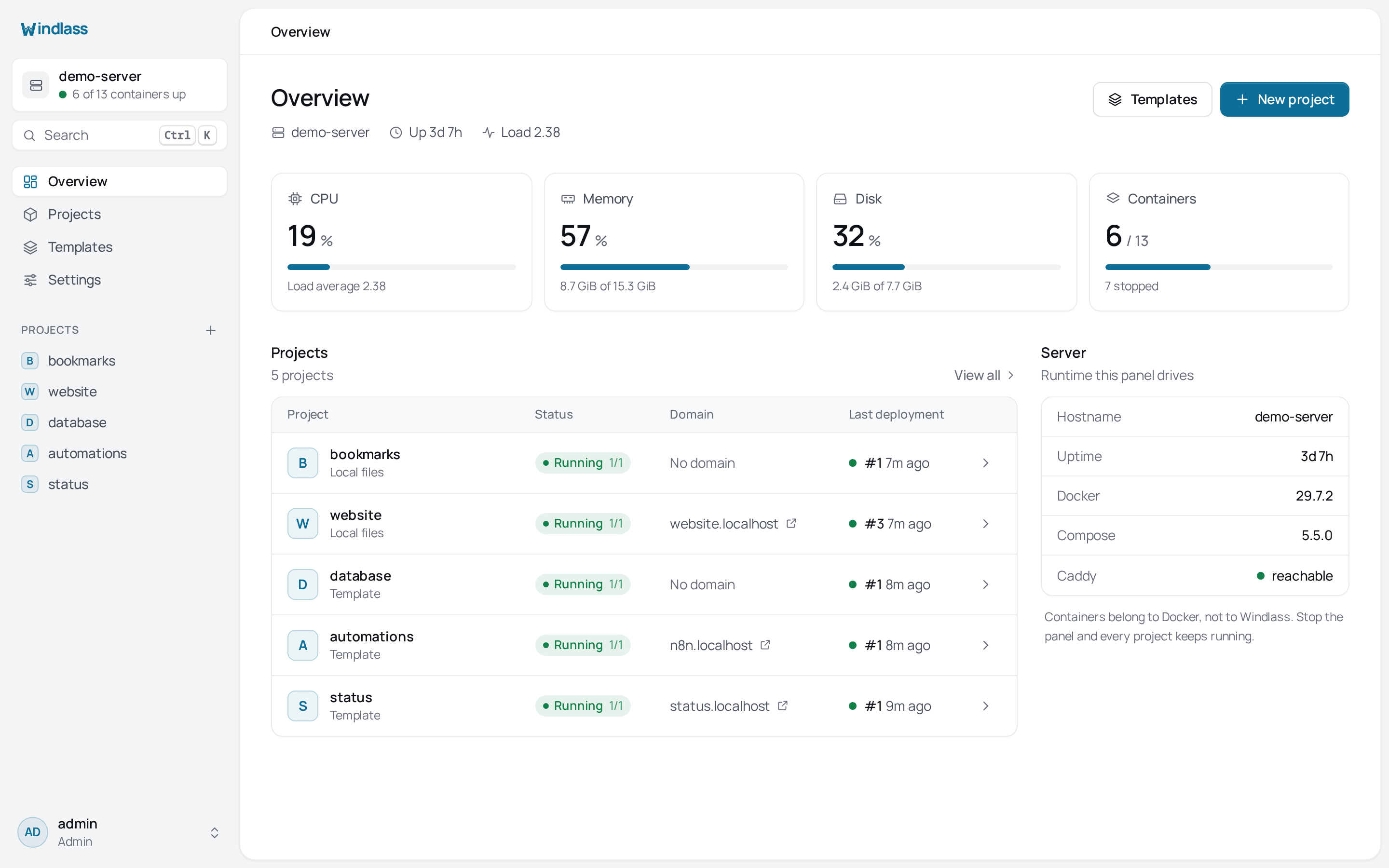
More screens in docs/screenshots, and the full guides at
windlass.run.
Source-of-truth model
Application configuration lives under the projects directory:
<projects>/<name>/
├── compose.yaml       # services, images, ports, volumes, networks, env references, limits
├── .env               # optional standard dotenv file; mode 0600
└── .windlass.json     # source repository, branch, auto-deploy, and domains
Windlass executes the real docker compose CLI in that directory. Hand-editing the files
and running docker compose up -d is supported. The Files and Environment screens read the
same files, and Scan directory rebuilds the SQLite project/domain index.
SQLite is not application configuration. It contains platform state such as users, sessions,
audit entries, deployment history, jobs, backup records, settings, encrypted credentials,
and rebuildable project/domain/environment indexes. Removing SQLite does not stop running
containers; filesystem scanning restores the application index, but platform history and
accounts require a platform backup.
Main features
- Manual, Git, webhook, template, and rollback deployments
- Crash-resumable deployment jobs and replayable deployment events
- Staging per project: pushes deploy to a copy with its own domains and data,
and Promote deploys the commit and image digests it verified to live - Caddy application domains and a Settings-managed HTTPS domain for the panel itself
- Raw file editing plus individual or bulk-paste environment variable editing
- Compose-native CPU/memory limit visibility and application readiness checks
- Container logs, browser terminal, host/container metrics, and image cleanup
- Local and S3-compatible backups with optional schedules
- Local users, roles, TOTP, and optional GitHub or Google sign-in
- Personal API tokens for scripts and CI: read only, deploy only, deploy and edit, or admin
- An MCP server for AI agents: Claude Code, Cursor, VS Code or Codex can read
projects, logs and deployments, and deploy with a deploy only token - Private registry credentials, applied to the host with a real
docker login - Optional external-process plugins
Application readiness is configured with ordinary Compose labels:
services:
  web:
    labels:
      windlass.health.url: https://app.example.com/health
      windlass.health.status: "200"
      windlass.health.contains: ready
      windlass.health.stability_seconds: "10"
Install
curl -fsSL https://get.windlass.run | sudo sh
Claim the instance using the one-time token from sudo journalctl -u windlass | grep setup_token, then open Settings, General, Panel domain after pointing a DNS record at
the server. Caddy obtains and
renews the panel certificate automatically.
See Installation for systemd, container, configuration, update, and
uninstall details.
Contributing
Building, testing and the architecture rules a change has to keep are in
CONTRIBUTING.md. Vulnerabilities go to SECURITY.md, never a
public issue.
Licence
Apache-2.0
Yorumlar (0)
Yorum birakmak icin giris yap.
Yorum birakSonuc bulunamadi