canon-skills
Health Uyari
- License — License: MIT
- Description — Repository has a description
- Active repo — Last push 0 days ago
- Low visibility — Only 9 GitHub stars
Code Basarisiz
- child_process — Shell command execution capability in bin/install.js
- spawnSync — Synchronous process spawning in bin/install.js
- os.homedir — User home directory access in bin/install.js
- process.env — Environment variable access in bin/install.js
- fs module — File system access in bin/install.js
- exec() — Shell command execution in examples/dsl-discount-spec/app/dsl_runner.js
- fs module — File system access in examples/dsl-discount-spec/app/dsl_runner.js
Permissions Gecti
- Permissions — No dangerous permissions requested
Bu listing icin henuz AI raporu yok.
The agent workflow harness: plans, decisions and acceptance criteria live in your repo, and a second agent grades the work before a sprint closes.
canon
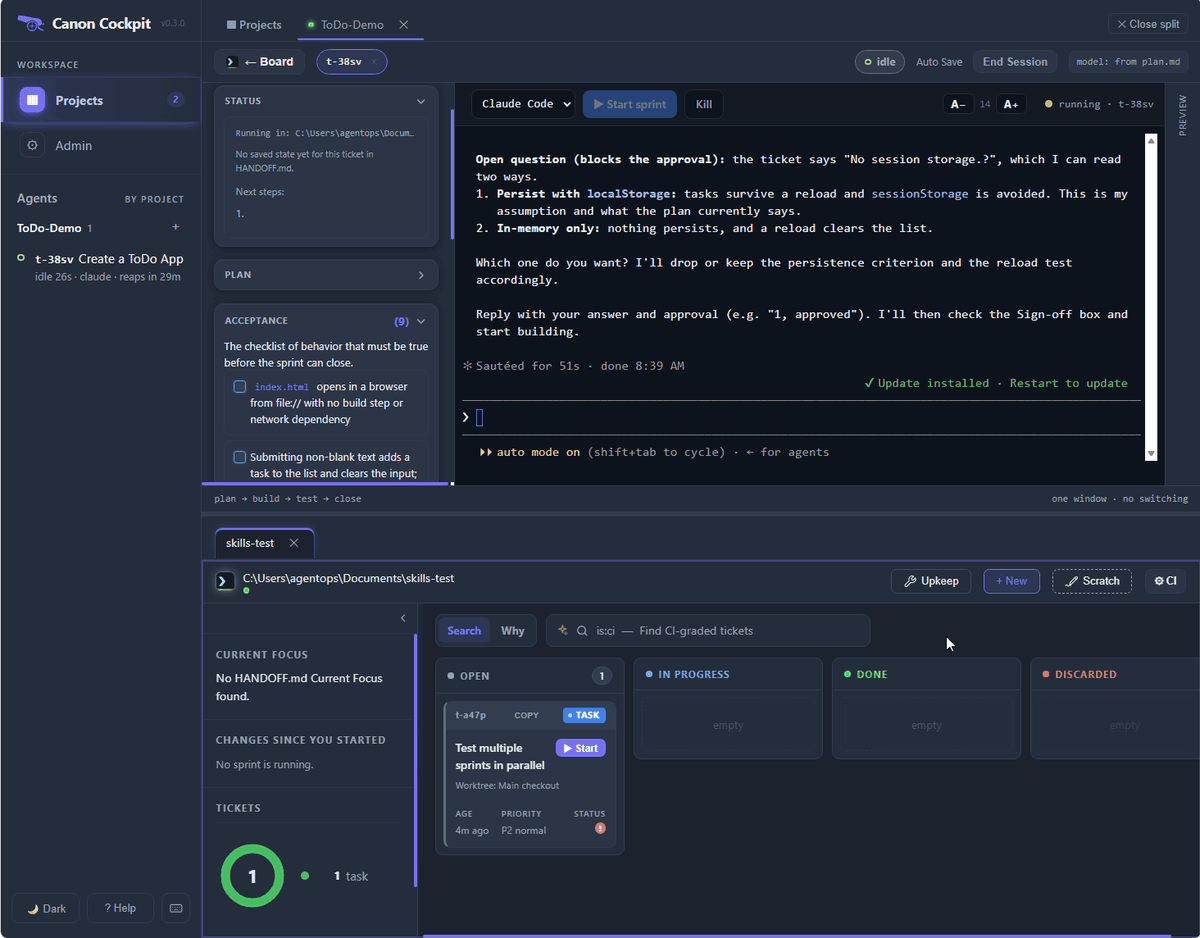
Plan. Build. See it.
Two commands and a local board. Your agent forgets — your repo shouldn't.
Don't let your agent self-review.


One-time setup:
# curl|bash — installs to ~/.canon
curl -fsSL https://raw.githubusercontent.com/sunitghub/canon-skills/main/install.sh | bash
# or to a custom path:
# CANON_HOME=/path/to/dir bash <(curl -fsSL https://raw.githubusercontent.com/sunitghub/canon-skills/main/install.sh)

cd /path/to/your-project
~/.canon/tools/skills.sh add sprint
If the installer prompts to add ~/.canon/tools to PATH, answer y and run the
printed source command before using bare skills.sh, sprint, orsprint-check — see Full setup guide → for the full steps.
To uninstall, close the Cockpit window and run canon uninstall. It prints a plan, asks, stops the daemon, cleans canon's hooks and skill symlinks out of every registered project, deletes the Cockpit data and the install folder, and on Windows removes canon from your user PATH:
canon uninstall --dry-run   # show the plan, change nothing
canon uninstall             # ask, then remove (add --keep-data to keep the Cockpit data)
It never deletes a git clone that has uncommitted or unpushed work: it prints the exact rm -rf for you instead. See Uninstall →.
Daily workflow:
sprint startandsprint-checkrequire~/.canon/toolson your PATH. The installer andskills.sh addcan add it to your shell rc file, then you need to run the printedsource ...command or open a new shell.
Run these from the project root. In practice, ask your AI agent to runsprint startandsprint completeafter it hascd'd into that repo; runsprint-checkwhen you want the local board.
sprint start "add OAuth login"   # agent: plan the work, create a local ticket
sprint-check                     # you/agent: open the board in your browser
sprint complete                  # agent: review, verify, close
That's the day-to-day surface. Setup wires the tools once; after that, your agent does the work and canon keeps it in your repo — not your prompt history.
Guided example: read examples/restaurant-bill-split/README.md
and give its starting prompt to your agent in a disposable folder — it walks through a fresh
sprint end to end without adding local sprint state to the canon checkout.
What Makes canon Different
The agent that wrote the code is the worst possible reviewer of that code. Most harnesses ask the
same agent to check its own work. canon makes that structurally impossible.
- A second agent, with no memory of building it. Before a sprint closes, a fresh subagent —
Read and Bash only, no implementation history — grades every acceptance criterion against the
actual code, with afile:linecite per verdict. It has no idea why any choice was made, so it
cannot inherit the assumption that produced the bug. Afailblocks the close. - The close gate is mechanical, not advisory. The CLI refuses to close while any acceptance box
is unchecked,summary.mdis missing, the gates record is absent, a referenced visual mockup was never embedded, or the eval verdict isn'tpass:. Anypartialornot-runforcesfail:. Gates don't make agents smarter — they make certain
failures impossible. - A delivery receipt you can't write prose around. Close produces a plan-vs-actual table, one
row per criterion: delivered, waived, deferred, or partial. Deviations appear in the table or the
sprint doesn't close. - Decisions outlive the context window. A long-running agent fails in three ways no bigger model
fixes — it contradicts an earlier decision, redoes finished work, or drifts off the question.
Those are state-management failures, not capability gaps. Plans, rejected alternatives, discovered constraints and
the acceptance bar live in.tickets/as plain markdown — read back in at the nextsprint start.
A compaction, a new session, or you in six months all get the same thread. - Cost you control. Simple work stays light. The close gates stay mandatory but run on the model
you set once in the Cockpit's Admin > Model Tiers ("Review & Eval", shipped as Sonnet 5), overridable per ticket viaGate model:—
a setting a human chose, never the agent's own judgment of its own work.
The Board
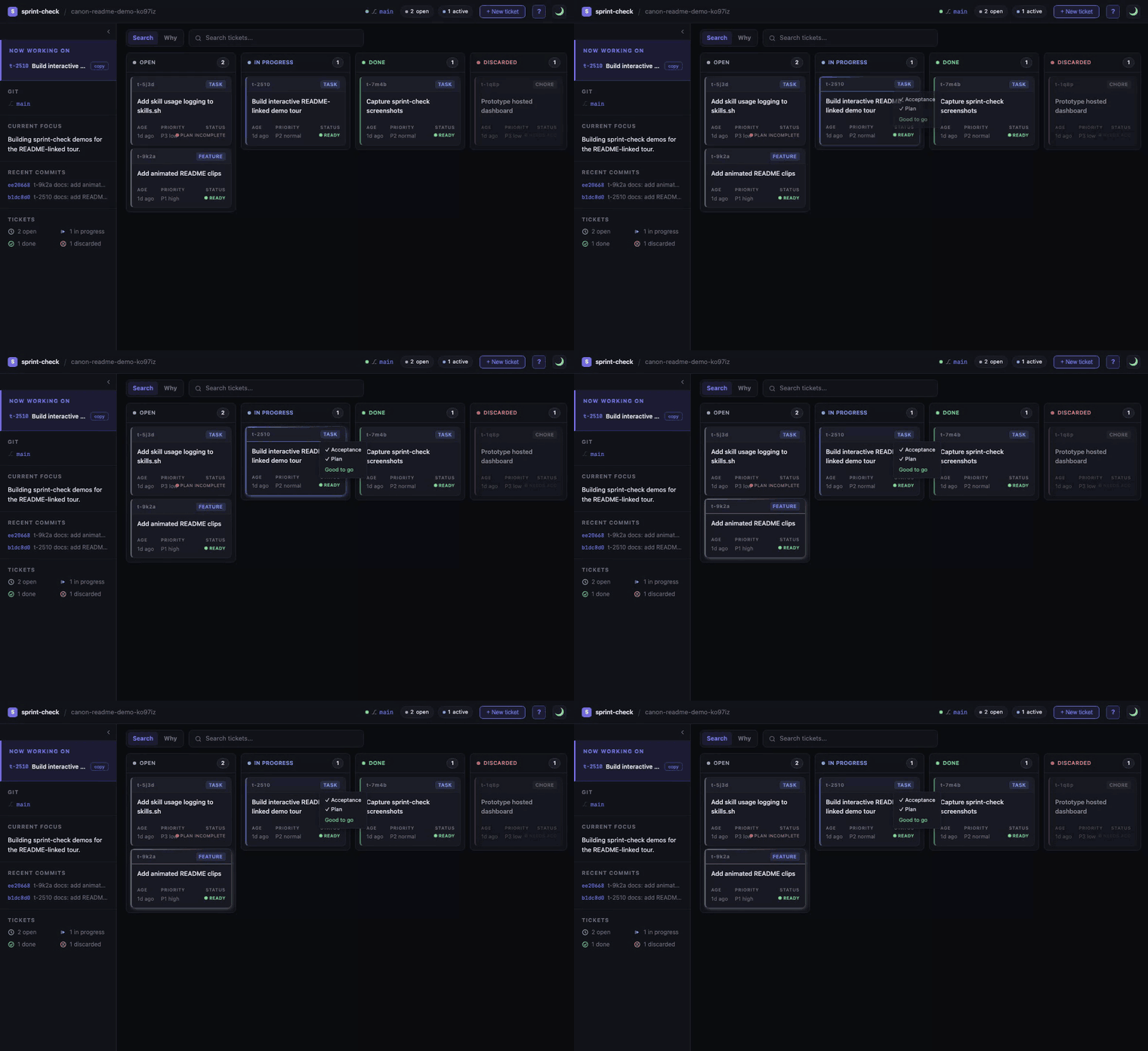
sprint-check reads your .tickets/ folder, HANDOFF.md, and git log, and opens a local kanban board in your browser. No account, no remote, no commit — the work is already there. It shows git state, current focus, recent commits, ticket status, and sprint docs at a glance, and tickets link to commits automatically.
A full, README-linked tour with refreshed dark-mode clips lives in docs/index.html.
Screenshots / clips
Board
CI gate & Eval-only mode
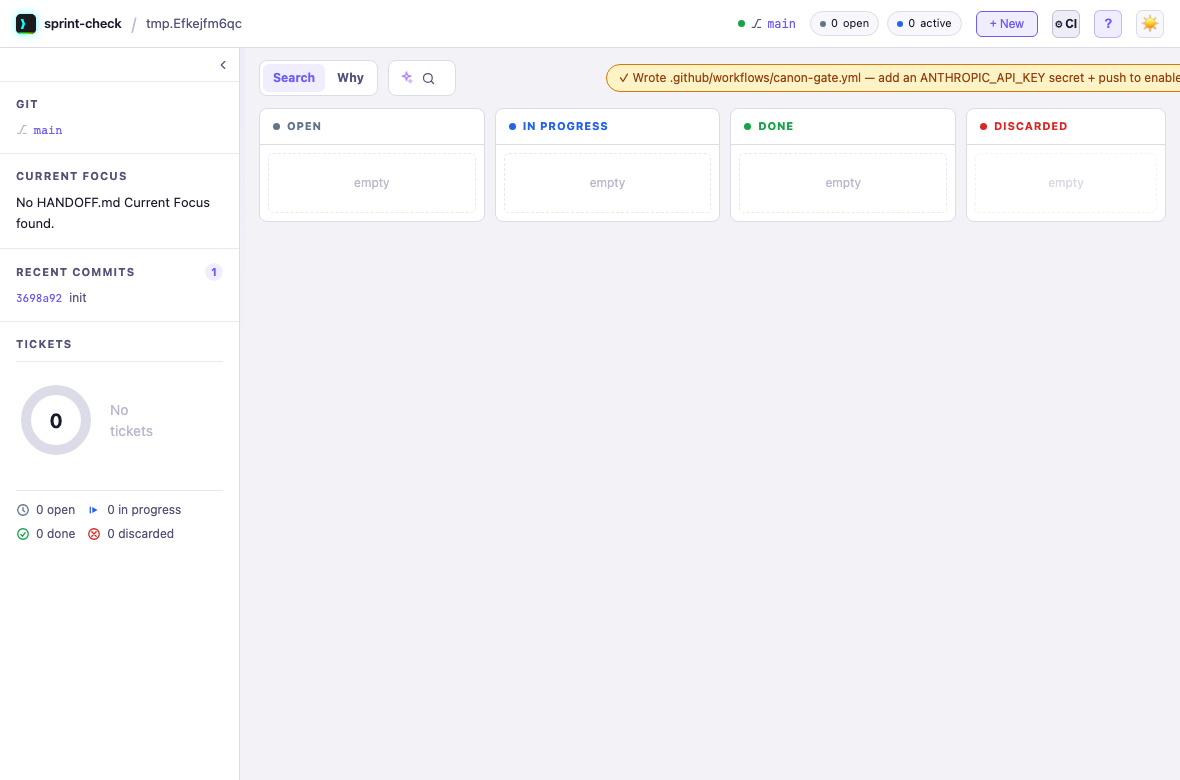
New tickets can be marked Eval-only (evaluator-only headless grading) alongside CI; the ⚙ CI button writes a ticket-driven, gate-aware canon-gate.yml so opened PRs are graded automatically.
Eval Report — run by a fresh agent with no implementation history
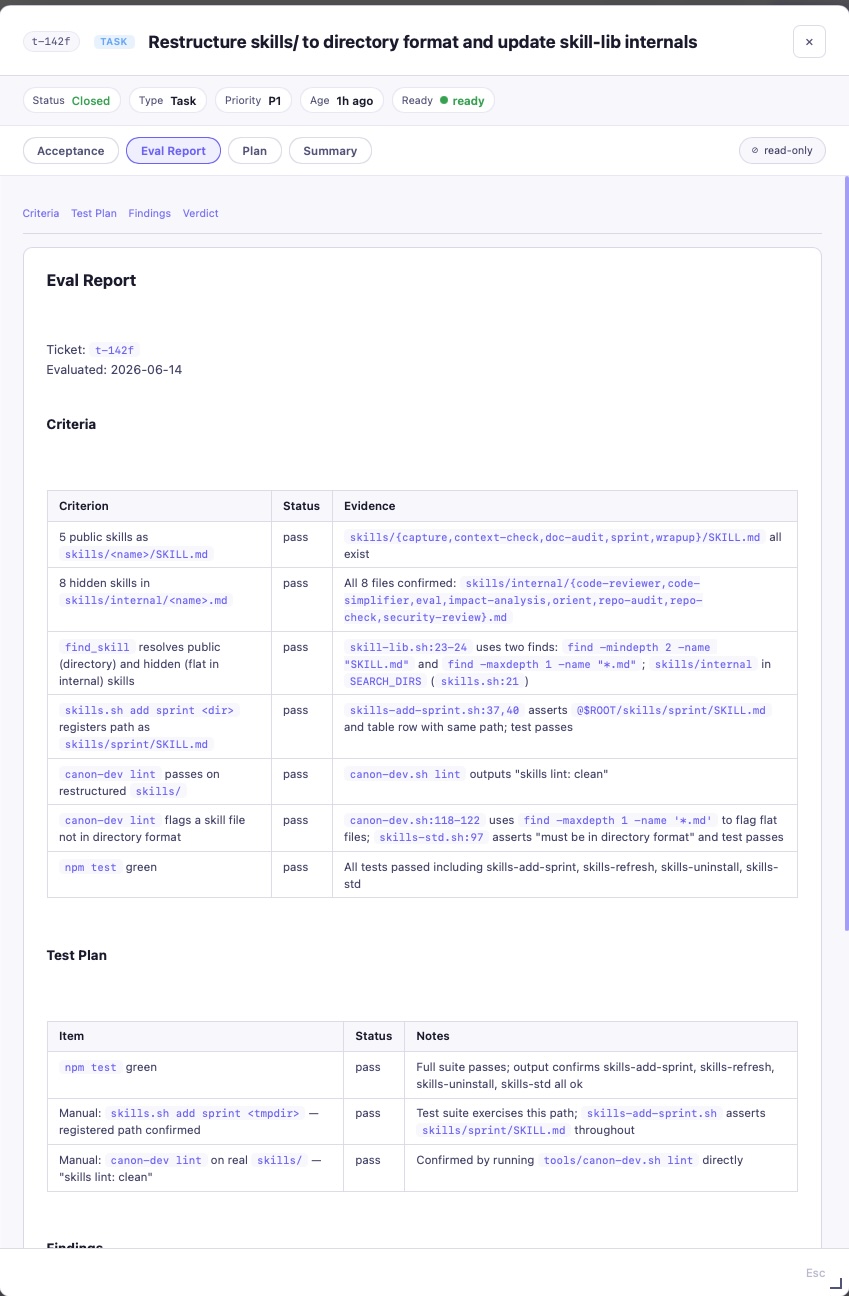
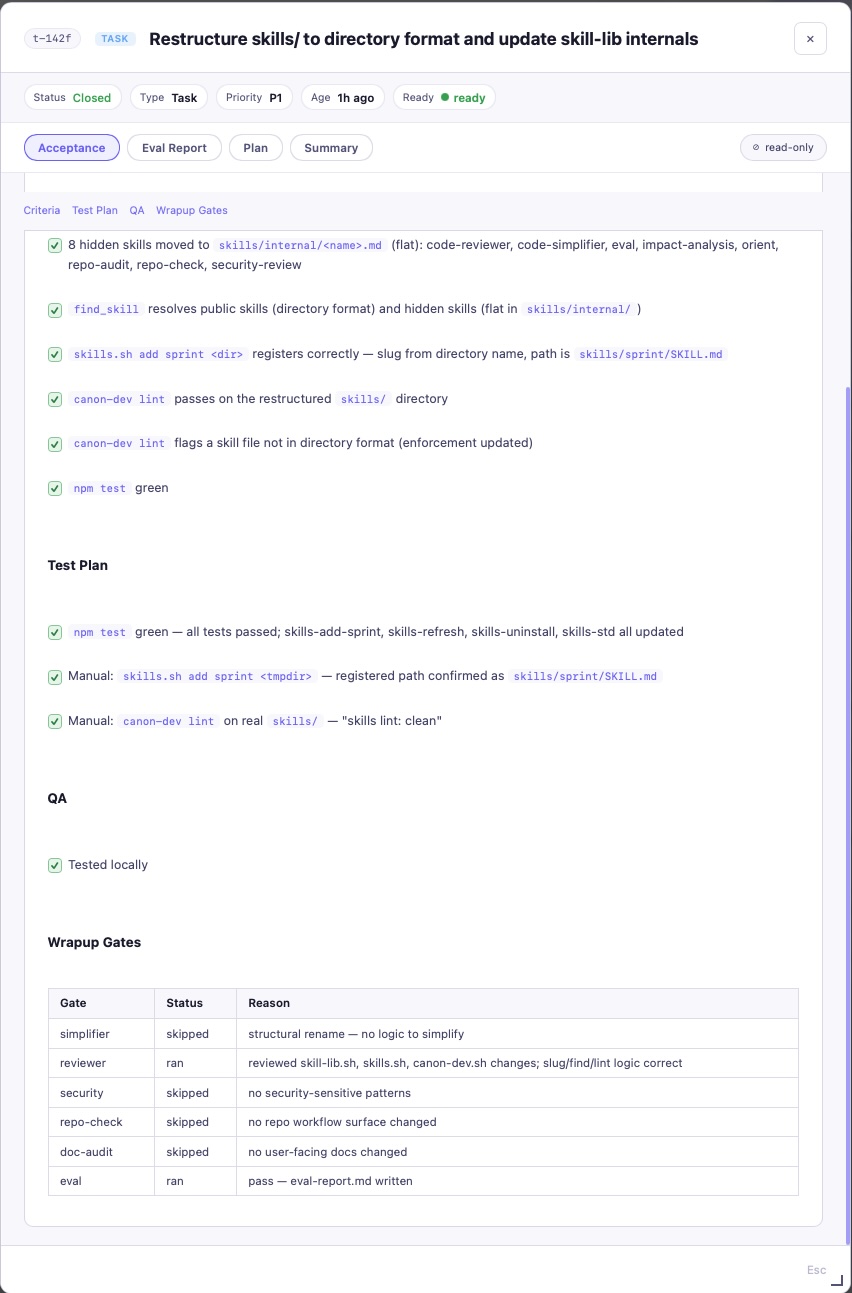
Acceptance & Wrapup Gates
Sprint Summary — Plan vs. Actual
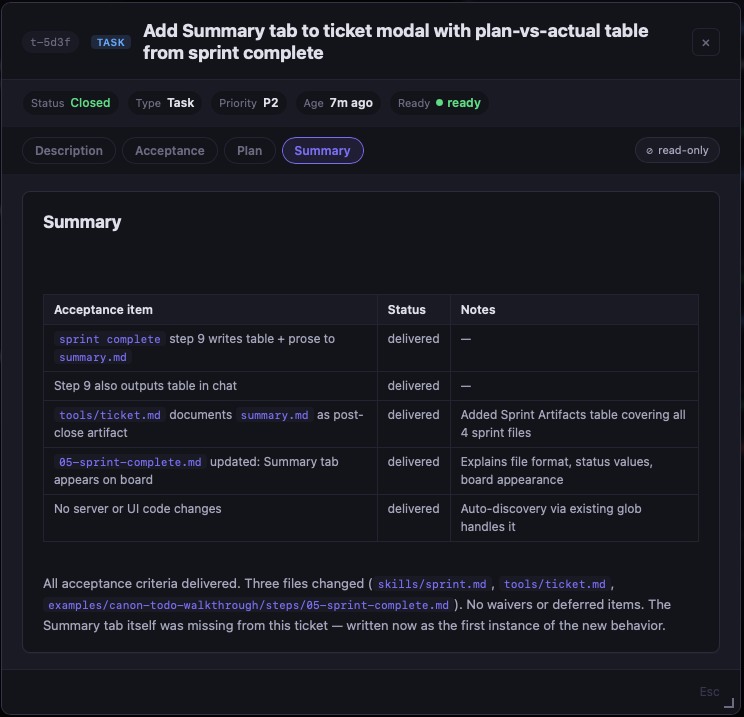
Every acceptance criterion, its outcome, and any deviations — permanently on the ticket.
The distinction that matters: context files inject knowledge but gate nothing, and external trackers keep state outside the repo where it drifts. canon keeps state in your repo (.tickets/) and governs it with a mechanical close gate — so what the repo holds is checked memory, not just recall.
Full feature tour → — dark mode, ticket detail, in-place doc editing, commit intelligence, drag-to-update, completeness checks.
Headless CI grading → — run reviewer/evaluator/security-review against an open PR unattended, via claude -p.
The Cockpit — run the agent inside the board
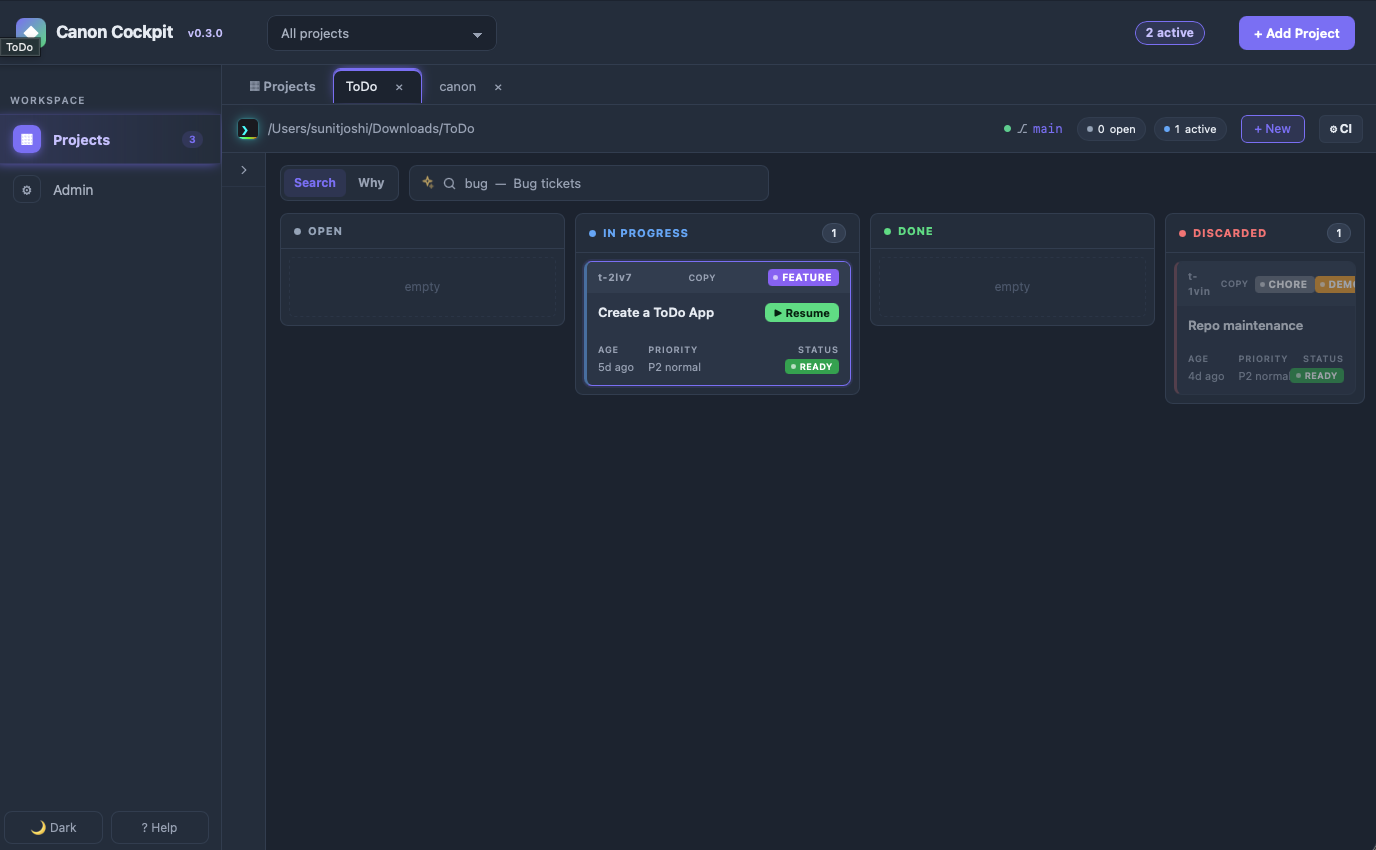
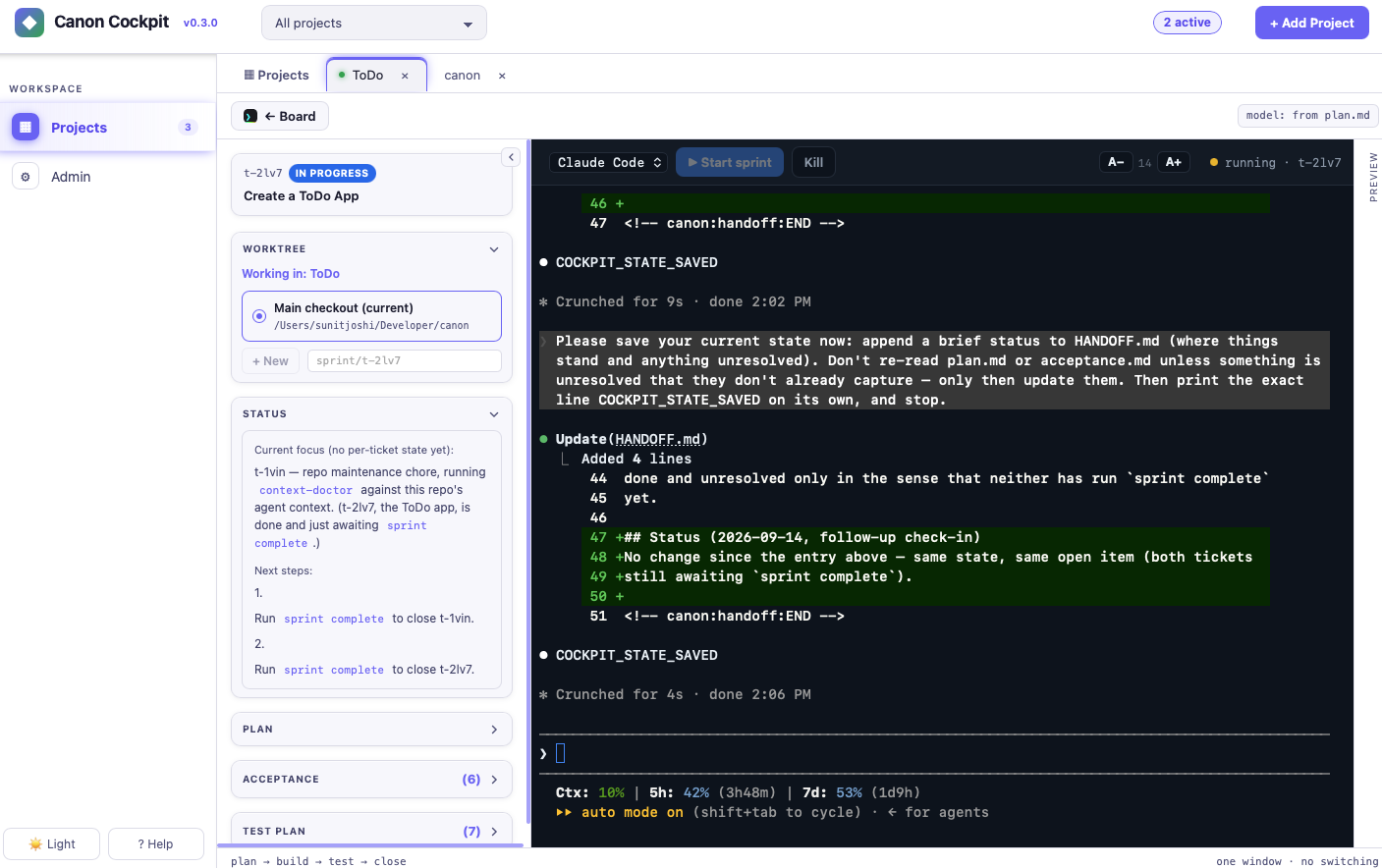
sprint-check isn't only a viewer: it can run the coding agent itself, in an embedded terminal — the cockpit — so plan → build → close happens without leaving the board.
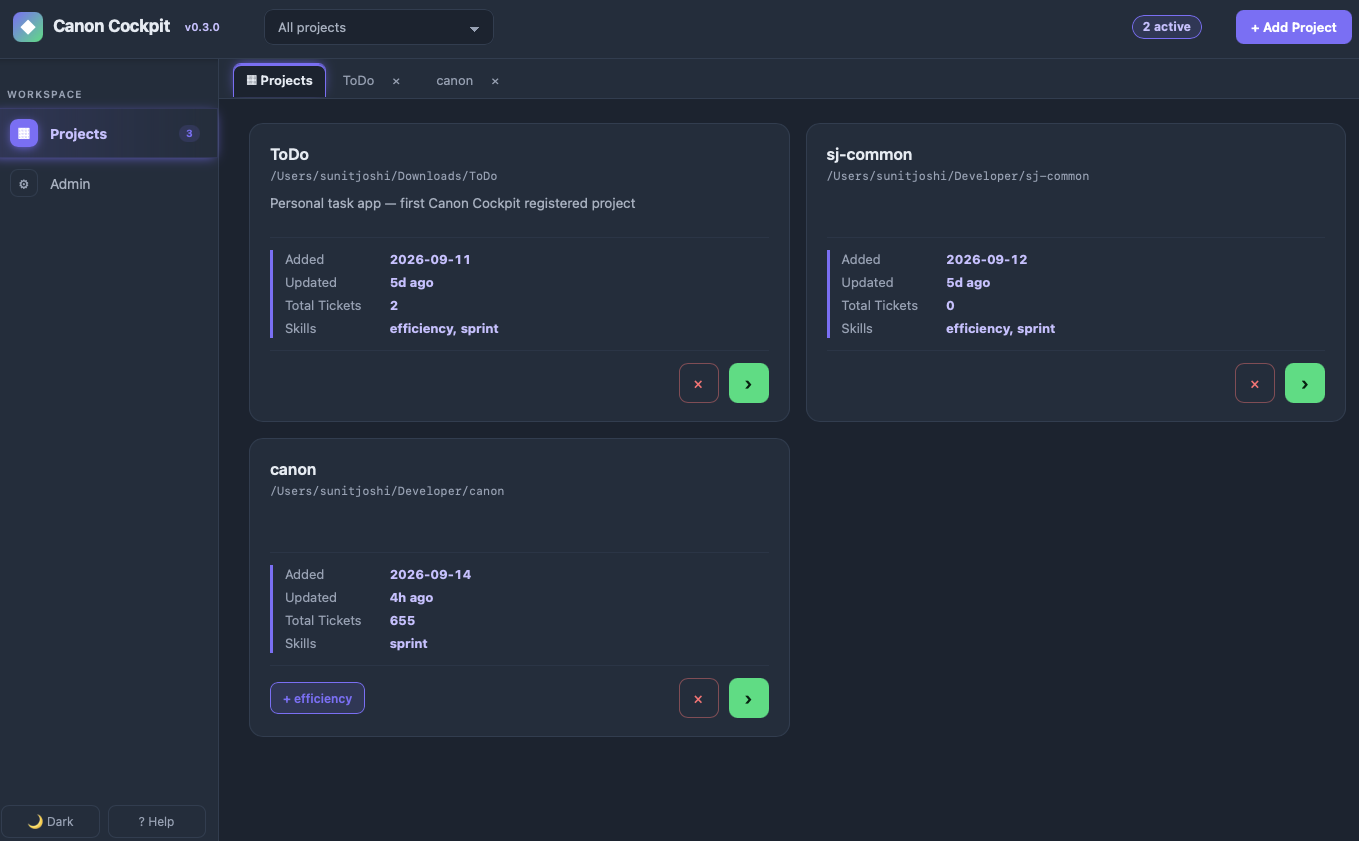
- Run the agent in the board. Pick a ticket, choose the agent — Claude Code, Pi, or Copilot CLI — and it runs the sprint in an embedded terminal, with the live STATUS / PLAN / ACCEPTANCE rail beside it. The model comes from the ticket's
plan.md(or the session default). - Several agents at once. One project can run several sessions side by side, each with its own agent — Claude Code on one ticket, Pi or Copilot CLI on another — and each ticket can start in its own git worktree.
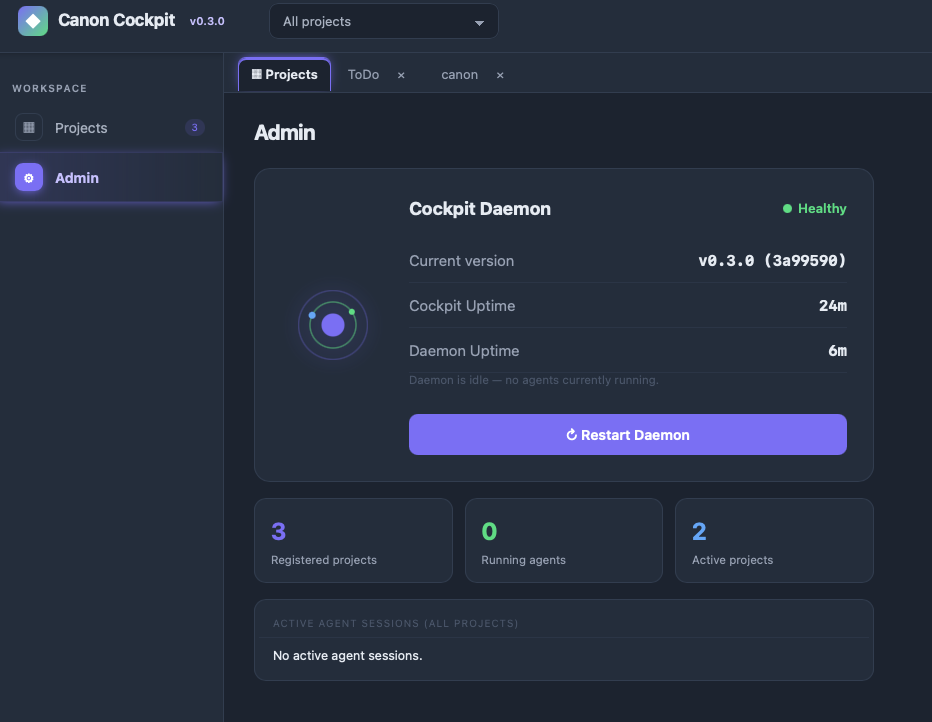
- A local daemon that outlives the tab. A small cockpit daemon owns the terminal, so a browser refresh never kills a running agent — and one daemon serves all your projects. The Admin page shows daemon health, version, uptime, one-click Stop/Restart, and every active agent session across projects with its directory.
- Worktree-aware. Run in the main checkout or a git worktree — the cockpit spawns the agent in the directory you pick and shows "Working in: …".
- Save & End. One click saves the sprint's state to
HANDOFF.mdand ends the session cleanly — no orphaned agent left behind. - One command.
canonopens the Cockpit athttp://127.0.0.1:8899/cockpit(a second run focuses the same window;canon <port>orCANON_COCKPIT_PORTpicks another port). From a terminal:canon status(board, daemon, sessions by state),canon sessions(every live agent session across projects;--jsonfor scripts), andcanon stop/canon restartfor the daemon (they refuse while sessions are running unless you add--force).canon wait <id> --until needs-youblocks until a session reaches a state (needs-you,working,done,idle,exited) — for scripts and CI;--timeout MSexits 1 if it doesn't.canon updatefast-forwards your canon clone (it refuses if the clone has uncommitted changes, isn't onmain, or can't fast-forward) and refreshes every project registered in the Cockpit. A Windows install from the one-line installer has no git, socanon updatere-runs that installer (keeping your Cockpit data) and then refreshes the projects; on macOS/Linux a folder that isn't a git clone is refused with the reinstall command. Tab completion:eval "$(canon completion zsh)"(orbash) in your shell rc, orcanon completion powershell | Out-String | Invoke-Expressionin your PowerShell$PROFILE. None of them needs or prints a session token. Renamed in t-03a8: this command wascanon-cockpit; there is no alias.
The daemon is loopback-only and session-token-gated, and the board never holds that token — it starts, attaches, and restarts sessions over localhost only, never exposing agent control off-machine.
What it actually caught
Claims about process are cheap. Here is what the gates found across two sprints on a real project —
an agentic app whose code and tests were largely AI-written.
They never found a wrong number. Every figure reproduced exactly when the evaluator recomputed it
independently. What they found instead were things a test suite structurally cannot reach.
A test that could not fail. The suite checked that a button was disabled when a flag was set:
assert button.disabled == live_only # both sides read the same list
Change the code and the expected answer changes with it — the check agrees with itself, always. It
passed every run until someone broke the code on purpose. The fix is to state the expectation
independently:
offline_safe = {"question A", "question B"}          # written by hand, not derived
assert button.disabled == (q not in offline_safe)
How you find those: break the code on purpose. If no test complains, the test was decoration.
$ # deliberately flip a flag the suite claims to guard
$ run the suite
  all checks passed              ← the bug: it cannot fail

$ # after stating the expectation independently
  FAILED — disabled=False contradicts the offline-safe list      ✓
Safety code nobody had ever run. Three defects sat in branches written specifically to be
defensive — including a guard that fell back to a call raising the same error it existed to avoid.
All three passed the suite. The reviewer found them by executing the failure case, not by reading
the branch, which looked correct.
Evidence that had quietly gone stale. Screenshots proving a feature still worked were timestamped
13 minutes before the commit that replaced it. Nothing in a test suite checks whether your evidence
still describes your code. The evaluator compared file times against commit times and said so.
And it doesn't take the fix on trust either. On the next pass it re-checked every finding it had
raised, and one row is still partial.
The part that makes it trustworthy is that it also declines to over-reach. Here it found one of my
totals was corroborated for only 11 of its 17 members, and that a label I had cited as evidence was
"an unfalsifiable handle". It considered grading the item partial, decided that would mean
penalising outside the stated criteria — and recorded the gap anyway:
"Recorded here so the total is not mistaken for verified evidence."
That sentence is the whole design in one line. A gate that only ever fails things is noise; a gate
that only ever passes things is theatre. This one refused to certify a number and refused to fail
the work over a criterion nobody had set.
The transferable lesson: "the tests pass" is a claim, and it needs its own evidence.
Not just CRUD
Most agent harnesses are demonstrated on todo apps and CRUD endpoints, where "correct" is obvious
and a wrong answer is visibly wrong.
canon's harder workout has been standards-governed industrial work — a knowledge-graph agent
answering questions against CFIHOS (the IOGP capital-facilities
handover specification) and ISO 14224 failure taxonomy, where every answer must cite a source and an
uncited one is marked unverified.
That domain punishes a harness differently. Correctness is semantic: a plausible, fluent, well-cited
answer can still be wrong because a threshold came from the wrong source. Domain conventions are
non-negotiable in ways no linter knows about. And the failure mode isn't a crash — it's an answer that
looks authoritative and isn't. Adversarial review earns its cost fastest exactly there.
The Two Commands
sprint start "<what>" — Make your agent plan before it codes.
Creates a ticket, defines acceptance criteria, and writes the plan before touching source. Normal changes stay light; a bugfix tier (a single logic file plus its covering test) runs eval-only — it keeps the binding evaluator but skips the advisory reviewer and heavier wrapup; high-risk changes add parallel subsystem mapping (one agent per independent subsystem, run concurrently), gray-area resolution, five-dimension impact analysis, any required human checkpoint, and adversarial review. The plan lives in .tickets/<id>/ and survives context resets.
sprint complete — Block close until every box is checked.
Runs the close path: simplify → code-review → security → repo/doc audit → reviewer (fresh subagent, advisory) → evaluator (fresh subagent, binding) → acceptance check → close. The evaluator — Read and Bash tools only, no implementation history — grades each acceptance criterion against the actual code. It writes a machine-generated evaluator-run-id before grading; the CLI blocks close if the field is absent or the verdict isn't pass. Any partial or not-run criterion forces the verdict to fail — there's no separate non-blocking partial/not-run verdict — and either blocks close the same way.
When the sprint closes, the agent writes summary.md — a plan-vs-actual table, one row per acceptance criterion, showing whether each was delivered, waived, deferred, or partial. Deviations must appear in the table; the agent can't bury them in prose. The Summary tab on the ticket board makes this permanent and queryable: find out whether the spec was fully met without scrolling through chat history.
Each sprint produces up to eight docs:
| Doc | Written | Contains |
|---|---|---|
acceptance.md |
sprint start | Done criteria · test plan · QA sign-off |
plan.md |
sprint start | Approach · decisions made along the way |
research.md |
sprint start | Objective truth: relevant files, system model, constraints, unknowns — brief for normal tier, full orient protocol for high-risk/brownfield |
review-notes.md |
sprint complete (normal+) | Advisory reviewer findings — code quality, scope, standards — with a YES/NO verdict |
eval-report.md |
sprint complete (normal+, incl. bugfix) | Adversarial criterion grades · pass/fail with file:line evidence |
mutation-report.md |
sprint complete (optional) | Advisory: surviving mutants when logic files changed — never close-gated |
learnings.md |
sprint complete (optional, via tkt learn) |
UNPROMOTED lessons candidate — the sprint's deviations + evaluator and reviewer findings, for a non-builder to promote |
summary.md |
sprint complete | Plan-vs-actual table · close prose |
Root LEARNINGS.md keeps a capped, always-current index of every open learnings.md candidate —
the learnings-sweep skill upserts one row per ticket close (the sprint agent runs it right aftertkt learn, per the close protocol), and its --full mode backfills/reconciles by hand; it is a
skill, not a shell command. It's read alongside HANDOFF.md at
every sprint start, and never promotes anything itself — see skills/learnings-sweep/SKILL.md.
All are plain markdown in .tickets/<id>/ and are read into the agent's context by sprint start — so a context reset or a fresh session never loses the thread. Projects can track that workflow state in git or keep it local; canon itself keeps its working tickets ignored.
Gated, not vibes. The CLI owns state; the agent and evaluator judge whether the work behind the gates is true. The board surfaces the same checks early — cards flag incomplete in red well before close-time.
What each wrapup gate checks — and doesn't → — the checks/skips reference for every close-path gate, and the install-time/runtime security it deliberately leaves out of scope.
Layering is intentional: sprint complete is CLI-enforced; planning, audits,
test judgment, and clean-context evaluation are agent-required; sprint-check
is board-surfaced visibility while the work is still in progress.
Two ways to grade headless — sprint-headless vs sprint-headless-eval
Both grade a diff that already exists and both run only against a base ref — you never let
them write code. The difference is ceremony: the full pipeline runs three gates against an
approved ticket; the eval-only command runs one gate against anything with checklist criteria.
sprint-headless |
sprint-headless-eval |
|
|---|---|---|
| Gates | reviewer + evaluator + security-review (bugfix tier: evaluator + security-review) |
evaluator only |
| Input | ticket id + committed, approved plan.md/acceptance.md |
a ticket id (grades its acceptance.md) or any markdown file with - [ ] criteria |
| Requires | tkt ci <id> on, - [x] Plan approved, ticket committed |
just the ticket/spec + a git repo |
| Writes | review-notes.md + eval-report.md in .tickets/<id>/ |
eval-report.md in the ticket folder, or next to the spec file |
| Cost | ~100k+ tokens (three subagents) | ~30–40k tokens (one subagent) |
| Verdict | HEADLESS_VERDICT: PASS/FAIL → exit 0/1; any gate fail → FAIL |
same; any partial or not-run forces fail: |
Neither headless command runs your code. Both dispatch through claude -p --permission-mode dontAsk with Bash whitelisted to git diff/log/show/status plus read-only tools — so they grade
by reading the diff and citing file:line, never by executing a test suite or rendering a
browser. That means an acceptance item phrased as "run npm test …" or "render and assert the
DOM" can't be executed here; it will be graded statically (or land not-run → fail). Execution
lives at the interactive sprint complete close, whose evaluator gets full Bash and does
run your tests / a headless browser and grades by exit code. Rule of thumb: write headless
criteria to be verifiable by reading the diff; reserve run-it-and-watch-it-fail checks for the
interactive close.
Cache an unchanged diff (opt-in). Re-grading a diff you haven't touched costs tokens for a
verdict you already have. Pass --cache (or set CANON_GATE_CACHE=1) and either headless command
reuses the prior verdict — keyed on the exact diff content — without re-dispatching claude -p,
announcing loudly that it did. Off by default (canon never silently reduces gate assurance);--no-cache always wins. Both PASS and FAIL are cached; edit the code to force a fresh grade. See
Headless CI grading → Verdict Caching.
No remote? The base ref defaults to
origin/main→main. If neither resolves (e.g. your
branch ismaster, or there's no remote), it silently falls back to diffing against the repo's
root commit — which makes the whole tree look "changed." Tag a real baseline
(git tag seed <commit>) and pass--base-ref seedso the diff means "what this sprint
changed." Verified end-to-end on Windows-on-ARM (Git BashMINGW64_NT…ARM64), where the
bundled x64sprint-headless-json-win.exeruns under emulation and noANTHROPIC_API_KEYis
needed ifclaudeis already logged in.
Headless CI grading → — full prerequisites, the spec-file format, model/cost control, waivers, and consumer-project CI wiring.
Which model runs the close gates
The close gates stay mandatory regardless of model — this only decides which model runs the
reviewer and the binding evaluator. First match wins:
| # | Condition | Set by | Model used | Scope |
|---|---|---|---|---|
| 1 | Gate model: is a model id (haiku/sonnet/opus) |
User only — live instruction or manual edit in plan.md |
that model | Both gates; overrides everything below, any risk tier |
| 2 | Gate model: session |
User only | current session model | Forces full session-model review; skips the rows below |
| 3 | demo: true on the ticket (and no Gate model:) |
User, via the demo flag | Haiku, on any diff | Evaluator only — security-review runs inline on the session model |
| 4 | Admin "Review & Eval" default (defaults.eval.anthropic in tools/sprint-check-app/model-tiers.json) |
Admin > Model Tiers, applied to every interactive close regardless of diff risk | the registry model's alias (e.g. sonnet) |
Read directly from disk; interactive sprint complete only — headless is unchanged |
| 5 | Fallback — registry missing/unreadable, or the default has no matching alias | Automatic | the gate definition's floor, claude-sonnet-5 (agents/canon-*.md); the session model only if the gate fell back to Plan |
Never silently inherits an expensive session model |
The gates run as canon's own agent definitions, canon-reviewer and canon-evaluator in agents/. skills.sh add sprint
and refresh link or copy them into .claude/agents/. The definitions fix what a dispatch can't: effort high and
a read-only tool set (Read, Grep, Glob, plus a shell: Bash for Claude Code, execute for Copilot CLI). The table above still picks the model, and a dispatched model overrides
the definition's claude-sonnet-5 floor. A project that hasn't been refreshed falls back to the built-in Plan type,
recorded as (fallback: Plan) on the gate's row. On Windows, write agent/skill files from a shell or a code editor:
Notepad's Markdown mode saves the frontmatter's --- as \---, which silently drops it. Also open the project by its
path's real case (ToDo, not todo), because Claude Code keys workspace trust by the exact path string. add/refresh also
offer deny rules for system-wide installers (brew/apt/choco/winget install) in .claude/settings.json, after asking;
the board's register flow applies them without a prompt, like the subagent-log permission. Codex mirrors ship inagents/codex/*.toml (unverified live); copy them into .codex/agents/ yourself.
The gates run on whatever you set in Admin > Model Tiers (row 4), unless a ticket's own Gate model:
or the demo flag (rows 1–3) says otherwise — a human's setting, never the agent's own judgment of
its own work. Note this applies to code changes too, not just docs-only diffs: pick a weak model there
and every close uses it unless overridden. The chosen model and its source are recorded on the eval
row as (model: <id> — <source>) for audit. (Applying the Admin default is confirmed only under Claude Code.) Full logic:skills/sprint/reference/complete.md → "Model tier for gates."
Code Archaeology
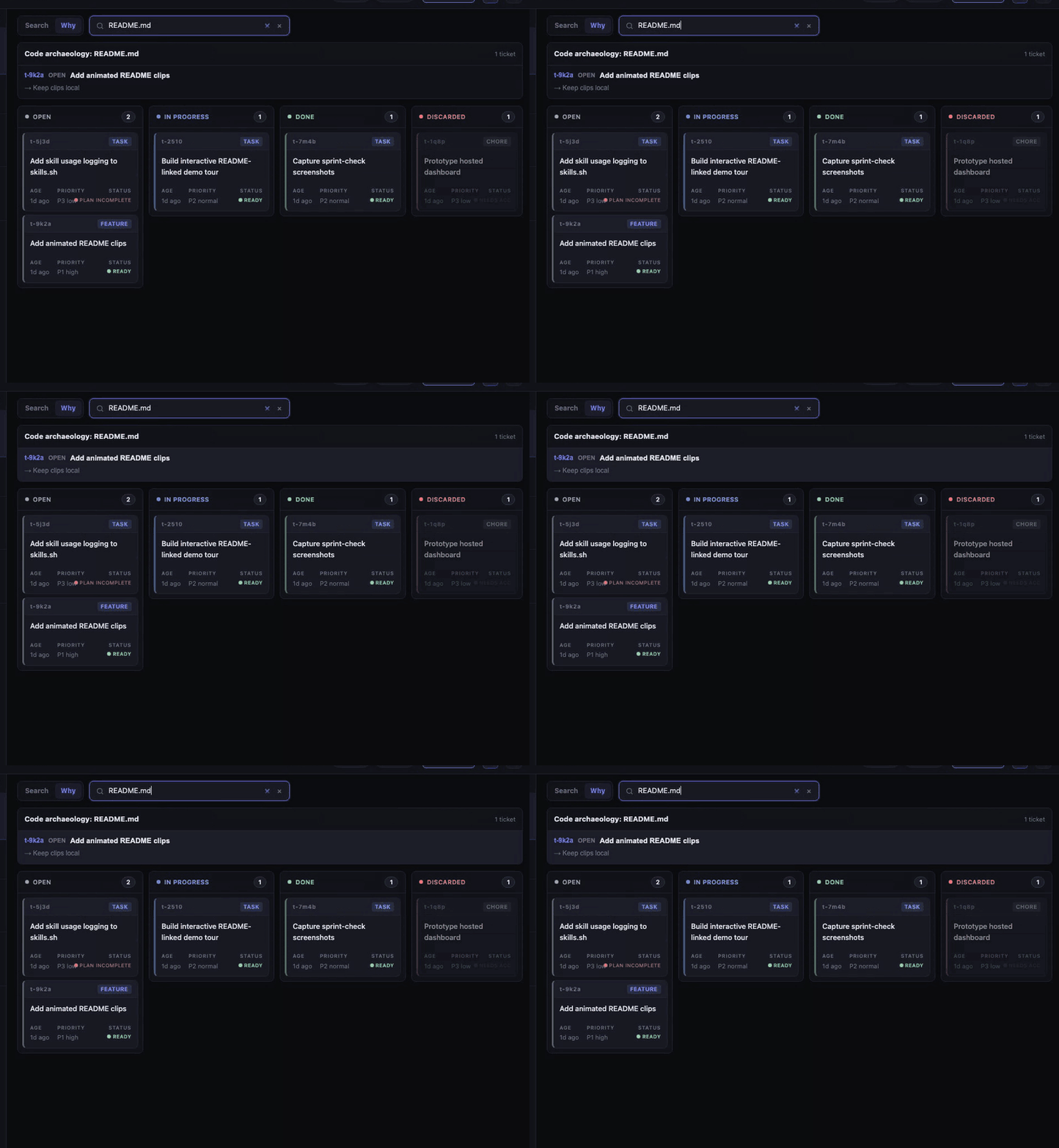
Why mode — Ask why this file was built this way.
Switch the sprint-check query control from Search to Why, enter a
project-relative file path, and the board shows the tickets and Plan decisions
behind that file without leaving the kanban view. Keyboard shortcut:why:path/to/file.
CLI path: tkt why <file> scans git log for ticket IDs in commit messages,
then reads each ticket's plan.md for decisions made during that sprint. When
commits predate ticket IDs, it falls back to keyword matching against ticket
titles.
git log tells you what changed. .tickets/ tells you why — decisions made, alternatives rejected, the acceptance bar set. The board makes it searchable without touching git history. A new agent, or you six months later, gets the full picture before touching a line.
Learn mode — Capture the lesson a sprint just taught, without letting the author grade itself.
tkt why is the read side of repo-as-memory; tkt learn <id> is the capture side. It distills a
closed sprint's objective close artifacts — the non-delivered rows of summary.md, the
evaluator's eval-report.md findings, and the advisory reviewer's review-notes.md findings — into
an UNPROMOTED .tickets/<id>/learnings.md candidate. It proposes, never promotes: a reviewer without the sprint's implementation history
(a fresh agent or you later) moves any keeper into the durable store, so the agent that wrote the
code never certifies its own lessons. In a project that adds canon's sprint skill, that store is the
project's own PROMOTED.md, seeded by skills.sh add sprint/refresh and loaded every session via@PROMOTED.md in its AGENTS.md. sprint complete runs it automatically when there are deviations
or gate findings, then indexes the candidate into LEARNINGS.md. Clean sprints produce nothing.
How learnings flow, end to end → — a real ticket from reviewer finding to promoted rule, where each lesson goes, and how a project uses PROMOTED.md.
How Sprint Works
flowchart LR
    P["Plan\nticket · acceptance · plan.md\nresearch.md"]
    B["Build\ncode · commits"]
    W["Wrapup\nsimplify · code-review · security\nrepo-check · doc-audit"]
    E[["Evaluate\nreviewer (advisory) · evaluator (binding)\nclean-context · adversarial\npass/fail per criterion"]]
    C["Close\nsprint complete"]
    D["Board\nsprint-check"]

    P -->|"GATE\nuser approves"| B
    B -->|"GATE\ntests pass"| W
    W --> E
    E -->|"GATE\nall ✓ · eval verdict\nsummary.md"| C
    C --> D
High-risk sprints add orient (with parallel subagents when multiple subsystems are in scope), grill, and impact analysis between Plan and Build. Double-bordered nodes are reference docs/skills the agent runs — you don't invoke them. Full lifecycle →
Why canon
Define your standards once; every project inherits them via symlinked skills directories — Claude Code, Codex, and Pi, in sync. Update the canon repo, every project picks it up on the next session. No copies, no drift, no setup ritual per project. How this works →
canon enforces its own standards on itself. A git-native pre-commit hook runs the test suite and blocks before commit — no advisory reminders, no honour system. What ships is what passed.
Setup
| Tool | Required | For |
|---|---|---|
| Claude Code / Codex / Pi | At least one | running the agent |
| Git | Yes | clone/update canon |
| Bash | Yes | CLI tools (sprint, tkt, skills.sh) |
| Python 3 | sprint-check on macOS/Linux |
the board — Windows uses the Go binary, no Python needed |
| curl | macOS/Linux | fetching the prebuilt cockpit daemon (agent sessions) on install and canon update; checked against a SHA-256 in the clone before it runs. Go 1.26.5+ is only a fallback that builds it when the download is unavailable |
Windows 11 — no WSL, no git clone needed. In PowerShell, run the one-liner. It offers to install Git for Windows (for its bash) with winget if missing, fetches canon as a zip into %USERPROFILE%\.canon, and adds tools\ to your user PATH; re-running updates in place and keeps cockpit\:
irm https://raw.githubusercontent.com/sunitghub/canon-skills/main/install.ps1 | iex
No PowerShell policy change is made. Prefer to read it first? Download install.ps1, open it, then run powershell -ExecutionPolicy Bypass -File .\install.ps1 (process-scoped). From cmd: curl.exe -fsSLO https://raw.githubusercontent.com/sunitghub/canon-skills/main/install.cmd && install.cmd. Set $env:CANON_YES=1 to skip the Git prompt. Then open a new terminal and run canon.
Already have a clone? Install Git for Windows, then:
- Run
install.cmdonce — double-click it, or runinstall.cmdfrom any terminal. It launchesinstall.ps1for you and addstools/to your user PATH. (Runninginstall.ps1directly can fail with "install.ps1 is not digitally signed … UnauthorizedAccess" — that's Windows' PowerShell execution policy blocking unsigned scripts, not a canon bug.install.cmdsidesteps it with a process-scoped bypass; if you prefer the.ps1, runpowershell -ExecutionPolicy Bypass -File .\install.ps1.) - Use Git Bash to clone canon and run
git pullto stay updated. - Use PowerShell for everything else. Each command has a
.cmdwrapper intools/, so run it by name:canonorsprint-check-winopens the board, andsprint,tktandskills(for exampleskills refresh) run canon's CLI through Git Bash for you.
In a Git Bash window the same tools work too, but use the script names: skills.sh refresh, not skills refresh (Git Bash doesn't run .cmd files, and tools/skills is a folder). See fresh-machine-test.md → Windows 11 for the full setup.
Git for Windows is the only dependency on Windows. canon never requires Python there:
canonandsprint-checkstart the Gosprint-check-win.exewhen there's no working Python.skills.shedits.claude/settings.json(the permission and deny rules) with Windows' built-in PowerShell.sprint,tktand the pre-commit hook use only bash.
canon never runs a python3 found under …\AppData\Local\Microsoft\WindowsApps\. That's an App execution alias, and on some machines running it downloads and installs Python. A test, tests/no-python-windows-paths.sh, fails if an end-user script starts depending on Python.
Windows: what's different
- The board runs the Go binary (
sprint-check-win.exe) unless a working Python is found, so a few board features behave differently from macOS/Linux. - Command names depend on the shell: PowerShell and cmd use the
.cmdwrappers (skills refresh), Git Bash needs the script names (skills.sh refresh).
Adding or removing a Windows gap? Update this list in the same change.
Register canon in another project:
~/.canon/tools/skills.sh add sprint          # plan → build → ship (includes wrapup, handoff)
~/.canon/tools/skills.sh add context-check   # optional: context-budget audits
A project that isn't a git repo (common for PM and design folders) is a first-class project: register it and start an agent as usual. canon records what the agent changed from a snapshot it keeps outside the folder (under ~/.canon/cockpit/changes/), and the End dialog and the ticket's Changes panel show it in plain words. Each card on the Projects page also shows a git icon beside the project name (hidden if its status check fails), for version history you can opt into. Hover it for its state: Git enabled — this project keeps a version history, Git not enabled — click to turn on version history, or Version history needs Git, which isn't installed on this computer (the icon is disabled then). Click the "not enabled" icon and confirm, and canon creates a local history in that folder (git init, a .gitignore, and a first commit containing only that .gitignore). Nothing is uploaded and your files stay uncommitted. canon refuses if the folder already has a .git or sits inside another repository, and warns for iCloud Drive, Dropbox, OneDrive and Google Drive folders, where sync can damage that history.
- Full setup guide → — install, hook wiring, skill lifecycle, reference commands.
- Production incident playbook → — Surface → Trace → Isolate → Resolve → Harden. The five-stage protocol for when an AI agent misbehaves in production.
- Retrieval architecture playbook → — vector RAG or Graph RAG? Four ordered tests, cheapest first. Corpus size appears in none of them.
- Restaurant bill splitter → — a prompt-driven sprint walkthrough: can a fresh evaluator catch plausible-looking but numerically wrong code?
- DSL spec workshop → — build a feature against a hand-written
Given/When/Thenspec inside a sprint, then break the implementation live and watch the spec (not a person) catch it. - Mikado refactor workshop → — drive a cascading refactor inside a sprint using the
mikadoskill: attempt the goal, revert on breakage, record prerequisites, and execute leaves-first so the tree stays green the whole way.
Contributing
Add or refine a skill — see CONTRIBUTING.md. For the full skill authoring lifecycle (lint → eval → register), see standards/skill-setup-std.md.
canon /ˈkænən/ — the standard your agent follows across projects.
Make it canon.
Yorumlar (0)
Yorum birakmak icin giris yap.
Yorum birakSonuc bulunamadi