mini-cc
agent
Uyari
Health Uyari
- License — License: MIT
- Description — Repository has a description
- Active repo — Last push 0 days ago
- Low visibility — Only 7 GitHub stars
Code Uyari
- process.env — Environment variable access in mini-claw/src/index.ts
Permissions Gecti
- Permissions — No dangerous permissions requested
Purpose
This is a CLI-based coding assistant that leverages a local Ollama model (via LangChain.js) to interact with a user's codebase. It can read, create, and edit files, as well as execute shell commands using native tool calling.
Security Assessment
The tool introduces significant capabilities that require careful handling, though it includes sensible mitigations. Its `run_command` tool can execute shell commands, but it is sandboxed by a permission system requiring explicit user confirmation for any command not explicitly whitelisted in a local configuration file. Additionally, `write_file` is restricted to the current working directory. There are no hardcoded secrets detected. The tool reads environment variables (`MINI_CC_MODEL`, `OLLAMA_HOST`) for configuration, which is standard practice, but this flagged access warrants a brief manual review of the source code to ensure no sensitive data is improperly logged. Network requests are restricted to communicating with the user's local Ollama instance, meaning no code or prompts are sent to external third-party servers. Overall risk is rated as Medium due to the inherent dangers of AI-driven shell execution, even with permission checks in place.
Quality Assessment
The project is very new and currently has low community visibility with only 7 GitHub stars. However, it is actively maintained (last updated today) and benefits from a clear, standard MIT license. The project includes a comprehensive README, built-in safety guardrails (user confirmation, timeouts, file size limits), and a logical code structure, suggesting thoughtful and active development.
Verdict
Use with caution — it is a promising and well-structured local tool with built-in safety constraints, but its low community adoption means it should be vetted before relying on it for critical tasks.
This is a CLI-based coding assistant that leverages a local Ollama model (via LangChain.js) to interact with a user's codebase. It can read, create, and edit files, as well as execute shell commands using native tool calling.
Security Assessment
The tool introduces significant capabilities that require careful handling, though it includes sensible mitigations. Its `run_command` tool can execute shell commands, but it is sandboxed by a permission system requiring explicit user confirmation for any command not explicitly whitelisted in a local configuration file. Additionally, `write_file` is restricted to the current working directory. There are no hardcoded secrets detected. The tool reads environment variables (`MINI_CC_MODEL`, `OLLAMA_HOST`) for configuration, which is standard practice, but this flagged access warrants a brief manual review of the source code to ensure no sensitive data is improperly logged. Network requests are restricted to communicating with the user's local Ollama instance, meaning no code or prompts are sent to external third-party servers. Overall risk is rated as Medium due to the inherent dangers of AI-driven shell execution, even with permission checks in place.
Quality Assessment
The project is very new and currently has low community visibility with only 7 GitHub stars. However, it is actively maintained (last updated today) and benefits from a clear, standard MIT license. The project includes a comprehensive README, built-in safety guardrails (user confirmation, timeouts, file size limits), and a logical code structure, suggesting thoughtful and active development.
Verdict
Use with caution — it is a promising and well-structured local tool with built-in safety constraints, but its low community adoption means it should be vetted before relying on it for critical tasks.
🤖 一个基于本地 Ollama 模型的代码助手 CLI 工具。集成 LangChain.js,使用模型原生 tool calling 能力实现可靠的工具调用。
README.md
Mini Claude Code (mini-cc)


🤖 一个基于本地 Ollama 模型的代码助手 CLI 工具。集成 LangChain.js,使用模型原生 tool calling 能力实现可靠的工具调用。
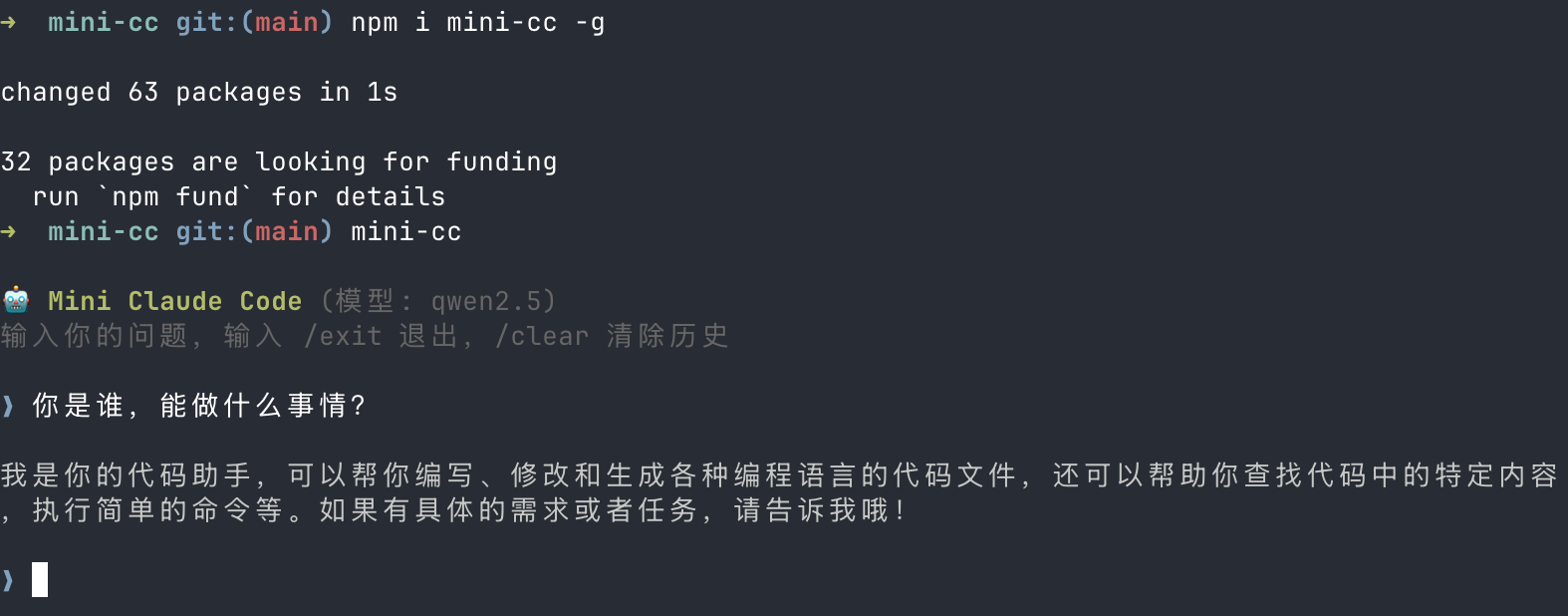
前置要求
- Node.js >= 18
- Ollama 已安装并运行
安装
npm install -g mini-cc
快速开始
1. 安装 Ollama 和模型
# 安装 Ollama(macOS)
brew install ollama

# 启动 Ollama 服务
ollama serve

# 拉取默认模型
ollama pull qwen2.5
2. 运行
mini-cc
从源码开发
# 克隆仓库
git clone https://github.com/Sunny-117/mini-cc.git
cd mini-cc

# 安装依赖
pnpm install

# 开发模式(推荐,直接运行 TypeScript)
pnpm dev

# 或者先编译再运行
pnpm build
pnpm start
使用方式
交互式聊天(默认)
pnpm dev
进入交互式对话,可以连续提问:
🤖 Mini Claude Code (模型: qwen2.5)
输入你的问题,输入 /exit 退出,/clear 清除历史

❯ 列出当前目录的文件
  🔧 调用工具: list_files {"pattern":"*"}
  📋 结果: docs.md
            package.json
            src
            tsconfig.json

当前目录包含以下文件: ...

❯ 读取 package.json 的内容
  🔧 调用工具: read_file {"path":"package.json"}
  📋 结果: { "name": "mini-cc", ... }

package.json 的内容如下: ...

❯ /clear
对话历史已清除。

❯ /exit
再见!👋
单次提问
# 通过编译后的入口
node dist/index.js ask "这个项目用了哪些依赖?"

# 或通过 tsx
npx tsx src/index.ts ask "帮我创建一个 hello.ts 文件"
交互命令
| 命令 | 说明 |
|---|---|
/exit 或 /quit |
退出程序 |
/clear |
清除对话历史 |
配置
命令权限控制
默认情况下,所有 shell 命令执行前都需要用户确认。在项目根目录创建 .mini-cc.json 可配置命令白名单:
{
  "allowedCommands": ["ls", "cat", "git status", "git diff", "git log"]
}
- 白名单采用前缀匹配,如
"ls"可匹配ls -la、ls src/ - 白名单内的命令自动执行,白名单外的命令会提示用户确认:
⚠️  即将执行命令: npm install
  是否允许执行?(y/N)
- 不创建配置文件时,所有命令都需要确认
切换模型
通过环境变量 MINI_CC_MODEL 指定模型(需支持原生 tool calling):
MINI_CC_MODEL=qwen2.5:14b pnpm dev
MINI_CC_MODEL=llama3.1 pnpm dev
MINI_CC_MODEL=mistral pnpm dev
默认模型:qwen2.5
自定义 Ollama 地址
通过环境变量 OLLAMA_HOST 指定 Ollama 服务地址:
OLLAMA_HOST=http://192.168.1.100:11434 pnpm dev
默认地址:http://127.0.0.1:11434
内置工具
Agent 在对话中可以自动调用以下工具:
| 工具 | 功能 | 限制 |
|---|---|---|
read_file |
读取文件内容 | 最大 100KB |
write_file |
创建新文件 | 仅限工作目录内 |
edit_file |
精准编辑现有文件(diff/patch 式替换) | 需匹配唯一文本 |
list_files |
glob 模式列出文件 | 排除 node_modules/.git/dist |
search_code |
搜索代码文本 | 最多 50 条结果 |
run_command |
执行 shell 命令 | 30 秒超时,需用户确认 |
项目结构
mini-cc/
├── src/
│   ├── index.ts            # 入口
│   ├── config.ts           # 配置文件加载(.mini-cc.json)
│   ├── permission.ts       # 命令权限确认
│   ├── cli/index.ts        # CLI 交互
│   ├── agent/
│   │   └── agent.ts        # LangGraph ReAct Agent
│   ├── tools/
│   │   ├── readFile.ts     # read_file
│   │   ├── writeFile.ts    # write_file
│   │   ├── editFile.ts     # edit_file
│   │   ├── listFiles.ts    # list_files
│   │   ├── searchCode.ts   # search_code
│   │   ├── runCommand.ts   # run_command
│   │   └── index.ts        # 工具导出
│   └── llm/ollama.ts       # ChatOllama 封装
├── .mini-cc.json           # 可选配置文件
├── docs/                   # 设计文档
├── package.json
└── tsconfig.json
开发
# 编译
pnpm build

# 开发模式运行
pnpm dev

# 编译后运行
pnpm start
技术栈
- TypeScript + Node.js (ESM)
- LangChain.js — LLM 框架(
@langchain/core,@langchain/ollama) - LangGraph — Agent 编排(
@langchain/langgraph,createReactAgent) - Ollama — 本地 LLM 推理
- Zod — 工具参数 schema 定义
- Commander — CLI 框架
- chalk + ora — 终端 UI
文档
详细设计文档位于 v2-langchain-docs/ 目录:
历史版本:通过 ReAct 循环实现智能工具调用
- v0.1.2 - 一个基于本地 Ollama 模型的代码助手 CLI 工具。支持文件读写、代码搜索、命令执行等能力,通过 ReAct 循环实现智能工具调用。
Yorumlar (0)
Yorum birakmak icin giris yap.
Yorum birakSonuc bulunamadi