OpenWand
Health Uyari
- License — License: MIT
- Description — Repository has a description
- Active repo — Last push 0 days ago
- Low visibility — Only 8 GitHub stars
Code Gecti
- Code scan — Scanned 12 files during light audit, no dangerous patterns found
Permissions Gecti
- Permissions — No dangerous permissions requested
Bu listing icin henuz AI raporu yok.
OpenWand - A hotkey-driven AI overlay for your desktop. Press a key, pick an intent, and OpenWand reads the right context, then streams an answer without making you leave what you're doing. Local-first, voice in/out, bring your own model provider.

OpenWand
OpenWand aims to be the go-to app for AI co-work. No more switching windows, no more copy-pasting. All you need to do is prompt.
OpenWand keeps AI beside you while you work. Prompt AI with context automatically fetched, or add them manually with just one click. It is completely free, cross-platform, extensible, permissively licensed, and Python-first, so you can choose how it works and which model runs behind it.




Languages: English | 简体中文 | 繁體中文 | Français | Español
Website: OpenWand Docs
Quick start | How it works | Demos | Configuration | Free APIs | Privacy

Why OpenWand
OpenWand keeps you productive by making AI prompting a natural, seamless part of your workflow.
Prompting, side by side
| Typical AI chat — 8 steps | OpenWand — as few as 2 |
|---|---|
| 1. Find and copy the first piece of context. 2. Switch to an AI chat. 3. Paste it in. 4. Repeat until the model has everything it needs. 5. Type your prompt. 6. Send the request. 7. Wait for the response. 8. Read it, then switch back to your work. |
1. Press a hotkey to open OpenWand. 2. Run a preset prompt. |
Your selected text and the context sources you enabled in the settings are gathered automatically. If needed, enabling a context source is just one click away. Then choose a preset prompt, or enter a custom prompt.
How OpenWand Works
OpenWand gives you access to AI from anywhere on your desktop. With reusable prompts at your fingertips, automatic context gathering, and one-click access to additional sources, every request takes fewer steps.
Prompting AI
You: Press a hotkey → (Add context) → Choose a reusable or custom prompt
OpenWand: Gather and preview context → (Check privacy and prompt injection) → Ask your chosen model → Show the answer
Ask AI to rewrite in Place
You: Select text → Press the rewrite hotkey → (Add context) → Choose a rewrite → Accept
OpenWand: Capture the selection → (Check privacy and prompt injection) → Write answer → Show a preview → Paste it back
Actions in parentheses are optional.
Highlights
- Skip the setup. Just prompt. — Prompt from anywhere without worrying about context.
- Better-presented answers — Every response becomes polished HTML and CSS locally, without an extra model call or cost.
- Codex and Claude integration — Run either agent directly through OpenWand.
- Private mode — Optional warnings and redaction for sensitive context.
- Highly customizable — Customize hotkeys, prompts, context, models, voice, paste-back, and the interface.
- Powerful, but approachable — OpenWand makes models, privacy, memory, and context easy to control.
- Controllable context within one click — OpenWand handles context automatically or with a single click.
- Typing is optional — Speak your prompt and listen to the answer.
- Ask about anything on screen — Draw a region and turn it into visual context instantly.
- Rewrite in place — Rewrite selected text, review it, and paste the result back where it was.
- Use any model you want — Support many popular cloud providers, local models, or any OpenAI-compatible server.
- Memory you control — Keep optional short- and long-term memory locally, where you can review or delete it.
- Extend everything — Add new prompts, actions, hotkeys, hooks, and model tools through addons and MCP.
- Multi-agent work made simple — Build your team through a visual interface with plain-language guidance, then follow its progress and review the results.
Demos
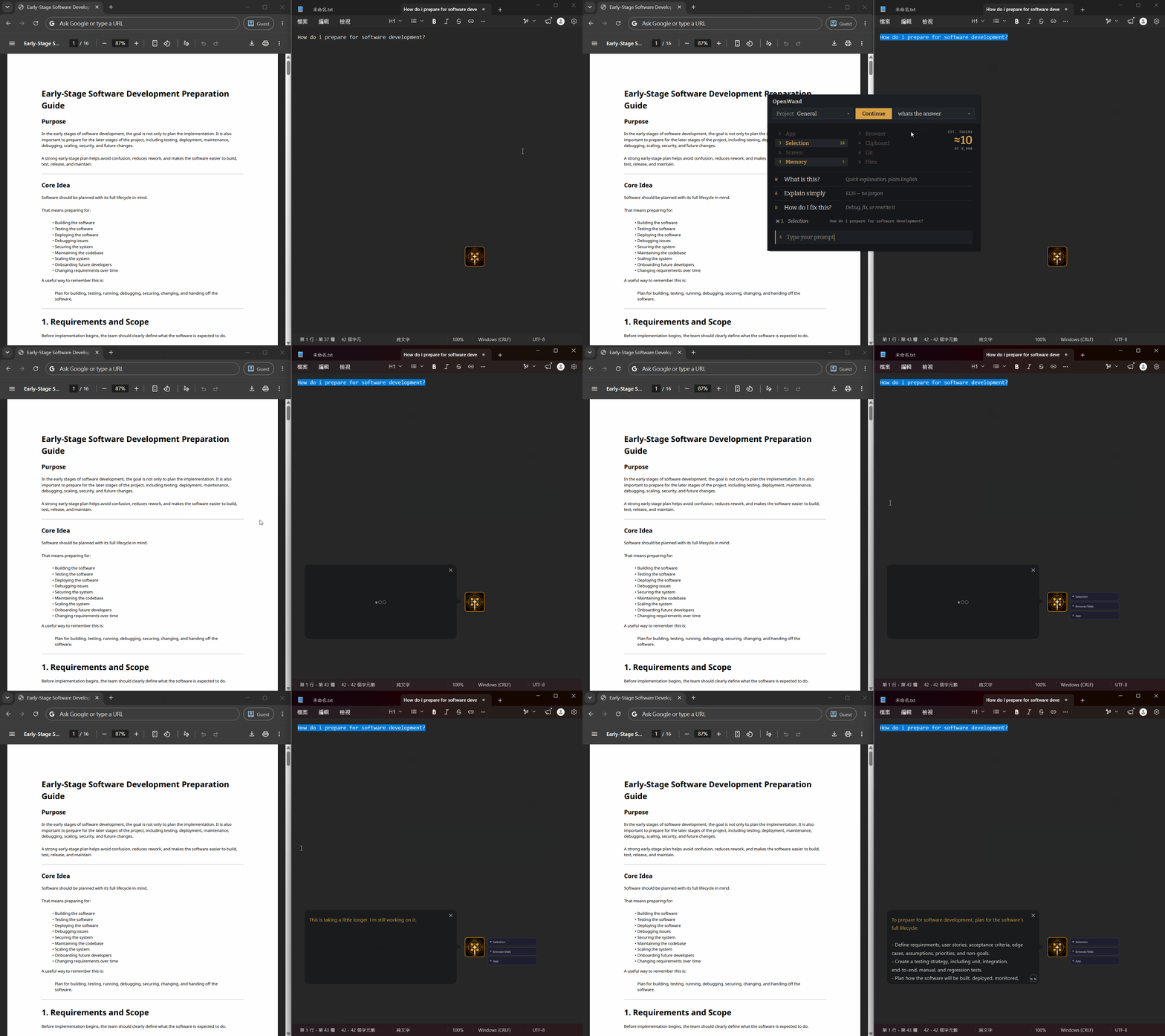
Cross-app context: Combine the active selection with enabled browser and app context, giving the model the material it needs without manual copy-paste.
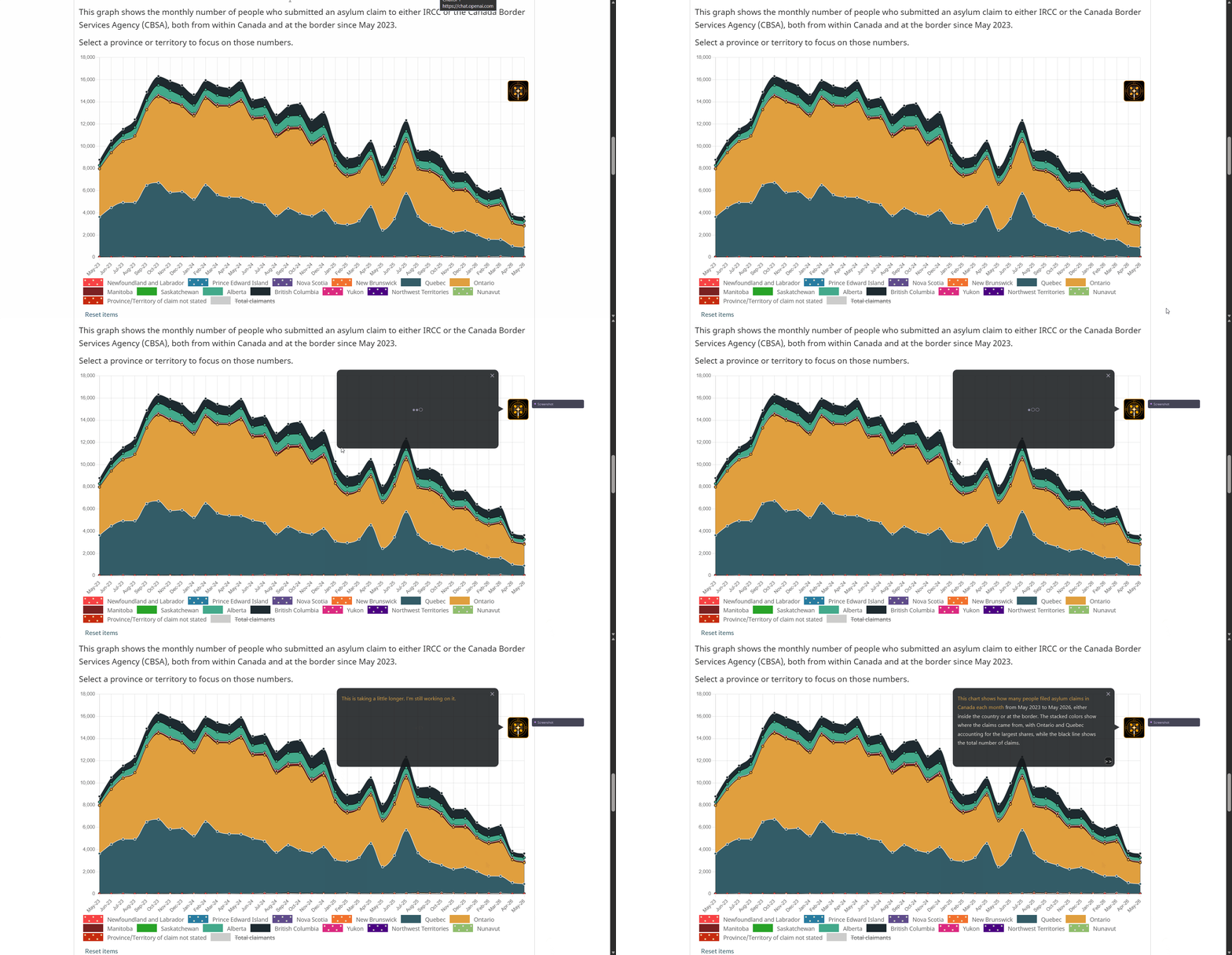
Vision snip: The snip flow is for cases where visual context matters. Ctrl+Alt+Q lets you draw a region, send just that crop to a vision model, and keep the answer in the overlay instead of switching apps.
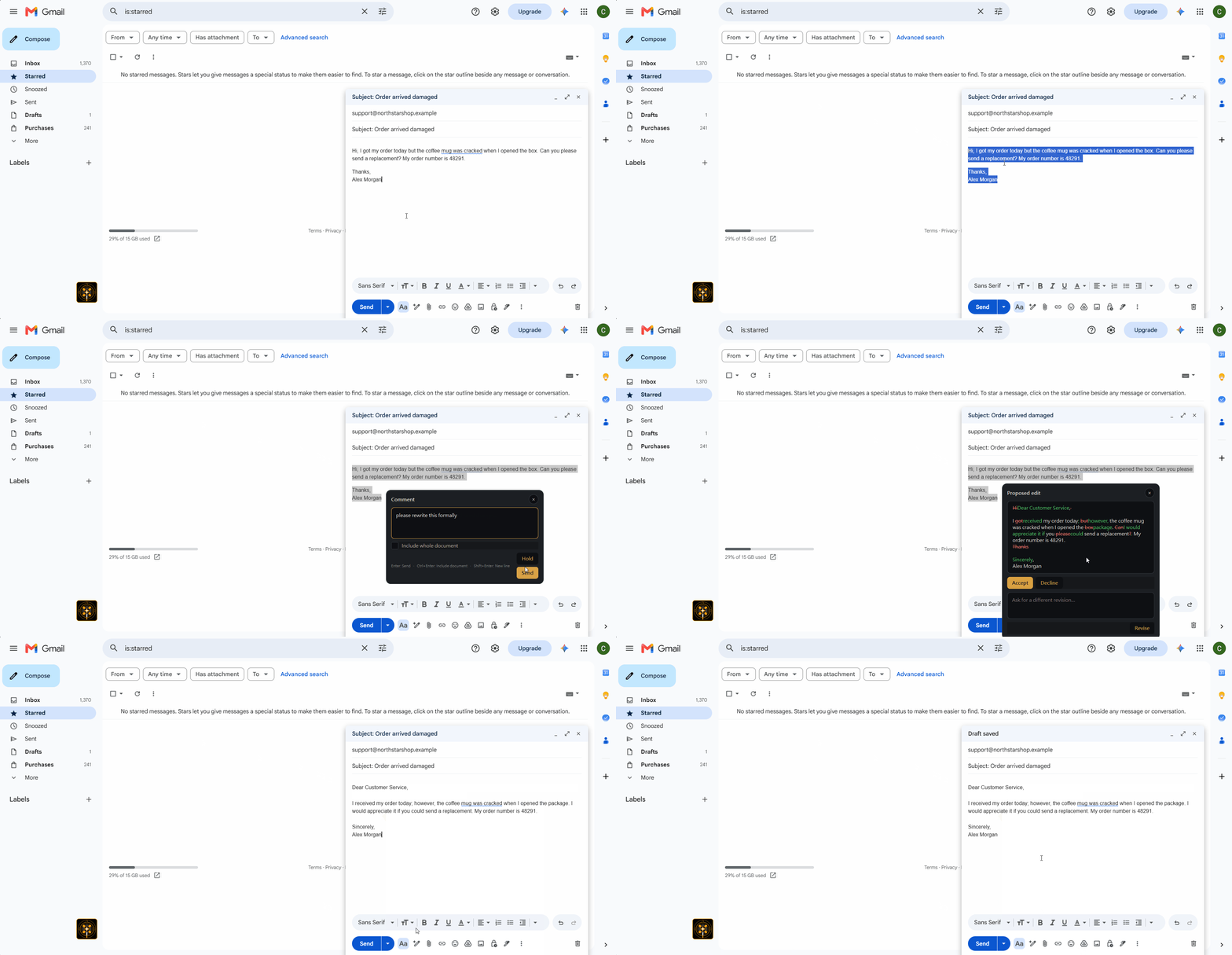
Rewrite in place: Rewrite only the selected text, review the proposed wording, and paste the accepted result back into the field that was active when you invoked OpenWand.
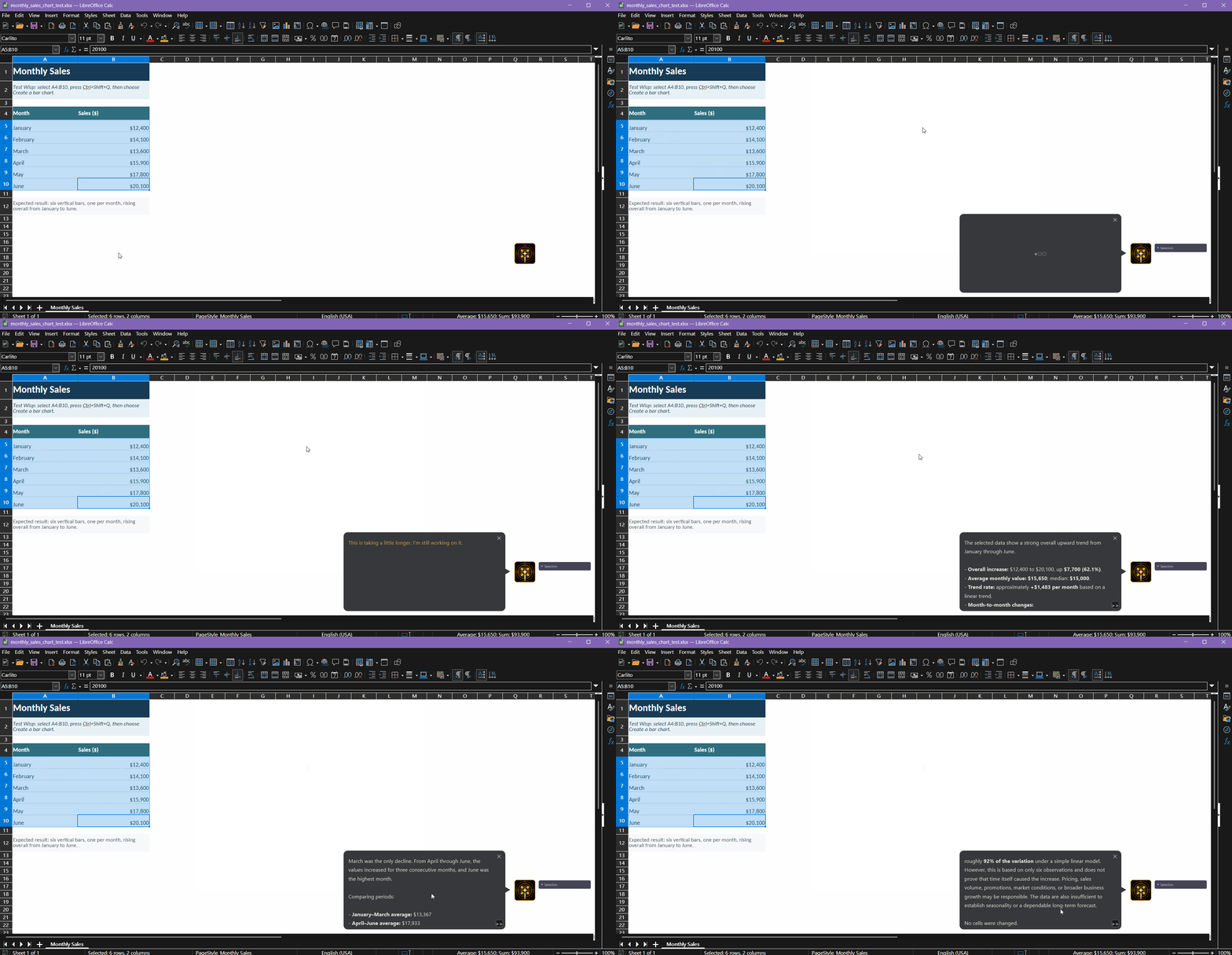
App-aware action: Use focused application context to analyze or act on the current work, with a clear result and confirmation when no document cells were changed.
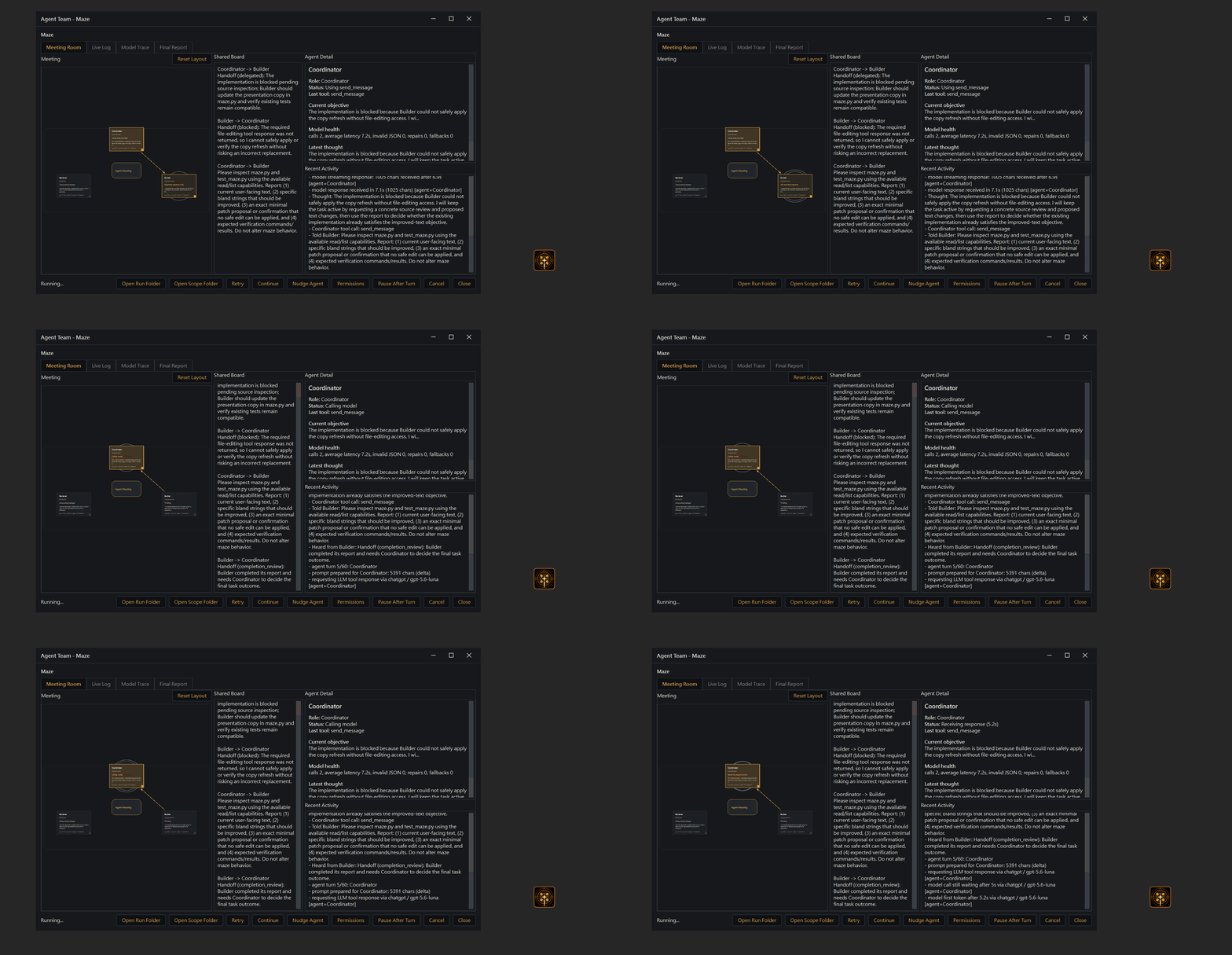
Agent Team: Delegate a longer workspace job to coordinator, builder, and reviewer roles. The team can inspect project files, make a focused change, run checks, and leave behind a final report and reviewable artifacts while you keep using OpenWand.
Workflow
| Your side | What OpenWand does |
|---|---|
| Highlight text, choose context, or draw a snip | Captures only the selected or enabled context |
| Press the caller hotkey and choose an action or custom prompt | Builds the model request from your prompt and chosen context |
| Send the request | Sends it directly to your configured model provider |
| Wait for the answer | Streams the reply into a bubble, with optional auto-speak TTS |
| Keep useful information for later | Stores memory locally only when memory is enabled |
Common Shortcuts
| When you want to... | With OpenWand |
|---|---|
| Understand selected text | Select it, open OpenWand, and choose What is this? or Explain simply. |
| Rewrite without copy-pasting | Select the text, choose a rewrite, review it, and paste the accepted version back in place. |
| Ask your own question | Enter a custom prompt. Enabled context is already attached; additional sources are one click away. |
| Ask about anything on screen | Press Ctrl+Alt+Q, draw around the relevant area, and send it to your vision model. |
| Prompt without typing | Press F9 and speak. OpenWand transcribes your request and sends it to the model. |
| Dictate into any app | Press F8 and speak. Your words appear directly in the active text field. |
Quick Start
Download the App
- Download the latest version from GitHub Releases.
- Extract it and launch OpenWand.
- Open Settings and connect your model.
You can install OpenWand before choosing a model connection. If you do not have one yet, start with one of the 20+ free and trial API sources, or connect a local model.
| Windows | macOS | Linux |
|---|---|---|
OpenWand.exe |
OpenWand.app |
OpenWand |
Run from Source
OpenWand requires Python 3.12.
git clone https://github.com/SunnyLich/OpenWand.git
cd OpenWand
Run the launcher for your platform:
| Windows | macOS | Linux |
|---|---|---|
Start OpenWand.bat |
Start OpenWand.command |
Start OpenWand.sh |
The first launch provisions the Python environment and installs dependencies. Later launches go straight into the app.
To package OpenWand yourself, see Building an EXE.
System Requirements
| Level | Requirements | Best for |
|---|---|---|
| Minimum | Windows 10+, macOS 13+, or Linux X11; 4 GB RAM; 2 GB free disk | Core overlay features with a cloud or free API |
| Recommended | 8 GB+ RAM; 6 GB+ free disk; microphone for voice features | Local speech, the optional 2.8 GB advanced privacy filter, and more working room |
Local AI models may need substantially more RAM, VRAM, and storage depending on the model. Screen capture, global hotkeys, paste-back, and voice may request the corresponding OS permissions when you use them.
Configuration
Use the Settings window for normal setup. .env.example is only a reference for advanced source configuration.
- Open Settings.
- Choose a conversation engine.
- Connect your provider or account.
- Customize context, hotkeys, voice, privacy, and memory.
- Run Setup Check.
Choose Your Engine
| Engine | Behavior |
|---|---|
| OpenWand | Uses the LLM provider and model configured in OpenWand. |
| ChatGPT | Uses the installed Codex CLI and your ChatGPT/Codex account. |
| Claude Agent | Uses Claude Agent with your Claude Code account. |
Agent Controls
- Continuity — Keep the conversation in OpenWand or resume it with ChatGPT or Claude.
- Live progress — Follow replies, plans, tool activity, file status, and approval requests.
- Permissions — Ask before changes, allow project changes, or use read-only plan mode.
- Project scope — Agent writes stay inside the selected project; changing projects starts a new session.
- History — Import, optionally sync, or export ChatGPT/Codex and Claude conversations.
Good to Know
- Provider keys and OAuth tokens are stored in your OS keychain, not a plain-text configuration file.
- Advanced source settings are documented in
.env.example. - See the live-agent guide or browse the free model API sources for more.
Default Hotkeys
| Hotkey | Action |
|---|---|
Ctrl+Q on Windows, Ctrl+Alt+Space on macOS/Linux |
Open the general action picker |
Ctrl+Shift+Q on Windows, Ctrl+Alt+Shift+Space on macOS/Linux |
Open the rewrite/paste action picker |
Ctrl+Alt+Q |
Draw a screen snip for vision |
Alt+Q |
Add the current selection to the context buffer |
Alt+W |
Clear the context buffer |
F7 |
Read the selected text aloud |
F9 hold |
Record voice, transcribe, and query |
F8 hold |
Direct dictation into the focused text field |
W / A / D |
Trigger built-in action rows |
S |
Custom prompt mode |
Esc |
Cancel the picker |
Every caller, hotkey, label, prompt, context source, paste-back setting, and UI dimension is configurable from Settings.
Addons
Deeply extensible, OpenWand transforms with addons - new features, new workflows, new possibilities. Each addon declares its author and requested OpenWand access before activation; an update asks again only when that access expands. Addons run in separate Python processes, and publisher-declared packages stay in dedicated virtual environments. Full-code addons still run with your normal user permissions, so install only addons you trust.
In portable packaged builds, OpenWand creates an addons folder next to OpenWand.exe
when that folder is writable. Alternatively, use Addon Manager -> Open addons folder to open the fallback user-writable addon
directory.
An addon can hook into OpenWand at several points:
- Context - read or rewrite the prompt and context before a query is sent.
- Tools - register model-callable tools the model can invoke mid-answer.
- Responses - observe completed responses to log, save, or forward them.
- Actions and hotkeys - add its own action rows and global hotkeys with custom prompts.
- UI - contribute tray actions, settings fields, and notifications.
- LLM actions - run its own capped model calls from a hook or hotkey.
What addons can do: because an addon can inject context, expose tools, and react to responses, the surface is broad. A few examples, and the hook each one uses:
| You want to... | Hook | Manifest needs |
|---|---|---|
| Pull your git diff, calendar, or an open ticket into the prompt automatically | Context (before_query) |
query = "modify" |
| Give the model a tool to search an internal wiki, query a database, hit a weather or stock API, or toggle a smart-home device | Tools (get_tools) |
tools = true (plus [dependencies] for any packages) |
| Redact or tag sensitive context on its way out for compliance | Context (before_query) |
query = "modify" |
| Append every answer to a daily journal, or push it to Notion or Slack | Responses (after_response) |
response = "read" |
| Add a one-key "rewrite this in our house style" action backed by its own prompt | Actions and hotkeys | [[intents]] / [[hotkeys]], hotkeys = true |
If you can write it in Python and it fits one of the hook points above, you can wire it into the same hotkey-driven overlay you already use.
MCP Client and Server
MCP Client: use external servers inside OpenWand
OpenWand ships with an MCP bridge addon (addons/mcp_bridge) that acts as an MCP client: list any Model Context Protocol servers in its servers.json and OpenWand exposes their whole toolkit to its model as OpenWand tools. This lets the overlay use external MCP capabilities without leaving the desktop workflow. See the Addon guide for the full manifest and hook contract, or the Add-ons documentation.
MCP Server: OpenWand Context Server
OpenWand also ships a local MCP stdio server called OpenWand Context Server. Trusted MCP clients such as Claude Desktop, Cursor, and Codex can launch it to read live desktop context; the OpenWand app itself does not need to stay open.
Tools
OpenWand Context Server provides five read-only tools:
get_selected_text— the text currently selected on the desktop.get_clipboard— clipboard text.get_active_window— the active app, window title, and browser URL when available.read_browser_page— text from the visible browser page.take_screen_snip— a screenshot of the primary monitor.
Connect a client
Start OpenWand once, then copy the mcpServers entry from addons/mcp_bridge/claude_config_snippet.json into your MCP client's configuration. OpenWand generates this snippet with the correct local path to its own Python interpreter and addons/mcp_bridge/context_server.py; do not substitute system Python. See the MCP Bridge server setup guide for platform notes and troubleshooting.
Only register the server with clients you trust: tool results can contain selected text, clipboard content, browser content, and screenshots from your desktop.
Privacy and Control
OpenWand has no hosted storage layer.
| Area | What happens |
|---|---|
| Local data | Settings, chats, memory, privacy reports, and configuration stay on your machine. |
| Model requests | Your prompt and enabled context go directly to the provider or local server you choose. |
| Credentials | Provider keys and OAuth tokens are stored in your OS keychain. |
| Context previews | Sources and token estimates are inspected locally without being sent or saved. |
| Permissions | Context sources and model tools are controlled separately; optional features remain off until configured. |
| Addons | Each addon runs in an isolated process and declares the access it needs. |
Privacy Modes
| Mode | Protection |
|---|---|
| Off | Sends your chosen context without privacy redaction. |
| Built-in | Locally detects structured secrets such as credentials, tokens, and payment details. |
| Advanced | Adds the optional local OpenAI Privacy Filter for names, addresses, private URLs, account details, and other sensitive information. |
Advanced mode is an optional download of about 2.8 GB and may need time to warm up. It can reduce accidental disclosure, but cannot guarantee that every piece of sensitive information will be detected.
Prompt Injection Protection
When enabled, OpenWand checks captured text for attempts to override the model's instructions and lets you continue or cancel before sending.
For security vulnerabilities, read the Security Policy. Do not include vulnerability details, credentials, captured context, or private logs in a public issue.
Platform Status
| Platform | Status |
|---|---|
| Windows 10+ | Supported |
| macOS 13+ | Supported* |
| Linux X11 | Supported |
| Linux Wayland | In progress - Wayland support is currently being worked on |
*This application was only tested on macOS during two weeks of major development, and I cannot test it afterward due to limited hardware access. If you find bugs on macOS, please create an issue on this repo and I will try my best to fix them. Better yet, if you can provide a solution, please create a pull request.
Help and Feedback
When reporting a bug, include your OS version, launcher, logs, and the action that triggered it. Logs can contain captured text, so remove credentials and personal information before sharing them.
We are currently working on Linux Wayland support, and help testing or improving it is especially useful. macOS support testing is also welcome; these platforms have the most native integration edge cases, so real-world reports from different machines, desktop environments, and permission states make OpenWand better for everyone.
If you want to support this project and the broader mission, you can contribute to the development directly or make a donation here.
Contributor docs- Developer README - setup, runtime entrypoints, checks, and debugging notes.
- Code overview - subsystem ownership and runtime boundaries.
- Addon guide - addon manifest, permissions, hooks, tools, hotkeys, and packaging.
- Building an EXE - Windows packaging notes.
Free Model API Sources
Start using OpenWand at no cost with a free API or locally hosted model. Explore more than 20 free and trial API sources, plus local options, in our guide.
License
MIT
Yorumlar (0)
Yorum birakmak icin giris yap.
Yorum birakSonuc bulunamadi